Hosted Fields JSAPI guide
Hosted Fields put PayMe's card inputs inside your own checkout form. Each card input is a PayMe iframe, so the card goes straight from the buyer's browser to PayMe, and your page and server only ever see a token. You style the form; you charge the token from your server.
Use Hosted Fields when the checkout must look native to your site. Otherwise the Hosted Payment Page needs less code: see Integration Options.
How it works
| Step | Where | What happens |
|---|---|---|
| 1 | Browser | Load PayMe's script, then PayMe.create(publicKey) |
| 2 | Browser | Create and mount the card fields in your form |
| 3 | Browser | instance.tokenize(saleData) returns a token |
| 4 | Your server | Charge the token with generate-sale |
| 5 | Your server | Confirm the result before you fulfil the order |
Before you start
The seller's public key.
PayMe.createtakes this key, a uuid, and never an MPL or a partner key. A direct seller finds it in the dashboard, under Admin → API & Integration → Hosted Fields JSAPI Credentials. A partner gets it fromcreate-sellerorGET /sellers/{mpl}/public-keys.The environment. Use
testMode: truewith a sandbox key andfalsein production. A sandbox token can't pay a live sale.Test cards. In the sandbox, use the test cards.
Your Content Security Policy. If your site sets one, allow PayMe:
script-src https://cdn.payme.io; frame-src https://hf.payme.io; connect-src https://hf.payme.io;connect-srcis needed only forPayMe.clientData(), which 3DS with Hosted Fields uses. Apple Pay and Google Pay need more: see Apple Pay and Google Pay.
Minimal integration
This page is complete. Put in your public key, open it and pay with a test card. Tested with a sandbox key and a test card.
<!doctype html>
<html lang="en">
  <head>
    <meta charset="utf-8" />
    <title>Checkout</title>
    <script src="https://cdn.payme.io/hf/v1/hostedfields.js"></script>
    <style>
      /* A PayMe field is an iframe, with no height of its own. */
      .card-field { height: 44px; padding: 10px; border: 1px solid #c4c9d4; }
    </style>
  </head>
  <body>
    <form id="checkout">
      <div id="card-number" class="card-field"></div>
      <div id="card-expiry" class="card-field"></div>
      <div id="card-cvv" class="card-field"></div>
      <input id="first-name" placeholder="First name" />
      <input id="last-name" placeholder="Last name" />
      <input id="email" placeholder="Email" />
      <input id="phone" placeholder="Phone" />
      <input id="social-id" placeholder="Social ID" />
      <button type="submit">Pay 55.00 ILS</button>
    </form>
    <p id="message"></p>

    <script>
      const publicKey = 'YOUR_SELLER_PUBLIC_KEY';
      const value = (id) => document.getElementById(id).value;
      const message = document.getElementById('message');

      PayMe.create(publicKey, { testMode: true }).then(async (instance) => {
        const fields = instance.hostedFields();
        await Promise.all([
          fields.create(PayMe.fields.NUMBER).mount('#card-number'),
          fields.create(PayMe.fields.EXPIRATION).mount('#card-expiry'),
          fields.create(PayMe.fields.CVC).mount('#card-cvv'),
        ]);

        document.getElementById('checkout').addEventListener('submit', async (event) => {
          event.preventDefault();
          try {
            const result = await instance.tokenize({
              payerFirstName: value('first-name'),
              payerLastName: value('last-name'),
              payerEmail: value('email'),
              payerPhone: value('phone'),
              payerSocialId: value('social-id'),
              // Display only: your server sets the amount charged.
              total: { label: 'Order 1234', amount: { currency: 'ILS', value: '55.00' } },
            });
            // Send result.token to your server, which charges it.
            message.textContent = `Token received for card ${result.card.cardMask}`;
          } catch (failure) {
            // After a failure the same instance can tokenize again. See "Tokenize" below for every error shape.
            message.textContent = Object.values(failure.errors ?? {})[0] ?? failure.message ?? 'Please try again.';
          }
        });
      });
    </script>
  </body>
</html>
Then charge the token from your server.
Charge the token
Send the token to your server and make the call there, with your MPL. Never call PayMe's server API from the browser.
Build the request on your server:
generate-sale field |
Where it comes from |
|---|---|
buyer_key |
token from the tokenize result |
sale_price |
Your own order, as an integer in minor units: 55.00 becomes 5500 |
currency |
Your own order |
product_name |
Your own order |
The browser's amount is display only, so never take the charge amount from it. Show the buyer the same amount your server will charge.
{
  "seller_payme_id": "MPLDEMO-MPLDEMO-MPLDEMO-1234567",
  "sale_price": 5500,
  "currency": "ILS",
  "product_name": "Order 1234",
  "transaction_id": "order-1234",
  "buyer_key": "BUYERDEMO-BUYERDEMO-BUYERDEMO-1234567"
}
POST it to https://sandbox.payme.io/api/generate-sale, or https://live.payme.io/api/generate-sale in production. With a buyer_key, the call charges straight away and answers with the result:
{
  "status_code": 0,
  "payme_sale_id": "SALE1655-3843870J-NTPYLJNW-SOWRLK9X",
  "sale_status": "completed"
}
The response has other fields as well. See generate-sale with a token for every field.
Which token you get
tokenIsPermanent |
Charging the token | In the sandbox |
|---|---|---|
true (default) |
Can be charged again later, so store it as you would a saved card | A second charge completed |
false |
Charges once | A second charge failed with error 604, "Buyer inactive" |
When you need pay-sale
If you need the sale to exist first, call generate-sale without a buyer_key, keep its payme_sale_id, tokenize, then call pay-sale with payme_sale_id and buyer_key. It completes the same way in the sandbox. 3DS with Hosted Fields uses this order.
Rules that cost people time
- One token per instance. After a successful
tokenize()the instance is spent, and a second call rejects. After a failed call you can calltokenize()again on the same instance, or start from a new instance. - Create only the fields you mount.
tokenize()waits for a value from every field you created, so a field that is created but never mounted makes it wait forever. - Clear the container before you remount.
mount()adds its iframe to the container rather than replacing what's there, so a new instance mounted into an old container shows two card fields. Mounting the same field twice fails withalready mounted. - Give each container a height. A PayMe field has no height of its own and collapses to nothing without one.
- Mount failures can be silent. In a sandboxed iframe without
allow-same-origin,createandmountstill succeed while the fields stay blank andtokenizenever answers. Check your page's iframe attributes if that happens. - Use the public key.
PayMe.createtakes the seller's public key, never an MPL or a partner key. - The browser's amount isn't the charge.
total.amount.valueis a decimal string for display. Setsale_price, in minor units, on your server.
Examples
Five working designs, each with its full code. Each runs in the sandbox with a test card and stops at the token: nothing is charged. Copy the files of the one closest to your design and put in your public key. checkout-form.js and hosted-fields.js are the same in all five.
Compact form
Buyer details and card fields in one panel.
The page shows first name, last name, email, phone and social ID as ordinary inputs in one teal panel, and card number, expiry and CVV in a second panel, each of those three inside a PayMe frame. Pressing Pay asks PayMe for a token and shows it with the name, email and card mask, and a Try again button that mounts the form anew. Nothing is charged, and the token goes nowhere: a real checkout sends it to your server, which pays the sale with it. Invalid or empty fields are marked before any request is made; a request that fails shows PayMe's message under the button and starts again with a new instance. Use test cards only.
index.html
<!doctype html>
<html lang="en" dir="ltr">
<head>
<meta charset="utf-8" />
<meta name="viewport" content="width=device-width, initial-scale=1" />
<title>Compact form</title>
<link rel="stylesheet" href="./styles.css" />
<script type="module" src="./checkout.js"></script>
</head>
<body>
<form id="checkout" novalidate>
<div class="panel">
<label class="row field">
<span>First name</span>
<input name="payerFirstName" placeholder="First name" autocomplete="off"
data-required="Field "First name" is mandatory" data-invalid="Letters only for field "First name"" />
</label>
<label class="row field">
<span>Last name</span>
<input name="payerLastName" placeholder="Last name" autocomplete="off"
data-required="Field "Last name" is mandatory" data-invalid="Letters only for field "Last name"" />
</label>
<label class="row field">
<span>Email</span>
<input name="payerEmail" placeholder="Email" autocomplete="off"
data-required="Field "Email" is mandatory" data-invalid="Invalid email" />
</label>
<label class="row field">
<span>Phone</span>
<input name="payerPhone" placeholder="Contact phone" autocomplete="off"
data-required="Field "Phone" is mandatory" data-invalid="Invalid phone" />
</label>
<label class="row field">
<span>Social ID</span>
<input name="payerSocialId" placeholder="Social ID" autocomplete="off"
data-required="Field "Social ID" is mandatory" data-invalid="Invalid social ID" />
</label>
</div>
<div class="panel card-row">
<div id="card-number" class="field" data-placeholder="Credit card number"
data-required="Field "Card number" is mandatory" data-invalid="Bad credit card number"></div>
<div id="card-expiry" class="field" data-placeholder="MM / YY"
data-required="Field "Expiration" is mandatory" data-invalid="Invalid expiration"></div>
<div id="card-cvv" class="field" data-placeholder="CVV"
data-required="Field "CVV" is mandatory" data-invalid="Invalid CVV"></div>
</div>
<button id="submit" type="submit" disabled>Pay $55</button>
<p id="error" role="alert" data-fallback="The card could not be read. Check it and try again."></p>
</form>
<section id="success" class="panel" role="status" hidden>
<h1>Token received</h1>
<dl>
<div class="row"><dt>Name</dt><dd data-result="name"></dd></div>
<div class="row"><dt>Email</dt><dd data-result="email"></dd></div>
<div class="row"><dt>Card</dt><dd data-result="card"></dd></div>
<div class="row"><dt>Token</dt><dd data-result="token"></dd></div>
</dl>
<button id="again" type="button">Try again</button>
</section>
</body>
</html>
checkout.js
import { mountCheckout } from './checkout-form.js';

// This one script runs both the English and the Hebrew page: the page's lang picks.
const { lang } = document.documentElement;

mountCheckout({
  // The seller's PUBLIC key, from the dashboard or from create-seller.
  sellerPublicKey: 'YOUR_SELLER_PUBLIC_KEY',
  language: lang,
  // Display only: the amount charged is the one on the server-side sale.
  total: { label: 'Example order', currency: lang === 'he' ? 'ILS' : 'USD', amountMinor: 5500 },
  // Only these properties are honoured, under base, invalid and valid.
  styles: {
    base: { color: '#ffffff', 'font-size': '13.5px', '::placeholder': { color: '#acd7e4' } },
    invalid: { color: '#ff0000' },
    valid: { color: '#ffffff' },
  },
});
styles.css
* {
  box-sizing: border-box;
}

[hidden] {
  display: none !important;
}

html {
  background: #d7e6ec;
}

body {
  display: flex;
  align-items: center;
  justify-content: center;
  min-height: 100vh;
  margin: 0;
  padding: 28px 20px;
  color: #fff;
  font: 13.5px/1.4 Arial, sans-serif;
}

form,
#success {
  position: relative;
  width: 100%;
  max-width: 320px;
}

.panel {
  margin-bottom: 14px;
  border-radius: 4px;
  background: #619d9e;
  box-shadow: 0 2px 10px rgba(0, 0, 0, 0.18);
}

.row {
  display: flex;
  align-items: center;
  gap: 10px;
  height: 38px;
  padding: 0 12px;
  border-bottom: 1px solid #158a89;
}

.row:last-child {
  border-bottom: 0;
}

.row span,
.row dt {
  flex: 0 0 70px;
  font-weight: 500;
}

[dir='rtl'] .row span {
  flex-basis: 104px;
  white-space: nowrap;
}

.row input {
  flex: 1;
  min-width: 0;
  padding: 0;
  border: 0;
  outline: 0;
  background: none;
  color: #fff;
  font: inherit;
}

.row input::placeholder {
  color: #acd7e4;
  opacity: 1;
}

.row.is-invalid input {
  color: #ff0000;
}

.row.is-invalid,
[dir='rtl'] .row.is-invalid {
  box-shadow: inset 0 -2px 0 #ff0000;
}

.row.is-focused {
  box-shadow: inset 2px 0 0 #fff;
}

[dir='rtl'] .row.is-focused {
  box-shadow: inset -2px 0 0 #fff;
}

.card-row {
  display: flex;
  align-items: center;
  gap: 10px;
  height: 40px;
  padding: 0 12px;
}

/* A cross-origin frame has no height of its own, so its container needs one. */
.card-row .field {
  height: 22px;
}

#card-number {
  flex: 1;
  min-width: 0;
}

#card-expiry {
  flex: 0 0 52px;
}

#card-cvv {
  flex: 0 0 34px;
}

.card-row .is-invalid {
  box-shadow: 0 2px 0 #ff0000;
}

button {
  width: 100%;
  height: 42px;
  margin-top: 8px;
  border: 0;
  border-radius: 4px;
  background: #158a89;
  color: #fff;
  font: 500 15px 'Segoe UI', system-ui, sans-serif;
  cursor: pointer;
}

[dir='rtl'] button {
  font-family: Arial, sans-serif;
}

button:hover:enabled {
  box-shadow: 0 0 12px rgba(0, 0, 0, 0.35);
}

button:disabled {
  opacity: 0.65;
  cursor: default;
}

/* Below the button, so a message doesn't move the centred form. */
#error {
  position: absolute;
  top: 100%;
  right: 0;
  left: 0;
  margin: 10px 0 0;
  color: #000;
  text-align: center;
}

#success {
  padding-bottom: 12px;
}

#success h1 {
  margin: 0;
  padding: 12px;
  border-bottom: 1px solid #158a89;
  font-size: 15px;
  font-weight: 600;
}

#success dl {
  margin: 0;
}

#success dd {
  flex: 1;
  min-width: 0;
  margin: 0;
  overflow: hidden;
  text-overflow: ellipsis;
  white-space: nowrap;
}

#again {
  display: block;
  width: calc(100% - 24px);
  margin: 12px 12px 0;
}
checkout-form.js
/**
 * A checkout form around PayMe's card fields, shared by the live examples.
 * The page brings the markup and the look; this file brings the behaviour.
 *
 * What it expects on the page:
 *   #checkout  the form, with #submit and an #error line inside it
 *   #card-number, #card-expiry, #card-cvv  empty containers with a height
 *   input[name]  the payer fields
 *   #success  hidden until a token arrives, with [data-result] slots to fill
 *             (name, email, card, token) and an #again button
 *
 * Words live in the page: a container's data-placeholder, and data-required
 * and data-invalid on a container or an input, replace PayMe's English.
 *
 * What it sets, for the page's CSS, on the closest .field:
 *   is-focused, is-filled, is-invalid
 */
import { mountHostedFields } from './hosted-fields.js';

const CONTAINERS = { number: '#card-number', expiry: '#card-expiry', cvv: '#card-cvv' };
const CONTAINER_OF_FIELD = { cardNumber: CONTAINERS.number, cardExpiration: CONTAINERS.expiry, cvc: CONTAINERS.cvv };

const $ = (selector) => document.querySelector(selector);

const fieldOf = (element) => element.closest('.field') ?? element;

/** A failure's words: PayMe's tokenize errors are a map of field to message. */
function failureMessage(failure) {
  const [first] = Object.values(failure?.errors ?? {});
  return first ?? failure?.message ?? $('#error').dataset.fallback;
}

/** A container's words, as the options PayMe's field takes. */
function fieldWords(selector) {
  const { placeholder, required, invalid } = $(selector).dataset;
  return { placeholder, messages: { required, invalid } };
}

/**
 * Mount the card fields, wire the form, and mount again after each attempt.
 *
 * @param {object} opts
 * @param {string} opts.sellerPublicKey  the seller's PUBLIC key (uuid), never an MPL
 * @param {string} opts.language         'en' | 'he'
 * @param {object} opts.styles           the card fields' look (see hosted-fields.js)
 * @param {{label: string, currency: string, amountMinor: number}} opts.total
 * @param {(values: object) => object} [opts.payer]  turns the form's inputs into the payer
 *   fields, when a page doesn't name its inputs after them or leaves some out
 */
export function mountCheckout({ sellerPublicKey, language, styles, total, payer = (values) => values }) {
  const form = $('#checkout');
  const submit = $('#submit');
  const error = $('#error');
  const success = $('#success');
  const inputs = [...form.querySelectorAll('input[name]')];
  const cards = Object.values(CONTAINERS).map($);

  let session = null;
  /** Each card field's latest state from PayMe, by container id. */
  let cardStates = {};

  /** An input's problem in words, or null: PayMe's own rule for a payer field, else the input's. */
  function inputProblem(input) {
    const rule = window.PayMe?.validators?.[input.name];
    const problems = rule ? rule.test(input.value) : null;
    if (rule ? !problems : input.checkValidity()) return null;
    return input.value.trim() ? input.dataset.invalid : input.dataset.required;
  }

  /** A card field's problem in words, or null. A field never touched has no state yet: it's empty. */
  function cardProblem(container) {
    const state = cardStates[container.id];
    if (state?.isValid) return null;
    return !state || state.isEmpty ? container.dataset.required : container.dataset.invalid;
  }

  const problemOf = (element) => (element.matches('input') ? inputProblem(element) : cardProblem(element));

  /** A problem put right; the words go with the last one. A failed request's words stay until the next attempt. */
  function markFixed(field) {
    if (!field.classList.contains('is-invalid')) return;
    field.classList.remove('is-invalid');
    if (!form.querySelector('.is-invalid')) error.textContent = '';
  }

  function onCardEvent(state) {
    const container = $(CONTAINER_OF_FIELD[state.field]);
    cardStates[container.id] = state;
    const field = fieldOf(container);
    if (state.event === 'focus') field.classList.add('is-focused');
    if (state.event === 'blur') field.classList.remove('is-focused');
    field.classList.toggle('is-filled', !state.isEmpty);
    // While typing, only clear a problem; a new one shows when the buyer leaves the field.
    if (state.isValid) markFixed(field);
    else if (state.event === 'blur' && !state.isEmpty) field.classList.add('is-invalid');
  }

  function setBusy(busy) {
    submit.disabled = busy;
    submit.setAttribute('aria-busy', String(busy));
  }

  // One instance, one tokenize(): every attempt starts from a new one.
  async function mount() {
    setBusy(true);
    session?.teardown();
    session = null;
    cardStates = {};
    for (const container of cards) fieldOf(container).classList.remove('is-focused', 'is-filled', 'is-invalid');
    try {
      session = await mountHostedFields({
        sellerPublicKey,
        testMode: true,
        containers: CONTAINERS,
        language,
        styles,
        tokenIsPermanent: false,
        fieldOptions: {
          number: fieldWords(CONTAINERS.number),
          expiry: fieldWords(CONTAINERS.expiry),
          cvv: fieldWords(CONTAINERS.cvv),
        },
        listeners: { focus: onCardEvent, blur: onCardEvent, keyup: onCardEvent, 'validity-changed': onCardEvent },
      });
      setBusy(false);
    } catch (failure) {
      error.textContent = failureMessage(failure);
      submit.setAttribute('aria-busy', 'false');
    }
  }

  for (const input of inputs) {
    const field = fieldOf(input);
    input.addEventListener('focus', () => field.classList.add('is-focused'));
    input.addEventListener('blur', () => {
      field.classList.remove('is-focused');
      field.classList.toggle('is-invalid', Boolean(input.value && inputProblem(input)));
    });
    input.addEventListener('input', () => {
      field.classList.toggle('is-filled', Boolean(input.value));
      if (!inputProblem(input)) markFixed(field);
    });
  }

  form.addEventListener('submit', async (event) => {
    event.preventDefault();
    if (!session) return;
    const elements = [...form.querySelectorAll('input[name], #card-number, #card-expiry, #card-cvv')];
    for (const element of elements) fieldOf(element).classList.toggle('is-invalid', Boolean(problemOf(element)));
    const invalid = elements.find(problemOf);
    if (invalid) {
      error.textContent = problemOf(invalid);
      return;
    }

    setBusy(true);
    error.textContent = '';
    const details = payer(Object.fromEntries(new FormData(form)));
    try {
      // A real checkout sends this token to your server, which pays the sale with it.
      const { token, cardMask } = await session.tokenize(details, total);
      const results = {
        name: `${details.payerFirstName} ${details.payerLastName}`,
        email: details.payerEmail,
        card: cardMask,
        token,
      };
      for (const slot of success.querySelectorAll('[data-result]')) slot.textContent = results[slot.dataset.result];
      form.hidden = true;
      success.hidden = false;
      $('#again').focus();
    } catch (failure) {
      error.textContent = failureMessage(failure);
      await mount();
    }
  });

  $('#again').addEventListener('click', () => {
    form.reset();
    for (const input of inputs) fieldOf(input).classList.remove('is-filled', 'is-invalid');
    success.hidden = true;
    form.hidden = false;
    mount();
  });

  return mount();
}
hosted-fields.js
/**
 * PayMe Hosted Fields (JSAPI) — the browser half of tokenization. Vanilla ES
 * module, no framework. Port the calls into your own frontend; keep the rules.
 *
 *   1. browser: PayMe.create(sellerPublicKey)     -> instance
 *               instance.hostedFields() -> create + mount
 *               instance.tokenize(saleData)       -> { token, card, ... }
 *   2. server:  generate-sale with buyer_key = token -> charge
 *
 * Card data goes browser -> PayMe's vault inside cross-origin iframes. It never
 * touches your server, which keeps you out of PCI DSS scope.
 *
 * Guide: https://docs.payme.io/accepting-payments/checkout-and-in-person/hosted-fields-jsapi-guide
 *
 * RULES (each one has cost someone an afternoon):
 *  - PayMe.create takes the seller's PUBLIC key (a uuid). Never a partner key
 *    and never an MPL: both are server-side credentials. A partner gets the key
 *    from create-seller or GET /sellers/{mpl}/public-keys, which is partner-only.
 *    A direct seller takes it from the dashboard: Admin -> API & Integration,
 *    section Hosted Fields JSAPI Credentials.
 *  - testMode must match the environment you charge in: true for sandbox,
 *    false for production. A sandbox token cannot pay a live sale.
 *  - One instance, one tokenize(). A second call fails with "Bad session —
 *    Session expired or deleted". After any failure, clear the containers and
 *    start again from a NEW instance.
 *  - mount() appends; it does not replace. Empty the containers before
 *    remounting or the buyer sees two card fields.
 *  - Containers need an explicit height (e.g. 44px). A cross-origin iframe
 *    has no intrinsic height and collapses to nothing.
 *  - total.amount.value is a DECIMAL STRING ("50.75"), not minor units. It is
 *    display-only; the amount charged is the one on the server-side sale, so
 *    keep them equal.
 *  - Any payer field you do not mount must be passed as a value in tokenize().
 *    Card number, expiry and CVV must always be mounted, never passed.
 *  - Styles: only `base`, `invalid`, `valid` groups, with `::placeholder`
 *    nested inside `base`. Only color, font-size, text-align, letter-spacing,
 *    text-decoration, text-shadow, text-transform are honoured. Anything else
 *    is dropped silently.
 *  - CSP: script-src https://cdn.payme.io, frame-src https://hf.payme.io.
 */

const SCRIPT_URL = 'https://cdn.payme.io/hf/v1/hostedfields.js';

const DEFAULT_STYLES = {
  base: { color: '#1a1a1a', 'font-size': '15px', '::placeholder': { color: '#8a8a8a' } },
  invalid: { color: '#b00020' },
  valid: { color: '#1a1a1a' },
};

let loader = null;

/** Load hostedfields.js once. */
export function loadPayMeSdk() {
  if (window.PayMe) return Promise.resolve(window.PayMe);
  if (loader) return loader;

  loader = new Promise((resolve, reject) => {
    const script = document.createElement('script');
    script.src = SCRIPT_URL;
    script.async = true;
    script.onload = () =>
      window.PayMe
        ? resolve(window.PayMe)
        : reject(new Error('hostedfields.js loaded but window.PayMe is undefined'));
    script.onerror = () =>
      reject(
        new Error(
          `Could not load ${SCRIPT_URL}. An ad blocker or a CSP without cdn.payme.io in script-src will block it.`,
        ),
      );
    document.head.appendChild(script);
  }).catch((error) => {
    loader = null; // allow a retry
    throw error;
  });
  return loader;
}

/**
 * Mount card fields into three empty containers and return a one-shot
 * `pay()` function.
 *
 * @param {object} opts
 * @param {string} opts.sellerPublicKey  the seller's PUBLIC key (uuid), never an MPL
 * @param {boolean} opts.testMode        true in sandbox, false in production
 * @param {{number: string, expiry: string, cvv: string}} opts.containers  CSS selectors
 * @param {(event: object) => void} [opts.onValidity]  per-field validity updates
 * @param {string} [opts.language]       'en' | 'he'
 * @param {object} [opts.styles]         the card fields' look, under the rules above
 * @param {boolean} [opts.tokenIsPermanent]  false for a single-use token
 * @param {{number?: object, expiry?: object, cvv?: object}} [opts.fieldOptions]
 *   each field's own `placeholder` and `messages: { required, invalid }`
 * @param {Record<string, (event: object) => void>} [opts.listeners]
 *   field events by name, such as focus, blur and keyup, on all three fields
 */
export async function mountHostedFields({
  sellerPublicKey,
  testMode,
  containers,
  onValidity,
  language = 'en',
  styles = DEFAULT_STYLES,
  tokenIsPermanent = true,
  fieldOptions = {},
  listeners = {},
}) {
  const PayMe = await loadPayMeSdk();
  const instance = await PayMe.create(sellerPublicKey, {
    testMode,
    language,
    tokenIsPermanent,
  });

  const fields = instance.hostedFields();
  const number = fields.create('cardNumber', { styles, placeholder: 'Card number', ...fieldOptions.number });
  const expiry = fields.create('cardExpiration', { styles, placeholder: 'MM/YY', ...fieldOptions.expiry });
  const cvv = fields.create('cvc', { styles, placeholder: 'CVV', ...fieldOptions.cvv });

  for (const field of [number, expiry, cvv]) {
    if (onValidity) field.on('validity-changed', onValidity);
    for (const [event, listener] of Object.entries(listeners)) field.on(event, listener);
  }

  // mount() appends — clear first so a remount does not duplicate fields.
  for (const selector of Object.values(containers)) {
    document.querySelector(selector).replaceChildren();
  }
  await Promise.all([
    number.mount(containers.number),
    expiry.mount(containers.expiry),
    cvv.mount(containers.cvv),
  ]);

  let used = false;

  /**
   * Tokenize once. Resolves with the token to send to YOUR server, which then
   * calls generate-sale with buyer_key = token. Never call PayMe's server API from
   * the browser.
   *
   * @param {object} payer  payerFirstName, payerLastName, payerEmail, payerPhone, payerSocialId
   * @param {{label: string, currency: string, amountMinor: number}} total
   */
  async function tokenize(payer, total) {
    if (used) {
      throw new Error('This Hosted Fields session was already used. Remount to start again.');
    }
    used = true;
    const result = await instance.tokenize({
      ...payer,
      total: {
        label: total.label,
        // Decimal string for display only; must equal the server-side sale price.
        amount: { currency: total.currency, value: (total.amountMinor / 100).toFixed(2) },
      },
    });
    return { token: result.token, cardMask: result.card?.cardMask };
  }

  /** Remove the fields and end this instance, before mounting a new one. */
  function teardown() {
    instance.teardown();
  }

  return { tokenize, teardown };
}
Hebrew, right to left
The same form with Hebrew labels, right-to-left layout and shekel pricing.
The same script and styles as the compact form, with the page in Hebrew (lang="he", dir="rtl"), PayMe's fields set to language he, Hebrew placeholders and messages, and a total in shekels (₪). Pressing Pay asks PayMe for a token and shows it with the name, email and card mask, and a Try again button that mounts the form anew. Nothing is charged, and the token goes nowhere: a real checkout sends it to your server, which pays the sale with it. Invalid or empty fields are marked before any request is made; a request that fails shows PayMe's message under the button and starts again with a new instance. Use test cards only.
index.html
<!doctype html>
<html lang="he" dir="rtl">
  <head>
    <meta charset="utf-8" />
    <meta name="viewport" content="width=device-width, initial-scale=1" />
    <title>טופס קומפקטי</title>
    <link rel="stylesheet" href="./styles.css" />
    <script type="module" src="./checkout.js"></script>
  </head>
  <body>
    <form id="checkout" novalidate>
      <div class="panel">
        <label class="row field">
          <span>שם פרטי</span>
          <input name="payerFirstName" placeholder="שם פרטי" autocomplete="off"
            data-required="שדה שם פרטי הינו חובה" data-invalid="שדה שם פרטי חייב להכיל אותיות בלבד" />
        </label>
        <label class="row field">
          <span>שם משפחה</span>
          <input name="payerLastName" placeholder="שם משפחה" autocomplete="off"
            data-required="שדה שם משפחה הינו חובה" data-invalid="שדה שם משפחה חייב להכיל אותיות בלבד" />
        </label>
        <label class="row field">
          <span>דואר אלקטרוני</span>
          <input name="payerEmail" placeholder="דואר אלקטרוני" autocomplete="off"
            data-required="שדה דואר אלקטרוני הינו חובה" data-invalid="דואר אלקטרוני לא תקין" />
        </label>
        <label class="row field">
          <span>טלפון נייד</span>
          <input name="payerPhone" placeholder="טלפון נייד" autocomplete="off"
            data-required="שדה טלפון הינו חובה" data-invalid="טלפון לא תקין" />
        </label>
        <label class="row field">
          <span>תעודת זהות</span>
          <input name="payerSocialId" placeholder="תעודת זהות" autocomplete="off"
            data-required="שדה תעודת זהות הינו חובה" data-invalid="תעודת זהות שגויה" />
        </label>
      </div>

      <div class="panel card-row">
        <div id="card-number" class="field" data-placeholder="מספר כרטיס"
          data-required="שדה מספר כרטיס אשראי הינו חובה" data-invalid="מספר כרטיס אשראי לא תקין"></div>
        <div id="card-expiry" class="field" data-placeholder="MM / YY"
          data-required="שדה תוקף הינו חובה" data-invalid="כרטיס פג תוקף"></div>
        <div id="card-cvv" class="field" data-placeholder="CVV"
          data-required="שדה CVV הינו חובה" data-invalid="CVV שגוי"></div>
      </div>

      <button id="submit" type="submit" disabled>לתשלום ₪55</button>
      <p id="error" role="alert" data-fallback="לא ניתן היה לקרוא את הכרטיס. בדקו ונסו שוב."></p>
    </form>

    <section id="success" class="panel" role="status" hidden>
      <h1>התקבל טוקן</h1>
      <dl>
        <div class="row"><dt>שם</dt><dd data-result="name"></dd></div>
        <div class="row"><dt>דוא״ל</dt><dd data-result="email"></dd></div>
        <div class="row"><dt>כרטיס</dt><dd data-result="card" dir="ltr"></dd></div>
        <div class="row"><dt>טוקן</dt><dd data-result="token" dir="ltr"></dd></div>
      </dl>
      <button id="again" type="button">נסו שוב</button>
    </section>
  </body>
</html>
checkout.js is the same file as under Compact form above.
styles.css is the same file as under Compact form above.
checkout-form.js is the same file as under Compact form above.
hosted-fields.js is the same file as under Compact form above.
Rounded, dark theme
Fields styled to match a dark brand.
The page shows rounded fields on a dark indigo background, the payer inputs and PayMe's three card frames in the same shape. A focused or filled field turns white and an invalid one coral. Pressing Pay asks PayMe for a token and shows it with the name, email and card mask, and a Try again button that mounts the form anew. Nothing is charged, and the token goes nowhere: a real checkout sends it to your server, which pays the sale with it. Invalid or empty fields are marked before any request is made; a request that fails shows PayMe's message under the button and starts again with a new instance. Use test cards only.
index.html
<!doctype html>
<html lang="en" dir="ltr">
<head>
<meta charset="utf-8" />
<meta name="viewport" content="width=device-width, initial-scale=1" />
<title>Rounded, dark theme</title>
<link rel="stylesheet" href="./styles.css" />
<script type="module" src="./checkout.js"></script>
</head>
<body>
<form id="checkout" novalidate>
<div class="field pill">
<input name="payerFirstName" aria-label="First name" placeholder="First name" autocomplete="off"
data-required="Field "First name" is mandatory" data-invalid="Letters only for field "First name"" />
</div>
<div class="field pill">
<input name="payerLastName" aria-label="Last name" placeholder="Last name" autocomplete="off"
data-required="Field "Last name" is mandatory" data-invalid="Letters only for field "Last name"" />
</div>
<div class="two">
<div class="field pill">
<input name="payerEmail" aria-label="Email" placeholder="Email" autocomplete="off"
data-required="Field "Email" is mandatory" data-invalid="Invalid email" />
</div>
<div class="field pill">
<input name="payerPhone" aria-label="Phone" placeholder="Phone" autocomplete="off"
data-required="Field "Phone" is mandatory" data-invalid="Invalid phone" />
</div>
</div>
<div class="gap"></div>
<div class="field pill">
<div id="card-number" data-placeholder="Card number"
data-required="Field "Card number" is mandatory" data-invalid="Bad credit card number"></div>
</div>
<div class="three">
<div class="field pill">
<div id="card-expiry" data-placeholder="MM / YY"
data-required="Field "Expiration" is mandatory" data-invalid="Invalid expiration"></div>
</div>
<div class="field pill">
<div id="card-cvv" data-placeholder="CVV"
data-required="Field "CVV" is mandatory" data-invalid="Invalid CVV"></div>
</div>
<div class="field pill">
<input name="payerSocialId" aria-label="Social ID" placeholder="Social ID" autocomplete="off"
data-required="Field "Social ID" is mandatory" data-invalid="Invalid social ID" />
</div>
</div>
<button id="submit" type="submit" disabled>Pay $25</button>
<p id="error" role="alert" data-fallback="The card could not be read. Check it and try again."></p>
</form>
<section id="success" role="status" hidden>
<h1>Token received</h1>
<dl>
<div><dt>Name</dt><dd data-result="name"></dd></div>
<div><dt>Email</dt><dd data-result="email"></dd></div>
<div><dt>Card</dt><dd data-result="card"></dd></div>
<div><dt>Token</dt><dd data-result="token"></dd></div>
</dl>
<button id="again" type="button">Try again</button>
</section>
</body>
</html>
checkout.js
import { mountCheckout } from './checkout-form.js';

mountCheckout({
  // The seller's PUBLIC key, from the dashboard or from create-seller.
  sellerPublicKey: 'YOUR_SELLER_PUBLIC_KEY',
  language: 'en',
  // Display only: the amount charged is the one on the server-side sale.
  total: { label: 'Example order', currency: 'USD', amountMinor: 2500 },
  // Only these properties are honoured, under base, invalid and valid.
  // The text is dark because a focused or filled field turns white (styles.css).
  styles: {
    base: { color: '#565b7d', 'font-size': '13.5px', '::placeholder': { color: '#c6cfe4' } },
    invalid: { color: '#ffffff' },
    valid: { color: '#565b7d' },
  },
});
styles.css
* {
  box-sizing: border-box;
}

[hidden] {
  display: none !important;
}

html {
  background: #555a7f;
}

body {
  display: flex;
  align-items: center;
  justify-content: center;
  min-height: 100vh;
  margin: 0;
  padding: 28px 20px;
  color: #fff;
  font: 13.5px/1.4 Arial, sans-serif;
}

form,
#success {
  position: relative;
  width: 100%;
  max-width: 320px;
}

.pill {
  display: flex;
  align-items: center;
  height: 38px;
  margin-bottom: 7px;
  padding: 0 16px;
  border-radius: 40px;
  background: #7482aa;
  transition: background 0.3s;
}

.pill input {
  width: 100%;
  min-width: 0;
  padding: 0;
  border: 0;
  outline: 0;
  background: none;
  color: #565b7d;
  font: inherit;
}

.pill input::placeholder {
  color: #c6cfe4;
  opacity: 1;
}

/* A cross-origin frame has no height of its own, so its container needs one. */
.pill > div {
  position: relative;
  top: -2px;
  width: 100%;
  height: 22px;
}

.pill.is-focused,
.pill.is-filled {
  background: #fff;
}

.pill.is-invalid {
  background: #f8735e;
}

.pill.is-invalid input {
  color: #fff;
}

.two {
  display: grid;
  grid-template-columns: 1fr 1fr;
  gap: 7px;
}

.three {
  display: grid;
  grid-template-columns: 1fr 1fr 1fr;
  gap: 7px;
}

.gap {
  height: 12px;
}

button {
  width: 100%;
  height: 40px;
  margin-top: 12px;
  border: 0;
  border-radius: 50px;
  background: #fcdd60;
  color: #3b3b4f;
  font: 600 14px 'Segoe UI', system-ui, sans-serif;
  letter-spacing: 0.02em;
  text-transform: uppercase;
  cursor: pointer;
}

button:hover:enabled {
  box-shadow: 0 0 14px rgba(0, 0, 0, 0.4);
}

button:disabled {
  opacity: 0.65;
  cursor: default;
}

/* Below the button, so a message doesn't move the centred form. */
#error {
  position: absolute;
  top: 100%;
  right: 0;
  left: 0;
  margin: 10px 0 0;
  text-align: center;
}

#success {
  padding: 18px;
  border-radius: 18px;
  background: #7482a7;
  box-shadow: 0 2px 10px rgba(0, 0, 0, 0.2);
}

#success h1 {
  margin: 0 0 8px;
  font-size: 15px;
  font-weight: 600;
}

#success dl {
  margin: 0;
}

#success dl div {
  display: flex;
  align-items: center;
  height: 34px;
}

#success dt {
  flex: 0 0 56px;
  font-weight: 600;
}

#success dd {
  flex: 1;
  min-width: 0;
  margin: 0;
  overflow: hidden;
  text-overflow: ellipsis;
  white-space: nowrap;
}
checkout-form.js is the same file as under Compact form above.
hosted-fields.js is the same file as under Compact form above.
Minimal lines
A light form with underlined fields.
The page shows underlined fields on white, the payer inputs and PayMe's three card frames alike. The underline turns green on focus and red when invalid. Pressing Pay asks PayMe for a token and shows it with the name, email and card mask, and a Try again button that mounts the form anew. Nothing is charged, and the token goes nowhere: a real checkout sends it to your server, which pays the sale with it. Invalid or empty fields are marked before any request is made; a request that fails shows PayMe's message under the button and starts again with a new instance. Use test cards only.
index.html
<!doctype html>
<html lang="en" dir="ltr">
<head>
<meta charset="utf-8" />
<meta name="viewport" content="width=device-width, initial-scale=1" />
<title>Minimal lines</title>
<link rel="stylesheet" href="./styles.css" />
<script type="module" src="./checkout.js"></script>
</head>
<body>
<form id="checkout" novalidate>
<div class="two">
<div class="field line">
<input name="payerFirstName" aria-label="First name" placeholder="First name" autocomplete="off"
data-required="Field "First name" is mandatory" data-invalid="Letters only for field "First name"" />
</div>
<div class="field line">
<input name="payerLastName" aria-label="Last name" placeholder="Last name" autocomplete="off"
data-required="Field "Last name" is mandatory" data-invalid="Letters only for field "Last name"" />
</div>
</div>
<div class="field line">
<input name="payerEmail" aria-label="Email" placeholder="Email" autocomplete="off"
data-required="Field "Email" is mandatory" data-invalid="Invalid email" />
</div>
<div class="two">
<div class="field line">
<input name="payerPhone" aria-label="Phone" placeholder="Phone" autocomplete="off"
data-required="Field "Phone" is mandatory" data-invalid="Invalid phone" />
</div>
<div class="field line">
<input name="payerSocialId" aria-label="Social ID" placeholder="Social ID" autocomplete="off"
data-required="Field "Social ID" is mandatory" data-invalid="Invalid social ID" />
</div>
</div>
<div class="field line">
<div id="card-number" data-placeholder="Card number"
data-required="Field "Card number" is mandatory" data-invalid="Bad credit card number"></div>
</div>
<div class="two">
<div class="field line">
<div id="card-expiry" data-placeholder="Expiration"
data-required="Field "Expiration" is mandatory" data-invalid="Invalid expiration"></div>
</div>
<div class="field line">
<div id="card-cvv" data-placeholder="CVV"
data-required="Field "CVV" is mandatory" data-invalid="Invalid CVV"></div>
</div>
</div>
<button id="submit" type="submit" disabled>Pay $25</button>
<p id="error" role="alert" data-fallback="The card could not be read. Check it and try again."></p>
</form>
<section id="success" role="status" hidden>
<h1>Token received</h1>
<dl>
<div><dt>Name</dt><dd data-result="name"></dd></div>
<div><dt>Email</dt><dd data-result="email"></dd></div>
<div><dt>Card</dt><dd data-result="card"></dd></div>
<div><dt>Token</dt><dd data-result="token"></dd></div>
</dl>
<button id="again" type="button">Try again</button>
</section>
</body>
</html>
checkout.js
import { mountCheckout } from './checkout-form.js';

mountCheckout({
  // The seller's PUBLIC key, from the dashboard or from create-seller.
  sellerPublicKey: 'YOUR_SELLER_PUBLIC_KEY',
  language: 'en',
  // Display only: the amount charged is the one on the server-side sale.
  total: { label: 'Example order', currency: 'USD', amountMinor: 2500 },
  // Only these properties are honoured, under base, invalid and valid.
  styles: {
    base: { color: '#000000', 'font-size': '14px', '::placeholder': { color: '#aeb8c4' } },
    invalid: { color: '#ff0000' },
    valid: { color: '#000000' },
  },
});
styles.css
* {
  box-sizing: border-box;
}

[hidden] {
  display: none !important;
}

html {
  background: #fff;
}

body {
  display: flex;
  align-items: center;
  justify-content: center;
  min-height: 100vh;
  margin: 0;
  padding: 28px 20px;
  color: #000;
  font: 14px/1.4 Arial, sans-serif;
}

form,
#success {
  position: relative;
  width: 100%;
  max-width: 320px;
}

.line {
  display: flex;
  align-items: flex-end;
  height: 42px;
  padding-bottom: 7px;
  border-bottom: 2px solid #e6eaef;
  transition: border-color 0.3s;
}

.line input {
  width: 100%;
  min-width: 0;
  padding: 0;
  border: 0;
  outline: 0;
  background: none;
  color: #000;
  font: inherit;
}

.line input::placeholder {
  color: #aeb8c4;
  opacity: 1;
}

/* A cross-origin frame has no height of its own, so its container needs one. */
.line > div {
  width: 100%;
  height: 22px;
}

.line.is-focused {
  border-bottom-color: #30b280;
}

.line.is-invalid {
  border-bottom-color: #ff0000;
}

.line.is-invalid input {
  color: #ff0000;
}

.two {
  display: grid;
  grid-template-columns: 1fr 1fr;
  gap: 14px;
}

button {
  width: 100%;
  height: 42px;
  margin-top: 26px;
  border: 0;
  border-radius: 4px;
  background: #00c07d;
  color: #fff;
  font: 600 14px 'Segoe UI', system-ui, sans-serif;
  letter-spacing: 0.02em;
  text-transform: uppercase;
  cursor: pointer;
}

button:hover:enabled {
  box-shadow: 0 0 10px rgba(0, 0, 0, 0.4);
}

button:disabled {
  opacity: 0.65;
  cursor: default;
}

/* Below the button, so a message doesn't move the centred form. */
#error {
  position: absolute;
  top: 100%;
  right: 0;
  left: 0;
  margin: 10px 0 0;
  color: #ff0000;
  text-align: center;
}

#success {
  padding: 18px;
  border-radius: 4px;
  background: #30b280;
  color: #fff;
  box-shadow: 0 2px 10px rgba(0, 0, 0, 0.2);
}

#success h1 {
  margin: 0 0 8px;
  font-size: 15px;
  font-weight: 600;
}

#success dl {
  margin: 0;
}

#success dl div {
  display: flex;
  align-items: center;
  height: 36px;
  border-bottom: 1px solid #fff;
}

#success dt {
  flex: 0 0 56px;
  font-weight: 600;
}

#success dd {
  flex: 1;
  min-width: 0;
  margin: 0;
  overflow: hidden;
  text-overflow: ellipsis;
  white-space: nowrap;
}

#again {
  margin-top: 16px;
  background: #fff;
  color: #30b280;
}
checkout-form.js is the same file as under Compact form above.
hosted-fields.js is the same file as under Compact form above.
Pay in a dialog
A "Pay with card" button that opens the form in a dialog.
The page shows one Pay with card button, which opens a native dialog with full name, email and PayMe's three card frames; the close button or Escape closes it. The fields mount once when the page loads, so the dialog opens ready. The payer fields the dialog doesn't ask for go to PayMe as fixed fake values. Pressing Pay asks PayMe for a token and shows it with the name, email and card mask, and a Try again button that mounts the form anew. Nothing is charged, and the token goes nowhere: a real checkout sends it to your server, which pays the sale with it. Invalid or empty fields are marked before any request is made; a request that fails shows PayMe's message under the button and starts again with a new instance. Use test cards only.
index.html
<!doctype html>
<html lang="en" dir="ltr">
<head>
<meta charset="utf-8" />
<meta name="viewport" content="width=device-width, initial-scale=1" />
<title>Pay in a dialog</title>
<link rel="stylesheet" href="./styles.css" />
<script type="module" src="./checkout.js"></script>
</head>
<body>
<button id="open-payment" type="button" class="primary" disabled>Pay with card</button>
<dialog id="payment" aria-labelledby="payment-title">
<header>
<h1 id="payment-title">Pay with card</h1>
<button id="close-payment" type="button" class="close" aria-label="Close">
<svg width="14" height="14" viewBox="0 0 14 14" aria-hidden="true">
<path d="M2 2 12 12M12 2 2 12" fill="none" stroke="currentColor" stroke-width="1.6" stroke-linecap="round" />
</svg>
</button>
</header>
<form id="checkout" novalidate>
<div class="field line">
<input autofocus name="fullName" aria-label="Full name" placeholder="Full name" autocomplete="off"
required pattern="\s*\S+\s+\S.*"
data-required="Field "Full name" is mandatory" data-invalid="Please enter a first and a last name" />
</div>
<div class="field line">
<input name="payerEmail" aria-label="Email" placeholder="Email" autocomplete="off"
data-required="Field "Email" is mandatory" data-invalid="Invalid email" />
</div>
<div class="field line">
<div id="card-number" data-placeholder="Card number"
data-required="Field "Card number" is mandatory" data-invalid="Bad credit card number"></div>
</div>
<div class="two">
<div class="field line">
<div id="card-expiry" data-placeholder="MM / YY"
data-required="Field "Expiration" is mandatory" data-invalid="Invalid expiration"></div>
</div>
<div class="field line">
<div id="card-cvv" data-placeholder="CVV"
data-required="Field "CVV" is mandatory" data-invalid="Invalid CVV"></div>
</div>
</div>
<button id="submit" type="submit" class="primary" disabled>Pay $25</button>
<p id="error" role="alert" data-fallback="The card could not be read. Check it and try again."></p>
</form>
<section id="success" role="status" hidden>
<h2>Token received</h2>
<dl>
<div><dt>Name</dt><dd data-result="name"></dd></div>
<div><dt>Email</dt><dd data-result="email"></dd></div>
<div><dt>Card</dt><dd data-result="card"></dd></div>
<div><dt>Token</dt><dd data-result="token"></dd></div>
</dl>
<button id="again" type="button" class="primary">Try again</button>
</section>
</dialog>
</body>
</html>
checkout.js
import { mountCheckout } from './checkout-form.js';

const dialog = document.querySelector('#payment');

// The button starts disabled, so an early click isn't lost before this script runs.
const open = document.querySelector('#open-payment');
open.addEventListener('click', () => dialog.showModal());
open.disabled = false;
document.querySelector('#close-payment').addEventListener('click', () => dialog.close());

mountCheckout({
  // The seller's PUBLIC key, from the dashboard or from create-seller.
  sellerPublicKey: 'YOUR_SELLER_PUBLIC_KEY',
  language: 'en',
  // Display only: the amount charged is the one on the server-side sale.
  total: { label: 'Example order', currency: 'USD', amountMinor: 2500 },
  // Only these properties are honoured, under base, invalid and valid.
  styles: {
    base: { color: '#000000', 'font-size': '13.5px', '::placeholder': { color: '#9aa3ae' } },
    invalid: { color: '#ff0000' },
    valid: { color: '#000000' },
  },
  // The dialog asks for less: PayMe needs two names, and the fields not shown go as values. These are fake.
  payer: ({ fullName, payerEmail }) => {
    const [payerFirstName, ...rest] = fullName.trim().split(/\s+/);
    return {
      payerFirstName,
      payerLastName: rest.join(' '),
      payerEmail,
      payerPhone: '0500000000',
      payerSocialId: '123456782',
    };
  },
});
styles.css
* {
  box-sizing: border-box;
}

[hidden] {
  display: none !important;
}

html {
  background: #f5f5f7;
}

body {
  display: flex;
  align-items: center;
  justify-content: center;
  min-height: 100vh;
  margin: 0;
  padding: 28px 20px;
  color: #0f172a;
  font: 13.5px/1.4 Arial, sans-serif;
}

.primary {
  height: 40px;
  border: 0;
  border-radius: 5px;
  background: #00c07d;
  color: #fff;
  font: 600 13.5px 'Segoe UI', system-ui, sans-serif;
  letter-spacing: 0.03em;
  text-transform: uppercase;
  cursor: pointer;
}

.primary:hover:enabled {
  box-shadow: 0 0 10px rgba(0, 0, 0, 0.4);
}

.primary:disabled {
  opacity: 0.65;
  cursor: default;
}

#open-payment {
  padding: 0 22px;
}

dialog {
  width: calc(100% - 40px);
  max-width: 310px;
  padding: 18px 20px 20px;
  border: 0;
  border-radius: 10px;
  background: #fff;
  color: inherit;
  box-shadow: 0 18px 44px -12px rgba(15, 23, 42, 0.35);
}

dialog::backdrop {
  background: rgba(15, 23, 42, 0.35);
}

header {
  display: flex;
  align-items: center;
  justify-content: space-between;
  margin-bottom: 6px;
}

h1 {
  margin: 0;
  font: 600 15px 'Segoe UI', system-ui, sans-serif;
}

.close {
  display: grid;
  place-items: center;
  width: 24px;
  height: 24px;
  margin-inline-end: -4px;
  padding: 0;
  border: 0;
  border-radius: 5px;
  background: none;
  color: #94a3b8;
  cursor: pointer;
}

.close:focus-visible {
  outline: 2px solid #00c16e;
  outline-offset: 2px;
}

.close:hover {
  background: #f1f5f9;
  color: #475569;
}

.line {
  display: flex;
  align-items: flex-end;
  height: 38px;
  padding-bottom: 6px;
  border-bottom: 1px solid #c8c8c9;
}

.line input {
  width: 100%;
  min-width: 0;
  padding: 0;
  border: 0;
  outline: 0;
  background: none;
  color: #000;
  font: inherit;
}

.line input::placeholder {
  color: #9aa3ae;
  opacity: 1;
}

/* A cross-origin frame has no height of its own, so its container needs one. */
.line > div {
  width: 100%;
  height: 22px;
}

.line.is-focused {
  border-bottom-color: #00c07d;
}

.line.is-invalid {
  border-bottom-color: #ff0000;
}

.line.is-invalid input {
  color: #ff0000;
}

.two {
  display: grid;
  grid-template-columns: 1fr 1fr;
  gap: 14px;
}

form .primary,
#success .primary {
  width: 100%;
  margin-top: 18px;
}

#error:empty {
  display: none;
}

#error {
  margin: 8px 0 0;
  color: #ff0000;
  text-align: center;
}

#success h2 {
  margin: 6px 0;
  color: #00a56b;
  font: 600 14px 'Segoe UI', system-ui, sans-serif;
}

#success dl {
  margin: 0;
}

#success dl div {
  display: flex;
  align-items: center;
  height: 34px;
  border-bottom: 1px solid #e5e7eb;
}

#success dt {
  flex: 0 0 56px;
  color: #64748b;
}

#success dd {
  flex: 1;
  min-width: 0;
  margin: 0;
  overflow: hidden;
  text-overflow: ellipsis;
  white-space: nowrap;
}
checkout-form.js is the same file as under Compact form above.
hosted-fields.js is the same file as under Compact form above.
Reference
PayMe.create options
PayMe.create(publicKey, options) resolves to an instance. options is optional. An unknown option, or a value of the wrong type, makes it reject.
| Option | Type | Default | What it does |
|---|---|---|---|
testMode |
boolean | false |
true processes in the sandbox, false in production. It must match the key and the server that charges the token. |
language |
'en' | 'he' |
'en' |
'he' makes the fields right-to-left and returns PayMe's error messages in Hebrew. Field messages stay in English unless you pass messages (see the compact-hebrew example). |
tokenIsPermanent |
boolean | true |
true: the token can be charged again. false: it charges once; a second charge fails with 604 "Buyer inactive". |
buyerIsPrivate |
boolean | false |
true: only this seller can charge the token. false: any seller of the same partner can. |
buyerPerformValidation |
boolean | true |
Validates the card when the token is created. |
domainName |
string | the page's host | Apple Pay only. The top-level domain, e.g. shop.example.com, when the SDK runs inside another site's iframe. A bare domain, without https://. |
PayMe.version holds the SDK's version, e.g. 1.21.0.
Fields
instance.hostedFields() returns a manager. fields.create(name, options) makes a field; calling it again for the same name returns the same field and ignores the new options. field.mount(selector) shows the field in the first element the selector finds. It returns a promise, rejects with <name> already mounted if the field is already mounted, and throws Container for <name> not found at once if no element matches.
Create only the fields you mount: tokenize() waits for a value from every created field.
PayMe.fields |
Name | Required for tokenize |
|---|---|---|
NUMBER |
cardNumber |
Yes, always a mounted field |
EXPIRATION |
cardExpiration |
Yes, always a mounted field |
CVC |
cvc |
Yes, always a mounted field |
NAME_FIRST |
payerFirstName |
Yes: mount it or pass its value |
NAME_LAST |
payerLastName |
Yes: mount it or pass its value |
EMAIL |
payerEmail |
Yes: mount it or pass its value |
PHONE |
payerPhone |
Yes: mount it or pass its value |
SOCIAL_ID |
payerSocialId |
No |
ZIP_CODE |
payerZipCode |
No |
The card number, expiry and CVV can't be passed as values, so those three fields are always mounted. A payer detail you don't mount goes in the tokenize data instead.
Field methods:
| Method | What it does |
|---|---|
field.on(event, handler) |
Listens to an event (see Field events) |
field.once(event, handler) |
Listens to the next occurrence only |
field.removeListener(event, handler) |
Stops one listener |
field.removeAllListeners(event?) |
Stops every listener, or every listener of one event |
field.focus() / field.blur() |
Moves the focus into or out of the field |
field.getState() |
Returns { field, isValid, isEmpty, message } |
fields.set({ colorScheme: PayMe.colorScheme.Dark }) sets the color scheme of every field: PayMe.colorScheme.Dark, Light or Normal.
Field options
const cardNumber = fields.create(PayMe.fields.NUMBER, {
  placeholder: 'Card number',
  messages: { required: 'Enter your card number', invalid: 'Check your card number' },
  styles: {
    base: { color: '#000000', '::placeholder': { color: '#8a8a8a' } },
    invalid: { color: 'red' },
    valid: { color: 'green' },
  },
});
placeholder, messages and styles are the only options. Any other key throws.
Field styling
Because a PayMe field is protected, styles takes three groups, base, invalid and valid, with only these properties. Anything else, including font-family, is dropped.
colorfont-sizetext-alignletter-spacingtext-decorationtext-shadowtext-transform::placeholder, nested inside a group
Everything around the field is yours: style its container for borders, backgrounds and focus. Your own inputs for payer details take any CSS.
Field events
field.on(event, handler):
| Event | Fields | When |
|---|---|---|
change |
All | Like the standard event |
blur |
All | Like the standard event |
focus |
All | Like the standard event |
keyup |
All | Like the standard event |
keydown |
All | Like the standard event |
keypress |
All | Like the standard event |
validity-changed |
All | The field's validity changed: use it to show messages |
card-type-changed |
cardNumber |
The card's brand was detected: use it to show an icon |
The handler gets no card data:
{
  type: 'validity-changed',
  event: 'validity-changed',
  field: 'cardNumber',
  isValid: false,
  isEmpty: false,
  message: 'Invalid credit card number', // when invalid
  cardType: 'mastercard',                // on card-type-changed
}
The field's messages are in English unless you pass your own messages, whatever the language option.
cardType |
Brand | Starts with |
|---|---|---|
visa |
Visa | 4 (except 4175, 4571) |
mastercard |
Mastercard | 51–55, 2221–2299, 23–27 |
amex |
American Express | 34, 37 |
diners |
Diners Club | 300–305, 309, 36, 38, 39 |
discover |
Discover | 6011, 644–649, 65 |
jcb |
JCB | 35 |
jcb15 |
JCB (15 digits) | 2131, 1800 |
maestro |
Maestro | 50, 56–58, 6304, 67 |
unionPay |
UnionPay | 62, 81 |
mir |
Mir | 2200–2204 |
dankort |
Dankort | 5019, 4175, 4571 |
instapayment |
InstaPayment | 637–639 |
uatp |
UATP | 1 (except 1800) |
unknown |
Not detected | Anything else, including local Isracard cards (8–10 digits), which the number field accepts |
Tokenize
instance.tokenize(saleData) returns a promise. saleData takes only these keys. Any other key, such as fullName or installments, makes it reject.
| Key | Required | Value |
|---|---|---|
payerFirstName |
Yes, unless mounted | Any text |
payerLastName |
Yes, unless mounted | Any text |
payerEmail |
Yes, unless mounted | An email address |
payerPhone |
Yes, unless mounted | Digits only, with an optional + and country code, e.g. 0501234567 or +972501234567. Spaces and dashes fail with "Invalid phone number". |
payerSocialId |
No | The buyer's ID number |
payerZipCode |
No | The buyer's zip code |
total |
Yes | label: non-empty text. amount.currency: non-empty, e.g. ILS. amount.value: a decimal string such as '55.00', not minor units. Display only. |
{
  payerFirstName: 'Israel',
  payerLastName: 'Israeli',
  payerEmail: 'buyer@example.com',
  payerPhone: '0500000000',
  payerSocialId: '123456782',
  payerZipCode: '123456',
  total: {
    label: 'Order 1234',
    // A decimal string, not minor units. Display only.
    amount: { currency: 'ILS', value: '55.00' },
  },
}
On success:
{
  type: 'tokenize-success',
  token: 'BUYERDEMO-BUYERDEMO-BUYERDEMO-1234567',
  testMode: true,
  card: { cardMask: '532610******5846', cardholderName: 'Israel Israeli', expiry: '1230' },
  payerName: 'Israel Israeli',
  payerEmail: 'buyer@example.com',
  payerPhone: '0500000000',
  payerSocialId: '123456782',
  total: { label: 'Order 1234', amount: { currency: 'ILS', value: '55.00' } },
}
It rejects in one of four forms:
| Cause | What you get | What to show |
|---|---|---|
Your data is wrong: a missing or invalid value you passed, a bad total, or an unknown key |
A plain Error with no type, e.g. Please provide "payerEmail" value, Invalid email address, Invalid phone number, currency should not be empty |
error.message, or fix your code |
| A mounted field is empty | { type: 'tokenize-error', validationError: true, errors: { payerEmail: 'Mandatory field' } }. The text is the field's messages.required. |
The message per field |
| PayMe refused the card: an invalid number, an expired card, a decline… | { type: 'tokenize-error', code: 'ERR-355', message: 'Invalid credit card number', statusCode: 500, commStatus: 500, payload: { … }, timestamp: '…' }. code is ERR- plus PayMe's error code for errors a buyer can act on, otherwise ERR-020 with a generic message. |
message. Don't show payload fields to the buyer |
| The instance already returned a token | { type: 'tokenize-error', commStatus: 400, commStatusText: 'Bad Request' } |
Start from a new instance |
A filled but invalid mounted field (for example a wrong card number) isn't caught in the browser: it comes back from PayMe as the third form. After a failed tokenize() you can call it again on the same instance. After a successful one, the instance is spent.
try {
  const result = await instance.tokenize(saleData);
  // send result.token to your server
} catch (failure) {
  const text = Object.values(failure.errors ?? {})[0] ?? failure.message ?? 'Please try again.';
  showError(text);
}
Validators
For your own payer inputs, PayMe.validators holds the rules tokenize applies to payerFirstName, payerLastName, payerEmail, payerPhone, payerSocialId and payerZipCode.
const problem = PayMe.validators[PayMe.fields.EMAIL].test('buyer@example.com');
// a falsy value when valid, { required: true } when empty, { invalid: true } when the format is wrong
Only the email and phone rules check the format. Names accept any non-empty value, and the social ID and zip code accept any value.
Teardown
instance.teardown() removes the instance's fields. Call it before you mount a new instance in the same containers.
Console errors
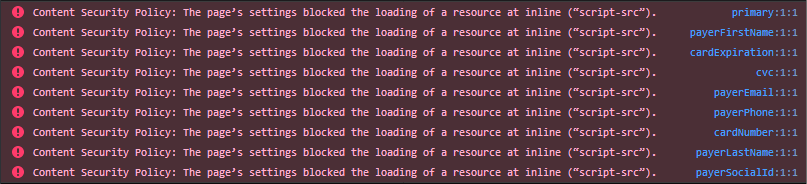
PayMe's fields have a strict Content Security Policy, which can put error messages in the browser console. They don't cause a malfunction or a security risk, and you can safely ignore them. Browser extensions that inject scripts cause most of them: to check, turn the extensions off or use a private window.