Saved Cards & Recurring
Save a buyer's card as a token to charge it again later, on its own or on a schedule with subscriptions. Step-by-step guides: Save a card and charge it later and Build recurring billing with subscriptions.
Endpoint reference: Generate, Pay, Cancel, Pause, Resume, Update Price, List Subscriptions. Statuses: Subscription Statuses.
How charging works
- A subscription created with
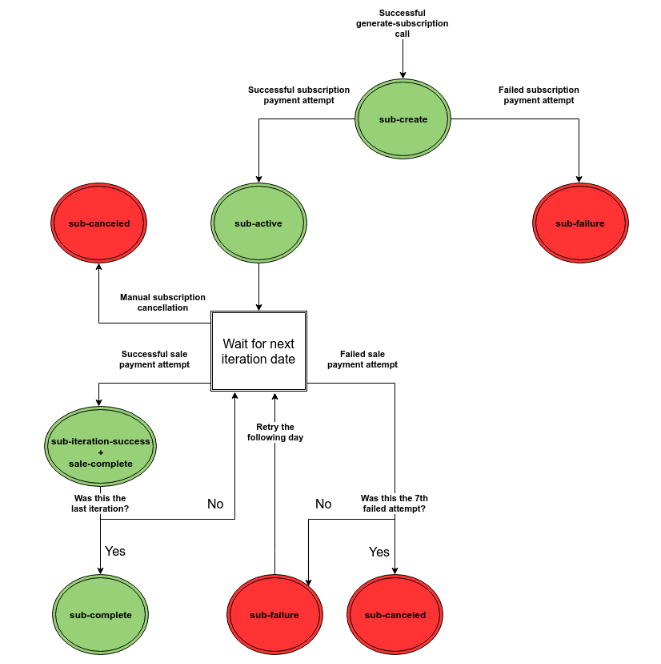
generate-subscriptionstarts in status1(initial). Entering the card onsub_urlactivates it (status2) and saves the card. - PayMe's billing engine checks active subscriptions continuously and charges a subscription when its
sub_next_datearrives. After a successful charge the iteration counter advances andsub_next_dateis recomputed fromsub_iteration_type. The next charge date is always readable on the subscription object. - The charge itself, including the first one, is made by a background job that runs once a minute. A first charge up to about 60 seconds after the card is entered is normal; there is no mode in which the first charge happens inside the card-entry request.
- The first charge date is
sub_start_date(default: today). A monthly subscription must start on a day between 1 and 28. - Each successful charge creates a sale with its own
payme_sale_id.
Failed charges and retries
- If the card-validation transaction fails when the buyer pays the subscription, the subscription moves to status
4(failed) and PayMe sendssub-failure. PayMe does not retry this step. You can pay the subscription again withpay-subscription. - A failed scheduled charge, including the first one, moves the subscription to status
7(failed, pending automatic retry) and pushessub_next_dateone day ahead, but only when another attempt is allowed. A daily subscription, and the seventh consecutive failure, instead move to status5and sendsub-cancel, withoutsub-failure. - Retries run once a day. At most 7 attempts are made (the original plus 6 retries); after the last failure the subscription is cancelled automatically:
sub_statusbecomes5andsub_next_datebecomesnull. - A daily subscription (
sub_iteration_type1) is not retried: it is cancelled on its first failure. - The 7-attempt limit is a fixed system setting and cannot be changed per account or per subscription.
- This charge retry is separate from the callback delivery retry (3 attempts within about 90 seconds), described on Callbacks.
- To re-run a failed iteration yourself, call
pay-subscriptionwithsub_payme_id. It works only while the status is initial, failed or failed-retry, and a lock prevents a double run: an active subscription is never charged again by it.
Subscription callbacks
Set sub_callback_url on generate-subscription. If it is empty, the account's default callback URL is used (the same merchant_callback_url that serves as the fallback for sale callbacks).
sub-iteration-successis sent after every successful charge (first, regular or after a retry) and carriespayme_sale_idandpayme_sale_code. Its body is identical whether or not a failure came before it. The time of a successful charge issub_prev_date.sub-failureis sent after a failed card-validation transaction when the buyer pays the subscription, and after every failed scheduled charge that leads to a retry. It is not sent for a failure that cancels the subscription; you receivesub-cancelinstead. It carries the subscription object withsub_error_text(the decline text with the code in brackets). It carries no sale id, no attempt id and no failed-attempt counter: the iteration counters count successful charges only, and the exact time of a failed attempt is on the transaction created for that attempt.sub-cancelis sent when the subscription is cancelled, by hand or automatically after the last failed attempt, withsub_status5. It always containsnotify_type,seller_payme_id,seller_id,sub_payme_idandsub_payme_code;subscription_idappears only if you set it at creation.- Callback handlers must be idempotent. Re-query
get-subscriptionsbefore acting, as with sale callbacks. - All dates are Asia/Jerusalem local time.
Tokens and buyer_key
- To skip card entry on
sub_url, pass an existingbuyer_keytogenerate-subscription(not withsub_typetemplate). - The token must be permanent: when you create it with
capture-buyer-token, sendbuyer_is_permanent: true. A one-time token is rejected by the subscription. - A token saved with
capture-buyer-tokenwithoutbuyer_is_permanent: trueis single-use for any charge: the firstgenerate-salecharge deactivates it, and later charges fail with error604. - With the Card Updater service active on the seller's account, PayMe updates saved cards when an Israeli card company reports a replacement card.
buyer_is_privateis sent on the call that captures the card (generate-salewithcapture_buyer, orcapture-buyer-token). Withtruethe token belongs to that one seller (MPL); without it the token is stored at account level and a lookup withseller_payme_idfails with "Merchant not allowed to use this buyer".generate-subscriptionitself does not takebuyer_is_private.- Subscription calls and callbacks (
get-subscriptions, the callbacks, thegenerate-subscriptionresponse) never expose thebuyer_key; they return the card mask, name, email, phone and ID only. The one way to read thebuyer_keyof a subscription created onsub_urlisget-buyer-keywithsub_payme_id.get-transactionsreturnsbuyer_keyfor sale-type transactions only, not for subscription charges. - A one-off charge on a subscription's
buyer_keyis allowed:generate-salewith thebuyer_keycreates a standalone sale that does not read or change the subscription.buyer_keycombined withsale_typetoken or template is blocked. - 3D Secure does not apply to subscription iterations, only to single transactions.
Common flows
Charge now, then monthly, without a double charge. Capture the card once (capture_buyer), charge the first payment as a one-off sale with that buyer_key, then call generate-subscription with the same buyer_key and sub_start_date in the next period. A future sub_start_date means no subscription charge before then.
Changing the price. set-price changes future charges only. It does not touch sub_next_date, sub_start_date, sub_prev_date, the iteration counters or the status, charges nothing, and sends the buyer an information email. The billing day stays anchored to sub_start_date.
Mid-cycle upgrade. There is no built-in proration. Compute the difference ((new price minus old price) times days left divided by cycle length), charge it once with generate-sale and the existing buyer_key, then call set-price with the new price; the next cycle charges the full new price on the same billing day. Do not cancel and re-create the subscription: that resets sub_start_date and the counters.
Changing the card. There is no buyer_key swap and no endpoint for an active subscription. While the status is initial, failed or failed-retry, replace the card by paying the subscription again with a new payment method: PATCH /api/subscriptions/{sub_payme_id} with a payment object, or pay-subscription with sub_payme_id. This creates a new buyer token and attaches it.
Joining a subscription link after its start date. Nothing is charged retroactively. The first charge moves into the current period: daily today; weekly the same weekday this week; monthly the same day this month (capped at the month's length); yearly the same day and month this year. A start date still in the future is kept.
Cancelling. End customers have no self-cancel link: the seller cancels, in the dashboard or with cancel-subscription. The seller receives an email when a subscription is cancelled (by hand or automatically), on every successful charge and when it completes, subject to the account's notification settings.
Your own reference: subscription_id
subscription_id is your free-form reference (max 50 characters, alphanumeric). It is not enforced unique: a repeated value on generate-subscription creates a second subscription and is neither rejected nor returned as "existing", so de-duplicate on your side. get-subscriptions accepts it as a filter (a single value or an array) and returns it on each item. PayMe's own identifiers are sub_payme_id (the GUID used in the API) and the numeric sub_payme_code.
Wallets
Google Pay is for one-time payments only and cannot pay a subscription. Apple Pay can: either pass a buyer_key captured earlier with Apple Pay to generate-subscription, or create the subscription and pay it with the Apple Pay token (pay-subscription, or PATCH /api/subscriptions/{sub_payme_id} with payment.method apple-pay). Off-session Apple Pay charges need a merchant token issued when the payment runs as recurring, and PayMe-side configuration of your account: contact PayMe Partners (partners@payme.io). capture_buyer on a wallet payment returns the same kind of buyer_key as a card.
How to create a subscription
In this group
- Tokenization
- Subscriptions: Recurring payments with subscriptions: the lifecycle, statuses, pausing, template subscriptions, callbacks and iteration types.