# PayMe API Documentation
## Accepting Payments
- [Hosted Payment Page options](https://docs.payme.io/accepting-payments/checkout-and-in-person/hosted-payment-page-options): Pre-fill PayMe's hosted payment page with the buyer's details, read the parameters of the success redirect to sale_return_url, and show sale_url in an iframe.
# Hosted Payment Page options
## Pre-fill the payment page
You can pre-fill the buyer's details on the payment page in two ways:
- send `sale_name`, `sale_email` and `sale_mobile` in [`generate-sale`](https://docs.payme.io/payments/hosted-payment-page/post-generate-sale) to pre-fill the name, email and phone;
- append query parameters to the `sale_url` you received. Query parameters override the values from `generate-sale`.
| Parameter | Description |
|---|---|
| `first_name` | Cardholder's first name |
| `last_name` | Cardholder's last name |
| `phone` | Cardholder's phone number |
| `email` | Cardholder's email address |
| `social_id` | Cardholder's social ID, used for cards issued in Israel |
| `zip_code` | Cardholder's ZIP code, used for cards issued in the USA, Canada and the United Kingdom |
Example: `sale_url + "?first_name=First&last_name=Last&phone=0500000002&email=test@example.com"`
Notes:
- Card fields can't be pre-filled, for security reasons.
- A value that fails validation isn't shown on the form.
## Success redirect
After a successful payment, PayMe redirects the buyer (inside the iframe, or the full page) to the `sale_return_url` you sent, with the sale details as query parameters.
Example redirect URL: `https://www.example.com/payment/success?payme_status=success&payme_signature=75e99dbcb25cdfbe1c62f0b9376f4144&payme_sale_id=XXXXXXXX-XXXXXXXX-XXXXXXXX-XXXXXXXX&payme_transaction_id=XXXXXXXX-XXXXXXXX-XXXXXXXX-XXXXXXXX&price=10000¤cy=USD&transaction_id=12345&is_token_sale=0&is_foreign_card=0`
| Parameter | Example | Description |
|---|---|---|
| `payme_status` | `success` | `success`, or `error` after a failed attempt |
| `payme_signature` | `75e99dbcb25cdfbe1c62f0b9376f4144` | MD5 signature. How to verify it is on [Callbacks](https://docs.payme.io/payments/getting-started/callbacks) ("Verifying a callback") |
| `payme_sale_id` | `XXXXXXXX-XXXXXXXX-XXXXXXXX-XXXXXXXX` | PayMe's sale ID |
| `payme_transaction_id` | `XXXXXXXX-XXXXXXXX-XXXXXXXX-XXXXXXXX` | PayMe's transaction ID |
| `price` | `10000` | Sale amount in minor units (50.75 is `5075`) |
| `currency` | `USD` | Sale currency, a 3-letter ISO 4217 code |
| `transaction_id` | `12345` | Your order reference |
| `is_token_sale` | `0` | `1` for a token sale |
| `is_foreign_card` | `0` | `1` when the card was issued outside Israel |
| `status_error_code` | | Only when `payme_status` is `error`: PayMe's error code |
| `status_error_details` | | Only when `payme_status` is `error`: the error message |
Use the redirect only to show the buyer a result page. Update your order from the [callback](https://docs.payme.io/payments/getting-started/callbacks).
## Showing `sale_url` in an iframe
`sale_url` works inside an iframe, 3D Secure included. Some issuing banks block their own 3D Secure screen inside an iframe, so keep a fallback that opens the page in a full window. The page reports completion with a `postMessage` to the parent window and by the redirect to `sale_return_url`.
- [Hosted Fields JSAPI guide](https://docs.payme.io/accepting-payments/checkout-and-in-person/hosted-fields-jsapi-guide): Add PayMe Hosted Fields to your own checkout: how the flow works, a complete minimal page, five working examples, charging the token from your server, and the full JavaScript API reference with every error shape.
# Hosted Fields JSAPI guide
Hosted Fields put PayMe's card inputs inside your own checkout form. Each card input is a PayMe iframe, so the card goes straight from the buyer's browser to PayMe, and your page and server only ever see a token. You style the form; you charge the token from your server.
Use Hosted Fields when the checkout must look native to your site. Otherwise the [Hosted Payment Page](https://docs.payme.io/payments/hosted-payment-page) needs less code: see [Integration Options](https://docs.payme.io/payments/getting-started/integration-options).
## How it works
| Step | Where | What happens |
|---|---|---|
| 1 | Browser | Load PayMe's script, then `PayMe.create(publicKey)` |
| 2 | Browser | Create and mount the card fields in your form |
| 3 | Browser | `instance.tokenize(saleData)` returns a token |
| 4 | Your server | Charge the token with [generate-sale](https://docs.payme.io/payments/hosted-fields-jsapi/post-generate-sale-hosted-fields-jsapi) |
| 5 | Your server | Confirm the result before you fulfil the order |
## Before you start
- **The seller's public key.** `PayMe.create` takes this key, a uuid, and never an MPL or a partner key. A direct seller finds it in the dashboard, under Admin → API & Integration → Hosted Fields JSAPI Credentials. A partner gets it from `create-seller` or `GET /sellers/{mpl}/public-keys`.
- **The environment.** Use `testMode: true` with a sandbox key and `false` in production. A sandbox token can't pay a live sale.
- **Test cards.** In the sandbox, use the [test cards](https://docs.payme.io/payments/getting-started/test-cards-and-payment-methods).
- **Your Content Security Policy.** If your site sets one, allow PayMe:
```
script-src https://cdn.payme.io;
frame-src https://hf.payme.io;
connect-src https://hf.payme.io;
```
`connect-src` is needed only for `PayMe.clientData()`, which [3DS with Hosted Fields](https://docs.payme.io/accepting-payments/3d-secure/3ds-with-hosted-fields) uses. Apple Pay and Google Pay need more: see [Apple Pay](https://docs.payme.io/accepting-payments/payment-methods/apple-pay) and [Google Pay](https://docs.payme.io/accepting-payments/payment-methods/google-pay).
## Minimal integration
This page is complete. Put in your public key, open it and pay with a test card. Tested with a sandbox key and a test card.
```html
Checkout
```
Then [charge the token](#charge-the-token) from your server.
## Charge the token
Send the token to your server and make the call there, with your MPL. Never call PayMe's server API from the browser.
Build the request on your server:
| `generate-sale` field | Where it comes from |
|---|---|
| `buyer_key` | `token` from the tokenize result |
| `sale_price` | Your own order, as an integer in minor units: `55.00` becomes `5500` |
| `currency` | Your own order |
| `product_name` | Your own order |
The browser's amount is display only, so never take the charge amount from it. Show the buyer the same amount your server will charge.
```json
{
"seller_payme_id": "MPLDEMO-MPLDEMO-MPLDEMO-1234567",
"sale_price": 5500,
"currency": "ILS",
"product_name": "Order 1234",
"transaction_id": "order-1234",
"buyer_key": "BUYERDEMO-BUYERDEMO-BUYERDEMO-1234567"
}
```
`POST` it to `https://sandbox.payme.io/api/generate-sale`, or `https://live.payme.io/api/generate-sale` in production. With a `buyer_key`, the call charges straight away and answers with the result:
```json
{
"status_code": 0,
"payme_sale_id": "SALE1655-3843870J-NTPYLJNW-SOWRLK9X",
"sale_status": "completed"
}
```
The response has other fields as well. See [generate-sale with a token](https://docs.payme.io/payments/hosted-fields-jsapi/post-generate-sale-hosted-fields-jsapi) for every field.
### Which token you get
| `tokenIsPermanent` | Charging the token | In the sandbox |
|---|---|---|
| `true` (default) | Can be charged again later, so store it as you would a saved card | A second charge completed |
| `false` | Charges once | A second charge failed with error `604`, "Buyer inactive" |
### When you need `pay-sale`
If you need the sale to exist first, call `generate-sale` without a `buyer_key`, keep its `payme_sale_id`, tokenize, then call [pay-sale](https://docs.payme.io/payments/direct-api/post-pay-sale) with `payme_sale_id` and `buyer_key`. It completes the same way in the sandbox. [3DS with Hosted Fields](https://docs.payme.io/accepting-payments/3d-secure/3ds-with-hosted-fields) uses this order.
## Rules that cost people time
- **One token per instance.** After a successful `tokenize()` the instance is spent, and a second call rejects. After a failed call you can call `tokenize()` again on the same instance, or start from a new instance.
- **Create only the fields you mount.** `tokenize()` waits for a value from every field you created, so a field that is created but never mounted makes it wait forever.
- **Clear the container before you remount.** `mount()` adds its iframe to the container rather than replacing what's there, so a new instance mounted into an old container shows two card fields. Mounting the same field twice fails with `already mounted`.
- **Give each container a height.** A PayMe field has no height of its own and collapses to nothing without one.
- **Mount failures can be silent.** In a sandboxed iframe without `allow-same-origin`, `create` and `mount` still succeed while the fields stay blank and `tokenize` never answers. Check your page's iframe attributes if that happens.
- **Use the public key.** `PayMe.create` takes the seller's public key, never an MPL or a partner key.
- **The browser's amount isn't the charge.** `total.amount.value` is a decimal string for display. Set `sale_price`, in minor units, on your server.
## Examples
Five working designs, each with its full code. Each runs in the sandbox with a test card and stops at the token: nothing is charged. Copy the files of the one closest to your design and put in your public key. `checkout-form.js` and `hosted-fields.js` are the same in all five.
**Compact form**
Buyer details and card fields in one panel.
The page shows first name, last name, email, phone and social ID as ordinary inputs in one teal panel, and card number, expiry and CVV in a second panel, each of those three inside a PayMe frame. Pressing Pay asks PayMe for a token and shows it with the name, email and card mask, and a Try again button that mounts the form anew. Nothing is charged, and the token goes nowhere: a real checkout sends it to your server, which pays the sale with it. Invalid or empty fields are marked before any request is made; a request that fails shows PayMe's message under the button and starts again with a new instance. Use test cards only.
`index.html`
```html
Compact form
Token received
Name
Email
Card
Token
```
`checkout.js`
```javascript
import { mountCheckout } from './checkout-form.js';
// This one script runs both the English and the Hebrew page: the page's lang picks.
const { lang } = document.documentElement;
mountCheckout({
// The seller's PUBLIC key, from the dashboard or from create-seller.
sellerPublicKey: 'YOUR_SELLER_PUBLIC_KEY',
language: lang,
// Display only: the amount charged is the one on the server-side sale.
total: { label: 'Example order', currency: lang === 'he' ? 'ILS' : 'USD', amountMinor: 5500 },
// Only these properties are honoured, under base, invalid and valid.
styles: {
base: { color: '#ffffff', 'font-size': '13.5px', '::placeholder': { color: '#acd7e4' } },
invalid: { color: '#ff0000' },
valid: { color: '#ffffff' },
},
});
```
`styles.css`
```css
* {
box-sizing: border-box;
}
[hidden] {
display: none !important;
}
html {
background: #d7e6ec;
}
body {
display: flex;
align-items: center;
justify-content: center;
min-height: 100vh;
margin: 0;
padding: 28px 20px;
color: #fff;
font: 13.5px/1.4 Arial, sans-serif;
}
form,
#success {
position: relative;
width: 100%;
max-width: 320px;
}
.panel {
margin-bottom: 14px;
border-radius: 4px;
background: #619d9e;
box-shadow: 0 2px 10px rgba(0, 0, 0, 0.18);
}
.row {
display: flex;
align-items: center;
gap: 10px;
height: 38px;
padding: 0 12px;
border-bottom: 1px solid #158a89;
}
.row:last-child {
border-bottom: 0;
}
.row span,
.row dt {
flex: 0 0 70px;
font-weight: 500;
}
[dir='rtl'] .row span {
flex-basis: 104px;
white-space: nowrap;
}
.row input {
flex: 1;
min-width: 0;
padding: 0;
border: 0;
outline: 0;
background: none;
color: #fff;
font: inherit;
}
.row input::placeholder {
color: #acd7e4;
opacity: 1;
}
.row.is-invalid input {
color: #ff0000;
}
.row.is-invalid,
[dir='rtl'] .row.is-invalid {
box-shadow: inset 0 -2px 0 #ff0000;
}
.row.is-focused {
box-shadow: inset 2px 0 0 #fff;
}
[dir='rtl'] .row.is-focused {
box-shadow: inset -2px 0 0 #fff;
}
.card-row {
display: flex;
align-items: center;
gap: 10px;
height: 40px;
padding: 0 12px;
}
/* A cross-origin frame has no height of its own, so its container needs one. */
.card-row .field {
height: 22px;
}
#card-number {
flex: 1;
min-width: 0;
}
#card-expiry {
flex: 0 0 52px;
}
#card-cvv {
flex: 0 0 34px;
}
.card-row .is-invalid {
box-shadow: 0 2px 0 #ff0000;
}
button {
width: 100%;
height: 42px;
margin-top: 8px;
border: 0;
border-radius: 4px;
background: #158a89;
color: #fff;
font: 500 15px 'Segoe UI', system-ui, sans-serif;
cursor: pointer;
}
[dir='rtl'] button {
font-family: Arial, sans-serif;
}
button:hover:enabled {
box-shadow: 0 0 12px rgba(0, 0, 0, 0.35);
}
button:disabled {
opacity: 0.65;
cursor: default;
}
/* Below the button, so a message doesn't move the centred form. */
#error {
position: absolute;
top: 100%;
right: 0;
left: 0;
margin: 10px 0 0;
color: #000;
text-align: center;
}
#success {
padding-bottom: 12px;
}
#success h1 {
margin: 0;
padding: 12px;
border-bottom: 1px solid #158a89;
font-size: 15px;
font-weight: 600;
}
#success dl {
margin: 0;
}
#success dd {
flex: 1;
min-width: 0;
margin: 0;
overflow: hidden;
text-overflow: ellipsis;
white-space: nowrap;
}
#again {
display: block;
width: calc(100% - 24px);
margin: 12px 12px 0;
}
```
`checkout-form.js`
```javascript
/**
* A checkout form around PayMe's card fields, shared by the live examples.
* The page brings the markup and the look; this file brings the behaviour.
*
* What it expects on the page:
* #checkout the form, with #submit and an #error line inside it
* #card-number, #card-expiry, #card-cvv empty containers with a height
* input[name] the payer fields
* #success hidden until a token arrives, with [data-result] slots to fill
* (name, email, card, token) and an #again button
*
* Words live in the page: a container's data-placeholder, and data-required
* and data-invalid on a container or an input, replace PayMe's English.
*
* What it sets, for the page's CSS, on the closest .field:
* is-focused, is-filled, is-invalid
*/
import { mountHostedFields } from './hosted-fields.js';
const CONTAINERS = { number: '#card-number', expiry: '#card-expiry', cvv: '#card-cvv' };
const CONTAINER_OF_FIELD = { cardNumber: CONTAINERS.number, cardExpiration: CONTAINERS.expiry, cvc: CONTAINERS.cvv };
const $ = (selector) => document.querySelector(selector);
const fieldOf = (element) => element.closest('.field') ?? element;
/** A failure's words: PayMe's tokenize errors are a map of field to message. */
function failureMessage(failure) {
const [first] = Object.values(failure?.errors ?? {});
return first ?? failure?.message ?? $('#error').dataset.fallback;
}
/** A container's words, as the options PayMe's field takes. */
function fieldWords(selector) {
const { placeholder, required, invalid } = $(selector).dataset;
return { placeholder, messages: { required, invalid } };
}
/**
* Mount the card fields, wire the form, and mount again after each attempt.
*
* @param {object} opts
* @param {string} opts.sellerPublicKey the seller's PUBLIC key (uuid), never an MPL
* @param {string} opts.language 'en' | 'he'
* @param {object} opts.styles the card fields' look (see hosted-fields.js)
* @param {{label: string, currency: string, amountMinor: number}} opts.total
* @param {(values: object) => object} [opts.payer] turns the form's inputs into the payer
* fields, when a page doesn't name its inputs after them or leaves some out
*/
export function mountCheckout({ sellerPublicKey, language, styles, total, payer = (values) => values }) {
const form = $('#checkout');
const submit = $('#submit');
const error = $('#error');
const success = $('#success');
const inputs = [...form.querySelectorAll('input[name]')];
const cards = Object.values(CONTAINERS).map($);
let session = null;
/** Each card field's latest state from PayMe, by container id. */
let cardStates = {};
/** An input's problem in words, or null: PayMe's own rule for a payer field, else the input's. */
function inputProblem(input) {
const rule = window.PayMe?.validators?.[input.name];
const problems = rule ? rule.test(input.value) : null;
if (rule ? !problems : input.checkValidity()) return null;
return input.value.trim() ? input.dataset.invalid : input.dataset.required;
}
/** A card field's problem in words, or null. A field never touched has no state yet: it's empty. */
function cardProblem(container) {
const state = cardStates[container.id];
if (state?.isValid) return null;
return !state || state.isEmpty ? container.dataset.required : container.dataset.invalid;
}
const problemOf = (element) => (element.matches('input') ? inputProblem(element) : cardProblem(element));
/** A problem put right; the words go with the last one. A failed request's words stay until the next attempt. */
function markFixed(field) {
if (!field.classList.contains('is-invalid')) return;
field.classList.remove('is-invalid');
if (!form.querySelector('.is-invalid')) error.textContent = '';
}
function onCardEvent(state) {
const container = $(CONTAINER_OF_FIELD[state.field]);
cardStates[container.id] = state;
const field = fieldOf(container);
if (state.event === 'focus') field.classList.add('is-focused');
if (state.event === 'blur') field.classList.remove('is-focused');
field.classList.toggle('is-filled', !state.isEmpty);
// While typing, only clear a problem; a new one shows when the buyer leaves the field.
if (state.isValid) markFixed(field);
else if (state.event === 'blur' && !state.isEmpty) field.classList.add('is-invalid');
}
function setBusy(busy) {
submit.disabled = busy;
submit.setAttribute('aria-busy', String(busy));
}
// One instance, one tokenize(): every attempt starts from a new one.
async function mount() {
setBusy(true);
session?.teardown();
session = null;
cardStates = {};
for (const container of cards) fieldOf(container).classList.remove('is-focused', 'is-filled', 'is-invalid');
try {
session = await mountHostedFields({
sellerPublicKey,
testMode: true,
containers: CONTAINERS,
language,
styles,
tokenIsPermanent: false,
fieldOptions: {
number: fieldWords(CONTAINERS.number),
expiry: fieldWords(CONTAINERS.expiry),
cvv: fieldWords(CONTAINERS.cvv),
},
listeners: { focus: onCardEvent, blur: onCardEvent, keyup: onCardEvent, 'validity-changed': onCardEvent },
});
setBusy(false);
} catch (failure) {
error.textContent = failureMessage(failure);
submit.setAttribute('aria-busy', 'false');
}
}
for (const input of inputs) {
const field = fieldOf(input);
input.addEventListener('focus', () => field.classList.add('is-focused'));
input.addEventListener('blur', () => {
field.classList.remove('is-focused');
field.classList.toggle('is-invalid', Boolean(input.value && inputProblem(input)));
});
input.addEventListener('input', () => {
field.classList.toggle('is-filled', Boolean(input.value));
if (!inputProblem(input)) markFixed(field);
});
}
form.addEventListener('submit', async (event) => {
event.preventDefault();
if (!session) return;
const elements = [...form.querySelectorAll('input[name], #card-number, #card-expiry, #card-cvv')];
for (const element of elements) fieldOf(element).classList.toggle('is-invalid', Boolean(problemOf(element)));
const invalid = elements.find(problemOf);
if (invalid) {
error.textContent = problemOf(invalid);
return;
}
setBusy(true);
error.textContent = '';
const details = payer(Object.fromEntries(new FormData(form)));
try {
// A real checkout sends this token to your server, which pays the sale with it.
const { token, cardMask } = await session.tokenize(details, total);
const results = {
name: `${details.payerFirstName} ${details.payerLastName}`,
email: details.payerEmail,
card: cardMask,
token,
};
for (const slot of success.querySelectorAll('[data-result]')) slot.textContent = results[slot.dataset.result];
form.hidden = true;
success.hidden = false;
$('#again').focus();
} catch (failure) {
error.textContent = failureMessage(failure);
await mount();
}
});
$('#again').addEventListener('click', () => {
form.reset();
for (const input of inputs) fieldOf(input).classList.remove('is-filled', 'is-invalid');
success.hidden = true;
form.hidden = false;
mount();
});
return mount();
}
```
`hosted-fields.js`
```javascript
/**
* PayMe Hosted Fields (JSAPI) — the browser half of tokenization. Vanilla ES
* module, no framework. Port the calls into your own frontend; keep the rules.
*
* 1. browser: PayMe.create(sellerPublicKey) -> instance
* instance.hostedFields() -> create + mount
* instance.tokenize(saleData) -> { token, card, ... }
* 2. server: generate-sale with buyer_key = token -> charge
*
* Card data goes browser -> PayMe's vault inside cross-origin iframes. It never
* touches your server, which keeps you out of PCI DSS scope.
*
* Guide: https://docs.payme.io/accepting-payments/checkout-and-in-person/hosted-fields-jsapi-guide
*
* RULES (each one has cost someone an afternoon):
* - PayMe.create takes the seller's PUBLIC key (a uuid). Never a partner key
* and never an MPL: both are server-side credentials. A partner gets the key
* from create-seller or GET /sellers/{mpl}/public-keys, which is partner-only.
* A direct seller takes it from the dashboard: Admin -> API & Integration,
* section Hosted Fields JSAPI Credentials.
* - testMode must match the environment you charge in: true for sandbox,
* false for production. A sandbox token cannot pay a live sale.
* - One instance, one tokenize(). A second call fails with "Bad session —
* Session expired or deleted". After any failure, clear the containers and
* start again from a NEW instance.
* - mount() appends; it does not replace. Empty the containers before
* remounting or the buyer sees two card fields.
* - Containers need an explicit height (e.g. 44px). A cross-origin iframe
* has no intrinsic height and collapses to nothing.
* - total.amount.value is a DECIMAL STRING ("50.75"), not minor units. It is
* display-only; the amount charged is the one on the server-side sale, so
* keep them equal.
* - Any payer field you do not mount must be passed as a value in tokenize().
* Card number, expiry and CVV must always be mounted, never passed.
* - Styles: only `base`, `invalid`, `valid` groups, with `::placeholder`
* nested inside `base`. Only color, font-size, text-align, letter-spacing,
* text-decoration, text-shadow, text-transform are honoured. Anything else
* is dropped silently.
* - CSP: script-src https://cdn.payme.io, frame-src https://hf.payme.io.
*/
const SCRIPT_URL = 'https://cdn.payme.io/hf/v1/hostedfields.js';
const DEFAULT_STYLES = {
base: { color: '#1a1a1a', 'font-size': '15px', '::placeholder': { color: '#8a8a8a' } },
invalid: { color: '#b00020' },
valid: { color: '#1a1a1a' },
};
let loader = null;
/** Load hostedfields.js once. */
export function loadPayMeSdk() {
if (window.PayMe) return Promise.resolve(window.PayMe);
if (loader) return loader;
loader = new Promise((resolve, reject) => {
const script = document.createElement('script');
script.src = SCRIPT_URL;
script.async = true;
script.onload = () =>
window.PayMe
? resolve(window.PayMe)
: reject(new Error('hostedfields.js loaded but window.PayMe is undefined'));
script.onerror = () =>
reject(
new Error(
`Could not load ${SCRIPT_URL}. An ad blocker or a CSP without cdn.payme.io in script-src will block it.`,
),
);
document.head.appendChild(script);
}).catch((error) => {
loader = null; // allow a retry
throw error;
});
return loader;
}
/**
* Mount card fields into three empty containers and return a one-shot
* `pay()` function.
*
* @param {object} opts
* @param {string} opts.sellerPublicKey the seller's PUBLIC key (uuid), never an MPL
* @param {boolean} opts.testMode true in sandbox, false in production
* @param {{number: string, expiry: string, cvv: string}} opts.containers CSS selectors
* @param {(event: object) => void} [opts.onValidity] per-field validity updates
* @param {string} [opts.language] 'en' | 'he'
* @param {object} [opts.styles] the card fields' look, under the rules above
* @param {boolean} [opts.tokenIsPermanent] false for a single-use token
* @param {{number?: object, expiry?: object, cvv?: object}} [opts.fieldOptions]
* each field's own `placeholder` and `messages: { required, invalid }`
* @param {Record void>} [opts.listeners]
* field events by name, such as focus, blur and keyup, on all three fields
*/
export async function mountHostedFields({
sellerPublicKey,
testMode,
containers,
onValidity,
language = 'en',
styles = DEFAULT_STYLES,
tokenIsPermanent = true,
fieldOptions = {},
listeners = {},
}) {
const PayMe = await loadPayMeSdk();
const instance = await PayMe.create(sellerPublicKey, {
testMode,
language,
tokenIsPermanent,
});
const fields = instance.hostedFields();
const number = fields.create('cardNumber', { styles, placeholder: 'Card number', ...fieldOptions.number });
const expiry = fields.create('cardExpiration', { styles, placeholder: 'MM/YY', ...fieldOptions.expiry });
const cvv = fields.create('cvc', { styles, placeholder: 'CVV', ...fieldOptions.cvv });
for (const field of [number, expiry, cvv]) {
if (onValidity) field.on('validity-changed', onValidity);
for (const [event, listener] of Object.entries(listeners)) field.on(event, listener);
}
// mount() appends — clear first so a remount does not duplicate fields.
for (const selector of Object.values(containers)) {
document.querySelector(selector).replaceChildren();
}
await Promise.all([
number.mount(containers.number),
expiry.mount(containers.expiry),
cvv.mount(containers.cvv),
]);
let used = false;
/**
* Tokenize once. Resolves with the token to send to YOUR server, which then
* calls generate-sale with buyer_key = token. Never call PayMe's server API from
* the browser.
*
* @param {object} payer payerFirstName, payerLastName, payerEmail, payerPhone, payerSocialId
* @param {{label: string, currency: string, amountMinor: number}} total
*/
async function tokenize(payer, total) {
if (used) {
throw new Error('This Hosted Fields session was already used. Remount to start again.');
}
used = true;
const result = await instance.tokenize({
...payer,
total: {
label: total.label,
// Decimal string for display only; must equal the server-side sale price.
amount: { currency: total.currency, value: (total.amountMinor / 100).toFixed(2) },
},
});
return { token: result.token, cardMask: result.card?.cardMask };
}
/** Remove the fields and end this instance, before mounting a new one. */
function teardown() {
instance.teardown();
}
return { tokenize, teardown };
}
```
[Run this example](https://docs.payme.io/run/compact/index.html). [Test cards](https://docs.payme.io/payments/getting-started/test-cards-and-payment-methods).
**Hebrew, right to left**
The same form with Hebrew labels, right-to-left layout and shekel pricing.
The same script and styles as the compact form, with the page in Hebrew (lang="he", dir="rtl"), PayMe's fields set to language he, Hebrew placeholders and messages, and a total in shekels (₪). Pressing Pay asks PayMe for a token and shows it with the name, email and card mask, and a Try again button that mounts the form anew. Nothing is charged, and the token goes nowhere: a real checkout sends it to your server, which pays the sale with it. Invalid or empty fields are marked before any request is made; a request that fails shows PayMe's message under the button and starts again with a new instance. Use test cards only.
`index.html`
```html
טופס קומפקטי
התקבל טוקן
שם
דוא״ל
כרטיס
טוקן
```
`checkout.js` is the same file as under **Compact form** above.
`styles.css` is the same file as under **Compact form** above.
`checkout-form.js` is the same file as under **Compact form** above.
`hosted-fields.js` is the same file as under **Compact form** above.
[Run this example](https://docs.payme.io/run/compact-hebrew/index.html). [Test cards](https://docs.payme.io/payments/getting-started/test-cards-and-payment-methods).
**Rounded, dark theme**
Fields styled to match a dark brand.
The page shows rounded fields on a dark indigo background, the payer inputs and PayMe's three card frames in the same shape. A focused or filled field turns white and an invalid one coral. Pressing Pay asks PayMe for a token and shows it with the name, email and card mask, and a Try again button that mounts the form anew. Nothing is charged, and the token goes nowhere: a real checkout sends it to your server, which pays the sale with it. Invalid or empty fields are marked before any request is made; a request that fails shows PayMe's message under the button and starts again with a new instance. Use test cards only.
`index.html`
```html
Rounded, dark theme
Token received
Name
Email
Card
Token
```
`checkout.js`
```javascript
import { mountCheckout } from './checkout-form.js';
mountCheckout({
// The seller's PUBLIC key, from the dashboard or from create-seller.
sellerPublicKey: 'YOUR_SELLER_PUBLIC_KEY',
language: 'en',
// Display only: the amount charged is the one on the server-side sale.
total: { label: 'Example order', currency: 'USD', amountMinor: 2500 },
// Only these properties are honoured, under base, invalid and valid.
// The text is dark because a focused or filled field turns white (styles.css).
styles: {
base: { color: '#565b7d', 'font-size': '13.5px', '::placeholder': { color: '#c6cfe4' } },
invalid: { color: '#ffffff' },
valid: { color: '#565b7d' },
},
});
```
`styles.css`
```css
* {
box-sizing: border-box;
}
[hidden] {
display: none !important;
}
html {
background: #555a7f;
}
body {
display: flex;
align-items: center;
justify-content: center;
min-height: 100vh;
margin: 0;
padding: 28px 20px;
color: #fff;
font: 13.5px/1.4 Arial, sans-serif;
}
form,
#success {
position: relative;
width: 100%;
max-width: 320px;
}
.pill {
display: flex;
align-items: center;
height: 38px;
margin-bottom: 7px;
padding: 0 16px;
border-radius: 40px;
background: #7482aa;
transition: background 0.3s;
}
.pill input {
width: 100%;
min-width: 0;
padding: 0;
border: 0;
outline: 0;
background: none;
color: #565b7d;
font: inherit;
}
.pill input::placeholder {
color: #c6cfe4;
opacity: 1;
}
/* A cross-origin frame has no height of its own, so its container needs one. */
.pill > div {
position: relative;
top: -2px;
width: 100%;
height: 22px;
}
.pill.is-focused,
.pill.is-filled {
background: #fff;
}
.pill.is-invalid {
background: #f8735e;
}
.pill.is-invalid input {
color: #fff;
}
.two {
display: grid;
grid-template-columns: 1fr 1fr;
gap: 7px;
}
.three {
display: grid;
grid-template-columns: 1fr 1fr 1fr;
gap: 7px;
}
.gap {
height: 12px;
}
button {
width: 100%;
height: 40px;
margin-top: 12px;
border: 0;
border-radius: 50px;
background: #fcdd60;
color: #3b3b4f;
font: 600 14px 'Segoe UI', system-ui, sans-serif;
letter-spacing: 0.02em;
text-transform: uppercase;
cursor: pointer;
}
button:hover:enabled {
box-shadow: 0 0 14px rgba(0, 0, 0, 0.4);
}
button:disabled {
opacity: 0.65;
cursor: default;
}
/* Below the button, so a message doesn't move the centred form. */
#error {
position: absolute;
top: 100%;
right: 0;
left: 0;
margin: 10px 0 0;
text-align: center;
}
#success {
padding: 18px;
border-radius: 18px;
background: #7482a7;
box-shadow: 0 2px 10px rgba(0, 0, 0, 0.2);
}
#success h1 {
margin: 0 0 8px;
font-size: 15px;
font-weight: 600;
}
#success dl {
margin: 0;
}
#success dl div {
display: flex;
align-items: center;
height: 34px;
}
#success dt {
flex: 0 0 56px;
font-weight: 600;
}
#success dd {
flex: 1;
min-width: 0;
margin: 0;
overflow: hidden;
text-overflow: ellipsis;
white-space: nowrap;
}
```
`checkout-form.js` is the same file as under **Compact form** above.
`hosted-fields.js` is the same file as under **Compact form** above.
[Run this example](https://docs.payme.io/run/rounded-dark/index.html). [Test cards](https://docs.payme.io/payments/getting-started/test-cards-and-payment-methods).
**Minimal lines**
A light form with underlined fields.
The page shows underlined fields on white, the payer inputs and PayMe's three card frames alike. The underline turns green on focus and red when invalid. Pressing Pay asks PayMe for a token and shows it with the name, email and card mask, and a Try again button that mounts the form anew. Nothing is charged, and the token goes nowhere: a real checkout sends it to your server, which pays the sale with it. Invalid or empty fields are marked before any request is made; a request that fails shows PayMe's message under the button and starts again with a new instance. Use test cards only.
`index.html`
```html
Minimal lines
Token received
Name
Email
Card
Token
```
`checkout.js`
```javascript
import { mountCheckout } from './checkout-form.js';
mountCheckout({
// The seller's PUBLIC key, from the dashboard or from create-seller.
sellerPublicKey: 'YOUR_SELLER_PUBLIC_KEY',
language: 'en',
// Display only: the amount charged is the one on the server-side sale.
total: { label: 'Example order', currency: 'USD', amountMinor: 2500 },
// Only these properties are honoured, under base, invalid and valid.
styles: {
base: { color: '#000000', 'font-size': '14px', '::placeholder': { color: '#aeb8c4' } },
invalid: { color: '#ff0000' },
valid: { color: '#000000' },
},
});
```
`styles.css`
```css
* {
box-sizing: border-box;
}
[hidden] {
display: none !important;
}
html {
background: #fff;
}
body {
display: flex;
align-items: center;
justify-content: center;
min-height: 100vh;
margin: 0;
padding: 28px 20px;
color: #000;
font: 14px/1.4 Arial, sans-serif;
}
form,
#success {
position: relative;
width: 100%;
max-width: 320px;
}
.line {
display: flex;
align-items: flex-end;
height: 42px;
padding-bottom: 7px;
border-bottom: 2px solid #e6eaef;
transition: border-color 0.3s;
}
.line input {
width: 100%;
min-width: 0;
padding: 0;
border: 0;
outline: 0;
background: none;
color: #000;
font: inherit;
}
.line input::placeholder {
color: #aeb8c4;
opacity: 1;
}
/* A cross-origin frame has no height of its own, so its container needs one. */
.line > div {
width: 100%;
height: 22px;
}
.line.is-focused {
border-bottom-color: #30b280;
}
.line.is-invalid {
border-bottom-color: #ff0000;
}
.line.is-invalid input {
color: #ff0000;
}
.two {
display: grid;
grid-template-columns: 1fr 1fr;
gap: 14px;
}
button {
width: 100%;
height: 42px;
margin-top: 26px;
border: 0;
border-radius: 4px;
background: #00c07d;
color: #fff;
font: 600 14px 'Segoe UI', system-ui, sans-serif;
letter-spacing: 0.02em;
text-transform: uppercase;
cursor: pointer;
}
button:hover:enabled {
box-shadow: 0 0 10px rgba(0, 0, 0, 0.4);
}
button:disabled {
opacity: 0.65;
cursor: default;
}
/* Below the button, so a message doesn't move the centred form. */
#error {
position: absolute;
top: 100%;
right: 0;
left: 0;
margin: 10px 0 0;
color: #ff0000;
text-align: center;
}
#success {
padding: 18px;
border-radius: 4px;
background: #30b280;
color: #fff;
box-shadow: 0 2px 10px rgba(0, 0, 0, 0.2);
}
#success h1 {
margin: 0 0 8px;
font-size: 15px;
font-weight: 600;
}
#success dl {
margin: 0;
}
#success dl div {
display: flex;
align-items: center;
height: 36px;
border-bottom: 1px solid #fff;
}
#success dt {
flex: 0 0 56px;
font-weight: 600;
}
#success dd {
flex: 1;
min-width: 0;
margin: 0;
overflow: hidden;
text-overflow: ellipsis;
white-space: nowrap;
}
#again {
margin-top: 16px;
background: #fff;
color: #30b280;
}
```
`checkout-form.js` is the same file as under **Compact form** above.
`hosted-fields.js` is the same file as under **Compact form** above.
[Run this example](https://docs.payme.io/run/minimal-lines/index.html). [Test cards](https://docs.payme.io/payments/getting-started/test-cards-and-payment-methods).
**Pay in a dialog**
A "Pay with card" button that opens the form in a dialog.
The page shows one Pay with card button, which opens a native dialog with full name, email and PayMe's three card frames; the close button or Escape closes it. The fields mount once when the page loads, so the dialog opens ready. The payer fields the dialog doesn't ask for go to PayMe as fixed fake values. Pressing Pay asks PayMe for a token and shows it with the name, email and card mask, and a Try again button that mounts the form anew. Nothing is charged, and the token goes nowhere: a real checkout sends it to your server, which pays the sale with it. Invalid or empty fields are marked before any request is made; a request that fails shows PayMe's message under the button and starts again with a new instance. Use test cards only.
`index.html`
```html
Pay in a dialog
```
`checkout.js`
```javascript
import { mountCheckout } from './checkout-form.js';
const dialog = document.querySelector('#payment');
// The button starts disabled, so an early click isn't lost before this script runs.
const open = document.querySelector('#open-payment');
open.addEventListener('click', () => dialog.showModal());
open.disabled = false;
document.querySelector('#close-payment').addEventListener('click', () => dialog.close());
mountCheckout({
// The seller's PUBLIC key, from the dashboard or from create-seller.
sellerPublicKey: 'YOUR_SELLER_PUBLIC_KEY',
language: 'en',
// Display only: the amount charged is the one on the server-side sale.
total: { label: 'Example order', currency: 'USD', amountMinor: 2500 },
// Only these properties are honoured, under base, invalid and valid.
styles: {
base: { color: '#000000', 'font-size': '13.5px', '::placeholder': { color: '#9aa3ae' } },
invalid: { color: '#ff0000' },
valid: { color: '#000000' },
},
// The dialog asks for less: PayMe needs two names, and the fields not shown go as values. These are fake.
payer: ({ fullName, payerEmail }) => {
const [payerFirstName, ...rest] = fullName.trim().split(/\s+/);
return {
payerFirstName,
payerLastName: rest.join(' '),
payerEmail,
payerPhone: '0500000000',
payerSocialId: '123456782',
};
},
});
```
`styles.css`
```css
* {
box-sizing: border-box;
}
[hidden] {
display: none !important;
}
html {
background: #f5f5f7;
}
body {
display: flex;
align-items: center;
justify-content: center;
min-height: 100vh;
margin: 0;
padding: 28px 20px;
color: #0f172a;
font: 13.5px/1.4 Arial, sans-serif;
}
.primary {
height: 40px;
border: 0;
border-radius: 5px;
background: #00c07d;
color: #fff;
font: 600 13.5px 'Segoe UI', system-ui, sans-serif;
letter-spacing: 0.03em;
text-transform: uppercase;
cursor: pointer;
}
.primary:hover:enabled {
box-shadow: 0 0 10px rgba(0, 0, 0, 0.4);
}
.primary:disabled {
opacity: 0.65;
cursor: default;
}
#open-payment {
padding: 0 22px;
}
dialog {
width: calc(100% - 40px);
max-width: 310px;
padding: 18px 20px 20px;
border: 0;
border-radius: 10px;
background: #fff;
color: inherit;
box-shadow: 0 18px 44px -12px rgba(15, 23, 42, 0.35);
}
dialog::backdrop {
background: rgba(15, 23, 42, 0.35);
}
header {
display: flex;
align-items: center;
justify-content: space-between;
margin-bottom: 6px;
}
h1 {
margin: 0;
font: 600 15px 'Segoe UI', system-ui, sans-serif;
}
.close {
display: grid;
place-items: center;
width: 24px;
height: 24px;
margin-inline-end: -4px;
padding: 0;
border: 0;
border-radius: 5px;
background: none;
color: #94a3b8;
cursor: pointer;
}
.close:focus-visible {
outline: 2px solid #00c16e;
outline-offset: 2px;
}
.close:hover {
background: #f1f5f9;
color: #475569;
}
.line {
display: flex;
align-items: flex-end;
height: 38px;
padding-bottom: 6px;
border-bottom: 1px solid #c8c8c9;
}
.line input {
width: 100%;
min-width: 0;
padding: 0;
border: 0;
outline: 0;
background: none;
color: #000;
font: inherit;
}
.line input::placeholder {
color: #9aa3ae;
opacity: 1;
}
/* A cross-origin frame has no height of its own, so its container needs one. */
.line > div {
width: 100%;
height: 22px;
}
.line.is-focused {
border-bottom-color: #00c07d;
}
.line.is-invalid {
border-bottom-color: #ff0000;
}
.line.is-invalid input {
color: #ff0000;
}
.two {
display: grid;
grid-template-columns: 1fr 1fr;
gap: 14px;
}
form .primary,
#success .primary {
width: 100%;
margin-top: 18px;
}
#error:empty {
display: none;
}
#error {
margin: 8px 0 0;
color: #ff0000;
text-align: center;
}
#success h2 {
margin: 6px 0;
color: #00a56b;
font: 600 14px 'Segoe UI', system-ui, sans-serif;
}
#success dl {
margin: 0;
}
#success dl div {
display: flex;
align-items: center;
height: 34px;
border-bottom: 1px solid #e5e7eb;
}
#success dt {
flex: 0 0 56px;
color: #64748b;
}
#success dd {
flex: 1;
min-width: 0;
margin: 0;
overflow: hidden;
text-overflow: ellipsis;
white-space: nowrap;
}
```
`checkout-form.js` is the same file as under **Compact form** above.
`hosted-fields.js` is the same file as under **Compact form** above.
[Run this example](https://docs.payme.io/run/pay-dialog/index.html). [Test cards](https://docs.payme.io/payments/getting-started/test-cards-and-payment-methods).
## Reference
### PayMe.create options
`PayMe.create(publicKey, options)` resolves to an instance. `options` is optional. An unknown option, or a value of the wrong type, makes it reject.
| Option | Type | Default | What it does |
|---|---|---|---|
| `testMode` | boolean | `false` | `true` processes in the sandbox, `false` in production. It must match the key and the server that charges the token. |
| `language` | `'en'` \| `'he'` | `'en'` | `'he'` makes the fields right-to-left and returns PayMe's error messages in Hebrew. Field messages stay in English unless you pass `messages` (see the `compact-hebrew` example). |
| `tokenIsPermanent` | boolean | `true` | `true`: the token can be charged again. `false`: it charges once; a second charge fails with `604` "Buyer inactive". |
| `buyerIsPrivate` | boolean | `false` | `true`: only this seller can charge the token. `false`: any seller of the same partner can. |
| `buyerPerformValidation` | boolean | `true` | Validates the card when the token is created. |
| `domainName` | string | the page's host | Apple Pay only. The top-level domain, e.g. `shop.example.com`, when the SDK runs inside another site's iframe. A bare domain, without `https://`. |
`PayMe.version` holds the SDK's version, e.g. `1.21.0`.
### Fields
`instance.hostedFields()` returns a manager. `fields.create(name, options)` makes a field; calling it again for the same name returns the same field and ignores the new options. `field.mount(selector)` shows the field in the first element the selector finds. It returns a promise, rejects with ` already mounted` if the field is already mounted, and throws `Container for not found` at once if no element matches.
Create only the fields you mount: `tokenize()` waits for a value from every created field.
| `PayMe.fields` | Name | Required for `tokenize` |
|---|---|---|
| `NUMBER` | `cardNumber` | Yes, always a mounted field |
| `EXPIRATION` | `cardExpiration` | Yes, always a mounted field |
| `CVC` | `cvc` | Yes, always a mounted field |
| `NAME_FIRST` | `payerFirstName` | Yes: mount it or pass its value |
| `NAME_LAST` | `payerLastName` | Yes: mount it or pass its value |
| `EMAIL` | `payerEmail` | Yes: mount it or pass its value |
| `PHONE` | `payerPhone` | Yes: mount it or pass its value |
| `SOCIAL_ID` | `payerSocialId` | No |
| `ZIP_CODE` | `payerZipCode` | No |
The card number, expiry and CVV can't be passed as values, so those three fields are always mounted. A payer detail you don't mount goes in the `tokenize` data instead.
**Field methods:**
| Method | What it does |
|---|---|
| `field.on(event, handler)` | Listens to an event (see [Field events](#field-events)) |
| `field.once(event, handler)` | Listens to the next occurrence only |
| `field.removeListener(event, handler)` | Stops one listener |
| `field.removeAllListeners(event?)` | Stops every listener, or every listener of one event |
| `field.focus()` / `field.blur()` | Moves the focus into or out of the field |
| `field.getState()` | Returns `{ field, isValid, isEmpty, message }` |
`fields.set({ colorScheme: PayMe.colorScheme.Dark })` sets the color scheme of every field: `PayMe.colorScheme.Dark`, `Light` or `Normal`.
### Field options
```js
const cardNumber = fields.create(PayMe.fields.NUMBER, {
placeholder: 'Card number',
messages: { required: 'Enter your card number', invalid: 'Check your card number' },
styles: {
base: { color: '#000000', '::placeholder': { color: '#8a8a8a' } },
invalid: { color: 'red' },
valid: { color: 'green' },
},
});
```
`placeholder`, `messages` and `styles` are the only options. Any other key throws.
### Field styling
Because a PayMe field is protected, `styles` takes three groups, `base`, `invalid` and `valid`, with only these properties. Anything else, including `font-family`, is dropped.
- `color`
- `font-size`
- `text-align`
- `letter-spacing`
- `text-decoration`
- `text-shadow`
- `text-transform`
- `::placeholder`, nested inside a group
Everything around the field is yours: style its container for borders, backgrounds and focus. Your own inputs for payer details take any CSS.
### Field events
`field.on(event, handler)`:
| Event | Fields | When |
|---|---|---|
| `change` | All | Like the standard event |
| `blur` | All | Like the standard event |
| `focus` | All | Like the standard event |
| `keyup` | All | Like the standard event |
| `keydown` | All | Like the standard event |
| `keypress` | All | Like the standard event |
| `validity-changed` | All | The field's validity changed: use it to show messages |
| `card-type-changed` | `cardNumber` | The card's brand was detected: use it to show an icon |
The handler gets no card data:
```js
{
type: 'validity-changed',
event: 'validity-changed',
field: 'cardNumber',
isValid: false,
isEmpty: false,
message: 'Invalid credit card number', // when invalid
cardType: 'mastercard', // on card-type-changed
}
```
The field's messages are in English unless you pass your own `messages`, whatever the `language` option.
| `cardType` | Brand | Starts with |
|---|---|---|
| `visa` | Visa | 4 (except 4175, 4571) |
| `mastercard` | Mastercard | 51–55, 2221–2299, 23–27 |
| `amex` | American Express | 34, 37 |
| `diners` | Diners Club | 300–305, 309, 36, 38, 39 |
| `discover` | Discover | 6011, 644–649, 65 |
| `jcb` | JCB | 35 |
| `jcb15` | JCB (15 digits) | 2131, 1800 |
| `maestro` | Maestro | 50, 56–58, 6304, 67 |
| `unionPay` | UnionPay | 62, 81 |
| `mir` | Mir | 2200–2204 |
| `dankort` | Dankort | 5019, 4175, 4571 |
| `instapayment` | InstaPayment | 637–639 |
| `uatp` | UATP | 1 (except 1800) |
| `unknown` | Not detected | Anything else, including local Isracard cards (8–10 digits), which the number field accepts |
### Tokenize
`instance.tokenize(saleData)` returns a promise. `saleData` takes only these keys. Any other key, such as `fullName` or `installments`, makes it reject.
| Key | Required | Value |
|---|---|---|
| `payerFirstName` | Yes, unless mounted | Any text |
| `payerLastName` | Yes, unless mounted | Any text |
| `payerEmail` | Yes, unless mounted | An email address |
| `payerPhone` | Yes, unless mounted | Digits only, with an optional `+` and country code, e.g. `0501234567` or `+972501234567`. Spaces and dashes fail with "Invalid phone number". |
| `payerSocialId` | No | The buyer's ID number |
| `payerZipCode` | No | The buyer's zip code |
| `total` | Yes | `label`: non-empty text. `amount.currency`: non-empty, e.g. `ILS`. `amount.value`: a decimal string such as `'55.00'`, not minor units. Display only. |
```js
{
payerFirstName: 'Israel',
payerLastName: 'Israeli',
payerEmail: 'buyer@example.com',
payerPhone: '0500000000',
payerSocialId: '123456782',
payerZipCode: '123456',
total: {
label: 'Order 1234',
// A decimal string, not minor units. Display only.
amount: { currency: 'ILS', value: '55.00' },
},
}
```
On success:
```js
{
type: 'tokenize-success',
token: 'BUYERDEMO-BUYERDEMO-BUYERDEMO-1234567',
testMode: true,
card: { cardMask: '532610******5846', cardholderName: 'Israel Israeli', expiry: '1230' },
payerName: 'Israel Israeli',
payerEmail: 'buyer@example.com',
payerPhone: '0500000000',
payerSocialId: '123456782',
total: { label: 'Order 1234', amount: { currency: 'ILS', value: '55.00' } },
}
```
It rejects in one of four forms:
| Cause | What you get | What to show |
|---|---|---|
| **Your data is wrong**: a missing or invalid value you passed, a bad `total`, or an unknown key | A plain `Error` with no `type`, e.g. `Please provide "payerEmail" value`, `Invalid email address`, `Invalid phone number`, `currency should not be empty` | `error.message`, or fix your code |
| **A mounted field is empty** | `{ type: 'tokenize-error', validationError: true, errors: { payerEmail: 'Mandatory field' } }`. The text is the field's `messages.required`. | The message per field |
| **PayMe refused the card**: an invalid number, an expired card, a decline… | `{ type: 'tokenize-error', code: 'ERR-355', message: 'Invalid credit card number', statusCode: 500, commStatus: 500, payload: { … }, timestamp: '…' }`. `code` is `ERR-` plus PayMe's error code for errors a buyer can act on, otherwise `ERR-020` with a generic message. | `message`. Don't show `payload` fields to the buyer |
| **The instance already returned a token** | `{ type: 'tokenize-error', commStatus: 400, commStatusText: 'Bad Request' }` | Start from a new instance |
A filled but invalid mounted field (for example a wrong card number) isn't caught in the browser: it comes back from PayMe as the third form. After a failed `tokenize()` you can call it again on the same instance. After a successful one, the instance is spent.
```js
try {
const result = await instance.tokenize(saleData);
// send result.token to your server
} catch (failure) {
const text = Object.values(failure.errors ?? {})[0] ?? failure.message ?? 'Please try again.';
showError(text);
}
```
### Validators
For your own payer inputs, `PayMe.validators` holds the rules `tokenize` applies to `payerFirstName`, `payerLastName`, `payerEmail`, `payerPhone`, `payerSocialId` and `payerZipCode`.
```js
const problem = PayMe.validators[PayMe.fields.EMAIL].test('buyer@example.com');
// a falsy value when valid, { required: true } when empty, { invalid: true } when the format is wrong
```
Only the email and phone rules check the format. Names accept any non-empty value, and the social ID and zip code accept any value.
### Teardown
`instance.teardown()` removes the instance's fields. Call it before you mount a new instance in the same containers.
## Console errors
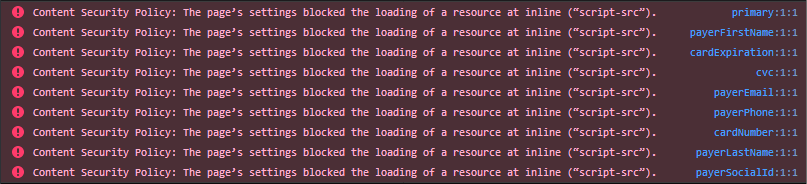
PayMe's fields have a strict Content Security Policy, which can put error messages in the browser console. They don't cause a malfunction or a security risk, and you can safely ignore them. Browser extensions that inject scripts cause most of them: to check, turn the extensions off or use a private window.
## Related
- [3DS with Hosted Fields](https://docs.payme.io/accepting-payments/3d-secure/3ds-with-hosted-fields)
- [generate-sale with a token](https://docs.payme.io/payments/hosted-fields-jsapi/post-generate-sale-hosted-fields-jsapi)
- [Test Cards and Payment Methods](https://docs.payme.io/payments/getting-started/test-cards-and-payment-methods)
- [Checkout steps for AI agents](https://docs.payme.io/agents/steps/checkout)
- [Template sales (one link, many payments)](https://docs.payme.io/accepting-payments/checkout-and-in-person/multi-payment-page): A template sale is one payment link that many buyers can pay; each payment creates its own sale. Create it with generate-sale and sale_type template; close it with cancel-template or sale_expiry_seconds.
# Template sales (one link, many payments)
A template sale is one payment link that many buyers can pay, for example a link you share on a social network. Create it with [`generate-sale`](https://docs.payme.io/payments/hosted-payment-page/post-generate-sale) and `sale_type: template`. The `sale_url` you get back has the form `…/sale/template/`.
| Field | Value |
|---|---|
| `sale_type` | `template` |
How it works:
- Each payment creates a new sale (`sale_type` `4`, `SaleFromTemplate`) with its own `payme_sale_id` and its own callbacks. The template sale itself stays `initial`.
- The link stays open until you cancel it with [`cancel-template`](https://docs.payme.io/payments/post-sale-actions/post-cancel-template) (send the template's ID as `sale_payme_id`), or until `sale_expiry_seconds` passes, if you sent it. Cancelling works only while the template is `initial` and sets it to `canceled`; payments on it then fail with error `305`.
Limits:
- You can't send `buyer_key` with a template (error `606`).
- `echeck` isn't supported on templates (error `4`).
Every other `generate-sale` field is on [Create a sale](https://docs.payme.io/payments/hosted-payment-page/post-generate-sale). A template is not the multi-method checkout (`sale_payment_method: multi`), which lets one buyer choose how to pay: see [Create a multi-method checkout sale](https://docs.payme.io/payments/hosted-payment-page/post-generate-sale-2).
- [Take in-person payments with a POS device](https://docs.payme.io/accepting-payments/checkout-and-in-person/point-of-sale): For partners. Order POS devices with vas-enable (extend_items in vas_data adds devices). PayMe pairs new devices; to pair yourself call pos/pair (payme_client_key, seller_payme_id, pos_id, terminal_id, optional name), then pos/authenticate with the 6-digit verification_code. Callbacks: point-of-sale-action-pair-update, -authenticate-update. Pay: POST /sales with payment.method pos, pos_id, currency; a decline is HTTP 200 status_code 1; 26020 means still verifying, wait for the callback. Refund: PUT /sales/{id} with payment.action refund. pos/transmit returns acknowledge_number and report.
## Prerequisites
- Partner credentials (payme_client_key) from PayMe Partners, for ordering and pairing devices
- The seller's seller_payme_id (MPL)
- The POS service active on the seller's account
- A callback URL on your partner account, for the pairing callbacks
## Related
- [Point of Sale (POS)](https://docs.payme.io/payments/point-of-sale-pos)
- [Order POS devices](https://docs.payme.io/payments/point-of-sale-pos/post-vas-enable)
- [Create a POS payment](https://docs.payme.io/payments/point-of-sale-pos/post-payment)
- [Refund a POS sale](https://docs.payme.io/payments/point-of-sale-pos/put-sales)
- [Callback types reference](https://docs.payme.io/payments/getting-started/callback-types)
- [Enable payment methods and services for your sellers](https://docs.payme.io/marketplaces-and-platforms/seller-onboarding/enable-services)
- [Understand the sale lifecycle](https://docs.payme.io/payments/codes-statuses/sale-lifecycle)
- [Errors](https://docs.payme.io/payments/getting-started/errors)
- [List sales](https://docs.payme.io/payments/query-apis/post-get-sales)
# Take in-person payments with a POS device
A PayMe POS device takes card-present payments for a seller. Your system sends each payment to the device through the Payments API, the buyer pays on the device, and the result comes back in the same response. This guide covers the whole flow: ordering devices, pairing them, taking and refunding payments, and transmitting the day's transactions.
Endpoint details are in the [POS module overview](https://docs.payme.io/payments/point-of-sale-pos) and its endpoint pages.
## How it works
1. **Order the devices.** A partner orders devices for its seller with `vas-enable`. PayMe prepares the devices, pairs them and ships them.
2. **Pair and authenticate.** A device takes payments only after it is paired and then authenticated. PayMe does both for new devices. You can also do it yourself with `pos/pair` and `pos/authenticate`. Each step sends you a callback.
3. **Take a payment.** Call `POST /sales` with `payment.method: pos` and the device's `pos_id`. PayMe pushes the payment to the device and waits for the buyer.
4. **Refund on the device.** Call `PUT /sales/{payme_sale_id}` with `payment.action: refund`.
5. **Transmit.** `pos/transmit` sends the device's transactions for deposit and returns the transmission report.
## Before you start
| You need | For |
|---|---|
| Your partner key (`payme_client_key`) | Ordering devices, and the `pos/pair`, `pos/authenticate` and `pos/transmit` calls. These calls are for partners only. |
| The seller's `seller_payme_id` (MPL) | Every call. On its own, it authenticates payments and refunds. |
| The POS service active on the seller's account | Without it, POS calls return error `720`. |
| A callback URL on your partner account | The `point-of-sale-action-*` callbacks. If your partner account has none, they aren't sent. |
Base URLs: `https://sandbox.payme.io/api` (sandbox) and `https://live.payme.io/api` (production). Send JSON with `Content-Type: application/json`. On the `pos/*` calls, every field goes in the JSON body, including `payme_client_key`.
## Step 1: Order the devices
Order devices for the seller with [Order POS devices](https://docs.payme.io/payments/point-of-sale-pos/post-vas-enable): one `vas-enable` call turns on the POS payment method, and a second one sends the device list in `vas_data`. The general `vas-enable` flow, including how to check the result, is in [Enable payment methods and services for your sellers](https://docs.payme.io/marketplaces-and-platforms/seller-onboarding/enable-services).
- **Adding devices later.** Send only the new devices, with `vas_data.extend_items: true`. Without it, the list you send replaces the devices already ordered.
- **It takes time.** The order is handled by hand: PayMe requests a new terminal, which can take up to 5 business days, then prepares, pairs and ships the devices.
- **Keep each `pos_id`.** It names the device in every later call. Send it exactly as it appears in the order and in the pair callback.
## Step 2: Pair and authenticate a device
A device can take payments only after two steps: `pos/pair` registers the device for the seller, and `pos/authenticate` completes the pairing with a 6-digit verification code. PayMe runs both steps for new devices before they ship, and you receive the two callbacks. To pair a device from your own system, use the calls below.
### Pair
```bash
curl -X POST https://sandbox.payme.io/api/pos/pair \
-H 'Content-Type: application/json' \
-d '{
"payme_client_key": "payme_partner_key",
"seller_payme_id": "MPLDEMO-MPLDEMO-MPLDEMO-1234567",
"pos_id": "001",
"terminal_id": "YOUR_TERMINAL_ID",
"name": "Front counter"
}'
```
| Field | Required | Description |
|---|---|---|
| `payme_client_key` | Yes | Your partner key. |
| `seller_payme_id` | Yes | The seller's MPL. |
| `pos_id` | Yes | The device's ID from the seller's device order. A device that isn't in the order returns `26014`. |
| `terminal_id` | Yes | The device's payment terminal ID. |
| `name` | No | A name for the device. Default: the seller's business name. The callbacks return it as `pos_name`. |
On success, the response is `status_code` `0`, PayMe records the device as paired but not yet active, and it sends `point-of-sale-action-pair-update`.
```json
{
"status_code": 0,
"session": "FhT3aXe7"
}
```
Pairing a device again starts over: the device stops taking payments until you authenticate it again.
### Authenticate
```bash
curl -X POST https://sandbox.payme.io/api/pos/authenticate \
-H 'Content-Type: application/json' \
-d '{
"payme_client_key": "payme_partner_key",
"seller_payme_id": "MPLDEMO-MPLDEMO-MPLDEMO-1234567",
"pos_id": "001",
"terminal_id": "YOUR_TERMINAL_ID",
"verification_code": "482913"
}'
```
`verification_code` is the 6-digit verification code for this pairing. Send it as a string, so that a leading zero is kept. A code that isn't a number returns error `10`, and one that isn't exactly 6 digits returns `999`. Authenticating a device that was never paired returns `26017`.
On success, the response is `status_code` `0`, the device becomes active, and PayMe sends `point-of-sale-action-authenticate-update`. The device can now take payments.
If you don't have a device's terminal ID or its verification code, ask PayMe Partners ().
### The pairing callbacks
PayMe sends both callbacks to your partner callback URL. They carry the seller fields of the seller callbacks, plus:
| `notify_type` | When | Device fields |
|---|---|---|
| `point-of-sale-action-pair-update` | `pos/pair` succeeded | `pos_id`, `pos_name` |
| `point-of-sale-action-authenticate-update` | `pos/authenticate` succeeded, and the device is active | `pos_id`, `pos_name` |
They aren't signed. The seller fields and the delivery rules are on [Callback types](https://docs.payme.io/payments/getting-started/callback-types#sellers).
### When the device service refuses
`pos/pair`, `pos/authenticate` and `pos/transmit` pass your request to the service that runs the devices. If that service refuses the request or can't be reached, the call returns **HTTP 200** with `status_code` `1`, `status_error_code` `20002`, and the service's message in `status_error_details`:
```json
{
"status_code": 1,
"session": "FhT3aXe7",
"status_error_code": 20002,
"status_error_details": "Message from the device service"
}
```
Always check `status_code`, not the HTTP status. A refused call changes nothing for the device and sends no callback.
## Step 3: Take a payment
Send the payment to the device with [Create a POS payment](https://docs.payme.io/payments/point-of-sale-pos/post-payment):
```bash
curl -X POST https://sandbox.payme.io/api/sales \
-H 'Content-Type: application/json' \
-d '{
"seller_payme_id": "MPLDEMO-MPLDEMO-MPLDEMO-1234567",
"sale_price": 10000,
"currency": "ILS",
"product_name": "Coffee beans 1kg",
"transaction_id": "order-1001",
"sale_callback_url": "https://your-server.example.com/payme/callback",
"payment": {
"method": "pos",
"pos_id": "001"
},
"language": "en"
}'
```
`currency` is required, and `sale_price` is in minor units (`10000` = 100.00). PayMe pushes the payment to the device and waits while the buyer pays, so the call stays open until the device answers. Give your HTTP client a long timeout.
A paid sale returns, shortened:
```json
{
"status_code": 0,
"payme_status": "success",
"status_error_code": 0,
"payme_sale_id": "SALE1700-000000AA-EXAMPLE1-SALE0001",
"payme_sale_code": 12346578,
"payme_sale_status": "completed",
"sale_status": "completed",
"currency": "ILS",
"transaction_id": "order-1001",
"price": 10000,
"payme_transaction_id": "TRAN1688-034834SZ-OYNALKNE-DWOXFEUZ",
"payme_transaction_auth_number": "12345678",
"installments": 1
}
```
Keep `payme_sale_id`: you need it to refund.
| Outcome | Response | What to do |
|---|---|---|
| Paid | HTTP 200, `status_code` `0`, `payme_sale_status` `completed` | Done. |
| Declined or canceled on the device | HTTP 200, `status_code` `1`, with `status_error_code` and `status_error_details` | Show the reason. To try again, send a new payment. |
| The device didn't answer in time | HTTP 400, `status_error_code` `26020` ("The payment is being verified") | Don't send the payment again. PayMe keeps checking it for up to 5 minutes, then completes or fails the sale. Wait for the sale callback, or read the sale with [`get-sales`](https://docs.payme.io/payments/query-apis/post-get-sales). |
| The device can't take payments | HTTP 400 with `720`, `26014`, `26017` or `26018` | See [Errors](#errors). |
A paid sale sends `sale-complete` and a failed one sends `sale-failure`, to `sale_callback_url`. See [Callback types](https://docs.payme.io/payments/getting-started/callback-types#sales).
More options:
- `sale_type: authorize` only authorizes the card. `installments` and the other [`generate-sale`](https://docs.payme.io/payments/hosted-payment-page/post-generate-sale) sale fields work here too.
- You can also create the sale first with `generate-sale` and `sale_payment_method: pos`, then push it to the device with `PUT /sales/{payme_sale_id}`. The [POS module overview](https://docs.payme.io/payments/point-of-sale-pos) shows this two-step flow.
- Which payment methods a device accepts depends on the device. Ask PayMe Partners () for the current list.
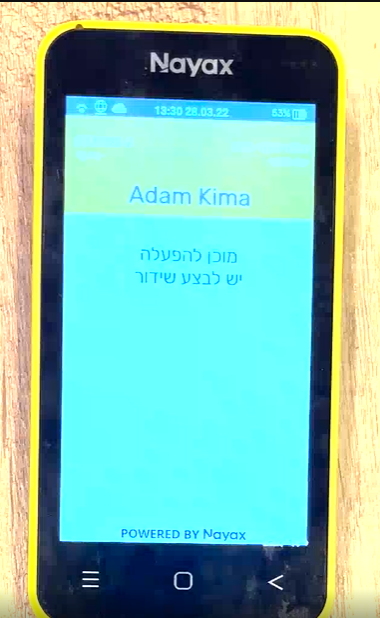
### What the buyer sees on the device
1. The payment is sent to the device.
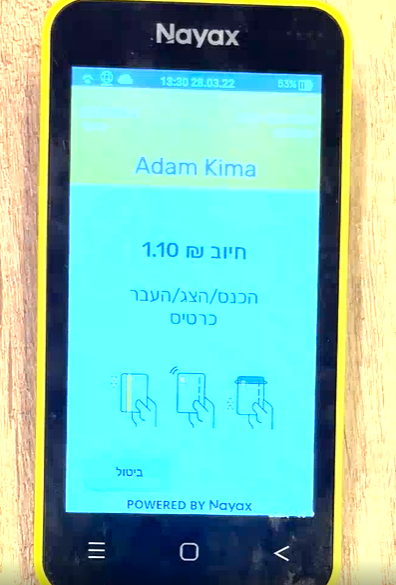
2. The buyer pays.
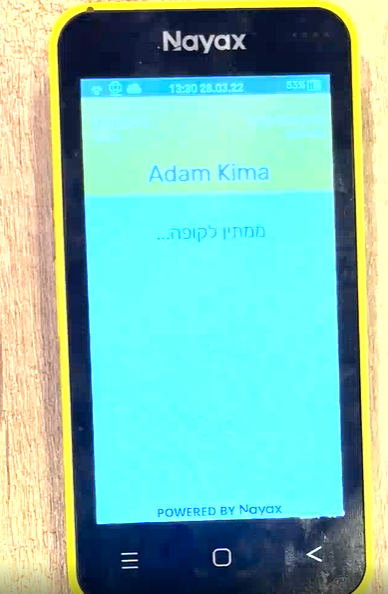
3. Pending approval from the card company.
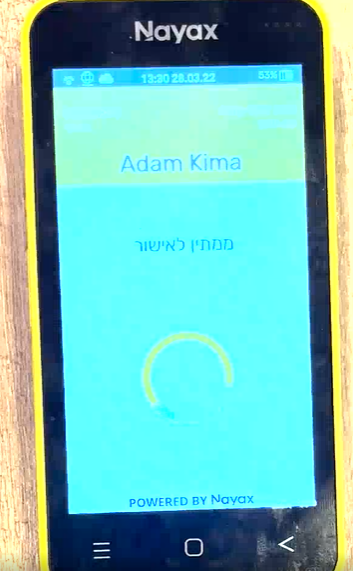
4. Payment confirmed.
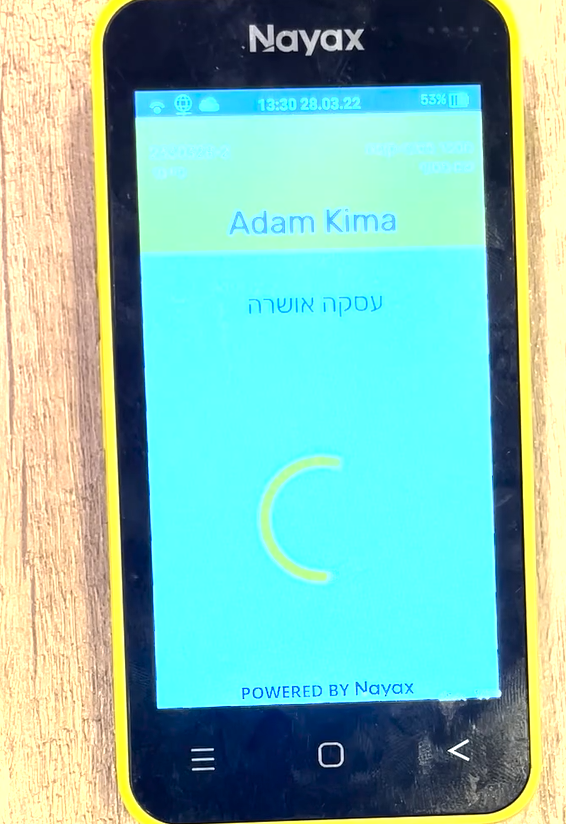
5. Payment deposited.
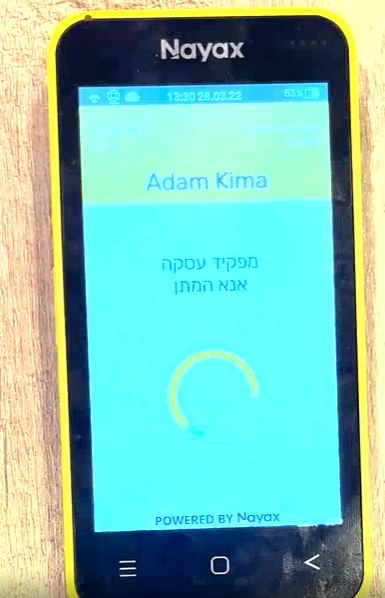
6. Final confirmation.
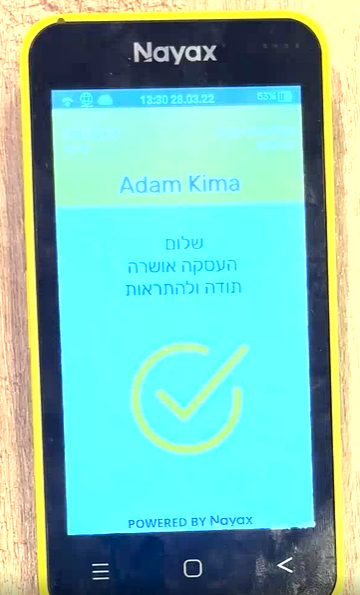
## Step 4: Refund on the device
Refund with [Refund a POS sale](https://docs.payme.io/payments/point-of-sale-pos/put-sales). The refund runs on the device in `payment.pos_id`:
```bash
curl -X PUT https://sandbox.payme.io/api/sales/SALE1700-000000AA-EXAMPLE1-SALE0001 \
-H 'Content-Type: application/json' \
-d '{
"seller_payme_id": "MPLDEMO-MPLDEMO-MPLDEMO-1234567",
"payment": {
"method": "pos",
"action": "refund",
"pos_id": "001"
},
"language": "en"
}'
```
- **Always send `payment.action: refund`.** Without it, this call pays the sale instead of refunding it.
- Leave out `payment.amount` to refund everything that can still be refunded, or send a smaller amount, in minor units, for a partial refund.
- The result comes back in the same response: `payme_sale_status` is `refunded`, or `partial-refund`. PayMe also sends a `refund` callback.
## Step 5: Transmit the day's transactions
The device's transactions are deposited when they are transmitted. `pos/transmit` runs this transmission now, for example at the end of the business day, and returns its report. Ask PayMe Partners whether the seller's devices also transmit on their own.
```bash
curl -X POST https://sandbox.payme.io/api/pos/transmit \
-H 'Content-Type: application/json' \
-d '{
"payme_client_key": "payme_partner_key",
"seller_payme_id": "MPLDEMO-MPLDEMO-MPLDEMO-1234567",
"pos_id": "001",
"terminal_id": "YOUR_TERMINAL_ID"
}'
```
```json
{
"status_code": 0,
"session": "FhT3aXe7",
"acknowledge_number": "000123",
"report": "Transmission report text"
}
```
| Field | Type | Description |
|---|---|---|
| `acknowledge_number` | string | The acknowledgment number of the transmission. Empty if the device service returned none. |
| `report` | string | The transmission report (Z report), as text from the device service. Empty if it returned none. |
Call it only for a paired device. A refused transmission returns `status_code` `1` with `20002`, as in [Step 2](#when-the-device-service-refuses).
## Errors
| Code | HTTP | Calls | Meaning | What to do |
|---|---|---|---|---|
| `1` | 500 | All | A required field is missing. `status_additional_info` names it. | Add the field. |
| `720` | 400 | All | The POS service isn't active for the seller. | Order the devices ([Step 1](#step-1-order-the-devices)). |
| `26014` | 400 | All | `pos_id` is missing, or no device in the seller's order has it. | Send the `pos_id` from the order. |
| `26017` | 400 | Authenticate, payment, refund | The device hasn't been paired. | Pair it. |
| `26018` | 400 | Payment, refund | The device is paired but not authenticated, for example after it was paired again. | Authenticate it. |
| `26020` | 400 | Payment | The device didn't answer in time. PayMe is still checking the payment. | Wait for the sale callback. Don't send the payment again. |
| `20002` | 200, `status_code` `1` | Pair, authenticate, transmit | The device service refused the request or couldn't be reached. | Check the IDs and the code, then try again. |
| `10` | 500 | Authenticate | `verification_code` isn't a number. | Send 6 digits. |
| `999` | 500 | Authenticate | `verification_code` isn't exactly 6 digits. | Send 6 digits, as a string. |
| A decline code | 200, `status_code` `1` | Payment | The payment was declined or canceled on the device. | Show the reason; send a new payment to try again. |
Credential errors, such as `200` (unknown partner key) and `251` (unknown seller key), are on [Errors](https://docs.payme.io/payments/getting-started/errors).
## Related
- [POS module overview](https://docs.payme.io/payments/point-of-sale-pos)
- [Order POS devices](https://docs.payme.io/payments/point-of-sale-pos/post-vas-enable), [Create a POS payment](https://docs.payme.io/payments/point-of-sale-pos/post-payment), [Refund a POS sale](https://docs.payme.io/payments/point-of-sale-pos/put-sales)
- [Callback types](https://docs.payme.io/payments/getting-started/callback-types)
- [Understand the sale lifecycle](https://docs.payme.io/payments/codes-statuses/sale-lifecycle)
- [Let the buyer choose how to pay](https://docs.payme.io/accepting-payments/checkout-and-in-person/let-the-buyer-choose): Send sale_payment_method: multi to generate-sale (default is credit-card). The card form is always shown. Apple Pay, Google Pay and Bit appear only if the seller's service is active and installments is 1, 0 or 102-112; fixed 2-12 leaves card only. Wallet buttons need a browser that supports them; Bit is ILS only; capture_buyer keeps card and Apple Pay (if set up). Wallets and Bit pay in one payment. Callbacks carry the method used in sale_payment_method; get-sales keeps multi, get-transactions has transaction_payment_method. Not a template sale.
## Prerequisites
- The seller's seller_payme_id (MPL)
- Apple Pay, Google Pay or Bit turned on for the seller, to offer more than cards
- A public HTTPS URL for sale_callback_url
## Related
- [Create a multi-method checkout sale](https://docs.payme.io/payments/hosted-payment-page/post-generate-sale-2)
- [Template sales (one link, many payments)](https://docs.payme.io/accepting-payments/checkout-and-in-person/multi-payment-page)
- [Accept Apple Pay](https://docs.payme.io/accepting-payments/payment-methods/apple-pay)
- [Accept Google Pay](https://docs.payme.io/accepting-payments/payment-methods/google-pay)
- [Accept Bit payments](https://docs.payme.io/accepting-payments/payment-methods/bit)
- [Enable payment methods and services for your sellers](https://docs.payme.io/marketplaces-and-platforms/seller-onboarding/enable-services)
- [Callbacks](https://docs.payme.io/payments/getting-started/callbacks)
- [List transactions](https://docs.payme.io/payments/query-apis/post-get-transactions)
- [Refund a sale](https://docs.payme.io/payments/post-sale-actions/post-refund-sale)
# Let the buyer choose how to pay
With `sale_payment_method: multi`, PayMe's payment page offers every payment method that is turned on for the seller, and the buyer picks one: a card, Apple Pay, Google Pay or Bit. You create one sale and get one result, whichever method the buyer used.
Use `multi` when you don't want to choose the method for the buyer. To offer a single method, send that method instead, for example `apple-pay` or `bit`.
## Create the sale
Call [`generate-sale`](https://docs.payme.io/payments/hosted-payment-page/post-generate-sale-2) from your server with `sale_payment_method: multi`. The field defaults to `credit-card`, so a request without it gets a card-only page.
`POST https://sandbox.payme.io/api/generate-sale` (production: `https://live.payme.io/api/generate-sale`)
```json
{
"seller_payme_id": "MPLDEMO-MPLDEMO-MPLDEMO-1234567",
"sale_payment_method": "multi",
"sale_price": 1000,
"currency": "ILS",
"product_name": "Smartphone",
"transaction_id": "order-1001",
"installments": "1",
"sale_callback_url": "https://your-server.example.com/payme/callback",
"sale_return_url": "https://your-site.example.com/payment/success",
"sale_name": "First Last",
"sale_email": "buyer@example.com",
"sale_mobile": "+972500000040",
"language": "en"
}
```
```json
{
"status_code": 0,
"session": "AtsJ0as5",
"sale_url": "https://sandbox.payme.io/sale/generate/SALE1700-000000AA-EXAMPLE1-SALE0001",
"payme_sale_id": "SALE1700-000000AA-EXAMPLE1-SALE0001",
"payme_sale_code": 12345678,
"price": 1000,
"transaction_id": "order-1001",
"currency": "ILS",
"sale_payment_method": "multi"
}
```
Show `sale_url` to the buyer in an iframe or a redirect. Store `payme_sale_id`: refunds and queries use it.
- Partners also send `payme_client_key`. See [Authentication](https://docs.payme.io/payments/getting-started/authentication).
- `sale_name`, `sale_email` and `sale_mobile` pre-fill the buyer's details on the page, for the card form and for Bit.
- Creating a `multi` sale doesn't check which methods the seller has. A seller with no other method turned on gets a page with the card form only.
- Every other field, and the `sale_url` validity rules, are on [Create a multi-method checkout sale](https://docs.payme.io/payments/hosted-payment-page/post-generate-sale-2).
## Which methods the buyer sees
The card form is always on the page. Apple Pay, Google Pay and Bit appear only when every rule below allows them. PayMe applies the rules each time the page opens.
### 1. The seller has the method turned on
A method appears only when the seller's service for it is active. A seller installs Apple Pay, Google Pay or Bit from the dashboard app store (חנות אפליקציות); a partner turns them on with `vas-enable`. See [Enable payment methods and services for your sellers](https://docs.payme.io/marketplaces-and-platforms/seller-onboarding/enable-services). When a service is turned off, its button no longer appears.
### 2. The installments allow a single payment
Apple Pay, Google Pay and Bit pay in one payment, so a fixed number of installments hides them:
| `installments` you send | Methods on the page |
|---|---|
| `1` (default) or `0` | Card, and every active wallet and Bit. One payment. |
| `2`–`12` (a fixed number) | Card only |
| `102`–`112` (the buyer chooses up to the last two digits) | Card, and every active wallet and Bit. A card buyer chooses the number of payments; a buyer who pays with Apple Pay, Google Pay or Bit pays in one payment, and the Bit option says so. |
More than one installment is ILS only (error `312`).
### 3. The buyer's device can pay with the wallet
PayMe shows a wallet button only when the buyer's browser can use it:
- **Apple Pay** appears when the browser supports Apple Pay and it is set up on the device, for example Safari on an iPhone with Apple Pay set up. See [Accept Apple Pay](https://docs.payme.io/accepting-payments/payment-methods/apple-pay) for the supported devices.
- **Google Pay** appears when Google Pay reports that the buyer can pay in this browser. See [Accept Google Pay](https://docs.payme.io/accepting-payments/payment-methods/google-pay).
When the check fails, the button is left out and the buyer still sees the other methods. A test from Chrome on Windows, for example, shows no Apple Pay.
### 4. Saving the card (`capture_buyer`) limits the methods
With `capture_buyer`, only methods that can save a token for later charges are offered: the card, and Apple Pay when PayMe has set up the seller's Apple Pay service for saved tokens. Google Pay and Bit are left out.
### 5. Bit pays in ILS only
Bit charges in ILS only, so a buyer can complete a Bit payment only on an ILS sale. See [Accept Bit payments](https://docs.payme.io/accepting-payments/payment-methods/bit).
### Not on this page
PayPal, bank transfers, Israeli direct debit and the other methods on [Available Payment Methods](https://docs.payme.io/payments/wallets-apms) aren't offered on a `multi` page. Create the sale with that method's `sale_payment_method` instead.
## What the buyer does
The Apple Pay and Google Pay buttons come first, then the card form and Bit. When both the card and Bit are offered, each is a section the buyer opens. When the card is the only method, the page opens straight on the card form.
- **Card:** the buyer fills in the card form. 3D Secure runs as on any card sale.
- **Apple Pay or Google Pay:** the buyer taps the button and approves the payment in the wallet.
- **Bit:** the buyer confirms their details, then scans the QR code (on a computer) or opens the Bit app (on a phone), and approves the payment in Bit.
If the buyer opens a Bit request and then pays another way, PayMe cancels the open Bit request, so the sale can't be paid twice. A failed attempt doesn't close the page: the buyer can try again, with the same method or another one. After a successful payment, PayMe redirects the buyer to `sale_return_url`, if you sent it.
## Callbacks
A `multi` sale sends the same callbacks as any sale, to `sale_callback_url`:
| `notify_type` | When |
|---|---|
| `sale-complete` | The buyer paid, with any method |
| `sale-authorized` | With `sale_type: authorize`: the payment was authorized and waits for [capture](https://docs.payme.io/accepting-payments/capture-and-saved-cards/capture-sale) |
| `sale-failure` | An attempt failed. Sent once per failed attempt; the sale can still complete afterwards |
| `refund` | The sale was refunded |
| `sale-create` | The sale was created. Only when you send `sale_send_creation_callback: true` |
In `sale-complete`, `sale-authorized` and `sale-failure`, `sale_payment_method` is the method of that attempt: `credit-card`, `apple-pay`, `google-pay` or `bit`, never `multi`. After an Apple Pay, Google Pay or Bit payment, `installments` is `1`.
The fields, the signature and the delivery rules are on [Callbacks](https://docs.payme.io/payments/getting-started/callbacks). Before you fulfil the order, confirm the sale's status and amount with [`get-sales`](https://docs.payme.io/payments/query-apis/post-get-sales).
## Find out how the buyer paid
| Where | What you see |
|---|---|
| Callbacks about a payment attempt | `sale_payment_method`: the method of that attempt |
| [`get-sales`](https://docs.payme.io/payments/query-apis/post-get-sales) | `sale_payment_method` stays `multi` |
| [`get-transactions`](https://docs.payme.io/payments/query-apis/post-get-transactions) | `transaction_payment_method`: the method used on each transaction. You can also filter on it. |
## Refunds
Refund a `multi` sale with [`refund-sale`](https://docs.payme.io/payments/post-sale-actions/post-refund-sale), as any other sale. The money goes back to the method the buyer paid with.
## `multi` and template sales
The two are easy to confuse. The guide [Template sales](https://docs.payme.io/accepting-payments/checkout-and-in-person/multi-payment-page) was formerly titled "Multi Payment Page"; it is about one link that many buyers pay, not about choosing a payment method.
| | `multi` | Template sale |
|---|---|---|
| You send | `sale_payment_method: multi` | `sale_type: template` |
| It solves | One buyer chooses how to pay | Many buyers pay the same link |
| Sales | One sale | A new sale for each payment |
You can combine them: a template sale with `sale_payment_method: multi` lets each buyer of the shared link choose how to pay.
## Test in the sandbox
- Pay with the cards on [Test Cards and Payment Methods](https://docs.payme.io/payments/getting-started/test-cards-and-payment-methods).
- The Apple Pay and Google Pay buttons appear only on a device and browser that support them (rule 3).
- To test Bit, see [Accept Bit payments](https://docs.payme.io/accepting-payments/payment-methods/bit).
- [Accept payments in a mobile app](https://docs.payme.io/accepting-payments/checkout-and-in-person/mobile-apps): Mobile app checkout: the app calls your server; your server calls generate-sale with the MPL and returns sale_url; the app opens it in SFSafariViewController (iOS) or Chrome Custom Tabs (Android), not a WebView. sale_return_url must be a public http(s) URL (myapp:// fails with error 21): use an HTTPS page that hands back with Universal Links/App Links or a button. Handle a closed browser. Confirm with the sale-complete callback and get-sales (sale_status completed, sale_price). Test wallets in the in-app browser on real devices. The iOS and Android SDKs are legacy.
## Prerequisites
- A server that holds your seller_payme_id (MPL) and receives callbacks
- Sandbox credentials (see Authentication)
## Related
- [Create a sale (hosted payment page)](https://docs.payme.io/payments/hosted-payment-page/post-generate-sale)
- [Hosted Payment Page options](https://docs.payme.io/accepting-payments/checkout-and-in-person/hosted-payment-page-options)
- [Callbacks](https://docs.payme.io/payments/getting-started/callbacks)
- [List sales](https://docs.payme.io/payments/query-apis/post-get-sales)
- [Understand the sale lifecycle](https://docs.payme.io/payments/codes-statuses/sale-lifecycle)
- [Let the buyer choose how to pay](https://docs.payme.io/accepting-payments/checkout-and-in-person/let-the-buyer-choose)
- [Save a card and charge it later](https://docs.payme.io/accepting-payments/capture-and-saved-cards/save-a-card-and-charge-it-later)
- [Hosted Fields JSAPI guide](https://docs.payme.io/accepting-payments/checkout-and-in-person/hosted-fields-jsapi-guide)
- [Authentication](https://docs.payme.io/payments/getting-started/authentication)
- [Get API access and go live: from sandbox to production](https://docs.payme.io/payments/getting-started/go-live)
- [iOS SDK](https://docs.payme.io/payments/ios-sdk)
- [Android SDK](https://docs.payme.io/payments/android-sdk)
# Accept payments in a mobile app
To take payments in an iOS or Android app, create the sale on your server and open PayMe's payment page in a secure in-app browser. The buyer types the card details into PayMe's page, your app holds no PayMe credentials, and your server confirms the result before you deliver the order. This guide shows the flow, the parts that are specific to apps, and what to test.
## How it works
1. The buyer taps **Pay** in your app. Your app asks your own server to start a checkout for the order.
2. Your server calls [`generate-sale`](https://docs.payme.io/payments/hosted-payment-page/post-generate-sale) with your MPL and sends the `sale_url` back to the app.
3. The app opens `sale_url` in a secure in-app browser: `SFSafariViewController` on iOS, Chrome Custom Tabs on Android.
4. The buyer pays. PayMe sends a callback to your server and redirects the in-app browser to your `sale_return_url`.
5. Your return page hands the buyer back to the app, and the app asks your server for the order's status.
6. Your server confirms the sale with [`get-sales`](https://docs.payme.io/payments/query-apis/post-get-sales) before it marks the order paid.
The app talks only to your server. Your server is the only part that talks to PayMe.
## Step 1: Create the sale on your server
When the app asks for a checkout, your server creates the sale:
```bash
curl -X POST https://sandbox.payme.io/api/generate-sale \
-H 'Content-Type: application/json' \
-d '{
"seller_payme_id": "MPLDEMO-MPLDEMO-MPLDEMO-1234567",
"sale_price": 1000,
"currency": "ILS",
"product_name": "Order 1001",
"transaction_id": "order-1001",
"sale_callback_url": "https://your-server.example.com/payme/callback",
"sale_return_url": "https://your-site.example.com/app/payment-done",
"language": "en"
}'
```
The response holds `sale_url` and `payme_sale_id`. Store `payme_sale_id` with the order on your server, and send only `sale_url` to the app.
- **Protect your own endpoint.** The app calls your server's checkout endpoint with your app's own user authentication. Your server decides the price, never the app.
- **One sale per order.** If the buyer leaves and comes back to the same unpaid order, reopen the same `sale_url` instead of creating a new sale. A second sale gives the buyer two payable pages. To close a sale after a set time, send `sale_expiry_seconds`. See [Understand the sale lifecycle](https://docs.payme.io/payments/codes-statuses/sale-lifecycle).
- **Pre-fill the buyer's details** with `sale_name`, `sale_email` and `sale_mobile`, so the buyer types less on a phone. See [Hosted Payment Page options](https://docs.payme.io/accepting-payments/checkout-and-in-person/hosted-payment-page-options).
## Step 2: Open `sale_url` in a secure in-app browser
| Platform | Open `sale_url` in | Not in |
|---|---|---|
| iOS | `SFSafariViewController` | `WKWebView` |
| Android | Chrome Custom Tabs | `WebView` |
A secure in-app browser runs the page in the system browser, apart from your app: your app can't read or change the page, and the buyer can see its address. In a WebView, your app controls the page and could read what the buyer types, so card details would pass through your app.
With a cross-platform framework such as Flutter or React Native, use a plugin that opens these same system browsers, not one that embeds a WebView.
Open `sale_url` exactly as returned. You can add the pre-fill query parameters from [Hosted Payment Page options](https://docs.payme.io/accepting-payments/checkout-and-in-person/hosted-payment-page-options#pre-fill-the-payment-page).
## Step 3: Bring the buyer back to the app
After a successful payment, PayMe redirects the in-app browser to your `sale_return_url`, with the sale details as query parameters. See [Success redirect](https://docs.payme.io/accepting-payments/checkout-and-in-person/hosted-payment-page-options#success-redirect).
`sale_return_url` must be an `http://` or `https://` address with a public host. A custom app scheme, such as `myapp://payment-done`, fails the whole `generate-sale` call with error `21`. See [Callback URL rules](https://docs.payme.io/payments/getting-started/callbacks#callback-url-rules). So:
1. Point `sale_return_url` at an HTTPS page on your own domain.
2. From that page, hand the buyer back to the app. Register the page's address as a Universal Link (iOS) or an App Link (Android), so the system can open your app for it. Also show a **Return to the app** button on the page that opens your app.
3. Keep the page useful on its own: it shows the result and the button. Whether a redirect opens your app directly depends on the operating system, the browser and your app's link setup, so test it on real devices.
The buyer can also close the in-app browser without paying. Then there is no redirect. Handle that case too: on iOS, `SFSafariViewControllerDelegate` calls `safariViewControllerDidFinish(_:)`; on Android, your activity resumes. In both cases, ask your server for the order's status.
Use the query parameters only to choose what the app shows next. The order's status comes from your server.
## Step 4: Confirm the payment on your server
PayMe sends a `sale-complete` callback to your `sale_callback_url`: a form-encoded `POST`. Reply `200` within 5 seconds. See [Callbacks](https://docs.payme.io/payments/getting-started/callbacks).
Before you deliver, confirm the sale. Call `get-sales` with the `payme_sale_id` you stored:
```bash
curl -X POST https://sandbox.payme.io/api/get-sales \
-H 'Content-Type: application/json' \
-d '{
"seller_payme_id": "MPLDEMO-MPLDEMO-MPLDEMO-1234567",
"sale_payme_id": "SALE1767-704312AB-CD3FGH12-JKLM4567"
}'
```
Check that the sale in `items` has `sale_status` `completed` and the `sale_price` of your order. Then mark the order paid. When the app asks for the order's status, answer from your own records.
If the app asks before the callback arrives, your server can call `get-sales` itself. By default `get-sales` leaves out unpaid sales (status `initial`), so include `initial` in `sale_status`, for example `"sale_status": ["initial", "completed", "failed"]`. A `failed` sale isn't final: the buyer can still pay it on the same page. See [Understand the sale lifecycle](https://docs.payme.io/payments/codes-statuses/sale-lifecycle).
Partners also verify `payme_signature` on the callback. A seller without a partner key relies on the `get-sales` check above.
## Payment methods inside an in-app browser
- **Apple Pay and Google Pay** appear on PayMe's page only when the buyer's browser can use them. Inside an in-app browser, that depends on the device, the operating system version and the browser. Test each wallet in your app on real devices before you offer it, and keep the card as the fallback. See [Let the buyer choose how to pay](https://docs.payme.io/accepting-payments/checkout-and-in-person/let-the-buyer-choose).
- **Bit and 3D Secure** can take the buyer to another app or to the bank's page, and back. Test that the buyer returns to the in-app browser and finishes the payment.
## Save a card for faster checkouts
The same flow can save the buyer's card: create the sale with `capture_buyer` (charge and save) or `sale_type` `token` (save only). Later charges run from your server with the `buyer_key`, with no payment page and nothing to open in the app. See [Save a card and charge it later](https://docs.payme.io/accepting-payments/capture-and-saved-cards/save-a-card-and-charge-it-later).
## Your own checkout design
If you need your own checkout design, build it as a web page on your domain with [Hosted Fields](https://docs.payme.io/accepting-payments/checkout-and-in-person/hosted-fields-jsapi-guide), and open that page in the in-app browser in the same way. The page uses the public key only, and your server charges the token and confirms the result. Wallets on your own page need their own setup: see [Accept Apple Pay](https://docs.payme.io/accepting-payments/payment-methods/apple-pay) and [Accept Google Pay](https://docs.payme.io/accepting-payments/payment-methods/google-pay).
## Keep credentials out of the app
- Never put `seller_payme_id` (the MPL), `payme_client_key` or the client password in your app, its configuration or its network calls. Anyone can unpack an app, and the MPL alone authenticates calls such as refunds. See [Authentication](https://docs.payme.io/payments/getting-started/authentication).
- The flow on this page needs no PayMe key in the app at all.
- The callback goes to your server, never to the app.
## The legacy iOS and Android SDKs
PayMe's [iOS SDK](https://docs.payme.io/payments/ios-sdk/ios-sdk) and [Android SDK](https://docs.payme.io/payments/android-sdk/android-sdk) are legacy. They collect card details inside your app and put your MPL in it, so they aren't recommended for new apps. Their pages stay available for existing integrations. Build new apps with the flow on this page.
## Before you release
- [ ] The app calls only your server. No PayMe credential is in the app.
- [ ] `sale_url` opens in `SFSafariViewController` or Chrome Custom Tabs, not in a WebView.
- [ ] `sale_return_url` is an HTTPS page on your domain that leads back to the app, tested on iOS and Android devices.
- [ ] The app handles a buyer who closes the browser without paying.
- [ ] Your server marks an order paid only after the callback and a `get-sales` check.
- [ ] Each payment method you offer works in the in-app browser on real devices.
- [ ] Production calls use `https://live.payme.io/api` and your production MPL. See [Get API access and go live](https://docs.payme.io/payments/getting-started/go-live).
- [Accept Apple Pay](https://docs.payme.io/accepting-payments/payment-methods/apple-pay): Accept Apple Pay on PayMe's Hosted Payment Page, or show the Apple Pay button on your own page: host PayMe's domain file, register the domains with vas-enable, create the sale and call appleSale().
# Accept Apple Pay
Apple Pay works on Apple devices only:
| iOS devices | macOS devices |
|---|---|
| Safari on an iPhone or iPad with Apple Pay set up | Safari on a Mac with Touch ID, or on a Mac from 2012 or later paired with an iPhone or Apple Watch that has Apple Pay set up and Handoff turned on |
You can offer it in two ways:
- **On PayMe's Hosted Payment Page.** Nothing to build: enable the service, then create a sale with `sale_payment_method: "apple-pay"` or `multi`.
- **On your own page**, with the browser SDK's `appleSale()`. You host PayMe's domain file, register your domains, and show the Apple Pay button yourself. The steps are below.
Installments aren't available with Apple Pay: a sale with `sale_payment_method: "apple-pay"` and more than one installment fails with error `351`. On a `multi` page that lets the buyer choose the number of installments, a buyer who pays with Apple Pay pays in a single payment.
## Enable Apple Pay
A seller installs Apple Pay from the dashboard app store (חנות אפליקציות), and it is active as soon as it is installed. A partner enables it for its seller with [vas-enable](https://docs.payme.io/payments/apple-pay/post-vas-enable-apple-pay). Without the service, `generate-sale` with `apple-pay` fails with error `720`.
## On PayMe's Hosted Payment Page
You don't need an Apple developer account or a domain file: PayMe's Apple merchant ID is used. The button appears only in Safari on an Apple device with a card in Wallet, so a test from Chrome or Windows shows no Apple Pay.
Recurring payments with Apple Pay need a merchant token, which only the Hosted Payment Page requests, and PayMe-side configuration of the account. See [Recurring Payments](https://docs.payme.io/payments/saved-cards-recurring).
## On your own page
1. [Host PayMe's domain file](#step-1-host-paymes-domain-file) on every domain that shows the button.
2. [Register the domains](#step-2-register-your-domains) with `vas-enable`.
3. [Get the testing account](#step-3-get-the-testing-account).
4. [Create the sale](#step-4-create-the-sale) on your server.
5. [Show the Apple Pay button](#step-5-show-the-apple-pay-button) with the browser SDK.
6. [Test your integration](#step-6-test-your-integration).
`appleSale()` doesn't request merchant tokens, so it pays one-time sales only. For recurring Apple Pay, use the Hosted Payment Page.
Registering domains with `vas-enable` takes a partner key. If you are a seller without a partner, contact PayMe Partners () to register your domains.
### Step 1: Host PayMe's domain file
Download PayMe's file from the environment where you call `vas-enable`:
| Environment | Download from |
|---|---|
| Sandbox | `https://sandbox.payme.io/.well-known/apple-developer-merchantid-domain-association` |
| Production | `https://live.payme.io/.well-known/apple-developer-merchantid-domain-association` |
The two files are different. Serve the sandbox file while you test, and replace it with the production file before you register the domains in production.
Serve the file unchanged at `https:///.well-known/apple-developer-merchantid-domain-association`, with no file extension, on every domain and subdomain that shows the button. Register each of them, for example `example.com` and `shop.example.com`, separately.
PayMe fetches the file from every domain during the `vas-enable` call and compares it byte for byte with its own file for that environment. Check that the file is:
- served over HTTPS with status 200, with no redirect and no error page;
- exactly the file you downloaded from PayMe, never one generated in your own Apple developer account, with nothing added (not even a line break at the end);
- not blocked by a CDN or a firewall.
If any domain fails, the whole call fails with error `703` and a message naming the site: "Certificate does not match, please reconfigure." or "Cannot locate certificate." Fix the file and send the call again: nothing is left pending.
### Step 2: Register your domains
Call [vas-enable](https://docs.payme.io/payments/apple-pay/post-vas-enable-apple-pay) with the domains that show the button in `vas_data.websites`, up to 99 per call. PayMe checks each domain's file and registers the domains with Apple in the same call.
```json
{
"payme_client_key": "payme_partner_key",
"seller_payme_id": "MPLDEMO-MPLDEMO-MPLDEMO-1234567",
"vas_payme_id": "VASLDEMO-VASLDEMO-VASLDEMO-1234567",
"vas_data": {
"websites": ["example.com", "shop.example.com"]
}
}
```
The response's `vas_data.websites` lists the approved domains, PayMe's own host included. To add a domain later, call `vas-enable` again with the new domain: domains already approved stay approved. (Partners can also use `vas-update`; contact PayMe support for its details.) See [vas-enable](https://docs.payme.io/payments/apple-pay/post-vas-enable-apple-pay) for the response and errors.
### Step 3: Get the testing account
PayMe provides a testing iCloud account, and the test cards are in [Apple Pay testing information](https://docs.payme.io/payments/getting-started/test-cards-and-payment-methods#apple-pay-testing-information). Ask PayMe which environment to test Apple Pay in.
Devices you can test on: iPhone 6 or later, iPad mini 3 or later, iPad Air 2, iPad Pro and Apple Watch. You can't test on a Mac.
### Step 4: Create the sale
On your server, create the sale with [generate-sale](https://docs.payme.io/payments/apple-pay/post-generate-sale-apple-pay) and `sale_payment_method: "apple-pay"`. It authenticates with `seller_payme_id`; never send this call from the browser.
`POST https://sandbox.payme.io/api/generate-sale` (production: `https://live.payme.io/api/generate-sale`)
```json
{
"seller_payme_id": "MPLDEMO-MPLDEMO-MPLDEMO-1234567",
"sale_price": 1000,
"currency": "ILS",
"product_name": "Order 1234",
"sale_payment_method": "apple-pay"
}
```
```json
{
"status_code": 0,
"sale_url": "https://sandbox.payme.io/sale/generate/SALE1655-3843870J-NTPYLJNW-SOWRLK9X",
"payme_sale_id": "SALE1655-3843870J-NTPYLJNW-SOWRLK9X",
"payme_sale_code": 1027305,
"price": 1000,
"transaction_id": "",
"currency": "ILS",
"sale_payment_method": "apple-pay"
}
```
Pass `payme_sale_id` to your page: `appleSale()` takes it as `saleGuid`.
### Step 5: Show the Apple Pay button
#### Load the scripts
Load Apple's `apple-pay-sdk.js`, which provides the `` element, and PayMe's SDK, which provides the global `PayMe`:
```html
```
If your site sets a Content Security Policy, allow `script-src https://cdn.payme.io https://applepay.cdn-apple.com`, `frame-src https://hf.payme.io` and `connect-src https://sandbox.payme.io https://live.payme.io`.
#### Add the button
Follow Apple's [buttons and marks guidelines](https://developer.apple.com/design/human-interface-guidelines/apple-pay/overview/buttons-and-marks/). Give the button an `id` or a class: you pass its selector to the SDK.
```html
```
`buttonstyle`, `type` and `locale` are Apple's attributes: see [Apple's button documentation](https://developer.apple.com/documentation/apple_pay_on_the_web/applepaybuttonstyle).
#### Check that Apple Pay is available
Show the button only when both checks pass:
| Check | Returns `true` when |
|---|---|
| `PayMe.isApplePayAvailable()` | The browser has Apple Pay (`window.ApplePaySession` exists) |
| `PayMe.isSupportsApplePayVersion()` | The browser supports Apple Pay JS API version `PayMe.applePayApiVersion` (`4`) |
| `instance.isMerchantSupportsApplePay(merchantId)` | Optional: Apple Pay is set up on the device (Apple's `canMakePayments()`) |
```javascript
if (!(PayMe.isApplePayAvailable() && PayMe.isSupportsApplePayVersion())) {
document.getElementById('pay-with-apple-pay').classList.add('hidden');
}
```
#### Start the sale
```javascript
const publicKey = 'xxxxxxxx-xxxx-xxxx-xxxx-xxxxxxxxxxxx'; // the seller's public key
const paymeSaleId = 'SALE1655-3843870J-NTPYLJNW-SOWRLK9X'; // from Step 4
const testMode = true; // false in production
const instance = await PayMe.create(publicKey, { testMode });
let sale;
try {
sale = instance.appleSale({ merchantId: 'merchant.paymeproduction', saleGuid: paymeSaleId });
} catch (error) {
// error.message is PayMe.ERR_MESSAGES.NOT_SUPPORTED_DEVICE, NO_APPLE_PAY or NOT_SUPPORTED_VERSION:
// hide Apple Pay and offer another payment method.
}
if (sale) {
sale.letsRock({
payButtonSelector: '#pay-with-apple-pay',
buttonLocale: 'he', // optional: sets locale="he-IL" on the
canceled() {
// the buyer closed the Apple Pay sheet
},
validated(err) {
// PayMe finished Apple's merchant validation; err is set if it failed
},
paymentCompleted(err, result) {
if (err) return showError(err.message); // ":" for PayMe errors
if (result.sale_status === 'completed') confirmOnServer(result.payme_sale_id);
else showError(result.status_error_details);
},
}).catch((err) => showError(err.message)); // config errors, VALIDATION_NO_NETWORKS, PayMe errors
}
```
`appleSale()` options:
| Option | Required | What it is |
|---|---|---|
| `saleGuid` | Yes | The `payme_sale_id` from Step 4 |
| `merchantId` | Yes | Pass `merchant.paymeproduction`. The SDK uses it only for the device check; the identifier Apple validates comes from the seller's Apple Pay service. |
| `debugFn` | No | A function that receives the SDK's debug messages |
`letsRock(config)` takes the button's selector as a string, or this object:
| Key | Default | What it does |
|---|---|---|
| `payButtonSelector` | none | A CSS selector for your Apple Pay button |
| `buttonLocale` | none | Sets the `locale` of an ``: `en` becomes `en-US`, `he` becomes `he-IL`, and a value with a region, such as `fr-FR`, is used as is |
| `canceled()` | does nothing | Called when the buyer closes the Apple Pay sheet |
| `validated(err)` | does nothing | Called after PayMe completes Apple's merchant validation, before the buyer authorizes the payment. `err` is set if the validation failed. |
| `paymentCompleted(err, result)` | does nothing | Called with the payment's result. `result` is the sale: `payme_sale_id`, `sale_status`, `payme_transaction_auth_number`, `buyer_card_mask`… |
The callbacks must be plain functions or arrow functions, not `async` functions: an `async` callback makes `letsRock()` reject with a `validation:invalid-type-for-…-callback` error.
Treat the order as paid only when `result.sale_status` is `completed`, and confirm it with the [sale callback](https://docs.payme.io/payments/getting-started/callbacks) on your server before you fulfil.
`letsRock()` resolves to a start function and attaches it to your button's click. Other methods on the sale:
- `sale.setButtonLocale(locale)` changes the button's locale later.
- `sale.destroy()` detaches the button and aborts an open Apple Pay session. Call it before you start a new sale on the same page.
- `sale.manual()` returns `{ verify, preparePayment }`, the two steps `letsRock()` runs. You don't need it with `letsRock()`.
#### Start the payment from your own control
If your page has no Apple Pay button for the SDK to find, give `letsRock()` a selector that matches nothing, and call the start function it resolves to from your own click handler:
```javascript
sale.letsRock('.no-apple-pay-button').then((startPayment) => {
document.getElementById('my-custom-button').addEventListener('click', startPayment);
});
```
Only a user action can start an Apple Pay payment. Call `startPayment` synchronously inside a click or tap handler. A call from a timer, or from a `postMessage` that a timer sent, fails with Apple's error "Must create a new ApplePaySession from a user gesture handler" ([Apple's documentation](https://developer.apple.com/documentation/apple_pay_on_the_web/apple_pay_js_api/creating_an_apple_pay_session)).
#### Inside another site's iframe
Apple validates the top-level page's domain. When the SDK runs inside another site's iframe, pass that domain, which must be registered in Step 2:
```javascript
const instance = await PayMe.create(publicKey, { testMode, domainName: 'shop.example.com' });
```
### Step 6: Test your integration
1. Put the test page below on your registered domain, for example `https://shop.example.com/apple-pay-test.html`.
2. Create a sale as in Step 4.
3. Open the page in Safari on a test device, fill in the seller's public key and the sale ID, and select **Start interaction**.
4. Pay with Apple Pay, and check that `paymentCompleted` and your sale callback both report the sale.
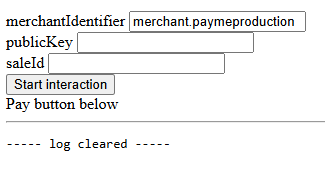
```html
Apple Pay test page
Pay button below
```
## Errors
The SDK reports errors as an `Error` whose `message` is one of the values in `PayMe.ERR_MESSAGES`, or a PayMe error.
| `PayMe.ERR_MESSAGES` key | `message` | When | Raised by |
|---|---|---|---|
| `NOT_SUPPORTED_DEVICE` | `no-supported:apple-pay-not-available-for-device` | The browser has no Apple Pay (`window.ApplePaySession` is missing) | `instance.appleSale()` throws |
| `NO_APPLE_PAY` | `no-supported:apple-pay-jsapi-not-available` | Apple Pay isn't set up on the device (`canMakePayments()` returned `false`) | `instance.appleSale()` throws |
| `NOT_SUPPORTED_VERSION` | `no-supported:apple-pay-version-not-supported` | The browser doesn't support Apple Pay JS API version 4. There is no workaround: offer another payment method. | `instance.appleSale()` throws |
| `VALIDATION_NO_NETWORKS` | `validation-error:no-supported-networks` | None of the seller's card brands is supported by Apple Pay. Contact PayMe support. | `letsRock()` rejects |
| `INVALID_CFG_PARAM` | `validation:unknown-configuration-parameter` | `letsRock()` got something other than a selector or a config object | `letsRock()` rejects |
| `INVALID_VALIDATED_CB`, `INVALID_CANCELLED_CB`, `INVALID_COMPLETED_CB` | `validation:invalid-type-for-validated-callback`, `validation:invalid-type-for-cancelled-callback`, `validation:invalid-type-for-payment-completed-callback` | That callback isn't a plain function (for example, it is `async`) | `letsRock()` rejects |
When PayMe rejects a call (the sale doesn't exist or isn't payable, the service isn't enabled, the merchant validation failed, the payment was declined), `letsRock()` rejects, or `validated(err)` or `paymentCompleted(err)` gets an `Error` whose message is `":"`.
The `message` values are codes, not text for buyers. Map them to your own messages:
```javascript
const messages = PayMe.ERR_MESSAGES;
const buyerMessages = {
[messages.NOT_SUPPORTED_DEVICE]: 'This device does not support Apple Pay',
[messages.NO_APPLE_PAY]: 'Apple Pay is not set up on this device',
[messages.NOT_SUPPORTED_VERSION]: 'This device does not support the current Apple Pay version',
[messages.VALIDATION_NO_NETWORKS]: 'Apple Pay is not available for this seller',
};
function showError(code) {
alert(buyerMessages[code] ?? 'Apple Pay is not available. Please choose another payment method.');
}
```
- [Accept Google Pay](https://docs.payme.io/accepting-payments/payment-methods/google-pay): Accept Google Pay on PayMe's Hosted Payment Page, or render the Google Pay button on your own page with googleSale(): setup, the payment result including 3D Secure, errors and testing.
# Accept Google Pay
Google Pay™ lets buyers pay with the cards saved in their Google account. It works for one-time sales, including `multi` sales where [the buyer chooses how to pay](https://docs.payme.io/accepting-payments/checkout-and-in-person/let-the-buyer-choose).
PayMe accepts Visa, Mastercard, American Express, Discover and JCB through Google Pay. If one of these networks is missing on your PayMe account, ask PayMe support () to add it.
You can offer it in two ways:
- **On PayMe's Hosted Payment Page.** Enable the service, create a sale with `sale_payment_method: "google-pay"` (or `multi`), and send the buyer to its `sale_url`. PayMe shows the Google Pay button.
- **On your own page**, with the browser SDK's `googleSale()`: register with Google, enable the service, create the sale, and render the button. The steps are below.
## Enable Google Pay
A seller installs Google Pay from the dashboard app store (חנות אפליקציות), and it is active as soon as it is installed. A partner enables it for its seller with [vas-enable](https://docs.payme.io/payments/google-pay/post-vas-enable-google-pay). Without the service, `generate-sale` with `google-pay` fails with error `720`.
## Limitations
- Google Pay is for one-time payments only: it can't pay a subscription. Use a card or Apple Pay for recurring payments.
- Installments aren't available: a sale with `sale_payment_method: "google-pay"` and more than one installment fails with error `351`. On a `multi` page that lets the buyer choose the number of installments, a buyer who pays with Google Pay pays in a single payment.
- Approved domains are managed in the Google Pay & Wallet Console of the merchant-ID owner, not in PayMe. Google error codes (for example `OR_BIBED_11`) come from Google.
## Google Pay terms
By integrating Google Pay, you agree to the [Google Pay and Wallet API Acceptable Use Policy](https://payments.developers.google.com/terms/aup) and accept Google's [terms of service](https://payments.developers.google.com/terms/sellertos).
## On your own page
### Step 1: Register in the Google Pay & Wallet Console
Before you show Google Pay on your own page, register your domain with Google:
1. Go to the Google Pay & Wallet Console:
2. Enter your business name in English, and check the first checkbox.
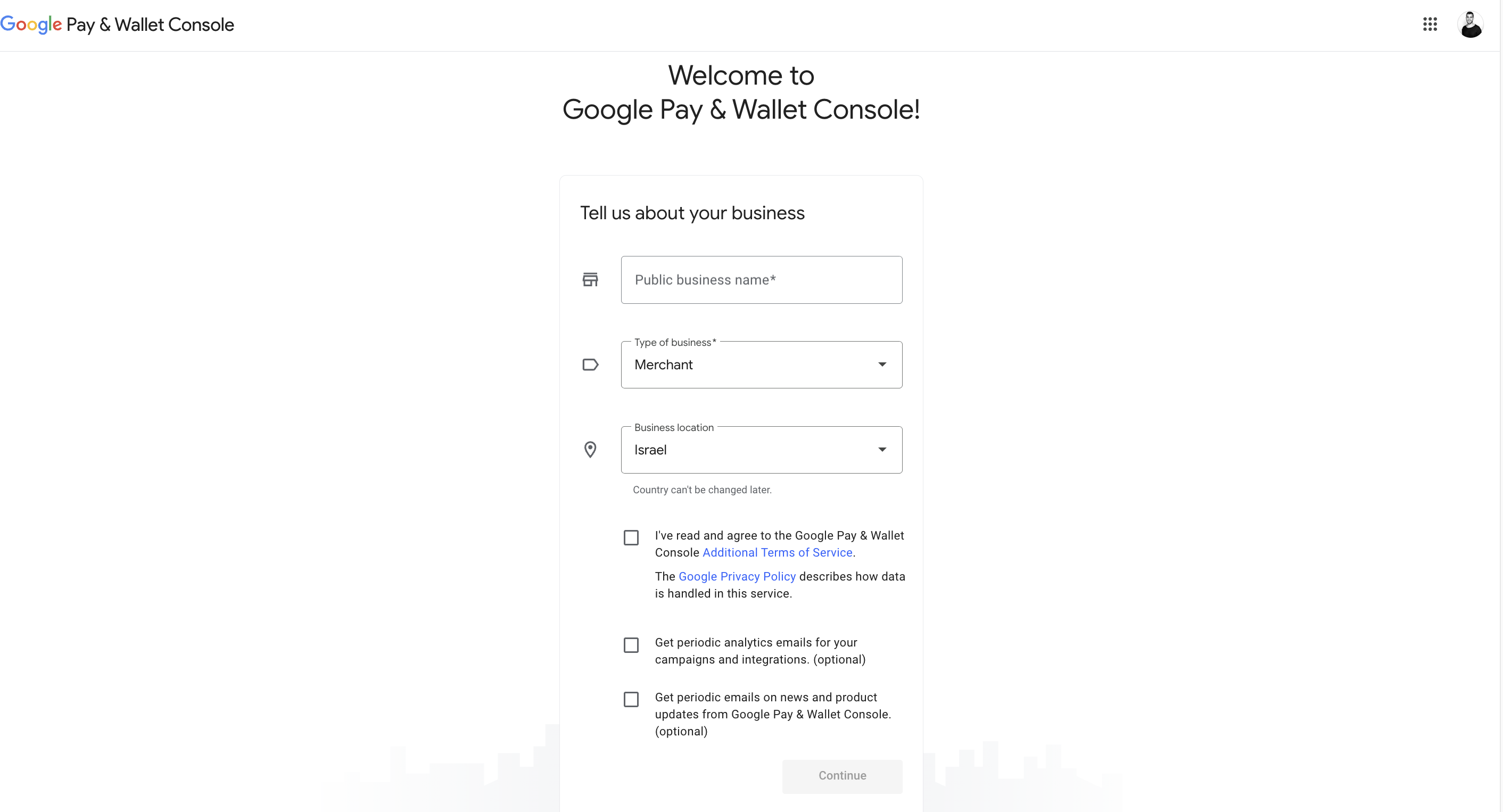
3. Select **Google Pay API**, then **Create an integration**.
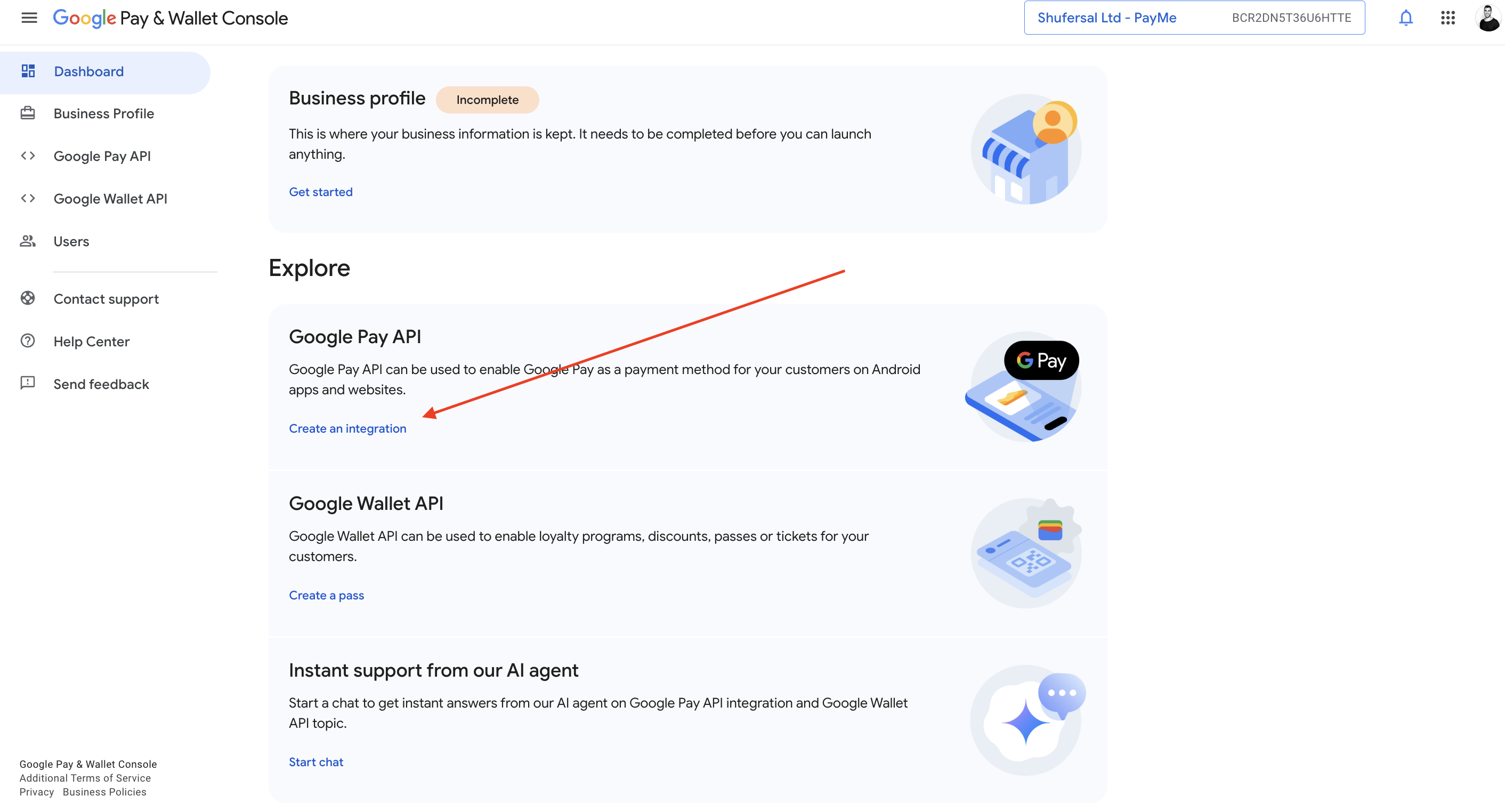
4. Choose **Web integration**.
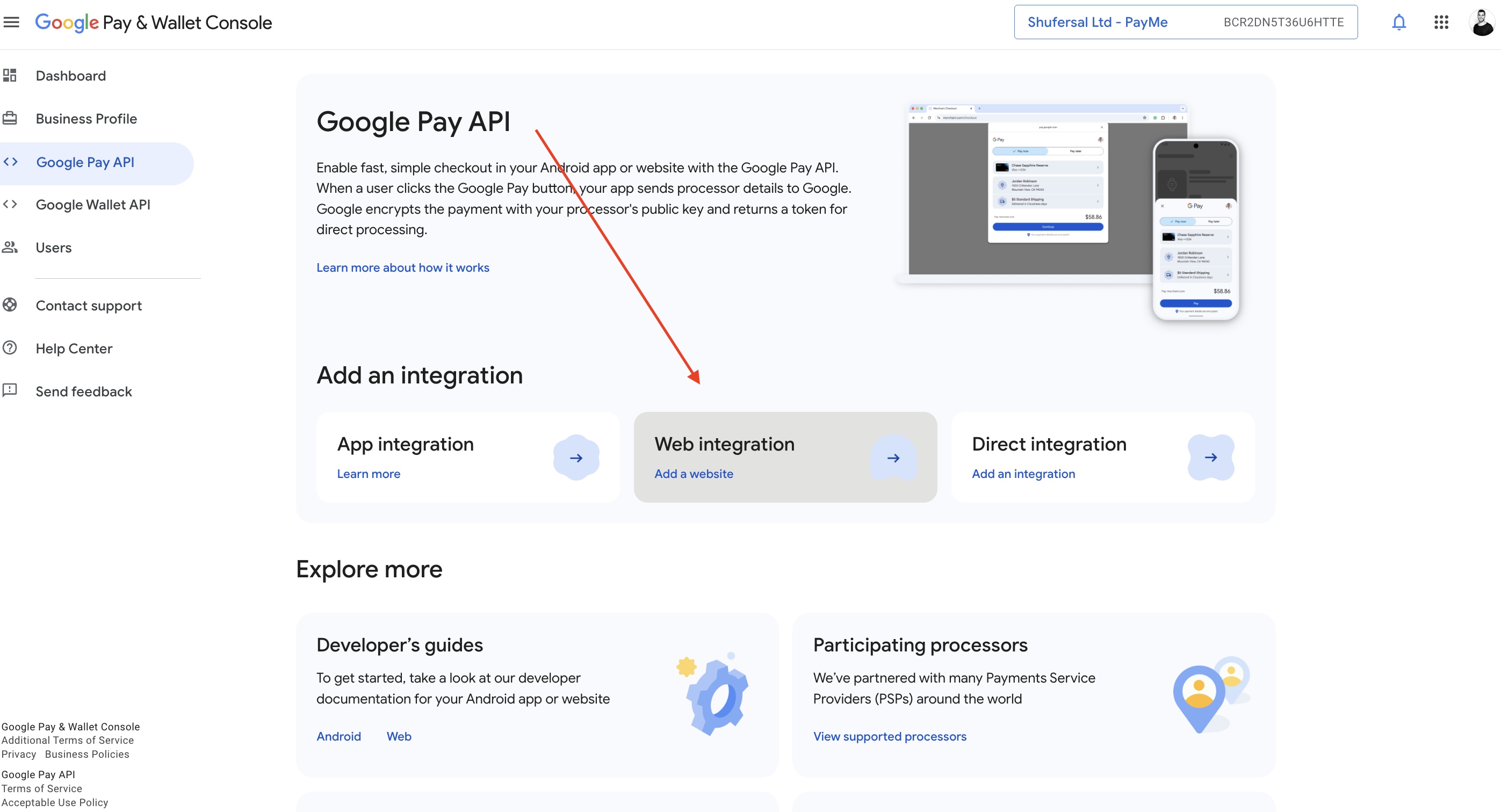
5. Under **Your website**, enter your website's URL. Under **Your Google Pay API integration type**, select **Gateway**.
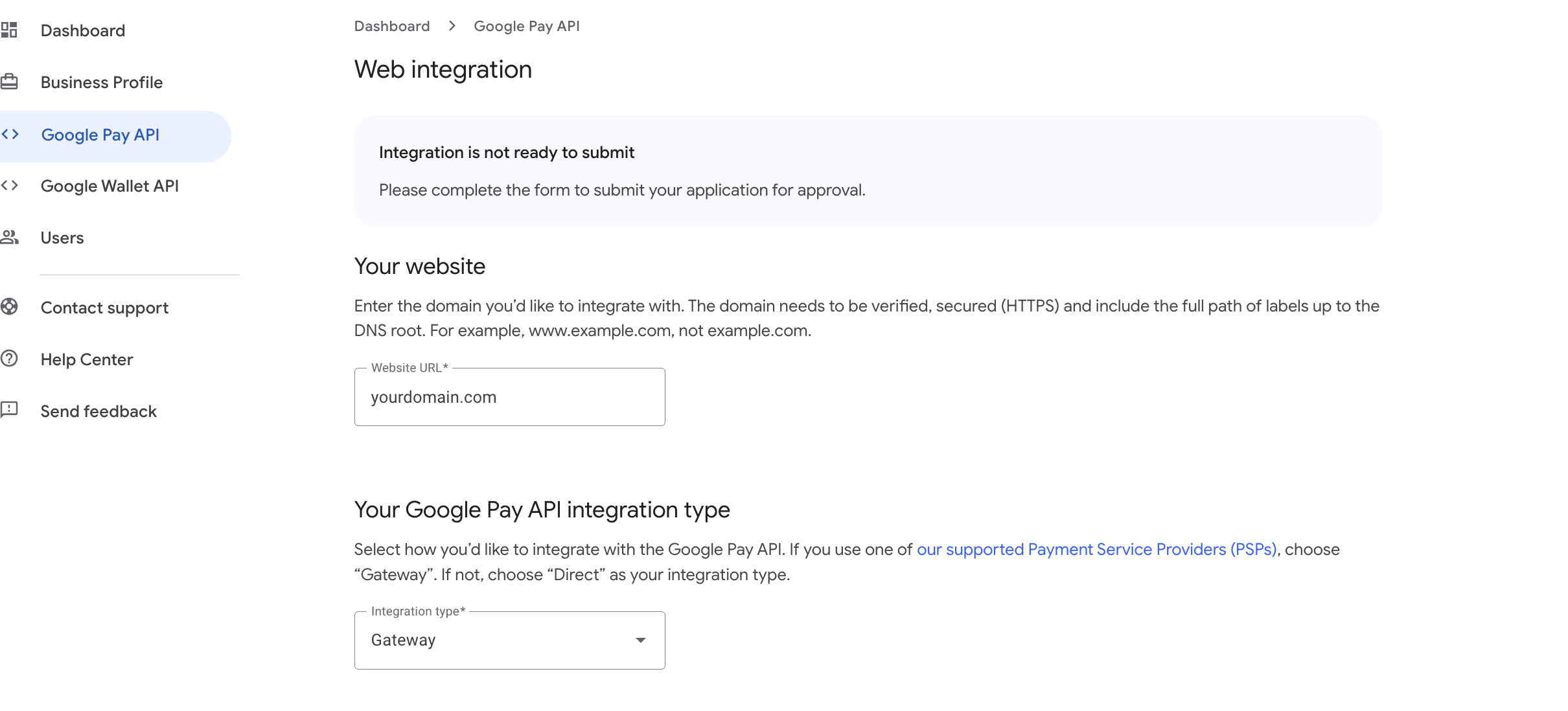
6. In **Screenshots of your buyflow**, upload a screenshot of each step Google asks for, taken on your site.
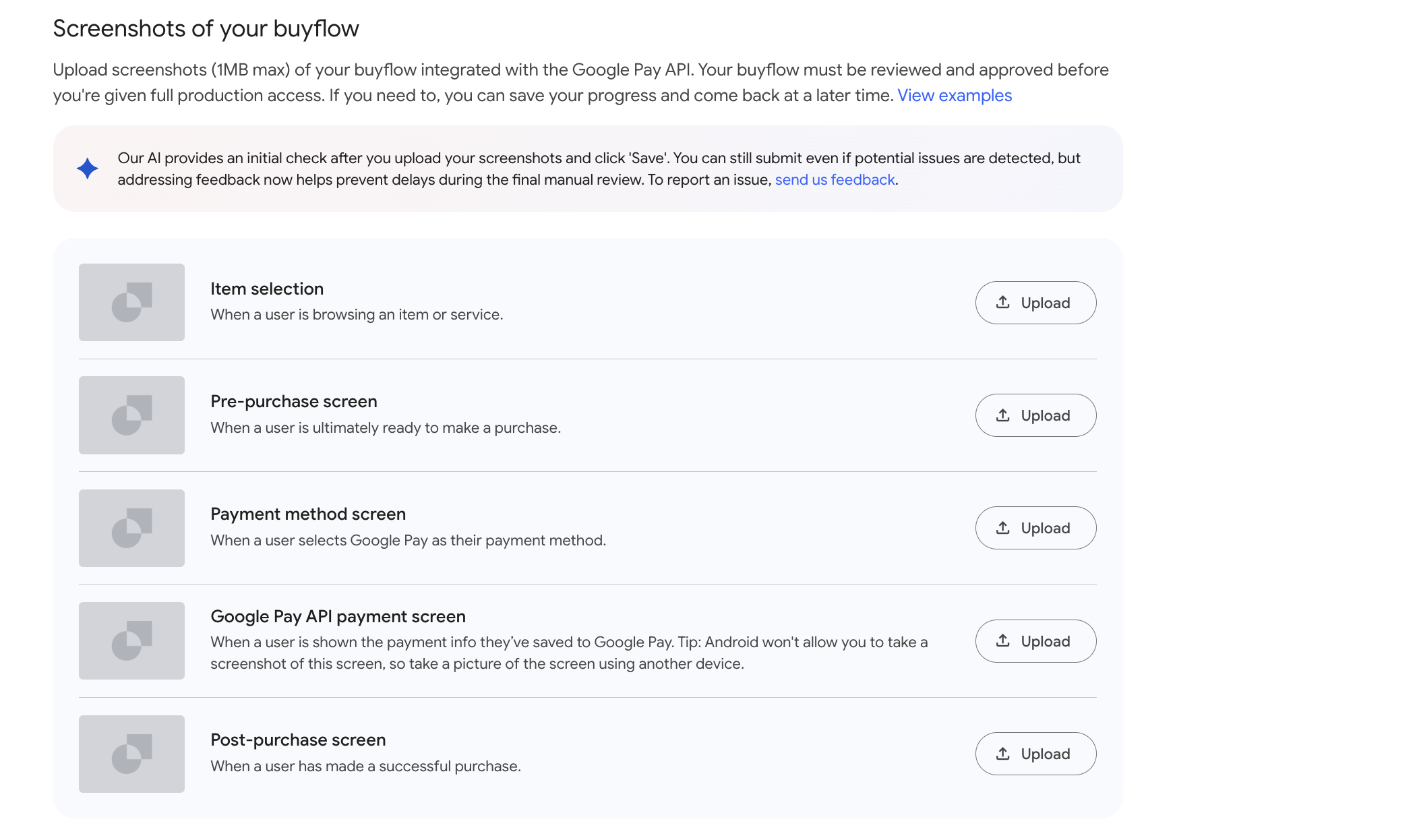
For the **Google Pay API payment screen**, upload a screenshot of this error:
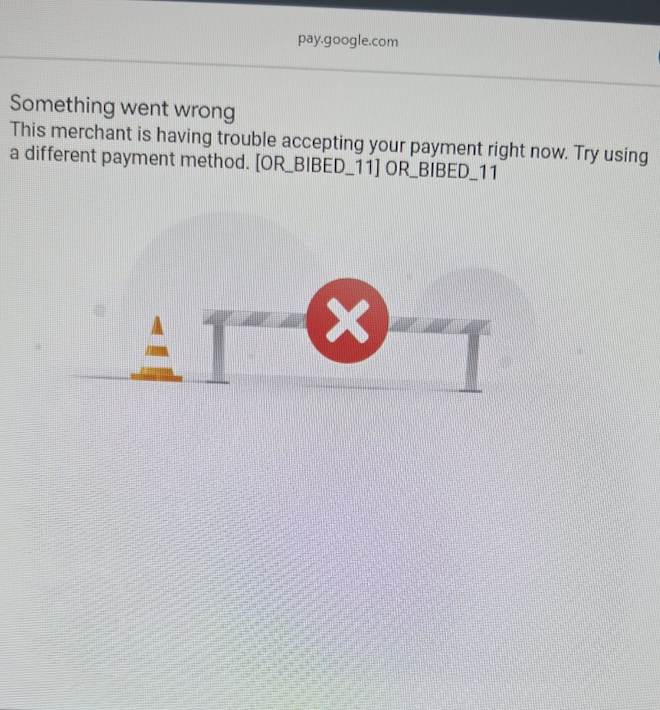
7. A nonprofit organization must also complete steps 1 to 3 of the [Google for Nonprofits](https://support.google.com/nonprofits/answer/3367631) validation.
8. When the registration is complete, email PayMe Partners () to confirm it. PayMe continues the setup on its side.
### Step 2: Enable Google Pay
See [Enable Google Pay](#enable-google-pay). A partner calls [vas-enable](https://docs.payme.io/payments/google-pay/post-vas-enable-google-pay) with its Google Pay service ID:
```json
{
"payme_client_key": "payme_partner_key",
"seller_payme_id": "MPLDEMO-MPLDEMO-MPLDEMO-1234567",
"vas_payme_id": "VASLDEMO-GOOGLEPAY-VASLDEMO-1234567"
}
```
### Step 3: Create a Google Pay sale
On your server, create the sale with [generate-sale](https://docs.payme.io/payments/google-pay/post-generate-sale-google-pay) and `sale_payment_method: "google-pay"`. Set `sale_callback_url` and `sale_return_url`: a payment that needs 3D Secure ends there (see [Step 5](#step-5-handle-the-result)).
`POST https://sandbox.payme.io/api/generate-sale` (production: `https://live.payme.io/api/generate-sale`)
```json
{
"seller_payme_id": "MPLDEMO-MPLDEMO-MPLDEMO-1234567",
"sale_price": 1000,
"currency": "ILS",
"product_name": "Order 1234",
"sale_payment_method": "google-pay",
"sale_callback_url": "https://www.example.com/payment/callback",
"sale_return_url": "https://www.example.com/payment/success"
}
```
```json
{
"status_code": 0,
"sale_url": "https://sandbox.payme.io/sale/generate/SALE1655-3843870J-NTPYLJNW-SOWRLK9X",
"payme_sale_id": "SALE1655-3843870J-NTPYLJNW-SOWRLK9X",
"payme_sale_code": 1027305,
"price": 1000,
"transaction_id": "",
"currency": "ILS",
"sale_payment_method": "google-pay"
}
```
Pass `payme_sale_id` to your page: `googleSale()` takes it as `saleGuid`.
### Step 4: Show the Google Pay button
Use the official Google Pay button and logo, unchanged, as the [Google Pay web brand guidelines](https://developers.google.com/pay/api/web/guides/brand-guidelines) and [Android brand guidelines](https://developers.google.com/pay/api/android/guides/brand-guidelines) require. Show the button only after the availability check passes, and always keep another payment method available.
#### 4.1 Load the PayMe SDK
```html
```
Use this URL in the sandbox and in production. The `testMode` option chooses the environment.
The SDK loads Google's `https://pay.google.com/gp/p/js/pay.js` itself. If your site sets a Content Security Policy, allow `script-src https://cdn.payme.io https://pay.google.com`, `frame-src https://hf.payme.io` and `connect-src https://sandbox.payme.io https://live.payme.io`, plus what Google Pay's own documentation requires.
#### 4.2 Add a container for the button
The SDK renders Google's button into this element:
```html
```
#### 4.3 Check availability, then start
```javascript
const publicKey = 'xxxxxxxx-xxxx-xxxx-xxxx-xxxxxxxxxxxx'; // the seller's public key
const paymeSaleId = 'SALE1655-3843870J-NTPYLJNW-SOWRLK9X'; // from Step 3
const testMode = true; // false in production
if (await PayMe.isGooglePayAvailable(testMode)) {
const instance = await PayMe.create(publicKey, { testMode });
const googleSale = instance.googleSale({
saleGuid: paymeSaleId,
debugFn: (message) => console.log('[PayMe]', message), // optional
});
await googleSale.letsRock({
payButtonSelector: '#pay-with-google-pay',
buttonType: 'buy',
buttonColor: 'default',
canceled() {
// the buyer closed the Google Pay sheet
},
paymentCompleted(err, sale) {
if (err) return showError(err.message); // ":"
if (sale.status_code === 5 && sale.redirect_url) {
window.location.assign(sale.redirect_url); // 3D Secure: the buyer completes it there
return;
}
if (sale.sale_status === 'completed') confirmOnServer(sale.payme_sale_id);
},
});
} else {
// hide Google Pay and offer another payment method
}
```
`PayMe.isGooglePayAvailable(testMode)` loads Google's script and asks Google whether the browser can pay. It resolves to `false` instead of rejecting.
`googleSale()` options:
| Option | Required | What it is |
|---|---|---|
| `saleGuid` | Yes | The `payme_sale_id` from Step 3 |
| `debugFn` | No | A function that receives the SDK's debug messages |
`letsRock(config)` takes the container's selector as a string, or this object:
| Key | Default | Values |
|---|---|---|
| `payButtonSelector` | none | A CSS selector for the container |
| `buttonType` | `buy` | `buy`, `book`, `checkout`, `donate`, `order`, `pay`, `plain`, `subscribe` |
| `buttonColor` | `default` | `default`, `black`, `white` |
| `buttonRadius` | `4` | The corner radius, in pixels |
| `buttonSizeMode` | `fill` | `fill` (fills the container) or `static` |
| `buttonLocale` | the browser's language | A two-letter language code, e.g. `en`. Google can't render a Hebrew button, so `he` shows the logo-only `plain` button. |
| `canceled()` | does nothing | Called when the buyer closes the Google Pay sheet |
| `paymentCompleted(err, sale)` | does nothing | Called with the payment's result: see Step 5 |
The callbacks must be plain functions or arrow functions, not `async` functions: an `async` callback makes `letsRock()` reject with a `validation:invalid-type-for-…-callback` error.
`letsRock()` resolves to the start function, which the button's click already calls. Other methods on the sale:
- `googleSale.setButtonLocale(locale)` re-renders the button in another language.
- `googleSale.destroy()` removes the button. Call it before you start a new sale on the same page.
- `googleSale.manual()` returns `{ createButton(target), startPayment() }`, to render the button into another element or start the payment from your own click handler.
### Step 5: Handle the result
The buyer pays with a card saved in their Google account. Whether 3D Secure runs depends on the card, not on the device:
- A card stored on the buyer's device (Google's `CRYPTOGRAM_3DS`) is charged directly.
- A card saved in the Google account (`PAN_ONLY`) always goes through PayMe's 3D Secure, on any device. This needs the seller's 3D Secure service; without it, the payment fails with error `21017` "Verification failed, please try again".
`paymentCompleted(err, sale)` gets one of these:
| You get | Meaning | What to do |
|---|---|---|
| `err` is `null`, `sale.status_code` is `5`, `sale.redirect_url` is set | 3D Secure needs the buyer | Send the buyer's browser to `redirect_url`. The result is posted to `sale_callback_url`, and the buyer lands on `sale_return_url`. **The sale isn't paid yet.** |
| `err` is `null`, `sale.status_code` is `0`, `sale.sale_status` is `completed` | Paid | Confirm on your server, then fulfil the order |
| `err` is an `Error` | The payment failed or was declined | `err.message` is `":"` |
Before you fulfil, confirm the payment with the [sale callback](https://docs.payme.io/payments/getting-started/callbacks) on your server, or with [get-transactions](https://docs.payme.io/payments/query-apis/post-get-transactions).
### Errors
`letsRock()` rejects with an `Error` whose `message` is:
| `message` | When |
|---|---|
| `no-supported:google-pay-jsapi-not-available` (`PayMe.ERR_MESSAGES.NO_GOOGLE_PAY`) | Google's `pay.js` didn't load, or Google says the browser can't pay |
| `not-found:google-pay-button-not-found` (`PayMe.ERR_MESSAGES.NO_GOOGLE_PAY_BUTTON`) | No element matches `payButtonSelector` |
| `Google Pay merchant settings are missing` | PayMe returned no Google Pay settings for the sale. Check that Google Pay is enabled for the seller. |
| `validation:unknown-configuration-parameter`, `validation:invalid-type-for-cancelled-callback`, `validation:invalid-type-for-payment-completed-callback` | The config isn't a selector or an object, or a callback isn't a plain function |
| `":"` | PayMe rejected the request, for example because the sale doesn't exist or can't be paid |
Payment errors arrive in `paymentCompleted(err)`, and `canceled()` runs when the buyer closes the Google Pay sheet.
### Step 6: Test your integration
1. Create a `google-pay` sale in the sandbox.
2. Load your page with `testMode: true` and the seller's sandbox public key.
3. Check that the availability check passes and the Google Pay button appears.
4. Pay with a card in a Google test account.
5. Check that `paymentCompleted` and your sale callback both report the sale. Then check the cancel flow by closing the Google Pay sheet.
| Problem | Likely cause | What to do |
|---|---|---|
| The Google Pay button doesn't appear | `PayMe.isGooglePayAvailable(testMode)` returned `false` | Check browser and device support, and keep other payment methods available |
| `PayMe.create` fails | A missing or wrong public key | Use the seller's public key for the environment you set with `testMode` |
| `generate-sale` fails | A wrong request or seller setup | Check the MPL and the sale fields, and that Google Pay is enabled for the seller (error `720` when it isn't) |
- [Israeli Direct Debit](https://docs.payme.io/accepting-payments/payment-methods/israeli-direct-debit): Collect an Israeli direct debit authorization (mandate) with generate-sale and sale_type token, then charge the bank account with the returned token (buyer_key). Covers the callbacks and timing of each step.
# Israeli Direct Debit
> **Availability.** Israeli Direct Debit is offered to high-volume sellers only. It is enabled per account after approval by your PayMe sales representative; it is not self-service.
In order to create a direct debit mandate for Israeli customers, you can use our generate-sale API endpoint to complete the two actions of:
1. Generating a mandate request.
2. Generating a new payment request.
### Generating a new bank authorization
#### Prerequisites
PayMe enables Israeli direct debit on the account after approval. Until then, `generate-sale` returns `720`.
The solution is based on our iframe, where the following details will be collected:
1. Account type (Individual/Company/Non-Profit/etc)
2. Account Owner Name
3. Account Owner Social ID/Business Code
4. Email Address
5. Phone Number
6. Bank
7. Bank Branch
8. Bank Account Number
9. Signature
In order to create a new bank authorization request, you will need to initiate the following request:
```
POST https://.payme.io/api/generate-sale
{
"seller_payme_id": "MPLDEMO-MPLDEMO-MPLDEMO-1234567",
"sale_price": "1000",
"currency": "ILS",
"product_name": "Shirt",
"sale_payment_method": "il-direct-debit",
"sale_type": "token"
}
```
Send all of these fields: `product_name` and a numeric `sale_price` are required even though nothing is charged. `currency` is optional for the setup (the account's default is used), so send `ILS`.
The response will include a URL for our iframe for the user to insert the details:
```
{
"status_code": 0,
"sale_url": "https://sandbox.payme.io/sale/generate/SALEGUID",
"payme_sale_id": "SALEGUID",
"payme_sale_code": 123456,
"price": 100,
"transaction_id": "",
"currency": "ILS",
"sale_payment_method": "il-direct-debit"
}
```
Once the bank authorization request was successfully created, the token for the buyer will remain inactive until we receive an official update from the bank that the authorization was successfully created and the account can be charged. PayMe then sends `sale-complete` (or `sale-failure` if the bank rejects it), followed by `sale-il-direct-debit-update`, to your callback URL.
### Creating a new payment request using the Israeli Direct Debit Payment Method
In order to create a new payment request using the IL DD, you will need to use our generate-sale API in the following form:
```
{
"seller_payme_id": "MPLDEMO-MPLDEMO-MPLDEMO-1234567",
"sale_price": "1000",
"currency": "ILS",
"product_name": "Shirt",
"language": "en",
"sale_payment_method": "il-direct-debit",
"sale_type": "sale",
"buyer_key": "BUYERDEMO-BUYERDEMO-BUYERDEMO-1234567"
}
```
If the charging request was successful, you will receive the following response:
```
{
"status_code": 0,
"payme_status": "success",
"status_error_code": null,
"payme_sale_id": "SALEGUID",
"payme_sale_code": 1088759,
"sale_created": "2022-07-03 08:52:16",
"payme_sale_status": "initial",
"sale_status": "initial",
"currency": "ILS",
"transaction_id": "",
"is_token_sale": false,
"price": 1000,
"payme_signature": "signatureID",
"sale_deferred_months": null,
"payme_transaction_id": "TRANGUID",
"payme_transaction_total": "1000",
"payme_transaction_card_brand": "PrivateLabel",
"payme_transaction_auth_number": null,
"payme_transaction_voucher": null,
"payme_transaction_emv_uid": null,
"payme_transaction_acquirer": null,
"payme_transaction_auth_source": null,
"payme_transaction_card_issuer": null,
"payme_transaction_credit_type": null,
"buyer_name": "Ran Tester",
"buyer_email": "TestTest@paymeservice.com",
"buyer_phone": "05222222",
"buyer_card_mask": null,
"buyer_card_exp": null,
"buyer_card_is_foreign": false,
"buyer_social_id": "123456789",
"installments": 1,
"transaction_first_payment": "1000",
"transaction_periodical_payment": 0,
"sale_paid_date": "2022-07-03 08:54:10",
"sale_release_date": null,
"sale_3ds": false
}
```
In this phase, the payment request will go through a process of validation with the related bank.
The approval will be received after 8 calendar days - a decline will be received earlier than that.
Callbacks: `sale-paid` when the debit is submitted, `sale-complete` about 8 days later, or `sale-failure` if the bank returns it. See [Callbacks](https://docs.payme.io/payments/getting-started/callbacks#israeli-direct-debit).
#### Authorization Cancellations and Revokes
The bank is eligible to revoke an authorization at any point of time - this means that once an authorization is revoked, PayMe will update the token to be inactive and you won't be able to use it for new payments anymore. The update can be communicated using our callback system to your designated URL.
- [Accept Bit payments](https://docs.payme.io/accepting-payments/payment-methods/bit): Bit runs on PayMe's payment page only. Enable it: the seller installs Bit from the dashboard app store, or a partner calls vas-enable (status_code 2 means PayMe completes it); without it generate-sale returns 720. Create the sale with sale_payment_method: bit (or multi), currency ILS, one payment (351), no capture_buyer (4). The buyer scans a QR code or opens the Bit app and approves. sale-complete on success; sale-failure with 23001 rejected, 23002 canceled, 23003 expired; the same sale_url stays payable. Refund with refund-sale.
## Prerequisites
- The seller's seller_payme_id (MPL)
- The Bit service active on the seller's account
- A public HTTPS URL for sale_callback_url
## Related
- [Create a sale (hosted payment page)](https://docs.payme.io/payments/hosted-payment-page/post-generate-sale)
- [Let the buyer choose how to pay](https://docs.payme.io/accepting-payments/checkout-and-in-person/let-the-buyer-choose)
- [Enable payment methods and services for your sellers](https://docs.payme.io/marketplaces-and-platforms/seller-onboarding/enable-services)
- [Callbacks](https://docs.payme.io/payments/getting-started/callbacks)
- [Errors](https://docs.payme.io/payments/getting-started/errors)
- [Refund a sale](https://docs.payme.io/payments/post-sale-actions/post-refund-sale)
- [List sales](https://docs.payme.io/payments/query-apis/post-get-sales)
# Accept Bit payments
Bit is an Israeli payment app. The buyer approves the payment in the Bit app on their phone, then PayMe completes the charge and sends you the result. Bit runs on PayMe's payment page: create a sale with `sale_payment_method: bit` to offer Bit alone, or with `multi` to offer it next to cards and wallets.
Limits:
- **ILS only.** Create Bit sales with `currency: ILS`.
- **One payment.** A `bit` sale with more than one installment fails with error `351`. On a `multi` page where the buyer chooses the number of installments, a buyer who pays with Bit pays in one payment.
- **No saved payment method.** `capture_buyer` with `bit` returns error `4`, and a `multi` page with `capture_buyer` doesn't offer Bit.
- **Payment page only.** The browser SDK has no Bit method.
## Enable Bit
- **A seller** installs Bit from the dashboard app store (חנות אפליקציות). It is active as soon as it is installed.
- **A partner** turns Bit on for its seller with `vas-enable`, sending your partner key, the seller's MPL and your partner account's Bit service ID as `vas_payme_id`:
```json
{
"payme_client_key": "payme_partner_key",
"seller_payme_id": "MPLDEMO-MPLDEMO-MPLDEMO-1234567",
"vas_payme_id": "VASLDEMO-BIT-VASLDEMO-1234567"
}
```
The response is either the seller's active service (`status_code: 0`, `vas_is_active: true`), or `status_code: 2` with the message `Zendesk ticket created` when PayMe's team completes the setup. The whole flow, including how to check the result, is on [Enable payment methods and services for your sellers](https://docs.payme.io/marketplaces-and-platforms/seller-onboarding/enable-services).
Without the service, `generate-sale` with `bit` fails with error `720`, and `multi` pages don't show Bit.
## Create a Bit sale
Call [`generate-sale`](https://docs.payme.io/payments/hosted-payment-page/post-generate-sale) from your server with `sale_payment_method: bit`.
`POST https://sandbox.payme.io/api/generate-sale` (production: `https://live.payme.io/api/generate-sale`)
```json
{
"seller_payme_id": "MPLDEMO-MPLDEMO-MPLDEMO-1234567",
"sale_payment_method": "bit",
"sale_price": 1000,
"currency": "ILS",
"product_name": "Order 1234",
"transaction_id": "order-1001",
"sale_callback_url": "https://your-server.example.com/payme/callback",
"sale_return_url": "https://your-site.example.com/payment/success",
"sale_mobile": "+972500000040",
"language": "en"
}
```
```json
{
"status_code": 0,
"session": "AtsJ0as5",
"sale_url": "https://sandbox.payme.io/sale/generate/SALE1700-000000AA-EXAMPLE1-SALE0001",
"payme_sale_id": "SALE1700-000000AA-EXAMPLE1-SALE0001",
"payme_sale_code": 12345678,
"price": 1000,
"transaction_id": "order-1001",
"currency": "ILS",
"sale_payment_method": "bit"
}
```
Show `sale_url` to the buyer in an iframe or a redirect, and store `payme_sale_id`. Partners also send `payme_client_key`; see [Authentication](https://docs.payme.io/payments/getting-started/authentication).
Options:
- `layout: qr-sms` adds a "Payment link via SMS" option: the buyer enters an Israeli mobile number and gets the payment link by SMS. `sale_mobile` pre-fills the number.
- To offer Bit next to cards and wallets, send `sale_payment_method: multi`. See [Let the buyer choose how to pay](https://docs.payme.io/accepting-payments/checkout-and-in-person/let-the-buyer-choose).
The request the buyer sees in the Bit app carries the seller's business name, not `product_name`.
## What the buyer does
1. The buyer opens `sale_url`.
2. On a computer, the page shows a QR code: the buyer scans it with their phone. On a phone, the page shows a button that opens the Bit app.
3. The buyer approves the payment in Bit. On a phone, Bit then brings the buyer back to the payment page.
4. PayMe completes the charge with Bit, shows the result, sends `sale-complete`, and redirects the buyer to `sale_return_url`, if you sent it.
Each new Bit request on a sale cancels the open one before it, so a buyer who reloads the page can't pay twice.
If the buyer closes the page after approving, PayMe keeps checking the request in the background. The sale still completes and the callback still arrives, possibly several minutes later. Don't treat a closed page as a failed payment: wait for the callback, or check the sale with [`get-sales`](https://docs.payme.io/payments/query-apis/post-get-sales).
## Outcomes and callbacks
| `notify_type` | When |
|---|---|
| `sale-complete` | The buyer approved and PayMe completed the charge. `sale_payment_method` is `bit` (also on a `multi` sale), and `installments` is `1`. |
| `sale-failure` | A Bit request ended without a payment. The reason is in `status_error_code`. |
| `refund` | The sale was refunded |
A Bit request ends with one of these codes:
| `status_error_code` | Meaning | PayMe's message | What to do |
|---|---|---|---|
| `23001` | The buyer rejected the request in Bit | "The request was rejected by the customer" | Let the buyer try again or choose another method. |
| `23002` | The request was canceled before the buyer paid it | "The request was canceled by the business" | Let the buyer start a new request. |
| `23003` | The request expired before the buyer approved it | "The request has expired" | Let the buyer start a new request, and approve it in Bit straight away. |
Other codes are listed on [Errors](https://docs.payme.io/payments/getting-started/errors).
A failed request doesn't close the sale: its status is `failed`, and the same `sale_url` stays payable, unless `sale_expiry_seconds` has passed. The buyer can start a new Bit request from the page, and a later success sends `sale-complete`. Callback fields, signature and delivery rules are on [Callbacks](https://docs.payme.io/payments/getting-started/callbacks).
## Refunds
Refund a Bit sale with [`refund-sale`](https://docs.payme.io/payments/post-sale-actions/post-refund-sale), in full or in part. The money goes back to the buyer through Bit.
```json
{
"seller_payme_id": "MPLDEMO-MPLDEMO-MPLDEMO-1234567",
"payme_sale_id": "SALE1700-000000AA-EXAMPLE1-SALE0001",
"sale_refund_amount": 500,
"language": "en"
}
```
If you refund a Bit sale in several parts, leave at least 5 minutes between two refunds of the same sale.
## Test Bit
Ask PayMe how to test Bit in the sandbox before you go live. You can test the rest of your integration (callbacks, `get-sales`, refunds) with the cards on [Test Cards and Payment Methods](https://docs.payme.io/payments/getting-started/test-cards-and-payment-methods).
- [Accept PayPal payments](https://docs.payme.io/accepting-payments/payment-methods/paypal): PayPal sales settle in the seller's own PayPal account, not the PayMe balance: no withdrawals, no market_fee, refunds paid from PayPal. Activation: contact PayMe Partners (partners@payme.io); without it generate-sale returns 720. Create the sale with generate-sale, sale_payment_method paypal, and send sale_callback_url, sale_return_url and cancel_url. Redirect the buyer to sale_url (not an iframe). One payment only (351), no capture_buyer (4), not on multi. Authorize: capture-sale or multi-capture; void the whole authorization only. PayPal disputes don't reach PayMe.
## Prerequisites
- The seller's seller_payme_id (MPL)
- The PayPal service active on the seller's account and connected to the seller's PayPal account
- A public HTTPS URL for sale_callback_url
## Related
- [Create a sale (hosted payment page)](https://docs.payme.io/payments/hosted-payment-page/post-generate-sale)
- [Authorize now, capture later](https://docs.payme.io/accepting-payments/capture-and-saved-cards/capture-sale)
- [Capture an authorization in several parts](https://docs.payme.io/accepting-payments/capture-and-saved-cards/multi-capture)
- [Void an authorization](https://docs.payme.io/payments/post-sale-actions/void-sale)
- [Refund a sale](https://docs.payme.io/payments/post-sale-actions/post-refund-sale)
- [Callbacks](https://docs.payme.io/payments/getting-started/callbacks)
- [Handle chargebacks](https://docs.payme.io/accepting-payments/after-the-sale/handle-chargebacks)
# Accept PayPal payments
With PayPal, the buyer pays from their PayPal account. The seller connects its own PayPal account to PayMe, and the money from PayPal sales goes to that PayPal account. You create the sale with `sale_payment_method: paypal`, the buyer approves the payment on PayPal, and PayMe completes it and sends you the result.
How PayPal differs from cards:
- **The money stays in PayPal.** PayPal sales aren't added to the seller's PayMe balance, so they aren't part of PayMe withdrawals. Refunds are paid from the seller's PayPal account.
- **No platform fee.** PayMe doesn't apply `market_fee` to PayPal sales.
- **Not on the `multi` page.** Create a sale with `sale_payment_method: paypal` to offer PayPal.
- **One payment.** A `paypal` sale with more than one installment fails with error `351`.
- **No saved payment method.** `capture_buyer` with `paypal` returns error `4`.
- **Payment page only.** Hosted Fields has no PayPal method.
## Turn on PayPal
PayPal must be active on the seller's account and connected to the seller's PayPal account. To set it up, contact PayMe Partners () with the seller's MPL.
Without the service, `generate-sale` with `paypal` fails with error `720`.
## Create a PayPal sale
Call [`generate-sale`](https://docs.payme.io/payments/hosted-payment-page/post-generate-sale) from your server with `sale_payment_method: paypal`.
`POST https://sandbox.payme.io/api/generate-sale` (production: `https://live.payme.io/api/generate-sale`)
```json
{
"seller_payme_id": "MPLDEMO-MPLDEMO-MPLDEMO-1234567",
"sale_payment_method": "paypal",
"sale_price": 1000,
"currency": "ILS",
"product_name": "Order 1234",
"transaction_id": "order-1001",
"sale_callback_url": "https://your-server.example.com/payme/callback",
"sale_return_url": "https://your-site.example.com/payment/success",
"cancel_url": "https://your-site.example.com/payment/canceled",
"language": "en"
}
```
```json
{
"status_code": 0,
"session": "AtsJ0as5",
"sale_url": "https://sandbox.payme.io/sale/generate/SALEDEMO-XXXXXXXX-XXXXXXXX-XXXXXXXX",
"payme_sale_id": "SALEDEMO-XXXXXXXX-XXXXXXXX-XXXXXXXX",
"payme_sale_code": 12345678,
"price": 1000,
"transaction_id": "order-1001",
"currency": "ILS",
"sale_payment_method": "paypal"
}
```
Store `payme_sale_id`, and redirect the buyer to `sale_url` in the full browser window. The page sends the buyer straight on to PayPal, so don't show it in an iframe. Partners also send `payme_client_key`; see [Authentication](https://docs.payme.io/payments/getting-started/authentication).
Send these URLs on every PayPal sale:
| Field | Why |
|---|---|
| `sale_callback_url` | Where PayMe sends the result. See [Callbacks](https://docs.payme.io/payments/getting-started/callbacks). |
| `sale_return_url` | Where the buyer goes after approving the payment on PayPal. |
| `cancel_url` | Where PayPal sends a buyer who cancels. Without it, a buyer who cancels on PayPal doesn't come back to your site. |
## What the buyer does
1. The buyer opens `sale_url`, and PayMe sends them to PayPal.
2. The buyer logs in to PayPal and approves the payment.
3. PayMe completes the payment, sends `sale-complete` to your `sale_callback_url`, and the buyer is sent to `sale_return_url`.
The buyer can reach `sale_return_url` before your callback arrives. Fulfil the order on `sale-complete`, or after you check the sale with [`get-sales`](https://docs.payme.io/payments/query-apis/post-get-sales), not on the redirect.
If the buyer cancels on PayPal, PayPal sends them to `cancel_url`. The sale stays `initial` and PayMe sends no callback. The buyer can open `sale_url` again to pay.
## Outcomes and callbacks
| `notify_type` | When |
|---|---|
| `sale-complete` | The buyer approved and PayMe completed the payment, or you captured an authorization. `sale_payment_method` is `paypal`. |
| `sale-authorized` | The buyer approved a sale created with `sale_type: authorize`. |
| `sale-failure` | PayPal declined the payment, or PayMe couldn't complete it. The reason is in `status_error_code`. |
| `refund` | The sale was refunded, or the authorization was voided. |
`buyer_name`, `buyer_email` and `buyer_phone` come from the buyer's PayPal account. When PayPal doesn't share one, PayMe uses the value you sent in `sale_name`, `sale_email` or `sale_mobile`.
Callback fields, signature and delivery rules are on [Callbacks](https://docs.payme.io/payments/getting-started/callbacks), and every type is on [Callback types reference](https://docs.payme.io/payments/getting-started/callback-types).
## Authorize now, capture later
PayPal supports authorizations. Create the sale with `sale_type: authorize`. When the buyer approves, the sale becomes `authorized` and PayMe sends `sale-authorized`. Then:
- **Capture once** with [`capture-sale`](https://docs.payme.io/payments/post-sale-actions/post-capture-sale), for the full amount or less, within 7 days. The flow is the same as for cards; see [Authorize now, capture later](https://docs.payme.io/accepting-payments/capture-and-saved-cards/capture-sale).
- **Capture in several parts** with [multi-capture](https://docs.payme.io/accepting-payments/capture-and-saved-cards/multi-capture#paypal), sending `paypal` as the payment method.
- **Void the whole authorization** with [`refund-sale`](https://docs.payme.io/payments/post-sale-actions/void-sale), leaving out `sale_refund_amount`. Partial voids aren't supported for PayPal. To charge less than you authorized, capture a lower amount instead.
## Refunds
Refund a PayPal sale with [`refund-sale`](https://docs.payme.io/payments/post-sale-actions/post-refund-sale), in full or in parts. The money goes back to the buyer through PayPal, and is paid from the seller's PayPal account, not from the PayMe balance.
```json
{
"seller_payme_id": "MPLDEMO-MPLDEMO-MPLDEMO-1234567",
"payme_sale_id": "SALEDEMO-XXXXXXXX-XXXXXXXX-XXXXXXXX",
"sale_refund_amount": 500,
"language": "en"
}
```
The rules on the `refund-sale` page apply, for example the minimum amount of each partial refund. Refund through `refund-sale` rather than in PayPal, so that PayMe records the refund and sends the `refund` callback.
## Disputes
A dispute that a buyer opens on a PayPal payment is handled in PayPal, between the buyer, PayPal and the seller's PayPal account. PayMe isn't notified, so it sends no `sale-chargeback` callback for it. Chargebacks on other payment methods are covered in [Handle chargebacks](https://docs.payme.io/accepting-payments/after-the-sale/handle-chargebacks).
## Reporting
PayPal sales appear in [`get-sales`](https://docs.payme.io/payments/query-apis/post-get-sales) and [`get-transactions`](https://docs.payme.io/payments/query-apis/post-get-transactions) like other sales, with `paypal` as the payment method. Because the money is paid out by PayPal, they don't appear in [withdrawals](https://docs.payme.io/marketplaces-and-platforms/fees-and-payouts/withdrawals).
## Test PayPal
Ask PayMe how to test PayPal in the sandbox before you go live. You can test the rest of your integration (callbacks, `get-sales`, refunds) with the cards on [Test Cards and Payment Methods](https://docs.payme.io/payments/getting-started/test-cards-and-payment-methods).
- [Authorize now, capture later](https://docs.payme.io/accepting-payments/capture-and-saved-cards/capture-sale): Place a hold on the buyer's card, then charge it within 7 days with capture-sale, or release it with refund-sale.
# Authorize now, capture later
Also known as pre-authorization. PayMe places a hold on the buyer's card; you charge it later with [`capture-sale`](https://docs.payme.io/payments/post-sale-actions/post-capture-sale), once, for the full amount or less.
Capture within 7 days (168 hours) of the authorization; after that, `capture-sale` fails with error `516`. The card issuer decides how long the hold stays on the card.
## Flow
1. Create the sale with [`generate-sale`](https://docs.payme.io/payments/hosted-payment-page/post-generate-sale) and `sale_type: "authorize"`. Show the buyer the `sale_url`.
2. When the buyer pays, the sale's status becomes `authorized` and PayMe sends a `sale-authorized` callback to your `sale_callback_url`.
3. Call `capture-sale` with `payme_sale_id` and, to charge less, `sale_price`. The sale becomes `completed` and PayMe sends a `sale-complete` callback.
### Create the sale
| Field | Value |
|---|---|
| `sale_type` | `authorize` |
| `sale_price` | The amount to hold, in minor units (`10000` = 100.00). |
All other `generate-sale` fields work as for a regular sale.
### Capture it
| Field | Required | Description |
|---|---|---|
| `seller_payme_id` | yes, unless you send `seller_id` with `payme_client_key` | The seller's MPL, as on `refund-sale`. |
| `payme_sale_id` | yes | The authorized sale. |
| `sale_price` | no | Amount to capture, in minor units. Default: the full authorized amount. At least the account's minimum sale value (500 by default). |
| `installments` | no | Number of installments, `1`–`36`. Default: the sale's installments. |
To capture in several parts, use [multi-capture](https://docs.payme.io/accepting-payments/capture-and-saved-cards/multi-capture).
## Releasing a hold
To cancel, void the hold with [`refund-sale`](https://docs.payme.io/payments/post-sale-actions/void-sale) while the sale is `authorized`. PayMe never voids an authorization on its own. If you don't release it, the card issuer releases the hold on its own schedule (days, up to about 30).
A partly voided sale can't be captured. To charge less than you authorized, capture with a lower `sale_price` instead.
## Errors
- `516`: the 7 days have passed. The error doesn't release the hold; void it with `refund-sale`.
- `305`: the sale isn't `authorized` (for example, already captured, voided or partly voided). `status_additional_info` holds its status.
- `352`: `sale_price` is `0`, below the account minimum (500 by default) or above the authorized amount.
- `518`: the sale's authorization is no longer open, for example because the authorization failed.
- A declined capture returns HTTP 200 with `status_code: 1` and leaves the sale `failed`. You can retry while the authorization is still valid.
- `20001`: the acquirer refused a void or refund. Contact PayMe with the `payme_sale_id` and the time of the call.
A captured sale that shows a balance of 0 right after the capture is normal: the funds reach the wallet during settlement.
- [Capture an authorization in several parts](https://docs.payme.io/accepting-payments/capture-and-saved-cards/multi-capture): Multi-capture: charge an authorized card or PayPal sale in several parts, each a new sale linked to the authorization.
# Capture an authorization in several parts
Multi-capture charges an authorized sale in several parts, for example one per shipment. Each part is a new sale linked to the original authorization. Cards (`credit-card`) and PayPal (`paypal`) are supported; any other payment method returns error `4`.
## Step 1: authorize
Create a sale with `sale_type: "authorize"`, in one of two ways:
- [`generate-sale`](https://docs.payme.io/payments/hosted-payment-page/post-generate-sale): PayMe returns a `sale_url` where the buyer enters the card.
- `sales`: you send the card details in the request (PCI DSS Level 1 partners only), and the response holds the result.
When the buyer's card is authorized, the sale's status is `authorized`.
`POST /generate-sale` request:
```json
{
"seller_payme_id": "MPLDEMO-MPLDEMO-MPLDEMO-1234567",
"sale_price": 10000,
"currency": "ILS",
"product_name": "Shirt",
"sale_type": "authorize",
"sale_payment_method": "credit-card",
"language": "en"
}
```
Response:
```json
{
"status_code": 0,
"sale_url": "https://sandbox.payme.io/sale/generate/SALEDEMO-XXXXXXXX-XXXXXXXX-XXXXXXXX",
"payme_sale_id": "SALEDEMO-XXXXXXXX-XXXXXXXX-XXXXXXXX",
"payme_sale_code": 1185468,
"price": 10000,
"transaction_id": "",
"currency": "ILS",
"sale_payment_method": "credit-card"
}
```
`POST /sales` request:
```json
{
"seller_payme_id": "MPLDEMO-MPLDEMO-MPLDEMO-1234567",
"product_name": "Shirt",
"sale_price": 10000,
"currency": "ILS",
"sale_type": "authorize",
"payment": {
"method": "credit-card",
"card_number": "5326105300985846",
"card_expiry": "1230",
"card_cvv": "658"
},
"customer": {
"name": "Israel Israeli",
"email": "buyer@example.com",
"phone": "+972500000000",
"social_id": "008336174"
}
}
```
Response (abridged):
```json
{
"status_code": 0,
"payme_sale_id": "SALEDEMO-XXXXXXXX-XXXXXXXX-XXXXXXXX",
"payme_sale_code": 1185468,
"sale_status": "authorized",
"payme_sale_status": "authorized",
"currency": "ILS",
"price": 10000,
"payme_transaction_total": "10000",
"buyer_card_mask": "532610******5846",
"installments": 1
}
```
## Step 2: capture each part
Call `generate-sale` once per part, with these fields on top of the usual ones:
| Field | Type | Description |
|---|---|---|
| `sale_type` | string | `multi-capture`. |
| `origin_sale_id` | string | The authorized sale's `payme_sale_id`. |
| `currency` | string | Required. The same currency as the authorized sale. |
| `sale_price` | integer | The amount of this part, in minor units. At least the account's minimum sale value (500 by default). |
PayMe charges at once, and the response holds the result.
`POST /generate-sale` request:
```json
{
"seller_payme_id": "MPLDEMO-MPLDEMO-MPLDEMO-1234567",
"sale_price": 4000,
"currency": "ILS",
"product_name": "Shirt, first shipment",
"sale_type": "multi-capture",
"origin_sale_id": "SALEDEMO-XXXXXXXX-XXXXXXXX-XXXXXXXX",
"sale_payment_method": "credit-card",
"language": "en"
}
```
Response (abridged):
```json
{
"status_code": 0,
"status_error_code": 0,
"payme_status": "success",
"payme_sale_id": "SALEDEMO-YYYYYYYY-YYYYYYYY-YYYYYYYY",
"payme_sale_code": 1185470,
"sale_created": "2026-11-09 09:58:26",
"sale_status": "completed",
"payme_sale_status": "completed",
"price": 4000,
"transaction_id": "",
"currency": "ILS",
"sale_payment_method": "credit-card",
"is_token_sale": false,
"sale_description": "Shirt, first shipment",
"sale_deferred_months": null,
"redirect_url": null,
"transaction_cc_auth_number": "123456",
"payme_transaction_auth_number": "123456"
}
```
A declined part returns HTTP 200 with `status_code: 1` and `status_error_code`.
## Rules
- The original sale must be `authorized` (error `305`).
- Each part must use the original's payment method (error `303`) and its currency, which you must send (error `320`). Both sales must belong to the same partner (error `303`).
- All parts together can't exceed the authorized amount, unless PayMe has set a higher capture limit on your account (error `352`).
- Don't send `buyer_key` or `token` with a multi-capture (error `357`).
- Once a part is captured, the authorization can't be voided (error `369`). The original sale stays `authorized`, and the card issuer releases what you don't capture.
## PayPal
Multi-capture works the same way for PayPal payments. You need a PayPal-enabled MPL on PayMe and a PayPal account for the authorization.
Use `generate-sale` for PayPal, sending `paypal` wherever the examples above use `credit-card`. The capture runs in the request, so the response holds the result, and PayMe also sends a `sale-complete` or `sale-failure` callback.
- [Save a card with a token sale](https://docs.payme.io/accepting-payments/capture-and-saved-cards/create-payment-with-buyer-key-token): Moved. Saving a buyer's card as a token (buyer_key) and charging it later is covered in the guide Save a card and charge it later: /accepting-payments/capture-and-saved-cards/save-a-card-and-charge-it-later
# Save a card with a token sale
This page has moved. Saving a card and charging it later is now covered in [Save a card and charge it later](https://docs.payme.io/accepting-payments/capture-and-saved-cards/save-a-card-and-charge-it-later).
- [Build recurring billing with subscriptions](https://docs.payme.io/accepting-payments/capture-and-saved-cards/build-recurring-billing): generate-subscription: status 1 with sub_url, or status 2 with a permanent buyer_key. A job charges each iteration from sub_start_date; each attempt is a sale_type 3 sale; success sends sub-iteration-success with payme_sale_id. List a subscription's sales with get-sales sale_type 3 + sale_parent_code = sub_payme_code. Card check fails: status 4, no retry. Renewal fails: status 7, daily retry, 7 attempts, then 5 + sub-cancel. Pause skips iterations; a paused subscription can't be canceled (305). set-price changes future charges. No wallets.
## Prerequisites
- Seller's seller_payme_id (MPL), sent in the JSON body
- A public HTTPS URL for sub_callback_url (not localhost or a private IP)
- For the saved-card model: a permanent buyer_key
## Related
- [Create a subscription](https://docs.payme.io/payments/subscriptions/post-generate-subscription)
- [Pay a subscription](https://docs.payme.io/payments/subscriptions/post-generate-subscription-2)
- [Pause a subscription](https://docs.payme.io/payments/subscriptions/post-pause-subscription)
- [Resume a subscription](https://docs.payme.io/payments/subscriptions/patch-subscriptions-sub-payme-id-resume)
- [Cancel a subscription](https://docs.payme.io/payments/subscriptions/postcancel-subscription)
- [Update a subscription's price](https://docs.payme.io/payments/subscriptions/patch-subscriptions-sub-id-set-price)
- [List subscriptions](https://docs.payme.io/payments/query-apis/post-get-subscriptions)
- [List sales](https://docs.payme.io/payments/query-apis/post-get-sales)
- [Save a card and charge it later](https://docs.payme.io/accepting-payments/capture-and-saved-cards/save-a-card-and-charge-it-later)
# Build recurring billing with subscriptions
A subscription charges a buyer's saved card on a fixed schedule (daily, weekly, monthly, quarterly or yearly) for a set number of iterations or until you cancel it. PayMe runs the schedule, retries failed charges and reports each step with a callback. You create the subscription, keep your records in sync from the callbacks, and pause, reprice or cancel it through the API.
Each iteration is charged separately; nothing is authorized up front. Wallets such as Apple Pay, Google Pay and Bit aren't offered for subscriptions.
This guide follows a subscription from creation to its last charge. The fields of each call are on the endpoint pages linked in each step.
## Before you start
- **Credentials.** [`generate-subscription`](https://docs.payme.io/payments/subscriptions/post-generate-subscription) needs the seller's `seller_payme_id` (MPL) in the JSON body; the `PayMe-Merchant-Key` header alone isn't enough there. Partners also send `payme_client_key`. See [Authentication](https://docs.payme.io/payments/getting-started/authentication).
- **Base URL.** `https://sandbox.payme.io/api/` in the sandbox, `https://live.payme.io/api/` in production.
- **A callback URL.** Send `sub_callback_url` when you create the subscription: no call changes it later. Without it, callbacks go to your partner's default callback URL, if one is set; a seller has no such setting. `localhost` and private IP addresses are refused with error `21`.
## Choose how the buyer signs up
| Model | How | Use it when |
|---|---|---|
| Payment link | Create the subscription and send the buyer to its `sub_url` to enter a card. | You don't have the buyer's card yet. |
| Saved card | Save a permanent card first, then create the subscription with its `buyer_key`. | The buyer already paid you, or you collect cards in your own checkout. |
| Template link | Create one subscription with `sub_type` `10` and share its `sub_url`. Each buyer who pays it gets their own subscription. | One public sign-up link for many buyers, for example on social media. |
How to save a permanent card: [Save a card and charge it later](https://docs.payme.io/accepting-payments/capture-and-saved-cards/save-a-card-and-charge-it-later).
**Charge now, then every month.** Charge the first payment as a regular sale with `capture_buyer: 1`, which also saves the card. Then create the subscription with that `buyer_key` and `sub_start_date` one period later (for a monthly plan, a day from 1 to 28). Nothing is charged before `sub_start_date`, so the buyer isn't charged twice.
## 1. Create the subscription
Call [`generate-subscription`](https://docs.payme.io/payments/subscriptions/post-generate-subscription):
```json
{
"seller_payme_id": "MPLDEMO-MPLDEMO-MPLDEMO-1234567",
"sub_price": 5000,
"sub_currency": "ILS",
"sub_description": "Monthly plan",
"sub_iteration_type": 3,
"sub_iterations": 12,
"sub_start_date": "01/12/2026",
"subscription_id": "order-1001",
"sub_callback_url": "https://www.example.com/payment/callback",
"sub_return_url": "https://www.example.com/payment/success",
"language": "en"
}
```
- `sub_price` is the price of one iteration, in minor units (`5000` = 50.00).
- `sub_iteration_type`: `1` daily, `2` weekly, `3` monthly, `4` yearly, `5` quarterly. See [Subscription iteration types](https://docs.payme.io/payments/codes-statuses/subscription-iteration-types).
- `sub_iterations`: `-1` (the default) for no end, or 1–54.
- `sub_start_date` is the date of the first charge, `DD/MM/YYYY`. The default is today. It can't be in the past (error `374`), and a monthly subscription must start on day 1–28 (error `375`).
- `subscription_id` is your own reference. It isn't unique: sending the same value twice creates two subscriptions.
The response returns the subscription in status `1` (Initial), with its `sub_url`, `sub_payme_id` and `sub_payme_code`. Store `sub_payme_id`: every other subscription call uses it. PayMe sends `sub-create`.
**With a saved card,** add a permanent `buyer_key` and skip `sub_url`. The subscription is created in status `2` (Active) at once, and PayMe also sends `sub-active`. A single-use token returns error `376`. A template can't take a `buyer_key`.
## 2. The buyer pays and the subscription starts
On `sub_url` the buyer enters a card. PayMe checks the card and saves it; nothing is charged yet. The subscription moves to status `2` (Active), PayMe sends `sub-active`, and the buyer is sent to `sub_return_url` if you set one. If you are PCI DSS Level 1 certified and collect the card in your own form, send it with [`pay-subscription`](https://docs.payme.io/payments/subscriptions/post-generate-subscription-2) instead.
A background job that runs once a minute makes every charge, including the first. The first charge runs within about a minute after `sub_start_date`, once a card is attached.
If the card check fails, the subscription moves to status `4` (Failed) and PayMe sends `sub-failure`. PayMe doesn't retry it and doesn't cancel it. The buyer can open `sub_url` again and enter another card, or you can send one with `pay-subscription`.
## 3. Each charge
When `sub_next_date` arrives, PayMe charges the saved card, with no CVV and no 3D Secure. Every attempt creates a sale of type `3` (`SaleFromSubscription`). When the charge succeeds:
- the subscription is in status `2`;
- `sub_prev_date` holds the time of the charge, and `sub_iterations_completed` goes up by one;
- `sub_next_date` moves to the next iteration. It is always counted from `sub_start_date`, so the billing day doesn't drift;
- PayMe sends `sub-iteration-success`, with the new sale's `payme_sale_id` and `payme_sale_code`.
After the last iteration the status becomes `6` (Completed) and PayMe sends `sub-complete`.
## 4. Link each charge to its subscription
A renewal sale doesn't name its subscription, and its own sale callbacks don't go to `sub_callback_url` (only to your partner's default callback URL, if one is set). Link charges in one of two ways:
1. **From the callback.** When `sub-iteration-success` arrives, store its `payme_sale_id` against the `sub_payme_id`. Refunds and reports work on the sale.
2. **From a query.** Call [`get-sales`](https://docs.payme.io/payments/query-apis/post-get-sales) with `sale_type` `3` and `sale_parent_code` set to the subscription's `sub_payme_code`. The result also lists failed attempts (`sale_status` `failed`); send `sale_status` to narrow it.
```json
{
"seller_payme_id": "MPLDEMO-MPLDEMO-MPLDEMO-1234567",
"sale_type": 3,
"sale_parent_code": 477004
}
```
The `sub-iteration-success` fields you need:
| Field | Example | Use |
|---|---|---|
| `notify_type` | `sub-iteration-success` | What happened. |
| `sub_payme_id` | `SUB16885-68336QPL-UQSSS1CC-SYKXI53N` | The subscription. |
| `subscription_id` | `order-1001` | Your reference, if you sent one. |
| `payme_sale_id` | `SALE1700-000000AA-EXAMPLE1-SALE0001` | The sale this charge created. |
| `payme_sale_code` | `12345678` | The same sale's numeric code. |
| `sub_price` | `5000` | The amount charged, in minor units. |
| `sub_prev_date` | `2026-12-01 00:01:00` | When the charge ran. |
| `sub_next_date` | `2027-01-01 00:00:00` | When the next charge is due. |
| `sub_iterations_completed`, `sub_iterations_left` | `1`, `11` | Progress. |
## 5. Handle failed charges
| What failed | Status | Callback | What PayMe does next |
|---|---|---|---|
| The card check when the buyer pays | `4` Failed | `sub-failure` | Nothing: the buyer must pay again. |
| A scheduled charge, with a retry left | `7` Failed, retry pending | `sub-failure` | Moves `sub_next_date` one day ahead and tries again. |
| A scheduled charge of a daily subscription, or the seventh failure in a row | `5` Canceled | `sub-cancel`, without `sub-failure` | Nothing: the subscription is over, and `sub_next_date` becomes `null`. |
- PayMe makes at most 7 attempts per charge, one a day: the original and 6 retries. This limit is fixed and can't be changed per account or per subscription.
- `sub-failure` carries `sub_error_text`, the decline message with its code in brackets. It carries no sale ID and no attempt counter. Each failed attempt is a `failed` sale, which you can list with `get-sales` as in step 4.
- When a retry succeeds, PayMe sends `sub-iteration-success` and the status returns to `2`. The billing day doesn't change.
- **To recover sooner,** have the buyer enter a new card: `sub_url` opens again while the status is `1`, `4` or `7`, or you can call `pay-subscription`. The new card is checked and saved, and the status becomes `2`. Nothing is charged at that moment: the job charges at `sub_next_date`, which for a status-`7` subscription is the next retry date.
- No call charges an iteration on demand.
- These charge retries are separate from callback delivery, which PayMe retries 3 times within about 90 seconds.
## 6. Pause, resume and cancel
| Call | Allowed in status | Result | Callback |
|---|---|---|---|
| [Pause](https://docs.payme.io/payments/subscriptions/post-pause-subscription): `POST /pause-subscription` | `2`, `4`, `7` | Status `3`. Nothing is charged. | `sub-pause` |
| [Resume](https://docs.payme.io/payments/subscriptions/patch-subscriptions-sub-payme-id-resume): `PATCH /subscriptions/{sub_payme_id}/resume` | `3` | Status `2`. The next charge runs at `sub_next_date`. | None |
| [Cancel](https://docs.payme.io/payments/subscriptions/postcancel-subscription): `POST /cancel-subscription` | `1`, `2`, `4`, `7` | Status `5`. Final. | `sub-cancel` |
- While a subscription is paused, each iteration whose date passes is skipped: it counts in `sub_iterations_skipped`, reduces `sub_iterations_left`, and PayMe sends `sub-iteration-skipped`. Skipped iterations are never charged, not even after you resume. If every remaining iteration is skipped, the subscription becomes `6` (Completed) while still paused.
- **A paused subscription can't be canceled:** `cancel-subscription` returns error `305`. Resume it, then cancel it right away.
- A canceled subscription can't be reactivated. Create a new one.
- After a cancel, `sub_next_date` keeps its old value. Ignore it.
- Cancelling emails the buyer. Buyers can't cancel on their own: the seller cancels, through the API or in the dashboard.
- Don't pause a status-`4` subscription to fix it: it has no working card. Have the buyer pay again instead.
- A status the call doesn't accept returns error `305`: HTTP 400 on resume, HTTP 500 on pause and cancel.
## 7. Change the price
Call [`PATCH /subscriptions/{sub_payme_id}/set-price`](https://docs.payme.io/payments/subscriptions/patch-subscriptions-sub-id-set-price) with the new `sub_price`, for example `PATCH https://sandbox.payme.io/api/subscriptions/SUB16885-68336QPL-UQSSS1CC-SYKXI53N/set-price`:
```json
{
"seller_payme_id": "MPLDEMO-MPLDEMO-MPLDEMO-1234567",
"sub_price": 7500
}
```
- The new price applies to future iterations. Nothing is charged, and `sub_next_date`, `sub_start_date`, the counters and the status don't change.
- You can update an active subscription (status `2`), a template in status `1`, or a status-`1` subscription whose `sub_start_date` is still in the future. Anything else returns error `377` (HTTP 400).
- The path takes `sub_payme_id`. Your own `subscription_id` returns error `371`.
- If the price changed and the subscription has a buyer email, PayMe emails the buyer about the new price, subject to the seller's email settings.
**Mid-cycle upgrade.** There is no proration. Work out the difference yourself, for example (new price − old price) × days left ÷ days in the cycle. Charge it once with `generate-sale` and the subscription's `buyer_key` (read it with [`get-buyer-key`](https://docs.payme.io/payments/tokenization/post-get-buyer-key) and `sub_payme_id`), then call `set-price`. The next cycle charges the full new price on the same billing day. Don't cancel and re-create the subscription: that resets `sub_start_date` and the counters.
## 8. Change the card
- **A failing subscription (status `4` or `7`).** Send the buyer back to `sub_url`, or call `pay-subscription` with the new card. The new card replaces the old one.
- **An active subscription.** No documented call replaces its card. Contact PayMe at .
If you can't wait, move the buyer to a new subscription: save the new card as a permanent token, create a subscription with that `buyer_key` and `sub_start_date` set to the old subscription's `sub_next_date`, then cancel the old one before that date. The new subscription has its own `sub_payme_id` and counters, so set `sub_iterations` to the iterations left. Cancelling the old one sends `sub-cancel` and emails the buyer.
## 9. Share one link with many buyers (templates)
A template (`sub_type` `10`) is one payment link for many buyers. Send the number `10`: the text `template` is rejected with error `24`.
- Share the template's `sub_url`. Each buyer who pays it gets a new subscription (`sub_type` `2`) with its own `sub_payme_id`, and PayMe sends `sub-create` and then `sub-active` for it.
- A buyer's subscription copies the template's price, schedule, `sub_callback_url` and `subscription_id`. Tell buyers apart by `sub_payme_id`.
- To list the buyers' subscriptions, call [`get-subscriptions`](https://docs.payme.io/payments/query-apis/post-get-subscriptions) with `sub_parent_code` set to the template's `sub_payme_code`.
- The link works while the template is in status `1`. Cancelling the template closes the link; subscriptions already created from it keep running, and you cancel them one by one.
- `set-price` on the template changes the price for buyers who join afterwards. Subscriptions already created keep their price.
## Callbacks
| `notify_type` | When |
|---|---|
| `sub-create` | The subscription was created. |
| `sub-active` | A card was attached and the subscription is active. |
| `sub-iteration-success` | A charge succeeded. Carries `payme_sale_id` and `payme_sale_code`. |
| `sub-failure` | The card check failed (status `4`), or a scheduled charge failed and will be retried (status `7`). |
| `sub-pause` | The subscription was paused. |
| `sub-iteration-skipped` | An iteration date passed while the subscription was paused. |
| `sub-complete` | The last iteration was charged or skipped. |
| `sub-cancel` | The subscription was canceled, by the seller or automatically. |
Subscription callbacks are form-encoded `POST` requests to `sub_callback_url`. They carry no `payme_signature`: before acting on one, confirm the state with [`get-subscriptions`](https://docs.payme.io/payments/query-apis/post-get-subscriptions) and `sub_payme_id`. They never contain the `buyer_key`. The same callback can arrive more than once, so process each one once; for `sub-iteration-success`, de-duplicate on `payme_sale_id`. Dates are Asia/Jerusalem local time. Every field: [Callbacks → Subscriptions](https://docs.payme.io/payments/getting-started/callbacks#subscriptions).
## Test it in the sandbox
- **A working subscription.** Create one that starts today and pay its `sub_url` with `5326105300985846`, expiry `12/30`, CVV `658`. You receive `sub-create`, `sub-active`, then `sub-iteration-success` when the first charge runs.
- **A failed renewal.** Save `4000000000000036` with `capture-buyer-token` and `buyer_is_permanent: true` (or with Hosted Fields), then create a monthly subscription with that `buyer_key`. Its scheduled charge is declined with `20004`, so the subscription moves to status `7` and you receive `sub-failure`.
- Later renewals and retries follow the real schedule: no call charges an iteration early.
More cards: [Test Cards and Payment Methods](https://docs.payme.io/payments/getting-started/test-cards-and-payment-methods).
## See also
- [Subscriptions overview](https://docs.payme.io/payments/subscriptions): endpoints, statuses and iteration types.
- [Subscription statuses](https://docs.payme.io/payments/codes-statuses/subscription-statuses)
- [List subscriptions](https://docs.payme.io/payments/query-apis/post-get-subscriptions)
- [Save a card and charge it later](https://docs.payme.io/accepting-payments/capture-and-saved-cards/save-a-card-and-charge-it-later): Save a card as a buyer_key: capture_buyer: 1 on generate-sale (charge and save), sale_type: token (save, no charge), Hosted Fields tokenize() or capture-buyer-token (PCI). capture-buyer-token is single-use unless buyer_is_permanent: true; a used token gives 604. buyer_is_private: true = one seller; default = any seller of the partner, and get-buyer-key then needs payme_client_key (603). Charge: generate-sale + buyer_key, at once, no CVV, no 3D Secure; a decline is HTTP 200 with status_code 1. Store buyer_key encrypted, server-side.
## Prerequisites
- Seller's seller_payme_id (MPL), kept on your server
- A public HTTPS URL for callbacks (not localhost or a private IP)
## Related
- [Save a card (token sale)](https://docs.payme.io/payments/tokenization/post-generate-sale-tokenization)
- [Save a card as a token](https://docs.payme.io/payments/tokenization/post-capture-buyer-token)
- [Get the buyer key of a sale or subscription](https://docs.payme.io/payments/tokenization/post-get-buyer-key)
- [Create a sale (hosted payment page)](https://docs.payme.io/payments/hosted-payment-page/post-generate-sale)
- [Hosted Fields JSAPI guide](https://docs.payme.io/accepting-payments/checkout-and-in-person/hosted-fields-jsapi-guide)
- [Build recurring billing with subscriptions](https://docs.payme.io/accepting-payments/capture-and-saved-cards/build-recurring-billing)
- [Test Cards and Payment Methods](https://docs.payme.io/payments/getting-started/test-cards-and-payment-methods)
# Save a card and charge it later
Save a buyer's card once as a token, the `buyer_key`, and charge it from your server whenever you need to: a repeat order, a top-up, or a charge after delivery. The buyer doesn't have to be present, and the card number never reaches your servers.
This guide covers the ways to save a card, the two settings that decide what a token can do, how to charge it, and how to keep tokens safe. To charge a saved card on a fixed schedule, see [Build recurring billing with subscriptions](https://docs.payme.io/accepting-payments/capture-and-saved-cards/build-recurring-billing).
## Before you start
- **Credentials.** The seller's `seller_payme_id` (MPL), in the JSON body. Partners also send `payme_client_key`. Keep both on your server: together with a `buyer_key`, the MPL is all it takes to charge the card. See [Authentication](https://docs.payme.io/payments/getting-started/authentication).
- **Base URL.** `https://sandbox.payme.io/api/` in the sandbox, `https://live.payme.io/api/` in production. A token works only in the environment where it was saved.
- **A callback URL.** A public address for `sale_callback_url`. `localhost` and private IP addresses are refused with error `21`. See [Callbacks](https://docs.payme.io/payments/getting-started/callbacks).
## 1. Save the card
| Way | Charges the buyer? | Who handles the card | Use it when |
|---|---|---|---|
| `capture_buyer: 1` on [`generate-sale`](https://docs.payme.io/payments/hosted-payment-page/post-generate-sale) | Yes, the sale amount | PayMe's payment page (`sale_url`) | The first order should also save the card. |
| `sale_type: token` on [`generate-sale`](https://docs.payme.io/payments/tokenization/post-generate-sale-tokenization) | No | PayMe's payment page (`sale_url`) | You want a card on file before any charge, for example at sign-up. |
| Hosted Fields `tokenize()` | No | PayMe's card fields inside your own checkout | Your checkout must look native to your site. |
| [`capture-buyer-token`](https://docs.payme.io/payments/tokenization/post-capture-buyer-token) | No | Your server sends the card number | You are PCI DSS Level 1 certified. |
Saving works with the payment methods `credit-card`, `apple-pay`, `il-direct-debit` and `multi`. Other methods return error `4`.
### Save while charging (`capture_buyer`)
Add `capture_buyer: 1` to a regular `generate-sale` and show the buyer the `sale_url`. When the buyer pays, PayMe charges the card, saves it, and sends the `buyer_key` in the `sale-complete` callback.
```json
{
"seller_payme_id": "MPLDEMO-MPLDEMO-MPLDEMO-1234567",
"sale_price": 5000,
"currency": "ILS",
"product_name": "First order",
"transaction_id": "order-1001",
"capture_buyer": 1,
"buyer_is_private": true,
"sale_callback_url": "https://your-server.example.com/payme/callback",
"language": "en"
}
```
### Save without charging (`sale_type: token`)
Send `sale_type: token` on `generate-sale` and show the buyer the `sale_url`. Nothing is charged: PayMe sets the price to `100` and doesn't charge it, but `product_name` and a numeric `sale_price` are still required. The `buyer_key` arrives in the `sale-complete` callback. For a page that can be opened only once, add `layout: token-capture` and `sale_should_be_opened_once: true`.
```json
{
"seller_payme_id": "MPLDEMO-MPLDEMO-MPLDEMO-1234567",
"sale_type": "token",
"sale_price": 100,
"currency": "ILS",
"product_name": "Save card",
"buyer_is_private": true,
"sale_callback_url": "https://your-server.example.com/payme/callback",
"language": "en"
}
```
### Save in your own checkout (Hosted Fields)
In the browser, `instance.tokenize()` returns a `token`: that is the `buyer_key`. Send it to your server and charge it there. A Hosted Fields token is permanent unless you create the instance with `tokenIsPermanent: false`, and account-level unless you pass `buyerIsPrivate: true` (both explained below). Setup and code: [Hosted Fields JSAPI guide](https://docs.payme.io/accepting-payments/checkout-and-in-person/hosted-fields-jsapi-guide).
### Save from your server (`capture-buyer-token`)
`capture-buyer-token` takes the card number, expiry and CVV, so use it only if you are PCI DSS Level 1 certified. It returns the `buyer_key` in the response. **The token is single-use unless you send `buyer_is_permanent: true`.**
## 2. Decide what the token can do
Two settings, sent when you save the card, decide how often the token can be charged and who can charge it.
### Single-use or permanent
| Saved with | Default |
|---|---|
| `capture_buyer` or `sale_type: token` | Permanent. |
| Hosted Fields | Permanent. `tokenIsPermanent: false` makes it single-use. |
| `capture-buyer-token` | **Single-use.** `buyer_is_permanent: true` makes it permanent. |
A permanent token can be charged any number of times and doesn't expire in PayMe. A single-use token is deactivated by the first charge, even when that charge is declined. Later charges return error `604` ("Buyer inactive"), and a subscription refuses it with error `376`. Save permanent tokens unless you want exactly one charge.
### Seller-level or account-level (`buyer_is_private`)
| | `buyer_is_private: true` (seller-level) | Not sent (account-level, the default) |
|---|---|---|
| Who can charge it | Only the seller (MPL) that saved it | Any seller of the same partner |
| Read it back with [`get-buyer-key`](https://docs.payme.io/payments/tokenization/post-get-buyer-key) | `seller_payme_id`, or a partner's `payme_client_key` | `payme_client_key` only. Sending `seller_payme_id` returns error `603`. |
In Hosted Fields the option is `buyerIsPrivate` (default `false`).
- **Direct sellers:** send `buyer_is_private: true`. Without a partner key you can't read an account-level token back.
- **Partners:** an account-level token lets several of your sellers charge the same buyer's card. Use seller-level tokens unless you need that.
- Error `603` comes only from `get-buyer-key`. A seller charges its own account-level token with its MPL as usual. A token that belongs to another seller, or to another partner, returns error `605` when you charge it.
## 3. Charge the saved card
Send the `buyer_key` to [`generate-sale`](https://docs.payme.io/payments/hosted-payment-page/post-generate-sale) from your server. The call charges the card at once: there is no payment page, no `sale_url`, no CVV and no 3D Secure.
```json
{
"seller_payme_id": "MPLDEMO-MPLDEMO-MPLDEMO-1234567",
"buyer_key": "BUYERDEMO-BUYERDEMO-BUYERDEMO-1234567",
"sale_price": 5000,
"currency": "ILS",
"product_name": "Repeat order",
"transaction_id": "order-1002",
"sale_callback_url": "https://your-server.example.com/payme/callback",
"language": "en"
}
```
The response holds the result (abridged):
```json
{
"status_code": 0,
"payme_status": "success",
"status_error_code": 0,
"payme_sale_id": "SALE1700-000000AA-EXAMPLE1-SALE0001",
"payme_sale_code": 12345678,
"sale_status": "completed",
"sale_payment_method": "credit-card",
"price": 5000,
"currency": "ILS",
"transaction_id": "order-1002",
"payme_transaction_id": "TRAN1700-000000AA-EXAMPLE1-TXN00001",
"buyer_card_mask": "532610******5846",
"sale_3ds": false
}
```
A declined charge also returns **HTTP 200**, with `status_code: 1` (abridged):
```json
{
"status_code": 1,
"status_error_code": 20004,
"status_error_details": "Refusal by credit company. Please try a different card",
"payme_sale_id": "SALE1700-000000AA-EXAMPLE1-SALE0002",
"sale_status": "failed"
}
```
- **Check `status_code`, not the HTTP status.** Request errors, such as an unusable token or a field that can't be combined with `buyer_key`, also return `status_code: 1`, with an HTTP error status.
- **Every call creates a new sale**, even when the charge is declined. PayMe doesn't de-duplicate `transaction_id`, so a repeated call charges again. After a timeout, look the sale up with [`get-sales`](https://docs.payme.io/payments/query-apis/post-get-sales) before you retry. See [Idempotency and Retries](https://docs.payme.io/payments/getting-started/idempotency-and-retries).
- **Callbacks** follow as for any sale: `sale-complete` for a charge, `sale-failure` for a decline.
- **The token's payment method** is used, whatever `sale_payment_method` you send.
- **To hold the amount instead of charging it**, add `sale_type: authorize`. The sale becomes `authorized`, and you capture it later: see [Authorize now, capture later](https://docs.payme.io/accepting-payments/capture-and-saved-cards/capture-sale).
Because the buyer isn't there, nothing is checked with them when you charge: no CVV and no 3D Secure. Charge a saved card only for payments the buyer has agreed to.
## 4. Get a token back
- **From the save itself.** The `sale-complete` callback of a `capture_buyer` or `token` sale carries `buyer_key`. `capture-buyer-token` returns it in the response, and Hosted Fields returns it from `tokenize()`.
- **If you missed it.** Call [`get-buyer-key`](https://docs.payme.io/payments/tokenization/post-get-buyer-key) with the `payme_sale_id` of the paid sale that saved the card. For a subscription whose card was entered on `sub_url`, send `sub_payme_id`: subscription calls and callbacks never return the `buyer_key`.
- **Same card, same key.** Saving the same card again for the same buyer and seller can return the `buyer_key` you already have. Store one record per `buyer_key`.
## 5. Store tokens safely
- **Treat `buyer_key` like a card number.** With the seller's MPL it charges the card. Store it encrypted, on your server only.
- **Keep it out of the browser.** Never send `buyer_key` or the MPL to a web page or an app, and keep both out of URLs and logs.
- **Store what you show, not the card.** Keep `buyer_card_mask` and the expiry next to the token, so the buyer can see which card is on file. Never store the card number or the CVV: you don't need them.
- **Record how it was saved:** which seller saved it, and whether it is permanent and seller-level.
- **When a buyer removes a card,** delete the `buyer_key` on your side and stop charging it.
## 6. Keep saved cards up to date (Card Updater)
Cards expire, and card companies replace lost or stolen ones. A charge on the old card then fails, and you have to save the new card and replace the stored `buyer_key`.
With the Card Updater service active on the seller's account, PayMe updates saved cards when an Israeli card company reports a replacement card. The `buyer_key` stays the same, so stored tokens and subscriptions keep working. The new masked number and expiry show the next time you read the token with `get-buyer-key`. PayMe sends no callback when it updates a card. To activate Card Updater, contact PayMe.
## Errors
| Code | When | What to do |
|---|---|---|
| `601` | `buyer_key` sent with `capture_buyer` | Send one or the other. |
| `602` | `buyer_key` sent with `sale_type` `token` or `seller-token` | Charge with a regular sale type. |
| `606` | `buyer_key` sent with `sale_type: template` | A template can't be charged with a token. |
| `357` | `buyer_key` sent with `sale_type: multi-capture` | Capture the original authorization instead. |
| `604` | The token is inactive, or a single-use token was already charged | Save the card again, as a permanent token. |
| `605` | The token belongs to another seller or another partner | Charge with the seller that saved it. |
| `603` | `get-buyer-key` with `seller_payme_id` for an account-level token | Send `payme_client_key` instead. |
| `600` | `get-buyer-key` found no saved card on the sale or subscription, or the sale isn't paid | Check the ID, and that the sale was paid. |
| `130` | The charge is over the seller's processing limit | Contact PayMe. |
| `4` | Saving isn't supported for the sale's payment method | Use one of the methods listed in step 1. |
| `608` | `buyer_perform_validation` sent without `capture_buyer` or a token sale | Remove it, or save a card in the same request. |
| A decline code, for example `20004` | The card issuer declined the charge (HTTP 200, `status_code: 1`) | Ask the buyer for another card. |
All codes: [Errors](https://docs.payme.io/payments/getting-started/errors).
## Test it in the sandbox
- Save and charge with `5326105300985846`, expiry `12/30`, CVV `658`, social ID `008336174`. It's a local Israeli card that accepts ILS only.
- `4000000000000036` saves through Hosted Fields or `capture-buyer-token`, and a later charge with its token is declined with `20004`. On a payment page with `capture_buyer` or `sale_type: token`, it's declined at once and no token is saved.
- To see the single-use rule, save a card with `capture-buyer-token` without `buyer_is_permanent` and charge it twice: the second charge returns `604`.
- Save and charge sandbox tokens with sandbox credentials on `https://sandbox.payme.io`.
More cards: [Test Cards and Payment Methods](https://docs.payme.io/payments/getting-started/test-cards-and-payment-methods).
- [3D Secure as a service](https://docs.payme.io/accepting-payments/3d-secure/3d-secure-as-a-service): Run PayMe's 3D Secure 2 authentication as its own API call, without charging the card, and use the result with PayMe or another gateway.
# 3D Secure as a service
## What is the standalone 3D Secure service?
The standalone 3D Secure service runs PayMe's 3D Secure authentication as its own API call, without charging or authorizing the card. You can rely on the result to authorize or charge the card later, with PayMe or with another gateway.
## When to use it
Use it when the card must pass 3D Secure at a specific point in your flow, before any charge. For example, authenticate the card when the customer signs up, then charge it only after you ship the order, or when the customer starts using a service.
## How it works
PayMe runs 3D Secure 2 with the buyer's browser data. The issuer either approves the card without asking the buyer anything (frictionless), or asks for a challenge, such as a one-time code.
1. **Start authentication.** Collect the browser data with PayMe's JS library ([3DS integration using JS API](https://docs.payme.io/accepting-payments/3d-secure/3ds-with-hosted-fields)), then call [Start 3D Secure authentication](https://docs.payme.io/payments/standalone-3d-secure-service/post-initialize-3dsecure-request) (`POST /sales/{payme_sale_id}/3ds`) with the card and the browser data. A frictionless approval returns `hash_3dsecure` at once. A challenge returns a `redirect_url` for the buyer, and the hash comes back after the challenge.
2. **Resolve the hash.** Call [Resolve a 3D Secure hash](https://docs.payme.io/payments/standalone-3d-secure-service/get-sales-payme-sale-id-3ds-hash) (`GET /sales/{payme_sale_id}/3ds/{hash_3dsecure}`) from your server with the seller's MPL. You get `eci`, `cavv` and `xid` to send to your gateway.
The seller must have the 3D Secure service active; otherwise the call returns error `720`. The full flow: [Standalone 3D Secure: process flow](https://docs.payme.io/payments/standalone-3d-secure-service).
## When PayMe applies 3D Secure to its own sales
On sales that PayMe processes, rules on the account can apply 3D Secure automatically: a minimum amount, a minimum number of installments, and cards issued abroad. The amount rule compares the sale's amount in minor units with the account's threshold, without converting currencies. A card counts as foreign when its issuing country differs from the seller's registered country.
- [3DS with Hosted Fields](https://docs.payme.io/accepting-payments/3d-secure/3ds-with-hosted-fields): Run 3D Secure on a Hosted Fields token: collect the browser data with PayMe.clientData, pay the sale with pay-sale and meta_data_jwt, and handle the challenge redirect and the result.
# 3DS with Hosted Fields
When 3D Secure is active on the seller's account and a sale meets its selection rules (a foreign card, an amount above the account's threshold, or 3 or more installments), pay the Hosted Fields token with `pay-sale` and the buyer's browser data. PayMe then runs 3D Secure: either frictionless, or with a challenge screen the buyer completes. No `services` parameter is needed to turn it on.
**Always send the browser data (`meta_data_jwt`).** Without it, `pay-sale` charges the token without 3D Secure.
The challenge screen opens at the `redirect_url` PayMe returns. If you restrict hosts with allow-lists or a Content Security Policy, allow the host of that URL. See [Environments](https://docs.payme.io/payments/getting-started/environments).
## Step 1: Tokenize
Tokenize the card as in the [Hosted Fields guide's minimal integration](https://docs.payme.io/accepting-payments/checkout-and-in-person/hosted-fields-jsapi-guide#minimal-integration). The result's `token` is the `buyer_key`. The 3D Secure part needs no extra HTML.
## Step 2: Collect the browser data
In the same page, call `PayMe.clientData(testMode)` and send the `hash` it resolves to your server, together with the token:
```html
```
Pass the same `testMode` you use for `PayMe.create`: `PayMe.clientData(true)` in the sandbox, `PayMe.clientData(false)` (or no argument) in production. The data is encrypted for that environment. If your site sets a Content Security Policy, allow `connect-src https://hf.payme.io`.
## Step 3: Create the sale
On your server, call [generate-sale](https://docs.payme.io/payments/hosted-payment-page/post-generate-sale) **without** a `buyer_key`, and keep the `payme_sale_id` it returns. Set the two URLs here: `pay-sale` doesn't take them.
- `sale_callback_url`: PayMe posts the result there, including the result of a challenge.
- `sale_return_url`: where the buyer lands after a challenge.
```json
{
"seller_payme_id": "MPLDEMO-MPLDEMO-MPLDEMO-1234567",
"sale_price": 1000,
"currency": "ILS",
"product_name": "Order 1234",
"sale_payment_method": "credit-card",
"sale_callback_url": "https://www.example.com/payment/callback",
"sale_return_url": "https://www.example.com/payment/success"
}
```
The response has other fields as well; you need `payme_sale_id`:
```json
{
"status_code": 0,
"payme_sale_id": "SALE1655-3843870J-NTPYLJNW-SOWRLK9X"
}
```
## Step 4: Pay the sale
On your server, call [pay-sale](https://docs.payme.io/payments/direct-api/post-pay-sale) with the sale, the token and the hash:
```json
{
"payme_sale_id": "SALE1655-3843870J-NTPYLJNW-SOWRLK9X",
"buyer_key": "BUYERDEMO-BUYERDEMO-BUYERDEMO-1234567",
"meta_data_jwt": ""
}
```
With a `buyer_key`, the buyer's name, email and ID come from the token, so don't send them. `installments` is read only when the sale lets the buyer choose the number of installments.
`POST` it to `https://sandbox.payme.io/api/pay-sale`, or `https://live.payme.io/api/pay-sale` in production.
## Step 5: Handle the result
| `status_code` | Meaning | What to do |
|---|---|---|
| `5` | A challenge is needed | Send the buyer's browser (the top window) to `redirect_url`. The result is posted to `sale_callback_url`, and the buyer lands on `sale_return_url`. |
| `0` | Paid without a challenge: `sale_status` is `completed` | Confirm, then fulfil the order |
| `1` | Declined: `sale_status` is `failed` | `status_error_code` and `status_error_details` say why |
Don't read `payme_status`: it is `success` on a declined payment too. `status_message` and `status_error_details` are in Hebrew unless you add `"language": "en"` to the `pay-sale` request.
A challenge:
```json
{
"status_code": 5,
"status_message": "Generating validation page, please wait",
"redirect_url": ""
}
```
Paid without a challenge (other fields omitted):
```json
{
"status_code": 0,
"payme_status": "success",
"status_error_code": 0,
"payme_sale_id": "SALE1655-3843870J-NTPYLJNW-SOWRLK9X",
"payme_sale_code": 20511311,
"sale_status": "completed",
"currency": "ILS",
"price": 1000,
"payme_transaction_auth_number": "1172408",
"buyer_card_mask": "490763******9022",
"sale_3ds": true
}
```
Declined (other fields omitted):
```json
{
"status_code": 1,
"payme_status": "success",
"status_error_code": 20004,
"status_error_details": "Refusal by credit company. Please try a different card",
"payme_sale_id": "SALE1655-3843870J-NTPYLJNW-SOWRLK9X",
"sale_status": "failed",
"currency": "ILS",
"price": 1000
}
```
**Before you fulfil**, confirm the payment with the callback or with [get-transactions](https://docs.payme.io/payments/query-apis/post-get-transactions). `sale_is_3ds` there tells you whether the payment was authenticated with 3D Secure.
## Test in the sandbox
The sandbox applies the same selection rules as production, so use a card and amount that trigger 3D Secure. See [3D Secure in the sandbox](https://docs.payme.io/payments/getting-started/test-cards-and-payment-methods#3d-secure-in-the-sandbox) for the test cards.
## Move to production
In production, call `PayMe.create(publicKey, { testMode: false })` with the production public key and `PayMe.clientData(false)`, and send the server calls to `https://live.payme.io/api`.
- [How 3D Secure works on PayMe](https://docs.payme.io/accepting-payments/3d-secure/how-3d-secure-works): PayMe runs 3D Secure 2 on a card payment when the seller has the 3D Secure service (PayMe enables it), the card brand is supported (not Discover, JCB or Isracard) and a rule selects it: a foreign card, 3+ installments, an amount at or above the account's threshold (minor units, no currency conversion), the account's own rules, or services 3DSecure active:true. active:false can't skip the system rules. Hosted Fields and the Direct API must send meta_data_jwt to pay-sale, or 3D Secure is skipped silently. A challenge returns status_code 5 and redirect_url. A failed check returns 21017.
## Prerequisites
- The 3D Secure service active on the seller's account (PayMe enables it)
## Related
- [Create a sale with 3D Secure](https://docs.payme.io/payments/generate-a-sale-with-3d-secure/post-generate-sale-generate-a-sale-with-3d-secure)
- [3DS with Hosted Fields](https://docs.payme.io/accepting-payments/3d-secure/3ds-with-hosted-fields)
- [3D Secure as a service](https://docs.payme.io/accepting-payments/3d-secure/3d-secure-as-a-service)
- [Standalone 3D Secure service](https://docs.payme.io/payments/standalone-3d-secure-service)
- [Pay a sale](https://docs.payme.io/payments/direct-api/post-pay-sale)
- [Accept Google Pay](https://docs.payme.io/accepting-payments/payment-methods/google-pay)
- [Test Cards and Payment Methods](https://docs.payme.io/payments/getting-started/test-cards-and-payment-methods)
- [Callbacks](https://docs.payme.io/payments/getting-started/callbacks)
- [Errors](https://docs.payme.io/payments/getting-started/errors)
- [Understand the sale lifecycle](https://docs.payme.io/payments/codes-statuses/sale-lifecycle)
# How 3D Secure works on PayMe
3D Secure (3DS) asks the card issuer to confirm that the buyer is the cardholder before the card is charged. PayMe runs 3D Secure 2 (version 2.2.0). The issuer either approves without asking the buyer anything (**frictionless**), or shows a **challenge**, such as a one-time code.
This page explains when PayMe runs 3D Secure, what each integration has to do, how to test it, and how to read the result. The step-by-step pages it links to have the full request and response fields.
## When 3D Secure runs
A card payment gets 3D Secure when all three conditions hold. Google Pay has its own rule, described [below](#google-pay).
1. **The seller's account has the 3D Secure service.** PayMe enables it. An account that has never had it gets no 3D Secure.
2. **The card brand is supported.** PayMe's 3D Secure provider doesn't support Discover, JCB or Isracard cards, so those cards are charged without 3D Secure.
3. **A rule selects the payment.** Any one of these is enough:
- **PayMe's system rules:** a card issued in a country other than the seller's registered country; 3 or more installments; or an amount of at least the account's 3D Secure threshold. The amount rule compares `sale_price` in minor units with the threshold, without converting currencies, so the same number applies to every currency.
- **Rules of your own**, which PayMe sets on the account. Ask your onboarding manager before you go live.
- **The per-sale setting** described below.
3D Secure applies to card payments: `credit-card`, a card the buyer chose on a `multi` page, and Google Pay cards saved in the buyer's Google account (see [Google Pay](#google-pay)). It runs on `authorize` sales as well as on ordinary sales.
These payments never go through 3D Secure:
- A charge on a saved card with `buyer_key` on `generate-sale` (see [Save a card with a token sale](https://docs.payme.io/accepting-payments/capture-and-saved-cards/save-a-card-and-charge-it-later#3-charge-the-saved-card)).
- Subscription charges.
- A token sale (`sale_type: token`), which saves the card without charging it.
### Turn it on or off for one sale
Send `services` with the `3DSecure` service when you create the sale with [Create a sale with 3D Secure](https://docs.payme.io/payments/generate-a-sale-with-3d-secure/post-generate-sale-generate-a-sale-with-3d-secure):
```json
{
"services": [{"name": "3DSecure", "settings": {"active": true}}]
}
```
- `"active": true` forces 3D Secure on this sale, while the account's 3D Secure service is turned on.
- `"active": false` turns off your account's own rules for this sale. PayMe's system rules still apply: a foreign card, 3 or more installments or an amount at or above the threshold still gets 3D Secure. You can't skip them for a single sale, for example a phone order. Only PayMe can switch the system rules off for the account.
- Turning the 3D Secure service off doesn't take the account out of 3D Secure: PayMe's system rules still apply, and the per-sale setting has no effect.
- Each entry needs `settings`: an entry without it returns error `1` after the sale has already been created. A setting for a service the account doesn't have is ignored, without an error.
## What each integration does
| Integration | Who collects the browser data | How the challenge reaches the buyer | Details |
|---|---|---|---|
| Hosted payment page (`sale_url`) | PayMe's page | PayMe's page shows it | [Below](#hosted-payment-page) |
| Hosted Fields | `PayMe.clientData()` in your page, sent as `meta_data_jwt` | `pay-sale` returns `status_code: 5` and `redirect_url` | [3DS with Hosted Fields](https://docs.payme.io/accepting-payments/3d-secure/3ds-with-hosted-fields) |
| Direct API (`pay-sale` with card fields) | You, sent as `meta_data_jwt` | `status_code: 5` and `redirect_url` | [Below](#direct-api-pay-sale) |
| Google Pay (`googleSale()`) | PayMe's library | `paymentCompleted` gets `status_code: 5` and `redirect_url` | [Accept Google Pay](https://docs.payme.io/accepting-payments/payment-methods/google-pay#step-5-handle-the-result) |
| Standalone 3D Secure | PayMe's JS library | `status_code: 5` and `redirect_url` | [Standalone 3D Secure](https://docs.payme.io/payments/standalone-3d-secure-service) |
### Hosted payment page
There's nothing extra to build. When a rule selects the payment, PayMe's page collects the browser data and shows the challenge. 3D Secure also works when you show `sale_url` in an iframe, but some issuing banks block their own challenge screen inside an iframe, so keep a fallback that opens the page in a full window. See [Hosted Payment Page options](https://docs.payme.io/accepting-payments/checkout-and-in-person/hosted-payment-page-options#showing-sale_url-in-an-iframe).
- **The buyer passes:** PayMe charges the card and sends `sale-complete` (or `sale-authorized` for an `authorize` sale) with `sale_3ds` set to `1`. The buyer lands on the sale's return URL.
- **The buyer fails the challenge:** the sale becomes `failed` and PayMe sends `sale-failure` with `status_error_code` `21017`. If the sale has a return URL (`sale_return_url`, or your partner's default), the buyer lands there with `payme_status=error` and `status_error_code=21017`. Without a return URL, the buyer goes to `cancel_url` if you sent one, and otherwise back to the payment page to try another card.
A failed attempt doesn't close the sale: `sale_url` stays payable until the sale is paid, or until `sale_expiry_seconds` passes if you set it. See [Understand the sale lifecycle](https://docs.payme.io/payments/codes-statuses/sale-lifecycle).
### Hosted Fields
Follow [3DS with Hosted Fields](https://docs.payme.io/accepting-payments/3d-secure/3ds-with-hosted-fields). In short:
1. Tokenize the card with Hosted Fields.
2. In the same page, call `PayMe.clientData(testMode)` and send the `hash` it returns to your server.
3. Create the sale with `generate-sale` **without** a `buyer_key`, and set `sale_callback_url` and `sale_return_url` there.
4. Call [`pay-sale`](https://docs.payme.io/payments/direct-api/post-pay-sale) with the `payme_sale_id`, the token as `buyer_key`, and the hash as `meta_data_jwt`.
5. Handle the result: `status_code` `5` means send the buyer's browser to `redirect_url`; `0` paid; `1` declined.
**Always send `meta_data_jwt`.** Without it, `pay-sale` charges the token without 3D Secure, and nothing in the response tells you so.
### Direct API (`pay-sale`)
The [Direct API](https://docs.payme.io/payments/direct-api) (PCI DSS Level 1 partners only) sends the card fields to [`pay-sale`](https://docs.payme.io/payments/direct-api/post-pay-sale). PayMe runs 3D Secure inside the same call when a rule selects the payment:
- Send the buyer's browser data as `meta_data_jwt`, collected in the buyer's browser with `PayMe.clientData()`. Without browser data, the card is charged without 3D Secure. The `meta_data` object takes the IP address and `Accept` header from the request itself, so use it only on a call made from the buyer's browser.
- `status_code` `5` with `redirect_url` means the issuer wants a challenge. Send the buyer's browser (the top window) to `redirect_url`; `status_message` is a message you can show meanwhile. The result arrives in the sale callback, and the buyer lands on `sale_return_url`.
- `status_code` `0` means paid, and `sale_3ds` tells you whether 3D Secure ran. `status_code` `1` is a decline, returned with HTTP 200.
- If you already ran 3D Secure with another provider, send its `xid`, `eci`, `cavv` and `3ds_version`. PayMe then doesn't run its own.
### Google Pay
Whether 3D Secure runs on a Google Pay payment depends on the card, not on the rules or the device:
- A card stored on the buyer's device (Google's `CRYPTOGRAM_3DS`) is charged directly, without PayMe's 3D Secure.
- A card saved in the buyer's Google account (`PAN_ONLY`) always goes through PayMe's 3D Secure, whatever the rules and the per-sale setting say. This needs the seller's 3D Secure service. Without it, or when 3D Secure can't run for the card, the payment fails with error `21017` "Verification failed, please try again".
With the `googleSale()` button, a payment that needs a challenge calls `paymentCompleted(null, sale)` with `sale.status_code` `5` and `sale.redirect_url`. The sale isn't paid yet: send the buyer to `redirect_url`. See [Accept Google Pay](https://docs.payme.io/accepting-payments/payment-methods/google-pay#step-5-handle-the-result).
### Standalone 3D Secure
Use it to authenticate a card without charging it: when another gateway processes the payment, or when you authenticate now and charge later. The flow is on [Standalone 3D Secure: process flow](https://docs.payme.io/payments/standalone-3d-secure-service), and the background on [3D Secure as a service](https://docs.payme.io/accepting-payments/3d-secure/3d-secure-as-a-service):
1. Collect the browser data with PayMe's JS library and create a card sale.
2. From the browser, call [Start 3D Secure authentication](https://docs.payme.io/payments/standalone-3d-secure-service/post-initialize-3dsecure-request). A frictionless approval returns `hash_3dsecure`; a challenge returns `status_code` `5` and `redirect_url`.
3. From your server, call [Resolve a 3D Secure hash](https://docs.payme.io/payments/standalone-3d-secure-service/get-sales-payme-sale-id-3ds-hash) to get `eci`, `cavv` and `xid` for your gateway. If authentication failed, the result has a non-null `status` and no `cavv`.
The seller needs the 3D Secure service (otherwise error `720`), and the call needs the browser data (otherwise error `670`).
## Test it in the sandbox
The sandbox applies the same rules as production, so a rule must select the sale. `4918914107195005` is issued abroad, so the foreign-card rule selects it at any amount. For the other two cards, make sure a rule selects the sale, for example by forcing 3D Secure with `services` (`"active": true`). All three cards use expiry `07/28` and CVV `123`.
| Card | What happens | What you see |
|---|---|---|
| `4918914107195005` | Challenge. Enter `555` to pass; any other code (for example `111`) fails. | Pass: `completed`, `sale_3ds` `1`. Fail: `failed`, error `21017` |
| `4907639999909022` | Frictionless approval, no challenge | `completed`, `sale_3ds` `1` |
| `5283901906612672` | Frictionless decline, no challenge | `failed`, error `21017` |
The full sandbox list is on [Test Cards and Payment Methods](https://docs.payme.io/payments/getting-started/test-cards-and-payment-methods#3d-secure-in-the-sandbox).
## Read the result
| Where | Field | Meaning |
|---|---|---|
| Sale callback | `sale_3ds` | `1` when the payment went through 3D Secure |
| `pay-sale` response | `sale_3ds` | `true` when the payment passed 3D Secure |
| [`get-sales`](https://docs.payme.io/payments/query-apis/post-get-sales) and [`get-transactions`](https://docs.payme.io/payments/query-apis/post-get-transactions) | `sale_is_3ds` | `true` if the payment used 3D Secure. Also a filter: `"sale_is_3ds": true` returns only those payments |
| Standalone: Resolve a 3D Secure hash | `eci`, `cavv`, `xid` | The values to send to your gateway |
Before you fulfil an order, confirm the sale with the callback or with `get-sales`, as described on [Callbacks](https://docs.payme.io/payments/getting-started/callbacks#confirm-the-sale-before-you-fulfil).
### Failures and error codes
| What happened | What you get |
|---|---|
| The buyer failed the challenge | The sale becomes `failed`. `sale-failure` with `status_error_code` `21017` ("Verification failed, please try again"). The return-URL redirect carries `payme_status=error` |
| The issuer declined without a challenge | `pay-sale` returns HTTP 200 with `status_code` `1` and `status_error_code` `21017`. The sale becomes `failed`, and PayMe sends `sale-failure` |
| The card or its issuer can't run 3D Secure | By default PayMe charges the card without 3D Secure, and `sale_3ds` is `0`. If PayMe has set your account to refuse such payments, or for a Google Pay `PAN_ONLY` card, the payment fails with `21017` |
| No browser data on `pay-sale` | No error: the card is charged without 3D Secure |
| 3D Secure is required, but no terminal on the account can run it | Error `420` with `3DS` in `status_additional_info`. Contact PayMe support |
| Standalone: the seller has no 3D Secure service | Error `720` |
| Standalone: the browser data is missing or unreadable | Error `670` |
A failed 3D Secure attempt is an ordinary failed attempt: the buyer can try again on the same sale. Error codes and the HTTP status of each are on [Errors](https://docs.payme.io/payments/getting-started/errors).
- [Handle chargebacks](https://docs.payme.io/accepting-payments/after-the-sale/handle-chargebacks): A chargeback is a payment the buyer's issuer takes back; the issuer decides. PayMe sends sale-chargeback (sale_status chargeback or partial-chargeback; inquiry_number, inquiry_code, card_last_four_digits, vas_3ds_exists) and emails the seller. The amount is taken from the PayMe balance; a handling fee may apply under the agreement and isn't returned automatically. Respond as the email describes, within its deadline; there is no chargeback API. A reversal sends sale-chargeback-refund. refund-sale on a charged-back sale returns 305. get-transactions lists chargeback rows.
## Prerequisites
- Sales created with a sale_callback_url that handles sale-chargeback and sale-chargeback-refund
## Related
- [Callback types reference](https://docs.payme.io/payments/getting-started/callback-types)
- [Understand the sale lifecycle](https://docs.payme.io/payments/codes-statuses/sale-lifecycle)
- [Sale Statuses](https://docs.payme.io/payments/codes-statuses/sale-statuses)
- [Refund a sale](https://docs.payme.io/payments/post-sale-actions/post-refund-sale)
- [List transactions](https://docs.payme.io/payments/query-apis/post-get-transactions)
- [Reconcile sales and withdrawals](https://docs.payme.io/accepting-payments/reporting/reconcile-sales-and-withdrawals)
- [How 3D Secure works on PayMe](https://docs.payme.io/accepting-payments/3d-secure/how-3d-secure-works)
- [Accept PayPal payments](https://docs.payme.io/accepting-payments/payment-methods/paypal)
# Handle chargebacks
A chargeback is a payment that the buyer's card issuer (or bank) takes back after the buyer disputes it. The issuer decides the case. PayMe and the acquirer pass the dispute, your evidence and the decision between the issuer and the seller.
This page explains how you learn about a chargeback, what happens to the money, how to respond, and how the case ends.
## How you learn about a chargeback
**Callback.** PayMe sends a `sale-chargeback` callback to the sale's `sale_callback_url`, and to your partner's sale callback URL if PayMe has set one. The sale's status changes:
| `sale_status` | Meaning |
|---|---|
| `chargeback` | The whole payment was charged back. |
| `partial-chargeback` | Part of the payment was charged back. |
On top of the usual [sale callback fields](https://docs.payme.io/payments/getting-started/callbacks#sale-callback-payload), the callback carries:
| Field | Description |
|---|---|
| `inquiry_number`, `inquiry_code` | The references of the chargeback case. Quote them when you contact PayMe about it. |
| `card_last_four_digits` | The last four digits of the card that was charged back. |
| `vas_3ds_exists` | `1` when the seller's account has the 3D Secure service. It doesn't say whether this payment went through 3D Secure: for that, see `sale_3ds` in the same callback. |
`payme_transaction_id` and `payme_transaction_total` in this callback describe the original payment, not the chargeback. Read the charged-back amount from `get-transactions`; see [What happens to the money](#what-happens-to-the-money). As with any callback, confirm the sale with [`get-sales`](https://docs.payme.io/payments/query-apis/post-get-sales) before you act on it.
**Email.** PayMe also emails the seller about the chargeback, with the details of the sale and how to respond.
There's no API call to respond to a chargeback. To find charged-back sales, call `get-sales` with `"sale_status": ["chargeback", "partial-chargeback"]`.
## What happens to the money
For a seller whose sales are paid out from the PayMe balance:
- PayMe takes the charged-back amount from the seller's PayMe balance.
- A chargeback handling fee may also apply under the seller's agreement. PayMe charges it from the balance separately, and partners get a [`charge-complete` callback](https://docs.payme.io/payments/getting-started/callback-types#seller-balance) for it. If the chargeback is later reversed, the fee isn't returned automatically.
- If the chargeback is reversed in the seller's favor, PayMe adds the amount back to the balance.
For a seller paid directly by the card companies, the chargeback amount isn't taken from a PayMe balance: it is settled between the seller and the card company. PayMe still sends the callbacks.
Each chargeback, and each reversal, is its own row in [`get-transactions`](https://docs.payme.io/payments/query-apis/post-get-transactions). To list them for a period:
`POST https://sandbox.payme.io/api/get-transactions` (production: `https://live.payme.io/api/get-transactions`)
```json
{
"seller_payme_id": "MPLDEMO-MPLDEMO-MPLDEMO-1234567",
"transaction_status": ["chargeback", "partial-chargeback", "chargeback-refund", "partial-chargeback-refund"],
"transaction_created_min": "2026-10-01 00:00:00",
"transaction_created_max": "2026-10-31 23:59:59",
"page": 1,
"page_size": 500
}
```
A chargeback row in the response (other fields omitted):
```json
{
"sale_payme_id": "SALEDEMO-XXXXXXXX-XXXXXXXX-XXXXXXXX",
"transaction_id": "order-1001",
"transaction_created_at": "2026-10-14 09:12:40",
"sale_status": "chargeback",
"transaction_status": "chargeback",
"transaction_action": "Chargeback",
"sale_currency": "ILS",
"transaction_price": 9000,
"sale_is_3ds": false
}
```
| Row | `transaction_status` | `transaction_action` | Effect on the balance |
|---|---|---|---|
| Chargeback | `chargeback`, `partial-chargeback` | `Chargeback`, `Partial Chargeback` | Subtract `transaction_price` |
| Reversal | `chargeback-refund`, `partial-chargeback-refund` | `Chargeback Refund`, `Partial Chargeback Refund` | Add `transaction_price` |
`transaction_price` is positive on every row, so apply the sign yourself. `transaction_comment` holds the chargeback reason. To match chargebacks against withdrawals, see [Reconcile sales and withdrawals](https://docs.payme.io/accepting-payments/reporting/reconcile-sales-and-withdrawals).
## Respond to a chargeback
The card issuer decides from the evidence it receives. To contest a chargeback:
1. Reply the way the email from PayMe describes, within the deadline stated in the email. PayMe passes what you send to the card company.
2. Send what shows that the buyer ordered and received what they paid for: for example the invoice or receipt, the order details, proof of delivery, and your messages with the buyer.
You can also contact the buyer. If the buyer withdraws the dispute with their card issuer, the chargeback can be reversed.
## How the case ends
- **In the seller's favor.** PayMe sends a `sale-chargeback-refund` callback and adds a `chargeback-refund` or `partial-chargeback-refund` row in `get-transactions`. The callback carries the standard sale fields only. Read the sale's `sale_status` from the callback, or with `get-sales`, rather than assuming a value.
- **In the buyer's favor.** PayMe sends no further callback. The sale stays `chargeback` or `partial-chargeback`, and the money stays with the buyer.
## You can't refund a charged-back sale
[`refund-sale`](https://docs.payme.io/payments/post-sale-actions/post-refund-sale) works only on `completed` and `partial-refund` sales. On a sale in `chargeback` or `partial-chargeback` it fails with HTTP 500 and error `305`, with the sale's status in `status_additional_info`:
```json
{
"status_code": 1,
"status_error_details": "Cannot perform action due to an incorrect status",
"status_additional_info": "chargeback",
"status_error_code": 305,
"session": "Ab12Cd34"
}
```
The chargeback already returns the money to the buyer, so don't refund them in another way as well.
## Reduce chargebacks
- **Use 3D Secure.** It confirms that the buyer is the cardholder. It doesn't stop a buyer from disputing for other reasons, such as an order that never arrived. Charges on a saved card (`buyer_key`) and subscription charges run without it. See [How 3D Secure works](https://docs.payme.io/accepting-payments/3d-secure/how-3d-secure-works).
- **Refund when a buyer asks.** Once a chargeback opens, you can no longer refund the sale.
- **Keep your evidence.** Store order details, receipts, delivery confirmations and messages with the buyer, so you can respond in time.
## Test your chargeback handling
[Test Cards and Payment Methods](https://docs.payme.io/payments/getting-started/test-cards-and-payment-methods) lists a SEPA test account, `DE35370400440532013002`, whose sale completes and then moves to `chargeback`. You can use it if SEPA is active on your sandbox account (SEPA sales are in `EUR`). Otherwise, ask PayMe how to test chargebacks.
PayPal disputes don't go through PayMe; see [Accept PayPal payments](https://docs.payme.io/accepting-payments/payment-methods/paypal#disputes).
- [Issue invoices and receipts for your sales](https://docs.payme.io/accepting-payments/after-the-sale/issue-invoices-and-receipts): Automatic documents: with invoicing set up, a paid or captured sale issues a document and each refund a credit document. sale_invoice_url is in sale-complete and refund; the number comes later in get-sales sale_invoices. Skip one sale with services [{name: invoice, settings: {active: false}}]. Documents API (deprecated, contact partners@payme.io first): needs its own activation (703); POST /documents with doc_type, buyer_name, items; asynchronous, so GET /documents/{doc_id} returns 1005 until ready; authority_redirect_url means Tax Authority approval first.
## Prerequisites
- The seller's seller_payme_id (MPL)
- Invoicing set up on the seller's account by PayMe, for automatic documents
- For the Documents API: its own activation on the seller's account
## Related
- [Create a document](https://docs.payme.io/payments/invoices/post-create-invoice)
- [Get a document](https://docs.payme.io/payments/invoices/show-generated-document-by-id)
- [List documents](https://docs.payme.io/payments/invoices/get-documents)
- [Document types](https://docs.payme.io/payments/codes-statuses/document-types)
- [Callback types reference](https://docs.payme.io/payments/getting-started/callback-types)
- [Refund a sale](https://docs.payme.io/payments/post-sale-actions/post-refund-sale)
- [List sales](https://docs.payme.io/payments/query-apis/post-get-sales)
- [Create a sale (hosted payment page)](https://docs.payme.io/payments/hosted-payment-page/post-generate-sale)
- [Get API access and go live: from sandbox to production](https://docs.payme.io/payments/getting-started/go-live)
# Issue invoices and receipts for your sales
PayMe can issue tax documents for a seller, such as invoices, receipts and credit documents, in two ways: automatically for each sale and refund, or one at a time through the Documents API. This guide explains both, and how to get each document once it is ready.
**The Documents API is deprecated.** Contact PayMe Partners () before building on it.
## Choose how to issue documents
| | Automatic documents | Documents API (deprecated) |
|---|---|---|
| What you get | A document for each paid sale, and a credit document for each refund | Any supported document type, with the lines and payments you send |
| What you call | Nothing new: the sale and refund calls you already make | `POST /documents`, then `GET /documents/{doc_id}` |
| Setup | Invoicing set up on the seller's account by PayMe | A separate activation. Until then, every call returns error `703` |
Use automatic documents when each document matches a PayMe sale. The Documents API is for documents with no PayMe sale behind them, for example a payment the seller received in cash or by bank transfer. To have either set up for a seller, ask PayMe Partners with the seller's MPL; see [Enable payment methods and services for your sellers](https://docs.payme.io/marketplaces-and-platforms/seller-onboarding/enable-services).
## Automatic documents for each sale
When invoicing is set up on the seller's account:
- **Paid sale.** When a sale is paid, or an authorization is captured, PayMe issues a document of the type set in the seller's invoicing settings, for example a receipt or an invoice receipt. A sale that only saves a card (`sale_type: token`) gets no document.
- **Refund.** Each refund, full or partial, issues a credit document for the refunded amount. The original document stays as it is.
- **Lines.** If the sale has `items`, the document lists them. Otherwise it has one line with the sale's `product_name` and amount.
- **Language.** Documents are in Hebrew. If the seller's settings ask for English documents for foreign sales, a sale in a currency other than ILS, or one paid with a foreign card, gets an English document.
### Get the document
PayMe creates the document in the background, just after the sale or refund.
- The `sale-complete` callback carries `sale_invoice_url`. For a refund, the [`refund-sale`](https://docs.payme.io/payments/post-sale-actions/post-refund-sale) response and the `refund` callback carry it for the credit document.
- `sale_invoice_url` is a PayMe link that opens the document once it has been created. Right after the sale, it can still show a "not found" page.
- The document number may not be known yet when the callback is sent, so `sale_invoice_number` can be `null`. Read the number later with [`get-sales`](https://docs.payme.io/payments/query-apis/post-get-sales): `sale_invoices` lists each document of the sale with its `invoice_doc_number` and `invoice_url`.
### Skip the document for one sale
Send `services` with the `invoice` service turned off on [`generate-sale`](https://docs.payme.io/payments/hosted-payment-page/post-generate-sale):
```json
{
"seller_payme_id": "MPLDEMO-MPLDEMO-MPLDEMO-1234567",
"sale_price": 1000,
"currency": "ILS",
"product_name": "Order 1234",
"transaction_id": "order-1001",
"sale_callback_url": "https://your-server.example.com/payme/callback",
"services": [
{
"name": "invoice",
"settings": {
"active": false
}
}
]
}
```
## Create documents with the Documents API
**Deprecated.** The Documents API is no longer recommended for new integrations. Contact PayMe Partners () before building on it.
### Activate it for the seller
The Documents API needs its own activation on the seller's account. Until it is active, every documents call fails with error `703` and `status_additional_info` "Invoicing Service was not properly activated. Operation not permitted". Automatic documents don't activate it. Ask PayMe Partners to activate it.
### Authenticate
- `POST /documents`: send the seller's MPL as `seller_payme_id` in the body, or in the `PayMe-Merchant-Key` header.
- `GET /documents` and `GET /documents/{doc_id}`: send the MPL in the `PayMe-Merchant-Key` header. A GET has no body, so without the header the call fails with error `1`.
- Partners may add `payme_client_key` (or the `PayMe-Partner-Key` header). The seller must then belong to you, or the call fails with error `20`.
### Create a document
Call [Create a document](https://docs.payme.io/payments/invoices/post-create-invoice):
```bash
curl -X POST https://sandbox.payme.io/api/documents \
-H 'Content-Type: application/json' \
-d '{
"seller_payme_id": "MPLDEMO-MPLDEMO-MPLDEMO-1234567",
"doc_type": 400,
"buyer_name": "Israel Israeli",
"doc_date": "2026-11-09",
"currency": "ILS",
"language": "he",
"doc_title": "Receipt for order 1001",
"total_paid": 140,
"items": [
{
"description": "Monthly plan",
"quantity": 1,
"unit_price": 140,
"vat_exempt": false,
"currency": "ILS"
}
],
"cash": {
"sum": 40
},
"credit_card": {
"sum": 100,
"installments": 1,
"type": "Visa",
"buyer_name": "Israel Israeli",
"auth_number": "0123456"
}
}'
```
- **`doc_type`** is required. Use one of the 9 codes on [Document types](https://docs.payme.io/payments/codes-statuses/document-types), for example `305` tax invoice, `320` invoice receipt, `330` credit invoice or `400` receipt.
- **`buyer_name`** and **`items`** are required. Send at least one line, and give each line a `description` of at least 3 characters.
- **Payments** (`cash`, `cheques`, `bank_transfer`, `paypal`, `credit_card`) are optional. Send only payments that were actually received; each one needs a `sum`.
- **`language`** is `he` (the default) or `en`.
- **Amounts.** PayMe passes amounts, totals and `vat_rate` to the invoicing service as you send them. Each field is described on [Create a document](https://docs.payme.io/payments/invoices/post-create-invoice).
A request that fails validation returns error `20` (HTTP 400), with the messages for each field in `status_additional_info`.
The response returns the document's job ID in `doc_id`, its link in `doc_url`, and the fields you sent. Keep `doc_id`.
```json
{
"status_code": 0,
"doc_id": "fa397fce-aee6-4c6d-ae9c-273ae1e3a317",
"doc_type": 400,
"buyer_name": "Israel Israeli",
"doc_date": "2026-11-09",
"currency": "ILS",
"language": "he",
"total_paid": 140,
"doc_url": "https://invoicing.example.com/documents/fa397fce-aee6-4c6d-ae9c-273ae1e3a317"
}
```
**Israel Tax Authority approval.** If the seller still has to approve the connection to the Israel Tax Authority, the response holds only `authority_redirect_url`, and no document is created. Send the seller to that URL to approve, then create the document again.
### Wait for the document to be ready
Documents are created asynchronously: the create call returns before the document exists. Read it with [Get a document](https://docs.payme.io/payments/invoices/show-generated-document-by-id), passing the `doc_id`:
```bash
curl https://sandbox.payme.io/api/documents/fa397fce-aee6-4c6d-ae9c-273ae1e3a317 \
-H 'PayMe-Merchant-Key: MPLDEMO-MPLDEMO-MPLDEMO-1234567'
```
| Response | Meaning | What to do |
|---|---|---|
| HTTP 400, error `1005`, `status_additional_info` such as `status:waiting` or `status:active` | The document is still being created | Wait a few seconds and call again. |
| HTTP 200 with the document, `doc_num`, `doc_status` and `doc_url` | The document is ready | Use `doc_url` and `doc_num`. |
| Error `1003` | The document failed to generate | Check the data you sent, then create the document again. |
| HTTP 200 with `status_code` `0` and no document fields | The invoicing service reported an unknown job status | Call again later. |
A not-ready answer looks like this:
```json
{
"status_code": 1,
"status_error_details": "Document you're requested not ready yet",
"status_additional_info": "status:waiting",
"status_error_code": 1005,
"session": "FhT3aXe7"
}
```
### List documents
[List documents](https://docs.payme.io/payments/invoices/get-documents) returns the seller's documents a page at a time:
```bash
curl 'https://sandbox.payme.io/api/documents?limit=5&field=createdAt&sort=desc' \
-H 'PayMe-Merchant-Key: MPLDEMO-MPLDEMO-MPLDEMO-1234567'
```
`page` picks the page, `limit` the page size, `field` and `sort` (`asc` or `desc`) the order, and `from` and `to` filter by date. Each item has the fields of a document, including `doc_id`, but not `doc_url`: call Get a document for the link.
### Errors
| Code | HTTP | Meaning |
|---|---|---|
| `703` | 403, or 400 when the activation is incomplete | The Documents API isn't active for the seller. |
| `20` | 400 | Validation failed, or the seller doesn't belong to your partner account. |
| `1` | 400 or 500 | A credential is missing: no seller with a partner key (400), or no key at all (500). |
| `251` | 500 | The seller key is unknown. |
| `1004` | 500 | The invoicing service didn't create the document. |
| `1005` | 400 | The document isn't ready yet. |
| `1003` | 500 | The document failed to generate. |
| `1001` | 500 or 503 | The invoicing service returned an error (500) or didn't answer in time (503). |
The full tables are on each endpoint page.
## Test documents
The invoicing service doesn't run in the sandbox. As [Get API access and go live](https://docs.payme.io/payments/getting-started/go-live) explains, check documents on a small live sale that you refund straight away.
## Related
- [Create a document](https://docs.payme.io/payments/invoices/post-create-invoice), [Get a document](https://docs.payme.io/payments/invoices/show-generated-document-by-id), [List documents](https://docs.payme.io/payments/invoices/get-documents)
- [Document types](https://docs.payme.io/payments/codes-statuses/document-types)
- [Callback types](https://docs.payme.io/payments/getting-started/callback-types)
- [Refund a sale](https://docs.payme.io/payments/post-sale-actions/post-refund-sale)
- [Find the right data](https://docs.payme.io/accepting-payments/reporting/find-the-right-data): Lookup table from business questions to the PayMe query API, filters and response fields that answer them (get-transactions for volume, refunds and chargebacks; get-sales for order status and release dates; get-subscriptions; get-sellers for balances; get-withdrawals and get-future-withdrawals for payouts), with paging (500 per page by default), Asia/Jerusalem time, rate limits and who can query what.
## Related
- [Reporting across your sellers](https://docs.payme.io/marketplaces-and-platforms/reporting/reporting-across-your-sellers)
- [Reconcile sales and withdrawals](https://docs.payme.io/accepting-payments/reporting/reconcile-sales-and-withdrawals)
# Find the right data
## Choose a query
Each row names the call to make, the filters to send and the field that holds the answer. All calls are `POST` with a JSON body. A seller sends its own `seller_payme_id` on every request. A partner adds `seller_payme_id` to narrow a query to some of its sellers.
| Question | Query API | Filters | Read from each item |
| --- | --- | --- | --- |
| What volume did a seller process on a given day? | [get-transactions](https://docs.payme.io/payments/query-apis/post-get-transactions) | `transaction_status`: `validated`, `sale_currency`, `transaction_created_min`, `transaction_created_max` | Sum of `transaction_price` |
| How many payments were there, and what was the average? | [get-transactions](https://docs.payme.io/payments/query-apis/post-get-transactions) | `transaction_status`: `validated`, `sale_currency`, `transaction_created_min`, `transaction_created_max` | Count the items, then divide the sum of `transaction_price` by the count |
| Which refunds happened in a period? | [get-transactions](https://docs.payme.io/payments/query-apis/post-get-transactions) | `transaction_status`: `["refunded", "p-refund"]`, `transaction_created_min`, `transaction_created_max` | `transaction_price`, `sale_payme_id`, `transaction_action` |
| Which chargebacks happened in a period? | [get-transactions](https://docs.payme.io/payments/query-apis/post-get-transactions) | `transaction_status`: `["chargeback", "partial-chargeback"]`, `transaction_created_min`, `transaction_created_max` | `transaction_price`, `sale_payme_id`, `transaction_action` |
| What method did the buyer pay with? | [get-transactions](https://docs.payme.io/payments/query-apis/post-get-transactions) | `sale_payme_id` | `transaction_payment_method`, and for cards `sale_buyer_details.buyer_card_brand` |
| What is the status of an order? | [get-sales](https://docs.payme.io/payments/query-apis/post-get-sales) | `transaction_id` (your order ID; can match several sales) or `sale_payme_id` | `sale_status`, `sale_paid_date` |
| When will a sale's funds be available? | [get-sales](https://docs.payme.io/payments/query-apis/post-get-sales) | `sale_payme_id` | `sale_release_date` |
| Which subscriptions are active? | [get-subscriptions](https://docs.payme.io/payments/query-apis/post-get-subscriptions) | `sub_status`: `2` | `sub_price`, `sub_currency`, `sub_next_date` |
| Which subscriptions are failing? | [get-subscriptions](https://docs.payme.io/payments/query-apis/post-get-subscriptions) | `sub_status`: `[4, 7]` | `sub_error_text`, `sub_next_date` |
| What is the balance available to withdraw? | [get-sellers](https://docs.payme.io/payments/query-apis/post-get-sellers) | `seller_payme_id` (don't send `api_mode` `slim`, which leaves out `seller_wallets`) | `seller_wallets..wallet_releasable` |
| What payouts were made? | [get-withdrawals](https://docs.payme.io/payments/query-apis/post-get-withdrawals) | `withdrawal_created_min`, `withdrawal_created_max`, `withdrawal_currency` | `withdrawal_total`, `withdrawal_created` |
| What payouts are coming up? | [get-future-withdrawals](https://docs.payme.io/payments/query-apis/get-future-withdrawals) | `seller_payme_id`, `currency` (both required) | `created_at` (expected date), `total`. An item with `end_time` `-1` is a summary and has no expected date |
Status values are listed on [Sale Statuses](https://docs.payme.io/payments/codes-statuses/sale-statuses), [Transaction Statuses](https://docs.payme.io/payments/codes-statuses/transaction-statuses) and [Subscription Statuses](https://docs.payme.io/payments/codes-statuses/subscription-statuses). To filter on a partially refunded transaction, send the value `p-refund`.
## Sale or transaction
A sale is one order; a transaction is one movement of money on it, such as the payment, a refund or a chargeback.
Use `get-sales` to see where an order stands. Use `get-transactions` for amounts in a period, because a refund or chargeback is its own row with its own date. Refund and chargeback rows hold a positive `transaction_price`, so subtract them yourself.
## Example: a seller's volume for one day
Send a request to `https://sandbox.payme.io/api/get-transactions` (production: `https://live.payme.io/api/get-transactions`):
```json
{
"seller_payme_id": "MPLDEMO-MPLDEMO-MPLDEMO-1234567",
"transaction_status": "validated",
"sale_currency": "ILS",
"transaction_created_min": "2026-11-03 00:00:00",
"transaction_created_max": "2026-11-03 23:59:59",
"page_size": 500,
"page": 1
}
```
Add up `transaction_price` across every page. Amounts are in minor units, so `10000` means 100.00. Query one currency at a time, since `transaction_price` is in the sale's currency.
## Dates and pages
- **Timezone:** timestamps and the `*_min` / `*_max` filters are [Asia/Jerusalem local time](https://docs.payme.io/payments/query-apis#timezone), not UTC. Send them as `yyyy-mm-dd hh:mm:ss`.
- **Pages:** `page_size` goes up to 500, which is also the default, and `page` starts at 1 and goes up to 1000. Without them, you get only the first 500 items. For larger results, narrow the dates. `items_count` counts the items on the current page, not the full result, so keep requesting pages until `items_count` is lower than `page_size`. `get-future-withdrawals` does not page.
- **Rate limits:** `get-transactions` and `get-future-withdrawals` are rate limited. On HTTP 429 with code `998`, wait and retry; see [Query APIs](https://docs.payme.io/payments/query-apis#rate-limits).
## Who can call what
Credentials are explained on [Authentication](https://docs.payme.io/payments/getting-started/authentication).
| Query API | As a seller (`seller_payme_id`) | As a partner (`payme_client_key`) |
| --- | --- | --- |
| `get-sales`, `get-transactions`, `get-subscriptions`, `get-sellers`, `get-withdrawals` | That seller's data | All the partner's sellers, or the sellers named in `seller_payme_id` |
| `get-future-withdrawals` | That seller's data | One seller per request; `seller_payme_id` is required |
A seller sends its own MPL as `seller_payme_id` in the JSON body, as a single value, or in the `PayMe-Merchant-Key` header. The results cover that seller only. A partner sends `payme_client_key` in the body or the `PayMe-Partner-Key` header, and can send `seller_payme_id` as an array of up to 100 MPLs of its own sellers. Every item carries its `seller_payme_id`, so a partner can group the results by seller.
- [Reconcile sales and withdrawals](https://docs.payme.io/accepting-payments/reporting/reconcile-sales-and-withdrawals): Step-by-step reconciliation of a seller's withdrawals (get-withdrawals, with withdrawal_source and withdrawal_card_brand) against money movements (get-transactions grouped by transaction_release_date, net of fees via transaction_price_after_fees), how to catch missed callbacks with get-sales, the fee fields in sale_fees, and why the totals can differ.
## Related
- [Find the right data](https://docs.payme.io/accepting-payments/reporting/find-the-right-data)
- [Withdrawals](https://docs.payme.io/marketplaces-and-platforms/fees-and-payouts/withdrawals)
# Reconcile sales and withdrawals
## What the API can match
The public API has no field that links a withdrawal to the sales inside it. [get-withdrawals](https://docs.payme.io/payments/query-apis/post-get-withdrawals) returns totals, and [get-transactions](https://docs.payme.io/payments/query-apis/post-get-transactions) has no withdrawal code. You can estimate which transactions a withdrawal covers from their release dates, but the result is an estimate.
There is one exception. When a partial withdrawal is requested with `transaction_ids` on [withdraw-balance](https://docs.payme.io/payments/merchants-management/post-withdraw-balance), the response lists the transactions involved. Store that list if you need a direct link.
If the card companies pay a seller directly, also compare against those companies' statements.
## Before you start: catch missed callbacks
Compare against PayMe's records, not only your own database. A [callback](https://docs.payme.io/payments/getting-started/callbacks) is dropped after three failed delivery attempts, so an order your system shows as unpaid may be paid.
On a schedule, call [get-sales](https://docs.payme.io/payments/query-apis/post-get-sales) for the sales you still treat as open and apply the `sale_status` it returns. `get-sales` leaves out `initial` sales unless you ask for them, so include that status when you need them:
```json
{
"seller_payme_id": "MPLDEMO-MPLDEMO-MPLDEMO-1234567",
"sale_status": ["initial", "authorized"],
"sale_created_min": "2026-11-03 00:00:00",
"page_size": 500,
"page": 1
}
```
## Step 1: List the withdrawals
Call `get-withdrawals` for the period and keep `withdrawal_payme_code`, `withdrawal_created`, `withdrawal_currency` and `withdrawal_total`. Also keep `withdrawal_source` and `withdrawal_card_brand`, which tell apart split withdrawals on the same date. Sort by date with `items_order_by_column`.
```json
{
"seller_payme_id": "MPLDEMO-MPLDEMO-MPLDEMO-1234567",
"withdrawal_currency": "ILS",
"withdrawal_created_min": "2026-10-01 00:00:00",
"withdrawal_created_max": "2026-10-31 23:59:59",
"items_order_by_column": "withdrawal_created",
"items_order_by_direction": "asc",
"page_size": 500,
"page": 1
}
```
`withdrawal_payme_code` is the same number as `withdrawal_id` in the withdraw-balance response and `tran_payme_code` in the `withdrawal-complete` callback.
## Step 2: List the money movements
Call `get-transactions` for the same seller and currency. It filters on the creation date only, so start well before the first withdrawal you are checking: a transaction can be released long after it was created.
```json
{
"seller_payme_id": "MPLDEMO-MPLDEMO-MPLDEMO-1234567",
"sale_currency": "ILS",
"transaction_status": ["validated", "refunded", "p-refund", "chargeback", "partial-chargeback", "chargeback-refund", "partial-chargeback-refund"],
"transaction_created_min": "2026-07-01 00:00:00",
"transaction_created_max": "2026-10-31 23:59:59",
"page_size": 500,
"page": 1
}
```
Keep requesting pages until `items_count` is lower than `page_size`.
## Step 3: Group by release date
For each withdrawal, take the transactions whose `transaction_release_date` falls after the previous withdrawal's `withdrawal_created` and no later than this one's. Then add them up, using `transaction_price_after_fees` on `validated` rows and `transaction_price` on the others, with the sign from this table:
| `transaction_status` | Effect on the seller's balance |
| --- | --- |
| `validated` | Add |
| `refunded`, `p-refund` | Subtract |
| `chargeback`, `partial-chargeback` | Subtract |
| `chargeback-refund`, `partial-chargeback-refund` | Add |
Amounts on these rows are positive, so apply the sign yourself. All amounts are in minor units, and timestamps are [Asia/Jerusalem local time](https://docs.payme.io/payments/query-apis#timezone).
## Step 4: Expect some differences
The sum can differ from `withdrawal_total` for these reasons:
- **Installments:** a sale paid in installments can be released in parts, while `transaction_release_date` is a single date.
- **Other charges:** a withdrawal also reflects charges that are not transaction fees and do not appear in `get-transactions`.
- **Split withdrawals:** one seller can have several withdrawals on the same date, split by source and card brand (`withdrawal_source` and `withdrawal_card_brand` on get-withdrawals).
- **Partial withdrawals:** these take specific transactions out of the date order.
- **Returned fees:** a refund's effect also depends on the fees returned to the seller.
- **Settlement timing:** `transaction_price_after_fees` holds its final value once the transaction is settled. Until then it can equal `transaction_price`.
If a difference remains, contact PayMe with the `withdrawal_payme_code`.
## Fees
On `validated` rows, use `transaction_price_after_fees` as the net amount. The fee detail in `sale_fees` explains the charge, but adding up its `*_total` values won't reproduce the net amount, because `sale_processing_fee_total`, `sale_discount_fee_total` and `sale_rapid_settlement_fee_total` exclude VAT.
| Field in `sale_fees` | Meaning |
| --- | --- |
| `sale_processing_fee`, `sale_processing_fee_total` | Processing rate, and its total in minor units |
| `sale_processing_charge` | Fixed processing charge, in major units |
| `sale_discount_fee`, `sale_discount_fee_total` | Discount rate, and its total |
| `sale_rapid_settlement_fee`, `sale_rapid_settlement_fee_total` | Rapid settlement rate, and its total |
| `sale_annual_interest_rate` | Annual interest rate (percent) behind the discount and rapid settlement fees |
| `sale_market_fee`, `sale_market_fee_fixed`, `sale_market_fee_total` | Platform fee percent, fixed platform fee in major units, and the total in minor units. On get-transactions, the total covers the percent part plus the fixed part, worked out on the row's `transaction_price`. See [Platform fees](https://docs.payme.io/marketplaces-and-platforms/fees-and-payouts/platform-fees) |
## Refunds and chargebacks
- **Sale status:** `get-sales` keeps one row per order and shows `refunded`, `partial-refund`, `chargeback` or `partial-chargeback` in `sale_status`. Use `get-transactions` for the amount and date of each event.
- **Refunds in parts:** each partial refund is its own transaction row with its own `payme_transaction_id`. A sale refunded in parts stays `partial-refund`, even after the whole amount is returned, so add up the refund rows to know the refunded total.
- **Notifications:** the `sale-chargeback` and `sale-chargeback-refund` [callbacks](https://docs.payme.io/payments/getting-started/callbacks) tell you when a chargeback arrives or is reverted.
## Marketplaces & Platforms
- [Start here: build a platform or marketplace on PayMe](https://docs.payme.io/marketplaces-and-platforms/start-here/how-platforms-work): Map of the PayMe partner model. A partner holds payme_client_key and a client password; each seller has its own MPL (seller_payme_id), public key, balance and bank account. Steps: onboard sellers (create-seller, documents, approval), enable payment methods (vas-enable), create sales with the seller's MPL and market_fee, handle callbacks, pay out (withdrawals), report. PayMe sets partner-level defaults: callback and return URLs, required seller fields, withdrawal plan, price range, rate limit. Seller callbacks go to the partner's default callback URL.
## Prerequisites
- Partner credentials (payme_client_key and client password) from PayMe Partners
## Related
- [Onboard a seller, from creation to first payout](https://docs.payme.io/marketplaces-and-platforms/seller-onboarding/onboard-a-seller)
- [Create sellers](https://docs.payme.io/marketplaces-and-platforms/seller-onboarding/create-seller)
- [Platform fees](https://docs.payme.io/marketplaces-and-platforms/fees-and-payouts/platform-fees)
- [Withdrawals](https://docs.payme.io/marketplaces-and-platforms/fees-and-payouts/withdrawals)
- [Reporting across your sellers](https://docs.payme.io/marketplaces-and-platforms/reporting/reporting-across-your-sellers)
- [Authentication](https://docs.payme.io/payments/getting-started/authentication)
- [Callbacks](https://docs.payme.io/payments/getting-started/callbacks)
- [Get API access and go live: from sandbox to production](https://docs.payme.io/payments/getting-started/go-live)
# Start here: build a platform or marketplace on PayMe
As a platform or marketplace, you are a PayMe **partner**. You onboard your sellers under your partner account, take payments for them, can collect a platform fee on each sale, and PayMe pays each seller out to its own bank account. This page maps the whole flow and links to the guide for each step.
## How the model works
```text
Partner (you): payme_client_key + client password
├─ Seller A: seller_payme_id (MPL), public key, balance, bank account
├─ Seller B: seller_payme_id (MPL), public key, balance, bank account
└─ …
Buyer pays a sale of Seller A
└─ PayMe ─┬─ Seller A's balance (after PayMe's fees and your market_fee) ─▶ withdrawal to A's bank account
└─ your platform fee (market_fee) ─▶ transferred to you
```
| Term | What it is |
|---|---|
| Partner | You. You hold `payme_client_key` and its client password, issued by PayMe Partners (). PayMe also keeps settings for your whole partner account. |
| Seller | Each business on your platform. It has its own `seller_payme_id` (MPL), public key, balance and bank account. |
| Sale | Always belongs to one seller. The buyer pays the seller. |
| Platform fee | `market_fee`: a percent of each sale that PayMe collects for you from the seller, on top of PayMe's own fees. By default it is transferred to you once a month. |
| Withdrawal | Moves a seller's released balance to its bank account, once PayMe has approved the seller. |
## Your credentials and your sellers'
| You want to | Send | Notes |
|---|---|---|
| Create a seller | `payme_client_key` | Partner-only: [create-seller](https://docs.payme.io/payments/merchants-management/post-create-seller) returns the seller's MPL |
| Update a seller or upload its documents | `payme_client_key` and the seller's `seller_payme_id`, or your `seller_id` for it | Partner-only: [update-seller](https://docs.payme.io/payments/merchants-management/post-update-seller), [upload-seller-files](https://docs.payme.io/payments/merchants-management/post-upload-seller-files) |
| Read or enable a seller's services | `payme_client_key` and the seller's `seller_payme_id` | Partner-only: [get-vas-seller](https://docs.payme.io/payments/merchants-management/post-get-vas-seller), `vas-enable` |
| Request a seller's withdrawal | `payme_client_key` and the seller's `seller_payme_id` | [withdraw-balance](https://docs.payme.io/payments/merchants-management/post-withdraw-balance) |
| Create a sale for a seller | The seller's `seller_payme_id` in the JSON body. You can add `payme_client_key`. | Or send your `seller_id` for the seller together with `payme_client_key`. See [generate-sale](https://docs.payme.io/payments/hosted-payment-page/post-generate-sale). |
| Refund a seller's sale | The seller's `seller_payme_id`. You can add `payme_client_key`. | See [refund-sale](https://docs.payme.io/payments/post-sale-actions/post-refund-sale). |
| Report across your sellers | `payme_client_key` alone covers all your sellers. Add `seller_payme_id`, one MPL or an array of up to 100, to narrow it. | `get-sales`, `get-transactions`, `get-sellers`, `get-subscriptions`, `get-withdrawals`. See [Reporting across your sellers](https://docs.payme.io/marketplaces-and-platforms/reporting/reporting-across-your-sellers). |
| Run Hosted Fields, Apple Pay or Google Pay in the browser | The seller's public key | From `seller_public_key` on create-seller or the `seller-create` callback, or from [List a seller's public keys](https://docs.payme.io/payments/merchants-management/get-sellers-mpl-public-keys). |
The rules:
- When you send `payme_client_key` with a `seller_payme_id`, the seller must be one of yours. Otherwise the call fails with error `20`.
- `seller_id` is your own ID for a seller, set on create-seller. It must be unique among your sellers (error `108`), and it identifies the seller only together with `payme_client_key`.
- Keep `payme_client_key`, the client password and every MPL on your server. Only the public key goes into browser or mobile code.
- Ignore `seller_payme_secret` on create-seller: it isn't a credential.
- Verify `payme_signature` on sale callbacks with your `payme_client_key` and client password. Seller and withdrawal callbacks carry no signature: re-read them with `get-sellers` or `get-withdrawals`. See [Callbacks](https://docs.payme.io/payments/getting-started/callbacks).
- Saved cards: a token captured without `"buyer_is_private": true` belongs to your partner account, and any of your sellers can charge it. Reading it with [get-buyer-key](https://docs.payme.io/payments/tokenization/post-get-buyer-key) and a seller's MPL returns error `603`: send `payme_client_key` instead. Capture with `"buyer_is_private": true` to keep a token with one seller.
More on each credential: [Authentication](https://docs.payme.io/payments/getting-started/authentication).
## The integration, step by step
1. **Onboard your sellers.** Create each seller, upload its documents and wait for PayMe's approval. See [Onboard a seller, from creation to first payout](https://docs.payme.io/marketplaces-and-platforms/seller-onboarding/onboard-a-seller) and [Create sellers](https://docs.payme.io/marketplaces-and-platforms/seller-onboarding/create-seller).
2. **Turn on payment methods.** A seller installs Apple Pay, Google Pay or Bit from the dashboard app store (חנות אפליקציות), or you enable it with `vas-enable`: see [Accept Apple Pay](https://docs.payme.io/accepting-payments/payment-methods/apple-pay) and [Accept Google Pay](https://docs.payme.io/accepting-payments/payment-methods/google-pay). Check what a seller has with [get-vas-seller](https://docs.payme.io/payments/merchants-management/post-get-vas-seller). 3D Secure is enabled on the account by PayMe.
3. **Take payments, with your fee.** Create each sale with the seller's MPL, and send `market_fee` to override the seller's default fee. See [Platform fees](https://docs.payme.io/marketplaces-and-platforms/fees-and-payouts/platform-fees).
4. **Handle callbacks.** Sale callbacks go to the sale's `sale_callback_url`. Seller and withdrawal callbacks go to your partner account's default callback URL. See [Callbacks](https://docs.payme.io/payments/getting-started/callbacks).
5. **Pay your sellers out.** See [Withdrawals](https://docs.payme.io/marketplaces-and-platforms/fees-and-payouts/withdrawals).
6. **Report and reconcile.** See [Reporting across your sellers](https://docs.payme.io/marketplaces-and-platforms/reporting/reporting-across-your-sellers) and [Reconcile sales and withdrawals](https://docs.payme.io/accepting-payments/reporting/reconcile-sales-and-withdrawals).
A sale for one of your sellers, with a 2.5% platform fee:
```bash
curl -X POST https://sandbox.payme.io/api/generate-sale \
-H 'Content-Type: application/json' \
-d '{
"payme_client_key": "XXXXXXXX",
"seller_payme_id": "MPLDEMO-MPLDEMO-MPLDEMO-1234567",
"sale_price": 10000,
"currency": "ILS",
"product_name": "Test order",
"transaction_id": "order-1001",
"sale_callback_url": "https://your-server.example.com/payme/callback",
"sale_return_url": "https://your-site.example.com/payment/success",
"market_fee": 2.5,
"language": "en"
}'
```
On this sale of `10000` (100.00), your fee is `250` (2.50).
## Settings PayMe keeps for your partner account
These settings apply to every seller under your partner account. PayMe sets them; to set or change one, contact PayMe Partners ().
| Setting | What it does |
|---|---|
| Default sale callback URL | Receives the callbacks of a sale created without `sale_callback_url`. If your account has no dedicated sale callback URL, the default callback URL is used. |
| Default callback URL | Receives the seller callbacks (`seller-create`, `seller-update`, `seller-approve`) and `withdrawal-complete`, and the callbacks of a subscription created without `sub_callback_url`. Without it, PayMe sends no seller callbacks. |
| Default return URL | Where the buyer goes after paying a sale created without `sale_return_url`. |
| Required seller fields | Which create-seller fields are required for your sellers. A missing one returns error `19`. |
| Withdrawal plan | The plan each new seller starts on: manual or automatic. No API field changes it. |
| Sale price range | The default `sale_price` range is `500`–`4000000` minor units. A different range set for you applies to all your sellers. |
| Rate limit | Payment calls share a per-seller limit. A limit set for you applies to each of your sellers separately. See [Rate limits](https://docs.payme.io/payments/getting-started/idempotency-and-retries#rate-limits). |
A default URL is shared by all your sellers. To route one seller's callbacks elsewhere, send `sale_callback_url` on each of its sales: a seller has no dashboard setting for it.
## Know these before you build
- **Payments start before approval; payouts don't.** A new seller can take payments at once. Withdrawals wait until PayMe approves the seller (error `109`).
- **A seller's default fee is set once.** `market_fee` on create-seller sets the seller's default. Update-seller can't change it: contact PayMe Partners, and send `market_fee` on each sale until it changes.
- **Sellers paid directly** by the card companies ignore the `market_fee` sent on a sale (the seller's default applies), and can't request withdrawals (error `908`).
- **Create-seller is rate limited** to 5 calls per minute per IP (error `998`).
## Test as a partner in the sandbox
- Create test sellers with the values on [Creating test sellers](https://docs.payme.io/payments/getting-started/test-cards-and-payment-methods#creating-test-sellers-partners).
- Sellers created on the sandbox test account start on an automatic withdrawal plan, so ask PayMe to set up a test seller before you test a withdrawal.
- Pay with the [test cards](https://docs.payme.io/payments/getting-started/test-cards-and-payment-methods).
When you are ready for production, follow [Get API access and go live](https://docs.payme.io/payments/getting-started/go-live).
- [Create sellers](https://docs.payme.io/marketplaces-and-platforms/seller-onboarding/create-seller): Partner guide to onboarding sellers. Create a seller with POST /create-seller (payme_client_key required; PayMe sets the required fields per partner, error 19; 5 calls per minute per IP, error 998) and store the returned seller_payme_id (MPL), or send the seller the seller_dashboard_signup_link to finish on PayMe's onboarding pages. Upload documents with upload-seller-files. Sellers can take payments at once; payouts wait for PayMe's approval.
# Create sellers
As a partner, you create each seller once and get back its `seller_payme_id` (MPL). Store it: you send it on every call for that seller. Only partners can create sellers, with their `payme_client_key`.
There are two ways to onboard a seller:
1. **API:** collect the seller's details on your platform and call [Create a seller](https://docs.payme.io/payments/merchants-management/post-create-seller). Then upload the seller's documents with [Upload seller files](https://docs.payme.io/payments/merchants-management/post-upload-seller-files).
2. **PayMe's onboarding pages:** send the seller the `seller_dashboard_signup_link` that Create a seller returns. The seller fills in the rest of the details and uploads documents there. The pages can carry your logo and colors: [contact PayMe](https://payme.io/contact-us/) to set this up.
## Before you start
- PayMe sets which fields are required for your account. A missing required field returns error `19`, with the field name in `status_additional_info`.
- Create a seller is limited to 5 calls per minute per IP. Over the limit, you get HTTP 429 with error `998`.
- `seller_email` must be unique among your sellers (error `150`).
- In the sandbox, use the test values listed on [Create a seller](https://docs.payme.io/payments/merchants-management/post-create-seller), such as bank `54`.
## After you create a seller
- The seller can take payments right away. Payouts wait until PayMe approves the seller (`seller_approved` on [List sellers](https://docs.payme.io/payments/query-apis/post-get-sellers)). See [Withdrawals](https://docs.payme.io/marketplaces-and-platforms/fees-and-payouts/withdrawals).
- Approval needs the seller's documents. The codes are on [File types](https://docs.payme.io/marketplaces-and-platforms/seller-reference/file-types).
- PayMe sends a seller [callback](https://docs.payme.io/payments/getting-started/callbacks) to your default callback URL when the seller is created, updated or approved.
## What the onboarding pages ask for
This is an example of PayMe's onboarding page. The steps can be split over several screens.
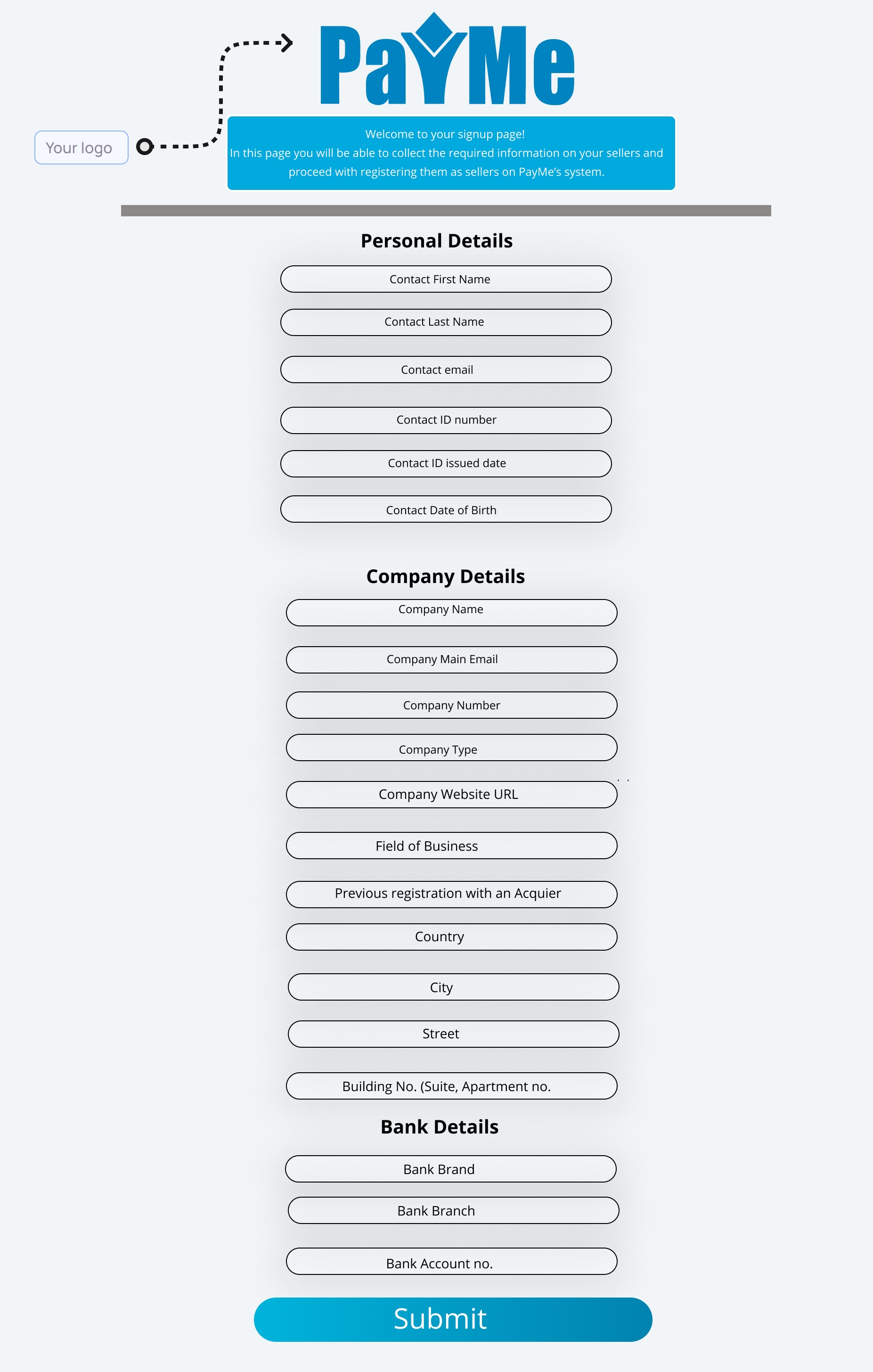
### Personal details
| Field | Description |
| --- | --- |
| **First name** | The contact person's first name |
| **Last name** | The contact person's last name |
| **ID number** | The contact person's national ID number |
| **Email address** | The seller's email address. It must be unique among your sellers |
| **Phone number** | The business phone number |
| **Contact phone** | The contact person's phone number |
| **Contact email** | The contact person's email address |
| **Password** | The seller's password for the PayMe dashboard |
### Company details
| Field | Description |
| --- | --- |
| **Company name** | The business's legal name |
| **Registration number** | The business's registration number |
| **Company type** | One of the [seller incorporation types](https://docs.payme.io/marketplaces-and-platforms/seller-reference/seller-incorporation-types-il) |
| **Acquirer registration** | The seller's existing business code on the acquirer's network, if it has one |
### Bank account details
| Field | Description |
| --- | --- |
| **Bank code** | A code from [Banks in Israel](https://docs.payme.io/payments/codes-statuses/banks-in-israel) |
| **Bank branch** | Branch number |
| **Bank account number** | Account number |
- [Enable payment methods and services for your sellers](https://docs.payme.io/marketplaces-and-platforms/seller-onboarding/enable-services): Partner guide to seller services (VAS). Sellers install Apple Pay, Google Pay and Bit from the dashboard app store. Partners call vas-enable with payme_client_key, seller_payme_id and the partner's vas_payme_id (from PayMe Partners); status_code 0 = on, 2 = Zendesk ticket, PayMe completes it. Apple Pay needs vas_data.websites (up to 99, domain file checked live, 703). Check with get-vas-seller (vas_type names, error 24; no callback). Turn off with vas-disable; then sales with that method fail 720. 703 = partner lacks the service.
## Prerequisites
- Partner credentials (payme_client_key) from PayMe Partners
- The seller's seller_payme_id (MPL)
- The vas_payme_id of each service on your partner account
## Related
- [List a seller's services](https://docs.payme.io/payments/merchants-management/post-get-vas-seller)
- [Enable Apple Pay for a seller](https://docs.payme.io/payments/apple-pay/post-vas-enable-apple-pay)
- [Enable Google Pay for a seller](https://docs.payme.io/payments/google-pay/post-vas-enable-google-pay)
- [Order POS devices](https://docs.payme.io/payments/point-of-sale-pos/post-vas-enable)
- [VAS types](https://docs.payme.io/marketplaces-and-platforms/seller-reference/vas-types)
- [Accept Apple Pay](https://docs.payme.io/accepting-payments/payment-methods/apple-pay)
- [Accept Google Pay](https://docs.payme.io/accepting-payments/payment-methods/google-pay)
- [Accept Bit payments](https://docs.payme.io/accepting-payments/payment-methods/bit)
- [Let the buyer choose how to pay](https://docs.payme.io/accepting-payments/checkout-and-in-person/let-the-buyer-choose)
- [Create sellers](https://docs.payme.io/marketplaces-and-platforms/seller-onboarding/create-seller)
# Enable payment methods and services for your sellers
Payment methods other than cards, such as Apple Pay, Google Pay and Bit, and other value-added services (VAS) are turned on per seller. A seller can install them in the PayMe dashboard. As a partner, you turn them on, check them and turn them off with three API calls:
| To | Call |
|---|---|
| Turn a service on | `POST /vas-enable` |
| See what a seller has | [`POST /get-vas-seller`](https://docs.payme.io/payments/merchants-management/post-get-vas-seller) |
| Turn a service off | `POST /vas-disable` |
All three are partner-only. Send your `payme_client_key` and the seller's `seller_payme_id` in the JSON body; the seller must be one of yours. Base URL: `https://sandbox.payme.io/api` in the sandbox, `https://live.payme.io/api` in production.
## The seller's own path: the dashboard app store
A seller who logs in to the PayMe dashboard installs Apple Pay, Google Pay or Bit from the app store (חנות אפליקציות). The method is active as soon as it is installed, and you don't need to do anything.
A seller can't call `vas-enable` itself, because the call needs a partner key. A seller without a partner who wants to show Apple Pay on its own domains asks PayMe Partners () to register them.
## Before you start
You need:
- your partner key (`payme_client_key`);
- the seller's MPL (`seller_payme_id`);
- the `vas_payme_id` of each service: your partner account's ID for that service (`VASL…`). Ask PayMe Partners () for the IDs of the services on your account.
You can turn on only the services that your partner account has. Any other returns error `703` with `Partner has no permission for this VAS`.
## Turn a service on
`POST https://sandbox.payme.io/api/vas-enable` (production: `https://live.payme.io/api/vas-enable`)
```json
{
"payme_client_key": "payme_partner_key",
"seller_payme_id": "MPLDEMO-MPLDEMO-MPLDEMO-1234567",
"vas_payme_id": "VASLDEMO-GOOGLEPAY-VASLDEMO-1234567",
"language": "en"
}
```
| Field | Required | Description |
|---|---|---|
| `payme_client_key` | Yes | Your partner key. Keep it on your server. |
| `seller_payme_id` | Yes | The seller's MPL. The seller must be one of yours. |
| `vas_payme_id` | Yes | Your partner account's ID for the service. |
| `vas_data` | Depends on the service | The service's settings. See [What each service needs](#what-each-service-needs). |
| `vas_payer_type` | No | Who pays the service fees: `1` – partner, `2` – seller, `3` – reseller. Used only when the service is first created for the seller. Default: the payer set on your partner account's service. |
| `language` | No | Language of error messages: `he` (default) or `en`. |
The response has one of two outcomes.
**`status_code: 0` – the service is on.** The response holds the seller's own copy of the service: `vas_guid`, `vas_is_active: true`, its type, prices and settings.
```json
{
"status_code": 0,
"session": "a1B2c3D4",
"seller_payme_id": "MPLDEMO-MPLDEMO-MPLDEMO-1234567",
"vas_payme_id": "VASLDEMO-GOOGLEPAY-VASLDEMO-1234567",
"vas_guid": "VASLDEMO-VASLDEMO-VASLDEMO-7654321",
"vas_type": "AlternativePaymentMethod",
"vas_name": null,
"vas_is_active": true,
"vas_payer_type": 2,
"vas_price_currency": "ILS",
"vas_price_setup_fixed": 0,
"vas_price_periodic_fixed": 0,
"vas_price_periodic_variable": "0.00",
"vas_price_usage_fixed": 0,
"vas_price_usage_variable": "0.00",
"vas_market_fee": null,
"vas_period": 1
}
```
**`status_code: 2` – PayMe's team completes the setup.** Some services are set up by hand. The call then opens a ticket for PayMe's team and answers:
```json
{
"status_code": 2,
"session": "a1B2c3D4",
"seller_payme_id": "MPLDEMO-MPLDEMO-MPLDEMO-1234567",
"message": "Zendesk ticket created"
}
```
Check the result later with `get-vas-seller`: `vas_is_active` is `true` once the service is on. PayMe sends partners no callback when a seller's service changes.
Calling `vas-enable` for a service the seller already has turns it back on and updates its settings with the `vas_data` you send.
## What each service needs
| Service | `vas_data` | Notes |
|---|---|---|
| Apple Pay | `websites`: the domains that show the Apple Pay button on your own pages, up to 99 per call | PayMe checks every domain during the call. See [Apple Pay domains](#apple-pay-domains). PayMe's own payment-page host is registered for you. |
| Google Pay | None | To show Google Pay on your own pages, also register your domain in the Google Pay & Wallet Console. See [Accept Google Pay](https://docs.payme.io/accepting-payments/payment-methods/google-pay). |
| Bit | None | ILS only, one payment. See [Accept Bit payments](https://docs.payme.io/accepting-payments/payment-methods/bit). |
| POS devices | The device order: `number_of_devices` and `items` | Two `vas-enable` calls, then a manual process. See [Order POS devices](https://docs.payme.io/payments/point-of-sale-pos/post-vas-enable). |
| 3D Secure, invoicing, B2B transfers and other services | — | Set up by PayMe. Ask PayMe Partners (), with the seller's MPL. |
Once a payment method is on, create sales with its `sale_payment_method` (`apple-pay`, `google-pay` or `bit`), or with `multi` to let the buyer choose: see [Let the buyer choose how to pay](https://docs.payme.io/accepting-payments/checkout-and-in-person/let-the-buyer-choose). A sale with a method the seller doesn't have fails with error `720`.
## Apple Pay domains
To show the Apple Pay button on your own pages, register every domain and subdomain that shows it:
1. Serve PayMe's domain file, unchanged, at `https:///.well-known/apple-developer-merchantid-domain-association`. The sandbox and production files are different: see [Host PayMe's domain file](https://docs.payme.io/accepting-payments/payment-methods/apple-pay#step-1-host-paymes-domain-file).
2. Call `vas-enable` with the domains in `vas_data.websites`. PayMe fetches each domain's file, compares it with its own, and registers the domains with Apple in the same call.
```json
{
"payme_client_key": "payme_partner_key",
"seller_payme_id": "MPLDEMO-MPLDEMO-MPLDEMO-1234567",
"vas_payme_id": "VASLDEMO-VASLDEMO-VASLDEMO-1234567",
"vas_data": {
"websites": ["example.com", "shop.example.com"]
}
}
```
- If any domain fails, the whole call fails with error `703`, and `status_additional_info` names each site: `: Certificate does not match, please reconfigure.` or `: Cannot locate certificate.` More than 99 domains also returns `703`. Fix the file and send the call again: nothing is left pending.
- If Apple refuses the registration, the call returns error `20` with `Domain is not registered`.
- To add domains later, call `vas-enable` again with the new ones. Domains already approved stay approved.
- `vas-update`: contact PayMe support for adding Apple Pay domains to an enabled service.
The whole Apple Pay setup, including the browser SDK, is on [Accept Apple Pay](https://docs.payme.io/accepting-payments/payment-methods/apple-pay).
## See what a seller has
Call [`get-vas-seller`](https://docs.payme.io/payments/merchants-management/post-get-vas-seller). To list only payment methods, filter by `vas_type: AlternativePaymentMethod`.
`POST https://sandbox.payme.io/api/get-vas-seller` (production: `https://live.payme.io/api/get-vas-seller`)
```json
{
"payme_client_key": "payme_partner_key",
"seller_payme_id": "MPLDEMO-MPLDEMO-MPLDEMO-1234567",
"vas_type": "AlternativePaymentMethod",
"language": "en"
}
```
Each item in `items` is one of the seller's services. Read `vas_description` (the service's name), `vas_guid` (the seller's copy of the service) and `vas_is_active`. Send `vas_type` as a name from [VAS types](https://docs.payme.io/marketplaces-and-platforms/seller-reference/vas-types): a number or an unknown name returns error `24`. Inactive sellers can be queried too.
## Turn a service off
`POST https://sandbox.payme.io/api/vas-disable` (production: `https://live.payme.io/api/vas-disable`), with the same three IDs as `vas-enable`:
```json
{
"payme_client_key": "payme_partner_key",
"seller_payme_id": "MPLDEMO-MPLDEMO-MPLDEMO-1234567",
"vas_payme_id": "VASLDEMO-GOOGLEPAY-VASLDEMO-1234567"
}
```
```json
{
"status_code": 0,
"session": "a1B2c3D4",
"seller_payme_id": "MPLDEMO-MPLDEMO-MPLDEMO-1234567",
"vas_payme_id": "VASLDEMO-GOOGLEPAY-VASLDEMO-1234567"
}
```
As with `vas-enable`, the answer can be `status_code: 2` with `Zendesk ticket created` when PayMe's team handles the change. If the seller doesn't have the service, the call returns error `720`.
Once a payment method is off, a sale with that `sale_payment_method` fails with error `720`, and `multi` pages stop showing it. To turn it back on, call `vas-enable` again.
## Errors
Errors return `status_code: 1` with `status_error_code`.
| HTTP | `status_error_code` | When |
|---|---|---|
| 500 | `1` | `payme_client_key`, `seller_payme_id` or `vas_payme_id` is missing (`get-vas-seller` needs only the first two). |
| 400 | `20` | The seller isn't one of yours, or Apple refused an Apple Pay domain registration. |
| 500 | `24` | `get-vas-seller`: `vas_type` is a number or an unknown name. |
| 500 | `200` | The partner key is unknown. |
| 500 | `251` | The seller key is unknown. |
| 400 or 500 | `703` | Your partner account doesn't have this service, partners can't change it, or an Apple Pay domain check failed. |
| 400 or 500 | `720` | No active service has this `vas_payme_id` (HTTP 500), or, on `vas-disable`, the seller doesn't have the service (HTTP 400). |
All error codes are on [Errors](https://docs.payme.io/payments/getting-started/errors).
- [Onboard a seller, from creation to first payout](https://docs.payme.io/marketplaces-and-platforms/seller-onboarding/onboard-a-seller): Partner guide to a seller's lifecycle. Collect details (PayMe sets required fields per partner, error 19). create-seller: store the MPL and public key, send seller_dashboard_signup_link; 5 calls/min per IP. Documents: 1 and 2 for every seller, 3 for most; 90-97 are personal (error 184). Approval: seller-approve callback and seller_approved on get-sellers; seller-update arrives during review. Then services, the first sale, and the first payout: approved, bank details, released funds, minimum 100.00; plans 1/2/3; errors 109, 907, 908, 913.
## Prerequisites
- Partner credentials (payme_client_key) from PayMe Partners
- A default callback URL on your partner account, to receive seller callbacks
## Related
- [Create sellers](https://docs.payme.io/marketplaces-and-platforms/seller-onboarding/create-seller)
- [Create a seller](https://docs.payme.io/payments/merchants-management/post-create-seller)
- [Upload seller files](https://docs.payme.io/payments/merchants-management/post-upload-seller-files)
- [File types](https://docs.payme.io/marketplaces-and-platforms/seller-reference/file-types)
- [List sellers](https://docs.payme.io/payments/query-apis/post-get-sellers)
- [Update a seller](https://docs.payme.io/payments/merchants-management/post-update-seller)
- [Withdrawals](https://docs.payme.io/marketplaces-and-platforms/fees-and-payouts/withdrawals)
- [Platform fees](https://docs.payme.io/marketplaces-and-platforms/fees-and-payouts/platform-fees)
- [Start here: build a platform or marketplace on PayMe](https://docs.payme.io/marketplaces-and-platforms/start-here/how-platforms-work)
- [Callbacks](https://docs.payme.io/payments/getting-started/callbacks)
# Onboard a seller, from creation to first payout
This guide follows one seller through its whole life on your platform: you create it, upload its documents, PayMe approves it, it takes its first payment and gets its first payout. Only partners onboard sellers, with their `payme_client_key`. For the two ways to create a seller and the fields PayMe's onboarding pages ask for, see [Create sellers](https://docs.payme.io/marketplaces-and-platforms/seller-onboarding/create-seller).
## The lifecycle at a glance
| Stage | What you do | How you know it's done |
|---|---|---|
| 1. Collect the details | Your onboarding form | Nothing to check yet |
| 2. Create the seller | [create-seller](https://docs.payme.io/payments/merchants-management/post-create-seller) | `seller_payme_id` in the response, then the `seller-create` callback |
| 3. Upload the documents | [upload-seller-files](https://docs.payme.io/payments/merchants-management/post-upload-seller-files), or the seller uploads them on PayMe's onboarding pages | `status_code` `0` |
| 4. Approval | Wait for PayMe's review | The `seller-approve` callback, and `seller_approved` `true` on [get-sellers](https://docs.payme.io/payments/query-apis/post-get-sellers) |
| 5. Services | The seller installs payment methods, or you call `vas-enable` | [get-vas-seller](https://docs.payme.io/payments/merchants-management/post-get-vas-seller) lists them |
| 6. First sale | [generate-sale](https://docs.payme.io/payments/hosted-payment-page/post-generate-sale) with the seller's MPL | The `sale-complete` callback |
| 7. First payout | [withdraw-balance](https://docs.payme.io/payments/merchants-management/post-withdraw-balance), or automatic | The `withdrawal-complete` callback, then [get-withdrawals](https://docs.payme.io/payments/query-apis/post-get-withdrawals) |
A seller can take payments from stage 2. Only the payout waits for approval.
## 1. Collect the seller's details
- **Required fields:** PayMe sets which create-seller fields are required for your partner account. A missing one returns error `19`, and `status_additional_info` names it. `seller_email` is always required and must be unique among your sellers (error `150`).
- **Your own ID:** send `seller_id` to find the seller by your ID later. It must be unique among your sellers (error `108`).
- **Reference lists:** incorporation types per country on [Seller incorporation types](https://docs.payme.io/marketplaces-and-platforms/seller-reference/seller-incorporation-types-il) (error `114`), business field codes on [List business fields](https://docs.payme.io/payments/merchants-management/get-business-fields) (error `110`), bank codes on [Banks in Israel](https://docs.payme.io/payments/codes-statuses/banks-in-israel) (error `106`).
- **Dates:** `dd/mm/yyyy` with leading zeros, for example `06/05/1989`.
- **Other people in the business:** owners, signatories and directors go in `seller_additional_details`, one object per person, with their roles from [Individual seller types](https://docs.payme.io/marketplaces-and-platforms/seller-reference/individual-seller-types).
## 2. Create the seller
Call [create-seller](https://docs.payme.io/payments/merchants-management/post-create-seller) from your server:
```bash
curl -X POST https://sandbox.payme.io/api/create-seller \
-H 'Content-Type: application/json' \
-d '{
"payme_client_key": "XXXXXXXX",
"seller_id": "store-1001",
"seller_first_name": "Dana",
"seller_last_name": "Levi",
"seller_social_id": "9999999999",
"seller_birthdate": "06/05/1989",
"seller_social_id_issued": "01/02/2015",
"seller_gender": 1,
"seller_email": "random@paymeservice.com",
"seller_phone": "+972501234567",
"seller_bank_code": 54,
"seller_bank_branch": 123,
"seller_bank_account_number": "123456",
"seller_site_url": "https://www.example.com",
"seller_person_business_type": 205,
"seller_inc": 1,
"seller_merchant_name": "Dana Ceramics",
"seller_address_city": "Tel Aviv",
"seller_address_street": "Herzl",
"seller_address_street_number": "10",
"seller_address_country": "IL",
"market_fee": 2.5,
"language": "en"
}'
```
The values `9999999999`, `random@paymeservice.com` and bank `54` are sandbox test values. Use the seller's real details in production.
From the response:
```json
{
"status_code": 0,
"session": "a1B2c3D4",
"seller_payme_id": "MPLDEMO-MPLDEMO-MPLDEMO-1234567",
"seller_payme_secret": "Qw3rTy7uI9oP1aS5dF8gH2jK4lZ6xC",
"seller_public_key": {
"uuid": "12345678-1234-4abc-9def-123456789012",
"description": "PayMe-Public-Key",
"is_active": true
},
"seller_id": "store-1001",
"seller_dashboard_signup_link": "https:///"
}
```
- Store `seller_payme_id` (the MPL) on your server. You send it on every call for this seller.
- Store `seller_public_key.uuid` for the seller's browser code.
- Send the seller `seller_dashboard_signup_link`, exactly as returned. There the seller sets a password and finishes onboarding.
- Ignore `seller_payme_secret`: it isn't a credential.
The call is limited to 5 requests per minute per IP. Over the limit, or while a call for the same `seller_email` is still running, it returns HTTP 429 with error `998`: wait and retry. A partner sets the seller's default platform fee here with `market_fee`; it can't be changed later with update-seller. See [Platform fees](https://docs.payme.io/marketplaces-and-platforms/fees-and-payouts/platform-fees).
## 3. Upload the documents
PayMe approves a seller only after it has checked the seller's documents. Use the codes on [File types](https://docs.payme.io/marketplaces-and-platforms/seller-reference/file-types):
| Seller | Files |
|---|---|
| Every seller | `1` social ID and `2` bank account ownership |
| Every seller except a private individual, a House Committee, and Municipalities and councils | Also `3` corporate certificate |
| A House Committee | Also `14` authorized signer protocol and `7` processing agreement |
| Municipalities and councils | Also `27` origin tax confirmation and `7` processing agreement |
| Some services and partner accounts | Also `7` or `29`. Your account manager will tell you. |
There are three ways to send them:
- **[upload-seller-files](https://docs.payme.io/payments/merchants-management/post-upload-seller-files):** one or more files, each as a public `url` or as `base64` content.
- **On create-seller:** public URLs in `seller_file_social_id` (type `1`), `seller_file_cheque` (type `2`) and `seller_file_corporate` (type `3`). PayMe downloads them in the background.
- **The seller uploads them** on PayMe's onboarding pages, through `seller_dashboard_signup_link`.
```json
{
"payme_client_key": "XXXXXXXX",
"seller_payme_id": "MPLDEMO-MPLDEMO-MPLDEMO-1234567",
"seller_files": [
{
"name": "social_id.pdf",
"type": 1,
"url": "https://www.example.com/files/social_id.pdf",
"mime_type": "application/pdf"
}
],
"language": "en"
}
```
Personal documents (types `90`–`97`, such as the front and back of an ID) belong to a person:
- In `seller_additional_details[].files` on create-seller, they are attached to that person.
- With upload-seller-files, they are attached to the seller's primary individual. If the seller has more than one individual, the call fails with error `184`.
Allowed file types and the upload errors (`904`, `905`, `909`) are on [upload-seller-files](https://docs.payme.io/payments/merchants-management/post-upload-seller-files).
## 4. Verification and approval
PayMe reviews the seller's details and documents. You learn the result from seller callbacks and from get-sellers.
### Seller callbacks
PayMe sends these callbacks to your partner account's default callback URL as a form-encoded `POST`. Each carries the seller's details (`seller_payme_id`, `seller_id`, `seller_active`, `seller_approved` and more): see [Callbacks → Sellers](https://docs.payme.io/payments/getting-started/callbacks#sellers-partners).
| `notify_type` | When PayMe sends it |
|---|---|
| `seller-create` | The seller was created. Also carries `seller_public_key`. |
| `seller-update` | The seller changed: after update-seller, when PayMe records the result of a check on the seller, and when the seller's approval changes. |
| `seller-approve` | PayMe approved the seller. Also carries `partner_name`. |
- When PayMe approves a seller, it sends both `seller-approve` and `seller-update`. They can arrive in any order.
- A `seller-update` during the review isn't an approval. Wait for `seller-approve`, or for `seller_approved` `1`.
- Seller callbacks carry no signature. Treat each one as a prompt: read the seller with get-sellers and act on what it returns.
- If your partner account has no default callback URL, PayMe sends no seller callbacks. Ask PayMe Partners to set one, or check get-sellers.
### Check the seller's state
Call [get-sellers](https://docs.payme.io/payments/query-apis/post-get-sellers) with the seller's MPL:
```json
{
"payme_client_key": "XXXXXXXX",
"seller_payme_id": "MPLDEMO-MPLDEMO-MPLDEMO-1234567",
"api_mode": "slim"
}
```
| Field | Meaning |
|---|---|
| `seller_approved` | `true` once PayMe has approved the seller. Withdrawals need it. |
| `seller_approved_date` | When PayMe approved the seller, or `null` |
| `seller_active` | `true` if the seller is active |
To list every seller that is still waiting, send `payme_client_key` with `"seller_approved": false`.
### If a document is declined
Upload a corrected file with the same type. If a required document is declined after the seller was approved, the seller loses its approval: you get a `seller-update` with `seller_approved` `0`, and withdrawals fail with error `109` until PayMe approves the seller again.
### Before and after approval
| | Before approval | After approval |
|---|---|---|
| Take payments | Yes | Yes |
| Request a withdrawal | No, error `109` | Yes, if the seller is active, has bank details and has released funds |
## 5. Turn on payment methods and services
- **Apple Pay, Google Pay, Bit:** the seller installs them from the dashboard app store (חנות אפליקציות), or you enable them with `vas-enable`. See [Accept Apple Pay](https://docs.payme.io/accepting-payments/payment-methods/apple-pay) and [Accept Google Pay](https://docs.payme.io/accepting-payments/payment-methods/google-pay). A sale with a method the seller doesn't have fails with error `720`.
- **3D Secure:** enabled on the seller's account by PayMe.
- **Check:** [get-vas-seller](https://docs.payme.io/payments/merchants-management/post-get-vas-seller) lists the services installed on the seller. Service types are on [VAS types](https://docs.payme.io/marketplaces-and-platforms/seller-reference/vas-types).
## 6. Take the first sale
Create the sale with the seller's MPL, from your server. Add `market_fee` to override the seller's default fee for this sale. The full example is on [Start here: build a platform or marketplace on PayMe](https://docs.payme.io/marketplaces-and-platforms/start-here/how-platforms-work), and the fee rules on [Platform fees](https://docs.payme.io/marketplaces-and-platforms/fees-and-payouts/platform-fees).
## 7. Get the first payout
How the seller is paid depends on `seller_withdrawal_plan` on get-sellers. A new seller starts on your partner account's default plan:
| Plan | How the seller is paid |
|---|---|
| `1` manual | You request each withdrawal with withdraw-balance |
| `2` automatic, daily | PayMe pays out by itself. withdraw-balance returns error `907`. |
| `3` automatic, monthly | PayMe pays out on `seller_withdrawal_date`. withdraw-balance returns error `907`. |
A seller paid directly by the card companies gets its money from them, and withdraw-balance returns error `908`.
Before the first withdrawal, check that:
- the seller is approved (otherwise error `109`) and has bank details on file (otherwise error `165`);
- `seller_wallets..wallet_releasable` on get-sellers is above zero. It isn't returned with `api_mode` `slim`. Each sale's `sale_release_date` on get-sales tells you when its money is released;
- the released balance reaches the minimum, by default 100.00 in the currency (otherwise error `913`).
On plan `1`, request the withdrawal:
```json
{
"payme_client_key": "XXXXXXXX",
"seller_payme_id": "MPLDEMO-MPLDEMO-MPLDEMO-1234567",
"withdrawal_currency": "ILS"
}
```
This withdraws the whole released balance in that currency. When the withdrawal is recorded, PayMe sends `withdrawal-complete` to your default callback URL, before the bank transfer arrives. Read the final amount from get-withdrawals. Partial withdrawals, specific transactions, the callback fields and every error are on [Withdrawals](https://docs.payme.io/marketplaces-and-platforms/fees-and-payouts/withdrawals).
In the sandbox, sellers start on an automatic plan: ask PayMe to set up a test seller before you test a withdrawal.
## Change a seller later
Call [update-seller](https://docs.payme.io/payments/merchants-management/post-update-seller) with `payme_client_key`, the seller's MPL (or your `seller_id`) and only the fields you want to change. PayMe then sends `seller-update`.
- PayMe sets which fields stay locked once they have a value. Changing one returns error `33`.
- `seller_additional_details` adds people. It doesn't change or remove the people already on file.
- The seller's default `market_fee` can't be changed with update-seller. Contact PayMe Partners ().
- [Platform fees](https://docs.payme.io/marketplaces-and-platforms/fees-and-payouts/platform-fees): How a partner charges a platform fee on its sellers' sales. market_fee is a percent (0-60) set as the seller's default on create-seller or per sale on generate-sale; market_fee_fixed adds a fixed fee per sale in major units. Errors 304 and 308. The seller's default can't be changed with update-seller; contact PayMe. See the fee on get-sellers, get-sales and get-transactions.
## Related
- [Reconcile sales and withdrawals](https://docs.payme.io/accepting-payments/reporting/reconcile-sales-and-withdrawals)
- [Withdrawals](https://docs.payme.io/marketplaces-and-platforms/fees-and-payouts/withdrawals)
# Platform fees
## What market_fee is
`market_fee` is the percent of each sale price that PayMe collects from the seller for you, the platform. It comes on top of PayMe's own fees. The buyer pays the same price.
- **Units:** a percent, not minor units. `2.5` means 2.5%.
- **Range:** 0 to 60.
- **VAT:** the percent includes VAT. PayMe adds none on top.
- **Payout:** by default, the fee is transferred to the marketplace once a month. The seller's balance is already net of it.
On a sale of `10000` (100.00) with `market_fee` `2.5`, the fee is `250` (2.50).
## Set a default for a seller
Send `market_fee` on [Create a seller](https://docs.payme.io/payments/merchants-management/post-create-seller). Without it, the seller's default is `0`. A value outside 0–60 returns error `304`.
The default can't be changed with [Update a seller](https://docs.payme.io/payments/merchants-management/post-update-seller). To change a seller's default later, contact PayMe Partners (). Until it's changed, set the fee on each sale with `market_fee`, as shown below.
A change to the default affects future sales only. Each sale keeps the fee it had when it was generated, including an authorization that hasn't been captured yet.
## Set the fee on one sale
Send `market_fee` on [Generate Payment](https://docs.payme.io/payments/hosted-payment-page/post-generate-sale) to override the seller's default for that sale. Without it, the sale uses the seller's default. Send `0` to charge no fee on that sale.
```json
{
"payme_client_key": "XXXXXXXX",
"seller_payme_id": "MPLDEMO-MPLDEMO-MPLDEMO-1234567",
"sale_price": 10000,
"currency": "ILS",
"product_name": "Monthly plan",
"transaction_id": "order-1001",
"sale_callback_url": "https://example.com/payme/callback",
"sale_return_url": "https://example.com/thanks",
"market_fee": 2.5
}
```
## Add a fixed fee per sale
Send `market_fee_fixed` on generate-sale to add a fixed fee to the percent on that sale. Unlike other amounts in the API, it is in **major units**: `2.5` means 2.50. The percent and the fixed fee are added together.
On a sale of `10000` (100.00) with `market_fee` `2.5` and `market_fee_fixed` `1`, the fee is `350` (3.50).
The percent plus the fixed fee, taken as a percent of the sale price, can't be more than 60%.
| Error | Meaning |
| --- | --- |
| `10` | `market_fee` is not a number |
| `304` | `market_fee` is negative, or `market_fee_fixed` is negative or not a number |
| `308` | `market_fee` plus `market_fee_fixed` is above 60% of the sale price |
## Sellers paid directly
Setting the fee on a sale isn't supported for sellers the card companies pay directly: the seller's default applies, whatever the sale sends. Contact PayMe to arrange platform fees for these sellers.
## See what was charged
| Where | Field | Meaning |
| --- | --- | --- |
| [get-sellers](https://docs.payme.io/payments/query-apis/post-get-sellers) | `seller_fees.fee_market_fee` | The seller's default percent. Use it to confirm a change took effect. You can also filter on `fee_market_fee` |
| [get-sales](https://docs.payme.io/payments/query-apis/post-get-sales) | `sale_fees.sale_market_fee`, `sale_fees.sale_market_fee_fixed` | The percent, and the fixed fee in major units, on this sale |
| [get-transactions](https://docs.payme.io/payments/query-apis/post-get-transactions) | `sale_fees.sale_market_fee_total` | The fee on this transaction's amount in minor units: the percent part plus the fixed part |
On `get-transactions`, a partial refund's `sale_market_fee_total` is worked out from the refunded amount, so it shows the fee on that part of the sale. Whether a seller gets fees back on a refund depends on the seller's account settings.
- [Withdrawals](https://docs.payme.io/marketplaces-and-platforms/fees-and-payouts/withdrawals): How sellers get paid. seller_withdrawal_plan 1 (manual) sellers request payouts with withdraw-balance (whole released balance, withdrawal_amount, or transaction_ids); plans 2 and 3 are automatic (error 907); paid-directly sellers get error 908. The seller must be approved by PayMe (error 109). Track with get-withdrawals and get-future-withdrawals; the withdrawal-complete callback; common errors.
## Related
- [Reconcile sales and withdrawals](https://docs.payme.io/accepting-payments/reporting/reconcile-sales-and-withdrawals)
- [Platform fees](https://docs.payme.io/marketplaces-and-platforms/fees-and-payouts/platform-fees)
# Withdrawals
## How sellers get paid
A withdrawal moves a seller's released balance to its bank account. How it starts depends on `seller_withdrawal_plan` on [get-sellers](https://docs.payme.io/payments/query-apis/post-get-sellers), and on whether the card companies pay the seller directly:
| Seller | How money arrives | Can request a withdrawal |
| --- | --- | --- |
| `seller_withdrawal_plan` `1` | Manual: you request each withdrawal | Yes |
| `seller_withdrawal_plan` `2` | Automatic, daily | No, error `907` |
| `seller_withdrawal_plan` `3` | Automatic, monthly on `seller_withdrawal_date` | No, error `907` |
| Paid directly by the card companies (`withdrawable` is `0` on get-future-withdrawals) | The card companies pay the seller directly | No, error `908` |
A new seller takes the partner's default plan, and no API field changes it. Every seller created on the sandbox test account came back on plan `2`, so PayMe has to set up a test seller before a withdrawal can succeed there.
## Before the first withdrawal
Funds can't be withdrawn until PayMe approves the seller. Until then, withdraw-balance returns error `109`. `seller_approved` on get-sellers shows the approval, and a partner receives the `seller-approve` [callback](https://docs.payme.io/payments/getting-started/callbacks).
Approval needs the seller's documents. Upload them with [Upload seller files](https://docs.payme.io/payments/merchants-management/post-upload-seller-files), using the codes on [File types](https://docs.payme.io/marketplaces-and-platforms/seller-reference/file-types):
| Document | Code | Needed by |
| --- | --- | --- |
| Social ID | `1` | Every seller |
| Bank account ownership | `2` | Every seller |
| Corporate certificate | `3` | Every seller except a private individual, a house committee or a municipality |
Some business types need more documents. File types lists them. The seller must also be active and have bank details on file.
Approval holds back payouts, not payments: a new seller can start taking payments while it waits. Show sellers their approval state early, and send them the `seller_dashboard_signup_link` that [Create a seller](https://docs.payme.io/payments/merchants-management/post-create-seller) returns so they can finish onboarding.
## Check the balance
There is no separate balance call. `seller_wallets` on get-sellers holds each currency's balance, in minor units. It isn't returned when you send `api_mode` `slim`.
| Field | Meaning |
| --- | --- |
| `wallet_total` | Everything PayMe holds for the seller |
| `wallet_releasable` | The part past its release date |
| The difference | Funds not released yet. `sale_release_date` on [get-sales](https://docs.payme.io/payments/query-apis/post-get-sales) gives each sale's date |
Check `seller_approved` as well: a positive `wallet_releasable` doesn't mean the seller can withdraw.
## Request a withdrawal
Call [withdraw-balance](https://docs.payme.io/payments/merchants-management/post-withdraw-balance) with one currency. A partner sends `payme_client_key` and `seller_payme_id`.
```json
{
"payme_client_key": "XXXXXXXX",
"seller_payme_id": "MPLDEMO-MPLDEMO-MPLDEMO-1234567",
"withdrawal_currency": "ILS"
}
```
This withdraws the whole released balance in that currency. To withdraw a set amount instead, add `withdrawal_amount` in minor units. It must be at least the minimum and no more than the released balance.
The response identifies the withdrawal:
```json
{
"status_code": 0,
"page": 1,
"items_per_page": 1,
"items_total": 1,
"items": [
{
"withdrawal_id": 10001,
"withdrawal_currency": "ILS",
"withdrawal_total": 600000
}
]
}
```
If `items` is empty, no withdrawal was created. PayMe finishes a whole-balance withdrawal in the background, so the amount can change and a failed withdrawal is removed. Read the final amount from get-withdrawals.
If the call times out or the connection drops, PayMe may still have acted. Check [get-withdrawals](https://docs.payme.io/payments/query-apis/post-get-withdrawals) before you retry: there is no idempotency key.
## Withdraw specific transactions
To withdraw only some transactions, add `transaction_ids` with `payme_transaction_id` values from [get-transactions](https://docs.payme.io/payments/query-apis/post-get-transactions):
```json
{
"payme_client_key": "XXXXXXXX",
"seller_payme_id": "MPLDEMO-MPLDEMO-MPLDEMO-1234567",
"withdrawal_currency": "ILS",
"transaction_ids": ["TRANDEMO-XXXXXXXX-XXXXXXXX-XXXXXXXX"]
}
```
Every transaction must belong to the seller, be in the withdrawal currency, be released and not be withdrawn already. PayMe also takes in the released, unwithdrawn transactions on the same sales, such as a refund. `transaction_ids` in the response lists every transaction involved, so it can hold more IDs than you sent.
## Track withdrawals
| To see | Call | Fields |
| --- | --- | --- |
| Past withdrawals | [get-withdrawals](https://docs.payme.io/payments/query-apis/post-get-withdrawals) | `withdrawal_payme_code`, `withdrawal_created`, `withdrawal_currency`, `withdrawal_total`, `withdrawal_source`, `withdrawal_card_brand` |
| Upcoming withdrawals | [get-future-withdrawals](https://docs.payme.io/payments/query-apis/get-future-withdrawals) | `created_at`, `total`, `start_time`, `end_time`, `withdrawable` |
- **get-withdrawals:** a seller sees its own withdrawals. A partner sees all its sellers, or those named in `seller_payme_id`. The response has no status for the bank transfer.
- **get-future-withdrawals:** send `seller_payme_id` and `currency`, both required, for one seller per request. An item with `end_time` `-1` covers everything after the listed periods. `withdrawal_payme_code` on this call doesn't match the code on get-withdrawals.
## Callback
PayMe sends `withdrawal-complete` to the partner's default [callback](https://docs.payme.io/payments/getting-started/callbacks) URL when the withdrawal is recorded, which is before the bank transfer arrives. Treat it as a prompt: read get-withdrawals and act on what that returns. De-duplicate on `tran_payme_code`.
| Field | Example | Meaning |
| --- | --- | --- |
| `notify_type` | `withdrawal-complete` | Type of callback |
| `payme_status` | `success` | Always `success` for this callback |
| `status_code` | `0` | `0` for success |
| `status_error_code` | `0` | `0` for success |
| `seller_payme_id` | `MPLDEMO-MPLDEMO-MPLDEMO-1234567` | The seller |
| `seller_id` | `store-1001` | Your own ID for the seller, if you set one |
| `sale_payme_code` | `0` | Always `0` |
| `tran_payme_code` | `10001` | The same number as `withdrawal_payme_code` |
| `tran_created` | `2026-11-03 15:15:15` | Withdrawal time, Asia/Jerusalem |
| `tran_type` | `40` | Bank withdrawal |
| `tran_currency` | `ILS` | Currency |
| `tran_total` | `600000` | Amount in minor units |
| `tran_description` | (Hebrew text) | A Hebrew label. Don't parse it |
## Common errors
Branch on `status_error_code`, as described on [Errors](https://docs.payme.io/payments/getting-started/errors).
| Code | Meaning | What to do |
| --- | --- | --- |
| `2` | A previous withdrawal is stuck on a funds mismatch | Contact PayMe support |
| `17` | More than one currency was sent | Send one currency per request |
| `42` | `withdrawal_amount` isn't an integer | Send the amount in minor units, as an integer |
| `109` | The seller isn't approved yet | Complete document verification and approval |
| `165` | Bank details are missing | Update the seller's bank details |
| `171` | No funds available to withdraw, or `withdrawal_amount` is above them | Check `wallet_releasable` and try after funds are released |
| `252` | Unknown `withdrawal_currency` | Send a 3-letter currency code, such as `ILS` |
| `907` | The seller is on an automatic plan | Don't call withdraw-balance; track with the query APIs |
| `908` | The seller is paid directly | Money comes from the card companies |
| `913` | Amount is below the minimum | Wait until the released balance reaches the minimum, by default 100.00 in the currency |
| `998` | HTTP 429: a withdrawal for this seller is still running | Retry later, after checking get-withdrawals |
| `507` | A listed transaction is in another currency | Send one currency per request |
| `523` | A listed transaction isn't released yet | Retry after `transaction_release_date` |
| `525` | A listed transaction was already withdrawn | Remove it from `transaction_ids` |
| `526` | A listed transaction wasn't found | Check the IDs and the seller |
- [File types](https://docs.payme.io/marketplaces-and-platforms/seller-reference/file-types): Reference list of seller document type codes for upload-seller-files and seller_additional_details[].files[].type. Every seller needs 1 (ID) and 2 (bank account); 3 (corporate certificate) for all but private individuals, house committees and municipalities, which need 14+7 and 27+7. Codes 90-97 are individual documents attached to the seller's primary individual (error 184 with more than one individual). Unknown code: error 20.
# File types
Use these codes as `type` when you upload seller documents with [Upload seller files](https://docs.payme.io/payments/merchants-management/post-upload-seller-files), or in `seller_additional_details[].files[]` on [Create a seller](https://docs.payme.io/payments/merchants-management/post-create-seller). An unknown code fails with error `20`.
This page lists the file types partners normally upload. Your account manager may ask for others.
## Required files
PayMe approves a seller, and releases its payouts, only after it has checked the seller's documents. See [Withdrawals](https://docs.payme.io/marketplaces-and-platforms/fees-and-payouts/withdrawals).
- Every seller needs `1` (social ID) and `2` (bank account ownership).
- Every seller except a private individual, a House Committee or Municipalities and councils also needs `3` (corporate certificate).
- A House Committee also needs `14` (authorized signer protocol) and `7` (processing agreement).
- Municipalities and councils also need `27` (origin tax confirmation) and `7`.
- Some services and partner accounts also require `7` or `29` (credit voucher discount agreement). Your account manager will tell you.
## Seller files and individual files
Codes `90`–`97` are individual documents. Upload seller files attaches them to the seller's primary individual, and the upload fails with error `184` if the seller has more than one individual. All other codes are attached to the seller. In `seller_additional_details[].files[]` on Create a seller, only codes `90`–`97` are accepted (error `160`).
## Codes
| Code | Name | Description |
| --- | --- | --- |
| `1` | Social ID | Social ID document (תעודת הזהות) |
| `2` | Bank account ownership | Proof of bank account ownership or a photo of a cancelled cheque (שיק מבוטל או אישור ניהול חשבון בנק) |
| `3` | Corporate certificate | Incorporation document (תעודת התאגדות של עוסק פטור/עוסק מורשה/חברה בע"מ/עמותה) |
| `4` | Bank authorization | Bank authorization (הרשאה לחיוב חשבון) |
| `5` | Personal guarantee | Personal guarantee (ערבות אוואל). Upload only if your account manager asks for it |
| `6` | Promissory note | Promissory note (שטר חוב). Upload only if your account manager asks for it |
| `7` | Processing agreement | Processing agreement (הסכם סליקה). Required for some business types and services, see above |
| `8` | Signature | Signature (חתימה). Upload only if your account manager asks for it |
| `9` | Stamp | Stamp (חותמת). Upload only if your account manager asks for it |
| `11` | Additional license | Additional license (רשיון נוסף). Upload only if your account manager asks for it |
| `12` | Public representative | Public representative statement (הצהרת איש ציבור). Upload only if your account manager asks for it |
| `13` | Regulatory authentication | Company extract or BDI report (נסח חברה או BDI). Upload only if your account manager asks for it |
| `14` | Authorized signer protocol | Authorized signer protocol (פרוטוקול מורשי חתימה). Required for a House Committee |
| `15` | Business proof | Business proof document (אישור עסק). Upload only if your account manager asks for it |
| `16` | Service receiver | Service receiver statement (הצהרת מקבל שירות). Upload only if your account manager asks for it |
| `17` | Face-to-face approval | Face-to-face identification approval (אישור זיהוי פנים מול פנים). Upload only if your account manager asks for it |
| `18` | False statement of information | False statement of information (הצהרת מידע כוזב). Upload only if your account manager asks for it |
| `19` | Bank statement | Bank statements for the last 3 months |
| `20` | Processing history | Credit card processing history |
| `21` | Tax return | Tax return |
| `22` | Inventory proof | Proof of inventory |
| `23` | Company logo | Company logo image. Upload only if your account manager asks for it |
| `24` | Driving license | Driving license (רשיון נהיגה). Used when you onboard Keep sellers |
| `25` | Social ID appendix | Social ID appendix (ספח תעודת זהות). Used when you onboard Keep sellers |
| `26` | Passport | Passport (דרכון). Used when you onboard Keep sellers |
| `27` | Origin tax confirmation | Tax deduction at source confirmation (אישור ניכוי מס במקור). Used when you onboard Keep sellers, and required for Municipalities and councils |
| `28` | Bookkeeping certificate | Bookkeeping certificate (אישור ניהול ספרים). Used when you onboard Keep sellers |
| `29` | Credit voucher discount agreement | Agreement for credit voucher discount. Required for some services, see above |
| `30` | Passport, color, front | Color scan of the front of the passport |
| `31` | Passport, color, back | Color scan of the back of the passport |
| `32` | Professional license | An image of a professional license |
| `33` | Ministry certificate | An image of a ministry certificate |
| `34` | Copyright | An image of a copyright certificate |
| `35` | Lease | An image of the lease agreement of the business |
| `90` | Social ID front | Individual: an image of the front of a social ID |
| `91` | Social ID back | Individual: an image of the back of a social ID |
| `92` | Passport front | Individual: an image of the front of the passport (דרכון) |
| `93` | Passport back | Individual: an image of the back of the passport |
| `94` | Driving license front | Individual: an image of the front of a driving license (רשיון נהיגה) |
| `95` | Driving license back | Individual: an image of the back of a driving license |
| `96` | Selfie | Individual: a selfie for face-to-face identification |
| `97` | Video recording | Individual: a video recording for face-to-face identification |
| `100` | PayMe | Acquirer-specific form. Upload only if your account manager asks for it |
| `101` | Isracard | Acquirer-specific form. Upload only if your account manager asks for it |
| `102` | Tzameret | Acquirer-specific form. Upload only if your account manager asks for it |
| `103` | Cal | Acquirer-specific form. Upload only if your account manager asks for it |
| `104` | ECom | Acquirer-specific form. Upload only if your account manager asks for it |
| `105` | CardCom | Acquirer-specific form. Upload only if your account manager asks for it |
- [Business field codes (MCC)](https://docs.payme.io/marketplaces-and-platforms/seller-reference/mcc-list): Reference list of PayMe business field codes (10000 and up, top-level fields and their children) with Hebrew and English names. Send the code as seller_person_business_type on create-seller or update-seller; an unknown or inactive code returns error 110. The live list is GET /business-fields (allow_children=true for child codes). The Hebrew name is authoritative.
# Business field codes (MCC)
Send one of these codes as `seller_person_business_type` when you [create](https://docs.payme.io/payments/merchants-management/post-create-seller) or [update](https://docs.payme.io/payments/merchants-management/post-update-seller) a seller. An unknown or inactive code fails with error `110`. If you send `seller_inc` without `seller_person_business_type`, the seller gets code `205`.
These are PayMe business field codes. PayMe maps each one to the card companies' own merchant category codes.
Codes are grouped: each top-level field (for example `10000` Nurseries) has more specific child fields (`10001`–`10003`). Some child codes have the same name as their parent. To get the live list, call [`GET /business-fields`](https://docs.payme.io/payments/merchants-management/get-business-fields). It returns top-level fields only; add `allow_children=true` to get all of them.
Older sellers may have a code below 10000. Most of those codes are still accepted, but use a code from this list for new sellers. If an English name doesn't match the Hebrew name, the Hebrew name is correct.
| Code | Name (Hebrew) | Name (English) |
| --- | --- | --- |
| 10000 | משתלות | Nurseries |
| 10001 | משתלות רגילות | Ordinary nurseries |
| 10002 | משתלות יצרניות | Manufacturers' nurseries |
| 10003 | משתלות מעורבות | Multi-Purpose nurseries |
| 10004 | קונדיטוריה | Confectionery |
| 10005 | קונדיטוריה-קונדיטוריות לייצור עצמי ומכירה במקום | Confectionery-confectionery for self-production and sale instead |
| 10006 | קונדיטוריה-קונדיטוריות לייצור עצמי ומכירה במספר מוקדים | Confectionery-confectionery for self-production and selling in several focal points |
| 10007 | קונדיטוריה לייצור עצמי בתוספת בית קפה | Self -production confectionery plus a cafe |
| 10008 | קונדיטוריה בייצור סיטונאי | Confectionery in wholesale production |
| 10009 | מאפיה | bakery |
| 10010 | מאפיות קטנות | Small bakery |
| 10011 | מאפיות בינוניות | Medium bakeries |
| 10012 | מאפיות גדולות | Large bakery |
| 10013 | מאפיות פיתות | Pites bakery |
| 10014 | ייצור ופלים ועוגיות | Waffles and Cookies Manufacturing |
| 10015 | פאות | Wigs |
| 10016 | פאות-חנויות לאוכלוסייה החרדית\דתית | Wigs-shops for the ultra-Orthodox / religious population |
| 10017 | פאות-חנויות לכלל האוכלוסיה | Wigs-stores for the general population |
| 10018 | מסגריות | Locksmiths |
| 10019 | מסגריות מכניות-עיבוד שבבי | Mechanical cargo-chip processing |
| 10020 | מוסכים | Garages |
| 10021 | אביזרי רכב | car accessories |
| 10022 | אביזרי רכב-מוצרי מדף כללים | Automotive accessories-products |
| 10023 | אביזרי רכב-מצברים | Car accessories |
| 10024 | אביזרי רכב-נורות | Car-Lamp accessories |
| 10025 | אביזרי רכב-התקנת מערכות: רדיו דיסק, מולטימדיה | Car Accessories-Systems Installation: Disk Radio, Multimedia |
| 10026 | אביזרי רכב: דיבורית B.T | Car Accessories: B.T Handle |
| 10027 | אביזרי רכב: חיישני נסיעה לאחור | Automotive Accessories: Rehole |
| 10028 | אביזרי רכב: קודן | Car Accessories: Coden |
| 10029 | אביזרי רכב: כספת | Car Accessories: Safe |
| 10030 | אביזרי רכב: מצלמת דרך | Car Accessories: Camera |
| 10031 | מעדניה | deli |
| 10032 | ספרים | Books |
| 10033 | ספרים-חנויות לספרי קריאה ועיון | Books-stores for reading and reference books |
| 10034 | ספרים-חנויות לספרי לימוד בלבד | Books-stores for textbooks only |
| 10035 | ספרים-חנויות לספקי קריאה ועיון ולספרי לימוד | Books-stores for reading and seminar and textbooks |
| 10036 | הלבשת גברים - חנויות אופנה | Men's Clothing- fashion shops |
| 10037 | הלבשת גברים - חנויות הלבשה | Men's Clothing - dressing shops |
| 10038 | הלבשת גברים - חנויות בזאר | Men's Clothing - Bazaar shops |
| 10039 | הלבשת גברים - יבואנים | Men's Clothing - Importing |
| 10040 | הלבשת גברים - בתי אופנה יוקרתיים | Men's Clothin - luxury fashion houses |
| 10041 | הלבשת ילדים ונוער- חנויות הלבשה | Dressing Children and Youth- Clothing stores |
| 10042 | הלבשת ילדים ונוער - חנויות באזר | Children and Youth Clothing - Baza Stores |
| 10043 | הלבשת ילדים ונוער - יבואנים | Children and Youth Clothing - Importing |
| 10044 | הלבשת ילדים ונוער - בתי אופנה יוקרתיים | Children and Youth - Luxury Fashion Homes |
| 10045 | הלבשת נשים - בתי אופנה יוקרתיים | Women's Clothing- Luxury Fashion Homes |
| 10046 | הלבשת נשים - חנויות אופנה | Women's Clothing - Fashion Stores |
| 10047 | הלבשת נשים - חנויות הלבשה | Women's Clothing - Clothing stores |
| 10048 | הלבשת נשים - חנויות בזאר | Women's Clothing - Bazaar shops |
| 10049 | הלבשת נשים - יבואנים | Dressing Women - Importers |
| 10050 | חנויות הלבשת נשים עליונה | Supreme Women's Clothing stores |
| 10051 | כובעים - חנויות בערי הפריפריה | Hats - shops in peripheral cities |
| 10052 | כובעים - חנויות בערים הגדולות והבינוניות וחנויות האופנה | Hats - shops in the big and medium cities and fashion stores |
| 10053 | כובעים - פריטים נלווים | Hats - related items |
| 10054 | הלבשה תחתונה | Lingerie |
| 10055 | גלריות | Galleries |
| 10056 | תערוכות | Exhibitions |
| 10057 | מסגרות לתמונות | picture frames |
| 10058 | עתיקות ותשמישי קדושה | Antiquities and Saint Grace |
| 10059 | עתיקות ותשמישי קדושה-חנות עממית | Antiquities and Popular Saint-Store |
| 10060 | עתיקות ותשמישי קדושה-חנות עממית המתמחה בשיווק טליתות | Antiquities and Holy Holocaust-Popular Store specializing in Talit Marketing |
| 10061 | עתיקות ותשמישי קדושה-חנות יוקרתית | Antiques and prestigious holy-stores |
| 10062 | אופטיקה | optics |
| 10063 | אופטיקה-עדשות | Optics-lenses |
| 10064 | אופטיקה-מסגרות | Optics-frames |
| 10065 | אופטיקה-זוג משקפיים (מסגרת+עדשות) | Optics-Corporate Glasses (Frame+Lens) |
| 10066 | אופטיקה-עדשות מגע | Optics-Touch Lens |
| 10067 | ואופטומטריסט | And optometrist |
| 10068 | מצלמות וצרכי צילום | Cameras and photography needs |
| 10069 | צלמים | Photographers |
| 10070 | צילום-חנויות עם "מעבדה זעירה" לפיתוח סרטי צילום והדפסת תמונות | Store photography with "Tiny Laboratory" for developing photo films and printing photos |
| 10071 | צילום-חנויות עם שירותי מעבדה חיצונית לפיתוח סרטי צילום והדפסת תמונות | Photo-store with external laboratory services for developing photo films and printing photos |
| 10072 | צילום-שכפול מסמכים וצילומי פספורט | Photo-Duplicate Documents and Passport Photography |
| 10073 | חיות | Animals |
| 10074 | שירותי פנסיון ואילוף לחיות מחמד | Petal and pet training services |
| 10075 | חיות בית-טיפול וסיוע | Home-the-handle and assistance |
| 10076 | חיות בית-טיפול וסיוע-חנויות המתמחות במכירת מזון בלבד | Home-handling and assistance-stores specializing in food sale only |
| 10077 | חיות בית-טיפול וסיוע-חנויות באזורים יוקרתיים | Home-handling and shop assistance in prestigious areas |
| 10078 | חיות בית-טיפול וסיוע-חנויות שכיחות | Home-handed and store assistance is common |
| 10079 | מגרשי מכוניות משומשות | Used car fields |
| 10080 | סוכני רכב למשומשות | Car agents for used |
| 10081 | מסחר בכלי רכב משומשים-יבואנים וסוכנויות למכירת רכב חדש | Used vehicles-imported vehicles and new car sales agencies |
| 10082 | מסחר בכלי רכב משומשים-קבלני משנה של היבואנים | Trade in used-to-contract vehicles of importers |
| 10083 | מסחר בכלי רכב משומשים-חברות הליסינג התפעולי וההשכרה | Trade in used vehicles-operating leasing companies and rental |
| 10084 | מסחר בכלי רכב משומשים-סוחרי רכב פרטיים בעלי מגרש | Trade in used vehicles-traded car dealers with plot |
| 10085 | מסחר בכלי רכב משומשים-סוחרי רכב פרטיים ללא מגרש | Trading in used-traded vehicles without a lot |
| 10086 | חניוני רכב | Car parking lots |
| 10087 | חניונים | Parking lots |
| 10088 | פיצריות | Pizzas |
| 10089 | מסעדות מזון מהיר | Fast food restaurants |
| 10090 | בתי קפה | Coffee shops |
| 10091 | בניית אתרי אינטרנט | Building websites |
| 10092 | עו"ד | More |
| 10093 | אדריכלים | Architects |
| 10094 | מעצבי פנים | interior designers |
| 10095 | וטרינר | veterinarian |
| 10096 | השכרת רכב | Car Rental |
| 10097 | סלון לכלות | A bridal salon |
| 10098 | גננים-עבודות הקמה של גנים | Gardens-Labor Establishment of Gardens |
| 10099 | גננים-עבודת אחזקה של גנים | Gardens-Gardens Maintenance Labor |
| 10100 | גני ילדים וצהרונים | Kindergartens and Haruns |
| 10101 | בית ספר לנהיגה | Driving school |
| 10102 | רופאי שיניים | Dentists |
| 10103 | רופאי שיניים אורתודנטיים | Orthodontic dentists |
| 10104 | רפואת שיניים | dentistry |
| 10105 | בתי אבות | Retirement homes |
| 10106 | שירותי סיעוד | Nursing services |
| 10107 | לשכות פרטיות להבאה, לתיווך ולטיפול בעובדים זרים בענף הסיעוד | Private bureaus to bring, mediation and handling foreign workers in the nursing industry |
| 10108 | מכוני כושר | Gyms |
| 10109 | מכבסות וניקוי יבש | Laundry and dry cleaning |
| 10110 | מכוני יופי | Beauty Institutes |
| 10111 | מספרות | Hairdressers |
| 10112 | מספרות גברים | Men's hairdressers |
| 10113 | ספא | spa |
| 10114 | אביזרי אופנה | fashion accessories |
| 10115 | אהילים ונברשות | Lampshades and chandeliers |
| 10116 | חנויות כלי בית ומתנות | Housewives and Gifts |
| 10117 | חנויות כלי בית ומתנות-חנויות פשוטות | Housewives and simple gifts |
| 10118 | חנויות כלי בית ומתנות-חנויות בינוניות | Housewives and Medium Gifts |
| 10119 | חנויות כלי בית ומתנות-חנויות יוקרה ורשתות לכלי בית | Housewares and Gifts-Luxury Stores and Networks for Home Tools |
| 10120 | מסחר קמעוני במתנות לגבר | Retail trading in men's gifts |
| 10121 | אולמי שמחות | A happy hall |
| 10122 | אופטומטריסט | Optometrist |
| 10123 | אופניים | Bicycle |
| 10124 | מכירה ותיקון אופניים | Bicycle Sales and repair |
| 10125 | מכירה ותיקון אופניים-חנויות המתמקצעות באופניים חשמליים בלבד | Sales and repair-stores that specialize in electric bicycles only |
| 10126 | מכירה ותיקון אופניים-חנויות מעורבות לאופניים חשמליים ורגילים | Sales and repair bicycle-stores mixed to electric and normal bicycles |
| 10127 | מכירה ותיקון אופניים-חנויות המתמקדות באופניים רגילים בלבד | Sales and repair-store-focusing on ordinary bicycles only |
| 10128 | מסחר קמעוני במוצרי ספורט ובמוצרי מחנאות | Retail trading in sports and camping products |
| 10129 | מסחר קמעוני במוצרי ספורט ובמוצרי מחנאות-חנויות יוקרתיות | Retail trade in sports products and in prestigious stores |
| 10130 | מסחר קמעוני במוצרי ספורט ובמוצרי מחנאות-חנויות בינוניות | Retail trade in sports products and in medium stores |
| 10131 | מסחר קמעוני במוצרי ספורט ובמוצרי מחנאות-חנויות קטנות | Retail trade in sports products and in small stores |
| 10132 | טיולים | Tours |
| 10133 | אכסניות וכפרי נופש | Hostels and resorts |
| 10134 | בתי"ס שדה | SUPS CBS |
| 10135 | צימרים, דירות ובתי הארחה | Zimmer, apartments and guest houses |
| 10136 | בתי הבראה ומרגוע | Houses of recovery and relaxation |
| 10137 | בתי מלון | Hotels |
| 10138 | ארנק אלקטרוני | Electronic wallet |
| 10139 | נש"מים | UAV |
| 10140 | ארנקים ותיקים | Veteran wallets |
| 10141 | מזודות | baggage |
| 10142 | בדים וטכסטיל | Fabric |
| 10143 | מסחר בבדים | Trade in fabrics |
| 10144 | מסחר בבדים-בדי ריפוד | Trading in padding fabrics |
| 10145 | מסחר בבדים-יבואני בדי אופנה (לביגוד) | Fabric trade-in fashion fabrics (to clothing) |
| 10146 | מסחר בבדים-קמעונאים: חנויות בדים | Trade in Fabrics: Fabric Stores |
| 10147 | מסחר בבדים-חנויות במרכז הארץ שממקומות במרכז העיר | Trade in shop fabrics in the center of the country that are located in the city center |
| 10148 | מסחר בבדים-חנויות במרכז הארץ שממקומות ברחובות צדדיים או בסמיכות לשווקים | Trade in shop fabrics in the center of the country that are located on side streets or close proximity to markets |
| 10149 | מסחר בבדים-חנויות בפריפריות (מרוחקות ממרכז הארץ) | Trade in stores in peripherals (distant from the center of the country) |
| 10150 | ביטוח לאומי | Social Security |
| 10151 | ביטוח מוצרי חשמל | Electrical Insurance |
| 10152 | סוכני ביטוח | Insurance Agents |
| 10153 | תיכנות | Play |
| 10154 | תוכנות מחשבים | Computer software |
| 10155 | דגים | Fish |
| 10156 | מסחר קמעונאי בדגים-חנויות הממוקמות בשווקים\בערי המרכז ובפריפריה באזורים עם תחרות גדולה | Retail-in-store retail trade located in the markets / cities of the center and periphery in areas with large competition |
| 10157 | מסחר קמעונאי בדגים-חנויות בעלות מוניטין הממוקמות ביישוב פריפרי, לרוב חנויות גדולות | Retail trade in reputable fish-stores located in a peripheral settlement, usually large stores |
| 10158 | מסחר קמעונאי בדגים-חנויות הממוקמות בערי המרכז וקיימת חנות אחת או שתיים מסוג זה באזור | Retail-in-store retail trading located in the cities of the center and there is one or two stores of this type in the area |
| 10159 | מעדני בשר | Meat delicacies |
| 10160 | בשר חזיר-גידול החזירים | Pork-growing pigs |
| 10161 | בשר חזיר-מסחר סיטוני בגופות חזירים וטבחות בקר (מפורקים) | Sights pork pork in pig bodies and beef (disassembled) |
| 10162 | בשר חזיר-ייצור מוצרי בשר: נקניקים, מעושנים, בשרים מוכנים ובשרים מעובדים | Pork-Manufacturing Meat Products: Senannics, Smokers, Ready Meat and Processed Meats |
| 10163 | אטליזים | Alas |
| 10164 | בתי דפוס | Print houses |
| 10165 | פירסום | Advertising |
| 10166 | הוצאה לאור ספרים | Publishing Books |
| 10167 | הוצאה לאור ספרים | Publishing Books |
| 10168 | הוצאה לאור עיתונים | Publishing newspapers |
| 10169 | בתי מרקחת | Pharmacies |
| 10170 | בתי מרקחת חו"ל | Overseas pharmacies |
| 10171 | בתי ספר יסודי ותיכון | Elementary and high school schools |
| 10172 | גלידריות | Ice creams |
| 10173 | יצרני גלידות | Ice cream manufacturers |
| 10174 | גמ"ח הלוואות | Loans |
| 10175 | דיסקוטק | discotheque |
| 10176 | פאבים | Pubs |
| 10177 | דלק לחימום ביתי | Fuel for home heating |
| 10178 | התקנת מערכות סולריות | Installation of solar systems |
| 10179 | דלק שרות עצמי | Fuel self -service |
| 10180 | דרגאסטורים | Dargalstors |
| 10181 | חנויות טבע-קבוצה 1-חנויות גדולות | Nature-Group stores 1-stores are large |
| 10182 | חנויות טבע-קבוצה 2-חנויות בינוניות | Nature-Group-Group 2-Medium Stores |
| 10183 | חנויות טבע-קבוצה 3-חנויות קטנות | Nature-Group stores 3-stores |
| 10184 | רשתות פארמה-רשתות גדולות | Large Pharma-Networks |
| 10185 | דשנים וכימיקלים | Fertilizers and chemicals |
| 10186 | הובלות | Moving |
| 10187 | מערבלי בטון | Concrete western |
| 10188 | משאבות בטון | Concrete pumps |
| 10189 | הובלת מטענים במשאיות | Transporting cargoes in trucks |
| 10190 | הסעות | Shuttles |
| 10191 | הסעות באוטובוסים | Buses shuttle |
| 10192 | הסעות באוטובוסים ציבוריים זעירים | Shuttles on tiny public buses |
| 10193 | הסעות | Shuttles |
| 10194 | מוניות בקווי שירות-בין עירוני ועירוני | Taxis in Urban and Urban Service lines |
| 10195 | הסעות | Shuttles |
| 10196 | הסעות | Shuttles |
| 10197 | מוניות בשירות מיוחד | Taxis in a special service |
| 10198 | שליחיות | Curses |
| 10199 | היכרויות ושדוכים | Dating and taps |
| 10200 | הלבשה כללית | General dressing |
| 10201 | הלוואות פקדונות חסכו | Deposit loans have saved |
| 10202 | העברת כספים לכרטיס | Transfer of funds to card |
| 10203 | בעלי אירוע | Event owners |
| 10204 | הפקות אירועים | Productions |
| 10205 | מוצרים לארועים | Products for events |
| 10206 | מיזם חתונות-אולמות | Weddings Initiative |
| 10207 | הרבלייף | Herbalife |
| 10208 | השכרת דירות | apartments rental |
| 10209 | השכרת משרדים | Office rental |
| 10210 | וידאו אוטומט | Automatic video |
| 10211 | וילונות ודקורטיבים | Curtains and decorative |
| 10212 | חברות ניהול ואחזקה | Management and maintenance companies |
| 10213 | חברות כוח אדם והשמה | Personnel companies and placement |
| 10214 | ועדי בתים | And witnesses |
| 10215 | עבודות עפר | Earthworks |
| 10216 | עבודות עפר- עבודות קטנות היקף ובינוניות | Earthworks- small and medium-sized jobs |
| 10217 | עבודות עפר ופיתוח רחבות היקף | Earthworks and wide -ranging development |
| 10218 | בנייה ושיפוצים | Construction and renovations |
| 10219 | מסחר מעורב בחומרי בניין | Commerce involved in building materials |
| 10220 | מסחר מעורב בחומרי בניין-מסחר קמעונאי-חנות | Commerce involved in retail-shop building materials |
| 10221 | מסחר מעורב בחומרי בניין-מגרש לחומרי בניין | Commerce involved in building-building materials for building materials |
| 10222 | מסחר קמעונאי במוצרי פרזול | Retail trading in forging products |
| 10223 | מסחר קמעונאי במוצרי פרזול-חנויות כלליות | Retail trading in General Shopping Products |
| 10224 | מסחר קמעונאי במוצרי פרזול-חנויות מקצועיות: מכירה לפרטיים | Retail trade in Professional Professional Store Products: Private Sales |
| 10225 | מסחר קמעונאי במוצרי פרזול-חנויות מקצועיות: מכירה לנגרים | Retail trade in Professional Professional Store Products: Sales for Density |
| 10226 | מסחרי בצרכי גינון | Commercial in gardening needs |
| 10227 | חברות בניה | Construction girlfriends |
| 10228 | קבלני גגות | Roofing contractors |
| 10229 | קבלני גגות גדולים | Large roof contractors |
| 10230 | קבלני גגות קטנים | Small roofs |
| 10231 | סוככים ופרגולות | Awnings and pergolas |
| 10232 | סוככים ופרגולות-עסקים גדולים | Large awnings and pergolas |
| 10233 | סוככים ופרגולות-עסקים קטנים | Small awnings and pergolas |
| 10234 | איטום גגות | roof sealing |
| 10235 | איטום גגות-2 שכבות זפת+פיברגלס או אינטרלס | Sealing Roofs 2 Tarboxs+Fiberglass or Interlis |
| 10236 | איטום גגות-יריעות ביטומנית | Sealing roofs-bituminous sheets |
| 10237 | איטום גגות-סיוד גגות | Sealing roof-roofs |
| 10238 | קבלני שלד | Skeletal contractors |
| 10239 | קבלני שלד-בניין גבוה ונמוך בשיטה הקונבנציונלית | High and low building skeletal contractors in the conventional method |
| 10240 | קבלני שלד-בית צמוד קרקע בשיטה הקונבנציונלית | Land-linked skeleton contractors using the conventional method |
| 10241 | קבלני משנה לאינסטלציה חשמלית | Subcontractors for electrical plumbing |
| 10242 | קבלני משנה לאינסטלציה סניטרית | Subcontractors to Sanitarian plumbing |
| 10243 | קבלני משנה לאינסטלציה סניטרית-קבלני אינסטלציה לבתים פרטיים | Subcontractors for Senternity-contractor plumbing for private homes |
| 10244 | קבלני משנה לאינסטלציה סניטרית-קבלני אינסטלציה לבנייני מגורים נמוכים עד גבוהים | Subcontractors for Senternity-contractor plumbing plumbing for low to high residential buildings |
| 10245 | קבלני משנה לאינסטלציה סניטרית-קבלני אינסטלציה לבנייני מגורים רבי קומות | Subcontractors for Senternity-contractor plumbing plumbing for high-rise residential buildings |
| 10246 | מוצרי אינסטלציה | Plumbing products |
| 10247 | מסחר בקרמיקה וכלים סניטריים | Ceramic trading and sanitary ware |
| 10248 | מסחר בקרמיקה וכלים סניטריים-יבואנים גדולים | Trading in ceramics and a great sanitary-importer |
| 10249 | מסחר בקרמיקה וכלים סניטריים-יבואנים קטנים | Trading in ceramics and small sanitary-imported tools |
| 10250 | מסחר בקרמיקה וכלים סניטריים-יצרנים מקומיים ליבואנים, לקמעונאים ולקבלנים | Commerce in ceramics and sanitary-manufacturers to local importers, retailers and contractors |
| 10251 | מסחר בקרמיקה וכלים סניטריים-יצרנים מקומיים לצרכן הפרטי | Ceramic trading and sanitary-manufacturers to private consumer |
| 10252 | חברות עירוניות | Urban companies |
| 10253 | קיבוצים | Kibbutzim |
| 10254 | חברות תעופה | Airlines |
| 10255 | חברת דלק מקשר | A fuel company connects |
| 10256 | חברת דלק צי רכב | Delek Company Vehicle fleet |
| 10257 | חברת חשמל | IEC |
| 10258 | חומרי ניקוי | Cleaners |
| 10259 | פרפומריות | Poptimism |
| 10260 | חלקי חלוף לרכב | Parts of pass to car |
| 10261 | מסחר סיטונאי בחלקי חילוף לרכב | Wholesale trading in car spare parts |
| 10262 | מסחר קמעונאי בחלקי חילוף לרכב | Retail trading in car spare parts |
| 10263 | חלקי חלוף לרכב | Parts of pass to car |
| 10264 | חלקי חלוף לרכב | Parts of pass to car |
| 10265 | טבק וצרכי עישון | Tobacco and smoking needs |
| 10266 | טובין דיגיטלי | Digital goods |
| 10267 | טלפונים סלולריים | cellphones |
| 10268 | טפטים | Wallpapers |
| 10269 | טרקלין שדה תעופה | Airport lounge |
| 10270 | יהלומים/אבנים יקרות | Diamonds/Dear Stones |
| 10271 | חריטת אופנים לליטוש יהלומים | Engraving bike to polishing diamonds |
| 10272 | החזרי מס | Tax refunds |
| 10273 | ייעוץ משכנתאות/החזרי מס | Mortgage counseling/tax refunds |
| 10274 | ייעוץ פיננסי | financial advice |
| 10275 | דלתות פלדה | Steel doors |
| 10276 | כלי בית ומטבח | Houseware and kitchen |
| 10277 | מטבחים | Kitchens |
| 10278 | קבלני טיח | Plaster contractors |
| 10279 | קבלני טיח-קבלן משנה לטיח בנייה רוויה, טיח גבס | Plaster-contractor contractors for saturated construction, plaster plaster |
| 10280 | קבלני טיח-קבלן משנה לטיח בבנייה רוויה, טיח שחור | Plaster-contractor contractors for plaster with saturated construction, black plaster |
| 10281 | קבלני טיח-קבלן טיח בבנייה פרטית | Plaster-contractor contractors with private construction |
| 10282 | מקלחונים | Showers |
| 10283 | קרמיקה וכלים סניטרים | Ceramic and sanitary ware |
| 10284 | קבלני מצבות | Tombstones |
| 10285 | הרכבת שיש במטבחים ואמבטיות | The train has in kitchens and baths |
| 10286 | מפעלי הבטון | Concrete factories |
| 10287 | ייצור בלוקים | Production of blocks |
| 10288 | כלי מיטה | Bedding |
| 10289 | מזרונים וחדרי שינה | Mattresses and bedrooms |
| 10290 | כלי נגינה | Musical Instruments |
| 10291 | בנין צבע | A color building |
| 10292 | קבלני משנה לצבע | Subcontractors to color |
| 10293 | קבלני משנה לצבע-צביעת פנים הדירה | Subcontractors to the color of the interior of the apartment |
| 10294 | קבלני משנה לצבע-צביעת הבניין מבחוץ | Subcontractors to the color of the building from the outside |
| 10295 | כלי עבודה | Tools |
| 10296 | יבואני רכב | Car importers |
| 10297 | כלי רכב | Vehicles |
| 10298 | לוטו טוטו | Lotto Toto |
| 10299 | ליסינג | Leasing |
| 10300 | מוניות | Taxis |
| 10301 | תחבורה ציבורית | Public Transport |
| 10302 | מועדוני ספורט | Sports Clubs |
| 10303 | מחנאות | camping |
| 10304 | מועצות ועיריות | Councils and municipalities |
| 10305 | מיסי עיריות/רשויות | Municipal taxes/authorities |
| 10306 | מוזיאונים | Museums |
| 10307 | מרכז אומניות ועבודות יד | Arts and Handmade Center |
| 10308 | תאטרון תרבות ופנאי | Culture and leisure theater |
| 10309 | מוצרי גומי ופלסטיק | Rubber and plastic products |
| 10310 | צמיגים | Tires |
| 10311 | מסחר קמעונאי ותיקון צמיגים (פנצ'ריות) | Retail trading and tire repair (punctures) |
| 10312 | מסחר קמעונאי ותיקון צמיגים (פנצ'ריות)-מכירת צמיגים חדשים בכלי רכב פרטיים | Retail trade and tire repair (punctures)-Selling new tires in private vehicles |
| 10313 | מסחר קמעונאי ותיקון צמיגים (פנצ'ריות)-מכירת צמיגים חדשים ברכבי משא | Retail trade and tire repair (punctures)-Selling new tires in freight vehicles |
| 10314 | מסחר קמעונאי ותיקון צמיגים (פנצ'ריות)-מכירת צמיגים משומשים | Retail trade and tire repair (punctures)-Selling used tires |
| 10315 | מסחר קמעונאי ותיקון צמיגים (פנצ'ריות)-תיקון תקרים | Retail trading and tire repair (punctures)-repairing ceilings |
| 10316 | צמיגים | Tires |
| 10317 | חברות גז | Gas companies |
| 10318 | מוצרי גז | Gas products |
| 10319 | אביזרי חשמל | Electrical accessories |
| 10320 | מוצרי חשמל גדולים | Large electrical products |
| 10321 | מוצרי חשמל גדולים-מזגנים | Large-air-conditioned electrical products |
| 10322 | מוצרי חשמל גדולים-מזגנים | Large-air-conditioned electrical products |
| 10323 | מזגנים-קטנים עד 1.5 כ"ס | Air conditioners up to 1.5 kW |
| 10324 | מזגנים-בינוניים 2.5-3.5 כ"ס | Medium-medium-to-mediums 2.5-3.5 kW |
| 10325 | מגזנים-גדולים 4 כ"ס ומעלה ומיני מרכזיים | Magazines-large 4 kW and centers and mini |
| 10326 | דודי שמש ואנרגיה סולארית | Solar boilers and solar energy |
| 10327 | דודי שמש ואנרגיה סולארית | Solar boilers and solar energy |
| 10328 | חשמל ואלקטרוניקה | electricity and electronics |
| 10329 | רדיו ומערכות למכוניות | Radio and systems for cars |
| 10330 | מוסכים לחשמלאות רכב | Garages for car pumps |
| 10331 | מכוני רחיצה למכוניות | Watchs for cars |
| 10332 | תיקון והתקנת מוצרי חשמל | Repair and installation of electrical appliances |
| 10333 | פירסום ודפוס | Advertising and pattern |
| 10334 | מוצרי תוכן דיגיטלי | Digital content products |
| 10335 | בתי טבע | Natural homes |
| 10336 | מוצ.דיאטה | Moada diet |
| 10337 | מזכרות מתנות חפצי חן | Souvenirs of grace gifts |
| 10338 | אטרקציות | attractions |
| 10339 | ברכות שחיה/קאנטרי קלאב | Congratulations/Country Club |
| 10340 | מאמני כושר | Fitness trainers |
| 10341 | ספורט ומחנאות | Sports and flattens |
| 10342 | מחשבים | Computers |
| 10343 | חנויות סלולר | Cellular shops |
| 10344 | מטהרי מים-מכירת ציוד | Water Pure-Sale Equipment |
| 10345 | מטהרי מים-שירות | Service-water purifiers |
| 10346 | מכלת ומינימרקט | Intelligence and Minimarket |
| 10347 | מיסטיקה | Mysticism |
| 10348 | מתפרות | Sewn |
| 10349 | בית חולים פרטי/מרכז שיקום/מכון רפואי | Private Hospital/Rehabilitation Center/Medical Institute |
| 10350 | מכונות כתיבה/תפירה | Writing/sewing machines |
| 10351 | מכונות לתעשיה חקלאות | Agricultural Industries Machines |
| 10352 | חוגים וקורסים | Classes and courses |
| 10353 | מכוני לימוד והדרכה | Learning and Training Institutes |
| 10354 | מכללות ואוניברסיטאות | Colleges and universities |
| 10355 | מכוני קוסמטיקה | Cosmetics institutes |
| 10356 | יבואני אופנועים | Motorcycles importers |
| 10357 | סוכנות אופנועים | Motorcycle agency |
| 10358 | מוסכי קטנועים ואופנועים | Scooters and motorcycles garages |
| 10359 | תיווך נדל"ן | Real Estate |
| 10360 | מכירת כלי רכב | Selling vehicles |
| 10361 | מכירת כלי רכב | Selling vehicles |
| 10362 | מכירת מכשירי גז | Selling Gas Devices |
| 10363 | מכשירי בריאות | Health devices |
| 10364 | בית חב"ד | Chabad House |
| 10365 | בית כנסת | Synagogue |
| 10366 | סופרי סת"ם | Catholic writers |
| 10367 | עמותה לרווחת חיילים | Association for the Welfare of Soldiers |
| 10368 | עמותות בריאות | Health associations |
| 10369 | עמותות לקהילה | Community associations |
| 10370 | עמותות מחקר | Research associations |
| 10371 | מנויי לוטו טוטו | Lotto Toto subscribers |
| 10372 | אלומיניום מסגריות | Aluminum Fragments |
| 10373 | חדר עסקאות - פורקסים | Transaction Room - Forxies |
| 10374 | מסחר במט"ח | Forex Trading |
| 10375 | מסעדות | Restaurants |
| 10376 | מסעדות פועלים | Restaurant Works |
| 10377 | מסעדות סיניות | Chinese restaurants |
| 10378 | מסעדות מזרחיות | Eastern restaurants |
| 10379 | מסעדות דגים | Fish restaurants |
| 10380 | מסעדות איטלקיות | Italian restaurants |
| 10381 | פאות | Wigs |
| 10382 | טכנאות שיניים | Tooth techniques |
| 10383 | מעבדת שניים | Two lab |
| 10384 | מערכות אזעקה | Alarm systems |
| 10385 | מערכות בטחון | Security systems |
| 10386 | מפעל הפיס - זכיינים | Lottery - franchisees |
| 10387 | מפעל הפיס | Lottery |
| 10388 | משחקים און ליין | Games online |
| 10389 | יקב | winery |
| 10390 | משקאות חריפים וקלים | Acute and soft drinks |
| 10391 | משרד התחבורה-רישוי | The Ministry of Transport-Licensing |
| 10392 | משרדי ממשלה | Government Offices |
| 10393 | משרדי פרסום | Advertising agencies |
| 10394 | הדברת מזיקים | Pest control |
| 10395 | מתן אשרות שהיה | Giving visas that was |
| 10396 | מרכז קהילתי | community Center |
| 10397 | מתנס | community Center |
| 10398 | נגריות/רפדיות | Carpentry/paddies |
| 10399 | בדי רפוד | Rapped Fabrics |
| 10400 | מסחר בחומרי נגרות | Trading in carpentry materials |
| 10401 | מסחר בחומרי נגרות-מכירות מסיביות-הפצה | Trading in massive carpentry materials-distributing |
| 10402 | מסחר בחומרי נגרות-מכירה סיטונאית | Trading in carpentry-wholesale materials |
| 10403 | מסחר בחומרי נגרות-מכירה קמעונאית ("לפרטיים") | Trade in retail carpentry materials (“to private”) |
| 10404 | מסחר בחומרי נגרות-מכירות חומרי עץ מעובדים | Trade in carpentry materials-wooden materials processed |
| 10405 | מסחר בחומרי נגרות-מכירת פרזולים וחומרים שונים | Trading in carpentry-selling materials and various materials |
| 10406 | נותני שרותי מטבע (חלפני כספים) | Currency service providers (Financial Almighty) |
| 10407 | הנעלה | footwear |
| 10408 | הנעלה-חנויות סוג 1 | Type-Type 1 store |
| 10409 | הנעלה-חנויות סוג 2 | Type 2 stores |
| 10410 | הנעלה-חנויות סוג 3 | The trace-store type 3 |
| 10411 | הנעלה-חנויות סוג 4 | The Type 4 stores |
| 10412 | נשק ותחמושת | Weapons and ammunition |
| 10413 | נשק ותחמושת | Weapons and ammunition |
| 10414 | סדקית ומוצרי תפירה | Crack and sewing products |
| 10415 | סוכני דלק | Fuel agents |
| 10416 | מסחר בדלק | Fuel commerce |
| 10417 | מסחר בדלק-תחנות של חברות הדלק היצרניות: בנזין 95 | Fuel trading of the manufacturer's fuel companies: gasoline 95 |
| 10418 | מסחר בדלק-תחנות של חברות הדלק היצרניות: סולר לתחבורה | Fuel trading of the manufacturer's fuel companies: Due to Transportation |
| 10419 | מסחר בדלק-תחנות של חברות הדלק היצרניות: סולר להסקה | Fuel trading of the manufacturer's fuel companies: diesel fuel |
| 10420 | מסחר בדלק-תחנות של חברות הדלק היצרניות: נפט | Fuel trading of the manufacturer's fuel companies: oil |
| 10421 | מסחר בדלק-תחנות מוזלות של חברות הדלק היצרניות: בנזין 95 מוזל | Fuel Trade-Discounted Fuel Companies Station |
| 10422 | מסחר בדלק-תחנות מוזלות של חברות הדלק היצרניות: סולר לתחבורה מוזל | Discounted Fuel Fuel Commerce of Manufacturer Fuel Companies: Dyer For Disposable Transportation |
| 10423 | מסחר בדלק-מכירה סיטונאית של בנזין 95 | Fuel trading-wholesale of petrol 95 |
| 10424 | מסחר בדלק-מכירה סיטונאית של סולר לתחבורה | Fuel trading-wholesale of diesel fuel for transportation |
| 10425 | מסחר בדלק-סוכנים ומפיצים קמעונאים של בנזין 95 | Fuel-agent trading and retail distributors of gasoline 95 |
| 10426 | מסחר בדלק-סוכנים ומפיצים קמעונאים של סולר לתחבורה בתחנה | Fuel-agent trading and retail distributors of transport to transportation at the station |
| 10427 | מסחר בדלק-סוכנים ומפיצים קמעונאים של סולר לתחבורה והסקה במיכליות | Fuel-agent trading and retail distributors of diesel and heating in tankers |
| 10428 | סופרמרקטים | Supermarkets |
| 10429 | סטקיות ומזנונים | Steaks and buffets |
| 10430 | דוכני פלאפל | Falafel booths |
| 10431 | פיצוחים | Nuts |
| 10432 | סיטונאי - מוצרים לא עמידים | Wholesale - non -resistant products |
| 10433 | מסחר סיטוני בפירות ובירקות | Wholesale trading in fruits and vegetables |
| 10434 | סיטונאי - מוצרים לא עמידים | Wholesale - non -resistant products |
| 10435 | סיטונאי - מוצרים לא עמידים: משחטות-מסחר בעופות והודים | Wholesale - non -durable products: poultry trading and Indian trading |
| 10436 | סוחרי בקר וצאן | Beef and flock traders |
| 10437 | סיטונאי-מוצרים עמידים | Wholesale-products resistant |
| 10438 | סיטונאי-מוצרים עמידים | Wholesale-products resistant |
| 10439 | מסחר בבדים | Trade in fabrics |
| 10440 | סיטונאי-מוצרים עמידים | Wholesale-products resistant |
| 10441 | בתי קולנוע | Theaters |
| 10442 | סניטציה | Sanitation |
| 10443 | ספק תוכן אינטרנט | Internet content provider |
| 10444 | ספריות וידיאו | Video libraries |
| 10445 | דיסקים | Discs |
| 10446 | דמי חברות מועדון | Club Companion Fee |
| 10447 | עמותות ואגודות | Associations and associations |
| 10448 | עמותות חינוך | Education associations |
| 10449 | מפלגות, בחירות | Parties, elections |
| 10450 | עמותות לקהילה | Community associations |
| 10451 | עמותות דת | Religious associations |
| 10452 | עמותות מוסלמיות | Muslim associations |
| 10453 | עמותות נוצריות | Christian associations |
| 10454 | עמותות תרומות | Donations of donations |
| 10455 | פירות וירקות | Fruits and Vegetables |
| 10456 | מסחר קמעונאי בפירות וירקות | Retail trading in fruits and vegetables |
| 10457 | מסחר קמעונאי בפירות וירקות-חנויות שכונתיות עממיות | Retail trade in fruits and vegetables-mummous neighborhood stores |
| 10458 | מסחר קמעונאי בפירות וירקות-חנויות שכונתיות יוקרתיות | Retail trading in prestigious neighborhoods and vegetables |
| 10459 | מסחר קמעונאי בפירות וירקות-חנויות ברחובות ראשיים בערים | Retail trading in fruits and vegetables on main streets in cities |
| 10460 | בגדי עור | Leather clothes |
| 10461 | מסחר קמעוני בתיקים ומזוודות-חנויות סוג 1 | Retail trading in bags and luggage-type 1 |
| 10462 | מסחר קמעוני בתיקים ומזוודות-חנויות סוג 2 | Retail trading in bags and luggage-type 2 |
| 10463 | מסחר קמעוני בתיקים ומזוודות-חנויות סוג 3 | Retail trading in bags and luggage-store type 3 |
| 10464 | פרוות | Fur |
| 10465 | פרחים ועציצים | Flowers and flower pots |
| 10466 | מסחר קמעונאי בפרחים | Retail trading in flowers |
| 10467 | ציוד לתינוק | Baby equipment |
| 10468 | מכש.כתיבה | P.S. Writing |
| 10469 | מסחר קמעוני במכשירי כתיבה | Retail trading on writing devices |
| 10470 | מסחר קמעוני במכשירי כתיבה-חנויות מכשירי כתיבה וציוד משרדי שעיקר מכירותיהן לחברות ומוסדרות | Retail trading on writing devices-writing devices and office equipment whose main sales for companies and regulations |
| 10471 | מסחר קמעוני במכשירי כתיבה-חנויות למכשירי כתיבה וציוד משרדי שעיקר מכירותיהן ללקוחות פרטיים | Retail trading on writing-stores for writing devices and office equipment whose main sales are private customers |
| 10472 | מסחר קמעוני במכשירי כתיבה-חנויות למכשירי כתיבה (כולל מכשירי כתיבה בחנויות מעורבות) | Retail Trade on Writing Store Writing devices (including writing appliances in mixed stores) |
| 10473 | ציוד משרדי | Office Supplies |
| 10474 | מיכשור רפואי | Medical devices |
| 10475 | צמר וסריגה | Wool and knitting |
| 10476 | ציוד לגנים | Garden equipment |
| 10477 | צעצועים | Toys |
| 10478 | מסחר בצעצועים ומשחקים | Trade in toys and games |
| 10479 | מסחר בצעצועים ומשחקים-חנויות ברמה א' | Trade in toys and Games-stores at level 1 |
| 10480 | מסחר בצעצועים ומשחקים-חנויות ברמה ב' | Trade in toys and Games-Stores B |
| 10481 | מסחר בצעצועים ומשחקים-חנויות ברמה ג' | Trade in toys and Games-Games Level C. |
| 10482 | חנויות נוחות ופיצוציות | Convenient and explosive shops |
| 10483 | קייטנה | Summer Camp |
| 10484 | קייטרינג | Catering |
| 10485 | קפה ותבלינים | Coffee and spices |
| 10486 | מסחר קמעונאי בתבלינים, קטניות, פיצוחים ופירות יבשים | Retail trading in spices, legumes, crackers and dried fruits |
| 10487 | מסחר קמעונאי בתבלינים, קטניות, פיצוחים ופירות יבשים-קניון | Retail trading in spices, legumes, crackers and dried fruits-malls |
| 10488 | מסחר קמעונאי בתבלינים, קטניות, פיצוחים ופירות יבשים-רחוב ראשי | Retail trading in spices, legumes, crackers and dried fruits-main street |
| 10489 | מסחר קמעונאי בתבלינים, קטניות, פיצוחים ופירות יבשים-שוק | Retail trade in spices, legumes, crackers and dried fruits-market |
| 10490 | רהיטים | furniture |
| 10491 | רהיטים-חנויות המוכרות מוצרים פשוטים | Furniture-stores selling simple products |
| 10492 | רהיטים-חנויות המוכרות מוצרים ברמה בינונית | Furniture-stores familiar with medium-level products |
| 10493 | רהיטים-חנויות המוכרות מוצרים ברמה גבוהה | Furniture-stores selling high-level products |
| 10494 | רהיטים-חנויות יוקרתיות (מחיר לפריט) | Luxury store furniture (item for item) |
| 10495 | חנויות ריהוט וציוד לתינוקות | Furniture and baby equipment |
| 10496 | חנויות ריהוט וציוד לתינוקות-חנויות קטנות עממיות | Furniture stores and equipment for small popular stores |
| 10497 | חנויות ריהוט וציוד לתינוקות-חנויות בינוניות | Furniture and Baby Equipment-Medium Stores |
| 10498 | חנויות ריהוט וציוד לתינוקות-חנויות גדולות | Furniture and Big Baby-store equipment |
| 10499 | חנויות ריהוט וציוד לתינוקות-חנויות רשת | Furniture stores and baby-store equipment |
| 10500 | ייבוא רהיטים | Import furniture |
| 10501 | ייבוא מטבחים | Import kitchens |
| 10502 | ייבוא מטבחים-מטבחים פשוטים | Import Kitchens-Simple kitchens |
| 10503 | ייבוא מטבחים-מטבחי יוקרה | Import kitchens-kitchens luxury |
| 10504 | רהיטים-ייצור רהיטים מעץ מלא | Furniture-Manufacture of solid wood furniture |
| 10505 | נגרות פלטות | Passover carpentry |
| 10506 | מהנדסים | engineers |
| 10507 | רו"ח | Breeze |
| 10508 | רכישת ניירות ערך | Purchase securities |
| 10509 | טיפולי בריאות לגוף | Health treatments to the body |
| 10510 | רפואה אלטרנטיבית | Alternative Medicine |
| 10511 | רשות השידור | IBA |
| 10512 | רשתות מזון ארציות | Nursing food chains |
| 10513 | תעשיית מזון קפוא מוכן | Frozen food industry ready |
| 10514 | פרקטים | Parquets |
| 10515 | קבלני ריצוף | Flooring contractors |
| 10516 | שטיחים | Rugs |
| 10517 | שטיחים | Rugs |
| 10518 | שיווק ישיר | direct marketing |
| 10519 | שירותי ייעוץ | consulting services |
| 10520 | שירותי מלאכה לבית | Home Craft Services |
| 10521 | שירותי רכב | Automotive Services |
| 10522 | מוסכי פחחות וצביעת רכב | Bins and Car Determination |
| 10523 | מוסכי פחחות וצביעת רכב-מוסך מורשה או מומחה | Tinted garages and a licensed vehicle-garage or expert |
| 10524 | מוסכי פחחות וצביעת רכב-מוסך כללי | Tin Garages and General Vehicle Determination |
| 10525 | שירותי רכב | Automotive Services |
| 10526 | מינהל ציבורי כללי | General public administration |
| 10527 | פיקוח על מתן שירותי בריאות, חינוך, תרבות ושירותים חברתיים אחרים, פרט ל | Supervision for providing health, education, culture and other social services, except |
| 10528 | מינהל ציבורי לנמ"א | Public Administration for the NMA |
| 10529 | ניהול ענייני החוץ | Foreign Affairs Management |
| 10530 | פעילויות צבא והגנה | Army and Protection Activities |
| 10531 | שמירה על הסדר הציבורי ועל ביטחון הציבור | Maintaining public order and public security |
| 10532 | שירותים ממשלתיים | Government Services |
| 10533 | שלטים | Signs |
| 10534 | שמאים | Appraisers |
| 10535 | שמאי ביטוח | Insurance Appraiser |
| 10536 | בתי חולים ממשלתים | Government Hospitals |
| 10537 | פסיכולוגים | Psychologists |
| 10538 | רופאים | Doctors |
| 10539 | שרותי אמבולנס | Ambulance services |
| 10540 | מכשירי כתיבה וציוד משרדי | Writing and Office Equipment |
| 10541 | תחנות דלק | gas stations |
| 10542 | תיווך | Mediation |
| 10543 | תיירות למרפא | Tourism to Medicine |
| 10544 | תכשיטים ושעונים | Jewelry and watches |
| 10545 | תכשיטים ושעונים-חנויות יוקרתיות מאוד | Very prestigious jewelry and watches |
| 10546 | תכשיטים ושעונים-חנויות יוקרתיות | Luxury jewelry and watches |
| 10547 | תכשיטים ושעונים-חנויות איכות טובה | Jewelry and watches-good quality stores |
| 10548 | תכשיטים ושעונים-חנויות בינוניות | Jewelry jewelry and watches |
| 10549 | תכשיטים ושעונים-חנויות קטנות | Jewelry jewelry and watches |
| 10550 | תכשיטים ושעונים | Jewelry and watches |
| 10551 | יוצקים בענף התכשיטים | Pour in the jewelry industry |
| 10552 | תמרוקיות | Cosmetics |
| 10553 | נופש ותיור | Vacation and tour |
| 10554 | סוכני נסיעות | Travel Agents |
| 10555 | כנסים | Conferences |
| 10556 | תערוכות | Exhibitions |
| 10557 | תקליטים | Records |
| 10558 | ציוד טלפוני | Telephone equipment |
| 10559 | תקשורת | communication |
| 10560 | טלויזיה בכבלים | Cable TV |
| 10561 | עיתונות | journalism |
| 10562 | תרומות | Donations |
| 10563 | אלומניום | Aluminum |
| 10564 | אלומניום-ייצור והתקנה | Aluminum-production and installation |
| 10565 | תריסים | Shutters |
- [Individual roles](https://docs.payme.io/marketplaces-and-platforms/seller-reference/individual-seller-types): Role codes for individuals linked to a seller: 1 Owner, 2 Signatory, 4 Director, 8 Executive, 16 Back Office, 32 Charity Member, 64 Committee Member, 128 Corporate Officer. Send them as an array in seller_additional_details[].type on create-seller (required, error 160; unknown code error 24). Without additional individuals, the seller's own person is Owner and Signatory for a private individual or sole proprietorship, Back Office otherwise.
# Individual roles
The roles a person can hold in a seller's business. Send them in `seller_additional_details[].type` on [Create a seller](https://docs.payme.io/payments/merchants-management/post-create-seller), as an array of codes. A person can hold several roles, for example `[1, 2]` for an owner who is also a signatory.
`type` is required for every additional individual: without it, the call fails with error `160`. An unknown code fails with error `24`.
If you don't send additional individuals, the seller's own person is set to Owner and Signatory for a private individual or a sole proprietorship, and to Back Office otherwise.
| Code | Role |
| --- | --- |
| `1` | Owner |
| `2` | Signatory |
| `4` | Director |
| `8` | Executive |
| `16` | Back Office |
| `32` | Charity Member |
| `64` | Committee Member |
| `128` | Corporate Officer |
- [Seller incorporation types (Israel)](https://docs.payme.io/marketplaces-and-platforms/seller-reference/seller-incorporation-types-il): Israeli incorporation type codes for seller_inc on create-seller and update-seller (0 or 1 Individual, 2 Sole Proprietorship, 3 Incorporated Company, 4 Partnership, 5 Exempt Sole Proprietorship, 6 Charity, 7 Limited Partnership, 8 Publicly Traded Company, 9 Shared Cooperative, 10 Public Benefit Company, 295 House Committee, 296 Municipalities and councils). The type must match seller_address_country, and seller_inc_code must fit the type's rule, otherwise error 114.
# Seller incorporation types (Israel)
Send the code as `seller_inc` on [Create a seller](https://docs.payme.io/payments/merchants-management/post-create-seller) and [Update a seller](https://docs.payme.io/payments/merchants-management/post-update-seller). The type must belong to the seller's country (`seller_address_country`, Israel by default). Otherwise the request fails with error `114`. For other countries, get the codes from `GET /business-types/{country_iso_code}`.
| Code | Type in Hebrew | Type in English |
| --- | --- | --- |
| `1` (or `0`) | פרטי | Individual |
| `2` | עוסק מורשה | Sole Proprietorship |
| `3` | חברה בע"מ | Incorporated Company |
| `4` | שותפות | Partnership |
| `5` | עוסק פטור | Exempt Sole Proprietorship |
| `6` | עמותה | Charity (non-profit) |
| `7` | שותפות מוגבלת | Limited Partnership |
| `8` | חברה ציבורית | Publicly Traded Company |
| `9` | אגודה שיתופית | Shared Cooperative (cooperative society) |
| `10` | חברה לתועלת הציבור (חל"צ) | Public Benefit Company |
| `295` | ועד בית | House Committee |
| `296` | עיריות ומועצות | Municipalities and councils |
> **Individual is `0` in the seller API.** `seller_inc` accepts `0` or `1` for a private individual and always returns `0`. `GET /business-types/IL` returns the stored id, which is `1` for the same type.
## Business code rule
The seller's business code (`seller_inc_code`) must fit its incorporation type. Otherwise the request fails with error `114`, and the error message says which rule failed.
| Type | `seller_inc_code` must |
| --- | --- |
| `1`/`0` Individual, `2` Sole Proprietorship, `5` Exempt Sole Proprietorship | Equal the owner's national ID number (`seller_social_id`) |
| `3` Incorporated Company, `8` Publicly Traded Company, `10` Public Benefit Company | Start with `51`, `52` or `56` |
| `4` Partnership | Start with `53` or `55` |
| `6` Charity | Start with `58` or `59` |
| `7` Limited Partnership | Start with `54` |
| `9` Shared Cooperative | Start with `57` |
| Municipalities and councils | Start with `50` |
| House Committee | Contact PayMe before you send a `seller_inc_code` |
For every type except Individual, Sole Proprietorship and Exempt Sole Proprietorship, the business code must not equal the owner's national ID number.
## Documents
Most types need the corporate certificate (file type `3`). A House Committee needs file types `14` (authorized signer protocol) and `7` (processing agreement) instead. Municipalities and councils need `27` (origin tax confirmation) and `7` instead. See [File types](https://docs.payme.io/marketplaces-and-platforms/seller-reference/file-types).
- [VAS types](https://docs.payme.io/marketplaces-and-platforms/seller-reference/vas-types): List of vas_type values for PayMe value-added services (VAS). The API takes and returns the type name (case-insensitive), for example AlternativePaymentMethod for Apple Pay and Google Pay; numeric codes are rejected with error 24. Used by vas-enable and get-vas-seller.
# VAS types
Value-added services (VAS) are identified by type. Send the type **name** as `vas_type` in VAS calls, for example `"vas_type": "AlternativePaymentMethod"`. Names are case-insensitive, and responses return the name. A number or an unknown name returns error `24`.
`vas_type` is used by:
- [Enable Apple Pay](https://docs.payme.io/payments/apple-pay/post-vas-enable-apple-pay) and [Enable Google Pay](https://docs.payme.io/payments/google-pay/post-vas-enable-google-pay), with `AlternativePaymentMethod`;
- [List a seller's services](https://docs.payme.io/payments/merchants-management/post-get-vas-seller), to filter by type and in each returned item.
| `vas_type` |
| --- |
| `Integration` |
| `Payments` |
| `Discount` |
| `Merchandise` |
| `Invoice` |
| `Sms` |
| `CreditMatch` |
| `Antifraud` |
| `Insurance` |
| `Delivery` |
| `Marketplace` |
| `Development` |
| `CreationPlans` |
| `VaultsExternal` |
| `AlternativePaymentMethod` |
| `Loan` |
| `MIDs` |
| `MIDSwitcher` |
| `ReleaseDate` |
| `Settlements` |
| `Email` |
| `Catalog` |
| `Customers` |
| `MerchantRules` |
| `InvoicingService` |
| `KeepAdditionalService` |
| `Pos` |
- [Reporting across your sellers](https://docs.payme.io/marketplaces-and-platforms/reporting/reporting-across-your-sellers): How a partner reports across its sellers with the query APIs: send payme_client_key (body or PayMe-Partner-Key header) and optionally seller_payme_id (up to 100). Recipes for volume and refunds (get-transactions), active subscriptions (get-subscriptions), seller counts and balances (get-sellers, not api_mode slim), payouts (get-withdrawals, get-future-withdrawals), paging up to 500 per page and rate limits.
## Related
- [Find the right data](https://docs.payme.io/accepting-payments/reporting/find-the-right-data)
- [Withdrawals](https://docs.payme.io/marketplaces-and-platforms/fees-and-payouts/withdrawals)
# Reporting across your sellers
## Two ways to get the data
As a partner, you can export reports by hand from the Partner Dashboard, or pull the same kind of data with the query APIs. This guide covers the query APIs.
Send your `payme_client_key` on [get-sellers](https://docs.payme.io/payments/query-apis/post-get-sellers), [get-sales](https://docs.payme.io/payments/query-apis/post-get-sales), [get-transactions](https://docs.payme.io/payments/query-apis/post-get-transactions), [get-subscriptions](https://docs.payme.io/payments/query-apis/post-get-subscriptions) and [get-withdrawals](https://docs.payme.io/payments/query-apis/post-get-withdrawals). It can go in the body or in the `PayMe-Partner-Key` header; see [Authentication](https://docs.payme.io/payments/getting-started/authentication).
## Choose the sellers
| To query | Send |
| --- | --- |
| All your sellers | `payme_client_key` only |
| One seller | `payme_client_key` and `seller_payme_id` |
| Several sellers | `payme_client_key` and `seller_payme_id` as an array, up to 100 values |
Send only MPLs of your own sellers. Every item in the response carries its `seller_payme_id`, so you can group results by seller.
## Seller performance
Call `get-transactions` for a period. Group the items by `seller_payme_id` and add up `transaction_price` for volume, or count them for the number of payments.
```json
{
"payme_client_key": "XXXXXXXX",
"seller_payme_id": ["MPLDEMO-MPLDEMO-MPLDEMO-1234567"],
"transaction_status": "validated",
"sale_currency": "ILS",
"transaction_created_min": "2026-10-01 00:00:00",
"transaction_created_max": "2026-10-31 23:59:59",
"page_size": 500,
"page": 1
}
```
Leave out `seller_payme_id` to cover all your sellers. Refunds and chargebacks are separate rows: request `transaction_status` `["refunded", "p-refund"]` or `["chargeback", "partial-chargeback"]` and subtract their `transaction_price` for net volume. Add back `["chargeback-refund", "partial-chargeback-refund"]`, which are chargebacks that were reverted.
## Average transaction value
From the `get-transactions` results, divide the sum of `transaction_price` by the number of items, per seller and per currency. Amounts are in minor units.
## Active subscriptions
Call `get-subscriptions` with `sub_status` `2` and group by `seller_payme_id`. Other values are on [Subscription Statuses](https://docs.payme.io/payments/codes-statuses/subscription-statuses).
```json
{
"payme_client_key": "XXXXXXXX",
"sub_status": 2,
"page_size": 500,
"page": 1
}
```
Group by `sub_iteration_type` and `sub_price` to estimate recurring revenue. The types are on [Subscription Iteration Types](https://docs.payme.io/payments/codes-statuses/subscription-iteration-types).
## Number of sellers
Call `get-sellers` and count the items across all pages. `items_count` covers the current page only. `get-sellers` returns seller accounts only, not partner or system accounts, so the count is your sellers.
```json
{
"payme_client_key": "XXXXXXXX",
"seller_active": true,
"page_size": 500,
"page": 1
}
```
Useful filters: `seller_approved`, `seller_created_min` and `seller_created_max`. Each item also has the seller's fees in `seller_fees`, and balances in `seller_wallets`.
## Balances across sellers
`get-sellers` returns each seller's `seller_wallets`, so one call can refresh many sellers. Don't send `api_mode` `slim`, which leaves out `seller_wallets`. Send `seller_payme_id` as an array of up to 100 values, instead of one call per seller. `wallet_total` is everything PayMe holds for the seller, and `wallet_releasable` is the part past its release date.
```json
{
"payme_client_key": "XXXXXXXX",
"seller_payme_id": ["MPLDEMO-MPLDEMO-MPLDEMO-1234567"],
"page_size": 500,
"page": 1
}
```
## Payouts
Call `get-withdrawals` with a date range and group `withdrawal_total` by `seller_payme_id` and `withdrawal_currency`. `get-future-withdrawals` takes one seller and one currency per request, so call it once for each.
## Run large reports safely
- **Pages:** `page_size` goes up to 500, which is also the default, and `page` starts at 1 and goes up to 1000. Without them, you get only the first 500 items. Keep requesting pages until `items_count` is lower than `page_size`; for larger results, narrow the dates.
- **Time:** timestamps and the `*_min` / `*_max` filters are [Asia/Jerusalem local time](https://docs.payme.io/payments/query-apis#timezone).
- **Rate limits:** `get-transactions` and `get-future-withdrawals` are rate limited. On HTTP 429 with code `998`, wait and retry; see [Errors](https://docs.payme.io/payments/getting-started/errors).
- **Personal data:** `get-sellers` and the buyer details on sales, transactions and subscriptions include personal and bank details. Keep the partner key and the results on your server.
## Payments
- [Accepting Payments](https://docs.payme.io/payments/accepting-payments): Hosted Payment Page, Hosted Fields - JSAPI, Direct API, iOS SDK, Android SDK, Point of Sale (POS), Post Sale Actions
# Accepting Payments
Choose how the buyer's card details reach PayMe, then manage the sale after payment: refund it, void or capture an authorization, or cancel a template sale.
Not sure which integration fits? Compare them on [Integration options](https://docs.payme.io/payments/getting-started/integration-options).
- [Wallets & APMs](https://docs.payme.io/payments/wallets-apms): Apple Pay, Google Pay, IL Direct Debit
# Wallets & APMs
Choose the payment method with `sale_payment_method` in [generate-sale](https://docs.payme.io/payments/hosted-payment-page/post-generate-sale). This table lists the values you can send, cards included. The sections below cover the wallets and alternative payment methods that have their own setup.
| Payment method | Type | `sale_payment_method` |
|---|---|---|
| Credit card | Card payment | `credit-card` |
| Multi | The buyer chooses among the methods enabled on the account. See [Let the buyer choose how to pay](https://docs.payme.io/accepting-payments/checkout-and-in-person/let-the-buyer-choose) | `multi` |
| Bank transfer | Bank transfer | `bank-transfer` |
| PayPal | Card or wallet. See [Accept PayPal payments](https://docs.payme.io/accepting-payments/payment-methods/paypal) | `paypal` |
| Alipay QR | Wallet | `alipay-qr` |
| Alipay Online | Wallet | `alipay-online` |
| Funds transfer | Bank transfer | `funds-transfer` |
| Cash | Cash | `cash` |
| Cheque | Cheque | `cheque` |
| eCheck | Online bank transfer | `echeck` |
| Bit | Wallet. See [Accept Bit payments](https://docs.payme.io/accepting-payments/payment-methods/bit) | `bit` |
| BACS | Online bank transfer | `bacs` |
| SEPA | Online bank transfer | `sepa` |
| Apple Pay | Wallet | `apple-pay` |
| IL Direct Debit | Online bank transfer | `il-direct-debit` |
| Verifone Prepaid | Prepaid card | `verifone-prepaid` |
| Google Pay | Wallet | `google-pay` |
Installments are available only for card payments: with `sale_payment_method` `credit-card`, `multi` or `pos`. Any other method with more than one installment returns error `351`. On a `multi` page that lets the buyer choose the number of installments, a buyer who pays with Apple Pay or Google Pay pays in a single payment.
A seller installs Apple Pay, Google Pay or Bit from the dashboard app store (חנות אפליקציות); a partner enables them with `vas-enable`. See [Enable payment methods and services for your sellers](https://docs.payme.io/marketplaces-and-platforms/seller-onboarding/enable-services).
## The method actually used on a `multi` sale
When a sale is opened with `multi`, `sale_payment_method` keeps the value `multi` even after payment; that is by design. To see what the buyer paid with, read `transaction_payment_method` on the transaction from [`get-transactions`](https://docs.payme.io/payments/query-apis/post-get-transactions): `credit-card`, `bit`, `apple-pay`, `google-pay` or another supported method.
- [Saved Cards & Recurring](https://docs.payme.io/payments/saved-cards-recurring): Tokenization, Subscriptions
# Saved Cards & Recurring
Save a buyer's card as a token to charge it again later, on its own or on a schedule with subscriptions. Step-by-step guides: [Save a card and charge it later](https://docs.payme.io/accepting-payments/capture-and-saved-cards/save-a-card-and-charge-it-later) and [Build recurring billing with subscriptions](https://docs.payme.io/accepting-payments/capture-and-saved-cards/build-recurring-billing).
Endpoint reference: [Generate](https://docs.payme.io/payments/subscriptions/post-generate-subscription), [Pay](https://docs.payme.io/payments/subscriptions/post-generate-subscription-2), [Cancel](https://docs.payme.io/payments/subscriptions/postcancel-subscription), [Pause](https://docs.payme.io/payments/subscriptions/post-pause-subscription), [Resume](https://docs.payme.io/payments/subscriptions/patch-subscriptions-sub-payme-id-resume), [Update Price](https://docs.payme.io/payments/subscriptions/patch-subscriptions-sub-id-set-price), [List Subscriptions](https://docs.payme.io/payments/query-apis/post-get-subscriptions). Statuses: [Subscription Statuses](https://docs.payme.io/payments/codes-statuses/subscription-statuses).
## How charging works
- A subscription created with `generate-subscription` starts in status `1` (initial). Entering the card on `sub_url` activates it (status `2`) and saves the card.
- PayMe's billing engine checks active subscriptions continuously and charges a subscription when its `sub_next_date` arrives. After a successful charge the iteration counter advances and `sub_next_date` is recomputed from `sub_iteration_type`. The next charge date is always readable on the subscription object.
- The charge itself, including the first one, is made by a background job that runs once a minute. A first charge up to about 60 seconds after the card is entered is normal; there is no mode in which the first charge happens inside the card-entry request.
- The first charge date is `sub_start_date` (default: today). A monthly subscription must start on a day between 1 and 28.
- Each successful charge creates a sale with its own `payme_sale_id`.
## Failed charges and retries
- If the card-validation transaction fails when the buyer pays the subscription, the subscription moves to status `4` (failed) and PayMe sends `sub-failure`. PayMe does not retry this step. You can pay the subscription again with `pay-subscription`.
- A failed scheduled charge, including the first one, moves the subscription to status `7` (failed, pending automatic retry) and pushes `sub_next_date` one day ahead, but only when another attempt is allowed. A daily subscription, and the seventh consecutive failure, instead move to status `5` and send `sub-cancel`, without `sub-failure`.
- Retries run **once a day**. At most **7 attempts** are made (the original plus 6 retries); after the last failure the subscription is cancelled automatically: `sub_status` becomes `5` and `sub_next_date` becomes `null`.
- A **daily** subscription (`sub_iteration_type` `1`) is not retried: it is cancelled on its first failure.
- The 7-attempt limit is a fixed system setting and cannot be changed per account or per subscription.
- This charge retry is separate from the callback *delivery* retry (3 attempts within about 90 seconds), described on [Callbacks](https://docs.payme.io/payments/getting-started/callbacks).
- To re-run a failed iteration yourself, call [`pay-subscription`](https://docs.payme.io/payments/subscriptions/post-generate-subscription-2) with `sub_payme_id`. It works only while the status is initial, failed or failed-retry, and a lock prevents a double run: an active subscription is never charged again by it.
## Subscription callbacks
Set `sub_callback_url` on `generate-subscription`. If it is empty, the account's default callback URL is used (the same `merchant_callback_url` that serves as the fallback for sale callbacks).
- `sub-iteration-success` is sent after every successful charge (first, regular or after a retry) and carries `payme_sale_id` and `payme_sale_code`. Its body is identical whether or not a failure came before it. The time of a successful charge is `sub_prev_date`.
- `sub-failure` is sent after a failed card-validation transaction when the buyer pays the subscription, and after every failed scheduled charge that leads to a retry. It is not sent for a failure that cancels the subscription; you receive `sub-cancel` instead. It carries the subscription object with `sub_error_text` (the decline text with the code in brackets). It carries **no sale id, no attempt id and no failed-attempt counter**: the iteration counters count successful charges only, and the exact time of a failed attempt is on the transaction created for that attempt.
- `sub-cancel` is sent when the subscription is cancelled, by hand or automatically after the last failed attempt, with `sub_status` `5`. It always contains `notify_type`, `seller_payme_id`, `seller_id`, `sub_payme_id` and `sub_payme_code`; `subscription_id` appears only if you set it at creation.
- Callback handlers must be idempotent. Re-query [`get-subscriptions`](https://docs.payme.io/payments/query-apis/post-get-subscriptions) before acting, as with sale callbacks.
- All dates are Asia/Jerusalem local time.
## Tokens and `buyer_key`
- To skip card entry on `sub_url`, pass an existing `buyer_key` to `generate-subscription` (not with `sub_type` template).
- The token must be **permanent**: when you create it with [`capture-buyer-token`](https://docs.payme.io/payments/tokenization/post-capture-buyer-token), send `buyer_is_permanent: true`. A one-time token is rejected by the subscription.
- A token saved with `capture-buyer-token` without `buyer_is_permanent: true` is single-use for any charge: the first `generate-sale` charge deactivates it, and later charges fail with error `604`.
- With the Card Updater service active on the seller's account, PayMe updates saved cards when an Israeli card company reports a replacement card.
- `buyer_is_private` is sent on the call that captures the card (`generate-sale` with `capture_buyer`, or `capture-buyer-token`). With `true` the token belongs to that one seller (MPL); without it the token is stored at account level and a lookup with `seller_payme_id` fails with "Merchant not allowed to use this buyer". `generate-subscription` itself does not take `buyer_is_private`.
- Subscription calls and callbacks (`get-subscriptions`, the callbacks, the `generate-subscription` response) never expose the `buyer_key`; they return the card mask, name, email, phone and ID only. The one way to read the `buyer_key` of a subscription created on `sub_url` is [`get-buyer-key`](https://docs.payme.io/payments/tokenization/post-get-buyer-key) with `sub_payme_id`. `get-transactions` returns `buyer_key` for sale-type transactions only, not for subscription charges.
- A one-off charge on a subscription's `buyer_key` is allowed: `generate-sale` with the `buyer_key` creates a standalone sale that does not read or change the subscription. `buyer_key` combined with `sale_type` token or template is blocked.
- 3D Secure does not apply to subscription iterations, only to single transactions.
## Common flows
**Charge now, then monthly, without a double charge.** Capture the card once (`capture_buyer`), charge the first payment as a one-off sale with that `buyer_key`, then call `generate-subscription` with the same `buyer_key` and `sub_start_date` in the next period. A future `sub_start_date` means no subscription charge before then.
**Changing the price.** [`set-price`](https://docs.payme.io/payments/subscriptions/patch-subscriptions-sub-id-set-price) changes future charges only. It does not touch `sub_next_date`, `sub_start_date`, `sub_prev_date`, the iteration counters or the status, charges nothing, and sends the buyer an information email. The billing day stays anchored to `sub_start_date`.
**Mid-cycle upgrade.** There is no built-in proration. Compute the difference ((new price minus old price) times days left divided by cycle length), charge it once with `generate-sale` and the existing `buyer_key`, then call `set-price` with the new price; the next cycle charges the full new price on the same billing day. Do not cancel and re-create the subscription: that resets `sub_start_date` and the counters.
**Changing the card.** There is no `buyer_key` swap and no endpoint for an active subscription. While the status is initial, failed or failed-retry, replace the card by paying the subscription again with a new payment method: `PATCH /api/subscriptions/{sub_payme_id}` with a `payment` object, or `pay-subscription` with `sub_payme_id`. This creates a new buyer token and attaches it.
**Joining a subscription link after its start date.** Nothing is charged retroactively. The first charge moves into the current period: daily today; weekly the same weekday this week; monthly the same day this month (capped at the month's length); yearly the same day and month this year. A start date still in the future is kept.
**Cancelling.** End customers have no self-cancel link: the seller cancels, in the dashboard or with [`cancel-subscription`](https://docs.payme.io/payments/subscriptions/postcancel-subscription). The seller receives an email when a subscription is cancelled (by hand or automatically), on every successful charge and when it completes, subject to the account's notification settings.
## Your own reference: `subscription_id`
`subscription_id` is your free-form reference (max 50 characters, alphanumeric). It is **not enforced unique**: a repeated value on `generate-subscription` creates a second subscription and is neither rejected nor returned as "existing", so de-duplicate on your side. `get-subscriptions` accepts it as a filter (a single value or an array) and returns it on each item. PayMe's own identifiers are `sub_payme_id` (the GUID used in the API) and the numeric `sub_payme_code`.
## Wallets
Google Pay is for one-time payments only and cannot pay a subscription. Apple Pay can: either pass a `buyer_key` captured earlier with Apple Pay to `generate-subscription`, or create the subscription and pay it with the Apple Pay token (`pay-subscription`, or `PATCH /api/subscriptions/{sub_payme_id}` with `payment.method` `apple-pay`). Off-session Apple Pay charges need a merchant token issued when the payment runs as recurring, and PayMe-side configuration of your account: contact PayMe Partners (). `capture_buyer` on a wallet payment returns the same kind of `buyer_key` as a card.
## How to create a subscription
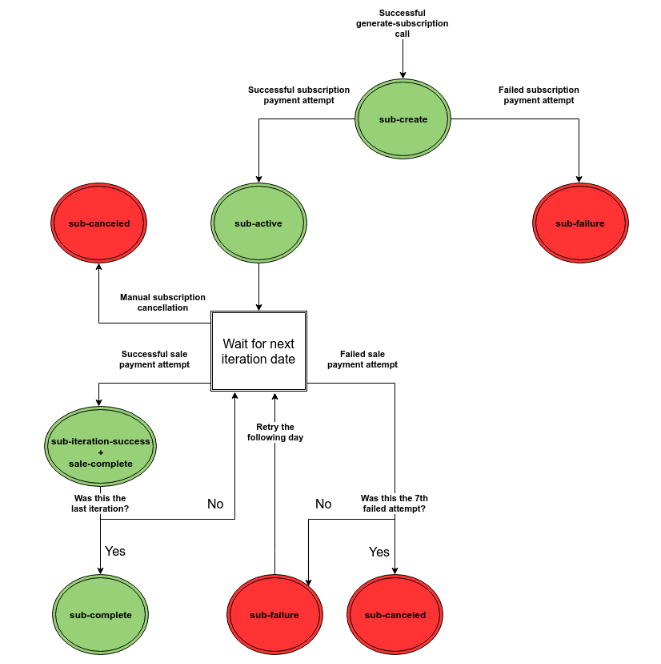
- [Documents](https://docs.payme.io/payments/documents): Invoices
# Documents
The Documents API creates and reads invoices, receipts and other tax documents through PayMe's invoicing service. It is deprecated: contact PayMe Partners () before building on it.
To issue documents for your sales, see [Issue invoices and receipts for your sales](https://docs.payme.io/accepting-payments/after-the-sale/issue-invoices-and-receipts).
- [3D Secure](https://docs.payme.io/payments/3d-secure): Generate a Sale with 3D Secure, Standalone 3D Secure service
# 3D Secure
Authenticate cards with 3D Secure 2, either as part of a PayMe sale or as a separate step with the standalone service when another gateway charges the card.
For how 3D Secure works across every integration, see [How 3D Secure works on PayMe](https://docs.payme.io/accepting-payments/3d-secure/how-3d-secure-works).
- [Platforms & Marketplaces](https://docs.payme.io/payments/platforms-marketplaces): Merchants Management, Buyers Management
# Platforms & Marketplaces
A partner (a platform or marketplace) creates and manages sellers through the API, takes a platform fee on their sales, and pays them out. Partner calls use your `payme_client_key` together with the seller's `seller_payme_id` (MPL). See [Authentication](https://docs.payme.io/payments/getting-started/authentication).
New to this? Start with [Start here: build a platform or marketplace on PayMe](https://docs.payme.io/marketplaces-and-platforms/start-here/how-platforms-work).
## Guides
- [Start here: build a platform or marketplace on PayMe](https://docs.payme.io/marketplaces-and-platforms/start-here/how-platforms-work)
- [Onboard a seller, from creation to first payout](https://docs.payme.io/marketplaces-and-platforms/seller-onboarding/onboard-a-seller)
- [Enable payment methods and services for your sellers](https://docs.payme.io/marketplaces-and-platforms/seller-onboarding/enable-services)
- [Platform fees](https://docs.payme.io/marketplaces-and-platforms/fees-and-payouts/platform-fees)
- [Withdrawals](https://docs.payme.io/marketplaces-and-platforms/fees-and-payouts/withdrawals)
- [Reporting across your sellers](https://docs.payme.io/marketplaces-and-platforms/reporting/reporting-across-your-sellers)
## Default URLs
When PayMe opens your partner account, you give two default URLs:
| URL | Use |
| --- | --- |
| Callback URL | Receives seller and withdrawal callbacks, and the callbacks of sales and subscriptions created without their own callback URL, as `x-www-form-urlencoded` `POST` requests. The full rules are in [Start here: build a platform or marketplace on PayMe](https://docs.payme.io/marketplaces-and-platforms/start-here/how-platforms-work); the payloads are on [Callbacks](https://docs.payme.io/payments/getting-started/callbacks). |
| Return URL | Where PayMe sends the buyer after a successful payment, unless the sale sets its own `sale_return_url`. The redirect is a `GET` request with the sale's parameters. |
## Value-added services
Sellers can have value-added services (VAS), such as invoices, Apple Pay and Google Pay. To turn them on and off, see [Enable payment methods and services for your sellers](https://docs.payme.io/marketplaces-and-platforms/seller-onboarding/enable-services). To see a seller's services, call [List a seller's services](https://docs.payme.io/payments/merchants-management/post-get-vas-seller). The service types are on [VAS types](https://docs.payme.io/marketplaces-and-platforms/seller-reference/vas-types).
- [Data & Reporting](https://docs.payme.io/payments/data-reporting): Query APIs, Codes & Statuses
# Data & Reporting
## Guides
- [Find the right data](https://docs.payme.io/accepting-payments/reporting/find-the-right-data): which query answers which business question.
- [Reconcile sales and withdrawals](https://docs.payme.io/accepting-payments/reporting/reconcile-sales-and-withdrawals): match a seller's payouts to its sales.
- [Start Here](https://docs.payme.io/payments/getting-started/start-here): PayMe's Payments API lets platforms and merchants accept payments via a hosted payment page, hosted fields (JSAPI) or a direct API, with tokenization, subscriptions, refunds and capture, 3D Secure, invoices and POS. Read in order: Authentication, Environments (sandbox.payme.io/api, live.payme.io/api), Test Cards, Quickstart, Callbacks; then Errors and Idempotency & Retries. Requests are JSON, callbacks form-encoded; amounts in minor units (500-4000000); send language en. Other APIs: B2B Payments, Keep, Products & Customers. To build an integration, follow the AI Toolkit.
## Related
- [Authentication](https://docs.payme.io/payments/getting-started/authentication)
- [Environments](https://docs.payme.io/payments/getting-started/environments)
- [Test Cards and Payment Methods](https://docs.payme.io/payments/getting-started/test-cards-and-payment-methods)
- [Quickstart](https://docs.payme.io/payments/getting-started/quickstart)
- [Callbacks](https://docs.payme.io/payments/getting-started/callbacks)
- [Errors](https://docs.payme.io/payments/getting-started/errors)
- [Idempotency and Retries](https://docs.payme.io/payments/getting-started/idempotency-and-retries)
- [Integration Options](https://docs.payme.io/payments/getting-started/integration-options)
# Start Here
PayMe's Payments API is "designed to allow platforms to offer a full payment solution as part of their product." You `POST` JSON to PayMe's URLs and get JSON replies, so you can use any programming language.
## Building an integration?
The [AI Toolkit](https://docs.payme.io/agents) has the whole procedure, for a person or an AI agent: your test account, the rules, each step in order, test cases and reference code, the go-live checklist and an answer for each common error. It starts by helping you choose between integrating as a [partner](https://docs.payme.io/agents/partner/payme-partner-integration) and as a [direct seller](https://docs.payme.io/agents/seller/payme-seller-integration). Start there if you are building, and use the pages here as the reference.
## Read these first
Read these five pages, in this order, before you write integration code.
| # | Page | What you learn |
|---|------|----------------|
| 1 | [Authentication](https://docs.payme.io/payments/getting-started/authentication) | Which credential goes where — `seller_payme_id` (MPL), `payme_client_key`, the public key — and how to open a sandbox account and find your keys. |
| 2 | [Environments](https://docs.payme.io/payments/getting-started/environments) | Sandbox vs production base URLs, and the hosts you will see in `sale_url`, 3D Secure redirects and browser scripts. |
| 3 | [Test Cards and Payment Methods](https://docs.payme.io/payments/getting-started/test-cards-and-payment-methods) | Sandbox test cards (including cards that force each decline), wallet cards, bank accounts and test-seller values. |
| 4 | [Quickstart](https://docs.payme.io/payments/getting-started/quickstart) | One complete sale in the sandbox with `curl`: create a sale, pay it, receive the callback, refund it. |
| 5 | [Callbacks](https://docs.payme.io/payments/getting-started/callbacks) | How PayMe notifies your server, what the payload contains, and how to handle it. |
After those, read [Errors](https://docs.payme.io/payments/getting-started/errors) and [Idempotency and retries](https://docs.payme.io/payments/getting-started/idempotency-and-retries) before going live.
## Three facts that trip up most integrations
1. **Amounts are in minor units.** A price of 50.75 is sent as `5075`, and the minimum `sale_price` is `500`.
2. **Callbacks are not JSON.** PayMe sends a `POST` with an `application/x-www-form-urlencoded` body to your callback URL, even though your requests to PayMe are JSON.
3. **Error messages default to Hebrew.** Send `"language": "en"` to get English error messages.
## What PayMe offers
With the Payments API you can:
- create and manage merchants on your platform;
- accept credit-card payments and other payment methods;
- create recurring payments (subscriptions);
- use hosted (secured) payment pages;
- tokenize cards for delayed and future payments;
- charge a platform (market) fee on each transaction;
- query sellers, transactions, subscriptions and withdrawals.
### APIs in this documentation
| API | What it covers |
|-----|----------------|
| [Payments](https://docs.payme.io/payments) | Sales (hosted payment page, hosted fields, direct API), Apple Pay, Google Pay, Israeli direct debit, tokenization, subscriptions, refunds / capture / void, 3D Secure (including a standalone 3D Secure service), invoices, point-of-sale devices, merchant management for partners, and query APIs. |
| [B2B Payments](https://docs.payme.io/b2b-payments/contracts/overview) | Payment contracts (send a payment or a payment request between businesses) and transfers between wallets. |
| [Keep](https://docs.payme.io/keep/partner-authorization/prerequisites) | APIs for PayMe's accounting product: sellers, income documents (invoices, receipts), expenses, tax and VAT. |
| [Products and Customers](https://docs.payme.io/products-and-customers/authentication/hosts-authentication-and-errors) | Create, list, update and delete products and customers. |
Mobile: open the [Hosted Payment Page](https://docs.payme.io/payments/hosted-payment-page) in a secure in-app browser. Legacy [iOS](https://docs.payme.io/payments/ios-sdk/ios-sdk) and [Android](https://docs.payme.io/payments/android-sdk/android-sdk) SDKs remain available but aren't recommended for new integrations.
## Integration options
There are three ways to take a payment: the **Hosted Payment Page** (the buyer pays on PayMe's secure page, `sale_url`, shown as an IFRAME or a redirect), **Hosted Fields (JSAPI)** (payment fields embedded in your page with PayMe's JavaScript library) and the **Direct API** (your server sends card details to PayMe). [Integration Options](https://docs.payme.io/payments/getting-started/integration-options) compares them.
## Payment methods
The full list of `sale_payment_method` values, with their codes, is on [Available Payment Methods](https://docs.payme.io/payments/wallets-apms). Use `multi` to let the buyer choose on one checkout page. If `sale_payment_method` is omitted, the sale is created as `credit-card`; `multi` must be sent explicitly.
Card networks named in the docs: Visa, Mastercard, American Express, Diners, Discover, JCB and Isracard (test cards). Google Pay supports Visa, Mastercard, American Express, Discover and JCB.
Installments: a fixed number from `1` to `12`, or `1NN` (`102`–`112`) to let the buyer choose up to NN, for example `106` for up to 6. Fixed values above 12 are accepted when the sale is created, but the payment fails unless PayMe has enabled more installments on your account. Installments are for card payments only (`credit-card` or `multi`).
## Currencies
Sale currency is a 3-letter ISO 4217 code. Supported currencies, subject to your account configuration:
ILS, USD, EUR, GBP, TRY, CHF, SEK, NOK, CAD, ZAR, JPY, AUD, AED, ARS, BHD, BRL, CNY, INR, KRW, KWD, KZT, MXN, NGN, PLN, RON, RUB, SAR, UAH, PHP, VND, HKD.
- Each account has its own allowed set; any other currency returns error `252`.
- PayMe does not convert currencies: each sale is paid out in the currency it was cleared in, so there is no conversion fee. A payout in USD needs a USD bank account on the record.
- ILS only: Israeli direct debit, Bit, and any sale with more than one installment.
Which currencies each sandbox test card accepts is on [Test Cards and Payment Methods](https://docs.payme.io/payments/getting-started/test-cards-and-payment-methods).
## Countries
The documentation is Israel-centred: Israeli bank codes, Israeli business incorporation types, Israeli social ID fields, and Israeli direct debit. Test data also exists for SEPA and BACS accounts. The payment page collects a ZIP code for cards issued in the USA, Canada and the United Kingdom.
## Amounts and limits
- Default `sale_price` range: `500`–`4000000` minor units, the same in every currency and payment method (so `500` is 5.00 ILS or USD but 500 JPY). PayMe can set a different range for a partner, and it then applies to all of that partner's sellers. Out of range returns error `352`. Token sales (`sale_type` `token` or `seller-token`) are always created with a price of `100`: send any numeric `sale_price` (a missing or non-numeric value returns `352`). Token sales are not range-checked. A partial refund amount (`sale_refund_amount`) must be within the same range.
- An authorization (J5) reserves funds for up to 168 hours; capture is allowed once.
- Rate limit: `generate-sale`, `pay-sale`, `capture-sale` and several other payment calls share a per-seller limit; over the limit returns HTTP 429. The default values and the full list are under [Rate limits](https://docs.payme.io/payments/getting-started/idempotency-and-retries#rate-limits).
PayMe can set different limits for a partner. To request a higher limit, write to ; what to include in the request is listed under [Rate limits](https://docs.payme.io/payments/getting-started/idempotency-and-retries#rate-limits).
## Compliance
- With the Hosted Payment Page, responsibility for PCI DSS lies with PayMe.
- With the Direct API, the merchant must meet PCI DSS level 1. PCI compliant and want to use the direct credit-card API? [Let PayMe know](https://payme.io/contact-us/).
- Tokenization reduces the scope of PCI DSS requirements for recurring payments.
- 3D Secure is supported, including as a standalone service.
## Contact
Our [Status Page](https://status.payme.io/) is available 24/7, you can now subscribe and receive notifications regarding maintenance, issues or general updates to your inbox.
- Integration and API questions: .
- Help center (merchant dashboard, plugins, account questions): .
- General contact form:
- Adding Google Pay card networks: `support@payme.io`
- Keep API keys come from your Account Manager; see [Keep prerequisites](https://docs.payme.io/keep/partner-authorization/prerequisites).
## Machine-readable docs
Every page is available as Markdown by appending `.md` to its URL; each API section publishes one OpenAPI file at `///openapi.json`, and `//openapi.json` returns a 404 that lists them; the site index for AI agents is `/llms.txt`.
## Identifiers
| Shape | Field | Meaning |
|-------|-------|---------|
| `MPL….-….-….-….` | `seller_payme_id` | The seller (merchant) identifier, also called the MPL. It is an identifier that authenticates seller-level calls, not an API key, but treat it as a credential. |
| `SALE….` | `payme_sale_id` | Sale ID; `payme_sale_code` is its short numeric form. |
| `SUB….` | `sub_payme_id` | Subscription ID; `sub_payme_code` is its short numeric form. |
| `BUYER….` | `buyer_key` | Saved-card token. Secret: encrypt it at rest; it replaces the card number. |
| `TRAN….` | `payme_transaction_id` | Transaction ID (reporting, withdrawals). |
| `VASL….` | `vas_payme_id` | Value-added-service ID. |
| free string | `transaction_id`, `subscription_id` | Your own references, echoed back. Not enforced unique. |
| `411111******1111` | `buyer_card_mask` | First 6 and last 4 digits of the card. |
- [Authentication](https://docs.payme.io/payments/getting-started/authentication): Payments API requests carry credentials in the JSON body, not an Authorization header. seller_payme_id (the MPL) identifies and authenticates the seller on its own, so keep it server-side. payme_client_key is the partner (platform) key held only by partners; merchants can call refund-sale without it. The per-seller public key (PayMe-Public-Key) is for browser code. Sandbox and production keys are separate. Keep, B2B Payments and Products & Customers authentication is documented with those APIs.
## Related
- [Environments](https://docs.payme.io/payments/getting-started/environments)
- [Quickstart](https://docs.payme.io/payments/getting-started/quickstart)
- [Callbacks](https://docs.payme.io/payments/getting-started/callbacks)
- [Authorization Flow](https://docs.payme.io/keep/partner-authorization/authorization-flow)
- [Authentication](https://docs.payme.io/products-and-customers/authentication)
- [Contracts](https://docs.payme.io/b2b-payments/contracts)
# Authentication
The Payments API does **not** use an `Authorization` header. You identify yourself with keys inside the JSON request body (and, on some endpoints, in custom headers). Always send `Content-Type: application/json`.
## The credentials at a glance
| Credential | Who has it | What it does | Where it goes | Keep it |
|------------|-----------|--------------|---------------|---------|
| `seller_payme_id` (the **MPL**) | Every seller (merchant) | Identifies the seller **and, on its own, authenticates** most seller-level calls: creating sales, refunding, querying sales, updating the seller. | JSON body field `seller_payme_id` (required in the body on `generate-sale`), or header `PayMe-Merchant-Key` on the endpoints listed under *Header-based endpoints* | **Secret** — server-side only |
| `payme_client_key` | **Partners** (platforms and marketplaces) only | The partner key. Needed for partner-level calls such as creating sellers and querying across sellers. | JSON body field `payme_client_key`, or header `PayMe-Partner-Key` | **Secret** — server-side only |
| Public key | Every seller; one per seller per environment | Designed for browser code: tokenizing cards (Hosted Fields), Apple Pay and Google Pay flows, and reading a filtered list of the seller's transactions. | Header `PayMe-Public-Key`; first argument of `PayMe.create(apiKey, …)` | May be exposed in the browser — but note it can read transactions |
Example MPL format: `MPLDEMO-MPLDEMO-MPLDEMO-1234567`.
**`seller_payme_secret` is not a credential.** `create-seller` returns it, but it is a random value that PayMe never stores or checks. Ignore it.
## Merchants and partners
- **A merchant** (a single seller) authenticates with `seller_payme_id`. It can call `refund-sale` with `seller_payme_id` alone — PayMe finds the partner from the seller.
- **A partner** (a platform managing many sellers) also holds `payme_client_key`, sent in the body or the `PayMe-Partner-Key` header. If a partner sends both keys, the seller must belong to that partner; otherwise the request fails with error `20` ("Merchant-Seller inconsistency"). A partner can also identify the seller by the `seller_id` it set when creating the seller, together with `payme_client_key`.
Partner-only endpoints documented with `payme_client_key` include `create-seller`, `update-seller`, `upload-seller-files`, `get-vas-seller`, `vas-enable`, `vas-disable`, and POS `authenticate` and `pair`. `withdraw-balance` takes either a partner's `payme_client_key` with the seller's `seller_payme_id`, or the seller's own `seller_payme_id`.
The query APIs `get-sales`, `get-subscriptions`, `get-sellers` and `get-withdrawals` are not partner-only. A partner sends `payme_client_key` (or the `PayMe-Partner-Key` header). A seller without a partner key sends `seller_payme_id` in the JSON body; results are limited to that seller.
`merchant_key` and `merchant_password` do not exist on a seller account: they are partner-level credentials. A seller that puts its own MPL in `payme_client_key` gets HTTP 500 with code `200` "Merchant was not found": remove the field and send `seller_payme_id` alone.
Error codes you may see while setting up keys: `1` — no key sent at all; `200` — the `payme_client_key` matches no partner; `201` — the partner is inactive; `251` — the `seller_payme_id` matches no seller; `163` — the seller is inactive.
### Header-based endpoints
| Header | Carries | Used on (examples) |
|--------|---------|--------------------|
| `PayMe-Merchant-Key` | The seller's MPL | `GET /buyers/{buyer_guid}`, `GET /documents`, 3D Secure hash resolution, `PATCH /subscriptions/{sub_payme_id}/resume` |
| `PayMe-Partner-Key` | The partner's client key | `GET /sellers/{seller_payme_id}/public-keys`, `GET /banks/{country_iso_code}` |
| `PayMe-Public-Key` | The seller's public key | `POST /sales/{payme_sale_id}/3ds` (called from the browser) |
| `PayMe-Signature` | A static value PayMe provides on request | `/sellers/{mpl_key}/individuals`, `/sellers/{mpl_key}/mids` |
`PayMe-Signature` is not computed per request: it is a static secret value that PayMe gives you on request. Keep it secret and never paste it into code samples or tickets.
### The public key
Each seller has its own public key, issued separately in each environment. A partner can look it up with `GET /sellers/{seller_payme_id}/public-keys` (header `PayMe-Partner-Key`), and `create-seller` returns it as `seller_public_key`.
The public key is meant for browser code, but it can read a filtered list of the seller's transactions. Use it only where you need it in the browser.
In the merchant dashboard, the public key, the MPL and the Hosted Fields JSAPI credentials are on **Admin → API & Integration** (API ואינטגרציה). The Hosted Fields public key is in the section **Hosted Fields JSAPI Credentials** on that page, and it differs between the sandbox and production. `PayMe.create` takes the public key only: never put the MPL (`seller_payme_id`) in browser code. `GET /sellers/{seller_payme_id}/public-keys` is partner-only.
## Getting credentials
- **Payments API — sandbox:** if you already have a PayMe account, open the test account from the dashboard: click your name at the top → **Switch to test account** → **Create test account**. A developer with no account registers at → "הרשמה" (Register), then opens the test account from the dashboard as above. The "התנסות" (Try it out) button opens a shared demo, not your own sandbox: it has no keys of your own. The sandbox is free and asks for no signatures.
- **Where the keys are:** **Admin → API & Integration** shows the MPL (`seller_payme_id`, with a test/production toggle), the public key, both base URLs and the Hosted Fields JSAPI credentials. If the page is missing, install the API service from the dashboard app store (חנות אפליקציות) first; depending on your account it may carry a charge.
- **Payments API — production:** the same page in production mode. Sandbox and production are separate accounts with separate credentials: a sandbox key is rejected by `live.payme.io` and vice versa.
- **Partner key (`payme_client_key`):** issued to partners by PayMe Partners (). It is never given to individual sellers, even for refunds — a seller refunds with `seller_payme_id` alone.
- Questions about credentials: .
## Other APIs
- **B2B Payments** uses the Payments API keys: [Hosts and authentication](https://docs.payme.io/b2b-payments/contracts/overview#hosts-and-authentication).
- **Keep** uses OAuth 2.0 client credentials: [Authorization Flow](https://docs.payme.io/keep/partner-authorization/authorization-flow).
- **Products & Customers** uses a JWT: [Hosts, Authentication and Errors](https://docs.payme.io/products-and-customers/authentication/hosts-authentication-and-errors#authentication).
## Keeping credentials secret
- Keep `seller_payme_id`, `payme_client_key`, the client password (called `payme_merchant_secret` in older PayMe documentation; see [Callbacks](https://docs.payme.io/payments/getting-started/callbacks)) and `PayMe-Signature` on your **server**. Never put them in browser or mobile code, logs, or public repositories such as GitHub.
- Only the public key belongs in browser code. The 3D Secure guide makes the same split: the browser call uses the public key, the hash-resolution call "should be called from your backend".
- Store tokens securely and encrypted.
### If a key leaks
There is no self-service key regeneration or rotation. If you believe a key has leaked, contact PayMe support immediately.
- [Environments](https://docs.payme.io/payments/getting-started/environments): PayMe has two environments: Sandbox at https://sandbox.payme.io/api/ and Production at https://live.payme.io/api/; they are separate accounts and each issues its own keys. sale_url is the environment's host (without /api) plus /sale/generate/; use it exactly as returned. 3D Secure redirect pages are served from paymeservice.com. Browser scripts load from cdn.paymeservice.com (also cdn.payme.io); Hosted Fields uses testMode: true for the sandbox. Test data is on Test Cards and Payment Methods.
## Related
- [Test Cards and Payment Methods](https://docs.payme.io/payments/getting-started/test-cards-and-payment-methods)
- [Authentication](https://docs.payme.io/payments/getting-started/authentication)
- [Quickstart](https://docs.payme.io/payments/getting-started/quickstart)
- [Errors](https://docs.payme.io/payments/getting-started/errors)
# Environments
## Base URLs
| Environment | Base URL |
|-------------|----------|
| Sandbox | `https://sandbox.payme.io/api/` |
| Production | `https://live.payme.io/api/` |
Point every request at the correct environment **with that environment's credentials**. Endpoint pages show both URLs.
A full endpoint URL is the base URL plus the path, for example `https://sandbox.payme.io/api/generate-sale` and `https://live.payme.io/api/refund-sale`.
Sandbox and production are separate accounts with separate credentials: a sandbox key is rejected by `live.payme.io` and vice versa.
The sandbox is free and asks for no signatures. A test account cannot be converted into a live account. What works in the sandbox, and how to test what does not, is on [Test Cards and Payment Methods](https://docs.payme.io/payments/getting-started/test-cards-and-payment-methods).
### Other APIs
B2B Payments, Keep and Products & Customers document their hosts with their own APIs: [B2B Payments](https://docs.payme.io/b2b-payments/contracts/overview#hosts-and-authentication), [Keep](https://docs.payme.io/keep/partner-authorization/authorization-flow#base-url), [Products & Customers](https://docs.payme.io/products-and-customers/authentication/hosts-authentication-and-errors#hosts).
## Hosts you will see besides the API
### The payment page (`sale_url`)
`generate-sale` returns a `sale_url` — the secured payment page to show the buyer. It is the environment's host without `/api` (for example `https://sandbox.payme.io`) followed by `/sale/generate/`, or `/sale/template/` for template sales.
**Use `sale_url` exactly as returned**; do not build it yourself or hard-code its host.
Examples on some pages show other hosts (for example `preprod.paymeservice.com`); never copy a host from an example into your code or allow-lists — read it from the response.
### 3D Secure redirect pages
3D Secure redirect pages are served from a `paymeservice.com` address, for example `https://sandbox.paymeservice.com/3ds/redirect/?pa=`, not from `payme.io`. Allow-lists and Content Security Policies must include the host of the `redirect_url` you receive, or 3D Secure breaks.
### Browser scripts
Load the Hosted Fields script from `cdn.payme.io`; its protected fields load in iframes from `hf.payme.io`. In the sandbox, a page whose policy set only `script-src https://cdn.payme.io` (plus what its own inline code needed) and `frame-src https://hf.payme.io` tokenized a card with no policy errors. The same files are also served from `cdn.paymeservice.com` (both hosts returned the identical Hosted Fields script on 2026-10-29), so if you load from there, allow-list that host instead. The Apple Pay and Google Pay guides load `hostedfields.js` from `cdn.paymeservice.com`; the Hosted Fields guide shows `cdn.payme.io/hf/v1/hostedfields.js`.
Load the Hosted Fields script from the URL given on the [Hosted Fields guide](https://docs.payme.io/accepting-payments/checkout-and-in-person/hosted-fields-jsapi-guide); the same URL is used for sandbox and production, and `testMode` selects the environment.
In browser code, sandbox vs production is chosen with `testMode` (default `false`): `PayMe.create(apiKey, { testMode: true })` for the sandbox. Setting it to `false` sends requests to production.
## Testing in the sandbox
Use test data **only in the sandbox**. Test cards (including cards that force a decline), wallet cards, bank accounts and the values for creating test sellers are on [Test Cards and Payment Methods](https://docs.payme.io/payments/getting-started/test-cards-and-payment-methods).
### Merchant dashboard
`create-seller` returns a sign-up link to the merchant dashboard in `seller_dashboard_signup_link`.
The test account is opened from the dashboard (click your name at the top → **Switch to test account**); where its keys are is on [Authentication](https://docs.payme.io/payments/getting-started/authentication#getting-credentials). Test mode shows a white top bar and production a green one; switch back with your name → **Switch to live account**. Test sales appear in the test account's dashboard.
- [Integration Options](https://docs.payme.io/payments/getting-started/integration-options): PayMe offers three integration options: the Hosted Payment Page (your server calls generate-sale and the buyer pays on PayMe's sale_url; PayMe carries PCI DSS), Hosted Fields JSAPI (PayMe's card iframes inside your own form; the browser gets a token and your server charges it with generate-sale and buyer_key; your CSP must allow cdn.payme.io and hf.payme.io), and the Direct API (your server sends card details to pay-sale; PCI DSS level 1 required and PayMe must enable it).
## Related
- [Start Here](https://docs.payme.io/payments/getting-started/start-here)
- [Quickstart](https://docs.payme.io/payments/getting-started/quickstart)
- [Create a sale (hosted payment page)](https://docs.payme.io/payments/hosted-payment-page/post-generate-sale)
# Integration Options
Building with an AI agent? Start with the [AI Toolkit](https://docs.payme.io/agents).
There are three ways to take a payment. They differ in who renders the card form and how much of PCI DSS falls on you.
| Option | How it works | Choose it when | Trade-offs |
|---|---|---|---|
| [Hosted Payment Page](https://docs.payme.io/payments/hosted-payment-page/post-generate-sale) | Your server calls `generate-sale`; the buyer pays on PayMe's page (`sale_url`) in an iframe or a redirect. | You want the fastest integration, every payment method on one page (`multi`), and PayMe to carry PCI DSS. | Limited control over the page design. |
| [Hosted Fields (JSAPI)](https://docs.payme.io/accepting-payments/checkout-and-in-person/hosted-fields-jsapi-guide) | PayMe's card inputs (iframes) sit inside your own form; the browser gets a token and your server charges it with `generate-sale` and `buyer_key`. | You want your own checkout design without card data touching your servers. | More front-end work; your Content Security Policy must allow `cdn.payme.io` and `hf.payme.io`. |
| [Direct API](https://docs.payme.io/payments/direct-api) | Your server sends card details to `pay-sale`. | You are PCI DSS level 1 compliant and need full control. | You carry PCI DSS compliance; PayMe must enable the API for you. |
- [Test Cards and Payment Methods](https://docs.payme.io/payments/getting-started/test-cards-and-payment-methods): Use only in the sandbox. Main cards (expiry 12/30, Social ID 008336174): 4557430402053431 CVV 200 (international, one installment), 375516193000090 CVV 0957, 5326105300985846 CVV 658 (local, ILS only). Decline cards such as 4000000000000002 return HTTP 200 with status_code 1 and codes 20004 or 21001-21008. 3D Secure challenges foreign cards, amounts from the account's threshold, or 3 or more installments; challenge test card 4918914107195005 with OTP 555. Also Apple Pay cards, Israeli direct debit, SEPA and BACS accounts and test-seller values.
## Related
- [Environments](https://docs.payme.io/payments/getting-started/environments)
- [Errors](https://docs.payme.io/payments/getting-started/errors)
- [Quickstart](https://docs.payme.io/payments/getting-started/quickstart)
# Test Cards and Payment Methods
Use these test details only in the sandbox.
Google Pay and Apple Pay work in the sandbox; the invoicing service (iCount documents) does not, so test documents on a minimal live sale with an immediate refund. Live testing without a sandbox is possible with minimum amounts and an immediate refund, or with authorization-only sales.
## Main credit card numbers for testing
EMV supported credit cards:
Credit Card |Details
---|---
**Card Number:** `4557430402053431` **Expiration:** `12/30` **CVV:**`200` **Social ID:**`008336174`|**Limitations**: Acts as an international non-Israeli card. Accepts sales with only one installment. Accepts sales in ILS, USD, EUR.
**Card Number:** `375516193000090` **Expiration:** `12/30` **CVV:** `0957` **Social ID:**`008336174`| **Limitations**: Acts as an international Israeli card. Accepts sales with multiple installments. Accepts sales in ILS, USD, EUR.
**Card Number:** `5326105300985846` **Expiration:** `12/30` **CVV:** `658` **Social ID:**`008336174`| **Limitations**: Acts as a local Israeli card. Accepts sales with multiple installments. Accepts sales in ILS only.
## Secondary credit card numbers for testing
Credit Card Type |Credit Card Number
---|---
Visa| `4111111111111111` `4200000000000000`
Mastercard| `5555555555554444` `5454545454545454`
AmericanExpress| `378282246310005` `377777777777770`
Diners |`38520000023237`
Discover| `6011000990139424`
JCB |`3530111333300000`
Isracard|`12312312`
## Credit card numbers for testing specific responses and errors
These cards work only in the sandbox, where they always fail. A charge (`pay-sale`, or a charge with a `buyer_key`) returns **HTTP 200** with `status_code: 1` and the error below; tokenizing a decline card with `capture-buyer-token` returns **HTTP 500** with the same `status_code`, `status_error_code` and `status_error_details`.
Card Number |Description|`status_error_code`|Message (with `language: "en"`)
---|---|---|---
`4000000000000002`| Payment is declined with a card declined error|`20004`|Refusal by credit company. Please try a different card
`4000000000000051`| Payment is declined with a card blocked error|`21001`|The card is blocked
`4000000000000085`| Payment is declined with a card stolen error|`21002`|The card is stolen
`4000000000000069`| Payment is declined with a card expired error|`21004`|The card is expired
`4000000000000101`| Payment is declined with a required CVV error|`21007`|CVV/ID is required but was not entered
`4000000000000127`| Payment is declined with an incorrect CVV|`21008`|Incorrect CVV or ID
`4000000000000135`| Payment is declined with a credit limit reached error|`21006`|The credit limit has been reached
`4242424242424241`| Payment is declined with an incorrect card number error|`21005`|Incorrect card number
`4000000000000036`| Token capture succeeds only through Hosted Fields `tokenize()` or `capture-buyer-token`; a later charge with the token is then declined. On a hosted payment page it is declined at once, with `capture_buyer` or `sale_type: token`, and no token exists|`20004`|Refusal by credit company. Please try a different card
## 3D Secure in the sandbox
The sandbox applies the same selection rules as production. A sale gets the 3D Secure challenge when the card is foreign (issued in a country other than the seller's registered country), when the amount is at least the account's 3D Secure threshold, or when it has 3 or more installments. The amount rule compares `sale_price` in minor units with the threshold, without converting currencies. Whether a local card is challenged depends on the account's 3D Secure rules, so use a foreign card to test the challenge reliably.
| Card | Behavior |
|---|---|
| `4918914107195005` | Challenge: the issuer page asks for a one-time code. Enter `555` to pass; any other code (for example `111`) fails authentication. |
| `4907639999909022` | Frictionless approve: no challenge, authentication succeeds. |
| `5283901906612672` | Frictionless decline: no challenge, authentication fails. |
These cards use expiry `07/28` and CVV `123`. They produce a challenge only when the sale is selected for 3D Secure (see the rules above).
## Apple Pay Testing Information
Card Brand | Card Number | Card Expiry Date | Card CVV
---|---|---|---
Visa | 4051 0693 0220 0121 | 12/27 | 340
Mastercard | 5204 2452 5052 2095 | 12/30 | 111
American Express | 37272 79248 51007 | 12/28 | 1111
Discover | FPAN: 6011 0009 9475 4889 | 12/30 | 111
## Israeli Direct Debit Testing Information
Bank Account Information (Bank, Branch, Account Number) |Description
---|---
`54, 112, 2222111` |Bank Authorization is approved after 60 seconds
`54, 113, 4444333`|Bank Authorization is declined after 60 seconds
`54, 111, 1112223`|Bank Authorization is declined immediately
`54, 114, 5555111`|Bank Authorization stays pending (no status update is sent)
Any other bank account is approved immediately.
In the sandbox you only receive bank-authorization statuses 1 or 2.
## SEPA Payment Method Testing Information
Account Number |Description
---|---
`DE89370400440532013000`| The Payment status transitions from `initial` to `completed` immediately.
`DE08370400440532013003`|The Payment status transitions from `initial` to `completed` after 3 minutes.
`DE62370400440532013001` |The Payment status transitions from `initial` to `failed` immediately.
`DE78370400440532013004`|The Payment status transitions from `initial` to `failed` after 3 minutes.
`DE35370400440532013002`|The Payment status transitions from `initial` to `completed` and then immediately to `chargeback`.
## BACS Payment Method Testing Information
SORT CODE |Account Number| Description
---|---|---
`108800`| `00012345`| The Payment status transitions from `initial` to `completed` immediately.
`108800`| `90012345`| The Payment status transitions from `initial` to `completed` after 3 minutes.
`108800`| `33333335`| The Payment status transitions from `initial` to `completed` and then immediately to `failed`.
## Creating test sellers (partners)
`seller_social_id` `9999999999`, `seller_email` `random@paymeservice.com` (suppresses automatic emails), `seller_bank_code` `54`, any 3-digit branch, any 6-digit account.
## Tokens in the sandbox
Tokenization works in the sandbox out of the box. A token is scoped by the call that captures it: with `"buyer_is_private": true` it belongs to the seller (MPL); without it, it is account-level: any seller of the same partner can charge it, and a [`get-buyer-key`](https://docs.payme.io/payments/tokenization/post-get-buyer-key) call that sends `seller_payme_id` fails with error `603` ("Merchant not allowed to use this buyer"). Charging a token outside its scope (a seller-level token by another seller, or any token by a seller of another partner) fails with error `605` ("The buyer was not captured using the provided seller"). Capture and charge a sandbox token on the sandbox with sandbox credentials.
- [Quickstart](https://docs.payme.io/payments/getting-started/quickstart): End-to-end sandbox walkthrough. 1) POST https://sandbox.payme.io/api/generate-sale with seller_payme_id, sale_price (minor units, min 500), currency, product_name, transaction_id, sale_callback_url, sale_return_url, language en; response has sale_url and payme_sale_id. 2) Open sale_url and pay with test card 5326105300985846 12/30 CVV 658. 3) PayMe POSTs a form-encoded callback with notify_type sale-complete; reply 200 within 5 s. 4) POST /refund-sale with seller_payme_id, payme_sale_id and optional sale_refund_amount.
## Prerequisites
- Sandbox seller_payme_id (MPL)
- A public HTTPS URL that can receive POST requests (not localhost or a private IP)
## Related
- [Create a sale (hosted payment page)](https://docs.payme.io/payments/hosted-payment-page/post-generate-sale)
- [Refund a sale](https://docs.payme.io/payments/post-sale-actions/post-refund-sale)
- [Test Cards and Payment Methods](https://docs.payme.io/payments/getting-started/test-cards-and-payment-methods)
- [Callbacks](https://docs.payme.io/payments/getting-started/callbacks)
- [Errors](https://docs.payme.io/payments/getting-started/errors)
# Quickstart
Your first sale in the sandbox: you will create a sale, pay it as a buyer, receive PayMe's callback, and refund it. Every field below comes from the endpoint pages linked in each step.
**You need:**
- a sandbox `seller_payme_id` (MPL) — see [Authentication](https://docs.payme.io/payments/getting-started/authentication). Keep it on your server: on its own it authenticates seller-level calls;
- a public URL that accepts `POST` requests, for the callback. It may not be `localhost` or a private IP address; use HTTPS.
**Getting sandbox credentials.** If you already have a PayMe account, open the test account from the dashboard: click your name at the top → **Switch to test account** → **Create test account**. A developer with no account registers at → "הרשמה" (Register), then opens the test account from the dashboard as above. The "התנסות" (Try it out) button opens a shared demo, not your own sandbox: it has no keys of your own. The sandbox is free and asks for no signatures. Your keys, your MPL (`seller_payme_id`, with a test/production toggle), both base URLs and the Hosted Fields JSAPI credentials are on one dashboard page: **Admin → API & Integration** (API ואינטגרציה). If that page is missing, install the API service from the dashboard app store (חנות אפליקציות) first; depending on your account it may carry a charge. Partners receive `payme_client_key` from PayMe Partners (); it is never issued to individual sellers. Integration questions: .
## Step 1 — Create the sale
Endpoint: [`POST /generate-sale`](https://docs.payme.io/payments/hosted-payment-page/post-generate-sale). No payment happens yet.
```bash
curl -X POST https://sandbox.payme.io/api/generate-sale \
-H 'Content-Type: application/json' \
-d '{
"seller_payme_id": "MPLDEMO-MPLDEMO-MPLDEMO-1234567",
"sale_price": 1000,
"currency": "ILS",
"product_name": "Test order",
"transaction_id": "order-1001",
"installments": "1",
"sale_callback_url": "https://your-server.example.com/payme/callback",
"sale_return_url": "https://your-site.example.com/payment/success",
"language": "en"
}'
```
| Field | Meaning |
|-------|---------|
| `seller_payme_id` | Your MPL. Required. |
| `sale_price` | Price in minor units: `1000` = 10.00. Default allowed range `500`–`4000000`, in every currency (so `500` is 5.00 ILS but 500 JPY). Required. |
| `currency` | 3-letter ISO 4217 code, enabled on your account. Required. |
| `product_name` | Short product description, up to 500 characters. Required. |
| `transaction_id` | Your own order ID, for correlation with PayMe. Optional. |
| `installments` | `1`–`12` fixed, or `1NN` (`102`–`112`) to let the buyer choose up to NN, for example `106` for up to 6. Optional, default `1`. More than 12 can be enabled for your account on request. |
| `sale_callback_url` | Where PayMe sends the server-to-server callback. If omitted, PayMe uses your partner's default callback URL, if one is set; a seller has no dashboard setting for it, so send it. |
| `sale_return_url` | Where the buyer is redirected after paying. If omitted, your partner's default return URL is used, if one is set. |
| `language` | Payment page and error-message language. If omitted, messages are in Hebrew — always send `"en"` while integrating. |
`sale_price` and `installments` accept a number or a numeric string (`1000` or `"1000"`, `1` or `"1"`). A non-numeric `sale_price` returns error `352`; a non-numeric `installments` returns error `10`. A decimal `sale_price` is rounded to whole minor units.
Successful response (for the request above):
```json
{
"status_code": 0,
"sale_url": "https://sandbox.payme.io/sale/generate/XXXXXXXX-XXXXXXXX-XXXXXXXX-XXXXXXXX",
"payme_sale_id": "XXXXXXXX-XXXXXXXX-XXXXXXXX-XXXXXXXX",
"payme_sale_code": 12345678,
"price": 1000,
"transaction_id": "order-1001",
"currency": "ILS",
"sale_payment_method": "credit-card"
}
```
- `status_code` `0` means success, `1` means error.
- Save `payme_sale_id` (PayMe's sale ID) next to your `transaction_id`. You need it to refund.
- Responses also carry a `session` value; quote it when you contact PayMe.
- If `status_code` is `1`, read `status_error_code` and `status_error_details` — see [Errors](https://docs.payme.io/payments/getting-started/errors). Errors usually come back with HTTP 500, so check `status_code`, not the HTTP status.
- PayMe does not de-duplicate `transaction_id`: sending this request twice creates two sales.
## Step 2 — Pay as the buyer
Open `sale_url` in a browser (or an IFRAME). Pay with a sandbox test card, for example:
| Card number | Expiry | CVV | Social ID |
|-------------|--------|-----|-----------|
| `5326105300985846` | `12/30` | `658` | `008336174` |
This is a local Israeli card that accepts ILS only. Other cards, including cards that force a decline, are on [Test Cards and Payment Methods](https://docs.payme.io/payments/getting-started/test-cards-and-payment-methods).
You can pre-fill buyer details by appending query parameters to `sale_url`, for example `?first_name=First&last_name=Last&email=test@example.com`. Card fields cannot be pre-filled.
Use `sale_url` exactly as returned. It has no fixed expiry: it works while the sale is `initial`, and after a declined attempt, when the sale is `failed` and a good card can still complete it.
To try a decline, pay with `4000000000000002`: the result is HTTP 200 with `status_code: 1` and error `20004`. Other decline cards are on [Test Cards and Payment Methods](https://docs.payme.io/payments/getting-started/test-cards-and-payment-methods#credit-card-numbers-for-testing-specific-responses-and-errors).
After a successful payment the buyer is redirected (`GET`) to your `sale_return_url` with the sale details as query parameters:
```
https://your-site.example.com/payment/success?payme_status=success&payme_signature=75e99dbcb25cdfbe1c62f0b9376f4144&payme_sale_id=XXXXXXXX-XXXXXXXX-XXXXXXXX-XXXXXXXX&payme_transaction_id=XXXXXXXX-XXXXXXXX-XXXXXXXX-XXXXXXXX&price=1000¤cy=ILS&transaction_id=order-1001&is_token_sale=0&is_foreign_card=0
```
Use the redirect only to show the buyer a result page. Use the callback (step 3) to update your order.
## Step 3 — Receive the callback
When the sale is paid, PayMe sends a `POST` with an `x-www-form-urlencoded` body to `sale_callback_url`. Key fields:
| Field | Example | Meaning |
|-------|---------|---------|
| `notify_type` | `sale-complete` | What happened. See [Callbacks](https://docs.payme.io/payments/getting-started/callbacks). |
| `status_code` | `0` | `0` success, `1` error |
| `payme_sale_id` | `XXXXXXXX-…` | PayMe's sale ID |
| `transaction_id` | `order-1001` | Your order ID |
| `sale_status` | `completed` | See [Sale Statuses](https://docs.payme.io/payments/codes-statuses/sale-statuses) |
| `price`, `currency` | `1000`, `ILS` | Amount in minor units and currency |
| `payme_signature` | `75e99dbcb25cdfbe1c62f0b9376f4144` | Signature |
To test your handler before you have a sandbox account, send yourself a callback with the documented shape:
```bash
curl -X POST https://your-server.example.com/payme/callback \
-H 'Content-Type: application/x-www-form-urlencoded' \
--data-urlencode 'status_code=0' \
--data-urlencode 'notify_type=sale-complete' \
--data-urlencode 'sale_created=2016-01-01 15:15:15' \
--data-urlencode 'transaction_id=order-1001' \
--data-urlencode 'payme_sale_id=XXXXXXXX-XXXXXXXX-XXXXXXXX-XXXXXXXX' \
--data-urlencode 'payme_sale_code=12345678' \
--data-urlencode 'payme_transaction_id=XXXXXXXX-XXXXXXXX-XXXXXXXX-XXXXXXXX' \
--data-urlencode 'price=1000' \
--data-urlencode 'currency=ILS' \
--data-urlencode 'sale_status=completed' \
--data-urlencode 'installments=1' \
--data-urlencode 'is_token_sale=0' \
--data-urlencode 'payme_signature=75e99dbcb25cdfbe1c62f0b9376f4144'
```
Your handler should:
1. **Reply `200` within 5 seconds.** Any status below 400 counts as delivered; anything else, or a timeout, makes PayMe retry — up to 3 attempts in total, then the callback is dropped.
2. **Ignore repeats** — de-duplicate on `notify_type` + `payme_sale_id` + `payme_transaction_id`.
3. **Verify `payme_signature`** — the recipe is on [Callbacks](https://docs.payme.io/payments/getting-started/callbacks) (section "Verifying a callback").
4. **Confirm the sale before fulfilling** — treat the callback's status and amount as a notification, not proof of payment: call [`POST /get-sales`](https://docs.payme.io/payments/query-apis/post-get-sales) with `sale_payme_id` and check `sale_status` and `sale_price`. [`POST /get-transactions`](https://docs.payme.io/payments/query-apis/post-get-transactions) works too, and shows each charge and refund as a row.
## Step 4 — Refund the sale
Endpoint: [`POST /refund-sale`](https://docs.payme.io/payments/post-sale-actions/post-refund-sale). Omit `sale_refund_amount` for a full refund; send it for a partial refund (minimum `500`). You can refund several times as long as the total does not exceed the sale amount.
```bash
curl -X POST https://sandbox.payme.io/api/refund-sale \
-H 'Content-Type: application/json' \
-d '{
"seller_payme_id": "MPLDEMO-MPLDEMO-MPLDEMO-1234567",
"payme_sale_id": "SALEDEMO-XXXXXXXX-XXXXXXXX-XXXXXXXX",
"sale_refund_amount": 500,
"language": "en"
}'
```
`payme_client_key` is not needed here: a merchant can refund with `seller_payme_id` alone. Partners (platforms) may also send their `payme_client_key`, in which case the seller must belong to that partner.
Successful response (abridged):
```json
{
"status_code": 0,
"status_error_code": 0,
"payme_status": "success",
"sale_status": "partial-refund",
"sale_refund_buffer": 500,
"payme_transaction_total": 500,
"payme_transaction_id": "TRANDEMO-XXXXXXXX-XXXXXXXX-XXXXXXXX",
"payme_signature": "b71e**************ca5a"
}
```
PayMe also sends a callback with `notify_type` `refund` to the callback URL; its `payme_transaction_total` is the amount of this refund and `sale_refund_buffer` the amount still refundable.
**Do not blindly retry a refund that timed out**: a repeated partial refund runs again and refunds a second time. Read [Idempotency and retries](https://docs.payme.io/payments/getting-started/idempotency-and-retries) first.
## Next steps
- [Callbacks](https://docs.payme.io/payments/getting-started/callbacks) — every notification type and how to handle it.
- [Errors](https://docs.payme.io/payments/getting-started/errors) — error codes and messages.
- To charge a saved card later, see [Save a card and charge it later](https://docs.payme.io/accepting-payments/capture-and-saved-cards/save-a-card-and-charge-it-later); to authorize now and capture later, see [Capture sale](https://docs.payme.io/accepting-payments/capture-and-saved-cards/capture-sale).
- [Callbacks](https://docs.payme.io/payments/getting-started/callbacks): PayMe callbacks are form-encoded POSTs to sale_callback_url (or the partner's default callback URL, if one is set). Any status below 400 counts as delivered; each attempt times out after 5 s; up to 3 attempts within about 90 seconds, then dropped. Duplicates happen and ordering is not guaranteed: de-duplicate on notify_type + payme_sale_id + payme_transaction_id. payme_signature = lowercase hex MD5 of payme_client_key + client password + payme_transaction_id + payme_sale_id. Before fulfilling an order, confirm the sale's status and amount with POST /get-sales.
## Related
- [Callback types reference](https://docs.payme.io/payments/getting-started/callback-types)
- [Sale Statuses](https://docs.payme.io/payments/codes-statuses/sale-statuses)
- [List sales](https://docs.payme.io/payments/query-apis/post-get-sales)
- [Idempotency and Retries](https://docs.payme.io/payments/getting-started/idempotency-and-retries)
- [Quickstart](https://docs.payme.io/payments/getting-started/quickstart)
# Callbacks
A callback (PayMe also calls it an "IPN") is a request PayMe's server sends to yours when something happens to a sale, a subscription or a seller.
**In short:** reply quickly with HTTP 200, expect repeats and out-of-order delivery, verify `payme_signature`, and confirm the sale's status and amount with [`POST /get-sales`](https://docs.payme.io/payments/query-apis/post-get-sales) before you fulfil an order.
## Format
- Method and encoding: `POST` with an `x-www-form-urlencoded` body — not JSON.
- Destination: the `sale_callback_url` you sent. If you omit it, PayMe uses your partner's default callback URL, if your partner has one; a seller has no dashboard setting for it, so always send `sale_callback_url` (and `sub_callback_url` for subscriptions). One sale can notify two URLs: the sale's callback URL and the partner's sale callback URL (one delivery per host).
- The `language` field of the request sets the language of the callback.
### Callback URL rules
- `http://` and `https://` are both accepted. Use HTTPS.
- Non-standard ports are allowed (for example `:8443`).
- Rejected, with error `21` for the whole call: `localhost` and other hosts without a dot, IP addresses in private or loopback ranges, all IPv6 addresses, and hosts whose top-level domain isn't letters only. Ports must be 2–5 digits.
- PayMe doesn't resolve the host, so a valid-looking name is accepted even if it doesn't exist. `sale_return_url` follows the same rules.
The callback is separate from the **return URL** redirect. The return URL is a browser `GET` that takes the buyer to your result page; the callback is server-to-server.
## Sale notification types (`notify_type`)
Every `notify_type` PayMe sends, with when it fires and its key fields, is listed on [Callback types reference](https://docs.payme.io/payments/getting-started/callback-types).
| `notify_type` | Meaning |
|---------------|---------|
| `sale-complete` | The sale was paid successfully |
| `sale-authorized` | The sale was authorized successfully |
| `refund` | The sale was refunded — full refund, partial refund, or void of an authorization |
| `sale-failure` | A payment attempt failed |
| `sale-chargeback` | The sale was charged back |
| `sale-chargeback-refund` | The chargeback was reverted |
| `sale-create` | The sale was created. Sent only when `generate-sale` included `sale_send_creation_callback: true`; carries `sale_url`. |
| `sale-paid` | Israeli direct debit only: the debit was submitted to the bank. |
| `sale-il-direct-debit-update` | Israeli direct debit only: the bank authorization status changed. |
- **`sale-failure` is sent once per failed attempt**, not once per sale. A buyer can retry on the payment page; each failure sends another `sale-failure` with a different `payme_transaction_id`. They stop once the sale completes. So `failed` isn't final: the sale can still move to `completed`, or `authorized` for a capture sale.
- **Refund callbacks:** `payme_transaction_total` is the amount of this refund, `price` is the original sale price, `sale_refund_buffer` is the amount still refundable, and `payme_transaction_id` / `payme_signature` refer to the refund transaction.
After a partial refund `sale_status` is `partial-refund`. A sale fully refunded in parts stays `partial-refund` and never moves to `refunded`, so track the refunded total yourself.
## Sale callback payload
| Field | Example | Description |
|-------|---------|-------------|
| `status_code` | `0` | `0` success, `1` error |
| `status_error_code` | | In case of an error, PayMe's error code |
| `status_error_details` | | In case of an error, the error message |
| `notify_type` | `sale-complete` | Notification type (table above) |
| `sale_created` | `2016-01-01 15:15:15` | Sale creation time |
| `transaction_id` | `12345` | Your order ID |
| `payme_sale_id` | `XXXXXXXX-XXXXXXXX-XXXXXXXX-XXXXXXXX` | PayMe's sale ID |
| `payme_sale_code` | `12345678` | Sale code, for display only |
| `payme_transaction_id` | `XXXXXXXX-XXXXXXXX-XXXXXXXX-XXXXXXXX` | PayMe's ID for this transaction (payment, capture, refund or failed attempt) |
| `price` | `1000` | Amount in minor units (50.75 → `5075`) |
| `currency` | `USD` | ISO 4217 code |
| `sale_status` | `completed` | See [Sale Statuses](https://docs.payme.io/payments/codes-statuses/sale-statuses) |
| `payme_transaction_card_brand` | `Visa` | Card brand |
| `payme_transaction_auth_number` | `01A2B3C` | Authorization number from the card company |
| `buyer_card_mask` | `458045******4580` | Masked card number |
| `buyer_card_exp` | `0118` | Card expiry |
| `buyer_name`, `buyer_email`, `buyer_phone`, `buyer_social_id` | | Buyer details |
| `buyer_key` | `XXXXXXXX-…` | Token for future payments; only when `capture_buyer` was set |
| `installments` | `1` | Number of installments |
| `sale_paid_date` | `2016-01-01 15:16:15` | When the payment happened (not when the callback was sent) |
| `sale_release_date` | `2016-01-08 15:15:15` | Release date |
| `is_token_sale` | `0` | `0` false, `1` true |
| `payme_signature` | `75e99dbcb25cdfbe1c62f0b9376f4144` | Signature (see below) |
| `sale_invoice_url` | `https://www.example.com/XXXXXX.pdf` | Invoice URL, if the seller enabled invoices |
| `sale_payment_method` | `credit-card` | Payment method name; see [Available Payment Methods](https://docs.payme.io/payments/wallets-apms) |
| `sale_type` | `Sale` | Sale type name: `Sale` (also for authorizations), `Token`, `SaleFromTemplate`, `SaleFromSubscription`, … See [Sale Types](https://docs.payme.io/payments/codes-statuses/sale-types) |
| `payme_transaction_total` | `1000` | Amount of this transaction, in minor units |
| `buyer_card_is_foreign` | `0` | `1` when the card was issued outside Israel |
| `sale_3ds` | `0` | `1` when the payment went through 3D Secure |
| `buyer_status` | `1` | With `buyer_key`: the status of the saved token |
Fields with no value are left out of the body.
## Other callbacks
### Subscriptions
Sent to `sub_callback_url`; if it is empty, to your partner's default callback URL (`merchant_callback_url`), if one is set. **Subscription callbacks carry no `payme_signature`.**
| `notify_type` | When |
|---------------|------|
| `sub-create` | The subscription was created |
| `sub-active` | The subscription became active |
| `sub-iteration-success` | A charge succeeded: first, regular or after a retry, with an identical body in every case (adds `payme_sale_id` and `payme_sale_code`; the charge time is `sub_prev_date`) |
| `sub-iteration-skipped` | A billing iteration was skipped |
| `sub-failure` | A payment attempt failed. If the card-validation transaction failed when the buyer paid the subscription, its status is `4` and PayMe does not retry. If a scheduled charge failed and will be retried, its status is `7` and `sub_next_date` moves one day. Carries `sub_error_text`, but no sale id, attempt id or failed-attempt counter |
| `sub-pause` | The subscription was paused |
| `sub-cancel` | The subscription was cancelled, by hand or automatically after the last failed attempt (status `5`). Always contains `seller_payme_id`, `seller_id`, `sub_payme_id`, `sub_payme_code`; `subscription_id` only if you set it |
| `sub-complete` | The subscription completed |
The payload includes `sub_payme_id`, `sub_status`, `sub_price`, iteration counters and buyer fields (card mask, name, email, phone and ID; never the `buyer_key`). The iteration counters count successful charges only. Each successful iteration also creates a sale, which sends its own `sale-complete` or `sale-failure`. Handlers must be idempotent: re-query [`get-subscriptions`](https://docs.payme.io/payments/query-apis/post-get-subscriptions) before acting. Charge retries (once a day, up to 7 attempts) are described on [Recurring Payments](https://docs.payme.io/payments/saved-cards-recurring).
`sub_callback_url` is sent on every successful charge while the subscription is active and on every failed attempt that leads to a retry.
#### Subscription callback payload
| Field | Example | Description |
|-------|---------|-------------|
| `notify_type` | `sub-iteration-success` | Notification type (table above) |
| `status_code` | `0` | `0` success, `1` error |
| `status_error_code` | | In case of an error, PayMe's error code |
| `sub_error_text` | | In case of an error, the error message |
| `seller_payme_id` | `MPLDEMO-MPLDEMO-MPLDEMO-1234567` | PayMe's seller ID |
| `seller_id` | `12345` | Your seller ID |
| `sub_payme_id` | `XXXXXXXX-XXXXXXXX-XXXXXXXX-XXXXXXXX` | PayMe's subscription ID |
| `sub_payme_code` | `1234` | PayMe's subscription code |
| `sub_created` | `2016-01-01 15:15:15` | Subscription creation time |
| `sub_payment_date` | `2016-01-01 18:32:23` | Subscription payment time |
| `sub_start_date` | `2016-01-02 00:00:00` | When the first iteration was charged |
| `sub_next_date` | `2016-01-03 00:00:00` | Next iteration time |
| `sub_status` | `1` | See [Subscription Statuses](https://docs.payme.io/payments/codes-statuses/subscription-statuses) |
| `sub_iteration_type` | `1` | See [Subscription Iteration Types](https://docs.payme.io/payments/codes-statuses/subscription-iteration-types) |
| `sub_currency` | `USD` | ISO 4217 code |
| `sub_price` | `10000` | Price of one iteration in minor units (50.75 → `5075`) |
| `sub_iterations` | `4` | Number of iterations |
| `sub_iterations_completed` | `4` | Completed iterations |
| `sub_iterations_left` | `4` | Remaining iterations |
| `buyer_card_mask` | `458045******4580` | Masked card number |
| `buyer_name`, `buyer_email`, `buyer_phone`, `buyer_social_id` | | Buyer details |
### Israeli direct debit
- `sale-paid` when the debit is submitted. Take the token (`buyer_key`) from `sale-il-direct-debit-update` or `get-sales`, not from `sale-paid`.
- When the bank authorization status changes: `sale-complete` or `sale-failure`, then `sale-il-direct-debit-update` with `authorization_status` and `authorization_error_code`. The `authorization_status` values are listed on [Errors](https://docs.payme.io/payments/getting-started/errors) (section "Israeli direct debit").
An Israeli direct-debit *payment* sends `sale-paid` when submitted, then `sale-complete` about 8 days later, or `sale-failure` if the bank returns the debit before that.
### Sellers (partners)
Sent to the partner's callback URL with all `seller_*` and `fee_*` fields: `seller-create` (adds `seller_public_key`), `seller-update`, `seller-approve`. Related partner notifications: `withdrawal-complete`, `charge-complete`, and `point-of-sale-action-*` (for example after a POS device is paired).
#### Seller callback payload
| Field | Example | Description |
|-------|---------|-------------|
| `status_code` | `0` | `0` success, `1` error |
| `status_error_code` | | In case of an error, PayMe's error code |
| `status_error_details` | | In case of an error, the error message |
| `notify_type` | `seller-create` | Notification type (above) |
| `seller_payme_id` | `MPLDEMO-MPLDEMO-MPLDEMO-1234567` | PayMe's seller ID |
| `seller_id` | `12345` | Your seller ID |
| `seller_created` | `2016-01-01 15:15:15` | Seller creation time |
| `seller_first_name` | `First` | First name of the account owner |
| `seller_last_name` | `Last` | Last name of the account owner |
| `seller_social_id` | `999999999` | Social ID of the account owner |
| `seller_birthdate` | `1989-05-06` | Birth date, `yyyy-mm-dd` (the request sends DD/MM/YYYY) |
| `seller_gender` | `0` | `0` male, `1` female |
| `seller_email` | `personal@example.com` | Seller's personal email |
| `seller_contact_email` | `contact@example.com` | Contact email shown to buyers |
| `seller_phone` | `0500000042` | Seller's personal phone |
| `seller_contact_phone` | `031234567` | Contact phone shown to buyers |
| `seller_inc` | `2` | See [Seller Incorporation Types (IL)](https://docs.payme.io/marketplaces-and-platforms/seller-reference/seller-incorporation-types-il) |
| `seller_inc_code` | `123456` | Business ID (ח.פ, ע.מ) |
| `seller_merchant_name` | `Baby Ducks` | Merchant name |
| `seller_site_url` | `www.babyducks.com` | Site URL |
| `seller_address_city` | `Tel Aviv` | Business address: city |
| `seller_address_street` | `Rothschild` | Business address: street |
| `seller_address_street_number` | `45` | Business address: street number |
| `seller_address_country` | `IL` | Business address: country (ISO 3166-1 alpha-2) |
| `seller_active` | `1` | `0` inactive, `1` active |
| `seller_approved` | `1` | `0` not approved, `1` approved |
| `seller_currencies` | `[ILS, USD, EUR]` | Allowed currencies |
### Bank transfer
A bank transfer reaching `PAID` is reported with a callback.
There is no bank-transfer-specific `notify_type`: the standard sale callbacks apply (`sale-complete` when the transfer is paid, `sale-failure` otherwise).
### B2B payment contracts
Documented with the B2B Payments API: [Contracts: getting started → Callbacks](https://docs.payme.io/b2b-payments/contracts/overview#callbacks).
## Verifying a callback (`payme_signature`)
### How it is computed
Partners, who hold `payme_client_key`, verify callbacks with this formula; a seller without a partner key re-queries the sale instead (see below).
`payme_signature` is the **lowercase hexadecimal MD5** hash of four values joined with **no separator**, in this order:
1. `payme_client_key` (the partner key)
2. the client password issued together with the client key: the partner's `merchant_password` (called `payme_merchant_secret` in older PayMe documentation)
3. `payme_transaction_id` (from the payload)
4. `payme_sale_id` (from the payload)
It is a plain MD5 hash, not an HMAC.
The signature always uses your primary client key. If PayMe is moving you to a new client key, your API calls can already use the new key, but the signature stays on the primary key until PayMe completes the switch.
Worked example (fake values):
| Input | Value |
|-------|-------|
| `payme_client_key` | `demo_partner_KEY12345` |
| client password | `demoPassw0rd` |
| `payme_transaction_id` | `TRAN1700-000000AA-EXAMPLE1-TXN00001` |
| `payme_sale_id` | `SALE1700-000000AA-EXAMPLE1-SALE0001` |
Joined string: `demo_partner_KEY12345demoPassw0rdTRAN1700-000000AA-EXAMPLE1-TXN00001SALE1700-000000AA-EXAMPLE1-SALE0001`
`payme_signature` = `f8ffc5bb45fe6c3ad326c439f1a21c28`
```python
import hashlib, hmac
def payme_signature_ok(form, client_key, client_password):
expected = hashlib.md5(
(client_key + client_password
+ form["payme_transaction_id"] + form["payme_sale_id"]).encode()
).hexdigest()
return hmac.compare_digest(expected, form.get("payme_signature", ""))
```
The client password is issued together with your partner credentials by PayMe Partners (). A merchant that has no `payme_client_key` cannot compute the signature: verify the sale instead with [`POST /get-sales`](https://docs.payme.io/payments/query-apis/post-get-sales) or [`POST /get-transactions`](https://docs.payme.io/payments/query-apis/post-get-transactions), which is also the check PayMe support recommends.
### Where the same signature appears
The same formula is used in sale callbacks, the return-URL redirect (including when `payme_status=error`), and the `capture-sale` and `refund-sale` responses. In each case `payme_transaction_id` is the transaction in that payload — the payment, the capture or the refund.
Exceptions:
- Seller callbacks and `withdrawal-complete` have no signature. Ignore the body and re-read with `get-sellers` or `get-withdrawals`.
- Subscription callbacks have no signature. The subscription **return URL** is signed: the MD5 of the client key, the client password, the URL's `transaction_id` (PayMe's transaction ID; this URL has no `payme_transaction_id`) and `sub_payme_id`.
- `verify_only` refunds return `payme_signature: null`.
- B2B payment contracts use a shorter formula: the MD5 of the client key, the client password and the contract's `guid`. See [B2B Payments](https://docs.payme.io/b2b-payments/contracts/overview#callbacks).
### Confirm the sale before you fulfil
A valid signature tells you the callback refers to a real PayMe sale and transaction. Treat the status and amount in a callback as a notification, not as proof of payment.
**Safe practice:** before you fulfil an order, call [`POST /get-sales`](https://docs.payme.io/payments/query-apis/post-get-sales) with `sale_payme_id` and check `sale_status` and `sale_price` against your order. [`POST /get-transactions`](https://docs.payme.io/payments/query-apis/post-get-transactions) works too, and shows each charge and refund as a row, which is why the [AI Toolkit](https://docs.payme.io/agents) steps use it.
Find the order by the `payme_sale_id` you stored when you created the sale, and match it on your own order ID as well as the amount. Otherwise a real, cheap sale's ID could be replayed in a forged callback against an expensive order. If you confirm with `get-transactions` instead, send `transaction_type: 40` for a sale that is authorized and not yet captured: the default query doesn't return it.
PayMe does not publish a fixed list of callback source addresses, so do not allow-list by IP. Authenticate callbacks by their signature and confirm the sale with `get-sales`.
## Delivery, retries, duplicates and ordering
### What counts as delivered
- Any status below 400 counts as delivered. The response body is ignored.
- Each attempt times out after **5 seconds**. Reply `200` immediately and do the slow work (emails, fulfilment) afterwards.
### Retries
- PayMe makes **up to 3 attempts**: the first, a retry about 30 seconds later, and a last retry about 60 seconds after that.
- A 4xx or 5xx response, a timeout, or a connection error triggers a retry.
- After the last attempt the callback is **dropped**. It cannot be replayed through the API.
- If your host keeps returning 5xx, 408 or 429 responses, timing out or refusing connections, PayMe pauses deliveries to that host for a short time. Callbacks during the pause are not delivered or retried.
- A pause is triggered by 5xx responses, `429`, `408`, timeouts and connection errors on your host; an ordinary 4xx (for example a signature or authentication rejection by your code) never causes one. It lifts by itself once your endpoint answers. You can't reset it yourself; if you need it cleared at once, contact PayMe support with the callback host. There is no test ping. Acknowledge first (cold starts included) and process in the background.
- Order is not guaranteed: act on `notify_type` and the sale status, not on the order of arrival.
**Do not rely on callbacks alone.** Reconcile with [`POST /get-sales`](https://docs.payme.io/payments/query-apis/post-get-sales).
### Duplicates
The same callback can arrive more than once — typically when your endpoint processes it but replies after the 5-second timeout. There is no event ID. De-duplicate on **`notify_type` + `payme_sale_id` + `payme_transaction_id`**; each refund, capture and failed attempt has its own `payme_transaction_id`.
### Ordering
Callbacks are **not** guaranteed to arrive in order: they are sent by parallel workers with retry delays, so a `refund` can arrive before a `sale-complete` that is still being retried, and there is no sequence number or event timestamp. Never let a later-arriving callback overwrite a final state you already recorded, and query the sale when in doubt.
## Handling checklist
1. Parse the body as form data and reply `200` within 5 seconds.
2. If you are a partner, verify `payme_signature` (sale callbacks).
3. Ignore it if you already processed this `notify_type` + `payme_sale_id` + `payme_transaction_id`.
4. Before fulfilling, confirm `sale_status` and `sale_price` with `POST /get-sales`.
5. Run a periodic reconciliation with `get-sales`, because callbacks can be dropped after 3 attempts.
- [Callback types reference](https://docs.payme.io/payments/getting-started/callback-types): Sale callback URL, signed except sale-create: sale-create (opt-in), sale-complete, sale-authorized, sale-failure (per attempt), refund (refunds and voids), sale-chargeback, sale-chargeback-refund, sale-paid, sale-il-direct-debit-update. sub_callback_url, unsigned: sub-create, sub-active, sub-iteration-success, sub-iteration-skipped, sub-failure, sub-pause, sub-cancel, sub-complete. Partner URL, unsigned: seller-create, seller-update, seller-approve, point-of-sale-action-pair-update, point-of-sale-action-authenticate-update, withdrawal-complete, charge-complete. B2B: payment-contract-*.
## Related
- [Callbacks](https://docs.payme.io/payments/getting-started/callbacks)
- [Understand the sale lifecycle](https://docs.payme.io/payments/codes-statuses/sale-lifecycle)
- [List sales](https://docs.payme.io/payments/query-apis/post-get-sales)
- [List subscriptions](https://docs.payme.io/payments/query-apis/post-get-subscriptions)
- [List sellers](https://docs.payme.io/payments/query-apis/post-get-sellers)
- [List withdrawals](https://docs.payme.io/payments/query-apis/post-get-withdrawals)
- [Withdrawals](https://docs.payme.io/marketplaces-and-platforms/fees-and-payouts/withdrawals)
- [Take in-person payments with a POS device](https://docs.payme.io/accepting-payments/checkout-and-in-person/point-of-sale)
- [Contracts](https://docs.payme.io/b2b-payments/contracts)
# Callback types reference
This page lists every `notify_type` PayMe sends to your servers: who receives it, when it fires, its key fields, and whether it is signed. How callbacks are delivered (a form-encoded `POST`, the 5-second timeout, retries, duplicates and the signature formula) is on [Callbacks](https://docs.payme.io/payments/getting-started/callbacks).
## How to read this page
**Where it goes.** Each group below names its destination:
| Destination | What it is |
|---|---|
| Sale callback URL | The sale's `sale_callback_url`. If you left it out, your partner's default callback URL. If your partner also has a separate sale callback URL, that URL gets a copy; PayMe sends one delivery per host. |
| Subscription callback URL | The subscription's `sub_callback_url`. If you left it out, your partner's callback URL at the time the subscription was created. |
| Partner callback URL | Your partner's callback URL, set by PayMe. If your partner account has none, these callbacks aren't sent. |
| Contract callback URL | The B2B payment contract's `callback_url`. |
**Signed.** A signed callback carries `payme_signature`, which a partner verifies with the formula on [Callbacks](https://docs.payme.io/payments/getting-started/callbacks#verifying-a-callback-payme_signature). For an unsigned callback, re-read the object with its query call before you act on it.
**Body.** Every callback carries `notify_type`. Fields with no value are left out.
## Sales
Sent to the sale callback URL. Signed, except `sale-create`. The body has the fields of the [sale callback payload](https://docs.payme.io/payments/getting-started/callbacks#sale-callback-payload), plus the key fields below.
| `notify_type` | When it fires | Key fields |
|---|---|---|
| `sale-create` | Right after `generate-sale`, only when you sent `sale_send_creation_callback: true` | `sale_url`. No payment fields yet, and no `payme_signature` |
| `sale-complete` | The sale was paid, or an authorization was captured. A token sale (`sale_type: token`) sends it when the card is saved | `sale_status` `completed`. `buyer_key` and `buyer_status` when the card was saved. `is_token_sale` `1` on a token sale. `sale_invoice_url` when the invoicing service issued a document |
| `sale-authorized` | An `authorize` sale was authorized | `sale_status` `authorized`. `buyer_key` when the card was saved |
| `sale-failure` | A payment or capture attempt failed. Sent once per failed attempt | `status_code` `1`, `payme_status` `error`, `status_error_code`, `status_error_details`. Each attempt has its own `payme_transaction_id` |
| `refund` | A refund, a partial refund, or a full or partial void of an authorization succeeded | `payme_transaction_total` (the amount of this refund or void), `sale_refund_buffer` (the amount still refundable), `sale_status`, `refunded_from_creditcard`. `payme_transaction_id` and `payme_signature` refer to the refund transaction |
| `sale-chargeback` | The card issuer charged the payment back, in full or in part | `sale_status` `chargeback` or `partial-chargeback`. `inquiry_number` and `inquiry_code` (the references of the chargeback inquiry), `card_last_four_digits`, `vas_3ds_exists` (`1` when the seller has the 3D Secure service) |
| `sale-chargeback-refund` | A chargeback was reversed in the seller's favor | `sale_status`: `completed` once every chargeback on the sale is reversed |
| `sale-paid` | Israeli direct debit: the debit was submitted to the bank | Take the token (`buyer_key`) from `sale-il-direct-debit-update` or `get-sales`, not from this callback |
| `sale-il-direct-debit-update` | Israeli direct debit: the bank authorization of a direct-debit token changed. Sent right after the `sale-complete` or `sale-failure` for that token | `authorization_status`, `authorization_error_code`, `buyer_key`, `buyer_name`. The `authorization_status` values are on [Errors](https://docs.payme.io/payments/getting-started/errors#israeli-direct-debit) |
How each callback moves the sale's status is on [Understand the sale lifecycle](https://docs.payme.io/payments/codes-statuses/sale-lifecycle).
## Subscriptions
Sent to the subscription callback URL. **Not signed**: re-read the subscription with [`get-subscriptions`](https://docs.payme.io/payments/query-apis/post-get-subscriptions) before you act. The body is the [subscription callback payload](https://docs.payme.io/payments/getting-started/callbacks#subscription-callback-payload): `sub_payme_id`, `sub_status`, `sub_price`, the iteration counters and the buyer fields, never the `buyer_key`.
| `notify_type` | When it fires |
|---|---|
| `sub-create` | The subscription was created |
| `sub-active` | The subscription became active |
| `sub-iteration-success` | A charge succeeded: the first, a regular one, or one after a retry. Adds `payme_sale_id` and `payme_sale_code` of the charge's sale |
| `sub-iteration-skipped` | A billing iteration was skipped |
| `sub-failure` | A charge failed. Carries `sub_error_text` |
| `sub-pause` | The subscription was paused |
| `sub-cancel` | The subscription was canceled, by hand or after the last failed retry |
| `sub-complete` | The subscription completed |
Each charge also creates a sale, which sends its own `sale-complete` or `sale-failure`. Retry rules and statuses are on [Callbacks](https://docs.payme.io/payments/getting-started/callbacks#subscriptions) and [Recurring Payments](https://docs.payme.io/payments/saved-cards-recurring).
## Sellers
For partners. Sent to the partner callback URL. **Not signed**: re-read the seller with [`get-sellers`](https://docs.payme.io/payments/query-apis/post-get-sellers) before you act. The body has all the `seller_*` and `fee_*` fields of the [seller callback payload](https://docs.payme.io/payments/getting-started/callbacks#seller-callback-payload).
| `notify_type` | When it fires | Key fields |
|---|---|---|
| `seller-create` | A seller was created under your partner account | `seller_public_key`: the seller's public key, for Hosted Fields and other browser calls, with `uuid` (the key itself), `description` and `is_active` |
| `seller-update` | A seller's details or status changed: for example through `update-seller`, in the dashboard, or when PayMe approves the seller or withdraws the approval | `seller_active`, `seller_approved` |
| `seller-approve` | PayMe approved the seller | `seller_approved` `1`, `partner_name` |
| `point-of-sale-action-pair-update` | A POS device was paired with the seller | `pos_id` (the device ID you use with `pos` payments), `pos_name` |
| `point-of-sale-action-authenticate-update` | The paired POS device was authenticated with its 6-digit code and is now active | `pos_id`, `pos_name` |
The POS flow is on [Point of sale](https://docs.payme.io/accepting-payments/checkout-and-in-person/point-of-sale).
## Seller balance
For partners. Sent to the partner callback URL. **Not signed**: re-read with [`get-withdrawals`](https://docs.payme.io/payments/query-apis/post-get-withdrawals) or [`get-transactions`](https://docs.payme.io/payments/query-apis/post-get-transactions) before you act. Both use the same `tran_*` fields:
| `notify_type` | When it fires | Key fields |
|---|---|---|
| `withdrawal-complete` | A withdrawal from the seller's balance was recorded. It is sent before the bank transfer arrives | `tran_payme_code` (the same number as `withdrawal_payme_code` in `get-withdrawals`), `tran_total`, `tran_currency`, `tran_type` `40`, `tran_created`. The full table is on [Withdrawals](https://docs.payme.io/marketplaces-and-platforms/fees-and-payouts/withdrawals#callback) |
| `charge-complete` | PayMe debited or credited the seller's balance with a separate charge, for example a chargeback fee or a manual adjustment | `tran_total` in minor units: positive when PayMe takes money from the balance, negative when it credits it. `tran_currency`, `tran_description` (free text), `tran_type` (PayMe's charge type code), `tran_created`, `sale_payme_code` (the related sale, when there is one) |
Both also carry `seller_payme_id`, `seller_id`, `payme_status` `success`, `status_code` `0` and `status_error_code` `0`.
## B2B payment contracts
Sent to the contract callback URL whenever a contract's status changes: nine `payment-contract-*` types, from `payment-contract-created` to `payment-contract-payment-completed`. They are signed with a shorter formula than sale callbacks. The types and the signature are on [B2B payment contracts](https://docs.payme.io/b2b-payments/contracts#callbacks).
## Types you won't receive
PayMe also uses other `notify_type` values for its own systems. They go to PayMe's internal endpoints, never to your callback URLs, so don't wait for a type that isn't on this page.
- [Errors](https://docs.payme.io/payments/getting-started/errors): Payments API errors return status_code 1 with status_error_code, status_error_details (Hebrew unless language is en; he, en, es, ru, ar accepted) and status_additional_info (often the field name). Branch on status_code and status_error_code, never on HTTP status: card declines return HTTP 200, many request errors HTTP 500, some 400/403/422/429/503. Common codes: 1 missing parameter, 200 unknown client key, 251 seller not found, 252 currency not allowed, 305 wrong sale status, 352 invalid price, 998 too many or duplicate requests, 20xxx/21xxx card declines.
## Related
- [Idempotency and Retries](https://docs.payme.io/payments/getting-started/idempotency-and-retries)
- [Environments](https://docs.payme.io/payments/getting-started/environments)
- [Test Cards and Payment Methods](https://docs.payme.io/payments/getting-started/test-cards-and-payment-methods)
- [Sale Statuses](https://docs.payme.io/payments/codes-statuses/sale-statuses)
- [Quickstart](https://docs.payme.io/payments/getting-started/quickstart)
# Errors
## Error response shape
```json
{
"status_code": 1,
"status_error_details": "Seller was not found",
"status_additional_info": "seller_payme_id",
"status_error_code": 251
}
```
| Field | Meaning |
|-------|---------|
| `status_code` | `0` success, `1` error. |
| `status_error_code` | PayMe's numeric error code. `0` on success. |
| `status_error_details` | The error message, in the language you asked for. |
| `status_additional_info` | Extra detail — usually the name of the field at fault. Alternatives are joined with ` / `, for example `seller_payme_id / seller_id`. |
| `payme_status` | `success` or `error` (on some responses and on the return-URL redirect). |
Error bodies also include a `session` field.
## HTTP status vs `status_error_code`
The two numbers are separate: `status_error_code` is never used as the HTTP status.
| Situation | HTTP status |
|-----------|-------------|
| Card declined (codes `20xxx` / `21xxx`) | **200**, with `status_code: 1` |
| Most request errors — for example missing parameter (`1`), unknown client key (`200`), unknown seller (`251`), wrong sale status (`305`) | **500** |
| Some access and input errors | 400, 403 or 422 |
| Too many requests, or a duplicate call still running (`998`) | 429 |
| Service temporarily read-only | 503 |
**Decide what happened from `status_code` and `status_error_code`, not from the HTTP status.** A `200` can be a decline. A `500` with `status_code: 1` and an error code is a refusal: your request usually needs fixing, and it doesn't mean PayMe is down.
In a few cases the outcome is **unknown**, and PayMe may have acted. Check the sale before repeating a call that moves money ([how](https://docs.payme.io/payments/getting-started/idempotency-and-retries#before-retrying-check-the-sale)):
- codes `991` and `20002`, at any HTTP status: contact was lost part-way, and the sale can show `failed` even so. Code `999` gives no information;
- HTTP 429 (`998`): this call was turned away, but a matching call may still be running;
- a timeout, a dropped connection, a body that isn't JSON, a gateway error page, or a body with no error code.
## Getting messages in English
If you omit `language`, messages come back in **Hebrew**. Send `"language": "en"` on every call. `he` and `en` are fully supported; `es`, `ru` and `ar` are accepted, but messages and the payment page are then mostly in English. Values are case-insensitive. Any other value, or an empty string, returns error `51`.
A few very early errors, such as a malformed key format, may still come back in Hebrew.
## Common error codes
The tables below cover the codes integrators meet most often.
### Request and credential errors
| Code | Meaning | What to do |
|------|---------|------------|
| `1` | Required parameter is missing. `status_additional_info` names it. Also returned when no client key and no seller key are sent. | Add the named field. |
| `10` | `installments` or `market_fee` is not numeric | Send a number such as `1` or `"1"`. |
| `19` | Please provide all required fields (some endpoints) | Check the endpoint's required fields. |
| `20` | Validation error. Also "Merchant-Seller inconsistency" (HTTP 400): the seller belongs to a different partner from the `payme_client_key` sent. Also " contains invalid data" (HTTP 400): on `generate-sale`, `pay-sale`, `capture-buyer-token`, `POST /sales`, `pay-subscription` and `PATCH /subscriptions/{id}`, a field other than the card fields, `transaction_id` and `order_number` contains a 14–19-digit number that passes the card checksum. | Fix the fields listed in `status_additional_info`. Never put card-like numbers in descriptive fields. |
| `51` | Unsupported or empty `language` value | Use `he` or `en` (`es`, `ru` and `ar` are accepted but mostly shown in English). |
| `163` | "Account settings problem - please contact Customer Support": the MPL exists but is inactive, or a test MPL was sent to production | Check that `seller_payme_id` and the base URL are from the same environment; if they are, contact PayMe. |
| `200` | Merchant was not found (HTTP 500): the `payme_client_key` (or `PayMe-Partner-Key`) matches no partner, usually because a seller sent its own MPL there or a production key was sent to the sandbox. `status_additional_info` is `payme_client_key`. | A seller removes the field and authenticates with `seller_payme_id` alone; a partner checks the key and the environment. |
| `201` | The partner is inactive | Contact PayMe. |
| `251` | Seller was not found: the `seller_payme_id` / `seller_id` matches no seller. Also returned for an unknown public key during card tokenization. | Check the MPL or public key and the environment. |
| `252` | Currency not allowed for this account | Use a currency enabled on the account. |
| `312` | More than 1 installment in a non-ILS currency | Installments are available for ILS sales only. |
| `351` | `installments` outside the accepted ranges, or more than one installment with a payment method other than `credit-card`, `multi` or `pos` | Send `1`–`12`, or `102`–`112` to let the buyer choose. Installments are for card payments only. |
| `358` | ILS price lower than the number of installments | Raise the price or lower the installments. |
| `352` | `sale_price` is missing, not numeric or outside the allowed range. On `capture-sale`, also `0` or more than the authorization allows | Send minor units within the allowed range. |
| `353` | `product_name` is missing | Add `product_name`. |
| `357` | Invalid sale type: `sale_type` is not one of `sale`, `authorize`, `token`, `seller-token`, `credit`, `template`, `multi-capture`, or it can't be combined with the request (for example `multi-capture` with `buyer_key`). `status_additional_info` holds the value sent. | Send a listed value. For recurring payments, create a subscription with `generate-subscription` (see [Recurring Payments](https://docs.payme.io/payments/saved-cards-recurring)). |
| `24` | Unknown `sale_payment_method` value | Use a value from [Available Payment Methods](https://docs.payme.io/payments/wallets-apms). |
| `320` | The currency isn't supported for this payment method: BACS needs GBP, SEPA needs EUR, and an Israeli direct debit charge needs ILS | Send the method's currency. |
| `368` | `sale_payment_method` was sent as an array (HTTP 400) | Send one value, as a string. |
| `601` / `602` / `606` | `buyer_key` combined with `capture_buyer` (`601`), a `token` or `seller-token` sale type (`602`), or `template` (`606`) | Charge a saved token with `sale_type` `sale` or `authorize`. |
| `608` | `buyer_perform_validation: true` without `capture_buyer` or a token sale | Send it only when you capture a token. |
### Sale-state, retry and rate-limit errors
| Code | Meaning | What to do |
|------|---------|------------|
| `305` | Cannot perform action due to an incorrect status. `status_additional_info` holds the sale's current status. Returned, for example, when a paid sale is paid again or a fully refunded sale is refunded again. | Check the sale with `get-sales`; do not retry. |
| `517` | The refund amount is bigger than the sale's price | Refund no more than the sale's price, less what you already refunded. |
| `991` | A network problem, part-way through | The outcome is unknown. Check the sale, and quote `session` to PayMe. |
| `20002` | A network problem reaching the card company | The outcome is unknown. Check the sale, and quote `session` to PayMe. |
| `999` | No information provided | The outcome is unknown. Check the sale, and quote `session` to PayMe. |
| `998` | HTTP 429. Either "Too Many Attempts." (rate limit) or "Duplicated action detected, please retry later" (the same action on the same sale is still running). Tell them apart by `status_additional_info`; `status_error_details` is "Operation is not permitted" in both. | Wait (`Retry-After` header) and check the sale before retrying. |
### Codes PayMe support sees most often
The cases below come from PayMe's support knowledge base; the fix is what support will ask you to check first.
| Code or message | Usual cause | What to do |
|-----------------|-------------|------------|
| `251` / `ERR-020` "seller not found" | Wrong MPL, or a test key sent to the production URL (or the reverse) | Copy the MPL from the dashboard (**Admin → API & Integration**) and check that key and base URL belong to the same environment. |
| `130` "Seller is over sale limit, unable to create new sales" | This sale would take the seller over its processing limit | Complete any pending verification in the dashboard, then ask to review the seller's processing limit (send `seller_payme_id`). |
| `720` service not activated | Apple Pay, Google Pay, Bit, B2B transfers or another value-added service is not enabled on the account | A seller installs Apple Pay, Google Pay or Bit itself from the dashboard app store (חנות אפליקציות); the method is active as soon as it is installed. A partner enables it for its seller with `vas-enable`. For B2B transfers and other services, ask (give your MPL). |
| `603` from `get-buyer-key` | You sent `seller_payme_id` to read an account-level token (one captured without `buyer_is_private`). Only `get-buyer-key` returns `603`; charging an account-level token works for any seller of the same partner | Call `get-buyer-key` with `payme_client_key` instead, or capture new tokens with `"buyer_is_private": true`. A sandbox token works only on the sandbox, with sandbox credentials. |
| `357` "Invalid sale type: recurring" | `recurring` isn't a sale type | Recurring payments are subscriptions: create one with `generate-subscription` (see [Recurring Payments](https://docs.payme.io/payments/saved-cards-recurring)). |
| `401` / `403` | Invalid credentials | Check the key against the environment it belongs to. There is no self-service key regeneration; a correct key that is still refused points at the account — contact PayMe. |
| Garbled Hebrew or `?` characters in responses | Request not sent as UTF-8, or fields containing Hebrew quotation marks (for example בע"מ) | Send UTF-8; test with an ASCII-only value to isolate the field. |
| "Merchant not allowed to use this buyer" | The token was captured at account level, not for this seller | Re-capture the card with `"buyer_is_private": true` on the capturing call (`generate-sale` with `capture_buyer`, or `capture-buyer-token`). |
| Callbacks not arriving | URL, firewall, slow reply or signature problems | Send `sale_callback_url` on every `generate-sale` (and `sub_callback_url` on `generate-subscription`); there is no dashboard callback setting for a seller; make the endpoint publicly reachable (no VPN or firewall); reply `200` within the timeout; verify the signature as described on [Callbacks](https://docs.payme.io/payments/getting-started/callbacks). |
### Card declines
Declines return HTTP 200 with `status_code: 1`. Codes `21xxx` are card problems; `20xxx` are refusals from the card company or gateway.
| Code | Message |
|------|---------|
| `20004` | Refusal by credit company. Please try a different card |
| `21001` | The card is blocked |
| `21002` | The card is stolen |
| `21004` | The card is expired |
| `21005` | Incorrect card number |
| `21006` | The credit limit has been reached |
| `21007` | CVV/ID is required but was not entered |
| `21008` | Incorrect CVV or ID |
| `21017` | 3D Secure authentication failed. The buyer didn't complete the challenge, or the issuer rejected it |
The sandbox test cards that produce each one are on [Test Cards and Payment Methods](https://docs.payme.io/payments/getting-started/test-cards-and-payment-methods#credit-card-numbers-for-testing-specific-responses-and-errors).
### Bit
Bit requests end with their own codes. They are per-transaction outcomes, not account problems.
| Code | Meaning | What to do |
|------|---------|------------|
| `23001` | The buyer rejected the Bit request | Let the buyer retry or choose another method. |
| `23002` | The Bit request was canceled | Retry. |
| `23003` | The Bit request expired before the buyer approved it | Retry, and ask the buyer to approve it in the Bit app straight away. |
### Setup, seller and saved-card errors
| Code | Meaning | What to do |
|------|---------|------------|
| [`21`](https://docs.payme.io/agents/errors/error-21) | A callback or return URL was refused, often a local address. The whole call fails | Leave the field out when the address is local, or use a public one. |
| [`25`](https://docs.payme.io/agents/errors/error-25) | Phone number refused | Send `seller_phone` in international format, such as `+972501234567`. |
| [`42`](https://docs.payme.io/agents/errors/error-42) | A value that must be whole has decimals, for example `sale_price` on `capture-sale` | Send integer minor units. |
| [`114`](https://docs.payme.io/agents/errors/error-114) | Business type doesn't fit the seller's details | Read the message. For sole proprietors, `seller_inc_code` must equal `seller_social_id`. |
| [`116`](https://docs.payme.io/agents/errors/error-116) | `seller_birthdate` is unreadable, or the person is under 16 | Send `dd/mm/yyyy`. |
| [`118`](https://docs.payme.io/agents/errors/error-118) | `seller_social_id_issued` is unreadable or in the future | Send `dd/mm/yyyy`. |
| [`121`](https://docs.payme.io/agents/errors/error-121) | `seller_inc_code` isn't numeric | Send digits only. |
| [`174`](https://docs.payme.io/agents/errors/error-174) | Not supported for this seller type, usually a partner's own MPL used on `generate-sale` | Use the seller's MPL. |
| `303` | "Could not access sale": the sale isn't this seller's or this partner's | Check `seller_payme_id`, `payme_client_key` and the sale ID. |
| [`304`](https://docs.payme.io/agents/errors/error-304) | `market_fee` is negative (a non-numeric `market_fee` returns `10`) | Send a number from `0` to `60`. |
| [`308`](https://docs.payme.io/agents/errors/error-308) | The fee is above 60% | Keep it at 60% or below. |
| `367` | The sale has expired, after its `sale_expiry_seconds` | Create a new sale. |
| [`420`](https://docs.payme.io/agents/errors/error-420) | No connected terminal accepts this payment | If every card fails, no terminal is connected: ask PayMe. If only some payments fail, the account's terminals don't accept something in this one: the currency, the card brand, a foreign card, the amount, the number of installments, or the account's processing limit. Fewer installments or a currency the account allows can fix it; otherwise quote `session` to PayMe. |
| [`604`](https://docs.payme.io/agents/errors/error-604) | The saved-card token is inactive, often a single-use token charged again | Capture the card again. |
| [`605`](https://docs.payme.io/agents/errors/error-605) | The token doesn't belong to this seller | Charge it on a seller that can use it. |
| [`790`](https://docs.payme.io/agents/errors/error-790) | The plan requires or refuses the field named in `status_additional_info`, often `seller_id` | Add or remove that field. |
| `907` | The seller is on an automatic withdrawal plan, so manual withdrawals aren't allowed | PayMe pays out on the plan's schedule. |
### Answers for common errors
These codes each have a page with causes and fixes: [`10`](https://docs.payme.io/agents/errors/error-10), [`21`](https://docs.payme.io/agents/errors/error-21), [`25`](https://docs.payme.io/agents/errors/error-25), [`42`](https://docs.payme.io/agents/errors/error-42), [`109`](https://docs.payme.io/agents/errors/error-109), [`114`](https://docs.payme.io/agents/errors/error-114), [`116`](https://docs.payme.io/agents/errors/error-116), [`118`](https://docs.payme.io/agents/errors/error-118), [`121`](https://docs.payme.io/agents/errors/error-121), [`130`](https://docs.payme.io/agents/errors/error-130), [`163`](https://docs.payme.io/agents/errors/error-163), [`174`](https://docs.payme.io/agents/errors/error-174), [`200`](https://docs.payme.io/agents/errors/error-200), [`201`](https://docs.payme.io/agents/errors/error-201), [`251`](https://docs.payme.io/agents/errors/error-251), [`252`](https://docs.payme.io/agents/errors/error-252), [`304`](https://docs.payme.io/agents/errors/error-304), [`305`](https://docs.payme.io/agents/errors/error-305), [`308`](https://docs.payme.io/agents/errors/error-308), [`352`](https://docs.payme.io/agents/errors/error-352), [`420`](https://docs.payme.io/agents/errors/error-420), [`516`](https://docs.payme.io/agents/errors/error-516), [`604`](https://docs.payme.io/agents/errors/error-604), [`605`](https://docs.payme.io/agents/errors/error-605), [`790`](https://docs.payme.io/agents/errors/error-790), [`998`](https://docs.payme.io/agents/errors/error-998). [Troubleshooting by Symptom](https://docs.payme.io/agents/errors/troubleshooting) helps when the code doesn't explain it. The address is predictable: `/agents/errors/error-` followed by the code.
### Other codes
Other codes shown on endpoint pages: `356` invalid credit-card expiry (3D Secure initialize, capture-buyer-token); `600` buyer not found (get-buyer-key); `720` the service was not activated on the account, with the service name in `status_additional_info` (Apple Pay, Google Pay, B2B transfer); `901` invalid JSON (get-transactions); `906` withdrawal not found (credit-match).
### Codes seen in real integrations (from PayMe support)
| Code | Meaning | What to do |
|------|---------|------------|
| `4` | "Not implemented" (HTTP 500) on `POST /sales`: no payment block, or `sale_type: credit` on a non-card method | Send a payment block; use `credit` only with cards. |
| `109` | Seller not validated or approved | Complete the account verification. |
| `516` | Capture more than 7 days after the authorization | The authorization can no longer be captured; it is not voided by this error. Release it with `refund-sale`, otherwise the card issuer releases it on its own schedule. |
| `518` | "Cannot find authorization transaction": the authorization is no longer open (already captured, voided or failed). A capture with `sale_price: 0` returns `352`, not `518` | Check the sale with `get-sales`. A capture isn't a way to release a hold; use `refund-sale` on the authorized sale. |
| `752` | "Invoice document generation failed": the invoicing provider rejected the document, usually its credentials | Check the invoicing service settings on the account. |
| `20001` | The acquirer declined a forwarded void or refund | Contact PayMe with `payme_sale_id` and the time. |
### Israeli direct debit
When a bank authorization changes, the `sale-il-direct-debit-update` callback carries `authorization_status` and `authorization_error_code`.
| `authorization_status` | Meaning | Effect |
|------------------------|---------|--------|
| `1` | Success | Authorization active |
| `2` | Failed | Failed |
| `3` | Canceled | Canceled |
| `4` | Unknown | Failed |
| `5` | Moved from previous account | Failed |
| `6` | Account changed | Failed |
| `13` | Frozen authorization reactivated | Authorization active |
| `14` | Sent to the bank | Pending |
| `15` | Sent to the bank again | Pending |
| `16` | Details missing | Failed |
| `17` | Details incorrect | Failed |
| `18` | Already processed (success) | Authorization active |
`authorization_error_code` is passed through unchanged from the bank side. Statuses `14` and `15` keep the authorization pending and normally send no callback.
## Other APIs
Error formats of the other APIs are documented with them: [B2B payment contracts](https://docs.payme.io/b2b-payments/contracts/overview#errors), [Keep](https://docs.payme.io/keep/partners-api/overview#errors-and-rate-limits), [Products & Customers](https://docs.payme.io/products-and-customers/authentication/hosts-authentication-and-errors#errors).
## Related status lists
Not errors, but often needed when handling them: [Sale Statuses](https://docs.payme.io/payments/codes-statuses/sale-statuses), [Transaction Statuses](https://docs.payme.io/payments/codes-statuses/transaction-statuses), [Subscription Statuses](https://docs.payme.io/payments/codes-statuses/subscription-statuses).
- [Idempotency and Retries](https://docs.payme.io/payments/getting-started/idempotency-and-retries): PayMe has no idempotency key and does not de-duplicate transaction_id: two generate-sale calls create two sales. A second pay-sale, refund-sale or capture-sale for the same sale while the first is running gets HTTP 429 code 998; once it finished, a retry runs again (a repeated partial refund is a second refund; a paid sale paid again gets 305). After a timeout, check sale_status via POST /get-sales (filter by sale_payme_id or transaction_id) before retrying. generate-sale, pay-sale, capture-sale and other payment calls share a per-seller rate limit, 100 requests per 10 s by default.
## Related
- [Errors](https://docs.payme.io/payments/getting-started/errors)
- [Callbacks](https://docs.payme.io/payments/getting-started/callbacks)
- [Refund a sale](https://docs.payme.io/payments/post-sale-actions/post-refund-sale)
- [List sales](https://docs.payme.io/payments/query-apis/post-get-sales)
- [Authorize now, capture later](https://docs.payme.io/accepting-payments/capture-and-saved-cards/capture-sale)
# Idempotency and Retries
"Idempotent" means that sending the same request twice has the same effect as sending it once. **PayMe has no idempotency key**, so you must make retries safe yourself.
## What happens when a request runs twice
| Request | Second call while the first is **still running** | Second call **after** the first finished |
|---------|-----------------------------------------------|------------------------------------------|
| `generate-sale` | A second, separate sale | A second, separate sale — `transaction_id` is **not** checked for uniqueness |
| `generate-sale` with `buyer_key` / token (creates **and charges**) | A second charge is possible | A second charge is possible |
| `pay-sale` | Rejected: HTTP 429, code `998` "Duplicated action detected, please retry later" | If the first succeeded: rejected with HTTP 500, code `305`, current status in `status_additional_info`. If the first failed: accepted as a **new charge attempt**. |
| `refund-sale` — partial | Rejected: HTTP 429, code `998` | **Runs again** — a second refund, as long as refundable balance remains |
| `refund-sale` — full | Rejected: HTTP 429, code `998` | Rejected with code `305` |
| `capture-sale` | Rejected: HTTP 429, code `998` | An authorization can be captured only once. |
Notes:
- **`transaction_id` is your own reference.** PayMe stores and returns it but does not reject duplicates: each `generate-sale` creates a new sale with its own `payme_sale_id`.
- **`generate-sale` with `buyer_key`** creates a new sale on every call before it charges the token, so a refused charge still leaves a sale behind.
- **Template sales:** each `pay-sale` on a template creates a new sale, so the protections above do not apply to template sales.
- PayMe does not promise that a retried payment can never charge twice. Check before you retry.
- An authorization lasts up to 168 hours; a capture after that fails. A void can release the full authorized amount or part of it.
## Before retrying, check the sale
If a request timed out and you do not know whether it ran, look the sale up instead of resending it.
[`POST /get-sales`](https://docs.payme.io/payments/query-apis/post-get-sales) accepts these filters:
- `sale_payme_id` — PayMe's sale ID (one sale);
- `transaction_id` — your order ID. Because `transaction_id` is not unique, this can return several sales.
**By default `get-sales` leaves out unpaid sales** (status `initial`). To find an unpaid sale, pass `sale_status` including `initial`.
`get-sales` works with `seller_payme_id` alone; partners can also use `payme_client_key`.
**How to tell whether a timed-out operation ran:** read `sale_status` from `get-sales` — a capture shows `completed` (not `authorized` or `failed`), a full refund `refunded`, a void a voided status. After a partial refund the status is `partial-refund`, and it stays `partial-refund` even once partial refunds reach the full amount, so track the refunded total yourself. `sale_status` alone cannot show whether a **retried partial refund** already ran: compare `sale_refund_buffer` (the amount still refundable, returned by `refund-sale` and sent in each `refund` callback — `get-sales` does not return it) or count the `refund` callbacks, each of which has its own `payme_transaction_id`.
## Retrying safely
1. Retry only on network errors, timeouts, HTTP 429 code `998`, or codes `991`, `20002` and `999`, whose outcome is unknown. Never retry a response with `status_code` `1` that names a problem with your input.
2. On `998`, wait (honour the `Retry-After` header), then **check the sale** before retrying.
3. Before retrying anything that moves money (`pay-sale`, `refund-sale`, `capture-sale`, `generate-sale` with `buyer_key`), check the sale's current state as above.
4. Store PayMe's `payme_sale_id` as soon as `generate-sale` returns, so every later step refers to one sale.
5. Treat callbacks as confirmation, and process each one once — see [Callbacks](https://docs.payme.io/payments/getting-started/callbacks).
## PayMe's own retries
- **Callbacks:** up to 3 attempts within about 90 seconds (30 s, then 60 s), then dropped. Details on [Callbacks](https://docs.payme.io/payments/getting-started/callbacks).
- **Subscriptions:** a failed scheduled charge, including the first, puts the subscription in status `7` ("Failed - Pending automatic retry") only when another attempt is allowed. PayMe retries once a day, up to 7 attempts in total. A daily subscription and the seventh consecutive failure instead put it in status `5` and send `sub-cancel`, without `sub-failure`. Details on [Recurring Payments](https://docs.payme.io/payments/saved-cards-recurring).
## Rate limits
- One **per-seller** limit is shared by `generate-sale`, `pay-sale`, `capture-sale`, `POST /sales`, `capture-buyer-token`, `POST /tokens`, the 3D Secure calls and `get-future-withdrawals`. By default it allows **100 requests per 10 seconds**. `get-transactions` has the same limit; it is counted per partner when you send `payme_client_key`.
- PayMe can set a different limit for a partner. It then applies to each of the partner's sellers separately. Partners can read theirs from `GET /partners` (`technical.rate_limit_max_attempts`, `technical.rate_limit_decay_seconds`).
- Over the limit: **HTTP 429**, `status_error_code` `998`, `status_additional_info` `"Too Many Attempts."`, and the headers `X-RateLimit-Limit`, `X-RateLimit-Remaining`, `Retry-After` and `X-RateLimit-Reset`.
- `refund-sale` and `get-sales` have no rate limit.
The default applies to both environments unless PayMe has set a different limit for your partner. To request a higher limit, write to with the limit you need, whether it is a burst or a permanent need, and your current plan; increases are reviewed by PayMe's technical team. Until then, handle `429` with exponential backoff and request spacing.
Keep's rate limit is documented on [Keep → Partner API overview](https://docs.payme.io/keep/partners-api/overview#errors-and-rate-limits).
- [Get API access and go live: from sandbox to production](https://docs.payme.io/payments/getting-started/go-live): Launch path for the PayMe Payments API. Keys: seller_payme_id (MPL, server only) and the public key (browser) are on Admin → API & Integration; install the API service if it's missing. Partners also get payme_client_key and a client password. Sandbox: Switch to test account → Create test account; no account: register at paid.co.il (הרשמה). Test on sandbox.payme.io/api; go live on live.payme.io/api with production keys, testMode false, the production Apple Pay domain file, services active (720), public callback URLs (21) and get-sales checks.
## Prerequisites
- A PayMe account, or a registration at paid.co.il
## Related
- [Authentication](https://docs.payme.io/payments/getting-started/authentication)
- [Environments](https://docs.payme.io/payments/getting-started/environments)
- [Test Cards and Payment Methods](https://docs.payme.io/payments/getting-started/test-cards-and-payment-methods)
- [Quickstart](https://docs.payme.io/payments/getting-started/quickstart)
- [Callbacks](https://docs.payme.io/payments/getting-started/callbacks)
- [Errors](https://docs.payme.io/payments/getting-started/errors)
- [Idempotency and Retries](https://docs.payme.io/payments/getting-started/idempotency-and-retries)
- [Hosted Fields JSAPI guide](https://docs.payme.io/accepting-payments/checkout-and-in-person/hosted-fields-jsapi-guide)
- [Accept Apple Pay](https://docs.payme.io/accepting-payments/payment-methods/apple-pay)
- [Accept Google Pay](https://docs.payme.io/accepting-payments/payment-methods/google-pay)
# Get API access and go live: from sandbox to production
This guide puts the launch steps in order: get the right credentials, open your sandbox account, test what you built, then switch to production with the checklist below. Each step links to the reference page with the details.
## Step 1: Know which credentials you need
| Credential | Who has it | What it's for | Where to find it |
|---|---|---|---|
| `seller_payme_id` (the MPL) | Every seller | Identifies and authenticates the seller on server calls such as `generate-sale` and `refund-sale`. Keep it on your server. | Dashboard: **Admin → API & Integration** (API ואינטגרציה) |
| Public key | Every seller, one per environment | Browser code: `PayMe.create(publicKey, …)` for Hosted Fields, Apple Pay and Google Pay | The same page, section **Hosted Fields JSAPI Credentials** |
| `payme_client_key` | Partners (platforms and marketplaces) only | Partner calls such as `create-seller`, and queries across your sellers | Issued by PayMe Partners () |
| Client password | Partners only | Verifying `payme_signature` on callbacks | Issued together with `payme_client_key` |
- A seller account has no `merchant_key`, `merchant_password` or `payme_client_key`. A seller that puts its own MPL in `payme_client_key` gets error `200`: remove the field and send `seller_payme_id` alone.
- Every credential belongs to one environment. The sandbox and production are separate accounts, and a sandbox key is rejected in production, and the reverse.
- Only the public key may appear in browser or mobile code.
Where each credential goes in a request: [Authentication](https://docs.payme.io/payments/getting-started/authentication).
### If the API & Integration page is missing
The page appears once the API service is installed on the account. Install it from the dashboard app store (חנות אפליקציות). Depending on your account, it may carry a charge.
## Step 2: Open your sandbox account
The sandbox is free and asks for no signatures.
- **You already have a PayMe account:** in the dashboard, click your name at the top, then **Switch to test account** → **Create test account**.
- **You have no account yet:** register at → "הרשמה" (Register), then open the test account from the dashboard as above. The "התנסות" (Try it out) button opens a shared demo, not your own sandbox: it has no keys of your own.
The test account shows a white top bar, and production a green one. To switch back, click your name → **Switch to live account**. While the test account is open, **Admin → API & Integration** shows your sandbox MPL and public key.
A test account can't be converted into a live account. Sandbox tokens (`buyer_key`) and sandbox MPLs don't work in production.
If you can't open the test account, contact PayMe: for dashboard and account questions, for integration questions.
## Step 3: Build and test in the sandbox
Send every sandbox call to `https://sandbox.payme.io/api/` with your sandbox credentials. Send `"language": "en"` to get error messages in English. The [Quickstart](https://docs.payme.io/payments/getting-started/quickstart) runs the first checks below with `curl`.
```bash
curl -X POST https://sandbox.payme.io/api/generate-sale \
-H 'Content-Type: application/json' \
-d '{
"seller_payme_id": "MPLDEMO-MPLDEMO-MPLDEMO-1234567",
"sale_price": 1000,
"currency": "ILS",
"product_name": "Test order",
"transaction_id": "order-1001",
"sale_callback_url": "https://your-server.example.com/payme/callback",
"sale_return_url": "https://your-site.example.com/payment/success",
"language": "en"
}'
```
The callback URL must be a public address even in the sandbox. `localhost`, private and loopback IP addresses and IPv6 addresses fail the whole call with error `21`. See [Callback URL rules](https://docs.payme.io/payments/getting-started/callbacks#callback-url-rules).
Run these checks before you go live:
| Check | How | What you should see |
|---|---|---|
| Create a sale | [generate-sale](https://docs.payme.io/payments/hosted-payment-page/post-generate-sale), as above | `status_code` `0`, a `sale_url` and a `payme_sale_id`. Store `payme_sale_id` with your order. |
| Pay it | Open `sale_url` and pay with `5326105300985846`, expiry `12/30`, CVV `658`, ID `008336174` | The buyer is redirected to `sale_return_url` |
| Receive the callback | Your `sale_callback_url` | A form-encoded `POST` with `notify_type` `sale-complete`. Reply `200` within 5 seconds. |
| Confirm the sale | [get-sales](https://docs.payme.io/payments/query-apis/post-get-sales) with `sale_payme_id` | `sale_status` `completed` and the `sale_price` of your order |
| Handle a decline | Pay with `4000000000000002` | Error `20004`, and a `sale-failure` callback |
| Refund | [refund-sale](https://docs.payme.io/payments/post-sale-actions/post-refund-sale) with `seller_payme_id` and `payme_sale_id` | `status_code` `0`, and a `refund` callback |
If your sales go through 3D Secure, test the challenge too: the cards and the rules that select a sale are on [3D Secure in the sandbox](https://docs.payme.io/payments/getting-started/test-cards-and-payment-methods#3d-secure-in-the-sandbox). The challenge code is `555`.
All test data, including the other decline cards, Apple Pay cards and bank accounts, is on [Test Cards and Payment Methods](https://docs.payme.io/payments/getting-started/test-cards-and-payment-methods).
### What the sandbox doesn't cover
- **Invoices and receipts:** the invoicing service doesn't run in the sandbox. Test documents on a small live sale that you refund straight away.
- **Apple Pay on your own page:** ask PayMe which environment to test it in. See [Accept Apple Pay](https://docs.payme.io/accepting-payments/payment-methods/apple-pay).
## Step 4: Go-live checklist
Work through every item before your first live sale.
### Credentials and URLs
- [ ] Every server call goes to `https://live.payme.io/api/`.
- [ ] You use the production MPL and the production public key. Partners also use the production `payme_client_key` and client password.
- [ ] Credentials come from your server's configuration, not from code. The MPL, `payme_client_key` and client password never reach the browser or a mobile app.
A credential from the other environment fails: a sandbox MPL in production returns `163` or `251`, and a partner key from the other environment returns `200`. See [Errors](https://docs.payme.io/payments/getting-started/errors).
### Browser code
- [ ] `PayMe.create(publicKey, { testMode: false })`, with the production public key. `testMode` is the only switch: load the same Hosted Fields script URL in both environments. See [Hosted Fields](https://docs.payme.io/accepting-payments/checkout-and-in-person/hosted-fields-jsapi-guide).
- [ ] With 3D Secure on Hosted Fields: `PayMe.clientData(false)`, or no argument. See [3DS with Hosted Fields](https://docs.payme.io/accepting-payments/3d-secure/3ds-with-hosted-fields).
- [ ] With Google Pay on your own page: `PayMe.isGooglePayAvailable(false)`.
- [ ] If your site sets a Content Security Policy, it allows the production hosts that the Hosted Fields, Apple Pay and Google Pay pages list, and the host of the 3D Secure `redirect_url` you receive (a `paymeservice.com` address). See [Environments](https://docs.payme.io/payments/getting-started/environments).
### Test data
- [ ] Test card numbers, test bank accounts and test seller values (such as `9999999999` and `random@paymeservice.com`) are gone from production code, configuration and forms.
- [ ] Nothing from the sandbox, such as tokens or MPLs, is reused in production.
### Payment methods and services
- [ ] Every payment method you offer is active on the production account. A seller installs Apple Pay, Google Pay or Bit from the production dashboard's app store. A partner calls `vas-enable` against `live.payme.io`. A missing service fails with error `720`.
- [ ] 3D Secure, if you need it, is enabled on the production account. PayMe enables it, so confirm with PayMe before launch. Google Pay cards saved in the buyer's Google account always go through 3D Secure, and fail with error `21017` without the service.
- [ ] **Apple Pay on your own page:** every domain that shows the button serves the **production** domain file, downloaded from `https://live.payme.io/.well-known/apple-developer-merchantid-domain-association`, and the domains are registered in production. The sandbox file is different, and a mismatch fails the call with error `703`. See [Host PayMe's domain file](https://docs.payme.io/accepting-payments/payment-methods/apple-pay#step-1-host-paymes-domain-file). Apple Pay on PayMe's Hosted Payment Page needs no file.
- [ ] **Google Pay on your own page:** your registration in the Google Pay & Wallet Console is complete, and PayMe Partners confirmed it. See [Accept Google Pay](https://docs.payme.io/accepting-payments/payment-methods/google-pay).
- [ ] The production account allows each currency you charge (error `252`) and the number of installments you offer. More than 12 installments must be enabled by PayMe.
### Callbacks
- [ ] Every `generate-sale` sends `sale_callback_url`, and every subscription sends `sub_callback_url`, pointing at your production endpoint. A seller has no dashboard setting for a default.
- [ ] The endpoint is public, uses HTTPS and replies `200` within 5 seconds.
- [ ] Partners verify `payme_signature` with the production `payme_client_key` and client password.
- [ ] Your handler ignores repeats (`notify_type` + `payme_sale_id` + `payme_transaction_id`) and confirms the sale with `get-sales` before you fulfil an order.
- [ ] You don't allow-list callbacks by IP address: PayMe doesn't publish a fixed list.
Details: [Callbacks](https://docs.payme.io/payments/getting-started/callbacks).
### Retries, limits and monitoring
- [ ] A timed-out call that moves money is checked with `get-sales` before it is retried. PayMe has no idempotency key.
- [ ] HTTP 429 with error `998` is handled with backoff. Payment calls share a per-seller rate limit: see [Rate limits](https://docs.payme.io/payments/getting-started/idempotency-and-retries#rate-limits).
- [ ] A scheduled job reconciles your orders with `get-sales`, because a callback is dropped after 3 failed attempts.
- [ ] You log the `session` value of each response, so you can quote it to PayMe.
### First live payment
Run one real sale for a small amount with your own card, and refund it. Check that the callback arrived and that `get-sales` shows the sale. If PayMe issues invoices for your sales, check the document on this sale too.
## If a key leaks
There is no self-service key rotation. If you think a key has leaked, contact PayMe support at once.
If PayMe moves a partner to a new client key, your API calls can use the new key straight away. The callback signature stays on your primary client key until PayMe completes the switch.
## After launch
- **A callback didn't arrive:** look the sale up with `get-sales`. By default it leaves out unpaid sales (status `initial`), so add `initial` to `sale_status` to see them. If your endpoint keeps failing or timing out, PayMe pauses deliveries to your host for a while; see [Retries](https://docs.payme.io/payments/getting-started/callbacks#retries).
- **An error you don't recognize:** look the code up on [Errors](https://docs.payme.io/payments/getting-started/errors).
- **Need help:** write to for integration questions and quote the `session` value. PayMe's [Status Page](https://status.payme.io/) shows incidents and maintenance.
## Partners
If you are a platform or marketplace:
- PayMe Partners issues your `payme_client_key` and client password.
- Each of your sellers has its own MPL and public key in each environment. Production sellers are created with `create-seller` on `live.payme.io`, which returns their production MPL and public key.
- Create test sellers in the sandbox with the values on [Creating test sellers](https://docs.payme.io/payments/getting-started/test-cards-and-payment-methods#creating-test-sellers-partners).
The whole partner flow is on [Start here: build a platform or marketplace on PayMe](https://docs.payme.io/marketplaces-and-platforms/start-here/how-platforms-work).
- [Move your PayMe account to a new website or platform](https://docs.payme.io/payments/getting-started/connect-a-new-website): A PayMe account isn't tied to a website: sales, payouts, services and API keys (MPL and public key, per environment) carry over. Plugin sites (Wix, Shopify and similar): follow the plugin's setup or contact PayMe support. Own site: keys on Admin → API & Integration (install the API service if missing), MPL on the server only, Quickstart, go-live. Errors 200, 251/163, 1, 21, 720. Several sites: send sale_callback_url and sale_return_url on every sale; Apple Pay and Google Pay on your own page are set up per domain. Automations: webhook URL as sale_callback_url, confirm with get-sales.
## Prerequisites
- A PayMe seller account with access to the dashboard
## Related
- [Authentication](https://docs.payme.io/payments/getting-started/authentication)
- [Quickstart](https://docs.payme.io/payments/getting-started/quickstart)
- [Get API access and go live: from sandbox to production](https://docs.payme.io/payments/getting-started/go-live)
- [Callbacks](https://docs.payme.io/payments/getting-started/callbacks)
- [Callback types reference](https://docs.payme.io/payments/getting-started/callback-types)
- [Errors](https://docs.payme.io/payments/getting-started/errors)
- [Create a sale (hosted payment page)](https://docs.payme.io/payments/hosted-payment-page/post-generate-sale)
- [List sales](https://docs.payme.io/payments/query-apis/post-get-sales)
- [Accept Apple Pay](https://docs.payme.io/accepting-payments/payment-methods/apple-pay)
- [Accept Google Pay](https://docs.payme.io/accepting-payments/payment-methods/google-pay)
# Move your PayMe account to a new website or platform
Your PayMe account isn't tied to one website. When you move to a new site, or add another one, you connect the same account there. How you connect depends on how the new site takes payments: through a plugin of the site's platform, or through your own code with the PayMe API. This page covers both, running one account on several sites, and sending payment events to automation tools such as Make or Zapier.
## What stays with your account
- Your sales, payouts, payment methods and services (such as Apple Pay, Google Pay and Bit) belong to your PayMe account, not to a website. You manage them in the PayMe dashboard, whatever site you use.
- Your API credentials belong to the account and to an environment (the sandbox or production), not to a website. The same `seller_payme_id` (MPL) and public key work on your new site.
- Apple Pay and Google Pay **on your own page** are the exception: they are set up per domain. See [Run one account on several sites](#run-one-account-on-several-sites).
## Step 1: Choose how the new site connects
| Your new site | How it connects to PayMe |
|---|---|
| Runs on a platform where you add PayMe as a plugin or app, such as Wix or Shopify | Through that plugin. Follow the plugin's own setup, or contact [PayMe support](https://help.payme.io). |
| Your own code, or a site builder or AI tool that lets you run code on a server | The PayMe API: [step 2](#step-2-connect-your-own-site-with-the-api) |
Plugin setup, including which PayMe details a plugin asks for, is in the plugin's own instructions. If they aren't clear, contact PayMe support before you enter any PayMe key into a plugin.
## Step 2: Connect your own site with the API
1. **Find your credentials.** In the PayMe dashboard, open **Admin → API & Integration** (API ואינטגרציה). It shows your MPL and your public key. If the page is missing, install the API service from the dashboard app store (חנות אפליקציות) first; depending on your account, it may carry a charge.
2. **Put each key where it belongs.** The MPL identifies and authenticates your account on server calls, so it stays on your server. Only the public key may appear in browser code. See [Authentication](https://docs.payme.io/payments/getting-started/authentication).
3. **Build and test in the sandbox.** Open your test account from the dashboard and follow the [Quickstart](https://docs.payme.io/payments/getting-started/quickstart): create a sale, pay it with a test card, receive the callback and refund it.
4. **Go live** with the checklist in [Get API access and go live](https://docs.payme.io/payments/getting-started/go-live).
### If an AI tool or site builder writes your code
- Create sales from server-side code, such as a backend or serverless function. Your MPL must never appear in the page's code.
- `sale_callback_url` and `sale_return_url` must be public addresses. A preview on `localhost` or a private IP address fails the whole call with error `21`. See [Callback URL rules](https://docs.payme.io/payments/getting-started/callbacks#callback-url-rules).
- Give the tool PayMe's [AI Toolkit](https://docs.payme.io/agents) and the pages linked here, rather than older examples from elsewhere.
### When the key "doesn't work" on the new site
| What you see | Usual cause | Fix |
|---|---|---|
| Error `200` "Merchant was not found" | Your MPL was sent as `payme_client_key` | Remove `payme_client_key` and send `seller_payme_id` alone. A seller account has no `payme_client_key` |
| Error `251` or `163` | A sandbox MPL sent to production, or the reverse | Use the MPL of the environment you call: `https://sandbox.payme.io/api` or `https://live.payme.io/api` |
| Error `1` | No key in the request | Send `seller_payme_id` in the JSON body |
| Error `21` | A callback or return URL that isn't a public address | Use your site's public HTTPS address |
| Error `720` | The payment method isn't active on your account | Install it from the dashboard app store |
| Hosted Fields don't accept the key | The public key of the other environment, or the wrong `testMode` | Use the public key of the same environment as `testMode` |
More codes are on [Errors](https://docs.payme.io/payments/getting-started/errors).
## Run one account on several sites
One PayMe account can take payments on several sites at once. They share one account: one balance, one set of payouts and one set of services.
- **Send both URLs on every sale.** Each `generate-sale` carries its own `sale_callback_url` and `sale_return_url`, so each site gets its own callbacks and its own result page. A seller account has no dashboard setting for a default callback URL.
- **Tell the sites' orders apart.** Give each site its own `transaction_id` format, for example `siteA-1001`, or its own callback URL, and store each sale's `payme_sale_id` with the order. `get-sales` filters are exact matches, so look a sale up by its `payme_sale_id`, not by a prefix.
- **Apple Pay on PayMe's payment page** (the `sale_url`) needs no domain setup, on any site.
- **Apple Pay on your own page** (the browser SDK) needs PayMe's domain file on every domain and subdomain that shows the button, and each domain registered. A seller without a partner asks PayMe Partners () to register its domains. See [Accept Apple Pay](https://docs.payme.io/accepting-payments/payment-methods/apple-pay).
- **Google Pay on your own page:** approved domains are managed in the Google Pay & Wallet Console, not in PayMe. Add the new site's domain there. See [Accept Google Pay](https://docs.payme.io/accepting-payments/payment-methods/google-pay).
## Send payment events to an automation tool
Tools such as Make and Zapier can start a workflow from a PayMe callback.
1. In the automation tool, create a webhook trigger and copy its URL.
2. Send that URL as `sale_callback_url` when you create each sale. PayMe sends a form-encoded `POST` with fields such as `notify_type`, `payme_sale_id`, `sale_status` and `price`. A paid sale sends `notify_type` `sale-complete`. Every type is on [Callback types reference](https://docs.payme.io/payments/getting-started/callback-types).
3. Before the workflow acts (ships an order, adds a customer to your CRM), confirm the sale. Add an HTTP step that calls [`get-sales`](https://docs.payme.io/payments/query-apis/post-get-sales) with your MPL and the callback's `payme_sale_id`, and check that `sale_status` is `completed` and `sale_price` matches. A seller without a partner key can't verify the callback's `payme_signature`, so this check is your verification.
```json
{
"seller_payme_id": "MPLDEMO-MPLDEMO-MPLDEMO-1234567",
"sale_payme_id": "SALE1767-704312AB-CD3FGH12-JKLM4567"
}
```
- Store your MPL in the tool's secure credential settings, not in the text of a shared workflow.
- PayMe makes up to 3 attempts to deliver a callback, then drops it. Add a scheduled workflow that lists the day's sales with `get-sales` (`sale_created_min`, `sale_status`) to catch any you missed.
- If a plugin creates your sales, the plugin sets their callback URL, and you can't add your own. Check the plugin's own options for notifications, or use the scheduled `get-sales` workflow.
## Switch-over checklist
- [ ] The new site is connected: through its plugin's setup, or through the API with production keys kept on the server.
- [ ] With the API: every sale the new site creates sends `sale_callback_url` and `sale_return_url` that point to the new site.
- [ ] Apple Pay or Google Pay on your own page: the new domains are set up.
- [ ] Automations listen to the new site's events.
- [ ] Payment pages your old site already created stay payable until they are paid or expire, and their callbacks still go to the old site's callback URL. Keep that URL working until those sales are settled.
- [ ] You no longer use the old site: remove PayMe from it as its plugin's instructions describe, or ask PayMe support.
- [ ] You ran one small live payment on the new site, checked the callback and `get-sales`, and refunded it.
- [Hosted Payment Page](https://docs.payme.io/payments/hosted-payment-page): A payment page hosted by PayMe: create a sale with generate-sale and show the returned sale_url in an iframe or a redirect. Card and bank details never reach your servers.
# Hosted Payment Page
PayMe hosts the payment page, so card and bank details never reach your servers and PCI DSS stays with PayMe. Create a sale with [`generate-sale`](https://docs.payme.io/payments/hosted-payment-page/post-generate-sale), then show the returned `sale_url` to the buyer in an iframe or a redirect. One page can offer every payment method enabled on the account: send `sale_payment_method: multi` ([Create a multi-method checkout sale](https://docs.payme.io/payments/hosted-payment-page/post-generate-sale-2)).
- [Create a sale (hosted payment page)](https://docs.payme.io/payments/hosted-payment-page/post-generate-sale): POST /generate-sale — Create a sale (hosted payment page)
# Create a sale (hosted payment page)
- Sandbox: `POST https://sandbox.payme.io/api/generate-sale`
- Production: `POST https://live.payme.io/api/generate-sale`
## Credentials
- Request body field `seller_payme_id` (required): The seller's MPL. Send it in the JSON body: `generate-sale` doesn't read the `PayMe-Merchant-Key` header, so a request without a body MPL returns error `1`. Partners may send `seller_id` with `payme_client_key` instead.
- Request body field `payme_client_key` (optional): Partners only: your partner key (or send the `PayMe-Partner-Key` header). With `seller_payme_id`, the seller must belong to you, otherwise error `20`.
## Overview
Creates a sale and returns `sale_url`, PayMe's payment page for it. Show `sale_url` to the buyer in an iframe or a redirect. PayMe sends the result to `sale_callback_url` and redirects the buyer to `sale_return_url`.
`POST https://sandbox.payme.io/api/generate-sale` (production: `https://live.payme.io/api/generate-sale`), with a JSON body (`Content-Type: application/json`).
| To | Send |
|---|---|
| Charge now (J4) | `sale_type: sale` (default) |
| Authorize now, capture later (J5, up to 168 hours) | `sale_type: authorize`; then [capture-sale](/accepting-payments/capture-and-saved-cards/capture-sale) |
| Let many buyers pay one link | `sale_type: template` ([Template sales](/accepting-payments/checkout-and-in-person/multi-payment-page)) |
| Save the card while charging | `capture_buyer: 1` |
| Save the card without charging | `sale_type: token` ([Save a card](/payments/tokenization/post-generate-sale-tokenization)) |
| Charge a saved card now (no page) | `buyer_key` ([Save a card and charge it later](/accepting-payments/capture-and-saved-cards/save-a-card-and-charge-it-later)) |
| Offer every payment method on one page | `sale_payment_method: multi` ([Multi-method checkout](/payments/hosted-payment-page/post-generate-sale-2)) |
All sale types are on [Sale Types](/payments/codes-statuses/sale-types), and all payment methods on [Available Payment Methods](/payments/wallets-apms).
### Credentials
Send `seller_payme_id` (the MPL) in the JSON body: this endpoint doesn't read the `PayMe-Merchant-Key` header, so a request without a body MPL returns error `1`. Partners add `payme_client_key` (or the `PayMe-Partner-Key` header) and may name the seller by `seller_id` instead. See [Authentication](/payments/getting-started/authentication).
### Rules for every request
- Amounts are in minor units (`1000` = 10.00).
- Never put card numbers in any field. A value (other than `transaction_id` and `order_number`) that contains a 14–19-digit number passing the card checksum is refused with error `20` (HTTP 400), " contains invalid data".
- Don't send the legacy `price` field: it is in major units and, when numeric, overrides `sale_price`.
- PayMe doesn't de-duplicate `transaction_id`: every call creates a new sale. See [Idempotency and Retries](/payments/getting-started/idempotency-and-retries).
- Errors return `status_code: 1` with `status_error_code`, most with HTTP 500. See [Errors](/payments/getting-started/errors).
### Callbacks
When the sale is paid, PayMe sends a `POST` with an `application/x-www-form-urlencoded` body to `sale_callback_url`. The notification types and fields are on [Callbacks](/payments/getting-started/callbacks).
### `sale_url` validity and embedding
`sale_url` has no fixed expiry. The payment page stays usable while the sale is unpaid: `initial`, or `failed` after a declined attempt. A good card on the same page then completes a `failed` sale, so `failed` isn't final, and opening a second sale gives the buyer two payable pages. The same rule applies to card, Bit, Apple Pay and Google Pay sales. For a hard deadline, send `sale_expiry_seconds` when you create the sale: it closes a `failed` page too. An ordinary open sale has no cancel call.
`sale_url` can be shown inside an iframe, 3D Secure included. Some issuing banks block their own 3D Secure screen inside an iframe, so keep a fallback that opens the page in a full window. The page reports completion with a `postMessage` to the parent window and by the redirect to `sale_return_url`.
### Charging a saved card (`buyer_key`)
With `buyer_key`, the call charges the token at once: there is no payment page and no `sale_url`. On success the response holds the sale and transaction fields, the same as the callback. A declined charge also returns **HTTP 200**, with `status_code: 1`, so always check `status_code`. Each call creates a new sale, even when the charge is refused. The token's own payment method is used, whatever `sale_payment_method` you send. Errors: a token of another seller returns `605`; an inactive or already-used single-use token returns `604`; a charge over the seller's processing limit returns `130`.
### Issuing an invoice
With the invoicing service active on the account, a paid sale issues a document and a refund automatically issues a credit document. To skip the document for one sale, send `"services": [{"name": "invoice", "settings": {"active": false}}]` in the request; dashboard and payment-link sales keep issuing.
When you charge a saved card (`buyer_key`) and the invoicing service is active, you can issue the invoice to a business: send `buyer_business_name` (the business name) and `buyer_business_code` (its VAT identifier). Send both, or neither.
## Parameters
This endpoint takes no path, query or header parameters.
## Request body
Content type: `application/json`
| Field | Type | Required | Description |
| --- | --- | --- | --- |
| `seller_payme_id` | string | yes | The seller's MPL. Send it in the JSON body: `generate-sale` doesn't read the `PayMe-Merchant-Key` header, so a request without a body MPL returns error `1`. Partners may send `seller_id` with `payme_client_key` instead. |
| `payme_client_key` | string | no | Partners only: your partner key (or send the `PayMe-Partner-Key` header). With `seller_payme_id`, the seller must belong to you, otherwise error `20`. |
| `seller_id` | string | no | Partners only: your own ID for the seller, set in `create-seller`, sent instead of `seller_payme_id`. Requires `payme_client_key`. |
| `sale_price` | integer | yes | Sale amount in minor units: 50.75 is sent as `5075`. The default allowed range is `500`–`4000000`, the same in every currency; PayMe can set a different range for a partner. A missing, non-numeric or out-of-range value returns error `352`. Decimals are rounded. |
| `currency` | string | yes | Sale currency, a 3-letter [ISO 4217](https://en.wikipedia.org/wiki/ISO_4217) code such as `ILS`, enabled on the account (otherwise error `252`). Required for `sale` and `authorize`; a `token` or `template` sale without it uses the account's default currency. |
| `product_name` | string | yes | Short description of the product or service, up to 500 characters. Shown to the buyer, and on the invoice when the invoicing service is active. Missing returns error `353`. |
| `transaction_id` | string | no | Your own order reference, up to 50 characters. PayMe returns it in responses and callbacks but doesn't check it for uniqueness. |
| `installments` | string | no | Number of payments. `1` (default) or `0`: one payment. `2`–`12`: that fixed number. `102`–`112`: the buyer chooses on the page, up to the last two digits (`106` = up to 6). More than one installment is ILS only (`312`) and works only with `credit-card` or `multi` (other methods return `351`). On a `multi` page that lets the buyer choose, a buyer who pays with Apple Pay or Google Pay pays in one payment. Fixed values above 12 are accepted when the sale is created, but the payment fails unless PayMe has enabled more installments on your account. A non-numeric value returns `10`, any other unaccepted value `351`, and an ILS price lower than the number of installments `358`. |
| `sale_type` | string | no | `sale` (default) – charge now (J4). `authorize` – reserve the amount for up to 168 hours, then capture it with [`capture-sale`](/accepting-payments/capture-and-saved-cards/capture-sale) (J5). `token` – save the card without charging (the price is set to `100`). `template` – one link that many buyers can pay. `credit` – pay money to the card (needs the Credit Sale service). `multi-capture` – capture part of an authorization (needs `origin_sale_id`). The full list is on [Sale Types](/payments/codes-statuses/sale-types); any other value returns `357`. |
| `sale_payment_method` | string | no | Payment method; see [Available Payment Methods](/payments/wallets-apms). Default `credit-card`. Send `multi` to let the buyer choose among every method enabled on the account. Case-insensitive. An unknown value returns `24`; a method not enabled on the account returns `720` with the method name; `bacs` needs `GBP` and `sepa` needs `EUR` (`320`). Send a string: an array returns `368` (HTTP 400). |
| `market_fee` | number | no | The partner's (marketplace's) fee: a percentage of the sale price, VAT included, from `0` to `60`. It is added on top of PayMe's fees and transferred to the marketplace once a month. Default: the seller's market fee set at `create-seller`. A non-numeric value returns `10`, a negative one `304`, and more than 60 `308`. Ignored for sellers paid directly. |
| `sale_callback_url` | string | no | Where PayMe sends server-to-server callbacks for this sale, as a form-encoded `POST`; see [Callbacks](/payments/getting-started/callbacks). If omitted, PayMe uses your partner's default callback URL, if one is set; a seller has no dashboard setting for it, so send it on every call. Must be a public address: `localhost`, private or loopback IP addresses and IPv6 addresses are refused with error `21`, which fails the whole call. |
| `sale_return_url` | string | no | Where PayMe redirects the buyer (the iframe or the full page) after a successful payment, with the sale details as query parameters; see [Hosted Payment Page options](/accepting-payments/checkout-and-in-person/hosted-payment-page-options). If omitted, your partner's default return URL is used, if one is set. Same address rules as `sale_callback_url` (error `21`). |
| `cancel_url` | string | no | Where to send the buyer when 3D Secure authentication fails, instead of back to the payment page. Also the PayPal cancel address. Must be a public URL (error `21`). |
| `sale_send_notification` | boolean | no | `true`: PayMe sends the buyer a payment request with the payment link, by email to `sale_email` and by SMS to `sale_mobile`. Default `false`. |
| `sale_email` | string | no | Buyer's email. Pre-fills the payment page and receives the payment request when `sale_send_notification` is `true`. |
| `sale_mobile` | string | no | Buyer's mobile number. Pre-fills the payment page and receives the SMS payment request when `sale_send_notification` is `true` and the SMS service is active on the account. |
| `sale_name` | string | no | Buyer's full name. Pre-fills the payment page (split at the first space into first and last name) and is used in notifications. |
| `sale_send_creation_callback` | boolean | no | `true`: PayMe also sends a `sale-create` callback, with `sale_url`, as soon as the sale is created. Default `false`. |
| `sale_expiry_seconds` | integer | no | How many seconds the sale stays payable after it is created. After that, the payment page answers HTTP 403 and paying the sale fails with error `367`. Without it, `sale_url` has no fixed expiry. |
| `capture_buyer` | string | no | `1` or `true` to save the buyer's card as a token after the payment; the token arrives as `buyer_key` in the callback. Omit it, or send `0`, to skip. Works with `credit-card`, `apple-pay`, `il-direct-debit` and `multi` (other methods return `4`). Can't be combined with `buyer_key` (`601`). |
| `buyer_is_private` | boolean | no | With `capture_buyer` or a token sale: `true` ties the token to this seller, so `get-buyer-key` works with the seller's MPL. Without it the token is account-level: any seller of the same partner can charge it, and a `get-buyer-key` call that sends `seller_payme_id` fails with error `603`. |
| `buyer_perform_validation` | boolean | no | With `capture_buyer` or a token sale: whether PayMe validates the card with the issuer before saving the token. Default `true`. Sending `true` without `capture_buyer` or a token sale returns `608`. |
| `buyer_key` | string | no | Charges a saved token at once: no payment page and no `sale_url` (see the "Token charged" response). The token comes from a callback, [`get-buyer-key`](/payments/tokenization/post-get-buyer-key) or Hosted Fields `tokenize()`. Can't be combined with `capture_buyer` (`601`), `sale_type` `token`/`seller-token` (`602`) or `template` (`606`). |
| `buyer_business_name` | string | no | With `buyer_key` and the invoicing service: the business name the invoice is issued to. Send it together with `buyer_business_code`, or neither. |
| `buyer_business_code` | integer | no | With `buyer_key` and the invoicing service: the business code (VAT identifier) the invoice is issued to. Send it together with `buyer_business_name`, or neither. |
| `layout` | string | no | Payment page layout: `dynamic` (default), `dynamic-loose` (no social ID or CVV validation), `qr-sms` (Bit: QR code or SMS), `token-capture` (save a card without a charge; requires `sale_type: token`). Other values fall back to `dynamic`. |
| `sale_should_be_opened_once` | boolean | no | `true`: with `layout: token-capture`, the page can be opened only once. Ignored otherwise. |
| `language` | string | no | Language of the payment page and the error messages. Default `he`. `he` and `en` are fully supported; `es`, `ru` and `ar` are accepted, but messages and the payment page are then mostly in English. Case-insensitive; any other value, or an empty string, returns error `51`. |
| `services` | array | no | Per-sale settings for services on the account, as objects `{"name": "", "settings": {...}}`. For example `[{"name": "invoice", "settings": {"active": false}}]` skips the invoice for this sale, and `[{"name": "3DSecure", "settings": {"active": true}}]` forces 3D Secure. Each object needs `settings` (error `1`). Unknown or inactive services are ignored. |
| `sale_deferred_months` | integer | no | Deferred charge: the number of months, `1`–`12`, by which the card charge is deferred. Only for `credit-card` sales of `sale_type` `sale` (other types or methods return `4`); a value outside `1`–`12` returns `365`. PayMe must enable deferred charges on your account. |
| `order_number` | string | no | Purchase order number, used for level 2 and level 3 card data. Up to 15 digits. |
| `items` | array | no | Line items of the sale, as an array of objects. If you send `items`, every item needs `name`, `quantity`, `unit_price` and `total`; an invalid item returns error `20` (HTTP 422) with the failing rules in `status_additional_info`. Item keys are case-insensitive. |
| `items[].name` | string | yes | Item name, 1–50 characters. |
| `items[].quantity` | integer | yes | Quantity, `0`–`999999`. |
| `items[].unit_price` | integer | yes | Price of one unit, in minor units. |
| `items[].total` | integer | yes | Line total after discount, in minor units, `0`–`9000000000`. |
| `items[].unit_measurement` | string | no | Unit of measurement, for example `kg`. |
| `items[].discount_total` | number | no | Discount on this line, in minor units, sent as a negative number. |
| `items[].description` | string | no | Item description, up to 150 characters. |
| `items[].product_code` | string | no | Your catalog code for the item, up to 100 characters. |
| `items[].commodity_code` | number | no | Numeric commodity code of the item. |
| `items[].custom1` | string | no | Free text for your own use, up to 100 characters. |
| `items[].custom2` | string | no | Free text for your own use, up to 100 characters. |
| `fees` | object | no | Amounts included in the payment, for level 2 and level 3 card data. Each is in minor units, up to 12 digits. |
| `fees.tax` | number | no | Tax included in the payment. |
| `fees.duty` | number | no | International duties included in the payment. |
| `fees.discount` | number | no | Total discount given on the payment. |
| `fees.shipping` | number | no | Shipping cost included in the payment. |
| `shipping_details` | object | no | Where the order is shipped. Stored with the sale. |
| `shipping_details.name` | string | no | Addressee's full name or company name, up to 50 characters. |
| `shipping_details.email` | string | no | Addressee's email, up to 100 characters. |
| `shipping_details.phone` | string | no | Addressee's phone number, up to 50 characters. |
| `shipping_details.address` | object | no | The shipping address. |
| `shipping_details.address.line1` | string | no | First line of the shipping address. |
| `shipping_details.address.line2` | string | no | Second line of the shipping address. |
| `shipping_details.address.postal_code` | string | no | Postal code of the shipping address. |
| `shipping_details.address.city` | string | no | City of the shipping address. |
| `shipping_details.address.state` | string | no | State or region of the shipping address. |
| `shipping_details.address.country` | string | no | Two-letter ISO 3166-1 country code, for example `IL`. Other values are ignored. |
| `billing_details` | object | no | The payer's billing details. Stored with the sale. |
| `billing_details.name` | string | no | Payer's full name or company name. |
| `billing_details.email` | string | no | Payer's email. |
| `billing_details.phone` | string | no | Payer's phone number. |
| `billing_details.address` | object | no | The billing address. |
| `billing_details.address.line1` | string | no | First line of the billing address. |
| `billing_details.address.line2` | string | no | Second line of the billing address. |
| `billing_details.address.postal_code` | string | no | Postal code of the billing address. |
| `billing_details.address.city` | string | no | City of the billing address. |
| `billing_details.address.state` | string | no | State or region of the billing address. |
| `billing_details.address.country` | string | no | Two-letter ISO 3166-1 country code, for example `IL`. Other values are ignored. |
### Request example
```json
{
"seller_payme_id": "MPLDEMO-MPLDEMO-MPLDEMO-1234567",
"sale_price": 1000,
"currency": "ILS",
"product_name": "Smartphone",
"transaction_id": "order-1001",
"installments": "1",
"sale_type": "sale",
"sale_payment_method": "credit-card",
"sale_callback_url": "https://your-server.example.com/payme/callback",
"sale_return_url": "https://your-site.example.com/payment/success",
"sale_name": "First Last",
"sale_email": "buyer@example.com",
"sale_mobile": "+972500000040",
"language": "en"
}
```
## Code samples
### curl
```bash
curl -X POST 'https://sandbox.payme.io/api/generate-sale' \
-H 'Content-Type: application/json' \
--data-raw '{
"seller_payme_id": "MPLDEMO-MPLDEMO-MPLDEMO-1234567",
"sale_price": 1000,
"currency": "ILS",
"product_name": "Smartphone",
"transaction_id": "order-1001",
"installments": "1",
"sale_type": "sale",
"sale_payment_method": "credit-card",
"sale_callback_url": "https://your-server.example.com/payme/callback",
"sale_return_url": "https://your-site.example.com/payment/success",
"sale_name": "First Last",
"sale_email": "buyer@example.com",
"sale_mobile": "+972500000040",
"language": "en"
}'
```
### Node.js
```javascript
const response = await fetch("https://sandbox.payme.io/api/generate-sale", {
method: "POST",
headers: {
"Content-Type": "application/json",
},
body: JSON.stringify({
"seller_payme_id": "MPLDEMO-MPLDEMO-MPLDEMO-1234567",
"sale_price": 1000,
"currency": "ILS",
"product_name": "Smartphone",
"transaction_id": "order-1001",
"installments": "1",
"sale_type": "sale",
"sale_payment_method": "credit-card",
"sale_callback_url": "https://your-server.example.com/payme/callback",
"sale_return_url": "https://your-site.example.com/payment/success",
"sale_name": "First Last",
"sale_email": "buyer@example.com",
"sale_mobile": "+972500000040",
"language": "en"
}),
});
console.log(await response.text());
```
### Python
```python
import requests
response = requests.post(
"https://sandbox.payme.io/api/generate-sale",
json={
"seller_payme_id": "MPLDEMO-MPLDEMO-MPLDEMO-1234567",
"sale_price": 1000,
"currency": "ILS",
"product_name": "Smartphone",
"transaction_id": "order-1001",
"installments": "1",
"sale_type": "sale",
"sale_payment_method": "credit-card",
"sale_callback_url": "https://your-server.example.com/payme/callback",
"sale_return_url": "https://your-site.example.com/payment/success",
"sale_name": "First Last",
"sale_email": "buyer@example.com",
"sale_mobile": "+972500000040",
"language": "en",
},
)
print(response.text)
```
### PHP
```php
'POST',
CURLOPT_RETURNTRANSFER => true,
CURLOPT_HTTPHEADER => [
'Content-Type: application/json',
],
CURLOPT_POSTFIELDS => $body,
]);
$response = curl_exec($ch);
curl_close($ch);
echo $response;
```
## Responses
### 200 — Sale created (success)
| Field | Type | Description |
| --- | --- | --- |
| `status_code` | integer | `0` success, `1` error. |
| `sale_url` | string | PayMe's payment page for this sale. Show it to the buyer in an iframe or a redirect, exactly as returned. It stays payable while the sale is `initial` or `failed`, until `sale_expiry_seconds` passes if you sent it. |
| `payme_sale_id` | string | PayMe's sale ID. Store it: refunds, captures and queries use it. |
| `payme_sale_code` | integer | Short numeric sale code, for display only. |
| `price` | integer | Sale amount in minor units (`100` for a token sale). |
| `transaction_id` | string | Your order reference, as sent. |
| `currency` | string | Sale currency (ISO 4217). |
| `sale_payment_method` | string | Payment method of the sale, for example `credit-card` or `multi`. |
| `session` | string | Request ID. Quote it when you contact PayMe. |
```json
{
"status_code": 0,
"session": "AtsJ0as5",
"sale_url": "https://sandbox.payme.io/sale/generate/SALE1700-000000AA-EXAMPLE1-SALE0001",
"payme_sale_id": "SALE1700-000000AA-EXAMPLE1-SALE0001",
"payme_sale_code": 12345678,
"price": 1000,
"transaction_id": "order-1001",
"currency": "ILS",
"sale_payment_method": "credit-card"
}
```
### 200 — Token charged (`buyer_key`). The response holds the sale and transaction fields, the same as the callback, and has no `sale_url`. A declined charge also returns HTTP 200, with `status_code: 1`, `status_error_code` and `status_error_details`: always check `status_code`. (success)
| Field | Type | Description |
| --- | --- | --- |
| `status_code` | integer | `0` the token was charged; `1` the charge failed (a decline also comes with HTTP 200). |
| `payme_status` | string | `success` or `error`. |
| `status_error_code` | integer | `0` on success; otherwise the error or decline code, see [Errors](/payments/getting-started/errors). |
| `payme_sale_id` | string | PayMe's sale ID. Every call creates a new sale, even when the charge is refused. |
| `payme_sale_code` | integer | Short numeric sale code, for display only. |
| `sale_status` | string | See [Sale Statuses](/payments/codes-statuses/sale-statuses): `completed` for a charge, `authorized` for `sale_type: authorize`. |
| `sale_type` | string | Sale type name, for example `Sale`; see [Sale Types](/payments/codes-statuses/sale-types). |
| `sale_payment_method` | string | The token's payment method; it replaces any `sale_payment_method` you sent. |
| `price` | integer | Sale amount in minor units. |
| `currency` | string | Sale currency (ISO 4217). |
| `transaction_id` | string | Your order reference, as sent. |
| `is_token_sale` | boolean | `false`: this charge isn't a token-saving sale. |
| `payme_signature` | string | Signature, computed as described on [Callbacks](/payments/getting-started/callbacks). |
| `payme_transaction_id` | string | PayMe's ID for this charge. |
| `payme_transaction_total` | integer | Amount of this transaction, in minor units. |
| `payme_transaction_auth_number` | string | Authorization number from the card company. |
| `buyer_card_mask` | string | First 6 and last 4 digits of the card. |
| `installments` | integer | Number of installments. |
| `sale_paid_date` | string | When the payment happened. |
| `sale_3ds` | boolean | Whether 3D Secure was used. |
```json
{
"status_code": 0,
"payme_status": "success",
"status_error_code": 0,
"payme_sale_id": "SALE1700-000000AA-EXAMPLE1-SALE0001",
"payme_sale_code": 12345678,
"sale_status": "completed",
"sale_type": "Sale",
"sale_payment_method": "credit-card",
"price": 1000,
"currency": "ILS",
"transaction_id": "order-1001",
"is_token_sale": false,
"payme_signature": "f8ffc5bb45fe6c3ad326c439f1a21c28",
"payme_transaction_id": "TRAN1700-000000AA-EXAMPLE1-TXN00001",
"payme_transaction_total": 1000,
"payme_transaction_auth_number": "0123456",
"buyer_card_mask": "455743******3431",
"installments": 1,
"sale_paid_date": "2026-11-09 10:15:02",
"sale_3ds": false
}
```
### 500 — Request refused. Most request errors return HTTP 500 with `status_code: 1`; some return 400, 403, 422 or 429. See [Errors](/payments/getting-started/errors). (error)
| Field | Type | Description |
| --- | --- | --- |
| `status_code` | integer | `1` for an error. |
| `status_error_code` | integer | PayMe's error code, for example `251` (seller not found) or `352` (invalid price). |
| `status_error_details` | string | The error message, in the requested `language` (Hebrew by default). |
| `status_additional_info` | string | Extra detail, usually the name of the field at fault. |
| `session` | string | Request ID. Quote it when you contact PayMe. |
```json
{
"status_code": 1,
"status_error_details": "Seller was not found",
"status_additional_info": "seller_payme_id",
"status_error_code": 251,
"session": "AtsJ0as5"
}
```
- [Create a multi-method checkout sale](https://docs.payme.io/payments/hosted-payment-page/post-generate-sale-2): POST /generate-sale — Create a multi-method checkout sale
# Create a multi-method checkout sale
- Sandbox: `POST https://sandbox.payme.io/api/generate-sale`
- Production: `POST https://live.payme.io/api/generate-sale`
## Credentials
- Request body field `seller_payme_id` (required): The seller's MPL. Send it in the JSON body: `generate-sale` doesn't read the `PayMe-Merchant-Key` header, so a request without a body MPL returns error `1`. Partners may send `seller_id` with `payme_client_key` instead.
- Request body field `payme_client_key` (optional): Partners only: your partner key (or send the `PayMe-Partner-Key` header). With `seller_payme_id`, the seller must belong to you, otherwise error `20`.
## Overview
Creates a sale whose payment page lets the buyer choose any payment method enabled on the account: card, Bit, Apple Pay, Google Pay and others. Send `sale_payment_method: multi`; without it the sale is created as `credit-card`. Show the returned `sale_url` to the buyer in an iframe or a redirect.
`POST https://sandbox.payme.io/api/generate-sale` (production: `https://live.payme.io/api/generate-sale`), with a JSON body (`Content-Type: application/json`).
| To | Send |
|---|---|
| Charge now (J4) | `sale_type: sale` (default) |
| Authorize now, capture later (J5, up to 168 hours) | `sale_type: authorize`; then [capture-sale](/accepting-payments/capture-and-saved-cards/capture-sale) |
| Let many buyers pay one link | `sale_type: template` ([Template sales](/accepting-payments/checkout-and-in-person/multi-payment-page)) |
This page lists the fields that matter on a multi-method page. Every other `generate-sale` field, and the `sale_url` validity rules, are on [Create a sale](/payments/hosted-payment-page/post-generate-sale).
### Credentials
Send `seller_payme_id` (the MPL) in the JSON body: this endpoint doesn't read the `PayMe-Merchant-Key` header, so a request without a body MPL returns error `1`. Partners add `payme_client_key` (or the `PayMe-Partner-Key` header) and may name the seller by `seller_id` instead. See [Authentication](/payments/getting-started/authentication).
### Rules for every request
- Amounts are in minor units (`1000` = 10.00).
- Never put card numbers in any field. A value (other than `transaction_id` and `order_number`) that contains a 14–19-digit number passing the card checksum is refused with error `20` (HTTP 400), " contains invalid data".
- Don't send the legacy `price` field: it is in major units and, when numeric, overrides `sale_price`.
- PayMe doesn't de-duplicate `transaction_id`: every call creates a new sale. See [Idempotency and Retries](/payments/getting-started/idempotency-and-retries).
- Errors return `status_code: 1` with `status_error_code`, most with HTTP 500. See [Errors](/payments/getting-started/errors).
### Callbacks
When the sale is paid, PayMe sends a `POST` with an `application/x-www-form-urlencoded` body to `sale_callback_url`. The notification types and fields are on [Callbacks](/payments/getting-started/callbacks).
## Parameters
This endpoint takes no path, query or header parameters.
## Request body
Content type: `application/json`
| Field | Type | Required | Description |
| --- | --- | --- | --- |
| `seller_payme_id` | string | yes | The seller's MPL. Send it in the JSON body: `generate-sale` doesn't read the `PayMe-Merchant-Key` header, so a request without a body MPL returns error `1`. Partners may send `seller_id` with `payme_client_key` instead. |
| `payme_client_key` | string | no | Partners only: your partner key (or send the `PayMe-Partner-Key` header). With `seller_payme_id`, the seller must belong to you, otherwise error `20`. |
| `seller_id` | string | no | Partners only: your own ID for the seller, set in `create-seller`, sent instead of `seller_payme_id`. Requires `payme_client_key`. |
| `sale_payment_method` | string | yes | Required for this page: `multi`. The page lists every payment method enabled on the account. Without it the sale is created as `credit-card`. |
| `sale_price` | integer | yes | Sale amount in minor units: 50.75 is sent as `5075`. The default allowed range is `500`–`4000000`, the same in every currency; PayMe can set a different range for a partner. A missing, non-numeric or out-of-range value returns error `352`. Decimals are rounded. |
| `currency` | string | yes | Sale currency, a 3-letter [ISO 4217](https://en.wikipedia.org/wiki/ISO_4217) code such as `ILS`, enabled on the account (otherwise error `252`). Required for `sale` and `authorize`; a `token` or `template` sale without it uses the account's default currency. |
| `product_name` | string | yes | Short description of the product or service, up to 500 characters. Shown to the buyer, and on the invoice when the invoicing service is active. Missing returns error `353`. |
| `transaction_id` | string | no | Your own order reference, up to 50 characters. PayMe returns it in responses and callbacks but doesn't check it for uniqueness. |
| `installments` | string | no | Number of payments. `1` (default) or `0`: one payment. `2`–`12`: that fixed number. `102`–`112`: the buyer chooses on the page, up to the last two digits (`106` = up to 6). More than one installment is ILS only (`312`) and works only with `credit-card` or `multi` (other methods return `351`). On a `multi` page that lets the buyer choose, a buyer who pays with Apple Pay or Google Pay pays in one payment. Fixed values above 12 are accepted when the sale is created, but the payment fails unless PayMe has enabled more installments on your account. A non-numeric value returns `10`, any other unaccepted value `351`, and an ILS price lower than the number of installments `358`. |
| `sale_type` | string | no | `sale` (default) – charge now (J4). `authorize` – reserve the amount for up to 168 hours, then capture it with [`capture-sale`](/accepting-payments/capture-and-saved-cards/capture-sale) (J5). `template` – one link that many buyers can pay. The full list is on [Sale Types](/payments/codes-statuses/sale-types); any other value returns `357`. |
| `market_fee` | number | no | The partner's (marketplace's) fee: a percentage of the sale price, VAT included, from `0` to `60`. It is added on top of PayMe's fees and transferred to the marketplace once a month. Default: the seller's market fee set at `create-seller`. A non-numeric value returns `10`, a negative one `304`, and more than 60 `308`. Ignored for sellers paid directly. |
| `sale_callback_url` | string | no | Where PayMe sends server-to-server callbacks for this sale, as a form-encoded `POST`; see [Callbacks](/payments/getting-started/callbacks). If omitted, PayMe uses your partner's default callback URL, if one is set; a seller has no dashboard setting for it, so send it on every call. Must be a public address: `localhost`, private or loopback IP addresses and IPv6 addresses are refused with error `21`, which fails the whole call. |
| `sale_return_url` | string | no | Where PayMe redirects the buyer (the iframe or the full page) after a successful payment, with the sale details as query parameters; see [Hosted Payment Page options](/accepting-payments/checkout-and-in-person/hosted-payment-page-options). If omitted, your partner's default return URL is used, if one is set. Same address rules as `sale_callback_url` (error `21`). |
| `cancel_url` | string | no | Where to send the buyer when 3D Secure authentication fails, instead of back to the payment page. Also the PayPal cancel address. Must be a public URL (error `21`). |
| `sale_send_notification` | boolean | no | `true`: PayMe sends the buyer a payment request with the payment link, by email to `sale_email` and by SMS to `sale_mobile`. Default `false`. |
| `sale_email` | string | no | Buyer's email. Pre-fills the payment page and receives the payment request when `sale_send_notification` is `true`. |
| `sale_mobile` | string | no | Buyer's mobile number. Pre-fills the payment page and receives the SMS payment request when `sale_send_notification` is `true` and the SMS service is active on the account. |
| `sale_name` | string | no | Buyer's full name. Pre-fills the payment page (split at the first space into first and last name) and is used in notifications. |
| `sale_send_creation_callback` | boolean | no | `true`: PayMe also sends a `sale-create` callback, with `sale_url`, as soon as the sale is created. Default `false`. |
| `sale_expiry_seconds` | integer | no | How many seconds the sale stays payable after it is created. After that, the payment page answers HTTP 403 and paying the sale fails with error `367`. Without it, `sale_url` has no fixed expiry. |
| `capture_buyer` | string | no | `1` or `true` to save the buyer's card as a token after the payment; the token arrives as `buyer_key` in the callback. Omit it, or send `0`, to skip. Works with `credit-card`, `apple-pay`, `il-direct-debit` and `multi` (other methods return `4`). Can't be combined with `buyer_key` (`601`). |
| `buyer_is_private` | boolean | no | With `capture_buyer` or a token sale: `true` ties the token to this seller, so `get-buyer-key` works with the seller's MPL. Without it the token is account-level: any seller of the same partner can charge it, and a `get-buyer-key` call that sends `seller_payme_id` fails with error `603`. |
| `buyer_perform_validation` | boolean | no | With `capture_buyer` or a token sale: whether PayMe validates the card with the issuer before saving the token. Default `true`. Sending `true` without `capture_buyer` or a token sale returns `608`. |
| `layout` | string | no | Payment page layout: `dynamic` (default), `dynamic-loose` (no social ID or CVV validation), `qr-sms` (Bit: QR code or SMS), `token-capture` (save a card without a charge; requires `sale_type: token`). Other values fall back to `dynamic`. |
| `language` | string | no | Language of the payment page and the error messages. Default `he`. `he` and `en` are fully supported; `es`, `ru` and `ar` are accepted, but messages and the payment page are then mostly in English. Case-insensitive; any other value, or an empty string, returns error `51`. |
| `services` | array | no | Per-sale settings for services on the account, as objects `{"name": "", "settings": {...}}`. For example `[{"name": "invoice", "settings": {"active": false}}]` skips the invoice for this sale, and `[{"name": "3DSecure", "settings": {"active": true}}]` forces 3D Secure. Each object needs `settings` (error `1`). Unknown or inactive services are ignored. |
| `order_number` | string | no | Purchase order number, used for level 2 and level 3 card data. Up to 15 digits. |
| `items` | array | no | Line items of the sale, as an array of objects. If you send `items`, every item needs `name`, `quantity`, `unit_price` and `total`; an invalid item returns error `20` (HTTP 422) with the failing rules in `status_additional_info`. Item keys are case-insensitive. |
| `items[].name` | string | yes | Item name, 1–50 characters. |
| `items[].quantity` | integer | yes | Quantity, `0`–`999999`. |
| `items[].unit_price` | integer | yes | Price of one unit, in minor units. |
| `items[].total` | integer | yes | Line total after discount, in minor units, `0`–`9000000000`. |
| `items[].unit_measurement` | string | no | Unit of measurement, for example `kg`. |
| `items[].discount_total` | number | no | Discount on this line, in minor units, sent as a negative number. |
| `items[].description` | string | no | Item description, up to 150 characters. |
| `items[].product_code` | string | no | Your catalog code for the item, up to 100 characters. |
| `items[].commodity_code` | number | no | Numeric commodity code of the item. |
| `items[].custom1` | string | no | Free text for your own use, up to 100 characters. |
| `items[].custom2` | string | no | Free text for your own use, up to 100 characters. |
| `fees` | object | no | Amounts included in the payment, for level 2 and level 3 card data. Each is in minor units, up to 12 digits. |
| `fees.tax` | number | no | Tax included in the payment. |
| `fees.duty` | number | no | International duties included in the payment. |
| `fees.discount` | number | no | Total discount given on the payment. |
| `fees.shipping` | number | no | Shipping cost included in the payment. |
| `shipping_details` | object | no | Where the order is shipped. Stored with the sale. |
| `shipping_details.name` | string | no | Addressee's full name or company name, up to 50 characters. |
| `shipping_details.email` | string | no | Addressee's email, up to 100 characters. |
| `shipping_details.phone` | string | no | Addressee's phone number, up to 50 characters. |
| `shipping_details.address` | object | no | The shipping address. |
| `shipping_details.address.line1` | string | no | First line of the shipping address. |
| `shipping_details.address.line2` | string | no | Second line of the shipping address. |
| `shipping_details.address.postal_code` | string | no | Postal code of the shipping address. |
| `shipping_details.address.city` | string | no | City of the shipping address. |
| `shipping_details.address.state` | string | no | State or region of the shipping address. |
| `shipping_details.address.country` | string | no | Two-letter ISO 3166-1 country code, for example `IL`. Other values are ignored. |
| `billing_details` | object | no | The payer's billing details. Stored with the sale. |
| `billing_details.name` | string | no | Payer's full name or company name. |
| `billing_details.email` | string | no | Payer's email. |
| `billing_details.phone` | string | no | Payer's phone number. |
| `billing_details.address` | object | no | The billing address. |
| `billing_details.address.line1` | string | no | First line of the billing address. |
| `billing_details.address.line2` | string | no | Second line of the billing address. |
| `billing_details.address.postal_code` | string | no | Postal code of the billing address. |
| `billing_details.address.city` | string | no | City of the billing address. |
| `billing_details.address.state` | string | no | State or region of the billing address. |
| `billing_details.address.country` | string | no | Two-letter ISO 3166-1 country code, for example `IL`. Other values are ignored. |
### Request example
```json
{
"seller_payme_id": "MPLDEMO-MPLDEMO-MPLDEMO-1234567",
"sale_payment_method": "multi",
"sale_price": 1000,
"currency": "ILS",
"product_name": "Smartphone",
"transaction_id": "order-1001",
"installments": "1",
"sale_type": "sale",
"sale_callback_url": "https://your-server.example.com/payme/callback",
"sale_return_url": "https://your-site.example.com/payment/success",
"sale_name": "First Last",
"sale_email": "buyer@example.com",
"language": "en"
}
```
## Code samples
### curl
```bash
curl -X POST 'https://sandbox.payme.io/api/generate-sale' \
-H 'Content-Type: application/json' \
--data-raw '{
"seller_payme_id": "MPLDEMO-MPLDEMO-MPLDEMO-1234567",
"sale_payment_method": "multi",
"sale_price": 1000,
"currency": "ILS",
"product_name": "Smartphone",
"transaction_id": "order-1001",
"installments": "1",
"sale_type": "sale",
"sale_callback_url": "https://your-server.example.com/payme/callback",
"sale_return_url": "https://your-site.example.com/payment/success",
"sale_name": "First Last",
"sale_email": "buyer@example.com",
"language": "en"
}'
```
### Node.js
```javascript
const response = await fetch("https://sandbox.payme.io/api/generate-sale", {
method: "POST",
headers: {
"Content-Type": "application/json",
},
body: JSON.stringify({
"seller_payme_id": "MPLDEMO-MPLDEMO-MPLDEMO-1234567",
"sale_payment_method": "multi",
"sale_price": 1000,
"currency": "ILS",
"product_name": "Smartphone",
"transaction_id": "order-1001",
"installments": "1",
"sale_type": "sale",
"sale_callback_url": "https://your-server.example.com/payme/callback",
"sale_return_url": "https://your-site.example.com/payment/success",
"sale_name": "First Last",
"sale_email": "buyer@example.com",
"language": "en"
}),
});
console.log(await response.text());
```
### Python
```python
import requests
response = requests.post(
"https://sandbox.payme.io/api/generate-sale",
json={
"seller_payme_id": "MPLDEMO-MPLDEMO-MPLDEMO-1234567",
"sale_payment_method": "multi",
"sale_price": 1000,
"currency": "ILS",
"product_name": "Smartphone",
"transaction_id": "order-1001",
"installments": "1",
"sale_type": "sale",
"sale_callback_url": "https://your-server.example.com/payme/callback",
"sale_return_url": "https://your-site.example.com/payment/success",
"sale_name": "First Last",
"sale_email": "buyer@example.com",
"language": "en",
},
)
print(response.text)
```
### PHP
```php
'POST',
CURLOPT_RETURNTRANSFER => true,
CURLOPT_HTTPHEADER => [
'Content-Type: application/json',
],
CURLOPT_POSTFIELDS => $body,
]);
$response = curl_exec($ch);
curl_close($ch);
echo $response;
```
## Responses
### 200 — Sale created (success)
| Field | Type | Description |
| --- | --- | --- |
| `status_code` | integer | `0` success, `1` error. |
| `sale_url` | string | PayMe's payment page for this sale. Show it to the buyer in an iframe or a redirect, exactly as returned. It stays payable while the sale is `initial` or `failed`, until `sale_expiry_seconds` passes if you sent it. |
| `payme_sale_id` | string | PayMe's sale ID. Store it: refunds, captures and queries use it. |
| `payme_sale_code` | integer | Short numeric sale code, for display only. |
| `price` | integer | Sale amount in minor units (`100` for a token sale). |
| `transaction_id` | string | Your order reference, as sent. |
| `currency` | string | Sale currency (ISO 4217). |
| `sale_payment_method` | string | Payment method of the sale, for example `credit-card` or `multi`. |
| `session` | string | Request ID. Quote it when you contact PayMe. |
```json
{
"status_code": 0,
"session": "AtsJ0as5",
"sale_url": "https://sandbox.payme.io/sale/generate/SALE1700-000000AA-EXAMPLE1-SALE0001",
"payme_sale_id": "SALE1700-000000AA-EXAMPLE1-SALE0001",
"payme_sale_code": 12345678,
"price": 1000,
"transaction_id": "order-1001",
"currency": "ILS",
"sale_payment_method": "multi"
}
```
### 500 — Request refused. Most request errors return HTTP 500 with `status_code: 1`; some return 400, 403, 422 or 429. See [Errors](/payments/getting-started/errors). (error)
| Field | Type | Description |
| --- | --- | --- |
| `status_code` | integer | `1` for an error. |
| `status_error_code` | integer | PayMe's error code, for example `251` (seller not found) or `352` (invalid price). |
| `status_error_details` | string | The error message, in the requested `language` (Hebrew by default). |
| `status_additional_info` | string | Extra detail, usually the name of the field at fault. |
| `session` | string | Request ID. Quote it when you contact PayMe. |
```json
{
"status_code": 1,
"status_error_details": "Seller was not found",
"status_additional_info": "seller_payme_id",
"status_error_code": 251,
"session": "AtsJ0as5"
}
```
- [Hosted Fields - JSAPI](https://docs.payme.io/payments/hosted-fields-jsapi): Put PayMe's card inputs in your own checkout form with the browser SDK, then charge the token from your server with generate-sale.
# Hosted Fields - JSAPI
Hosted Fields put PayMe's card inputs inside your own checkout form as PayMe iframes. The browser SDK (`window.PayMe`) returns a token, and your server charges it with `generate-sale` and `buyer_key`. Start with the [Hosted Fields JSAPI guide](https://docs.payme.io/accepting-payments/checkout-and-in-person/hosted-fields-jsapi-guide).
- [Charge a Hosted Fields token](https://docs.payme.io/payments/hosted-fields-jsapi/post-generate-sale-hosted-fields-jsapi): POST /generate-sale — Charge a Hosted Fields token
# Charge a Hosted Fields token
- Sandbox: `POST https://sandbox.payme.io/api/generate-sale`
- Production: `POST https://live.payme.io/api/generate-sale`
## Credentials
- Request body field `seller_payme_id` (required): The seller's MPL. Send it in the JSON body: `generate-sale` doesn't read the `PayMe-Merchant-Key` header, so a request without a body MPL returns error `1`. Partners may send `seller_id` with `payme_client_key` instead.
- Request body field `payme_client_key` (optional): Partners only: your partner key (or send the `PayMe-Partner-Key` header). With `seller_payme_id`, the seller must belong to you, otherwise error `20`.
## Overview
Charges the token that `instance.tokenize()` returned, from your server, in one call: send it as `buyer_key`. There is no payment page and no `sale_url`. Read the result from `status_code`: a declined charge also returns HTTP 200.
`POST https://sandbox.payme.io/api/generate-sale` (production: `https://live.payme.io/api/generate-sale`), with a JSON body (`Content-Type: application/json`).
This is the server step of the [Hosted Fields guide](/accepting-payments/checkout-and-in-person/hosted-fields-jsapi-guide). The same call charges any saved token; see [Save a card and charge it later](/accepting-payments/capture-and-saved-cards/save-a-card-and-charge-it-later).
| To | Send |
|---|---|
| Charge now (J4) | `sale_type: sale` (default) |
| Authorize now, capture later (J5, up to 168 hours) | `sale_type: authorize`; then [capture-sale](/accepting-payments/capture-and-saved-cards/capture-sale) |
### Credentials
Send `seller_payme_id` (the MPL) in the JSON body: this endpoint doesn't read the `PayMe-Merchant-Key` header, so a request without a body MPL returns error `1`. Partners add `payme_client_key` (or the `PayMe-Partner-Key` header) and may name the seller by `seller_id` instead. See [Authentication](/payments/getting-started/authentication).
### What to expect
- Success: `status_code: 0` and the sale and transaction fields, the same as the callback.
- Decline: **HTTP 200** with `status_code: 1`, `status_error_code` (for example `20004`) and `status_error_details`.
- Every call creates a new sale, even when the charge is refused. Check the sale before you retry; see [Idempotency and Retries](/payments/getting-started/idempotency-and-retries).
- The token's own payment method is used.
- Errors: `buyer_key` with `capture_buyer` returns `601`, with `sale_type` `token`/`seller-token` `602`, with `template` `606`, and with `multi-capture` `357`. A token of another seller returns `605`; an inactive or already-used single-use token returns `604`; a charge over the seller's processing limit returns `130`.
- Never put card numbers in any field (error `20`), and don't send the legacy `price` field (major units; it overrides `sale_price`).
### Callbacks
When the sale is paid, PayMe sends a `POST` with an `application/x-www-form-urlencoded` body to `sale_callback_url`. The notification types and fields are on [Callbacks](/payments/getting-started/callbacks).
### Issuing an invoice to a business
With the invoicing service active on the account, send `buyer_business_name` and `buyer_business_code` to issue the invoice to a business. Send both, or neither.
## Parameters
This endpoint takes no path, query or header parameters.
## Request body
Content type: `application/json`
| Field | Type | Required | Description |
| --- | --- | --- | --- |
| `seller_payme_id` | string | yes | The seller's MPL. Send it in the JSON body: `generate-sale` doesn't read the `PayMe-Merchant-Key` header, so a request without a body MPL returns error `1`. Partners may send `seller_id` with `payme_client_key` instead. |
| `payme_client_key` | string | no | Partners only: your partner key (or send the `PayMe-Partner-Key` header). With `seller_payme_id`, the seller must belong to you, otherwise error `20`. |
| `seller_id` | string | no | Partners only: your own ID for the seller, set in `create-seller`, sent instead of `seller_payme_id`. Requires `payme_client_key`. |
| `buyer_key` | string | yes | The token from `instance.tokenize()`, or a saved `buyer_key`. The sale is charged at once. |
| `sale_price` | integer | yes | Sale amount in minor units: 50.75 is sent as `5075`. The default allowed range is `500`–`4000000`, the same in every currency; PayMe can set a different range for a partner. A missing, non-numeric or out-of-range value returns error `352`. Decimals are rounded. |
| `currency` | string | yes | Sale currency, a 3-letter [ISO 4217](https://en.wikipedia.org/wiki/ISO_4217) code such as `ILS`, enabled on the account (otherwise error `252`). Required for `sale` and `authorize`; a `token` or `template` sale without it uses the account's default currency. |
| `product_name` | string | yes | Short description of the product or service, up to 500 characters. Shown to the buyer, and on the invoice when the invoicing service is active. Missing returns error `353`. |
| `transaction_id` | string | no | Your own order reference, up to 50 characters. PayMe returns it in responses and callbacks but doesn't check it for uniqueness. |
| `installments` | string | no | Number of payments: `1` (default) to `12`. More than one installment is ILS only (`312`) and needs a card token. Fixed values above 12 fail unless PayMe has enabled more installments on your account. A non-numeric value returns `10`, an ILS price lower than the number of installments `358`. |
| `sale_type` | string | no | `sale` (default) – charge now (J4). `authorize` – reserve the amount for up to 168 hours, then capture it with [`capture-sale`](/accepting-payments/capture-and-saved-cards/capture-sale) (J5). `token`, `seller-token` and `template` can't be combined with `buyer_key` (`602`, `606`). |
| `market_fee` | number | no | The partner's (marketplace's) fee: a percentage of the sale price, VAT included, from `0` to `60`. It is added on top of PayMe's fees and transferred to the marketplace once a month. Default: the seller's market fee set at `create-seller`. A non-numeric value returns `10`, a negative one `304`, and more than 60 `308`. Ignored for sellers paid directly. |
| `sale_callback_url` | string | no | Where PayMe sends server-to-server callbacks for this sale, as a form-encoded `POST`; see [Callbacks](/payments/getting-started/callbacks). If omitted, PayMe uses your partner's default callback URL, if one is set; a seller has no dashboard setting for it, so send it on every call. Must be a public address: `localhost`, private or loopback IP addresses and IPv6 addresses are refused with error `21`, which fails the whole call. |
| `language` | string | no | Language of the payment page and the error messages. Default `he`. `he` and `en` are fully supported; `es`, `ru` and `ar` are accepted, but messages and the payment page are then mostly in English. Case-insensitive; any other value, or an empty string, returns error `51`. |
| `buyer_business_name` | string | no | With the invoicing service: the business name the invoice is issued to. Send it together with `buyer_business_code`, or neither. |
| `buyer_business_code` | integer | no | With the invoicing service: the business code (VAT identifier) the invoice is issued to. Send it together with `buyer_business_name`, or neither. |
| `items` | array | no | Line items of the sale, as an array of objects. If you send `items`, every item needs `name`, `quantity`, `unit_price` and `total`; an invalid item returns error `20` (HTTP 422) with the failing rules in `status_additional_info`. Item keys are case-insensitive. |
| `items[].name` | string | yes | Item name, 1–50 characters. |
| `items[].quantity` | integer | yes | Quantity, `0`–`999999`. |
| `items[].unit_price` | integer | yes | Price of one unit, in minor units. |
| `items[].total` | integer | yes | Line total after discount, in minor units, `0`–`9000000000`. |
| `items[].unit_measurement` | string | no | Unit of measurement, for example `kg`. |
| `items[].discount_total` | number | no | Discount on this line, in minor units, sent as a negative number. |
| `items[].description` | string | no | Item description, up to 150 characters. |
| `items[].product_code` | string | no | Your catalog code for the item, up to 100 characters. |
| `items[].commodity_code` | number | no | Numeric commodity code of the item. |
| `items[].custom1` | string | no | Free text for your own use, up to 100 characters. |
| `items[].custom2` | string | no | Free text for your own use, up to 100 characters. |
### Request example
```json
{
"seller_payme_id": "MPLDEMO-MPLDEMO-MPLDEMO-1234567",
"buyer_key": "BUYERDEMO-BUYERDEMO-BUYERDEMO-1234567",
"sale_price": 1000,
"currency": "ILS",
"product_name": "Smartphone",
"transaction_id": "order-1001",
"installments": "1",
"sale_callback_url": "https://your-server.example.com/payme/callback",
"language": "en"
}
```
## Code samples
### curl
```bash
curl -X POST 'https://sandbox.payme.io/api/generate-sale' \
-H 'Content-Type: application/json' \
--data-raw '{
"seller_payme_id": "MPLDEMO-MPLDEMO-MPLDEMO-1234567",
"buyer_key": "BUYERDEMO-BUYERDEMO-BUYERDEMO-1234567",
"sale_price": 1000,
"currency": "ILS",
"product_name": "Smartphone",
"transaction_id": "order-1001",
"installments": "1",
"sale_callback_url": "https://your-server.example.com/payme/callback",
"language": "en"
}'
```
### Node.js
```javascript
const response = await fetch("https://sandbox.payme.io/api/generate-sale", {
method: "POST",
headers: {
"Content-Type": "application/json",
},
body: JSON.stringify({
"seller_payme_id": "MPLDEMO-MPLDEMO-MPLDEMO-1234567",
"buyer_key": "BUYERDEMO-BUYERDEMO-BUYERDEMO-1234567",
"sale_price": 1000,
"currency": "ILS",
"product_name": "Smartphone",
"transaction_id": "order-1001",
"installments": "1",
"sale_callback_url": "https://your-server.example.com/payme/callback",
"language": "en"
}),
});
console.log(await response.text());
```
### Python
```python
import requests
response = requests.post(
"https://sandbox.payme.io/api/generate-sale",
json={
"seller_payme_id": "MPLDEMO-MPLDEMO-MPLDEMO-1234567",
"buyer_key": "BUYERDEMO-BUYERDEMO-BUYERDEMO-1234567",
"sale_price": 1000,
"currency": "ILS",
"product_name": "Smartphone",
"transaction_id": "order-1001",
"installments": "1",
"sale_callback_url": "https://your-server.example.com/payme/callback",
"language": "en",
},
)
print(response.text)
```
### PHP
```php
'POST',
CURLOPT_RETURNTRANSFER => true,
CURLOPT_HTTPHEADER => [
'Content-Type: application/json',
],
CURLOPT_POSTFIELDS => $body,
]);
$response = curl_exec($ch);
curl_close($ch);
echo $response;
```
## Responses
### 200 — Token charged. The response holds the sale and transaction fields, the same as the callback, and has no `sale_url`. (success)
| Field | Type | Description |
| --- | --- | --- |
| `status_code` | integer | `0` the token was charged; `1` the charge failed (a decline also comes with HTTP 200). |
| `payme_status` | string | `success` or `error`. |
| `status_error_code` | integer | `0` on success; otherwise the error or decline code, see [Errors](/payments/getting-started/errors). |
| `payme_sale_id` | string | PayMe's sale ID. Every call creates a new sale, even when the charge is refused. |
| `payme_sale_code` | integer | Short numeric sale code, for display only. |
| `sale_status` | string | See [Sale Statuses](/payments/codes-statuses/sale-statuses): `completed` for a charge, `authorized` for `sale_type: authorize`. |
| `sale_type` | string | Sale type name, for example `Sale`; see [Sale Types](/payments/codes-statuses/sale-types). |
| `sale_payment_method` | string | The token's payment method; it replaces any `sale_payment_method` you sent. |
| `price` | integer | Sale amount in minor units. |
| `currency` | string | Sale currency (ISO 4217). |
| `transaction_id` | string | Your order reference, as sent. |
| `is_token_sale` | boolean | `false`: this charge isn't a token-saving sale. |
| `payme_signature` | string | Signature, computed as described on [Callbacks](/payments/getting-started/callbacks). |
| `payme_transaction_id` | string | PayMe's ID for this charge. |
| `payme_transaction_total` | integer | Amount of this transaction, in minor units. |
| `payme_transaction_auth_number` | string | Authorization number from the card company. |
| `buyer_card_mask` | string | First 6 and last 4 digits of the card. |
| `installments` | integer | Number of installments. |
| `sale_paid_date` | string | When the payment happened. |
| `sale_3ds` | boolean | Whether 3D Secure was used. |
```json
{
"status_code": 0,
"payme_status": "success",
"status_error_code": 0,
"payme_sale_id": "SALE1700-000000AA-EXAMPLE1-SALE0001",
"payme_sale_code": 12345678,
"sale_status": "completed",
"sale_type": "Sale",
"sale_payment_method": "credit-card",
"price": 1000,
"currency": "ILS",
"transaction_id": "order-1001",
"is_token_sale": false,
"payme_signature": "f8ffc5bb45fe6c3ad326c439f1a21c28",
"payme_transaction_id": "TRAN1700-000000AA-EXAMPLE1-TXN00001",
"payme_transaction_total": 1000,
"payme_transaction_auth_number": "0123456",
"buyer_card_mask": "455743******3431",
"installments": 1,
"sale_paid_date": "2026-11-09 10:15:02",
"sale_3ds": false
}
```
### 200 — Declined. A declined token charge returns HTTP 200; check `status_code`. (error)
| Field | Type | Description |
| --- | --- | --- |
| `status_code` | integer | `1`: the charge failed. |
| `status_error_code` | integer | Decline or error code, for example `20004`; see [Errors](/payments/getting-started/errors). |
| `status_error_details` | string | The message, in the requested `language`. |
| `payme_sale_id` | string | The sale this call created. |
```json
{
"status_code": 1,
"status_error_code": 20004,
"status_error_details": "Refusal by credit company. Please try a different card",
"payme_sale_id": "SALE1700-000000AA-EXAMPLE1-SALE0001",
"sale_url": "https://sandbox.payme.io/sale/generate/SALE1700-000000AA-EXAMPLE1-SALE0001"
}
```
### 500 — Request refused. Most request errors return HTTP 500 with `status_code: 1`; some return 400, 403, 422 or 429. See [Errors](/payments/getting-started/errors). (error)
| Field | Type | Description |
| --- | --- | --- |
| `status_code` | integer | `1` for an error. |
| `status_error_code` | integer | PayMe's error code, for example `251` (seller not found) or `352` (invalid price). |
| `status_error_details` | string | The error message, in the requested `language` (Hebrew by default). |
| `status_additional_info` | string | Extra detail, usually the name of the field at fault. |
| `session` | string | Request ID. Quote it when you contact PayMe. |
```json
{
"status_code": 1,
"status_error_details": "Seller was not found",
"status_additional_info": "seller_payme_id",
"status_error_code": 251,
"session": "AtsJ0as5"
}
```
- [Direct API](https://docs.payme.io/payments/direct-api): Charge cards and save them as tokens from your own server. For partners certified PCI DSS Level 1.
# Direct API
The Direct API is for partners certified PCI DSS Level 1, who may handle raw card details on their own servers.
- Charge a card on a sale you created: [`pay-sale`](https://docs.payme.io/payments/direct-api/post-pay-sale).
- Save a card as a token without charging it: [`capture-buyer-token`](https://docs.payme.io/payments/tokenization/post-capture-buyer-token).
- Charge a saved card: [`generate-sale`](https://docs.payme.io/payments/hosted-payment-page/post-generate-sale) with `buyer_key`.
Without that certification, use the [Hosted Payment Page](https://docs.payme.io/payments/hosted-payment-page) or [Hosted Fields](https://docs.payme.io/payments/hosted-fields-jsapi), so card details never reach your servers.
PayMe Partners () can send the step-by-step Direct API guide on request.
- [Pay a sale](https://docs.payme.io/payments/direct-api/post-pay-sale): POST /pay-sale — Pay a sale
# Pay a sale
- Sandbox: `POST https://sandbox.payme.io/api/pay-sale`
- Production: `POST https://live.payme.io/api/pay-sale`
## Credentials
- Request body field `token` (optional): A partner-level token to pay with instead of the card fields: the `uuid` from [Create a partner-level token](/payments/tokenization/post-sellers-mpl-tokens).
## Overview
Charges a card, or a saved card, on a sale you created with [`generate-sale`](/payments/hosted-payment-page/post-generate-sale). Use it in the [Direct API](/payments/direct-api) (PCI DSS Level 1 partners only) and to finish a [Hosted Fields](/payments/hosted-fields-jsapi) payment.
This call takes no credentials: PayMe finds the sale by `payme_sale_id`, and the price, currency and callback URLs come from the sale. Treat `payme_sale_id` like the payment link: share it only with the buyer who pays it.
Send either the card fields (`credit_card_number`, `credit_card_exp`, `credit_card_cvv`) with `buyer_name` and `buyer_email`, or a saved card in `buyer_key` (or a partner-level `token`). With `buyer_key` or `token`, PayMe uses the saved card's details and needs no CVV.
### Reading the result
The response is synchronous. PayMe also sends the sale [callbacks](/payments/getting-started/callbacks). Read `status_code`:
| `status_code` | Meaning | What to do |
|---|---|---|
| `0` | Paid. On a sale created with `sale_type: "authorize"`, authorized: charge it later with [`capture-sale`](/payments/post-sale-actions/post-capture-sale). On a `token` sale, the card is saved and not charged. | Read `sale_status`. |
| `1` | Declined, with HTTP 200. `status_error_code` and `status_error_details` give the reason. The sale becomes `failed` and can be paid again. | Ask the buyer for another card. |
| `5` | The card issuer asks for a 3D Secure challenge. | Send the buyer's browser to `redirect_url`. The result arrives in the sale callback. |
### Before you call
- The sale must be `initial` or `failed`; otherwise the call returns error `305` with the sale's status in `status_additional_info`. An expired sale returns `367`.
- Only card sales can be paid here: a sale created for another payment method returns error `2`.
- A value that looks like a card number in any field other than `credit_card_number` is rejected with HTTP 400, error `20`.
- Send one call per sale at a time. A second call while the first is still running returns HTTP 429, error `998`.
## Parameters
This endpoint takes no path, query or header parameters.
## Request body
Content type: `application/json`
| Field | Type | Required | Description |
| --- | --- | --- | --- |
| `payme_sale_id` | string | yes | The sale to pay: the `payme_sale_id` that `generate-sale` returned. |
| `credit_card_number` | string | no | Card number, digits only. Required unless you send `buyer_key` or `token`. |
| `credit_card_exp` | string | no | Card expiry as `MMYY` (`MM/YY` and `MMYYYY` are also accepted). Required unless you send `buyer_key` or `token`. |
| `credit_card_cvv` | string | no | CVV, 3 or 4 digits. Required with the card fields unless `token_terminal` is `true`. On a sale whose `layout` is `token-capture` or `dynamic-loose`, leaving it out sends the payment to a token terminal. |
| `token_terminal` | boolean | no | `true` to charge the card fields without a CVV, on a token terminal. Default `false`. |
| `buyer_key` | string | no | A saved card to pay with instead of the card fields. See [Save a card as a token](/payments/tokenization/post-capture-buyer-token). |
| `token` | string | no | A partner-level token to pay with instead of the card fields: the `uuid` from [Create a partner-level token](/payments/tokenization/post-sellers-mpl-tokens). |
| `buyer_name` | string | no | Buyer's full name. Required, with `buyer_email`, when you pay with the card fields, unless the sale's `layout` is `token-capture` or `dynamic-loose`. |
| `buyer_email` | string | no | Buyer's email address. Same rule as `buyer_name`. |
| `buyer_phone` | string | no | Buyer's phone number. |
| `buyer_social_id` | string | no | Buyer's national ID number, digits only. Ignored when you pay with `buyer_key` or `token`. |
| `buyer_zip_code` | string | no | Buyer's zip code, letters and digits only; anything else returns error `37`. |
| `buyer_business_code` | string | no | For a business buyer: its registration number. Send it with `buyer_business_name`, or neither. |
| `buyer_business_name` | string | no | For a business buyer: its name. Send it with `buyer_business_code`, or neither. |
| `installments` | integer | no | Number of installments the buyer chose. Required only when the sale lets the buyer choose (a sale created with `installments` above `100`, such as `106`); otherwise the sale's own value is used. |
| `payment_method` | string | no | On a sale that offers several payment methods: the method being paid. Default `credit-card`. |
| `manual_auth_number` | string | no | An authorization code from the card issuer (voice authorization), to re-run a `failed` sale. Send it with `buyer_key` or `token`. |
| `xid` | string | no | If you ran 3D Secure yourself: its transaction ID. With `xid`, PayMe doesn't run its own 3D Secure. |
| `eci` | string | no | If you ran 3D Secure yourself: the ECI value. Send it with `xid`. |
| `cavv` | string | no | If you ran 3D Secure yourself: the CAVV value. Send it with `xid`. |
| `3ds_version` | string | no | If you ran 3D Secure yourself: the protocol version. Send it with `xid`. |
| `meta_data` | object | no | Browser data for 3D Secure, as an object. Send this or `meta_data_jwt`. See [3DS with Hosted Fields](/accepting-payments/3d-secure/3ds-with-hosted-fields). |
| `meta_data_jwt` | string | no | Browser data for 3D Secure, as the JWT Hosted Fields gives you. Send this or `meta_data`. See [3DS with Hosted Fields](/accepting-payments/3d-secure/3ds-with-hosted-fields). |
| `sale_additional_data` | object | no | Extra data to store on the sale. |
| `language` | string | no | Language of error messages: `en`, or `he` (the default). `es`, `ru` and `ar` are accepted, but messages then come back mostly in English. Any other value returns error `51`. |
### Request example
```json
{
"payme_sale_id": "SALEDEMO-XXXXXXXX-XXXXXXXX-XXXXXXXX",
"credit_card_number": "5326105300985846",
"credit_card_exp": "1230",
"credit_card_cvv": "658",
"buyer_name": "Israel Israeli",
"buyer_email": "buyer@example.com",
"buyer_social_id": "008336174",
"language": "en"
}
```
## Code samples
### curl
```bash
curl -X POST 'https://sandbox.payme.io/api/pay-sale' \
-H 'Content-Type: application/json' \
--data-raw '{
"payme_sale_id": "SALEDEMO-XXXXXXXX-XXXXXXXX-XXXXXXXX",
"credit_card_number": "5326105300985846",
"credit_card_exp": "1230",
"credit_card_cvv": "658",
"buyer_name": "Israel Israeli",
"buyer_email": "buyer@example.com",
"buyer_social_id": "008336174",
"language": "en"
}'
```
### Node.js
```javascript
const response = await fetch("https://sandbox.payme.io/api/pay-sale", {
method: "POST",
headers: {
"Content-Type": "application/json",
},
body: JSON.stringify({
"payme_sale_id": "SALEDEMO-XXXXXXXX-XXXXXXXX-XXXXXXXX",
"credit_card_number": "5326105300985846",
"credit_card_exp": "1230",
"credit_card_cvv": "658",
"buyer_name": "Israel Israeli",
"buyer_email": "buyer@example.com",
"buyer_social_id": "008336174",
"language": "en"
}),
});
console.log(await response.text());
```
### Python
```python
import requests
response = requests.post(
"https://sandbox.payme.io/api/pay-sale",
json={
"payme_sale_id": "SALEDEMO-XXXXXXXX-XXXXXXXX-XXXXXXXX",
"credit_card_number": "5326105300985846",
"credit_card_exp": "1230",
"credit_card_cvv": "658",
"buyer_name": "Israel Israeli",
"buyer_email": "buyer@example.com",
"buyer_social_id": "008336174",
"language": "en",
},
)
print(response.text)
```
### PHP
```php
'POST',
CURLOPT_RETURNTRANSFER => true,
CURLOPT_HTTPHEADER => [
'Content-Type: application/json',
],
CURLOPT_POSTFIELDS => $body,
]);
$response = curl_exec($ch);
curl_close($ch);
echo $response;
```
## Responses
### 200 — The payment result: paid (`status_code` `0`), declined (`1`) or a 3D Secure challenge (`5`). A decline also returns HTTP 200. (success)
| Field | Type | Description |
| --- | --- | --- |
| `status_code` | integer | `0`: paid (or authorized, or the card saved on a `token` sale). `1`: declined. `5`: 3D Secure challenge; send the buyer to `redirect_url`. |
| `status_error_code` | integer | `0` on success; the decline code when `status_code` is `1`. |
| `status_error_details` | string | The decline reason, when `status_code` is `1`. |
| `redirect_url` | string | With `status_code` `5`: the 3D Secure page to send the buyer to. On a paid sale: the sale's return URL, or `null`. |
| `status_message` | string | With `status_code` `5`: a message you can show the buyer. |
| `cancel_url` | string | The sale's cancel URL, or `null`. |
| `payme_status` | string | Legacy field. Read `status_code` instead. |
| `payme_sale_id` | string | The sale's ID. |
| `payme_sale_code` | integer | The sale's numeric code. |
| `sale_created` | string | When the sale was created, `YYYY-MM-DD HH:MM:SS` (Israel time). |
| `sale_status` | string | The sale's status, for example `completed`, `authorized` or `failed`. See [Sale Statuses](/payments/codes-statuses/sale-statuses). |
| `payme_sale_status` | string | Same as `sale_status`. |
| `sale_type` | string | The sale type as responses name it, for example `Sale` (also for an authorization) or `Token`. |
| `sale_payment_method` | string | Payment method, for example `credit-card`. |
| `currency` | string | Sale currency, an ISO 4217 code such as `ILS`. |
| `price` | integer | Sale price in minor units (`10000` = 100.00). |
| `transaction_id` | string | Your own reference for the sale. |
| `sale_description` | string | The sale's description. |
| `sale_deferred_months` | integer | Deferred months on the sale, or `null`. |
| `is_token_sale` | boolean | `true` for a `token` sale, which saves the card without charging it. |
| `payme_signature` | string | PayMe's signature for this payment. |
| `payme_transaction_id` | string | PayMe's ID of the payment transaction. |
| `payme_transaction_total` | string | Amount of the transaction, in minor units. |
| `payme_transaction_card_brand` | string | Card brand, for example `Mastercard`. |
| `payme_transaction_auth_number` | string | Authorization number from the card issuer. |
| `payme_transaction_voucher` | string | Voucher number of the transaction. |
| `payme_transaction_emv_uid` | string | EMV UID of the transaction, when the acquirer returns one; usually `null`. |
| `payme_transaction_acquirer` | string | The acquirer, for example `PayMe`. |
| `payme_transaction_auth_source` | string | Authorization source reported for the transaction. |
| `payme_transaction_card_issuer` | string | Card issuer, for example `Isracard`. |
| `payme_transaction_credit_type` | string | Credit type, for example `RegularCredit`. |
| `buyer_name` | string | Buyer's full name. |
| `buyer_email` | string | Buyer's email address. |
| `buyer_phone` | string | Buyer's phone number, or `null`. |
| `buyer_card_mask` | string | Masked card number, for example `532610******5846`. |
| `buyer_card_exp` | string | Card expiry, `MMYY`. |
| `buyer_card_is_foreign` | boolean | `true` for a card issued outside Israel. |
| `buyer_social_id` | string | Buyer's national ID number, or `null`. |
| `installments` | integer | Number of installments. |
| `transaction_first_payment` | integer | First installment, in minor units. |
| `transaction_periodical_payment` | integer | Each later installment, in minor units; `0` for a single payment. |
| `transaction_arn` | string | Acquirer reference (EMV UID) when the acquirer returns one; usually `null`. |
| `sale_paid_date` | string | When the payment was made, `YYYY-MM-DD HH:MM:SS` (Israel time). |
| `sale_release_date` | string | Date the funds are released to the seller, `YYYY-MM-DD`, or `null`. |
| `sale_3ds` | boolean | `true` when the payment passed 3D Secure. |
| `session` | string | PayMe's ID for this request. Quote it when you contact PayMe. |
```json
{
"status_code": 0,
"status_error_code": 0,
"payme_status": "success",
"payme_sale_id": "SALEDEMO-XXXXXXXX-XXXXXXXX-XXXXXXXX",
"payme_sale_code": 1111111,
"sale_created": "2026-11-09 10:15:02",
"sale_status": "completed",
"payme_sale_status": "completed",
"sale_type": "Sale",
"sale_payment_method": "credit-card",
"currency": "ILS",
"price": 10000,
"transaction_id": "order-1234",
"sale_description": "Shirt",
"sale_deferred_months": null,
"is_token_sale": false,
"payme_signature": "b71e**************ca5a",
"payme_transaction_id": "TRANDEMO-XXXXXXXX-XXXXXXXX-XXXXXXXX",
"payme_transaction_total": "10000",
"payme_transaction_card_brand": "Mastercard",
"payme_transaction_auth_number": "0123456",
"payme_transaction_voucher": "111111",
"payme_transaction_emv_uid": null,
"payme_transaction_acquirer": "PayMe",
"payme_transaction_auth_source": "VoiceMail",
"payme_transaction_card_issuer": "Isracard",
"payme_transaction_credit_type": "RegularCredit",
"buyer_name": "Israel Israeli",
"buyer_email": "buyer@example.com",
"buyer_phone": null,
"buyer_card_mask": "532610******5846",
"buyer_card_exp": "1230",
"buyer_card_is_foreign": false,
"buyer_social_id": "008336174",
"installments": 1,
"transaction_first_payment": 10000,
"transaction_periodical_payment": 0,
"transaction_arn": null,
"sale_paid_date": "2026-11-09 10:16:40",
"sale_release_date": null,
"sale_3ds": false,
"session": "Ab12Cd34",
"redirect_url": null,
"cancel_url": null
}
```
### 400 — Error `20`: a card-like number in a field other than `credit_card_number`. Error `367`: the sale has expired. (error)
| Field | Type | Description |
| --- | --- | --- |
| `status_code` | integer | `1`: the request failed. |
| `status_error_code` | integer | PayMe's error code. See [Errors](/payments/getting-started/errors). |
| `status_error_details` | string | The error message, in the language you asked for. |
| `status_additional_info` | string | Extra detail: usually the field at fault, the sale's current status, or the masked card number. |
| `session` | string | PayMe's ID for this request. Quote it when you contact PayMe. |
```json
{
"status_code": 1,
"status_error_details": "The sale has expired",
"status_additional_info": "",
"status_error_code": 367,
"session": "Ab12Cd34"
}
```
### 429 — Error `998`: another call for this sale is still running, or too many requests. Wait, then check the sale before retrying. (error)
| Field | Type | Description |
| --- | --- | --- |
| `status_code` | integer | `1`: the request failed. |
| `status_error_code` | integer | PayMe's error code. See [Errors](/payments/getting-started/errors). |
| `status_error_details` | string | The error message, in the language you asked for. |
| `status_additional_info` | string | Extra detail: usually the field at fault, the sale's current status, or the masked card number. |
| `session` | string | PayMe's ID for this request. Quote it when you contact PayMe. |
```json
{
"status_code": 1,
"status_error_details": "Operation is not permitted",
"status_additional_info": "Duplicated action detected, please retry later",
"status_error_code": 998,
"session": "Ab12Cd34"
}
```
### 500 — Request errors. `1`: a required field is missing (named in `status_additional_info`). `350`: no sale has this `payme_sale_id`. `305`: the sale isn't `initial` or `failed`. `354`, `355`, `356`: invalid CVV, card number or expiry. `37`: invalid `buyer_zip_code`. `351`: invalid `installments`. `2`: the sale isn't a card sale. `357`: `buyer_key` or `token` sent on a `token` sale. `600`, `604`, `605`: the saved card doesn't exist, is no longer active, or belongs to another seller. (error)
| Field | Type | Description |
| --- | --- | --- |
| `status_code` | integer | `1`: the request failed. |
| `status_error_code` | integer | PayMe's error code. See [Errors](/payments/getting-started/errors). |
| `status_error_details` | string | The error message, in the language you asked for. |
| `status_additional_info` | string | Extra detail: usually the field at fault, the sale's current status, or the masked card number. |
| `session` | string | PayMe's ID for this request. Quote it when you contact PayMe. |
```json
{
"status_code": 1,
"status_error_details": "Cannot perform action due to an incorrect status",
"status_additional_info": "completed",
"status_error_code": 305,
"session": "Ab12Cd34"
}
```
- [iOS SDK](https://docs.payme.io/payments/ios-sdk): Legacy SDK, not recommended for new integrations: use the Hosted Payment Page in a secure in-app browser instead. The PayMe iOS SDK collects card details in your app and embeds your seller_payme_id. The guide covers importing PMLib.framework, initializing the SDK, and paying a sale, paying a subscription and capturing a buyer token.
# iOS SDK
> **Legacy SDK.** This SDK is no longer recommended for new integrations. It isn't actively updated, it requires your app to collect card details, and it puts your `seller_payme_id` (MPL), a server-side credential, in the app. For new apps, open the [Hosted Payment Page](https://docs.payme.io/payments/hosted-payment-page) in a secure in-app browser (`SFSafariViewController` on iOS), so card details never pass through your app. You can also offer [Apple Pay](https://docs.payme.io/payments/apple-pay) and [Google Pay](https://docs.payme.io/payments/google-pay).
>
> How to: [Accept payments in a mobile app](https://docs.payme.io/accepting-payments/checkout-and-in-person/mobile-apps).
To get the SDK, ask PayMe Partners (partners@payme.io) for access.
## Getting started
### Get the PayMe package
Build the framework from sources:
1. Open the PayMe project.
2. Build the project.
3. The new framework is generated automatically in the Products directory of `PMLib.xcodeproj`: `PMLib.framework`.
4. Right-click → **Show in Finder** to get the path of the framework.
### Import the PayMe SDK framework
1. Open the project that needs to import the framework.
2. Select your project's **Targets → General → Embedded Binaries** (or **Build Phases → Embedded Frameworks**).
3. Press **Add (+)** and go to the path of `PMLib.framework`.
4. Build the project.
## Initialize the SDK
Create a shared `PayMe` instance, for example in your app delegate:
```objc
#import
#define SELLERKEY @"/* Your seller_payme_id */"
#define WEBSERVICE [PayMe sharedInstant:SELLERKEY stage:STAGING]
```
`stage` sets the environment. The sample uses `STAGING`; ask PayMe Partners for the value to use in production.
The samples below call `WEBSERVICE` and leave the success and failure handling to you.
## Integrate with the PayMe API
Each API request requires appropriate `PayMeRequest` and `TransactionListener` instances.
### Pay a sale
First, create the sale on your server with [generate-sale](https://docs.payme.io/payments/hosted-payment-page/post-generate-sale) and send its `payme_sale_id` to your app. Then create a `PaySaleRequest` and send it:
```objc
PaySaleRequest *request = [[PaySaleRequest alloc] init];
//payme_sale_id - Required - From your server
request.paymeSaleId = /* payme_sale_id */;
//Installments - Required
request.installments = installments;
//ID - Required only for Israeli cards
request.buyerSocialID = buyerSocialID;
//Email - Required
request.buyerEmail = buyerEmail;
//Name - Required
request.buyerName = buyerName;
//Credit Card Number - Required
request.creditCardNumber = creditCardNumber;
//CreditCard CVV - Required
request.creditCardCVV = creditCardCVV;
//Credit Card Expiration - Required
request.creditCardExp = creditCardExp;
[WEBSERVICE paySale:request success:^(PaySaleResponse *responseObject) {
if(responseObject != nil)
{
//Handle success request
}
} failure:^(PayMeError *error) {
if(error != nil)
{
//Handle failed request
}
}];
```
### Pay a subscription
First, create the subscription on your server with [generate-subscription](https://docs.payme.io/payments/subscriptions/post-generate-subscription) and send its `sub_payme_id` to your app. Then create a `PaySubscriptionRequest` and send it:
```objc
PaySubscriptionRequest *request = [[PaySubscriptionRequest alloc] init];
//Name - Required
request.buyerName = buyerName;
//ID - Required only for Israeli cards
request.buyerSocialId = buyerSocialId;
//Phone
request.buyerPhone = buyerPhone;
//Email - Required
request.buyerEmail = buyerEmail;
//sub_payme_id - Required - From your server
request.subPaymeId = /* sub_payme_id */;
//Credit Card Number - Required
request.creditCardNumber = creditCardNumber;
//CreditCard CVV - Required
request.creditCardCVV = creditCardCVV;
//Credit Card Expiration - Required
request.creditCardExp = creditCardExp;
[WEBSERVICE paySubscription:request success:^(PaySubscriptionResponse *responseObject) {
if(responseObject != nil)
{
//Handle success request
}
} failure:^(PayMeError *error) {
if(error != nil)
{
//Handle failed request
}
}];
```
### Capture a buyer token
```objc
CaptureBuyerRequest *request = [[CaptureBuyerRequest alloc] init];
//Name - Required
request.buyerName = buyerName;
//Phone - Required
request.buyerPhone = buyerPhone;
//Email - Required
request.buyerEmail = buyerEmail;
//ID - Required only for Israeli cards
request.buyerSocialId = buyerSocialId;
//SellerID - Required
request.sellerPaymeId = /* Your seller_payme_id */;
//Permanent
request.buyerIsPermanent = buyerIsPermanent;
//Credit Card Number - Required
request.creditCardNumber = creditCardNumber;
//CreditCard CVV - Required
request.creditCardCvv = creditCardCVV;
//Credit Card Expiration - Required
request.creditCardExp = creditCardExp;
[WEBSERVICE captureBuyer:request success:^(CaptureBuyerResponse *responseObject) {
if(responseObject != nil)
{
//Handle success request
}
} failure:^(PayMeError *error) {
if(error != nil)
{
//Handle failed request
}
}];
```
- [Android SDK](https://docs.payme.io/payments/android-sdk): Legacy SDK, not recommended for new integrations: use the Hosted Payment Page in a secure in-app browser instead. The PayMe Android SDK collects card details in your app and embeds your seller_payme_id. The guide covers building and importing the AAR with Gradle, initializing the SDK, paying a sale, paying a subscription, capturing a buyer token, and the reporting calls, which belong on your server.
# Android SDK
> **Legacy SDK.** This SDK is no longer recommended for new integrations. It isn't actively updated, it requires your app to collect card details, and it puts your `seller_payme_id` (MPL), a server-side credential, in the app. For new apps, open the [Hosted Payment Page](https://docs.payme.io/payments/hosted-payment-page) in a secure in-app browser (`Custom Tabs` on Android), so card details never pass through your app. You can also offer [Apple Pay](https://docs.payme.io/payments/apple-pay) and [Google Pay](https://docs.payme.io/payments/google-pay).
>
> How to: [Accept payments in a mobile app](https://docs.payme.io/accepting-payments/checkout-and-in-person/mobile-apps).
To get the SDK, ask PayMe Partners (partners@payme.io) for access.
## Getting started
### Build the AAR from sources
1. Open the SDK project and build it.
2. The new AAR is generated automatically at `library/build/outputs/library-release.aar`.
3. Rename the file to `isracard-global-##.aar`, where `##` is the version.
### Import the SDK with Gradle
1. Copy `isracard-global-##.aar` into your project's `libs` folder.
2. Add the folder to the repositories in `build.gradle`, and add the SDK to the dependencies:
```groovy
repositories {
flatDir {
dirs 'libs'
}
}
dependencies {
implementation(name:'isracard-global-1.0', ext:'aar')
}
```
## Initialize the SDK
Extend your `Application` and initialize the SDK:
```java
package com.paymeservice.example;
import android.app.Application;
import com.paymeservice.android.PayMe;
import com.paymeservice.android.model.Settings;
import static com.paymeservice.android.model.Settings.Environment.STAGING;
public class PayMeApplication extends Application {
@Override
public void onCreate() {
super.onCreate();
// Setting the Android SDK
PayMe.initialize(new Settings(/* Your seller_payme_id */, STAGING));
}
}
```
`Settings.Environment` sets the environment. The sample uses `STAGING`; ask PayMe Partners for the value to use in production.
## Integrate with the PayMe API
Each API request needs the matching request object and a `TransactionListener`.
Create sales and read reports from your server, never from the app: `generateSale`, `getFinancialTransactions`, `getSales`, `getStatistics` and `getGraphPoinsts` (the SDK's spelling) run with your MPL. In the app, use only the calls that take the buyer's card: `paySale`, `paySubscription` and `captureBuyer`.
### Generate a sale
Prefer [generate-sale](https://docs.payme.io/payments/hosted-payment-page/post-generate-sale) on your server.
```java
final GenerateSaleRequest request = new GenerateSaleRequest();
//Sale price - Required
request.setSalePrice(Long.parseLong(edtSalePrice.getText().toString()));
//Currency
request.setSaleCurrency(edtSaleCurrency.getText().toString());
//Installments - Required
request.setSaleInstallments(Integer.parseInt(edtSaleInstallments.getText().toString()));
//Product name - Required
request.setSaleProductName(edtSaleProductName.getText().toString());
//Capture Buyer
request.setCaptureBuyer(Boolean.parseBoolean(cbxCaptureBuyer.getText().toString()));
//Transaction ID
request.setSaleTransactionId(edtSaleTransactionId.getText().toString());
if (!isValid(request)) {
//Stop execution if request is not valid
return;
}
PayMe.generateSale(request, new PayMe.TransactionListener() {
@Override public void onSuccess(GenerateSaleResponse response) {
//Handle success request
}
@Override public void onFailed(Exception exception, PayMeError error) {
//Handle failed request
}
});
```
### Pay a sale
First, create the sale on your server with [generate-sale](https://docs.payme.io/payments/hosted-payment-page/post-generate-sale) and send its `payme_sale_id` to your app. Then create a `PaySaleRequest` and send it:
```java
final PaySaleRequest request = new PaySaleRequest();
//Name - Required
request.setBuyerName(edtBuyerName.getText().toString());
//Email - Required
request.setBuyerEmail(edtEmail.getText().toString());
//Phone
request.setBuyerPhone(edtBuyerPhone.getText().toString());
//ID
request.setBuyerSocialID(edtSocialId.getText().toString());
//payme_sale_id - Required - From your server
request.setPaymeSaleId(/* payme_sale_id */);
//Credit Card Number - Required
request.setCreditCardNumber(edtCreditCardNumber.getText().toString());
//CreditCard CVV - Required
request.setCreditCardCVV(edtCreditCardCvv.getText().toString());
//Credit Card Expiration - Required
request.setCreditCardExp(edtCreditCardExp.getText().toString());
if (!isValid(request)) {
//Stop execution if request is not valid
return;
}
PayMe.paySale(request, new PayMe.TransactionListener() {
@Override public void onSuccess(PaySaleResponse response) {
//Handle success request
}
@Override public void onFailed(Exception exception, PayMeError error) {
//Handle failed request
}
});
```
### Pay a subscription
First, create the subscription on your server with [generate-subscription](https://docs.payme.io/payments/subscriptions/post-generate-subscription) and send its `sub_payme_id` to your app. Then create a `PaySubscriptionRequest` and send it:
```java
PaySubscriptionRequest request = new PaySubscriptionRequest();
//Name - Required
request.setBuyerName(edtBuyerName.getText().toString());
//Email - Required
request.setBuyerEmail(edtEmail.getText().toString());
//ID
request.setBuyerSocialID(edtSocialId.getText().toString());
//sub_payme_id - Required - From your server
request.setSubPaymeId(/* sub_payme_id */);
//Credit Card Number - Required
request.setCreditCardNumber(edtCreditCardNumber.getText().toString());
//CreditCard CVV - Required
request.setCreditCardCVV(edtCreditCardCvv.getText().toString());
//Credit Card Expiration - Required
request.setCreditCardExp(edtCreditCardExp.getText().toString());
if (!isValid(request)) {
//Stop execution if request is not valid
return;
}
PayMe.paySubscription(request, new PayMe.TransactionListener() {
@Override public void onSuccess(PaySubscriptionResponse response) {
//Handle success request
}
@Override public void onFailed(Exception exception, PayMeError error) {
//Handle failed request
}
});
```
### Capture a buyer token
```java
CaptureBuyerRequest request = new CaptureBuyerRequest();
//Name - Required
request.setBuyerName(edtBuyerName.getText().toString());
//Phone - Required
request.setBuyerPhone(edtPhone.getText().toString());
//Email - Required
request.setBuyerEmail(edtEmail.getText().toString());
//ID
request.setBuyerSocialID(edtSocialId.getText().toString());
//Permanent
request.setBuyerIsPermanent(editIsPermanent.isChecked());
//Credit Card Number - Required
request.setCreditCardNumber(edtCreditCardNumber.getText().toString());
//CreditCard CVV - Required
request.setCreditCardCVV(edtCreditCardCvv.getText().toString());
//Credit Card Expiration - Required
request.setCreditCardExp(edtCreditCardExp.getText().toString());
if (!isValid(request)) {
//Stop execution if request is not valid
return;
}
PayMe.captureBuyer(request, new PayMe.TransactionListener() {
@Override public void onSuccess(CaptureBuyerResponse response) {
//Handle success request
}
@Override public void onFailed(Exception exception, PayMeError error) {
//Handle failed request
}
});
```
### List financial transactions
Run this on your server instead: see [get-transactions](https://docs.payme.io/payments/query-apis/post-get-transactions).
```java
GetFinancialTransactionsRequest request = new GetFinancialTransactionsRequest();
//Seller ID
request.setSellerId(edtSellerId.getText().toString());
//Transaction created
request.setTranCreated(edtTranCreated.getText().toString());
//Transaction created max
request.setTranCreatedMax(edtTranCreatedMax.getText().toString());
//Transaction created min
request.setTranCreatedMin(edtTranCreatedMin.getText().toString());
//Transaction currency
request.setTranCurrency(edtTranCurrency.getText().toString());
//Transaction total
request.setTranTotal(Long.parseLong(edtTranTotal.getText().toString()));
//Transaction type
request.setTranType(Integer.parseInt(edtTranType.getText().toString()));
if (!isValid(request)) {
//Stop execution if request is not valid
return;
}
PayMe.getFinancialTransactions(request, new PayMe.TransactionListener() {
@Override public void onSuccess(GetFinancialTransactionsResponse response) {
//Handle success request
}
@Override public void onFailed(Exception exception, PayMeError error) {
//Handle failed request
}
});
```
### List sales
Run this on your server instead: see [get-sales](https://docs.payme.io/payments/query-apis/post-get-sales).
```java
GetSalesRequest request = new GetSalesRequest();
//Seller ID
request.setSellerId(edtSellerId.getText().toString());
//Sale Payme Code
request.setSalePaymeCode(Long.parseLong(edtSalePaymeCode.getText().toString()));
//Sale Payme ID
request.setSalePaymeId(edtSalePaymeId.getText().toString());
//Transaction ID
request.setTransactionId(edtTransactionId.getText().toString());
//Sale Created
request.setSaleCreated(edtSaleCreated.getText().toString());
//Sale Created Min
request.setSaleCreatedMin(edtSaleCreatedMin.getText().toString());
//Sale Created Max
request.setSaleCreatedMax(edtSaleCreatedMax.getText().toString());
//Sale Status
request.setSaleStatus(edtSaleStatus.getText().toString());
//Sale Price
request.setSalePrice(Long.parseLong(edtSalePrice.getText().toString()));
//Sale Currency
request.setSaleCurrency(edtSaleCurrency.getText().toString());
//Sale Auth Number
request.setSaleAuthNumber(edtSaleAuthNumber.getText().toString());
//Buyer Card Mask
request.setBuyerCardMask(edtBuyerCardMask.getText().toString());
//Buyer Card Last Four Digits
request.setBuyerCardLastFourDigits(edtBuyerCardLastFourDigits.getText().toString());
//Buyer Name
request.setBuyerName(edtBuyerName.getText().toString());
//Buyer Email
request.setBuyerEmail(edtBuyerEmail.getText().toString());
//Buyer Phone
request.setBuyerPhone(edtBuyerPhone.getText().toString());
//Buyer Social Id
request.setBuyerSocialId(edtBuyerSocialId.getText().toString());
//Buyer Card is Foreign
request.setBuyerCardisForeign(chxBuyerCardIsForeign.isChecked());
if (!isValid(request)) {
//Stop execution if request is not valid
return;
}
PayMe.getSales(request, new PayMe.TransactionListener() {
@Override public void onSuccess(GetSalesResponse response) {
//Handle success request
}
@Override public void onFailed(Exception exception, PayMeError error) {
//Handle failed request
}
});
```
### Get statistics
```java
GetStatisticsRequest request = new GetStatisticsRequest();
//Time Frame - Required
request.setTimeFrame(edtTimeFrame.getText().toString());
//Date Format - Required
request.setDateFormat(edtDateFormat.getText().toString());
if (!isValid(request)) {
//Stop execution if request is not valid
return;
}
PayMe.getStatistics(request, new PayMe.TransactionListener() {
@Override public void onSuccess(GetStatisticsResponse response) {
//Handle success request
}
@Override public void onFailed(Exception exception, PayMeError error) {
//Handle failed request
}
});
```
### Get graph points
```java
GetGraphPointsRequest request = new GetGraphPointsRequest();
//Time Frame - Required
request.setTimeFrame(edtTimeFrame.getText().toString());
//Date Format - Required
request.setDateFormat(edtDateFormat.getText().toString());
if (!isValid(request)) {
//Stop execution if request is not valid
return;
}
PayMe.getGraphPoinsts(request, new PayMe.TransactionListener() {
@Override public void onSuccess(GetGraphPointsResponse response) {
//Handle success request
}
@Override public void onFailed(Exception exception, PayMeError error) {
//Handle failed request
}
});
```
- [Point of Sale (POS)](https://docs.payme.io/payments/point-of-sale-pos): Take card-present EMV payments on a POS device: prerequisites, device setup and pairing, payments and refunds.
# Point of Sale (POS)
The POS module lets platforms, sellers and PSPs take card-present EMV payments on a physical payment device and get the result through the Payments API.
How to: [Take in-person payments with a POS device](https://docs.payme.io/accepting-payments/checkout-and-in-person/point-of-sale) walks through the whole flow, including pairing a device yourself (`pos/pair`, `pos/authenticate`) and transmitting the day's transactions (`pos/transmit`).
## Supported payment methods
The device accepts payment cards (Visa, Mastercard, American Express, Diners Club). Other methods depend on the device; ask PayMe Partners () for the current list.
## Before you start
| Item | Description |
|---|---|
| `seller_payme_id` | The seller's MPL. It authenticates payments and refunds. |
| `payme_client_key` | Partners only. Needed to order devices with `vas-enable`. A seller can take payments with `seller_payme_id` alone. |
| Active POS service | The seller must have an active POS service; otherwise payment calls return error `720`. |
| A paired device | A supported POS device, paired and authenticated. Its `pos_id` names the device in each payment request. |
## Set up a device
1. Order the devices with [Order POS devices](https://docs.payme.io/payments/point-of-sale-pos/post-vas-enable). A new terminal takes up to 5 business days.
2. PayMe pairs the device and then authenticates it. Each step sends a callback: `point-of-sale-action-pair-update`, which carries the `pos_id`, then `point-of-sale-action-authenticate-update`. The device can't take payments until both steps are done.
3. The device ships to the seller.
## Take a payment
Call [Create a POS payment](https://docs.payme.io/payments/point-of-sale-pos/post-payment) (`POST /sales`) with `payment.method` `pos` and the device's `payment.pos_id`. PayMe pushes the payment to the device and waits for the buyer. The result comes back in the same response; there is nothing to poll.
A declined or canceled payment returns HTTP 200 with `status_code` `1`. Always check `status_code`, not the HTTP status.
You can also do it in two steps: create the sale with [`generate-sale`](https://docs.payme.io/payments/hosted-payment-page/post-generate-sale) and `sale_payment_method` `pos`, then push it to the device with `PUT /sales/{payme_sale_id}`, sending `seller_payme_id` and a `payment` object with `method` `pos` and `pos_id`.
## Refund a payment
Call [Refund a POS sale](https://docs.payme.io/payments/point-of-sale-pos/put-sales) (`PUT /sales/{payme_sale_id}`) with `payment.action` `refund`. The refund is sent to the device.
## Base URLs
| Environment | Base URL |
|---|---|
| Sandbox | `https://sandbox.payme.io/api` |
| Production | `https://live.payme.io/api` |
- [Order POS devices](https://docs.payme.io/payments/point-of-sale-pos/post-vas-enable): POST /vas-enable — Order POS devices
# Order POS devices
- Sandbox: `POST https://sandbox.payme.io/api/vas-enable`
- Production: `POST https://live.payme.io/api/vas-enable`
## Credentials
- Request body field `payme_client_key` (required): Your partner key.
- Request body field `seller_payme_id` (required): The seller's MPL.
## Overview
Partners only. Orders POS devices for a seller by enabling the POS services with `vas-enable`. The process is manual: PayMe requests a new terminal (up to 5 business days), prepares the devices and ships them. PayMe pairs each device and sends you a `point-of-sale-action-pair-update` callback with its `pos_id`.
Depending on how the service is set up, PayMe either opens a support ticket for the order (response `status_code` `2`, `Zendesk ticket created`) or enables the service at once and returns its details.
### Step 1: enable the POS payment method
Call `vas-enable` with the `vas_payme_id` of the POS payment method service.
```json
{
"payme_client_key": "",
"seller_payme_id": "MPLDEMO-MPLDEMO-MPLDEMO-1234567",
"vas_payme_id": "VASL1545-8192915E-8192915E-8192915E"
}
```
### Step 2: order the devices
Call `vas-enable` with the `vas_payme_id` of the POS device service and the device list in `vas_data`.
```json
{
"payme_client_key": "",
"seller_payme_id": "MPLDEMO-MPLDEMO-MPLDEMO-1234567",
"vas_payme_id": "VASL1545-8192915E-5NTSEUM1-03YNFWNU",
"vas_data": {
"number_of_devices": 2,
"items": [
{
"pos_id": "001",
"shipping_address": "1 Example St, Tel Aviv",
"name": "Front counter"
},
{
"pos_id": "002",
"shipping_address": "1 Example St, Tel Aviv",
"name": "Back counter"
}
]
}
}
```
### Adding devices later
Call step 2 again with only the new devices and `vas_data.extend_items` `true`. Without `extend_items`, the list you send replaces the devices already stored.
```json
{
"payme_client_key": "",
"seller_payme_id": "MPLDEMO-MPLDEMO-MPLDEMO-1234567",
"vas_payme_id": "VASL1545-8192915E-5NTSEUM1-03YNFWNU",
"vas_data": {
"extend_items": true,
"number_of_devices": 1,
"items": [
{
"pos_id": "003",
"shipping_address": "1 Example St, Tel Aviv",
"name": "Terrace"
}
]
}
}
```
## Errors
Errors return `status_code` `1`.
| HTTP | Code | When |
|---|---|---|
| 500 | `1` | `payme_client_key`, `seller_payme_id` or `vas_payme_id` is missing. |
| 400 | `703` | Your partner account has no permission for this service (`Partner has no permission for this VAS`). |
| 500 | `720` | No service has this `vas_payme_id`. |
| 500 | `200` | The partner key is unknown. |
| 500 | `251` | The seller key is unknown. |
## Parameters
This endpoint takes no path, query or header parameters.
## Request body
Content type: `application/json`
| Field | Type | Required | Description |
| --- | --- | --- | --- |
| `payme_client_key` | string | yes | Your partner key. |
| `seller_payme_id` | string | yes | The seller's MPL. |
| `vas_payme_id` | string | yes | The service to enable: the POS payment method service (step 1) or the POS device service (step 2). |
| `vas_payer_type` | integer | no | Who pays the service fees: `1` partner, `2` seller, `3` reseller. Used only when the service is first created for the seller. Default: the payer set on your partner's service. |
| `vas_data` | object | no | The device order. Send it in step 2. |
| `vas_data.number_of_devices` | integer | yes | Number of devices ordered. It must equal the number of `items`. |
| `vas_data.items` | array | yes | One entry per device. |
| `vas_data.items[].pos_id` | string | yes | The device's POS ID. Payment requests address the device by this ID (`payment.pos_id`). |
| `vas_data.items[].shipping_address` | string | yes | Where to ship the device. |
| `vas_data.items[].name` | string | yes | A name for the device, used during setup. |
| `vas_data.extend_items` | boolean | no | `true` adds `items` to the devices already ordered for this seller. Default: the list you send replaces them. |
### Request example
```json
{
"payme_client_key": "",
"seller_payme_id": "MPLDEMO-MPLDEMO-MPLDEMO-1234567",
"vas_payme_id": "VASL1545-8192915E-5NTSEUM1-03YNFWNU",
"vas_data": {
"number_of_devices": 2,
"items": [
{
"pos_id": "001",
"shipping_address": "1 Example St, Tel Aviv",
"name": "Front counter"
},
{
"pos_id": "002",
"shipping_address": "1 Example St, Tel Aviv",
"name": "Back counter"
}
]
}
}
```
## Code samples
### curl
```bash
curl -X POST 'https://sandbox.payme.io/api/vas-enable' \
-H 'Content-Type: application/json' \
--data-raw '{
"payme_client_key": "",
"seller_payme_id": "MPLDEMO-MPLDEMO-MPLDEMO-1234567",
"vas_payme_id": "VASL1545-8192915E-5NTSEUM1-03YNFWNU",
"vas_data": {
"number_of_devices": 2,
"items": [
{
"pos_id": "001",
"shipping_address": "1 Example St, Tel Aviv",
"name": "Front counter"
},
{
"pos_id": "002",
"shipping_address": "1 Example St, Tel Aviv",
"name": "Back counter"
}
]
}
}'
```
### Node.js
```javascript
const response = await fetch("https://sandbox.payme.io/api/vas-enable", {
method: "POST",
headers: {
"Content-Type": "application/json",
},
body: JSON.stringify({
"payme_client_key": "",
"seller_payme_id": "MPLDEMO-MPLDEMO-MPLDEMO-1234567",
"vas_payme_id": "VASL1545-8192915E-5NTSEUM1-03YNFWNU",
"vas_data": {
"number_of_devices": 2,
"items": [
{
"pos_id": "001",
"shipping_address": "1 Example St, Tel Aviv",
"name": "Front counter"
},
{
"pos_id": "002",
"shipping_address": "1 Example St, Tel Aviv",
"name": "Back counter"
}
]
}
}),
});
console.log(await response.text());
```
### Python
```python
import requests
response = requests.post(
"https://sandbox.payme.io/api/vas-enable",
json={
"payme_client_key": "",
"seller_payme_id": "MPLDEMO-MPLDEMO-MPLDEMO-1234567",
"vas_payme_id": "VASL1545-8192915E-5NTSEUM1-03YNFWNU",
"vas_data": {
"number_of_devices": 2,
"items": [
{
"pos_id": "001",
"shipping_address": "1 Example St, Tel Aviv",
"name": "Front counter",
},
{
"pos_id": "002",
"shipping_address": "1 Example St, Tel Aviv",
"name": "Back counter",
},
],
},
},
)
print(response.text)
```
### PHP
```php
",
"seller_payme_id": "MPLDEMO-MPLDEMO-MPLDEMO-1234567",
"vas_payme_id": "VASL1545-8192915E-5NTSEUM1-03YNFWNU",
"vas_data": {
"number_of_devices": 2,
"items": [
{
"pos_id": "001",
"shipping_address": "1 Example St, Tel Aviv",
"name": "Front counter"
},
{
"pos_id": "002",
"shipping_address": "1 Example St, Tel Aviv",
"name": "Back counter"
}
]
}
}
BODY;
$ch = curl_init('https://sandbox.payme.io/api/vas-enable');
curl_setopt_array($ch, [
CURLOPT_CUSTOMREQUEST => 'POST',
CURLOPT_RETURNTRANSFER => true,
CURLOPT_HTTPHEADER => [
'Content-Type: application/json',
],
CURLOPT_POSTFIELDS => $body,
]);
$response = curl_exec($ch);
curl_close($ch);
echo $response;
```
## Responses
### 200 — PayMe opened a ticket for the order (`status_code` `2`), or enabled the service (`status_code` `0`). (success)
| Field | Type | Description |
| --- | --- | --- |
| `status_code` | integer | `2` PayMe opened a support ticket for the order. `0` the service was enabled; the service fields below are returned. |
| `seller_payme_id` | string | The seller's MPL. |
| `message` | string | `Zendesk ticket created`, when `status_code` is `2`. |
| `vas_payme_id` | string | The `vas_payme_id` you sent, when `status_code` is `0`. |
| `vas_guid` | string | ID of the seller's service, when `status_code` is `0`. |
| `vas_is_active` | boolean | `true` if the seller's service is active. |
| `vas_type` | string | Service type. |
| `vas_description` | string | Service description. |
| `vas_payer_type` | integer | Who pays the service fees: `1` partner, `2` seller, `3` reseller. |
| `vas_data` | object | The stored device list, without hidden fields. |
```json
{
"status_code": 2,
"seller_payme_id": "MPLDEMO-MPLDEMO-MPLDEMO-1234567",
"message": "Zendesk ticket created"
}
```
### 500 — The request was refused. See the error table. (error)
| Field | Type | Description |
| --- | --- | --- |
| `status_code` | integer | `1` on failure. |
| `status_error_details` | string | What went wrong, in the language you asked for (Hebrew by default). |
| `status_additional_info` | string | The field or value concerned. Can be `null`. |
| `status_error_code` | integer | PayMe error code. See the error table above and [Errors](/payments/getting-started/errors). |
| `session` | string | PayMe session ID. Quote it when you contact support. |
```json
{
"status_code": 1,
"status_error_details": "Seller was not found",
"status_additional_info": "seller_payme_id",
"status_error_code": 251,
"session": "FhT3aXe7"
}
```
- [Create a POS payment](https://docs.payme.io/payments/point-of-sale-pos/post-payment): POST /sales — Create a POS payment
# Create a POS payment
- Sandbox: `POST https://sandbox.payme.io/api/sales`
- Production: `POST https://live.payme.io/api/sales`
## Credentials
- Request body field `seller_payme_id` (required): The seller's MPL.
- Request body field `payme_client_key` (optional): Partners only: your partner key. You can send it in the `PayMe-Partner-Key` header instead.
## Overview
Creates a sale and sends it to a paired POS device, then waits for the buyer to pay on the device. The result comes back in the same response; there is nothing to poll. To refund, see [Refund a POS sale](/payments/point-of-sale-pos/put-sales).
A declined or canceled payment returns **HTTP 200** with `status_code` `1`, `status_error_code` and `status_error_details`. Always check `status_code`, not the HTTP status. For example:
```json
{
"status_code": 1,
"payme_status": "error",
"status_error_code": 20003,
"status_error_details": "Transaction declined",
"payme_sale_id": "SALE1700-000000AA-EXAMPLE1-SALE0001",
"payme_sale_status": "failed"
}
```
- The seller must have an active POS service (error `720`), and the device must be paired and active.
- `sale_type` `sale` (default) charges the card; `authorize` only authorizes it. `token` returns error `357`.
- This call takes the same sale fields as [generate-sale](/payments/hosted-payment-page/post-generate-sale), for example `installments`.
- Setup, pairing and the two-step flow: [POS module overview](/payments/point-of-sale-pos).
## Authentication
Send `seller_payme_id` (the seller's MPL) in the JSON body. Partners also send `payme_client_key`, in the body or the `PayMe-Partner-Key` header.
## Errors
| HTTP | Code | When |
|---|---|---|
| 200 | Decline code | The payment was declined or canceled on the device. `status_code` is `1`. |
| 500 | `1` | A required field is missing, for example `seller_payme_id` or `currency`. `status_additional_info` names it. |
| 400 | `357` | `sale_type` `token` isn't supported here. |
| 400 | `720` | The POS service isn't active for this seller. |
| 400 | `26014` | `payment.pos_id` is missing, or the seller has no device with this ID. |
| 400 | `26017` | The device has no POS record. |
| 400 | `26018` | The device isn't active. |
| 500 | `251` | The seller key is unknown. |
## Parameters
This endpoint takes no path, query or header parameters.
## Request body
Content type: `application/json`
| Field | Type | Required | Description |
| --- | --- | --- | --- |
| `seller_payme_id` | string | yes | The seller's MPL. |
| `payme_client_key` | string | no | Partners only: your partner key. You can send it in the `PayMe-Partner-Key` header instead. |
| `sale_price` | integer | yes | Amount in minor units (`10000` = 100.00). |
| `currency` | string | yes | ISO 4217 currency code, for example `ILS`. |
| `product_name` | string | yes | What the buyer is paying for. |
| `payment` | object | yes | Where to send the payment. |
| `payment.method` | string | yes | `pos`. |
| `payment.pos_id` | string | yes | The device's ID, from the seller's POS service. The `point-of-sale-action-pair-update` callback also returns it. |
| `sale_type` | string | no | `sale` (default) charges the card. `authorize` only authorizes it. `token` returns error `357`. |
| `installments` | integer | no | Number of installments. |
| `transaction_id` | string | no | Your own reference for the sale. |
| `sale_callback_url` | string | no | URL for sale callbacks. Default: your partner's default callback URL, if one is set. |
| `customer` | object | no | Buyer details. Every field is optional. |
| `customer.name` | string | no | Buyer's name. |
| `customer.email` | string | no | Buyer's email. |
| `customer.phone` | string | no | Buyer's mobile number. |
| `customer.social_id` | string | no | Buyer's national ID. |
| `customer.zip_code` | string | no | Zip code. |
| `customer.country` | string | no | Two-letter ISO country code. |
| `customer.state` | string | no | State or region. |
| `customer.city` | string | no | City. |
| `customer.line1` | string | no | Address line 1. |
| `customer.line2` | string | no | Address line 2. |
| `customer.business_name` | string | no | The buyer's business name. Send it together with `business_code`. |
| `customer.business_code` | string | no | The buyer's business registration number. |
| `language` | string | no | Language of messages: `he` (default), `en`, `es`, `ru` or `ar`. |
### Request example
```json
{
"seller_payme_id": "MPLDEMO-MPLDEMO-MPLDEMO-1234567",
"sale_price": 10000,
"currency": "ILS",
"product_name": "Coffee beans 1kg",
"transaction_id": "order-1001",
"sale_callback_url": "https://www.example.com/payment/callback",
"payment": {
"method": "pos",
"pos_id": "001"
},
"customer": {
"name": "Israel Israeli",
"email": "buyer@example.com",
"phone": "0500000000"
},
"language": "en"
}
```
## Code samples
### curl
```bash
curl -X POST 'https://sandbox.payme.io/api/sales' \
-H 'Content-Type: application/json' \
--data-raw '{
"seller_payme_id": "MPLDEMO-MPLDEMO-MPLDEMO-1234567",
"sale_price": 10000,
"currency": "ILS",
"product_name": "Coffee beans 1kg",
"transaction_id": "order-1001",
"sale_callback_url": "https://www.example.com/payment/callback",
"payment": {
"method": "pos",
"pos_id": "001"
},
"customer": {
"name": "Israel Israeli",
"email": "buyer@example.com",
"phone": "0500000000"
},
"language": "en"
}'
```
### Node.js
```javascript
const response = await fetch("https://sandbox.payme.io/api/sales", {
method: "POST",
headers: {
"Content-Type": "application/json",
},
body: JSON.stringify({
"seller_payme_id": "MPLDEMO-MPLDEMO-MPLDEMO-1234567",
"sale_price": 10000,
"currency": "ILS",
"product_name": "Coffee beans 1kg",
"transaction_id": "order-1001",
"sale_callback_url": "https://www.example.com/payment/callback",
"payment": {
"method": "pos",
"pos_id": "001"
},
"customer": {
"name": "Israel Israeli",
"email": "buyer@example.com",
"phone": "0500000000"
},
"language": "en"
}),
});
console.log(await response.text());
```
### Python
```python
import requests
response = requests.post(
"https://sandbox.payme.io/api/sales",
json={
"seller_payme_id": "MPLDEMO-MPLDEMO-MPLDEMO-1234567",
"sale_price": 10000,
"currency": "ILS",
"product_name": "Coffee beans 1kg",
"transaction_id": "order-1001",
"sale_callback_url": "https://www.example.com/payment/callback",
"payment": {
"method": "pos",
"pos_id": "001",
},
"customer": {
"name": "Israel Israeli",
"email": "buyer@example.com",
"phone": "0500000000",
},
"language": "en",
},
)
print(response.text)
```
### PHP
```php
'POST',
CURLOPT_RETURNTRANSFER => true,
CURLOPT_HTTPHEADER => [
'Content-Type: application/json',
],
CURLOPT_POSTFIELDS => $body,
]);
$response = curl_exec($ch);
curl_close($ch);
echo $response;
```
## Responses
### 200 — The device returned a result: paid (`status_code` `0`) or declined (`status_code` `1`). (success)
| Field | Type | Description |
| --- | --- | --- |
| `status_code` | integer | `0` paid. `1` declined or canceled (still HTTP 200). |
| `payme_status` | string | `success`, or `error` when the payment failed. |
| `status_error_code` | integer | `0` on success; otherwise the decline code. |
| `status_error_details` | string | Why the payment failed, when `status_code` is `1`. |
| `payme_sale_id` | string | PayMe's sale ID. Use it to refund. |
| `payme_sale_code` | integer | PayMe's numeric sale ID. |
| `sale_created` | string | When the sale was created. |
| `payme_sale_status` | string | Sale status, for example `completed`. See [Sale statuses](/payments/codes-statuses/sale-statuses). |
| `sale_status` | string | Same as `payme_sale_status`. |
| `currency` | string | ISO 4217 currency code. |
| `transaction_id` | string | Your reference, as sent. |
| `is_token_sale` | boolean | `true` if the sale was paid with a saved token. |
| `price` | integer | Sale amount in minor units. |
| `payme_signature` | string | Signature of the sale. See [Callbacks](/payments/getting-started/callbacks). |
| `sale_description` | string | The `product_name` you sent. |
| `sale_deferred_months` | integer | Deferred months, or `null`. |
| `payme_transaction_id` | string | PayMe's transaction ID. |
| `payme_transaction_total` | string | Amount charged, in minor units. |
| `payme_transaction_card_brand` | string | Card brand. |
| `payme_transaction_auth_number` | string | Authorization number. |
| `payme_transaction_voucher` | string | Voucher number, or `null`. |
| `payme_transaction_emv_uid` | string | EMV transaction ID from the device. |
| `payme_transaction_acquirer` | string | The acquirer. |
| `payme_transaction_auth_source` | string | Who authorized the transaction, for example `CreditCompany`. |
| `payme_transaction_card_issuer` | string | The card issuer. |
| `payme_transaction_credit_type` | string | Credit type, for example `RegularCredit`. |
| `buyer_name` | string | Buyer's name. |
| `buyer_email` | string | Buyer's email. |
| `buyer_phone` | string | Buyer's phone number. |
| `buyer_card_mask` | string | Masked card number. |
| `buyer_card_exp` | string | Card expiry, `MMYY`. |
| `buyer_card_is_foreign` | boolean | `true` if the card was issued outside the seller's country. |
| `buyer_social_id` | string | Buyer's national ID, or `null`. |
| `installments` | integer | Number of installments. |
| `transaction_first_payment` | string | First installment amount, in minor units. |
| `transaction_periodical_payment` | integer | Amount of each later installment, in minor units. `0` for a single payment. |
| `transaction_arn` | string | Acquirer reference number (ARN). |
| `sale_paid_date` | string | When the sale was paid. |
| `sale_release_date` | string | When the funds are released to the seller, or `null`. |
| `sale_3ds` | boolean | `true` if 3D Secure was used. |
| `redirect_url` | string | The sale's return URL, or `null`. |
```json
{
"status_code": 0,
"payme_status": "success",
"status_error_code": 0,
"payme_sale_id": "SALE1700-000000AA-EXAMPLE1-SALE0001",
"payme_sale_code": 12346578,
"sale_created": "2026-11-09 13:33:54",
"payme_sale_status": "completed",
"sale_status": "completed",
"currency": "ILS",
"transaction_id": "order-1001",
"is_token_sale": false,
"price": 10000,
"payme_signature": "db1c276**********c5b39",
"sale_description": "Coffee beans 1kg",
"sale_deferred_months": null,
"payme_transaction_id": "TRAN1688-034834SZ-OYNALKNE-DWOXFEUZ",
"payme_transaction_total": "10000",
"payme_transaction_card_brand": "Mastercard",
"payme_transaction_auth_number": "12345678",
"payme_transaction_voucher": null,
"payme_transaction_emv_uid": "2306**********102613",
"payme_transaction_acquirer": "PayMe",
"payme_transaction_auth_source": "CreditCompany",
"payme_transaction_card_issuer": "Isracard",
"payme_transaction_credit_type": "RegularCredit",
"buyer_name": "Israel Israeli",
"buyer_email": "buyer@example.com",
"buyer_phone": "0500000000",
"buyer_card_mask": "532610******5846",
"buyer_card_exp": "0426",
"buyer_card_is_foreign": false,
"buyer_social_id": null,
"installments": 1,
"transaction_first_payment": "10000",
"transaction_periodical_payment": 0,
"transaction_arn": "2306**********2613",
"sale_paid_date": "2026-11-09 13:34:20",
"sale_release_date": null,
"sale_3ds": false,
"redirect_url": null
}
```
### 400 — The device or the POS service can't take the payment. See the error table. (error)
| Field | Type | Description |
| --- | --- | --- |
| `status_code` | integer | `1` on failure. |
| `status_error_details` | string | What went wrong, in the language you asked for (Hebrew by default). |
| `status_additional_info` | string | The field or value concerned. Can be `null`. |
| `status_error_code` | integer | PayMe error code. See the error table above and [Errors](/payments/getting-started/errors). |
| `session` | string | PayMe session ID. Quote it when you contact support. |
```json
{
"status_code": 1,
"status_error_details": "Desired device is inactive",
"status_additional_info": null,
"status_error_code": 26018,
"session": "FhT3aXe7"
}
```
### 500 — The request was refused. See the error table. (error)
| Field | Type | Description |
| --- | --- | --- |
| `status_code` | integer | `1` on failure. |
| `status_error_details` | string | What went wrong, in the language you asked for (Hebrew by default). |
| `status_additional_info` | string | The field or value concerned. Can be `null`. |
| `status_error_code` | integer | PayMe error code. See the error table above and [Errors](/payments/getting-started/errors). |
| `session` | string | PayMe session ID. Quote it when you contact support. |
```json
{
"status_code": 1,
"status_error_details": "Required parameter is missing",
"status_additional_info": "currency",
"status_error_code": 1,
"session": "FhT3aXe7"
}
```
- [Refund a POS sale](https://docs.payme.io/payments/point-of-sale-pos/put-sales): PUT /sales/{sale_guid} — Refund a POS sale
# Refund a POS sale
- Sandbox: `PUT https://sandbox.payme.io/api/sales/{sale_guid}`
- Production: `PUT https://live.payme.io/api/sales/{sale_guid}`
## Credentials
- Request body field `seller_payme_id` (required): The seller's MPL. The sale must belong to this seller.
- Request body field `payme_client_key` (optional): Partners only: your partner key. You can send it in the `PayMe-Partner-Key` header instead.
## Overview
Refunds a sale paid on a POS device. PayMe sends the refund to the device in `payment.pos_id` and returns the result in the same response.
Example: `PUT https://sandbox.payme.io/api/sales/SALE1700-000000AA-EXAMPLE1-SALE0001`.
- Send `payment.action` `refund`. Without it, this endpoint pays the sale instead of refunding it (see [POS module overview](/payments/point-of-sale-pos)).
- Leave out `payment.amount` to refund everything that can still be refunded, or send a smaller amount for a partial refund.
- `payment.verify_only` `true` runs the checks and returns without refunding.
- `refunded_from_creditcard` is `true` when the seller's balance didn't cover the refund and PayMe charged the seller's card on file for the difference.
## Authentication
Send `seller_payme_id` (the seller's MPL) in the JSON body. The sale must belong to this seller. Partners also send `payme_client_key`, in the body or the `PayMe-Partner-Key` header.
## Errors
| HTTP | Code | When |
|---|---|---|
| 500 | `1` | A required field is missing: `seller_payme_id`, `payment` or `payment.method`. |
| 500 | `350` | No sale has this ID. |
| 500 | `4` | `payment.method` isn't the sale's payment method (`pos`). |
| 400 | `720` | The POS service isn't active for this seller. |
| 400 | `26014` | `payment.pos_id` is missing, or the seller has no device with this ID. |
| 400 | `26017` | The device has no POS record. |
| 400 | `26018` | The device isn't active. |
| 500 | Decline code | The device or the card company declined the refund. |
## Parameters
| Name | In | Type | Required | Description |
| --- | --- | --- | --- | --- |
| `sale_guid` | path | string | yes | The sale's `payme_sale_id`. |
## Request body
Content type: `application/json`
| Field | Type | Required | Description |
| --- | --- | --- | --- |
| `seller_payme_id` | string | yes | The seller's MPL. The sale must belong to this seller. |
| `payme_client_key` | string | no | Partners only: your partner key. You can send it in the `PayMe-Partner-Key` header instead. |
| `payment` | object | yes | The refund to send to the device. |
| `payment.method` | string | yes | `pos`. It must match the sale's payment method. |
| `payment.action` | string | yes | `refund`. Without it, the call pays the sale instead of refunding it. |
| `payment.pos_id` | string | yes | The device that processes the refund. |
| `payment.amount` | integer | no | Amount to refund, in minor units. Default: everything that can still be refunded. |
| `payment.verify_only` | boolean | no | `true` runs the checks without refunding. |
| `language` | string | no | Language of messages: `he` (default), `en`, `es`, `ru` or `ar`. |
### Request example
```json
{
"seller_payme_id": "MPLDEMO-MPLDEMO-MPLDEMO-1234567",
"payment": {
"method": "pos",
"action": "refund",
"pos_id": "001"
},
"language": "en"
}
```
## Code samples
### curl
```bash
curl -X PUT 'https://sandbox.payme.io/api/sales/' \
-H 'Content-Type: application/json' \
--data-raw '{
"seller_payme_id": "MPLDEMO-MPLDEMO-MPLDEMO-1234567",
"payment": {
"method": "pos",
"action": "refund",
"pos_id": "001"
},
"language": "en"
}'
```
### Node.js
```javascript
const response = await fetch("https://sandbox.payme.io/api/sales/", {
method: "PUT",
headers: {
"Content-Type": "application/json",
},
body: JSON.stringify({
"seller_payme_id": "MPLDEMO-MPLDEMO-MPLDEMO-1234567",
"payment": {
"method": "pos",
"action": "refund",
"pos_id": "001"
},
"language": "en"
}),
});
console.log(await response.text());
```
### Python
```python
import requests
response = requests.put(
"https://sandbox.payme.io/api/sales/",
json={
"seller_payme_id": "MPLDEMO-MPLDEMO-MPLDEMO-1234567",
"payment": {
"method": "pos",
"action": "refund",
"pos_id": "001",
},
"language": "en",
},
)
print(response.text)
```
### PHP
```php
');
curl_setopt_array($ch, [
CURLOPT_CUSTOMREQUEST => 'PUT',
CURLOPT_RETURNTRANSFER => true,
CURLOPT_HTTPHEADER => [
'Content-Type: application/json',
],
CURLOPT_POSTFIELDS => $body,
]);
$response = curl_exec($ch);
curl_close($ch);
echo $response;
```
## Responses
### 200 — The refund was processed. (success)
| Field | Type | Description |
| --- | --- | --- |
| `status_code` | integer | `0` on success. |
| `payme_status` | string | `success`. |
| `payme_sale_id` | string | PayMe's sale ID. |
| `payme_sale_code` | integer | PayMe's numeric sale ID. |
| `payme_sale_status` | string | `refunded`, or `partial-refund` after a partial refund. |
| `sale_status` | string | Same as `payme_sale_status`. |
| `currency` | string | ISO 4217 currency code. |
| `price` | integer | The original sale amount, in minor units. |
| `transaction_id` | string | Your reference for the sale. |
| `sale_refund_buffer` | integer | Amount that can still be refunded, in minor units. |
| `payme_transaction_id` | string | ID of the refund transaction. |
| `payme_transaction_total` | integer | Amount refunded, in minor units. |
| `payme_transaction_card_brand` | string | Card brand. |
| `payme_transaction_auth_number` | string | Authorization number of the refund. |
| `payme_signature` | string | Signature of the refund. See [Callbacks](/payments/getting-started/callbacks). |
| `refunded_from_creditcard` | boolean | `true` if PayMe charged the seller's card on file because the balance didn't cover the refund. |
| `sale_invoice_number` | string | Number of the credit document, if the invoicing service issued one. Otherwise `null`. |
| `sale_invoice_url` | string | Link to the credit document, if one was issued. Otherwise `null`. |
```json
{
"status_code": 0,
"payme_status": "success",
"payme_sale_id": "SALE1700-000000AA-EXAMPLE1-SALE0001",
"payme_sale_code": 12346578,
"payme_sale_status": "refunded",
"sale_status": "refunded",
"currency": "ILS",
"price": 10000,
"transaction_id": "order-1001",
"sale_refund_buffer": 0,
"payme_transaction_id": "TRAN1700-000000AA-EXAMPLE1-TRAN0002",
"payme_transaction_total": 10000,
"payme_transaction_card_brand": "Mastercard",
"payme_transaction_auth_number": "0123456",
"payme_signature": "db1c276**********c5b39",
"refunded_from_creditcard": false,
"sale_invoice_number": null,
"sale_invoice_url": null
}
```
### 400 — The device or the POS service can't take the refund. See the error table. (error)
| Field | Type | Description |
| --- | --- | --- |
| `status_code` | integer | `1` on failure. |
| `status_error_details` | string | What went wrong, in the language you asked for (Hebrew by default). |
| `status_additional_info` | string | The field or value concerned. Can be `null`. |
| `status_error_code` | integer | PayMe error code. See the error table above and [Errors](/payments/getting-started/errors). |
| `session` | string | PayMe session ID. Quote it when you contact support. |
```json
{
"status_code": 1,
"status_error_details": "Desired device is inactive",
"status_additional_info": null,
"status_error_code": 26018,
"session": "FhT3aXe7"
}
```
### 500 — The request was refused or the refund was declined. See the error table. (error)
| Field | Type | Description |
| --- | --- | --- |
| `status_code` | integer | `1` on failure. |
| `status_error_details` | string | What went wrong, in the language you asked for (Hebrew by default). |
| `status_additional_info` | string | The field or value concerned. Can be `null`. |
| `status_error_code` | integer | PayMe error code. See the error table above and [Errors](/payments/getting-started/errors). |
| `session` | string | PayMe session ID. Quote it when you contact support. |
```json
{
"status_code": 1,
"status_error_details": "Sale was not found",
"status_additional_info": "SALE1700-000000AA-EXAMPLE1-SALE0001",
"status_error_code": 350,
"session": "FhT3aXe7"
}
```
- [Refund a sale](https://docs.payme.io/payments/post-sale-actions/post-refund-sale): POST /refund-sale — Refund a sale
# Refund a sale
- Sandbox: `POST https://sandbox.payme.io/api/refund-sale`
- Production: `POST https://live.payme.io/api/refund-sale`
## Credentials
- Request body field `payme_client_key` (optional): Partners: your partner key. You can send it in the `PayMe-Partner-Key` header instead. A seller leaves it out.
- Request body field `seller_payme_id` (optional): The seller's MPL. Required unless you send `seller_id` with `payme_client_key`. You can send it in the `PayMe-Merchant-Key` header instead.
## Overview
Refunds a paid sale, in full or in part. The money goes back to the payment method the buyer paid with. On an `authorized` sale the same call voids the hold instead; see [Void an authorization](/payments/post-sale-actions/void-sale).
### Credentials
Name the seller: send `seller_payme_id`, or `seller_id` with your partner key (`payme_client_key`). A seller needs no partner key. A partner key on its own fails with error `1`. The sale must belong to the seller you name; otherwise the call returns HTTP 403, error `303`.
### Rules
- The sale's status must be `completed` or `partial-refund`. Any other status, including `chargeback`, returns error `305` with the current status in `status_additional_info`. While a chargeback is open the dispute returns the money, so no refund is possible.
- Leave out `sale_refund_amount` to refund everything that is left. Never send `0`.
- You can refund several times, up to the sale price. Each partial refund, including the last one, must be at least the account's minimum sale value (500 by default).
- After a partial refund, `sale_status` stays `partial-refund` even when nothing is left. Read `sale_refund_buffer` for the amount that remains.
- If the seller's balance doesn't cover the refund, PayMe takes the shortfall from the seller's card on file and returns `refunded_from_creditcard: true`.
- A refund can't be undone.
- Sales paid by POS, eCheck or a Verifone prepaid card aren't refunded with this call (error `4`).
- Send `verify_only: true` to check a refund without making it.
### Callback
When the refund succeeds, PayMe sends a `refund` callback (`notify_type: refund`) to the sale's `sale_callback_url` and to your partner's sale callback URL. A void sends the same callback. See [Callbacks](/payments/getting-started/callbacks).
With the invoicing service active on the account, a refund issues a credit document; the original document is not cancelled.
### Language of errors
Errors about the refund itself (wrong status, amount, nothing left to refund) come back in the language the sale was created with, whatever you send in `language`.
## Parameters
This endpoint takes no path, query or header parameters.
## Request body
Content type: `application/json`
| Field | Type | Required | Description |
| --- | --- | --- | --- |
| `payme_client_key` | string | no | Partners: your partner key. You can send it in the `PayMe-Partner-Key` header instead. A seller leaves it out. |
| `seller_payme_id` | string | no | The seller's MPL. Required unless you send `seller_id` with `payme_client_key`. You can send it in the `PayMe-Merchant-Key` header instead. |
| `seller_id` | string | no | Partners: your own ID for the seller (the `seller_id` you set when you created it). Send it with `payme_client_key` instead of `seller_payme_id`. |
| `payme_sale_id` | string | yes | The sale to refund: PayMe's sale ID, or your own `transaction_id` for that sale. |
| `sale_refund_amount` | integer | no | Amount to refund, in minor units (`1000` = 10.00). Leave it out to refund everything that is left. Never send `0`. A partial amount must be at least the account's minimum sale value (500 by default). |
| `verify_only` | boolean | no | `true` to check the call without making it: PayMe validates the request and returns the amounts, but changes nothing and sends no callback. Default `false`. |
| `language` | string | no | Language of error messages: `en`, or `he` (the default). `es`, `ru` and `ar` are accepted, but messages then come back mostly in English. Any other value returns error `51`. |
### Request example
```json
{
"seller_payme_id": "MPLDEMO-MPLDEMO-MPLDEMO-1234567",
"payme_sale_id": "SALEDEMO-XXXXXXXX-XXXXXXXX-XXXXXXXX",
"sale_refund_amount": 1000,
"language": "en"
}
```
## Code samples
### curl
```bash
curl -X POST 'https://sandbox.payme.io/api/refund-sale' \
-H 'Content-Type: application/json' \
--data-raw '{
"seller_payme_id": "MPLDEMO-MPLDEMO-MPLDEMO-1234567",
"payme_sale_id": "SALEDEMO-XXXXXXXX-XXXXXXXX-XXXXXXXX",
"sale_refund_amount": 1000,
"language": "en"
}'
```
### Node.js
```javascript
const response = await fetch("https://sandbox.payme.io/api/refund-sale", {
method: "POST",
headers: {
"Content-Type": "application/json",
},
body: JSON.stringify({
"seller_payme_id": "MPLDEMO-MPLDEMO-MPLDEMO-1234567",
"payme_sale_id": "SALEDEMO-XXXXXXXX-XXXXXXXX-XXXXXXXX",
"sale_refund_amount": 1000,
"language": "en"
}),
});
console.log(await response.text());
```
### Python
```python
import requests
response = requests.post(
"https://sandbox.payme.io/api/refund-sale",
json={
"seller_payme_id": "MPLDEMO-MPLDEMO-MPLDEMO-1234567",
"payme_sale_id": "SALEDEMO-XXXXXXXX-XXXXXXXX-XXXXXXXX",
"sale_refund_amount": 1000,
"language": "en",
},
)
print(response.text)
```
### PHP
```php
'POST',
CURLOPT_RETURNTRANSFER => true,
CURLOPT_HTTPHEADER => [
'Content-Type: application/json',
],
CURLOPT_POSTFIELDS => $body,
]);
$response = curl_exec($ch);
curl_close($ch);
echo $response;
```
## Responses
### 200 — The refund was made (or, with `verify_only`, would be accepted). (success)
| Field | Type | Description |
| --- | --- | --- |
| `status_code` | integer | `0`: success. |
| `status_error_code` | integer | `0` on success. |
| `payme_status` | string | `success`. |
| `refunded_from_creditcard` | boolean | `true` when the seller's balance didn't cover the refund and PayMe took the shortfall from the seller's card on file. |
| `sale_invoice_number` | string | Number of the credit document, when the invoicing service is active on the account; otherwise `null`. |
| `sale_invoice_url` | string | Link to the credit document, when the invoicing service is active on the account; otherwise `null`. |
| `sale_refund_buffer` | integer | Amount still left to refund, in minor units. |
| `sale_status` | string | The sale's status after the refund: `refunded`, or `partial-refund` after a partial refund. |
| `payme_transaction_total` | integer | Amount refunded to the buyer, in minor units. |
| `payme_transaction_total_aft_deduction` | integer | Amount taken from the seller for this refund, after fees, in minor units. |
| `payme_transaction_id` | string | PayMe's ID of the refund transaction. `null` when `verify_only` is `true`. |
| `payme_transaction_card_brand` | string | Card brand. `null` when `verify_only` is `true`. |
| `payme_transaction_auth_number` | string | Authorization number from the card issuer. `null` when `verify_only` is `true`. |
| `payme_transaction_voucher` | string | Voucher number. `null` when `verify_only` is `true`. |
| `payme_signature` | string | PayMe's signature for the transaction. `null` when `verify_only` is `true`. |
| `payme_transaction_acquirer` | string | The acquirer, or `null`. |
| `payme_transaction_arn` | string | Acquirer reference (EMV UID) when the acquirer returns one; usually `null`. Not returned when `verify_only` is `true`. |
| `session` | string | PayMe's ID for this request. Quote it when you contact PayMe. |
```json
{
"status_code": 0,
"status_error_code": 0,
"payme_status": "success",
"refunded_from_creditcard": false,
"sale_invoice_number": null,
"sale_invoice_url": null,
"sale_refund_buffer": 9000,
"sale_status": "partial-refund",
"payme_transaction_total": 1000,
"payme_transaction_total_aft_deduction": 1000,
"payme_transaction_id": "TRANDEMO-XXXXXXXX-XXXXXXXX-XXXXXXXX",
"payme_transaction_card_brand": "Mastercard",
"payme_transaction_auth_number": "72****4",
"payme_transaction_voucher": "24****9",
"payme_signature": "b71e**************ca5a",
"payme_transaction_acquirer": null,
"payme_transaction_arn": null,
"session": "Ab12Cd34"
}
```
### 400 — Error `1`: no seller named (a partner key on its own). Error `352`: `sale_refund_amount` isn't a positive number. Error `357`: this sale type can't be refunded, for example a customer deposit. Error `20`: the seller doesn't belong to the partner key sent. (error)
| Field | Type | Description |
| --- | --- | --- |
| `status_code` | integer | `1`: the request failed. |
| `status_error_code` | integer | PayMe's error code. See [Errors](/payments/getting-started/errors). |
| `status_error_details` | string | The error message, in the language you asked for. |
| `status_additional_info` | string | Extra detail: usually the field at fault, the sale's current status, or the masked card number. |
| `session` | string | PayMe's ID for this request. Quote it when you contact PayMe. |
```json
{
"status_code": 1,
"status_error_details": "Required parameter is missing",
"status_additional_info": "seller_payme_id",
"status_error_code": 1,
"session": "Ab12Cd34"
}
```
### 403 — Error `303`: the sale belongs to another partner or another seller. (error)
| Field | Type | Description |
| --- | --- | --- |
| `status_code` | integer | `1`: the request failed. |
| `status_error_code` | integer | PayMe's error code. See [Errors](/payments/getting-started/errors). |
| `status_error_details` | string | The error message, in the language you asked for. |
| `status_additional_info` | string | Extra detail: usually the field at fault, the sale's current status, or the masked card number. |
| `session` | string | PayMe's ID for this request. Quote it when you contact PayMe. |
```json
{
"status_code": 1,
"status_error_details": "Could not access sale",
"status_additional_info": "",
"status_error_code": 303,
"session": "Ab12Cd34"
}
```
### 429 — Error `998`: another call for this sale is still running. Wait, then check the sale before retrying. (error)
| Field | Type | Description |
| --- | --- | --- |
| `status_code` | integer | `1`: the request failed. |
| `status_error_code` | integer | PayMe's error code. See [Errors](/payments/getting-started/errors). |
| `status_error_details` | string | The error message, in the language you asked for. |
| `status_additional_info` | string | Extra detail: usually the field at fault, the sale's current status, or the masked card number. |
| `session` | string | PayMe's ID for this request. Quote it when you contact PayMe. |
```json
{
"status_code": 1,
"status_error_details": "Operation is not permitted",
"status_additional_info": "Duplicated action detected, please retry later",
"status_error_code": 998,
"session": "Ab12Cd34"
}
```
### 500 — Request errors. `1`: a required field is missing. `200`: unknown partner key. `251`: unknown seller. `350`: no sale has this ID. `305`: the sale isn't `completed` or `partial-refund` (its status is in `status_additional_info`). `309`: already fully refunded. `352`: the amount is outside the account's limits. `503`: more than what is left to refund. `517`: more than the sale price. `4`: POS, eCheck or Verifone prepaid sale. (error)
| Field | Type | Description |
| --- | --- | --- |
| `status_code` | integer | `1`: the request failed. |
| `status_error_code` | integer | PayMe's error code. See [Errors](/payments/getting-started/errors). |
| `status_error_details` | string | The error message, in the language you asked for. |
| `status_additional_info` | string | Extra detail: usually the field at fault, the sale's current status, or the masked card number. |
| `session` | string | PayMe's ID for this request. Quote it when you contact PayMe. |
```json
{
"status_code": 1,
"status_error_details": "Cannot perform action due to an incorrect status",
"status_additional_info": "chargeback",
"status_error_code": 305,
"session": "Ab12Cd34"
}
```
- [Void an authorization](https://docs.payme.io/payments/post-sale-actions/void-sale): POST /refund-sale — Void an authorization
# Void an authorization
- Sandbox: `POST https://sandbox.payme.io/api/refund-sale`
- Production: `POST https://live.payme.io/api/refund-sale`
## Credentials
- Request body field `payme_client_key` (optional): Partners: your partner key. You can send it in the `PayMe-Partner-Key` header instead. A seller leaves it out.
- Request body field `seller_payme_id` (optional): The seller's MPL. Required unless you send `seller_id` with `payme_client_key`. You can send it in the `PayMe-Merchant-Key` header instead.
## Overview
Releases the hold of an `authorized` sale, in full or in part. It is the same call as [`refund-sale`](/payments/post-sale-actions/post-refund-sale): PayMe voids instead of refunding because the sale is `authorized`.
### Credentials
The same as `refund-sale`: send `seller_payme_id`, or `seller_id` with your partner key (`payme_client_key`). A partner key on its own fails with error `1`.
### Rules
- The sale's status must be `authorized`, or `partial-void` to release more of the hold. Otherwise the call returns error `305`.
- Leave out `sale_refund_amount` to release the whole hold; the sale becomes `voided`.
- Send an amount to release part of the hold; the sale becomes `partial-void` and can no longer be captured. To charge less than you authorized, capture with a lower `sale_price` instead. After a partial void, `sale_refund_buffer` shows the hold that remains.
- An authorization that [multi-capture](/accepting-payments/capture-and-saved-cards/multi-capture) has already captured from can't be voided (HTTP 400, error `369`).
- PayMe never voids an authorization on its own. If you don't void it, the card issuer releases the hold on its own schedule.
PayMe sends the same `refund` callback as for a refund. See [Callbacks](/payments/getting-started/callbacks).
## Parameters
This endpoint takes no path, query or header parameters.
## Request body
Content type: `application/json`
| Field | Type | Required | Description |
| --- | --- | --- | --- |
| `payme_client_key` | string | no | Partners: your partner key. You can send it in the `PayMe-Partner-Key` header instead. A seller leaves it out. |
| `seller_payme_id` | string | no | The seller's MPL. Required unless you send `seller_id` with `payme_client_key`. You can send it in the `PayMe-Merchant-Key` header instead. |
| `seller_id` | string | no | Partners: your own ID for the seller (the `seller_id` you set when you created it). Send it with `payme_client_key` instead of `seller_payme_id`. |
| `payme_sale_id` | string | yes | The authorized sale. |
| `sale_refund_amount` | integer | no | Amount of the hold to release, in minor units (`1000` = 10.00). Leave it out to release the whole hold. A partial amount must be at least the account's minimum sale value (500 by default). |
| `verify_only` | boolean | no | `true` to check the call without making it: PayMe validates the request and returns the amounts, but changes nothing and sends no callback. Default `false`. |
| `language` | string | no | Language of error messages: `en`, or `he` (the default). `es`, `ru` and `ar` are accepted, but messages then come back mostly in English. Any other value returns error `51`. |
### Request example
```json
{
"seller_payme_id": "MPLDEMO-MPLDEMO-MPLDEMO-1234567",
"payme_sale_id": "SALEDEMO-XXXXXXXX-XXXXXXXX-XXXXXXXX",
"language": "en"
}
```
## Code samples
### curl
```bash
curl -X POST 'https://sandbox.payme.io/api/refund-sale' \
-H 'Content-Type: application/json' \
--data-raw '{
"seller_payme_id": "MPLDEMO-MPLDEMO-MPLDEMO-1234567",
"payme_sale_id": "SALEDEMO-XXXXXXXX-XXXXXXXX-XXXXXXXX",
"language": "en"
}'
```
### Node.js
```javascript
const response = await fetch("https://sandbox.payme.io/api/refund-sale", {
method: "POST",
headers: {
"Content-Type": "application/json",
},
body: JSON.stringify({
"seller_payme_id": "MPLDEMO-MPLDEMO-MPLDEMO-1234567",
"payme_sale_id": "SALEDEMO-XXXXXXXX-XXXXXXXX-XXXXXXXX",
"language": "en"
}),
});
console.log(await response.text());
```
### Python
```python
import requests
response = requests.post(
"https://sandbox.payme.io/api/refund-sale",
json={
"seller_payme_id": "MPLDEMO-MPLDEMO-MPLDEMO-1234567",
"payme_sale_id": "SALEDEMO-XXXXXXXX-XXXXXXXX-XXXXXXXX",
"language": "en",
},
)
print(response.text)
```
### PHP
```php
'POST',
CURLOPT_RETURNTRANSFER => true,
CURLOPT_HTTPHEADER => [
'Content-Type: application/json',
],
CURLOPT_POSTFIELDS => $body,
]);
$response = curl_exec($ch);
curl_close($ch);
echo $response;
```
## Responses
### 200 — The hold was released, in full or in part. (success)
| Field | Type | Description |
| --- | --- | --- |
| `status_code` | integer | `0`: success. |
| `status_error_code` | integer | `0` on success. |
| `payme_status` | string | `success`. |
| `refunded_from_creditcard` | boolean | Always `false` on a void. |
| `sale_invoice_number` | string | Number of the credit document, when the invoicing service is active on the account; otherwise `null`. |
| `sale_invoice_url` | string | Link to the credit document, when the invoicing service is active on the account; otherwise `null`. |
| `sale_refund_buffer` | integer | The part of the hold that is still authorized, in minor units. |
| `sale_status` | string | The sale's status after the call: `voided`, or `partial-void` after a partial void. |
| `payme_transaction_total` | integer | Amount released from the hold, in minor units. |
| `payme_transaction_total_aft_deduction` | integer | Same as `payme_transaction_total` on a void. |
| `payme_transaction_id` | string | PayMe's ID of the void transaction. `null` when `verify_only` is `true`. |
| `payme_transaction_card_brand` | string | Card brand. `null` when `verify_only` is `true`. |
| `payme_transaction_auth_number` | string | Authorization number from the card issuer. `null` when `verify_only` is `true`. |
| `payme_transaction_voucher` | string | Voucher number. `null` when `verify_only` is `true`. |
| `payme_signature` | string | PayMe's signature for the transaction. `null` when `verify_only` is `true`. |
| `payme_transaction_acquirer` | string | The acquirer, or `null`. |
| `payme_transaction_arn` | string | Acquirer reference (EMV UID) when the acquirer returns one; usually `null`. Not returned when `verify_only` is `true`. |
| `session` | string | PayMe's ID for this request. Quote it when you contact PayMe. |
```json
{
"status_code": 0,
"status_error_code": 0,
"payme_status": "success",
"refunded_from_creditcard": false,
"sale_invoice_number": null,
"sale_invoice_url": null,
"sale_refund_buffer": 0,
"sale_status": "voided",
"payme_transaction_total": 10000,
"payme_transaction_total_aft_deduction": 10000,
"payme_transaction_id": "TRANDEMO-XXXXXXXX-XXXXXXXX-XXXXXXXX",
"payme_transaction_card_brand": "Mastercard",
"payme_transaction_auth_number": "72****4",
"payme_transaction_voucher": "24****9",
"payme_signature": "b71e**************ca5a",
"payme_transaction_acquirer": null,
"payme_transaction_arn": null,
"session": "Ab12Cd34"
}
```
### 400 — Error `1`: no seller named (a partner key on its own). Error `352`: `sale_refund_amount` isn't a positive number. Error `369`: multi-capture has already captured part of this authorization. (error)
| Field | Type | Description |
| --- | --- | --- |
| `status_code` | integer | `1`: the request failed. |
| `status_error_code` | integer | PayMe's error code. See [Errors](/payments/getting-started/errors). |
| `status_error_details` | string | The error message, in the language you asked for. |
| `status_additional_info` | string | Extra detail: usually the field at fault, the sale's current status, or the masked card number. |
| `session` | string | PayMe's ID for this request. Quote it when you contact PayMe. |
```json
{
"status_code": 1,
"status_error_details": "Authorization cannot be voided",
"status_additional_info": "",
"status_error_code": 369,
"session": "Ab12Cd34"
}
```
### 403 — Error `303`: the sale belongs to another partner or another seller. (error)
| Field | Type | Description |
| --- | --- | --- |
| `status_code` | integer | `1`: the request failed. |
| `status_error_code` | integer | PayMe's error code. See [Errors](/payments/getting-started/errors). |
| `status_error_details` | string | The error message, in the language you asked for. |
| `status_additional_info` | string | Extra detail: usually the field at fault, the sale's current status, or the masked card number. |
| `session` | string | PayMe's ID for this request. Quote it when you contact PayMe. |
```json
{
"status_code": 1,
"status_error_details": "Could not access sale",
"status_additional_info": "",
"status_error_code": 303,
"session": "Ab12Cd34"
}
```
### 500 — Request errors. `305`: the sale isn't `authorized` or `partial-void`. `357`: this sale type can't be voided. `519`: the amount is above the sale price. `352`: a partial amount outside the account's limits. `363`: already fully voided. `520`: more than the hold that remains. `251`: unknown seller. `350`: no sale has this ID. (error)
| Field | Type | Description |
| --- | --- | --- |
| `status_code` | integer | `1`: the request failed. |
| `status_error_code` | integer | PayMe's error code. See [Errors](/payments/getting-started/errors). |
| `status_error_details` | string | The error message, in the language you asked for. |
| `status_additional_info` | string | Extra detail: usually the field at fault, the sale's current status, or the masked card number. |
| `session` | string | PayMe's ID for this request. Quote it when you contact PayMe. |
```json
{
"status_code": 1,
"status_error_details": "Cannot perform action due to an incorrect status",
"status_additional_info": "completed",
"status_error_code": 305,
"session": "Ab12Cd34"
}
```
- [Capture an authorized sale](https://docs.payme.io/payments/post-sale-actions/post-capture-sale): POST /capture-sale — Capture an authorized sale
# Capture an authorized sale
- Sandbox: `POST https://sandbox.payme.io/api/capture-sale`
- Production: `POST https://live.payme.io/api/capture-sale`
## Credentials
- Request body field `payme_client_key` (optional): Partners: your partner key. You can send it in the `PayMe-Partner-Key` header instead. A seller leaves it out.
- Request body field `seller_payme_id` (optional): The seller's MPL. Required unless you send `seller_id` with `payme_client_key`.
## Overview
Charges a sale that was authorized with `sale_type: "authorize"`. Capture once, for the authorized amount or less, within 7 days of the authorization. To capture in several parts, use [multi-capture](/accepting-payments/capture-and-saved-cards/multi-capture). The whole flow is in [Authorize now, capture later](/accepting-payments/capture-and-saved-cards/capture-sale).
### Credentials
The same as [`refund-sale`](/payments/post-sale-actions/post-refund-sale): send `seller_payme_id`, or `seller_id` with your partner key (`payme_client_key`). A partner key on its own fails with error `1`. The sale must belong to the seller you name.
### Rules
- The sale must be `authorized`. A sale whose capture was declined (`failed`) can be captured again while the authorization is still valid. Any other status returns error `305`, with the status in `status_additional_info`.
- Leave out `sale_price` to capture the full authorized amount; send a lower `sale_price` to capture less.
- `sale_price` must be at least the account's minimum sale value (500 by default) and at most the authorized amount, unless PayMe has set a higher capture limit on your account. `0` or an amount outside these limits returns `352`; a decimal returns `42`.
- More than 7 days (168 hours) after the authorization, the call fails with `516`. The error doesn't release the hold: void it with [`refund-sale`](/payments/post-sale-actions/void-sale).
- `518` means the sale's authorization is no longer open, for example because the authorization failed.
### Result
A successful capture returns the sale with `sale_status: "completed"`, and PayMe sends a `sale-complete` callback. A declined capture returns HTTP 200 with `status_code: 1`, `status_error_code` and `status_error_details`, and the sale becomes `failed`; you can retry while the authorization is still valid and within the 7 days.
## Parameters
This endpoint takes no path, query or header parameters.
## Request body
Content type: `application/json`
| Field | Type | Required | Description |
| --- | --- | --- | --- |
| `payme_client_key` | string | no | Partners: your partner key. You can send it in the `PayMe-Partner-Key` header instead. A seller leaves it out. |
| `seller_payme_id` | string | no | The seller's MPL. Required unless you send `seller_id` with `payme_client_key`. |
| `seller_id` | string | no | Partners: your own ID for the seller (the `seller_id` you set when you created it). Send it with `payme_client_key` instead of `seller_payme_id`. |
| `payme_sale_id` | string | yes | The authorized sale. |
| `sale_price` | integer | no | Amount to capture, in minor units (`10000` = 100.00). Leave it out to capture the full authorized amount. At least the account's minimum sale value (500 by default); at most the authorized amount, unless PayMe has set a higher capture limit on your account. |
| `installments` | integer | no | Number of installments, `1`–`36`. Leave it out to keep the sale's installments. |
| `transaction_id` | string | no | Your own reference for the sale. Replaces the `transaction_id` you sent on `generate-sale`. |
| `sale_additional_data` | object | no | Extra data to store on the sale. |
| `language` | string | no | Language of error messages: `en`, or `he` (the default). `es`, `ru` and `ar` are accepted, but messages then come back mostly in English. Any other value returns error `51`. |
### Request example
```json
{
"seller_payme_id": "MPLDEMO-MPLDEMO-MPLDEMO-1234567",
"payme_sale_id": "SALEDEMO-XXXXXXXX-XXXXXXXX-XXXXXXXX",
"sale_price": 8000,
"language": "en"
}
```
## Code samples
### curl
```bash
curl -X POST 'https://sandbox.payme.io/api/capture-sale' \
-H 'Content-Type: application/json' \
--data-raw '{
"seller_payme_id": "MPLDEMO-MPLDEMO-MPLDEMO-1234567",
"payme_sale_id": "SALEDEMO-XXXXXXXX-XXXXXXXX-XXXXXXXX",
"sale_price": 8000,
"language": "en"
}'
```
### Node.js
```javascript
const response = await fetch("https://sandbox.payme.io/api/capture-sale", {
method: "POST",
headers: {
"Content-Type": "application/json",
},
body: JSON.stringify({
"seller_payme_id": "MPLDEMO-MPLDEMO-MPLDEMO-1234567",
"payme_sale_id": "SALEDEMO-XXXXXXXX-XXXXXXXX-XXXXXXXX",
"sale_price": 8000,
"language": "en"
}),
});
console.log(await response.text());
```
### Python
```python
import requests
response = requests.post(
"https://sandbox.payme.io/api/capture-sale",
json={
"seller_payme_id": "MPLDEMO-MPLDEMO-MPLDEMO-1234567",
"payme_sale_id": "SALEDEMO-XXXXXXXX-XXXXXXXX-XXXXXXXX",
"sale_price": 8000,
"language": "en",
},
)
print(response.text)
```
### PHP
```php
'POST',
CURLOPT_RETURNTRANSFER => true,
CURLOPT_HTTPHEADER => [
'Content-Type: application/json',
],
CURLOPT_POSTFIELDS => $body,
]);
$response = curl_exec($ch);
curl_close($ch);
echo $response;
```
## Responses
### 200 — The capture result: captured (`status_code` `0`) or declined (`1`). A decline also returns HTTP 200. (success)
| Field | Type | Description |
| --- | --- | --- |
| `status_code` | integer | `0`: captured. `1`: the capture was declined; the sale is now `failed`. |
| `status_error_code` | integer | `0` on success; the decline code when `status_code` is `1`. |
| `status_error_details` | string | The decline reason, when `status_code` is `1`. |
| `payme_status` | string | Legacy field. Read `status_code` instead. |
| `payme_sale_id` | string | The sale's ID. |
| `payme_sale_code` | integer | The sale's numeric code. |
| `sale_created` | string | When the sale was created, `YYYY-MM-DD HH:MM:SS` (Israel time). |
| `sale_status` | string | The sale's status, for example `completed`, `authorized` or `failed`. See [Sale Statuses](/payments/codes-statuses/sale-statuses). |
| `payme_sale_status` | string | Same as `sale_status`. |
| `sale_type` | string | The sale type as responses name it, for example `Sale` (also for an authorization) or `Token`. |
| `sale_payment_method` | string | Payment method, for example `credit-card`. |
| `currency` | string | Sale currency, an ISO 4217 code such as `ILS`. |
| `price` | integer | Sale price in minor units (`10000` = 100.00). |
| `transaction_id` | string | Your own reference for the sale. |
| `sale_description` | string | The sale's description. |
| `sale_deferred_months` | integer | Deferred months on the sale, or `null`. |
| `is_token_sale` | boolean | `true` for a `token` sale, which saves the card without charging it. |
| `payme_signature` | string | PayMe's signature for this payment. |
| `payme_transaction_id` | string | PayMe's ID of the payment transaction. |
| `payme_transaction_total` | string | Amount of the transaction, in minor units. |
| `payme_transaction_card_brand` | string | Card brand, for example `Mastercard`. |
| `payme_transaction_auth_number` | string | Authorization number from the card issuer. |
| `payme_transaction_voucher` | string | Voucher number of the transaction. |
| `payme_transaction_emv_uid` | string | EMV UID of the transaction, when the acquirer returns one; usually `null`. |
| `payme_transaction_acquirer` | string | The acquirer, for example `PayMe`. |
| `payme_transaction_auth_source` | string | Authorization source reported for the transaction. |
| `payme_transaction_card_issuer` | string | Card issuer, for example `Isracard`. |
| `payme_transaction_credit_type` | string | Credit type, for example `RegularCredit`. |
| `buyer_name` | string | Buyer's full name. |
| `buyer_email` | string | Buyer's email address. |
| `buyer_phone` | string | Buyer's phone number, or `null`. |
| `buyer_card_mask` | string | Masked card number, for example `532610******5846`. |
| `buyer_card_exp` | string | Card expiry, `MMYY`. |
| `buyer_card_is_foreign` | boolean | `true` for a card issued outside Israel. |
| `buyer_social_id` | string | Buyer's national ID number, or `null`. |
| `installments` | integer | Number of installments. |
| `transaction_first_payment` | integer | First installment, in minor units. |
| `transaction_periodical_payment` | integer | Each later installment, in minor units; `0` for a single payment. |
| `transaction_arn` | string | Acquirer reference (EMV UID) when the acquirer returns one; usually `null`. |
| `sale_paid_date` | string | When the payment was made, `YYYY-MM-DD HH:MM:SS` (Israel time). |
| `sale_release_date` | string | Date the funds are released to the seller, `YYYY-MM-DD`, or `null`. |
| `sale_3ds` | boolean | `true` when the payment passed 3D Secure. |
| `session` | string | PayMe's ID for this request. Quote it when you contact PayMe. |
```json
{
"status_code": 0,
"status_error_code": 0,
"payme_status": "success",
"payme_sale_id": "SALEDEMO-XXXXXXXX-XXXXXXXX-XXXXXXXX",
"payme_sale_code": 1111111,
"sale_created": "2026-11-09 10:15:02",
"sale_status": "completed",
"payme_sale_status": "completed",
"sale_type": "Sale",
"sale_payment_method": "credit-card",
"currency": "ILS",
"price": 8000,
"transaction_id": "order-1234",
"sale_description": "Shirt",
"sale_deferred_months": null,
"is_token_sale": false,
"payme_signature": "b71e**************ca5a",
"payme_transaction_id": "TRANDEMO-XXXXXXXX-XXXXXXXX-XXXXXXXX",
"payme_transaction_total": "8000",
"payme_transaction_card_brand": "Mastercard",
"payme_transaction_auth_number": "0123456",
"payme_transaction_voucher": "111111",
"payme_transaction_emv_uid": null,
"payme_transaction_acquirer": "PayMe",
"payme_transaction_auth_source": "VoiceMail",
"payme_transaction_card_issuer": "Isracard",
"payme_transaction_credit_type": "RegularCredit",
"buyer_name": "Israel Israeli",
"buyer_email": "buyer@example.com",
"buyer_phone": null,
"buyer_card_mask": "532610******5846",
"buyer_card_exp": "1230",
"buyer_card_is_foreign": false,
"buyer_social_id": "008336174",
"installments": 1,
"transaction_first_payment": 8000,
"transaction_periodical_payment": 0,
"transaction_arn": null,
"sale_paid_date": "2026-11-09 10:16:40",
"sale_release_date": null,
"sale_3ds": false,
"session": "Ab12Cd34"
}
```
### 400 — Error `1`: no seller named (a partner key on its own). Error `352`: `sale_price` is above the authorized amount (or your capture limit). Error `20`: the seller doesn't belong to the partner key sent. (error)
| Field | Type | Description |
| --- | --- | --- |
| `status_code` | integer | `1`: the request failed. |
| `status_error_code` | integer | PayMe's error code. See [Errors](/payments/getting-started/errors). |
| `status_error_details` | string | The error message, in the language you asked for. |
| `status_additional_info` | string | Extra detail: usually the field at fault, the sale's current status, or the masked card number. |
| `session` | string | PayMe's ID for this request. Quote it when you contact PayMe. |
```json
{
"status_code": 1,
"status_error_details": "Invalid price, out of min-max bounds",
"status_additional_info": "12000",
"status_error_code": 352,
"session": "Ab12Cd34"
}
```
### 403 — Error `303`: the sale belongs to another partner or another seller. (error)
| Field | Type | Description |
| --- | --- | --- |
| `status_code` | integer | `1`: the request failed. |
| `status_error_code` | integer | PayMe's error code. See [Errors](/payments/getting-started/errors). |
| `status_error_details` | string | The error message, in the language you asked for. |
| `status_additional_info` | string | Extra detail: usually the field at fault, the sale's current status, or the masked card number. |
| `session` | string | PayMe's ID for this request. Quote it when you contact PayMe. |
```json
{
"status_code": 1,
"status_error_details": "Could not access sale",
"status_additional_info": "",
"status_error_code": 303,
"session": "Ab12Cd34"
}
```
### 429 — Error `998`: another call for this sale is still running, or too many requests. Wait, then check the sale before retrying. (error)
| Field | Type | Description |
| --- | --- | --- |
| `status_code` | integer | `1`: the request failed. |
| `status_error_code` | integer | PayMe's error code. See [Errors](/payments/getting-started/errors). |
| `status_error_details` | string | The error message, in the language you asked for. |
| `status_additional_info` | string | Extra detail: usually the field at fault, the sale's current status, or the masked card number. |
| `session` | string | PayMe's ID for this request. Quote it when you contact PayMe. |
```json
{
"status_code": 1,
"status_error_details": "Operation is not permitted",
"status_additional_info": "Duplicated action detected, please retry later",
"status_error_code": 998,
"session": "Ab12Cd34"
}
```
### 500 — Request errors. `1`: a required field is missing. `350`: no sale has this ID. `305`: the sale isn't `authorized` or `failed`. `518`: the authorization is no longer open. `516`: more than 7 days since the authorization. `352`: `sale_price` below the account minimum. `42`: `sale_price` isn't a whole number. `351`: invalid `installments`. `251`: unknown seller. (error)
| Field | Type | Description |
| --- | --- | --- |
| `status_code` | integer | `1`: the request failed. |
| `status_error_code` | integer | PayMe's error code. See [Errors](/payments/getting-started/errors). |
| `status_error_details` | string | The error message, in the language you asked for. |
| `status_additional_info` | string | Extra detail: usually the field at fault, the sale's current status, or the masked card number. |
| `session` | string | PayMe's ID for this request. Quote it when you contact PayMe. |
```json
{
"status_code": 1,
"status_error_details": "Sale authorization has been expired",
"status_additional_info": "",
"status_error_code": 516,
"session": "Ab12Cd34"
}
```
- [Cancel a multi-payment page](https://docs.payme.io/payments/post-sale-actions/post-cancel-template): POST /cancel-template — Cancel a multi-payment page
# Cancel a multi-payment page
- Sandbox: `POST https://sandbox.payme.io/api/cancel-template`
- Production: `POST https://live.payme.io/api/cancel-template`
## Credentials
- Request body field `seller_payme_id` (optional): The MPL of the seller that owns the page. Required unless you send `payme_client_key`.
- Request body field `payme_client_key` (optional): Partners: your partner key, instead of `seller_payme_id`. You can send it in the `PayMe-Partner-Key` header instead.
## Overview
Closes a [multi-payment page](/accepting-payments/checkout-and-in-person/multi-payment-page) so no more buyers can pay on its link. The page must still be open (`initial`); its status becomes `canceled`. Nothing is refunded: sales already paid through the page stay as they are.
Send the page's ID in **`sale_payme_id`**. This call uses that name, unlike the other post-sale calls, which take `payme_sale_id`.
### Credentials
Send `seller_payme_id` of the seller that owns the page. Partners can send `payme_client_key` (or the `PayMe-Partner-Key` header) instead. The page must belong to the seller or partner you name; otherwise the call returns HTTP 403, error `303`.
This call works only on multi-payment pages (`template` sales); any other sale returns error `357`. There is no cancel call for an ordinary sale.
## Parameters
This endpoint takes no path, query or header parameters.
## Request body
Content type: `application/json`
| Field | Type | Required | Description |
| --- | --- | --- | --- |
| `seller_payme_id` | string | no | The MPL of the seller that owns the page. Required unless you send `payme_client_key`. |
| `payme_client_key` | string | no | Partners: your partner key, instead of `seller_payme_id`. You can send it in the `PayMe-Partner-Key` header instead. |
| `sale_payme_id` | string | yes | The multi-payment page's ID: the `payme_sale_id` that `generate-sale` returned for it. Note the field name. |
| `language` | string | no | Language of error messages: `en`, or `he` (the default). `es`, `ru` and `ar` are accepted, but messages then come back mostly in English. Any other value returns error `51`. |
### Request example
```json
{
"seller_payme_id": "MPLDEMO-MPLDEMO-MPLDEMO-1234567",
"sale_payme_id": "SALEDEMO-XXXXXXXX-XXXXXXXX-XXXXXXXX",
"language": "en"
}
```
## Code samples
### curl
```bash
curl -X POST 'https://sandbox.payme.io/api/cancel-template' \
-H 'Content-Type: application/json' \
--data-raw '{
"seller_payme_id": "MPLDEMO-MPLDEMO-MPLDEMO-1234567",
"sale_payme_id": "SALEDEMO-XXXXXXXX-XXXXXXXX-XXXXXXXX",
"language": "en"
}'
```
### Node.js
```javascript
const response = await fetch("https://sandbox.payme.io/api/cancel-template", {
method: "POST",
headers: {
"Content-Type": "application/json",
},
body: JSON.stringify({
"seller_payme_id": "MPLDEMO-MPLDEMO-MPLDEMO-1234567",
"sale_payme_id": "SALEDEMO-XXXXXXXX-XXXXXXXX-XXXXXXXX",
"language": "en"
}),
});
console.log(await response.text());
```
### Python
```python
import requests
response = requests.post(
"https://sandbox.payme.io/api/cancel-template",
json={
"seller_payme_id": "MPLDEMO-MPLDEMO-MPLDEMO-1234567",
"sale_payme_id": "SALEDEMO-XXXXXXXX-XXXXXXXX-XXXXXXXX",
"language": "en",
},
)
print(response.text)
```
### PHP
```php
'POST',
CURLOPT_RETURNTRANSFER => true,
CURLOPT_HTTPHEADER => [
'Content-Type: application/json',
],
CURLOPT_POSTFIELDS => $body,
]);
$response = curl_exec($ch);
curl_close($ch);
echo $response;
```
## Responses
### 200 — The page is canceled. (success)
| Field | Type | Description |
| --- | --- | --- |
| `status_code` | integer | `0`: the page is canceled. |
| `session` | string | PayMe's ID for this request. Quote it when you contact PayMe. |
```json
{
"status_code": 0,
"session": "Ab12Cd34"
}
```
### 403 — Error `303`: the page belongs to another partner or another seller. (error)
| Field | Type | Description |
| --- | --- | --- |
| `status_code` | integer | `1`: the request failed. |
| `status_error_code` | integer | PayMe's error code. See [Errors](/payments/getting-started/errors). |
| `status_error_details` | string | The error message, in the language you asked for. |
| `status_additional_info` | string | Extra detail: usually the field at fault, the sale's current status, or the masked card number. |
| `session` | string | PayMe's ID for this request. Quote it when you contact PayMe. |
```json
{
"status_code": 1,
"status_error_details": "Could not access sale",
"status_additional_info": "",
"status_error_code": 303,
"session": "Ab12Cd34"
}
```
### 500 — Request errors. `1`: a required field is missing (for example `sale_payme_id`) or no credential was sent. `200`: unknown partner key. `251`: unknown seller. `350`: no sale has this ID. `357`: the sale isn't a multi-payment page (`status_additional_info` holds its sale type number). `305`: the page isn't `initial` (its status, such as `canceled`, is in `status_additional_info`). (error)
| Field | Type | Description |
| --- | --- | --- |
| `status_code` | integer | `1`: the request failed. |
| `status_error_code` | integer | PayMe's error code. See [Errors](/payments/getting-started/errors). |
| `status_error_details` | string | The error message, in the language you asked for. |
| `status_additional_info` | string | Extra detail: usually the field at fault, the sale's current status, or the masked card number. |
| `session` | string | PayMe's ID for this request. Quote it when you contact PayMe. |
```json
{
"status_code": 1,
"status_error_details": "Cannot perform action due to an incorrect status",
"status_additional_info": "canceled",
"status_error_code": 305,
"session": "Ab12Cd34"
}
```
- [Apple Pay](https://docs.payme.io/payments/apple-pay): Accept Apple Pay on PayMe's Hosted Payment Page, or on your own page with the browser SDK's appleSale().
# Apple Pay
Accept Apple Pay. On PayMe's Hosted Payment Page it needs nothing beyond enabling the service: a seller installs Apple Pay from the dashboard app store (חנות אפליקציות), and a partner enables it for its seller with [vas-enable](https://docs.payme.io/payments/apple-pay/post-vas-enable-apple-pay). On your own page, the browser SDK's `appleSale()` shows the Apple Pay sheet, and your domains must be registered with `vas-enable`. See the [Apple Pay guide](https://docs.payme.io/accepting-payments/payment-methods/apple-pay).
- [Enable Apple Pay for a seller](https://docs.payme.io/payments/apple-pay/post-vas-enable-apple-pay): POST /vas-enable — Enable Apple Pay for a seller
# Enable Apple Pay for a seller
- Sandbox: `POST https://sandbox.payme.io/api/vas-enable`
- Production: `POST https://live.payme.io/api/vas-enable`
## Credentials
- Request body field `payme_client_key` (required): Your partner key. Keep it on your server.
- Request body field `seller_payme_id` (required): The seller's PayMe ID (MPL). The seller must belong to your partner.
Enables Apple Pay for one of your sellers and registers the domains that show the Apple Pay button on your own pages. Partner-only: authenticate with `payme_client_key`. A seller can install Apple Pay itself from the dashboard app store (חנות אפליקציות). Base URL: `https://sandbox.payme.io/api` in the sandbox, `https://live.payme.io/api` in production.
## What happens
For each domain in `vas_data.websites`, PayMe fetches `https:///.well-known/apple-developer-merchantid-domain-association` and compares it byte for byte with PayMe's file for the environment you call. The sandbox and production files differ: see [Host PayMe's domain file](/accepting-payments/payment-methods/apple-pay#step-1-host-paymes-domain-file). If every domain passes, PayMe registers the domains with Apple in the same call and returns the approved ones in `vas_data.websites`, together with PayMe's own host.
- Up to 99 domains per call. A domain can be sent with or without `https://`.
- To add domains later, call `vas-enable` again with the new ones. Approved domains stay approved. (Partners can also use `vas-update`; contact PayMe support for its details.)
## Errors
| HTTP | `status_error_code` | When |
|---|---|---|
| 400 | `703` | A domain's file is missing or different. `status_additional_info` names each site: `: Certificate does not match, please reconfigure.` or `: Cannot locate certificate.` Also when you send more than 99 domains. Fix the file and send the call again: nothing is left pending. |
| 400 | `20` | "Validation error": Apple refused the registration, and `status_additional_info` is `Domain is not registered`. |
| 500 | `720` | The service was not activated. |
See [Accept Apple Pay](/accepting-payments/payment-methods/apple-pay) for the whole setup.
## Parameters
This endpoint takes no path, query or header parameters.
## Request body
Content type: `application/json`
| Field | Type | Required | Description |
| --- | --- | --- | --- |
| `payme_client_key` | string | yes | Your partner key. Keep it on your server. |
| `seller_payme_id` | string | yes | The seller's PayMe ID (MPL). The seller must belong to your partner. |
| `vas_payme_id` | string | yes | Your partner's Apple Pay service ID (`VASL…`). |
| `vas_data` | object | yes | The service's settings. |
| `vas_data.websites` | array | yes | The domains that show the Apple Pay button, e.g. `shop.example.com`, with or without `https://`. Each must serve PayMe's domain file before the call. Up to 99. |
| `language` | string | no | Language of the error messages: `he` (default) or `en`. |
### Request example
```json
{
"payme_client_key": "payme_partner_key",
"seller_payme_id": "MPLDEMO-MPLDEMO-MPLDEMO-1234567",
"vas_payme_id": "VASLDEMO-VASLDEMO-VASLDEMO-1234567",
"vas_data": {
"websites": [
"example.com",
"shop.example.com"
]
},
"language": "en"
}
```
## Code samples
### curl
```bash
curl -X POST 'https://sandbox.payme.io/api/vas-enable' \
-H 'Content-Type: application/json' \
--data-raw '{
"payme_client_key": "payme_partner_key",
"seller_payme_id": "MPLDEMO-MPLDEMO-MPLDEMO-1234567",
"vas_payme_id": "VASLDEMO-VASLDEMO-VASLDEMO-1234567",
"vas_data": {
"websites": [
"example.com",
"shop.example.com"
]
},
"language": "en"
}'
```
### Node.js
```javascript
const response = await fetch("https://sandbox.payme.io/api/vas-enable", {
method: "POST",
headers: {
"Content-Type": "application/json",
},
body: JSON.stringify({
"payme_client_key": "payme_partner_key",
"seller_payme_id": "MPLDEMO-MPLDEMO-MPLDEMO-1234567",
"vas_payme_id": "VASLDEMO-VASLDEMO-VASLDEMO-1234567",
"vas_data": {
"websites": [
"example.com",
"shop.example.com"
]
},
"language": "en"
}),
});
console.log(await response.text());
```
### Python
```python
import requests
response = requests.post(
"https://sandbox.payme.io/api/vas-enable",
json={
"payme_client_key": "payme_partner_key",
"seller_payme_id": "MPLDEMO-MPLDEMO-MPLDEMO-1234567",
"vas_payme_id": "VASLDEMO-VASLDEMO-VASLDEMO-1234567",
"vas_data": {
"websites": [
"example.com",
"shop.example.com",
],
},
"language": "en",
},
)
print(response.text)
```
### PHP
```php
'POST',
CURLOPT_RETURNTRANSFER => true,
CURLOPT_HTTPHEADER => [
'Content-Type: application/json',
],
CURLOPT_POSTFIELDS => $body,
]);
$response = curl_exec($ch);
curl_close($ch);
echo $response;
```
## Responses
### 200 — Apple Pay is enabled and the domains are registered. (success)
| Field | Type | Description |
| --- | --- | --- |
| `status_code` | number | `0` on success. |
| `seller_payme_id` | string | The seller's PayMe ID (MPL). |
| `vas_payme_id` | string | The `vas_payme_id` you sent. |
| `vas_guid` | string | The ID of the seller's own service, created or re-enabled by this call. |
| `vas_description` | string | The service's description. |
| `vas_type` | string | The service type, `AlternativePaymentMethod`. See [VAS Types](/marketplaces-and-platforms/seller-reference/vas-types). |
| `vas_name` | string | The plan name, for creation-plan services only; `null` here. |
| `vas_api_key` | string | The service's public API ID, if it has one; otherwise empty. |
| `vas_is_active` | boolean | `true` when the service is active for the seller. |
| `vas_payer_type` | number | Who pays for the service: `1` partner, `2` seller, `3` reseller. |
| `vas_price_currency` | string | The currency the service is charged in. |
| `vas_price_setup_fixed` | number | The service's setup price, fixed part. |
| `vas_price_periodic_fixed` | number | The service's periodic price, fixed part. |
| `vas_price_periodic_variable` | string | The service's periodic price, variable part. |
| `vas_price_usage_fixed` | number | The service's price per use, fixed part. |
| `vas_price_usage_variable` | string | The service's price per use, variable part. |
| `vas_market_fee` | number | The market fee on the service, if one is set; otherwise `null`. |
| `vas_period` | number | How often the service is charged: `1` instant, `2` daily, `3` monthly, `4` yearly. |
| `vas_data` | object | The service's settings. |
| `vas_data.websites` | array | The approved domains, PayMe's own host included. |
```json
{
"status_code": 0,
"seller_payme_id": "MPLDEMO-MPLDEMO-MPLDEMO-1234567",
"vas_payme_id": "VASLDEMO-VASLDEMO-VASLDEMO-1234567",
"vas_guid": "VASLDEMO-VASLDEMO-VASLDEMO-7654321",
"vas_type": "AlternativePaymentMethod",
"vas_name": null,
"vas_is_active": true,
"vas_payer_type": 2,
"vas_price_currency": "ILS",
"vas_price_setup_fixed": 0,
"vas_price_periodic_fixed": 0,
"vas_price_periodic_variable": "0.00",
"vas_price_usage_fixed": 0,
"vas_price_usage_variable": "0.00",
"vas_market_fee": null,
"vas_period": 1,
"vas_data": {
"websites": [
"example.com",
"shop.example.com"
]
}
}
```
### 400 — A domain failed the check (`703`), or Apple refused the registration (`20`). (error)
| Field | Type | Description |
| --- | --- | --- |
| `status_code` | number | `1` for a failed request. |
| `status_error_code` | number | PayMe's error code. See [Errors](/payments/getting-started/errors). |
| `status_error_details` | string | The error message, in the request's `language`. |
| `status_additional_info` | string | More detail when there is any, for example the field or the site that failed; otherwise `null`. |
```json
{
"status_code": 1,
"status_error_details": "Action is not permitted",
"status_additional_info": "shop.example.com: Certificate does not match, please reconfigure.",
"status_error_code": 703
}
```
### 500 — The service was not activated (`720`). (error)
| Field | Type | Description |
| --- | --- | --- |
| `status_code` | number | `1` for a failed request. |
| `status_error_code` | number | PayMe's error code. See [Errors](/payments/getting-started/errors). |
| `status_error_details` | string | The error message, in the request's `language`. |
| `status_additional_info` | string | More detail when there is any, for example the field or the site that failed; otherwise `null`. |
```json
{
"status_code": 1,
"status_error_details": "The service was not activated",
"status_additional_info": null,
"status_error_code": 720
}
```
- [Create a Apple Pay sale](https://docs.payme.io/payments/apple-pay/post-generate-sale-apple-pay): POST /generate-sale — Create a Apple Pay sale
# Create a Apple Pay sale
- Sandbox: `POST https://sandbox.payme.io/api/generate-sale`
- Production: `POST https://live.payme.io/api/generate-sale`
## Credentials
- Request body field `seller_payme_id` (required): The seller's PayMe ID (MPL).
Creates a sale for Apple Pay. Send the buyer to `sale_url`, where PayMe's page shows Apple Pay, or pass `payme_sale_id` as `saleGuid` to `instance.appleSale()` to show Apple Pay on your own page: see [Accept Apple Pay](/accepting-payments/payment-methods/apple-pay).
The seller needs the Apple Pay service: a seller installs it from the dashboard app store (חנות אפליקציות), and a partner enables it with [vas-enable](/payments/apple-pay/post-vas-enable-apple-pay). Without it, the call fails with error `720`.
Apple Pay pays in a single payment: more than one `installments` fails with error `351`.
**Auth:** `seller_payme_id` in the body. Call it from your server, never from the browser. Base URL: `https://sandbox.payme.io/api` in the sandbox, `https://live.payme.io/api` in production.
This page lists the fields a wallet sale needs. `generate-sale` takes more optional fields, such as `transaction_id`, `sale_callback_url` and `sale_return_url`: see [generate-sale](/payments/hosted-payment-page/post-generate-sale).
## Parameters
This endpoint takes no path, query or header parameters.
## Request body
Content type: `application/json`
| Field | Type | Required | Description |
| --- | --- | --- | --- |
| `seller_payme_id` | string | yes | The seller's PayMe ID (MPL). |
| `sale_price` | integer | yes | Amount in minor units: `1000` = 10.00. |
| `currency` | string | yes | ISO 4217 currency code, e.g. `ILS`. |
| `product_name` | string | yes | What the payment is for. |
| `sale_payment_method` | string | yes | `apple-pay`. |
| `sale_type` | string | no | Default `sale`. See [Sale Types](/payments/codes-statuses/sale-types). |
| `language` | string | no | Language of the payment page and the error messages: `he` (default) or `en`. |
### Request example
```json
{
"seller_payme_id": "MPLDEMO-MPLDEMO-MPLDEMO-1234567",
"sale_price": 1000,
"currency": "ILS",
"product_name": "Order 1234",
"sale_payment_method": "apple-pay",
"language": "en"
}
```
## Code samples
### curl
```bash
curl -X POST 'https://sandbox.payme.io/api/generate-sale' \
-H 'Content-Type: application/json' \
--data-raw '{
"seller_payme_id": "MPLDEMO-MPLDEMO-MPLDEMO-1234567",
"sale_price": 1000,
"currency": "ILS",
"product_name": "Order 1234",
"sale_payment_method": "apple-pay",
"language": "en"
}'
```
### Node.js
```javascript
const response = await fetch("https://sandbox.payme.io/api/generate-sale", {
method: "POST",
headers: {
"Content-Type": "application/json",
},
body: JSON.stringify({
"seller_payme_id": "MPLDEMO-MPLDEMO-MPLDEMO-1234567",
"sale_price": 1000,
"currency": "ILS",
"product_name": "Order 1234",
"sale_payment_method": "apple-pay",
"language": "en"
}),
});
console.log(await response.text());
```
### Python
```python
import requests
response = requests.post(
"https://sandbox.payme.io/api/generate-sale",
json={
"seller_payme_id": "MPLDEMO-MPLDEMO-MPLDEMO-1234567",
"sale_price": 1000,
"currency": "ILS",
"product_name": "Order 1234",
"sale_payment_method": "apple-pay",
"language": "en",
},
)
print(response.text)
```
### PHP
```php
'POST',
CURLOPT_RETURNTRANSFER => true,
CURLOPT_HTTPHEADER => [
'Content-Type: application/json',
],
CURLOPT_POSTFIELDS => $body,
]);
$response = curl_exec($ch);
curl_close($ch);
echo $response;
```
## Responses
### 200 — The sale was created. (success)
| Field | Type | Description |
| --- | --- | --- |
| `status_code` | number | `0` on success. |
| `sale_url` | string | PayMe's payment page for this sale. It shows Apple Pay. |
| `payme_sale_id` | string | The sale's ID. Pass it to `instance.appleSale()` as `saleGuid`. |
| `payme_sale_code` | number | A short numeric sale code, for display only. |
| `price` | number | The amount, in minor units. |
| `transaction_id` | string | Your own order ID, if you sent `transaction_id`; otherwise empty. |
| `currency` | string | The sale's currency. |
| `sale_payment_method` | string | `apple-pay`. |
```json
{
"status_code": 0,
"sale_url": "https://sandbox.payme.io/sale/generate/SALE1655-3843870J-NTPYLJNW-SOWRLK9X",
"payme_sale_id": "SALE1655-3843870J-NTPYLJNW-SOWRLK9X",
"payme_sale_code": 1032526,
"price": 1000,
"transaction_id": "",
"currency": "ILS",
"sale_payment_method": "apple-pay"
}
```
### 400 — The request is invalid. For example, error `351` when `installments` is more than 1. (error)
| Field | Type | Description |
| --- | --- | --- |
| `status_code` | number | `1` for a failed request. |
| `status_error_code` | number | PayMe's error code. See [Errors](/payments/getting-started/errors). |
| `status_error_details` | string | The error message, in the request's `language`. |
| `status_additional_info` | string | More detail when there is any, for example the field or the site that failed; otherwise `null`. |
```json
{
"status_code": 1,
"status_error_details": "Please verify installments amount",
"status_additional_info": "installments are not allowed for apple-pay",
"status_error_code": 351
}
```
### 500 — The request failed. For example, error `720` "The service was not activated" when the seller has no active Apple Pay service. (error)
| Field | Type | Description |
| --- | --- | --- |
| `status_code` | number | `1` for a failed request. |
| `status_error_code` | number | PayMe's error code. See [Errors](/payments/getting-started/errors). |
| `status_error_details` | string | The error message, in the request's `language`. |
| `status_additional_info` | string | More detail when there is any, for example the field or the site that failed; otherwise `null`. |
```json
{
"status_code": 1,
"status_error_details": "The service was not activated",
"status_additional_info": "apple-pay",
"status_error_code": 720
}
```
- [Google Pay](https://docs.payme.io/payments/google-pay): Accept Google Pay on PayMe's Hosted Payment Page, or on your own page with the browser SDK's googleSale().
# Google Pay
Accept Google Pay. On PayMe's Hosted Payment Page it needs only the service enabled: a seller installs Google Pay from the dashboard app store (חנות אפליקציות), and a partner enables it for its seller with [vas-enable](https://docs.payme.io/payments/google-pay/post-vas-enable-google-pay). On your own page, the browser SDK's `googleSale()` renders the Google Pay button. See the [Google Pay guide](https://docs.payme.io/accepting-payments/payment-methods/google-pay).
- [Enable Google Pay for a seller](https://docs.payme.io/payments/google-pay/post-vas-enable-google-pay): POST /vas-enable — Enable Google Pay for a seller
# Enable Google Pay for a seller
- Sandbox: `POST https://sandbox.payme.io/api/vas-enable`
- Production: `POST https://live.payme.io/api/vas-enable`
## Credentials
- Request body field `payme_client_key` (required): Your partner key. Keep it on your server.
- Request body field `seller_payme_id` (required): The seller's PayMe ID (MPL). The seller must belong to your partner.
Enables Google Pay for one of your sellers. Partner-only: authenticate with `payme_client_key`. A seller can install Google Pay itself from the dashboard app store (חנות אפליקציות). Base URL: `https://sandbox.payme.io/api` in the sandbox, `https://live.payme.io/api` in production.
To show Google Pay on your own page, register your domain in the Google Pay & Wallet Console first: see [Accept Google Pay](/accepting-payments/payment-methods/google-pay).
## Errors
| HTTP | `status_error_code` | When |
|---|---|---|
| 500 | `720` | The service was not activated. |
## Parameters
This endpoint takes no path, query or header parameters.
## Request body
Content type: `application/json`
| Field | Type | Required | Description |
| --- | --- | --- | --- |
| `payme_client_key` | string | yes | Your partner key. Keep it on your server. |
| `seller_payme_id` | string | yes | The seller's PayMe ID (MPL). The seller must belong to your partner. |
| `vas_payme_id` | string | yes | Your partner's Google Pay service ID (`VASL…`). |
| `language` | string | no | Language of the error messages: `he` (default) or `en`. |
### Request example
```json
{
"payme_client_key": "payme_partner_key",
"seller_payme_id": "MPLDEMO-MPLDEMO-MPLDEMO-1234567",
"vas_payme_id": "VASLDEMO-GOOGLEPAY-VASLDEMO-1234567",
"language": "en"
}
```
## Code samples
### curl
```bash
curl -X POST 'https://sandbox.payme.io/api/vas-enable' \
-H 'Content-Type: application/json' \
--data-raw '{
"payme_client_key": "payme_partner_key",
"seller_payme_id": "MPLDEMO-MPLDEMO-MPLDEMO-1234567",
"vas_payme_id": "VASLDEMO-GOOGLEPAY-VASLDEMO-1234567",
"language": "en"
}'
```
### Node.js
```javascript
const response = await fetch("https://sandbox.payme.io/api/vas-enable", {
method: "POST",
headers: {
"Content-Type": "application/json",
},
body: JSON.stringify({
"payme_client_key": "payme_partner_key",
"seller_payme_id": "MPLDEMO-MPLDEMO-MPLDEMO-1234567",
"vas_payme_id": "VASLDEMO-GOOGLEPAY-VASLDEMO-1234567",
"language": "en"
}),
});
console.log(await response.text());
```
### Python
```python
import requests
response = requests.post(
"https://sandbox.payme.io/api/vas-enable",
json={
"payme_client_key": "payme_partner_key",
"seller_payme_id": "MPLDEMO-MPLDEMO-MPLDEMO-1234567",
"vas_payme_id": "VASLDEMO-GOOGLEPAY-VASLDEMO-1234567",
"language": "en",
},
)
print(response.text)
```
### PHP
```php
'POST',
CURLOPT_RETURNTRANSFER => true,
CURLOPT_HTTPHEADER => [
'Content-Type: application/json',
],
CURLOPT_POSTFIELDS => $body,
]);
$response = curl_exec($ch);
curl_close($ch);
echo $response;
```
## Responses
### 200 — Google Pay is enabled for the seller. (success)
| Field | Type | Description |
| --- | --- | --- |
| `status_code` | number | `0` on success. |
| `seller_payme_id` | string | The seller's PayMe ID (MPL). |
| `vas_payme_id` | string | The `vas_payme_id` you sent. |
| `vas_guid` | string | The ID of the seller's own service, created or re-enabled by this call. |
| `vas_description` | string | The service's description. |
| `vas_type` | string | The service type, `AlternativePaymentMethod`. See [VAS Types](/marketplaces-and-platforms/seller-reference/vas-types). |
| `vas_name` | string | The plan name, for creation-plan services only; `null` here. |
| `vas_api_key` | string | The service's public API ID, if it has one; otherwise empty. |
| `vas_is_active` | boolean | `true` when the service is active for the seller. |
| `vas_payer_type` | number | Who pays for the service: `1` partner, `2` seller, `3` reseller. |
| `vas_price_currency` | string | The currency the service is charged in. |
| `vas_price_setup_fixed` | number | The service's setup price, fixed part. |
| `vas_price_periodic_fixed` | number | The service's periodic price, fixed part. |
| `vas_price_periodic_variable` | string | The service's periodic price, variable part. |
| `vas_price_usage_fixed` | number | The service's price per use, fixed part. |
| `vas_price_usage_variable` | string | The service's price per use, variable part. |
| `vas_market_fee` | number | The market fee on the service, if one is set; otherwise `null`. |
| `vas_period` | number | How often the service is charged: `1` instant, `2` daily, `3` monthly, `4` yearly. |
| `vas_data` | object | The service's settings. |
```json
{
"status_code": 0,
"seller_payme_id": "MPLDEMO-MPLDEMO-MPLDEMO-1234567",
"vas_payme_id": "VASLDEMO-GOOGLEPAY-VASLDEMO-1234567",
"vas_guid": "VASLDEMO-VASLDEMO-VASLDEMO-7654321",
"vas_type": "AlternativePaymentMethod",
"vas_name": null,
"vas_is_active": true,
"vas_payer_type": 2,
"vas_price_currency": "ILS",
"vas_price_setup_fixed": 0,
"vas_price_periodic_fixed": 0,
"vas_price_periodic_variable": "0.00",
"vas_price_usage_fixed": 0,
"vas_price_usage_variable": "0.00",
"vas_market_fee": null,
"vas_period": 1
}
```
### 500 — The service was not activated (`720`). (error)
| Field | Type | Description |
| --- | --- | --- |
| `status_code` | number | `1` for a failed request. |
| `status_error_code` | number | PayMe's error code. See [Errors](/payments/getting-started/errors). |
| `status_error_details` | string | The error message, in the request's `language`. |
| `status_additional_info` | string | More detail when there is any, for example the field or the site that failed; otherwise `null`. |
```json
{
"status_code": 1,
"status_error_details": "The service was not activated",
"status_additional_info": null,
"status_error_code": 720
}
```
- [Create a Google Pay sale](https://docs.payme.io/payments/google-pay/post-generate-sale-google-pay): POST /generate-sale — Create a Google Pay sale
# Create a Google Pay sale
- Sandbox: `POST https://sandbox.payme.io/api/generate-sale`
- Production: `POST https://live.payme.io/api/generate-sale`
## Credentials
- Request body field `seller_payme_id` (required): The seller's PayMe ID (MPL).
Creates a sale for Google Pay. Send the buyer to `sale_url`, where PayMe's page shows Google Pay, or pass `payme_sale_id` as `saleGuid` to `instance.googleSale()` to show Google Pay on your own page: see [Accept Google Pay](/accepting-payments/payment-methods/google-pay).
The seller needs the Google Pay service: a seller installs it from the dashboard app store (חנות אפליקציות), and a partner enables it with [vas-enable](/payments/google-pay/post-vas-enable-google-pay). Without it, the call fails with error `720`.
Google Pay pays in a single payment: more than one `installments` fails with error `351`.
A Google Pay payment can need 3D Secure, which ends at your `sale_callback_url` and `sale_return_url`: set both when you create the sale.
**Auth:** `seller_payme_id` in the body. Call it from your server, never from the browser. Base URL: `https://sandbox.payme.io/api` in the sandbox, `https://live.payme.io/api` in production.
This page lists the fields a wallet sale needs. `generate-sale` takes more optional fields, such as `transaction_id`, `sale_callback_url` and `sale_return_url`: see [generate-sale](/payments/hosted-payment-page/post-generate-sale).
## Parameters
This endpoint takes no path, query or header parameters.
## Request body
Content type: `application/json`
| Field | Type | Required | Description |
| --- | --- | --- | --- |
| `seller_payme_id` | string | yes | The seller's PayMe ID (MPL). |
| `sale_price` | integer | yes | Amount in minor units: `1000` = 10.00. |
| `currency` | string | yes | ISO 4217 currency code, e.g. `ILS`. |
| `product_name` | string | yes | What the payment is for. |
| `sale_payment_method` | string | yes | `google-pay`. Send `multi` instead to let the buyer choose among the methods enabled on the account. |
| `sale_type` | string | no | Default `sale`. See [Sale Types](/payments/codes-statuses/sale-types). |
| `language` | string | no | Language of the payment page and the error messages: `he` (default) or `en`. |
### Request example
```json
{
"seller_payme_id": "MPLDEMO-MPLDEMO-MPLDEMO-1234567",
"sale_price": 1000,
"currency": "ILS",
"product_name": "Order 1234",
"sale_payment_method": "google-pay",
"language": "en"
}
```
## Code samples
### curl
```bash
curl -X POST 'https://sandbox.payme.io/api/generate-sale' \
-H 'Content-Type: application/json' \
--data-raw '{
"seller_payme_id": "MPLDEMO-MPLDEMO-MPLDEMO-1234567",
"sale_price": 1000,
"currency": "ILS",
"product_name": "Order 1234",
"sale_payment_method": "google-pay",
"language": "en"
}'
```
### Node.js
```javascript
const response = await fetch("https://sandbox.payme.io/api/generate-sale", {
method: "POST",
headers: {
"Content-Type": "application/json",
},
body: JSON.stringify({
"seller_payme_id": "MPLDEMO-MPLDEMO-MPLDEMO-1234567",
"sale_price": 1000,
"currency": "ILS",
"product_name": "Order 1234",
"sale_payment_method": "google-pay",
"language": "en"
}),
});
console.log(await response.text());
```
### Python
```python
import requests
response = requests.post(
"https://sandbox.payme.io/api/generate-sale",
json={
"seller_payme_id": "MPLDEMO-MPLDEMO-MPLDEMO-1234567",
"sale_price": 1000,
"currency": "ILS",
"product_name": "Order 1234",
"sale_payment_method": "google-pay",
"language": "en",
},
)
print(response.text)
```
### PHP
```php
'POST',
CURLOPT_RETURNTRANSFER => true,
CURLOPT_HTTPHEADER => [
'Content-Type: application/json',
],
CURLOPT_POSTFIELDS => $body,
]);
$response = curl_exec($ch);
curl_close($ch);
echo $response;
```
## Responses
### 200 — The sale was created. (success)
| Field | Type | Description |
| --- | --- | --- |
| `status_code` | number | `0` on success. |
| `sale_url` | string | PayMe's payment page for this sale. It shows Google Pay. |
| `payme_sale_id` | string | The sale's ID. Pass it to `instance.googleSale()` as `saleGuid`. |
| `payme_sale_code` | number | A short numeric sale code, for display only. |
| `price` | number | The amount, in minor units. |
| `transaction_id` | string | Your own order ID, if you sent `transaction_id`; otherwise empty. |
| `currency` | string | The sale's currency. |
| `sale_payment_method` | string | `google-pay`. |
```json
{
"status_code": 0,
"sale_url": "https://sandbox.payme.io/sale/generate/SALE1655-3843870J-NTPYLJNW-SOWRLK9X",
"payme_sale_id": "SALE1655-3843870J-NTPYLJNW-SOWRLK9X",
"payme_sale_code": 1032526,
"price": 1000,
"transaction_id": "",
"currency": "ILS",
"sale_payment_method": "google-pay"
}
```
### 400 — The request is invalid. For example, error `351` when `installments` is more than 1. (error)
| Field | Type | Description |
| --- | --- | --- |
| `status_code` | number | `1` for a failed request. |
| `status_error_code` | number | PayMe's error code. See [Errors](/payments/getting-started/errors). |
| `status_error_details` | string | The error message, in the request's `language`. |
| `status_additional_info` | string | More detail when there is any, for example the field or the site that failed; otherwise `null`. |
```json
{
"status_code": 1,
"status_error_details": "Please verify installments amount",
"status_additional_info": "installments are not allowed for google-pay",
"status_error_code": 351
}
```
### 500 — The request failed. For example, error `720` "The service was not activated" when the seller has no active Google Pay service. (error)
| Field | Type | Description |
| --- | --- | --- |
| `status_code` | number | `1` for a failed request. |
| `status_error_code` | number | PayMe's error code. See [Errors](/payments/getting-started/errors). |
| `status_error_details` | string | The error message, in the request's `language`. |
| `status_additional_info` | string | More detail when there is any, for example the field or the site that failed; otherwise `null`. |
```json
{
"status_code": 1,
"status_error_details": "The service was not activated",
"status_additional_info": "google-pay",
"status_error_code": 720
}
```
- [Create an Israeli direct debit authorization](https://docs.payme.io/payments/il-direct-debit/post-generate-sale-il-direct-debit): POST /generate-sale — Create an Israeli direct debit authorization
# Create an Israeli direct debit authorization
- Sandbox: `POST https://sandbox.payme.io/api/generate-sale`
- Production: `POST https://live.payme.io/api/generate-sale`
## Credentials
- Request body field `seller_payme_id` (required): The seller's MPL, in the JSON body. The authorization is given to this seller.
- Request body field `payme_client_key` (optional): Partners only: your partner key (or send the `PayMe-Partner-Key` header). With `seller_payme_id`, the seller must belong to you, otherwise error `20`.
## Overview
> **Availability.** Israeli Direct Debit is offered to high-volume sellers only. It is enabled per account after approval by your PayMe sales representative; it is not self-service. Until then, `generate-sale` returns `720`.
Israeli direct debit works in two phases:
1. Set up the bank authorization (this page): the buyer signs a debit authorization on PayMe's page, and PayMe saves it as a token (`buyer_key`).
2. [Charge the authorization](/payments/il-direct-debit/post-generate-sale-2-il-direct-debit) with `buyer_key`.
`POST https://sandbox.payme.io/api/generate-sale` (production: `https://live.payme.io/api/generate-sale`), with a JSON body (`Content-Type: application/json`).
### Set up the authorization
Call `generate-sale` with `sale_type: token` and `sale_payment_method: il-direct-debit`. Show the returned `sale_url` to the buyer: the page collects the account owner's identity, the bank account and a signature. Nothing is charged; the setup sale is always created with a price of `100`.
The token stays inactive until the bank confirms the authorization. Wait for the callbacks below before you charge it.
### Credentials
Send `seller_payme_id` (the MPL) in the JSON body: this endpoint doesn't read the `PayMe-Merchant-Key` header, so a request without a body MPL returns error `1`. Partners add `payme_client_key` (or the `PayMe-Partner-Key` header) and may name the seller by `seller_id` instead. See [Authentication](/payments/getting-started/authentication).
### Callbacks
PayMe sends form-encoded callbacks to `sale_callback_url`:
1. `sale-complete` – the bank approved the authorization; the token (`buyer_key`) is now active and can be charged. `sale-failure` – the bank rejected it.
2. `sale-il-direct-debit-update` – the authorization status, with `authorization_status`, `authorization_error_code`, `buyer_name` and `buyer_key`, plus the usual sale fields.
```
notify_type=sale-il-direct-debit-update&payme_sale_id=SALE1700-000000AA-EXAMPLE1-SALE0001&sale_status=completed&authorization_status=1&authorization_error_code=&buyer_key=BUYERDEMO-BUYERDEMO-BUYERDEMO-1234567&buyer_name=First%20Last&…
```
The `authorization_status` values are on [Errors → Israeli direct debit](/payments/getting-started/errors). The bank can revoke an authorization later; the token then becomes inactive and charges fail.
### Testing
Sandbox bank accounts are on [Test Cards and Payment Methods](/payments/getting-started/test-cards-and-payment-methods#israeli-direct-debit-testing-information). In the sandbox you receive only authorization statuses `1` (success) and `2` (failure).
## Parameters
This endpoint takes no path, query or header parameters.
## Request body
Content type: `application/json`
| Field | Type | Required | Description |
| --- | --- | --- | --- |
| `seller_payme_id` | string | yes | The seller's MPL, in the JSON body. The authorization is given to this seller. |
| `payme_client_key` | string | no | Partners only: your partner key (or send the `PayMe-Partner-Key` header). With `seller_payme_id`, the seller must belong to you, otherwise error `20`. |
| `sale_type` | string | yes | Must be `token`. |
| `sale_payment_method` | string | yes | Must be `il-direct-debit`. |
| `sale_price` | integer | yes | Any numeric value. The setup sale is always created with `100` and nothing is charged. A missing or non-numeric value returns `352`. |
| `currency` | string | no | Send `ILS`. Without it the account's default currency is used. |
| `product_name` | string | yes | Any short description, for example `Direct debit authorization`. It doesn't affect the setup. Missing returns `353`. |
| `transaction_id` | string | no | Your own order reference, up to 50 characters. PayMe returns it in responses and callbacks but doesn't check it for uniqueness. |
| `sale_callback_url` | string | no | Where PayMe sends the `sale-complete` / `sale-failure` and `sale-il-direct-debit-update` callbacks. If omitted, your partner's default callback URL is used, if one is set; a seller has no dashboard setting for it, so send it. Must be a public address: `localhost`, private or loopback IP addresses and IPv6 addresses are refused with error `21`, which fails the whole call. |
| `sale_return_url` | string | no | Where PayMe redirects the buyer after the setup page. Same address rules as `sale_callback_url` (error `21`). |
| `language` | string | no | Language of the payment page and the error messages. Default `he`. `he` and `en` are fully supported; `es`, `ru` and `ar` are accepted, but messages and the payment page are then mostly in English. Case-insensitive; any other value, or an empty string, returns error `51`. |
### Request example
```json
{
"seller_payme_id": "MPLDEMO-MPLDEMO-MPLDEMO-1234567",
"sale_type": "token",
"sale_payment_method": "il-direct-debit",
"sale_price": 100,
"currency": "ILS",
"product_name": "Direct debit authorization",
"transaction_id": "ildd-setup-1001",
"sale_callback_url": "https://your-server.example.com/payme/callback",
"sale_return_url": "https://your-site.example.com/ildd/done",
"language": "en"
}
```
## Code samples
### curl
```bash
curl -X POST 'https://sandbox.payme.io/api/generate-sale' \
-H 'Content-Type: application/json' \
--data-raw '{
"seller_payme_id": "MPLDEMO-MPLDEMO-MPLDEMO-1234567",
"sale_type": "token",
"sale_payment_method": "il-direct-debit",
"sale_price": 100,
"currency": "ILS",
"product_name": "Direct debit authorization",
"transaction_id": "ildd-setup-1001",
"sale_callback_url": "https://your-server.example.com/payme/callback",
"sale_return_url": "https://your-site.example.com/ildd/done",
"language": "en"
}'
```
### Node.js
```javascript
const response = await fetch("https://sandbox.payme.io/api/generate-sale", {
method: "POST",
headers: {
"Content-Type": "application/json",
},
body: JSON.stringify({
"seller_payme_id": "MPLDEMO-MPLDEMO-MPLDEMO-1234567",
"sale_type": "token",
"sale_payment_method": "il-direct-debit",
"sale_price": 100,
"currency": "ILS",
"product_name": "Direct debit authorization",
"transaction_id": "ildd-setup-1001",
"sale_callback_url": "https://your-server.example.com/payme/callback",
"sale_return_url": "https://your-site.example.com/ildd/done",
"language": "en"
}),
});
console.log(await response.text());
```
### Python
```python
import requests
response = requests.post(
"https://sandbox.payme.io/api/generate-sale",
json={
"seller_payme_id": "MPLDEMO-MPLDEMO-MPLDEMO-1234567",
"sale_type": "token",
"sale_payment_method": "il-direct-debit",
"sale_price": 100,
"currency": "ILS",
"product_name": "Direct debit authorization",
"transaction_id": "ildd-setup-1001",
"sale_callback_url": "https://your-server.example.com/payme/callback",
"sale_return_url": "https://your-site.example.com/ildd/done",
"language": "en",
},
)
print(response.text)
```
### PHP
```php
'POST',
CURLOPT_RETURNTRANSFER => true,
CURLOPT_HTTPHEADER => [
'Content-Type: application/json',
],
CURLOPT_POSTFIELDS => $body,
]);
$response = curl_exec($ch);
curl_close($ch);
echo $response;
```
## Responses
### 200 — Setup sale created (success)
| Field | Type | Description |
| --- | --- | --- |
| `status_code` | integer | `0` success, `1` error. |
| `sale_url` | string | PayMe's payment page for this sale. Show it to the buyer in an iframe or a redirect, exactly as returned. It stays payable while the sale is `initial` or `failed`, until `sale_expiry_seconds` passes if you sent it. |
| `payme_sale_id` | string | PayMe's sale ID. Store it: refunds, captures and queries use it. |
| `payme_sale_code` | integer | Short numeric sale code, for display only. |
| `price` | integer | Sale amount in minor units (`100` for a token sale). |
| `transaction_id` | string | Your order reference, as sent. |
| `currency` | string | Sale currency (ISO 4217). |
| `sale_payment_method` | string | Payment method of the sale, for example `credit-card` or `multi`. |
| `session` | string | Request ID. Quote it when you contact PayMe. |
```json
{
"status_code": 0,
"session": "AtsJ0as5",
"sale_url": "https://sandbox.payme.io/sale/generate/SALE1700-000000AA-EXAMPLE1-SALE0001",
"payme_sale_id": "SALE1700-000000AA-EXAMPLE1-SALE0001",
"payme_sale_code": 12345678,
"price": 100,
"transaction_id": "ildd-setup-1001",
"currency": "ILS",
"sale_payment_method": "il-direct-debit"
}
```
### 500 — Request refused. Most request errors return HTTP 500 with `status_code: 1`; some return 400, 403, 422 or 429. See [Errors](/payments/getting-started/errors). (error)
| Field | Type | Description |
| --- | --- | --- |
| `status_code` | integer | `1` for an error. |
| `status_error_code` | integer | PayMe's error code, for example `251` (seller not found) or `352` (invalid price). |
| `status_error_details` | string | The error message, in the requested `language` (Hebrew by default). |
| `status_additional_info` | string | Extra detail, usually the name of the field at fault. |
| `session` | string | Request ID. Quote it when you contact PayMe. |
```json
{
"status_code": 1,
"status_error_details": "Seller was not found",
"status_additional_info": "seller_payme_id",
"status_error_code": 251,
"session": "AtsJ0as5"
}
```
- [Charge an Israeli direct debit authorization](https://docs.payme.io/payments/il-direct-debit/post-generate-sale-2-il-direct-debit): POST /generate-sale — Charge an Israeli direct debit authorization
# Charge an Israeli direct debit authorization
- Sandbox: `POST https://sandbox.payme.io/api/generate-sale`
- Production: `POST https://live.payme.io/api/generate-sale`
## Credentials
- Request body field `seller_payme_id` (required): The seller's MPL, in the JSON body.
- Request body field `payme_client_key` (optional): Partners only: your partner key (or send the `PayMe-Partner-Key` header). With `seller_payme_id`, the seller must belong to you, otherwise error `20`.
## Overview
> **Availability.** Israeli Direct Debit is offered to high-volume sellers only. It is enabled per account after approval by your PayMe sales representative; it is not self-service. Until then, `generate-sale` returns `720`.
Israeli direct debit works in two phases:
1. [Set up the bank authorization](/payments/il-direct-debit/post-generate-sale-il-direct-debit) and receive its token (`buyer_key`).
2. Charge the authorization (this page).
`POST https://sandbox.payme.io/api/generate-sale` (production: `https://live.payme.io/api/generate-sale`), with a JSON body (`Content-Type: application/json`).
### Charge the authorization
Call `generate-sale` with:
1. `buyer_key` – the token from the authorization setup;
2. `sale_type: sale`;
3. `sale_payment_method: il-direct-debit`.
The call submits the debit at once: there is no payment page and no `sale_url`. The token's own payment method is used either way.
Constraints:
- `currency` must be `ILS` (otherwise error `320`).
- The token must be active: the setup's `sale-complete` callback has arrived. A token whose authorization isn't active yet, was rejected or was revoked returns `604`.
- Installments aren't allowed (`351`).
### Credentials
Send `seller_payme_id` (the MPL) in the JSON body: this endpoint doesn't read the `PayMe-Merchant-Key` header, so a request without a body MPL returns error `1`. Partners add `payme_client_key` (or the `PayMe-Partner-Key` header) and may name the seller by `seller_id` instead. See [Authentication](/payments/getting-started/authentication).
### Callbacks
| `notify_type` | When |
|---|---|
| `sale-paid` | The debit was submitted to the bank. |
| `sale-complete` | About 8 days later: the debit is final. |
| `sale-failure` | The bank returned the debit. |
The fields are on [Callbacks](/payments/getting-started/callbacks#israeli-direct-debit).
### Testing
Sandbox bank accounts are on [Test Cards and Payment Methods](/payments/getting-started/test-cards-and-payment-methods#israeli-direct-debit-testing-information).
## Parameters
This endpoint takes no path, query or header parameters.
## Request body
Content type: `application/json`
| Field | Type | Required | Description |
| --- | --- | --- | --- |
| `seller_payme_id` | string | yes | The seller's MPL, in the JSON body. |
| `payme_client_key` | string | no | Partners only: your partner key (or send the `PayMe-Partner-Key` header). With `seller_payme_id`, the seller must belong to you, otherwise error `20`. |
| `buyer_key` | string | yes | The token from the authorization setup. It must be active: the setup's `sale-complete` callback has arrived (otherwise error `604`). |
| `sale_type` | string | no | `sale` (default). |
| `sale_payment_method` | string | no | `il-direct-debit`. The token's own method is used either way. |
| `sale_price` | integer | yes | Amount to debit, in minor units. The default allowed range is `500`–`4000000` (error `352`). |
| `currency` | string | yes | `ILS` (anything else returns `320`). |
| `product_name` | string | yes | Shown on the seller's records and invoice. Missing returns `353`. |
| `transaction_id` | string | no | Your own order reference, up to 50 characters. PayMe returns it in responses and callbacks but doesn't check it for uniqueness. |
| `sale_callback_url` | string | no | Where PayMe sends `sale-paid`, `sale-complete` and `sale-failure`. If omitted, your partner's default callback URL is used, if one is set; a seller has no dashboard setting for it, so send it. Must be a public address: `localhost`, private or loopback IP addresses and IPv6 addresses are refused with error `21`, which fails the whole call. |
| `language` | string | no | Language of the payment page and the error messages. Default `he`. `he` and `en` are fully supported; `es`, `ru` and `ar` are accepted, but messages and the payment page are then mostly in English. Case-insensitive; any other value, or an empty string, returns error `51`. |
### Request example
```json
{
"seller_payme_id": "MPLDEMO-MPLDEMO-MPLDEMO-1234567",
"buyer_key": "BUYERDEMO-BUYERDEMO-BUYERDEMO-1234567",
"sale_type": "sale",
"sale_payment_method": "il-direct-debit",
"sale_price": 1000,
"currency": "ILS",
"product_name": "Monthly membership",
"transaction_id": "order-1003",
"sale_callback_url": "https://your-server.example.com/payme/callback",
"language": "en"
}
```
## Code samples
### curl
```bash
curl -X POST 'https://sandbox.payme.io/api/generate-sale' \
-H 'Content-Type: application/json' \
--data-raw '{
"seller_payme_id": "MPLDEMO-MPLDEMO-MPLDEMO-1234567",
"buyer_key": "BUYERDEMO-BUYERDEMO-BUYERDEMO-1234567",
"sale_type": "sale",
"sale_payment_method": "il-direct-debit",
"sale_price": 1000,
"currency": "ILS",
"product_name": "Monthly membership",
"transaction_id": "order-1003",
"sale_callback_url": "https://your-server.example.com/payme/callback",
"language": "en"
}'
```
### Node.js
```javascript
const response = await fetch("https://sandbox.payme.io/api/generate-sale", {
method: "POST",
headers: {
"Content-Type": "application/json",
},
body: JSON.stringify({
"seller_payme_id": "MPLDEMO-MPLDEMO-MPLDEMO-1234567",
"buyer_key": "BUYERDEMO-BUYERDEMO-BUYERDEMO-1234567",
"sale_type": "sale",
"sale_payment_method": "il-direct-debit",
"sale_price": 1000,
"currency": "ILS",
"product_name": "Monthly membership",
"transaction_id": "order-1003",
"sale_callback_url": "https://your-server.example.com/payme/callback",
"language": "en"
}),
});
console.log(await response.text());
```
### Python
```python
import requests
response = requests.post(
"https://sandbox.payme.io/api/generate-sale",
json={
"seller_payme_id": "MPLDEMO-MPLDEMO-MPLDEMO-1234567",
"buyer_key": "BUYERDEMO-BUYERDEMO-BUYERDEMO-1234567",
"sale_type": "sale",
"sale_payment_method": "il-direct-debit",
"sale_price": 1000,
"currency": "ILS",
"product_name": "Monthly membership",
"transaction_id": "order-1003",
"sale_callback_url": "https://your-server.example.com/payme/callback",
"language": "en",
},
)
print(response.text)
```
### PHP
```php
'POST',
CURLOPT_RETURNTRANSFER => true,
CURLOPT_HTTPHEADER => [
'Content-Type: application/json',
],
CURLOPT_POSTFIELDS => $body,
]);
$response = curl_exec($ch);
curl_close($ch);
echo $response;
```
## Responses
### 200 — Debit submitted. The response holds the sale and transaction fields and has no `sale_url`. A refused charge also returns HTTP 200, with `status_code: 1`: always check `status_code`. (success)
| Field | Type | Description |
| --- | --- | --- |
| `status_code` | integer | `0` the debit was submitted; `1` it was refused. |
| `payme_status` | string | `success` or `error`. |
| `payme_sale_id` | string | PayMe's sale ID. |
| `payme_sale_code` | integer | Short numeric sale code, for display only. |
| `sale_status` | string | `initial` until the debit completes (`completed`, about 8 days later) or fails. |
| `sale_payment_method` | string | `il-direct-debit`. |
| `price` | integer | Amount in minor units. |
| `currency` | string | `ILS`. |
| `transaction_id` | string | Your order reference, as sent. |
| `payme_transaction_id` | string | PayMe's ID for this debit. |
| `payme_transaction_total` | integer | Amount of this transaction, in minor units. |
| `payme_signature` | string | Signature, computed as described on [Callbacks](/payments/getting-started/callbacks). |
| `sale_paid_date` | string | When the debit was submitted. |
```json
{
"status_code": 0,
"payme_status": "success",
"payme_sale_id": "SALE1700-000000AA-EXAMPLE1-SALE0001",
"payme_sale_code": 12345678,
"sale_status": "initial",
"sale_payment_method": "il-direct-debit",
"price": 1000,
"currency": "ILS",
"transaction_id": "order-1003",
"payme_transaction_id": "TRAN1700-000000AA-EXAMPLE1-TXN00001",
"payme_transaction_total": 1000,
"payme_signature": "f8ffc5bb45fe6c3ad326c439f1a21c28",
"sale_paid_date": "2026-11-09 10:15:02"
}
```
### 500 — Request refused. Most request errors return HTTP 500 with `status_code: 1`; some return 400, 403, 422 or 429. See [Errors](/payments/getting-started/errors). (error)
| Field | Type | Description |
| --- | --- | --- |
| `status_code` | integer | `1` for an error. |
| `status_error_code` | integer | PayMe's error code, for example `251` (seller not found) or `352` (invalid price). |
| `status_error_details` | string | The error message, in the requested `language` (Hebrew by default). |
| `status_additional_info` | string | Extra detail, usually the name of the field at fault. |
| `session` | string | Request ID. Quote it when you contact PayMe. |
```json
{
"status_code": 1,
"status_error_details": "Seller was not found",
"status_additional_info": "seller_payme_id",
"status_error_code": 251,
"session": "AtsJ0as5"
}
```
- [Save a card as a token](https://docs.payme.io/payments/tokenization/post-capture-buyer-token): POST /capture-buyer-token — Save a card as a token
# Save a card as a token
- Sandbox: `POST https://sandbox.payme.io/api/capture-buyer-token`
- Production: `POST https://live.payme.io/api/capture-buyer-token`
## Credentials
- Request body field `seller_payme_id` (required): The seller's MPL.
## Overview
Saves a card and returns a `buyer_key` you can charge later. Nothing is charged. You send raw card details, so call it from your server only if you are PCI DSS Level 1 certified. Otherwise save cards with [Hosted Fields](/payments/hosted-fields-jsapi) or a [`token` sale](/accepting-payments/capture-and-saved-cards/save-a-card-and-charge-it-later).
Name the seller with `seller_payme_id`. (Hosted Fields sends the seller's public key in the `PayMe-Public-Key` header instead.)
### Two flags decide what the token is
- `buyer_is_permanent: true` makes a token you can charge any number of times. Without it the token is single-use: the first `generate-sale` charge with it deactivates it, later charges fail with error `604`, and subscriptions reject it.
- `buyer_is_private: true` ties the token to this seller (MPL). Without it the token belongs to your account, and any seller of the same partner can charge it. To read such a token back with [`get-buyer-key`](/payments/tokenization/post-get-buyer-key) you need `payme_client_key`.
### Charging the token
Send the `buyer_key` with [`generate-sale`](/payments/hosted-payment-page/post-generate-sale) to charge the card at once, with no payment page and no CVV. These charges run without 3D Secure. A permanent token doesn't expire in PayMe, but a charge can still fail if the card has expired or the issuer declines it, so handle the `sale-failure` callback. Store `buyer_key` encrypted: it stands in for the card number.
Saving the same card again for the same buyer and seller can return the existing `buyer_key`.
### Errors
A declined card returns HTTP 500, with the decline code in `status_error_code` (for example `20004`) and the masked card number in `status_additional_info`. This differs from `pay-sale`, which returns HTTP 200 for a decline. A value that looks like a card number in any field other than `credit_card_number` returns HTTP 400, error `20`.
## Parameters
This endpoint takes no path, query or header parameters.
## Request body
Content type: `application/json`
| Field | Type | Required | Description |
| --- | --- | --- | --- |
| `seller_payme_id` | string | yes | The seller's MPL. |
| `credit_card_number` | string | yes | Card number, digits only. |
| `credit_card_exp` | string | yes | Card expiry as `MMYY` (`MM/YY` and `MMYYYY` are also accepted). An expired or invalid date returns error `356`. |
| `credit_card_cvv` | string | no | CVV, 3 or 4 digits. Required unless `token_terminal` is `true`. |
| `token_terminal` | boolean | no | `true` to save the card without a CVV, on a token terminal. Default `false`. |
| `buyer_name` | string | no | Buyer's full name. |
| `buyer_email` | string | no | Buyer's email address. |
| `buyer_phone` | string | no | Buyer's phone number. |
| `buyer_social_id` | string | no | Buyer's national ID number, digits only. |
| `buyer_zip_code` | string | no | Buyer's zip code, letters and digits only; anything else returns error `37`. |
| `buyer_business_code` | string | no | For a business buyer: its registration number. Send it with `buyer_business_name`, or neither. |
| `buyer_business_name` | string | no | For a business buyer: its name. Send it with `buyer_business_code`, or neither. |
| `buyer_is_permanent` | boolean | no | `true`: a permanent token you can charge any number of times. Default `false`: a single-use token; the first `generate-sale` charge deactivates it and later charges fail with error `604`. Subscriptions accept permanent tokens only. |
| `buyer_is_private` | boolean | no | `true`: only this seller (MPL) can charge the token. Default `false`: the token belongs to your account, and any seller of the same partner can charge it. |
| `buyer_perform_validation` | boolean | no | Check the card with the issuer before saving it. Default `true`. |
| `language` | string | no | Language of error messages: `en`, or `he` (the default). `es`, `ru` and `ar` are accepted, but messages then come back mostly in English. Any other value returns error `51`. |
### Request example
```json
{
"seller_payme_id": "MPLDEMO-MPLDEMO-MPLDEMO-1234567",
"credit_card_number": "5326105300985846",
"credit_card_exp": "1230",
"credit_card_cvv": "658",
"buyer_name": "Israel Israeli",
"buyer_email": "buyer@example.com",
"buyer_phone": "+972500000000",
"buyer_social_id": "008336174",
"buyer_is_permanent": true,
"language": "en"
}
```
## Code samples
### curl
```bash
curl -X POST 'https://sandbox.payme.io/api/capture-buyer-token' \
-H 'Content-Type: application/json' \
--data-raw '{
"seller_payme_id": "MPLDEMO-MPLDEMO-MPLDEMO-1234567",
"credit_card_number": "5326105300985846",
"credit_card_exp": "1230",
"credit_card_cvv": "658",
"buyer_name": "Israel Israeli",
"buyer_email": "buyer@example.com",
"buyer_phone": "+972500000000",
"buyer_social_id": "008336174",
"buyer_is_permanent": true,
"language": "en"
}'
```
### Node.js
```javascript
const response = await fetch("https://sandbox.payme.io/api/capture-buyer-token", {
method: "POST",
headers: {
"Content-Type": "application/json",
},
body: JSON.stringify({
"seller_payme_id": "MPLDEMO-MPLDEMO-MPLDEMO-1234567",
"credit_card_number": "5326105300985846",
"credit_card_exp": "1230",
"credit_card_cvv": "658",
"buyer_name": "Israel Israeli",
"buyer_email": "buyer@example.com",
"buyer_phone": "+972500000000",
"buyer_social_id": "008336174",
"buyer_is_permanent": true,
"language": "en"
}),
});
console.log(await response.text());
```
### Python
```python
import requests
response = requests.post(
"https://sandbox.payme.io/api/capture-buyer-token",
json={
"seller_payme_id": "MPLDEMO-MPLDEMO-MPLDEMO-1234567",
"credit_card_number": "5326105300985846",
"credit_card_exp": "1230",
"credit_card_cvv": "658",
"buyer_name": "Israel Israeli",
"buyer_email": "buyer@example.com",
"buyer_phone": "+972500000000",
"buyer_social_id": "008336174",
"buyer_is_permanent": True,
"language": "en",
},
)
print(response.text)
```
### PHP
```php
'POST',
CURLOPT_RETURNTRANSFER => true,
CURLOPT_HTTPHEADER => [
'Content-Type: application/json',
],
CURLOPT_POSTFIELDS => $body,
]);
$response = curl_exec($ch);
curl_close($ch);
echo $response;
```
## Responses
### 200 — The card is saved. (success)
| Field | Type | Description |
| --- | --- | --- |
| `status_code` | integer | `0`: the card is saved. |
| `buyer_key` | string | The token. Send it as `buyer_key` on `generate-sale`. |
| `buyer_name` | string | Buyer's full name. |
| `buyer_email` | string | Buyer's email address. |
| `buyer_phone` | string | Buyer's phone number. |
| `buyer_card_mask` | string | Masked card number, for example `532610******5846`. |
| `buyer_card_exp` | string | Card expiry, `MMYY`. |
| `buyer_social_id` | string | Buyer's national ID number. |
| `buyer_is_permanent` | boolean | `true` for a permanent token, `false` for a single-use token. |
| `session` | string | PayMe's ID for this request. Quote it when you contact PayMe. |
```json
{
"status_code": 0,
"buyer_key": "BUYERDEMO-BUYERDEMO-BUYERDEMO-1234567",
"buyer_name": "Israel Israeli",
"buyer_email": "buyer@example.com",
"buyer_phone": "+972500000000",
"buyer_card_mask": "532610******5846",
"buyer_card_exp": "1230",
"buyer_social_id": "008336174",
"buyer_is_permanent": true,
"session": "Ab12Cd34"
}
```
### 400 — Error `20`: a card-like number in a field other than `credit_card_number`. (error)
| Field | Type | Description |
| --- | --- | --- |
| `status_code` | integer | `1`: the request failed. |
| `status_error_code` | integer | PayMe's error code. See [Errors](/payments/getting-started/errors). |
| `status_error_details` | string | The error message, in the language you asked for. |
| `status_additional_info` | string | Extra detail: usually the field at fault, the sale's current status, or the masked card number. |
| `session` | string | PayMe's ID for this request. Quote it when you contact PayMe. |
```json
{
"status_code": 1,
"status_error_details": "Validation error",
"status_additional_info": "buyer_name contains invalid data",
"status_error_code": 20,
"session": "Ab12Cd34"
}
```
### 500 — Request errors and declines. `1`: a required field is missing (named in `status_additional_info`). `251`: unknown seller. `354`, `355`, `356`: invalid CVV, card number or expiry. `37`: invalid `buyer_zip_code`. A decline returns its decline code, such as `20004`, with the masked card number in `status_additional_info`. (error)
| Field | Type | Description |
| --- | --- | --- |
| `status_code` | integer | `1`: the request failed. |
| `status_error_code` | integer | PayMe's error code. See [Errors](/payments/getting-started/errors). |
| `status_error_details` | string | The error message, in the language you asked for. |
| `status_additional_info` | string | Extra detail: usually the field at fault, the sale's current status, or the masked card number. |
| `session` | string | PayMe's ID for this request. Quote it when you contact PayMe. |
```json
{
"status_code": 1,
"status_error_details": "Refusal by credit company. Please try a different card",
"status_additional_info": "400000******0002",
"status_error_code": 20004,
"session": "Ab12Cd34"
}
```
- [Save a card (token sale)](https://docs.payme.io/payments/tokenization/post-generate-sale-tokenization): POST /generate-sale — Save a card (token sale)
# Save a card (token sale)
- Sandbox: `POST https://sandbox.payme.io/api/generate-sale`
- Production: `POST https://live.payme.io/api/generate-sale`
## Credentials
- Request body field `seller_payme_id` (required): The seller's MPL. Send it in the JSON body: `generate-sale` doesn't read the `PayMe-Merchant-Key` header, so a request without a body MPL returns error `1`. Partners may send `seller_id` with `payme_client_key` instead.
- Request body field `payme_client_key` (optional): Partners only: your partner key (or send the `PayMe-Partner-Key` header). With `seller_payme_id`, the seller must belong to you, otherwise error `20`.
## Overview
Saves the buyer's card as a token (`buyer_key`) for later server-to-server charges. Send `sale_type: token` to save the card without charging (PayMe sets the price to `100`, which is not charged), or `capture_buyer: 1` on a normal sale to charge and save. The token arrives as `buyer_key` in the callback; you can also read it with [`get-buyer-key`](/payments/tokenization/post-get-buyer-key).
`POST https://sandbox.payme.io/api/generate-sale` (production: `https://live.payme.io/api/generate-sale`), with a JSON body (`Content-Type: application/json`).
| To | Send |
|---|---|
| Save the card without charging | `sale_type: token` |
| Charge and save the card | `sale_type: sale` (default) and `capture_buyer: 1` |
| Save a card on a page that can be opened only once | `sale_type: token`, `layout: token-capture` and `sale_should_be_opened_once: true` |
| Charge a saved card later | `buyer_key` on a new `generate-sale`; see [Create a sale](/payments/hosted-payment-page/post-generate-sale) |
To charge and save, send the same request as the example with `"sale_type": "sale"`, your real `sale_price` and `"capture_buyer": 1`.
Rules:
- Send `buyer_is_private: true` to tie the token to this seller. Without it the token is account-level: any seller of the same partner can charge it, and a `get-buyer-key` call that sends `seller_payme_id` fails with error `603`.
- Token capture works with `credit-card`, `apple-pay`, `il-direct-debit` and `multi`; other methods return `4`.
- `product_name` and a numeric `sale_price` are required even when nothing is charged.
- Store `buyer_key` encrypted: it replaces the card number.
### Credentials
Send `seller_payme_id` (the MPL) in the JSON body: this endpoint doesn't read the `PayMe-Merchant-Key` header, so a request without a body MPL returns error `1`. Partners add `payme_client_key` (or the `PayMe-Partner-Key` header) and may name the seller by `seller_id` instead. See [Authentication](/payments/getting-started/authentication).
### Callbacks
When the sale is paid, PayMe sends a `POST` with an `application/x-www-form-urlencoded` body to `sale_callback_url`. The notification types and fields are on [Callbacks](/payments/getting-started/callbacks).
## Parameters
This endpoint takes no path, query or header parameters.
## Request body
Content type: `application/json`
| Field | Type | Required | Description |
| --- | --- | --- | --- |
| `seller_payme_id` | string | yes | The seller's MPL. Send it in the JSON body: `generate-sale` doesn't read the `PayMe-Merchant-Key` header, so a request without a body MPL returns error `1`. Partners may send `seller_id` with `payme_client_key` instead. |
| `payme_client_key` | string | no | Partners only: your partner key (or send the `PayMe-Partner-Key` header). With `seller_payme_id`, the seller must belong to you, otherwise error `20`. |
| `seller_id` | string | no | Partners only: your own ID for the seller, set in `create-seller`, sent instead of `seller_payme_id`. Requires `payme_client_key`. |
| `sale_type` | string | no | `token` – save the card without charging (the price is set to `100`). `sale` (default) – charge; add `capture_buyer: 1` to save the card too. Token capture works with `credit-card`, `apple-pay`, `il-direct-debit` and `multi` (other methods return `4`). The full list is on [Sale Types](/payments/codes-statuses/sale-types). |
| `sale_price` | integer | yes | Amount in minor units. Required, but for a token sale any numeric value works: PayMe replaces it with `100` and charges nothing. A missing or non-numeric value returns `352`. For a charge-and-save sale, the default allowed range is `500`–`4000000`. |
| `currency` | string | no | Sale currency, a 3-letter ISO 4217 code. Optional for a token sale (the account's default currency is used); required to charge. |
| `product_name` | string | yes | Short description shown to the buyer and in the seller's records, up to 500 characters. Required, also for token sales (missing returns `353`). |
| `capture_buyer` | string | no | `1` or `true` to save the buyer's card as a token after the payment; the token arrives as `buyer_key` in the callback. Omit it, or send `0`, to skip. Works with `credit-card`, `apple-pay`, `il-direct-debit` and `multi` (other methods return `4`). Can't be combined with `buyer_key` (`601`). |
| `buyer_is_private` | boolean | no | With `capture_buyer` or a token sale: `true` ties the token to this seller, so `get-buyer-key` works with the seller's MPL. Without it the token is account-level: any seller of the same partner can charge it, and a `get-buyer-key` call that sends `seller_payme_id` fails with error `603`. |
| `buyer_perform_validation` | boolean | no | With `capture_buyer` or a token sale: whether PayMe validates the card with the issuer before saving the token. Default `true`. Sending `true` without `capture_buyer` or a token sale returns `608`. |
| `sale_payment_method` | string | no | Payment method; see [Available Payment Methods](/payments/wallets-apms). Default `credit-card`. Send `multi` to let the buyer choose among every method enabled on the account. Case-insensitive. An unknown value returns `24`; a method not enabled on the account returns `720` with the method name; `bacs` needs `GBP` and `sepa` needs `EUR` (`320`). Send a string: an array returns `368` (HTTP 400). |
| `layout` | string | no | Payment page layout: `dynamic` (default), `dynamic-loose` (no social ID or CVV validation), `qr-sms` (Bit: QR code or SMS), `token-capture` (save a card without a charge; requires `sale_type: token`). Other values fall back to `dynamic`. |
| `sale_should_be_opened_once` | boolean | no | `true`: with `layout: token-capture`, the page can be opened only once. Ignored otherwise. |
| `buyer_key` | string | no | To charge a saved token later, on a new `generate-sale`: the call charges it at once, with no payment page. Can't be combined with `capture_buyer` (`601`) or `sale_type: token` (`602`). |
| `transaction_id` | string | no | Your own order reference, up to 50 characters. PayMe returns it in responses and callbacks but doesn't check it for uniqueness. |
| `market_fee` | number | no | The partner's (marketplace's) fee: a percentage of the sale price, VAT included, from `0` to `60`. It is added on top of PayMe's fees and transferred to the marketplace once a month. Default: the seller's market fee set at `create-seller`. A non-numeric value returns `10`, a negative one `304`, and more than 60 `308`. Ignored for sellers paid directly. |
| `sale_callback_url` | string | no | Where PayMe sends server-to-server callbacks for this sale, as a form-encoded `POST`; see [Callbacks](/payments/getting-started/callbacks). If omitted, PayMe uses your partner's default callback URL, if one is set; a seller has no dashboard setting for it, so send it on every call. Must be a public address: `localhost`, private or loopback IP addresses and IPv6 addresses are refused with error `21`, which fails the whole call. |
| `sale_return_url` | string | no | Where PayMe redirects the buyer (the iframe or the full page) after a successful payment, with the sale details as query parameters; see [Hosted Payment Page options](/accepting-payments/checkout-and-in-person/hosted-payment-page-options). If omitted, your partner's default return URL is used, if one is set. Same address rules as `sale_callback_url` (error `21`). |
| `sale_send_notification` | boolean | no | `true`: PayMe sends the buyer a payment request with the payment link, by email to `sale_email` and by SMS to `sale_mobile`. Default `false`. |
| `sale_email` | string | no | Buyer's email. Pre-fills the payment page and receives the payment request when `sale_send_notification` is `true`. |
| `sale_mobile` | string | no | Buyer's mobile number. Pre-fills the payment page and receives the SMS payment request when `sale_send_notification` is `true` and the SMS service is active on the account. |
| `sale_name` | string | no | Buyer's full name. Pre-fills the payment page (split at the first space into first and last name) and is used in notifications. |
| `language` | string | no | Language of the payment page and the error messages. Default `he`. `he` and `en` are fully supported; `es`, `ru` and `ar` are accepted, but messages and the payment page are then mostly in English. Case-insensitive; any other value, or an empty string, returns error `51`. |
### Request example
```json
{
"seller_payme_id": "MPLDEMO-MPLDEMO-MPLDEMO-1234567",
"sale_type": "token",
"sale_price": 100,
"currency": "ILS",
"product_name": "Save card",
"buyer_is_private": true,
"sale_callback_url": "https://your-server.example.com/payme/callback",
"language": "en"
}
```
## Code samples
### curl
```bash
curl -X POST 'https://sandbox.payme.io/api/generate-sale' \
-H 'Content-Type: application/json' \
--data-raw '{
"seller_payme_id": "MPLDEMO-MPLDEMO-MPLDEMO-1234567",
"sale_type": "token",
"sale_price": 100,
"currency": "ILS",
"product_name": "Save card",
"buyer_is_private": true,
"sale_callback_url": "https://your-server.example.com/payme/callback",
"language": "en"
}'
```
### Node.js
```javascript
const response = await fetch("https://sandbox.payme.io/api/generate-sale", {
method: "POST",
headers: {
"Content-Type": "application/json",
},
body: JSON.stringify({
"seller_payme_id": "MPLDEMO-MPLDEMO-MPLDEMO-1234567",
"sale_type": "token",
"sale_price": 100,
"currency": "ILS",
"product_name": "Save card",
"buyer_is_private": true,
"sale_callback_url": "https://your-server.example.com/payme/callback",
"language": "en"
}),
});
console.log(await response.text());
```
### Python
```python
import requests
response = requests.post(
"https://sandbox.payme.io/api/generate-sale",
json={
"seller_payme_id": "MPLDEMO-MPLDEMO-MPLDEMO-1234567",
"sale_type": "token",
"sale_price": 100,
"currency": "ILS",
"product_name": "Save card",
"buyer_is_private": True,
"sale_callback_url": "https://your-server.example.com/payme/callback",
"language": "en",
},
)
print(response.text)
```
### PHP
```php
'POST',
CURLOPT_RETURNTRANSFER => true,
CURLOPT_HTTPHEADER => [
'Content-Type: application/json',
],
CURLOPT_POSTFIELDS => $body,
]);
$response = curl_exec($ch);
curl_close($ch);
echo $response;
```
## Responses
### 200 — Token sale created (success)
| Field | Type | Description |
| --- | --- | --- |
| `status_code` | integer | `0` success, `1` error. |
| `sale_url` | string | PayMe's payment page for this sale. Show it to the buyer in an iframe or a redirect, exactly as returned. It stays payable while the sale is `initial` or `failed`, until `sale_expiry_seconds` passes if you sent it. |
| `payme_sale_id` | string | PayMe's sale ID. Store it: refunds, captures and queries use it. |
| `payme_sale_code` | integer | Short numeric sale code, for display only. |
| `price` | integer | Sale amount in minor units (`100` for a token sale). |
| `transaction_id` | string | Your order reference, as sent. |
| `currency` | string | Sale currency (ISO 4217). |
| `sale_payment_method` | string | Payment method of the sale, for example `credit-card` or `multi`. |
| `session` | string | Request ID. Quote it when you contact PayMe. |
```json
{
"status_code": 0,
"session": "AtsJ0as5",
"sale_url": "https://sandbox.payme.io/sale/generate/SALE1700-000000AA-EXAMPLE1-SALE0001",
"payme_sale_id": "SALE1700-000000AA-EXAMPLE1-SALE0001",
"payme_sale_code": 12345678,
"price": 100,
"transaction_id": null,
"currency": "ILS",
"sale_payment_method": "credit-card"
}
```
### 500 — Request refused. Most request errors return HTTP 500 with `status_code: 1`; some return 400, 403, 422 or 429. See [Errors](/payments/getting-started/errors). (error)
| Field | Type | Description |
| --- | --- | --- |
| `status_code` | integer | `1` for an error. |
| `status_error_code` | integer | PayMe's error code, for example `251` (seller not found) or `352` (invalid price). |
| `status_error_details` | string | The error message, in the requested `language` (Hebrew by default). |
| `status_additional_info` | string | Extra detail, usually the name of the field at fault. |
| `session` | string | Request ID. Quote it when you contact PayMe. |
```json
{
"status_code": 1,
"status_error_details": "Seller was not found",
"status_additional_info": "seller_payme_id",
"status_error_code": 251,
"session": "AtsJ0as5"
}
```
- [Get the buyer key of a sale or subscription](https://docs.payme.io/payments/tokenization/post-get-buyer-key): POST /get-buyer-key — Get the buyer key of a sale or subscription
# Get the buyer key of a sale or subscription
- Sandbox: `POST https://sandbox.payme.io/api/get-buyer-key`
- Production: `POST https://live.payme.io/api/get-buyer-key`
## Credentials
- Request body field `seller_payme_id` (optional): The seller's MPL, for a seller-level token (saved with `buyer_is_private: true`). Don't send it for an account-level token: that fails with error `603`. Send this or `payme_client_key`.
- Request body field `payme_client_key` (optional): Partners: your partner key, in the JSON body. Reads both kinds of token when you send no `seller_payme_id`.
## Overview
Returns the saved card (`buyer_key`) of a paid sale or of a subscription. Send `payme_sale_id` or `sub_payme_id`, not both.
Use `sub_payme_id` for a subscription whose card was entered on `sub_url`: subscription calls and callbacks never return the `buyer_key`.
For Israeli direct debit, approving a new authorization creates a buyer key behind the scenes; read it with this call.
### Which credential to send
Send the credential in the JSON body; a `PayMe-Partner-Key` header alone isn't enough.
| The token | Send |
|---|---|
| Saved with `buyer_is_private: true` (seller-level) | `seller_payme_id`, or (partners) `payme_client_key` |
| Saved without it (the default), or a partner-level token | `payme_client_key` only. Adding `seller_payme_id` fails with HTTP 403, error `603` |
A direct seller has no partner key, so it must save the token with `buyer_is_private: true` to read it back.
## Parameters
This endpoint takes no path, query or header parameters.
## Request body
Content type: `application/json`
| Field | Type | Required | Description |
| --- | --- | --- | --- |
| `payme_sale_id` | string | no | The paid sale whose saved card you want. Send this or `sub_payme_id`. |
| `sub_payme_id` | string | no | The subscription whose saved card you want. Send this or `payme_sale_id`. |
| `seller_payme_id` | string | no | The seller's MPL, for a seller-level token (saved with `buyer_is_private: true`). Don't send it for an account-level token: that fails with error `603`. Send this or `payme_client_key`. |
| `payme_client_key` | string | no | Partners: your partner key, in the JSON body. Reads both kinds of token when you send no `seller_payme_id`. |
| `language` | string | no | Language of error messages: `en`, or `he` (the default). `es`, `ru` and `ar` are accepted, but messages then come back mostly in English. Any other value returns error `51`. |
### Request example
```json
{
"payme_client_key": "XXXXXXXX",
"payme_sale_id": "SALEDEMO-XXXXXXXX-XXXXXXXX-XXXXXXXX",
"language": "en"
}
```
## Code samples
### curl
```bash
curl -X POST 'https://sandbox.payme.io/api/get-buyer-key' \
-H 'Content-Type: application/json' \
--data-raw '{
"payme_client_key": "XXXXXXXX",
"payme_sale_id": "SALEDEMO-XXXXXXXX-XXXXXXXX-XXXXXXXX",
"language": "en"
}'
```
### Node.js
```javascript
const response = await fetch("https://sandbox.payme.io/api/get-buyer-key", {
method: "POST",
headers: {
"Content-Type": "application/json",
},
body: JSON.stringify({
"payme_client_key": "XXXXXXXX",
"payme_sale_id": "SALEDEMO-XXXXXXXX-XXXXXXXX-XXXXXXXX",
"language": "en"
}),
});
console.log(await response.text());
```
### Python
```python
import requests
response = requests.post(
"https://sandbox.payme.io/api/get-buyer-key",
json={
"payme_client_key": "XXXXXXXX",
"payme_sale_id": "SALEDEMO-XXXXXXXX-XXXXXXXX-XXXXXXXX",
"language": "en",
},
)
print(response.text)
```
### PHP
```php
'POST',
CURLOPT_RETURNTRANSFER => true,
CURLOPT_HTTPHEADER => [
'Content-Type: application/json',
],
CURLOPT_POSTFIELDS => $body,
]);
$response = curl_exec($ch);
curl_close($ch);
echo $response;
```
## Responses
### 200 — The saved card. (success)
| Field | Type | Description |
| --- | --- | --- |
| `status_code` | integer | `0`: success. |
| `payme_sale_id` | string | The sale you asked about. Returned when you sent `payme_sale_id`. |
| `sub_payme_id` | string | The subscription you asked about. Returned instead of `payme_sale_id` when you sent `sub_payme_id`. |
| `buyer_key` | string | The saved card's token. |
| `buyer_card_mask` | string | Masked card number, for example `532610******5846`. |
| `buyer_card_expiry` | string | Card expiry, `MMYY`. |
| `buyer_card_brand` | string | Card brand: `MasterCard`, `Visa`, `AmericanExpress`, `Diners`, `Isracard` and so on. |
| `session` | string | PayMe's ID for this request. Quote it when you contact PayMe. |
```json
{
"status_code": 0,
"payme_sale_id": "SALEDEMO-XXXXXXXX-XXXXXXXX-XXXXXXXX",
"buyer_key": "BUYERDEMO-BUYERDEMO-BUYERDEMO-1234567",
"buyer_card_mask": "532610******5846",
"buyer_card_expiry": "1230",
"buyer_card_brand": "MasterCard",
"session": "Ab12Cd34"
}
```
### 400 — Error `1`: neither `payme_sale_id` nor `sub_payme_id` sent. Error `20`: both sent. Error `600`: no saved card on this sale or subscription, or the sale isn't paid (`status_additional_info` then holds its status, `initial` or `failed`). (error)
| Field | Type | Description |
| --- | --- | --- |
| `status_code` | integer | `1`: the request failed. |
| `status_error_code` | integer | PayMe's error code. See [Errors](/payments/getting-started/errors). |
| `status_error_details` | string | The error message, in the language you asked for. |
| `status_additional_info` | string | Extra detail: usually the field at fault, the sale's current status, or the masked card number. |
| `session` | string | PayMe's ID for this request. Quote it when you contact PayMe. |
```json
{
"status_code": 1,
"status_error_details": "Buyer not found",
"status_additional_info": "No Buyer for Sale",
"status_error_code": 600,
"session": "Ab12Cd34"
}
```
### 403 — Error `603`: `seller_payme_id` sent for an account-level token. Error `303` (sale) or `370` (subscription): it belongs to another partner. (error)
| Field | Type | Description |
| --- | --- | --- |
| `status_code` | integer | `1`: the request failed. |
| `status_error_code` | integer | PayMe's error code. See [Errors](/payments/getting-started/errors). |
| `status_error_details` | string | The error message, in the language you asked for. |
| `status_additional_info` | string | Extra detail: usually the field at fault, the sale's current status, or the masked card number. |
| `session` | string | PayMe's ID for this request. Quote it when you contact PayMe. |
```json
{
"status_code": 1,
"status_error_details": "Merchant not allowed to use this buyer",
"status_additional_info": "",
"status_error_code": 603,
"session": "Ab12Cd34"
}
```
### 500 — Request errors. `1`: neither `payme_client_key` nor `seller_payme_id` in the body. `200`: unknown partner key. `251`: unknown seller. `350`: no sale has this ID. `605`: a seller-level token read with another seller's MPL. (error)
| Field | Type | Description |
| --- | --- | --- |
| `status_code` | integer | `1`: the request failed. |
| `status_error_code` | integer | PayMe's error code. See [Errors](/payments/getting-started/errors). |
| `status_error_details` | string | The error message, in the language you asked for. |
| `status_additional_info` | string | Extra detail: usually the field at fault, the sale's current status, or the masked card number. |
| `session` | string | PayMe's ID for this request. Quote it when you contact PayMe. |
```json
{
"status_code": 1,
"status_error_details": "Required parameter is missing",
"status_additional_info": "payme_client_key / seller_payme_id",
"status_error_code": 1,
"session": "Ab12Cd34"
}
```
- [Create a partner-level token](https://docs.payme.io/payments/tokenization/post-sellers-mpl-tokens): POST /sellers/{mpl}/tokens — Create a partner-level token
# Create a partner-level token
- Sandbox: `POST https://sandbox.payme.io/api/sellers/{mpl}/tokens`
- Production: `POST https://live.payme.io/api/sellers/{mpl}/tokens`
## Credentials
- Request body field `options.validate_token` (optional): Check the card with the issuer before saving it. Default `true`.
## Overview
**For PayMe partners only.** Saves a card as a token that belongs to your partner account, so you can charge it later for any of your sellers. A buyer saves a card while buying from one seller and can then pay another seller without typing it again. A seller-level token can't do that.
The MPL in the path (the `seller_payme_id` of one of your sellers) identifies your account; the call takes no other key. Treat the MPL as a secret: call this endpoint from your server only, never from a browser.
**This endpoint takes raw card details, so call it only if you are PCI DSS certified.** Without that certification, capture the same kind of token on a page PayMe hosts: send [`generate-sale`](/payments/hosted-payment-page/post-generate-sale) with `sale_type: "seller-token"` and show the buyer its `sale_url`. PayMe sets the price of such a sale itself.
## Using the token
The token is the `uuid` in the response. Send it as `token` on `generate-sale`, with the `seller_payme_id` of the seller you are charging for. It is not a `buyer_key`: sent as `buyer_key`, it fails with error `600`. Against a seller of a different partner it fails with error `605`.
The token is permanent: it doesn't expire in PayMe, and each charge with it runs at once, with no CVV and no 3D Secure. A charge can still fail if the card has expired or the issuer declines it.
The response isn't PayMe's usual envelope. A success has no `status_code`, so check for HTTP 201 and a `uuid`. A failure has the usual `status_code: 1` and `status_error_code`; decide from those, not from the HTTP status.
A token is a bearer credential: store it encrypted, and never log it or send it to a browser. See [Saved Cards](/agents/steps/saved-cards) for the rules.
This page covers `credit-card`, the method checked in the sandbox.
## Parameters
| Name | In | Type | Required | Description |
| --- | --- | --- | --- | --- |
| `mpl` | path | string | yes | The `seller_payme_id` (MPL) of one of your sellers. It identifies your partner account, so keep it secret and send it from your server only. The token is stored under this seller and can be charged for your other sellers too. |
## Request body
Content type: `application/json`
| Field | Type | Required | Description |
| --- | --- | --- | --- |
| `payment` | object | yes | The card to save. |
| `payment.method` | string | yes | `credit-card`. |
| `payment.card_number` | string | yes | Card number, digits only. |
| `payment.card_expiry` | string | yes | Card expiry, `MMYY`. |
| `payment.card_cvv` | string | no | CVV, 3 or 4 digits. Required unless `options.use_token_terminal` is `true`; missing, it returns error `1`. |
| `customer` | object | yes | The buyer. |
| `customer.name` | string | yes | Buyer's full name. Missing: error `1`. |
| `customer.email` | string | yes | Buyer's email address. Missing or invalid: error `13`. |
| `customer.phone` | string | yes | Buyer's phone number. Missing: error `1`. |
| `customer.social_id` | string | no | Buyer's Israeli ID number. When sent, it must be a valid Israeli ID. |
| `customer.zip_code` | string | no | Buyer's zip code. |
| `customer.country` | string | no | Buyer's country, a two-letter code such as `IL`. |
| `customer.state` | string | no | Buyer's state or region. |
| `customer.city` | string | no | Buyer's city. |
| `customer.line1` | string | no | Buyer's street address. |
| `customer.line2` | string | no | Buyer's address, second line. |
| `customer.business_code` | string | no | For a business buyer: its registration number. Send it with `customer.business_name`, or neither. |
| `customer.business_name` | string | no | For a business buyer: its name. Send it with `customer.business_code`, or neither. |
| `options` | object | no | Token options. |
| `options.validate_token` | boolean | no | Check the card with the issuer before saving it. Default `true`. |
| `options.use_token_terminal` | boolean | no | `true` to save the card without a CVV, on a token terminal. Then `payment.card_cvv` is optional. Default `false`. |
### Request example
```json
{
"payment": {
"method": "credit-card",
"card_number": "4557430402053431",
"card_expiry": "1230",
"card_cvv": "200"
},
"customer": {
"name": "First Last",
"email": "buyer@example.com",
"phone": "+972501234567",
"social_id": "008336174"
}
}
```
## Code samples
### curl
```bash
curl -X POST 'https://sandbox.payme.io/api/sellers//tokens' \
-H 'Content-Type: application/json' \
--data-raw '{
"payment": {
"method": "credit-card",
"card_number": "4557430402053431",
"card_expiry": "1230",
"card_cvv": "200"
},
"customer": {
"name": "First Last",
"email": "buyer@example.com",
"phone": "+972501234567",
"social_id": "008336174"
}
}'
```
### Node.js
```javascript
const response = await fetch("https://sandbox.payme.io/api/sellers//tokens", {
method: "POST",
headers: {
"Content-Type": "application/json",
},
body: JSON.stringify({
"payment": {
"method": "credit-card",
"card_number": "4557430402053431",
"card_expiry": "1230",
"card_cvv": "200"
},
"customer": {
"name": "First Last",
"email": "buyer@example.com",
"phone": "+972501234567",
"social_id": "008336174"
}
}),
});
console.log(await response.text());
```
### Python
```python
import requests
response = requests.post(
"https://sandbox.payme.io/api/sellers//tokens",
json={
"payment": {
"method": "credit-card",
"card_number": "4557430402053431",
"card_expiry": "1230",
"card_cvv": "200",
},
"customer": {
"name": "First Last",
"email": "buyer@example.com",
"phone": "+972501234567",
"social_id": "008336174",
},
},
)
print(response.text)
```
### PHP
```php
/tokens');
curl_setopt_array($ch, [
CURLOPT_CUSTOMREQUEST => 'POST',
CURLOPT_RETURNTRANSFER => true,
CURLOPT_HTTPHEADER => [
'Content-Type: application/json',
],
CURLOPT_POSTFIELDS => $body,
]);
$response = curl_exec($ch);
curl_close($ch);
echo $response;
```
## Responses
### 201 — The token was created (success)
| Field | Type | Description |
| --- | --- | --- |
| `uuid` | string | The token. Send it as token on generate-sale. |
| `customer` | object | name, email, phone and social_id |
| `payment` | object | display (the masked card number), expiry, brand, club, type, organization, origin_country and is_foreign |
```json
{
"uuid": "00000000-0000-0000-0000-000000000000",
"customer": {
"name": "First Last",
"email": "buyer@example.com",
"phone": "+972501234567",
"social_id": "008336174"
},
"payment": {
"display": "455743******3431",
"expiry": "1230",
"brand": "Visa"
}
}
```
### 400 — The card was declined or failed validation. Read `status_code` and `status_error_code`. (error)
| Field | Type | Description |
| --- | --- | --- |
| `status_code` | integer | `1`: the request failed. |
| `status_error_code` | integer | PayMe's error code, such as `20004` for a declined card. |
| `status_error_details` | string | The error message. |
| `status_additional_info` | string | More detail, such as the masked card number. |
```json
{
"status_code": 1,
"status_error_code": 20004,
"status_error_details": "Refusal by credit company. Please try a different card",
"status_additional_info": "400000******0002"
}
```
### 500 — A required field is missing or invalid (error)
| Field | Type | Description |
| --- | --- | --- |
| `status_code` | integer | 1 |
| `status_error_code` | integer | `1` for a missing field (`customer.name`, `customer.phone`, `payment.card_cvv` and so on), named in `status_additional_info`. `13` for a missing or invalid email. |
| `status_error_details` | string | The error message |
| `status_additional_info` | string | The field at fault, when there is one |
```json
{
"status_code": 1,
"status_error_code": 1,
"status_error_details": "Required parameter is missing",
"status_additional_info": "payment.card_cvv"
}
```
- [Subscriptions](https://docs.payme.io/payments/subscriptions): Recurring payments with subscriptions: the lifecycle, statuses, pausing, template subscriptions, callbacks and iteration types.
# Subscriptions
A subscription charges a buyer on a fixed schedule. Each iteration is charged separately: unlike an installment sale, nothing is authorized up front. For 100.00 a month over 10 months, each month is charged 100.00, not 1,000.00 at once.
How charging, retries, callbacks and saved cards work in detail: [Saved cards & recurring](https://docs.payme.io/payments/saved-cards-recurring).
## Endpoints
- [Create a subscription](https://docs.payme.io/payments/subscriptions/post-generate-subscription): `POST /generate-subscription`
- [Pay a subscription](https://docs.payme.io/payments/subscriptions/post-generate-subscription-2): `POST /pay-subscription`
- [Pause a subscription](https://docs.payme.io/payments/subscriptions/post-pause-subscription): `POST /pause-subscription`
- [Resume a subscription](https://docs.payme.io/payments/subscriptions/patch-subscriptions-sub-payme-id-resume): `PATCH /subscriptions/{sub_payme_id}/resume`
- [Update a subscription's price](https://docs.payme.io/payments/subscriptions/patch-subscriptions-sub-id-set-price): `PATCH /subscriptions/{sub_payme_id}/set-price`
- [Cancel a subscription](https://docs.payme.io/payments/subscriptions/postcancel-subscription): `POST /cancel-subscription`
- [List subscriptions](https://docs.payme.io/payments/query-apis/post-get-subscriptions): `POST /get-subscriptions`
## Lifecycle
1. Create the subscription. It starts in status `1` (Initial) and returns `sub_url`, the hosted page where the buyer enters a card. Or send a permanent `buyer_key` to attach a saved card at once.
2. When a card is attached, the status becomes `2` (Active) and PayMe sends `sub-active`.
3. A background job charges each iteration when its date arrives; the first charge runs within about a minute after `sub_start_date`. Each successful charge creates a sale and sends `sub-iteration-success`.
4. If the card check fails when the buyer pays, the status becomes `4` (Failed) and PayMe sends `sub-failure`. The subscription isn't canceled: the buyer can pay again.
5. A failed scheduled charge moves the subscription to status `7` and is retried once a day, up to 7 attempts in total. A daily subscription, and the seventh consecutive failure, are canceled instead (status `5`, `sub-cancel`).
6. After the last iteration, the status becomes `6` (Completed) and PayMe sends `sub-complete`.
## Pausing
While a subscription is paused (status `3`), nothing is charged. Each iteration whose date passes is skipped: it counts in `sub_iterations_skipped`, reduces `sub_iterations_left`, and sends `sub-iteration-skipped`. Resuming doesn't charge skipped iterations and sends no callback. If every remaining iteration is skipped, the subscription becomes `6` (Completed) while still paused.
## Automatic cancellation and blocked sellers
No charges run while the seller's account is blocked. PayMe cancels a subscription automatically after the last failed charge attempt. It also cancels the active subscriptions, and those waiting for a retry, of a seller whose account has been blocked for more than 30 days.
## Template subscriptions
A template (`sub_type` `10`), also called a "Multilink subscription", is one shareable payment link for many buyers. You can post it on a social network, for example. Each buyer who pays it gets their own subscription with its own `sub_payme_id` (`sub_type` `2`). Send the number `10`; the text `template` is rejected.
| `sub_type` | Meaning |
|---|---|
| `1` | Regular subscription (the default). |
| `2` | A subscription created when a buyer paid a template. You don't send this value. |
| `10` | Template. Its link doesn't expire. |
## Iteration types
| ID | Interval |
|---|---|
| `1` | Daily |
| `2` | Weekly |
| `3` | Monthly. The start day must be between 1 and 28. |
| `4` | Yearly |
| `5` | Quarterly |
## Statuses
| ID | Status |
|---|---|
| `1` | Initial: waiting for the buyer to pay. |
| `2` | Active: a card is attached and charges run on schedule. |
| `3` | Paused: no charges; iterations whose date passes are skipped. |
| `4` | Failed: the card check failed when the buyer paid. No automatic retry; the buyer can pay again. |
| `5` | Canceled: by the seller, or automatically after the last failed attempt. |
| `6` | Completed: all iterations were charged or skipped. |
| `7` | Failed, retry pending: a scheduled charge failed and is retried the next day. |
## Callbacks
PayMe sends callbacks to `sub_callback_url`, or to your partner's default callback URL if you didn't send one. They are `POST` requests of type `x-www-form-urlencoded`. The fields are listed on [Callbacks → Subscriptions](https://docs.payme.io/payments/getting-started/callbacks#subscriptions).
| `notify_type` | When |
|---|---|
| `sub-create` | The subscription was created. |
| `sub-active` | A card was attached and the subscription is active. The first charge follows within about a minute after `sub_start_date`. |
| `sub-iteration-success` | A scheduled charge succeeded. |
| `sub-failure` | A charge failed: the card check when the buyer paid (status `4`), or a scheduled charge that will be retried (status `7`). |
| `sub-pause` | The subscription was paused. |
| `sub-iteration-skipped` | An iteration date passed while the subscription was paused. The iteration is skipped and never charged. |
| `sub-complete` | The last iteration was charged or skipped. |
| `sub-cancel` | The subscription was canceled, by the seller or automatically. |
## Saved cards
To charge a saved card instead of sending the buyer to `sub_url`, pass a permanent `buyer_key` to [Create a subscription](https://docs.payme.io/payments/subscriptions/post-generate-subscription). How to get one: [Saved cards & recurring](https://docs.payme.io/payments/saved-cards-recurring).
- [Create a subscription](https://docs.payme.io/payments/subscriptions/post-generate-subscription): POST /generate-subscription — Create a subscription
# Create a subscription
- Sandbox: `POST https://sandbox.payme.io/api/generate-subscription`
- Production: `POST https://live.payme.io/api/generate-subscription`
## Credentials
- Request body field `seller_payme_id` (required): The seller's MPL. Must be in the JSON body on this endpoint.
- Request body field `payme_client_key` (optional): Partners only: your partner key. You can send it in the `PayMe-Partner-Key` header instead. A seller authenticates with `seller_payme_id` alone.
## Overview
Creates a subscription that charges the buyer once per iteration. A new subscription is in status `1` (Initial), and the response returns `sub_url`, the hosted page where the buyer enters a card. To skip that page, send a permanent `buyer_key`: the card is attached at once and the subscription is created in status `2` (Active).
- Each iteration is charged separately: for 50.00 a month over 12 months, each month is charged 50.00.
- Nothing is charged in this call, even with `buyer_key`. A background job that runs once a minute makes every charge, including the first: it runs within about a minute after `sub_start_date` (default: today) once a card is attached.
- If the card check fails when the buyer pays on `sub_url`, the subscription moves to status `4` (Failed) and PayMe sends `sub-failure`. It isn't canceled and isn't retried: the buyer can pay again.
- A failed scheduled charge moves the subscription to status `7` and is retried once a day, up to 7 attempts in total. A daily subscription, and the seventh consecutive failure, move to status `5` (Canceled) and send `sub-cancel` instead.
- The response and the callbacks never contain the `buyer_key`. Read it with [Get buyer key](/payments/tokenization/post-get-buyer-key) and `sub_payme_id`.
- `subscription_id` isn't unique: sending the same value twice creates two subscriptions.
To share one payment link with many buyers, send `sub_type` `10` (template). Each buyer who pays it gets their own subscription.
Lifecycle, retries, callbacks and price changes: [Subscriptions overview](/payments/subscriptions) and [Saved cards & recurring](/payments/saved-cards-recurring).
## Authentication
Send `seller_payme_id` (the seller's MPL) in the JSON body: on this endpoint the `PayMe-Merchant-Key` header alone isn't enough. Partners also send `payme_client_key`, in the body or the `PayMe-Partner-Key` header.
## Errors
Errors return `status_code` `1` with HTTP 500 unless the table says otherwise.
| HTTP | Code | When |
|---|---|---|
| 500 | `1` | A required field is missing. `status_additional_info` names it. |
| 500 | `24` | `sub_type` isn't `1` or `10` (for example the text `template`). |
| 500 | `251` | The `seller_payme_id` matches no seller. |
| 500 | `252` | The seller can't use `sub_currency`. |
| 500 | `352` | `sub_price` is outside your account's range. |
| 500 | `372` | `sub_iteration_type` isn't between `1` and `5`. |
| 500 | `373` | `sub_iterations` isn't `-1` or between 1 and 54. |
| 500 | `374` | `sub_start_date` is before today. |
| 500 | `375` | A monthly subscription starts after the 28th of the month. |
| 500 | `376` | `buyer_key` is a one-time token or can't be used, or `sub_payment_method` needs a `buyer_key`. |
## Parameters
This endpoint takes no path, query or header parameters.
## Request body
Content type: `application/json`
| Field | Type | Required | Description |
| --- | --- | --- | --- |
| `seller_payme_id` | string | yes | The seller's MPL. Must be in the JSON body on this endpoint. |
| `payme_client_key` | string | no | Partners only: your partner key. You can send it in the `PayMe-Partner-Key` header instead. A seller authenticates with `seller_payme_id` alone. |
| `sub_price` | integer | yes | Price of one iteration, in minor units (`5075` = 50.75). Default range 500–4,000,000; your account may have different limits. Out of range returns error `352`. |
| `sub_currency` | string | yes | ISO 4217 currency code, for example `ILS`. The seller must be allowed to use it (error `252`). |
| `sub_description` | string | yes | What the buyer is paying for. Up to 300 characters. |
| `sub_iteration_type` | integer | yes | Billing interval: `1` Daily, `2` Weekly, `3` Monthly, `4` Yearly, `5` Quarterly. Other values return error `372`. See [Subscription iteration types](/payments/codes-statuses/subscription-iteration-types). |
| `sub_start_date` | string | no | Date of the first charge, `DD/MM/YYYY` or epoch seconds. Default: today. Must be today or later (error `374`). For a monthly subscription the day must be between 1 and 28 (error `375`). Nothing is charged before this date: use it for "charge now, then monthly" after a one-off sale with the same `buyer_key`. |
| `sub_iterations` | integer | no | Number of iterations. `-1` (default) means unlimited; otherwise 1–54. Other values return error `373`. |
| `sub_type` | integer | no | `1` Regular (default) or `10` Template: one shareable payment link, where each buyer who pays gets their own subscription. Send the number: the text `template` is rejected with error `24`. |
| `buyer_key` | string | no | A permanent buyer token to attach instead of sending the buyer to `sub_url` (create it with `buyer_is_permanent: true` on [capture-buyer-token](/payments/tokenization/post-capture-buyer-token)). The subscription is then active at once; the first charge still runs in the background. A one-time token returns error `376`. Don't combine it with `sub_type` `10`. |
| `buyer_business_name` | string | no | With `buyer_key`: the buyer's business name. Send it together with `buyer_business_code`. |
| `buyer_business_code` | string | no | With `buyer_key`: the buyer's business registration number. |
| `sub_payment_method` | string | no | Payment method. Default: `credit-card`. A method other than `credit-card` or `multi` needs a `buyer_key` (error `376`). With `buyer_key` this field is ignored and the token's method is used. |
| `subscription_id` | string | no | Your own reference, up to 50 characters. Not unique: a repeated value creates a second subscription. [List subscriptions](/payments/query-apis/post-get-subscriptions) accepts it as a filter. |
| `sub_callback_url` | string | no | URL that receives the subscription callbacks (`sub-create`, `sub-active`, `sub-iteration-success`, `sub-failure` and the others listed on [Callbacks](/payments/getting-started/callbacks#subscriptions)). Default: your partner's default callback URL, if one is set. No call changes it later. |
| `sub_return_url` | string | no | Where the buyer is sent after paying on `sub_url`. PayMe adds `payme_status`, `payme_signature`, `sub_payme_id`, `subscription_id`, `transaction_id`, `price`, `currency` and `is_foreign_card` to the query string. |
| `sub_indicative_name` | string | no | The buyer's name, stored on the subscription. |
| `sub_email_address` | string | no | Buyer email for subscription emails. When a card is attached, the card holder's email replaces it. |
| `sub_indicative_mobile` | string | no | Buyer mobile number, stored for reference. When a card is attached, the card holder's phone replaces it. |
| `sub_send_notification` | boolean | no | `true` emails the payment link to `sub_email_address` when the subscription is created. Default: `false`. |
| `language` | string | no | Language of the payment page, buyer emails and error messages: `he` (default), `en`, `es`, `ru` or `ar`. |
### Request example
```json
{
"seller_payme_id": "MPLDEMO-MPLDEMO-MPLDEMO-1234567",
"sub_price": 5000,
"sub_currency": "ILS",
"sub_description": "Monthly plan",
"sub_iteration_type": 3,
"sub_iterations": 12,
"sub_start_date": "01/12/2026",
"subscription_id": "order-1001",
"sub_callback_url": "https://www.example.com/payment/callback",
"sub_return_url": "https://www.example.com/payment/success",
"language": "en"
}
```
## Code samples
### curl
```bash
curl -X POST 'https://sandbox.payme.io/api/generate-subscription' \
-H 'Content-Type: application/json' \
--data-raw '{
"seller_payme_id": "MPLDEMO-MPLDEMO-MPLDEMO-1234567",
"sub_price": 5000,
"sub_currency": "ILS",
"sub_description": "Monthly plan",
"sub_iteration_type": 3,
"sub_iterations": 12,
"sub_start_date": "01/12/2026",
"subscription_id": "order-1001",
"sub_callback_url": "https://www.example.com/payment/callback",
"sub_return_url": "https://www.example.com/payment/success",
"language": "en"
}'
```
### Node.js
```javascript
const response = await fetch("https://sandbox.payme.io/api/generate-subscription", {
method: "POST",
headers: {
"Content-Type": "application/json",
},
body: JSON.stringify({
"seller_payme_id": "MPLDEMO-MPLDEMO-MPLDEMO-1234567",
"sub_price": 5000,
"sub_currency": "ILS",
"sub_description": "Monthly plan",
"sub_iteration_type": 3,
"sub_iterations": 12,
"sub_start_date": "01/12/2026",
"subscription_id": "order-1001",
"sub_callback_url": "https://www.example.com/payment/callback",
"sub_return_url": "https://www.example.com/payment/success",
"language": "en"
}),
});
console.log(await response.text());
```
### Python
```python
import requests
response = requests.post(
"https://sandbox.payme.io/api/generate-subscription",
json={
"seller_payme_id": "MPLDEMO-MPLDEMO-MPLDEMO-1234567",
"sub_price": 5000,
"sub_currency": "ILS",
"sub_description": "Monthly plan",
"sub_iteration_type": 3,
"sub_iterations": 12,
"sub_start_date": "01/12/2026",
"subscription_id": "order-1001",
"sub_callback_url": "https://www.example.com/payment/callback",
"sub_return_url": "https://www.example.com/payment/success",
"language": "en",
},
)
print(response.text)
```
### PHP
```php
'POST',
CURLOPT_RETURNTRANSFER => true,
CURLOPT_HTTPHEADER => [
'Content-Type: application/json',
],
CURLOPT_POSTFIELDS => $body,
]);
$response = curl_exec($ch);
curl_close($ch);
echo $response;
```
## Responses
### 200 — The subscription was created. (success)
| Field | Type | Description |
| --- | --- | --- |
| `sub_url` | string | The hosted payment page where the buyer enters a card. For a template, the shareable link. |
| `status_code` | integer | `0` on success. |
| `payme_status` | string | `success`. |
| `status_error_code` | integer | `0` on success. |
| `seller_payme_id` | string | The seller's MPL. |
| `seller_id` | string | The partner's own reference for the seller, if the partner set one. Otherwise `null`. |
| `sub_payme_id` | string | PayMe's subscription ID (`SUB…`). Use it in every other subscription call. |
| `sub_payme_code` | integer | PayMe's numeric subscription ID. |
| `subscription_id` | string | Your own reference, as sent when the subscription was created. `null` if you didn't send one. |
| `sub_created` | string | When the subscription was created, `YYYY-MM-DD HH:MM:SS`. |
| `sub_start_date` | string | Date of the first charge, `YYYY-MM-DD HH:MM:SS`. |
| `sub_prev_date` | string | When the last successful charge ran. `null` until the first charge. |
| `sub_next_date` | string | When the next charge is due. Ignore it on a canceled or completed subscription. |
| `sub_status` | integer | Current status. See [Subscription statuses](/payments/codes-statuses/subscription-statuses). |
| `sub_iteration_type` | integer | Billing interval. See [Subscription iteration types](/payments/codes-statuses/subscription-iteration-types). |
| `sub_currency` | string | ISO 4217 currency code, e.g. `ILS`. |
| `sub_price` | integer | Price of one iteration, in minor units (`5000` = 50.00). |
| `sub_description` | string | What the buyer is paying for. |
| `sub_iterations` | integer | Total number of iterations. `-1` means unlimited. |
| `sub_iterations_completed` | integer | Iterations charged successfully. |
| `sub_iterations_skipped` | integer | Iterations skipped while the subscription was paused. They are never charged. |
| `sub_iterations_left` | integer | `sub_iterations` minus completed and skipped iterations. `-1` when unlimited. |
| `sub_paid` | boolean | `true` once a card (buyer token) is attached to the subscription. It does not mean the current iteration was charged. |
| `sub_error_text` | string | The last failure, pause or cancel reason. `null` if there is none. Reasons that PayMe writes are in Hebrew. |
| `sub_payment_date` | string | Returned only when a card is attached: when the card was attached. |
| `buyer_card_mask` | string | Returned only when a card is attached: the masked card number. |
| `buyer_card_exp` | string | Returned only when a card is attached: card expiry, `MMYY`. |
| `buyer_name` | string | Returned only when a card is attached: the card holder's name. |
| `buyer_email` | string | Returned only when a card is attached: the card holder's email. |
| `buyer_phone` | string | Returned only when a card is attached: the card holder's phone, or `null`. |
| `buyer_social_id` | string | Returned only when a card is attached: the card holder's national ID, or `null`. |
```json
{
"sub_url": "https://sandbox.payme.io/subscription/generate/SUB16885-68336QPL-UQSSS1CC-SYKXI53N",
"status_code": 0,
"payme_status": "success",
"status_error_code": 0,
"seller_payme_id": "MPLDEMO-MPLDEMO-MPLDEMO-1234567",
"seller_id": null,
"sub_payme_id": "SUB16885-68336QPL-UQSSS1CC-SYKXI53N",
"sub_payme_code": 477004,
"subscription_id": "order-1001",
"sub_created": "2026-11-09 10:15:00",
"sub_start_date": "2026-12-01 00:00:00",
"sub_prev_date": null,
"sub_next_date": "2026-12-01 00:00:00",
"sub_status": 1,
"sub_iteration_type": 3,
"sub_currency": "ILS",
"sub_price": 5000,
"sub_description": "Monthly plan",
"sub_iterations": 12,
"sub_iterations_completed": 0,
"sub_iterations_skipped": 0,
"sub_iterations_left": 12,
"sub_paid": false,
"sub_error_text": null
}
```
### 500 — The request was refused. See the error table. (error)
| Field | Type | Description |
| --- | --- | --- |
| `status_code` | integer | `1` on failure. |
| `status_error_details` | string | What went wrong, in the language you asked for (Hebrew by default). |
| `status_additional_info` | string | The field or value concerned. Can be `null`. |
| `status_error_code` | integer | PayMe error code. See the error table above and [Errors](/payments/getting-started/errors). |
| `session` | string | PayMe session ID. Quote it when you contact support. |
```json
{
"status_code": 1,
"status_error_details": "Required parameter is missing",
"status_additional_info": "seller_payme_id",
"status_error_code": 1,
"session": "FhT3aXe7"
}
```
- [Pay a subscription](https://docs.payme.io/payments/subscriptions/post-generate-subscription-2): POST /pay-subscription — Pay a subscription
# Pay a subscription
- Sandbox: `POST https://sandbox.payme.io/api/pay-subscription`
- Production: `POST https://live.payme.io/api/pay-subscription`
## Credentials
- Request body field `seller_payme_id` (optional): Not needed and not read by this call: `sub_payme_id` identifies the seller.
## Overview
Attaches a card to a subscription and activates it. Use it when you collect the card in your own form instead of sending the buyer to `sub_url`, or to replace the card on a subscription in status `4` (Failed) or `7` (Failed, retry pending).
- The call checks the card with a validation transaction and saves it as the subscription's buyer token. It doesn't charge an iteration: the status becomes `2` (Active), and the background job charges at `sub_next_date`. For a status-`7` subscription, that is the next retry date.
- Only a subscription in status `1`, `4` or `7` can be paid. Any other status returns error `305`; an active subscription is never charged again by this call.
- If the card check fails, the subscription moves to status `4` and PayMe sends `sub-failure`. Call this endpoint again with another card.
- For a template (`sub_type` `10`), each successful call creates a new subscription for that buyer and returns it.
- A lock stops two calls on the same subscription from running at once.
There is no card swap for an active subscription.
## Authentication
No API key is needed: `sub_payme_id` identifies the seller, so you can make this call from the buyer's browser, like `pay-sale`. `seller_payme_id` and `payme_client_key` aren't read here.
## Errors
Errors return `status_code` `1` with HTTP 500 unless the table says otherwise.
| HTTP | Code | When |
|---|---|---|
| 500 | `1` | A required field is missing. `status_additional_info` names it. |
| 500 | `305` | The subscription isn't in status `1`, `4` or `7`. `status_additional_info` is the current status. |
| 500 | `371` | No subscription has this `sub_payme_id`. |
| 500 | Card error code | The card number, expiry or CVV is invalid, or the card check was declined: the response carries the card error code. |
## Parameters
This endpoint takes no path, query or header parameters.
## Request body
Content type: `application/json`
| Field | Type | Required | Description |
| --- | --- | --- | --- |
| `sub_payme_id` | string | yes | The subscription (`sub_payme_id` from [Create a subscription](/payments/subscriptions/post-generate-subscription)). |
| `seller_payme_id` | string | no | Not needed and not read by this call: `sub_payme_id` identifies the seller. |
| `credit_card_number` | string | yes | Card number. |
| `credit_card_exp` | string | yes | Card expiry, `MMYY`. |
| `credit_card_cvv` | string | yes | Card CVV. |
| `buyer_name` | string | yes | Card holder's full name. |
| `buyer_email` | string | yes | Card holder's email. It replaces the subscription's buyer email. |
| `buyer_phone` | string | no | Card holder's phone number. |
| `buyer_social_id` | string | no | Card holder's national ID. |
| `buyer_business_name` | string | no | The buyer's business name. Send it together with `buyer_business_code`. |
| `buyer_business_code` | string | no | The buyer's business registration number. |
| `payment` | object | no | The newer request shape: a `payment` object with `payment.method` and that method's fields. When you send it, the `credit_card_*`, `buyer_name` and `buyer_email` fields aren't required. |
| `payment.method` | string | yes | Payment method, for example `credit-card`. |
### Request example
```json
{
"sub_payme_id": "SUB16885-68336QPL-UQSSS1CC-SYKXI53N",
"credit_card_number": "5326105300985846",
"credit_card_exp": "1230",
"credit_card_cvv": "658",
"buyer_name": "Israel Israeli",
"buyer_email": "buyer@example.com"
}
```
## Code samples
### curl
```bash
curl -X POST 'https://sandbox.payme.io/api/pay-subscription' \
-H 'Content-Type: application/json' \
--data-raw '{
"sub_payme_id": "SUB16885-68336QPL-UQSSS1CC-SYKXI53N",
"credit_card_number": "5326105300985846",
"credit_card_exp": "1230",
"credit_card_cvv": "658",
"buyer_name": "Israel Israeli",
"buyer_email": "buyer@example.com"
}'
```
### Node.js
```javascript
const response = await fetch("https://sandbox.payme.io/api/pay-subscription", {
method: "POST",
headers: {
"Content-Type": "application/json",
},
body: JSON.stringify({
"sub_payme_id": "SUB16885-68336QPL-UQSSS1CC-SYKXI53N",
"credit_card_number": "5326105300985846",
"credit_card_exp": "1230",
"credit_card_cvv": "658",
"buyer_name": "Israel Israeli",
"buyer_email": "buyer@example.com"
}),
});
console.log(await response.text());
```
### Python
```python
import requests
response = requests.post(
"https://sandbox.payme.io/api/pay-subscription",
json={
"sub_payme_id": "SUB16885-68336QPL-UQSSS1CC-SYKXI53N",
"credit_card_number": "5326105300985846",
"credit_card_exp": "1230",
"credit_card_cvv": "658",
"buyer_name": "Israel Israeli",
"buyer_email": "buyer@example.com",
},
)
print(response.text)
```
### PHP
```php
'POST',
CURLOPT_RETURNTRANSFER => true,
CURLOPT_HTTPHEADER => [
'Content-Type: application/json',
],
CURLOPT_POSTFIELDS => $body,
]);
$response = curl_exec($ch);
curl_close($ch);
echo $response;
```
## Responses
### 200 — The card was attached and the subscription is active. (success)
| Field | Type | Description |
| --- | --- | --- |
| `status_code` | integer | `0` on success. |
| `payme_status` | string | `success`. |
| `status_error_code` | integer | `0` on success. |
| `seller_payme_id` | string | The seller's MPL. |
| `seller_id` | string | The partner's own reference for the seller, if the partner set one. Otherwise `null`. |
| `sub_payme_id` | string | PayMe's subscription ID (`SUB…`). Use it in every other subscription call. |
| `sub_payme_code` | integer | PayMe's numeric subscription ID. |
| `subscription_id` | string | Your own reference, as sent when the subscription was created. `null` if you didn't send one. |
| `sub_created` | string | When the subscription was created, `YYYY-MM-DD HH:MM:SS`. |
| `sub_start_date` | string | Date of the first charge, `YYYY-MM-DD HH:MM:SS`. |
| `sub_prev_date` | string | When the last successful charge ran. `null` until the first charge. |
| `sub_next_date` | string | When the next charge is due. Ignore it on a canceled or completed subscription. |
| `sub_status` | integer | Current status. See [Subscription statuses](/payments/codes-statuses/subscription-statuses). |
| `sub_iteration_type` | integer | Billing interval. See [Subscription iteration types](/payments/codes-statuses/subscription-iteration-types). |
| `sub_currency` | string | ISO 4217 currency code, e.g. `ILS`. |
| `sub_price` | integer | Price of one iteration, in minor units (`5000` = 50.00). |
| `sub_description` | string | What the buyer is paying for. |
| `sub_iterations` | integer | Total number of iterations. `-1` means unlimited. |
| `sub_iterations_completed` | integer | Iterations charged successfully. |
| `sub_iterations_skipped` | integer | Iterations skipped while the subscription was paused. They are never charged. |
| `sub_iterations_left` | integer | `sub_iterations` minus completed and skipped iterations. `-1` when unlimited. |
| `sub_paid` | boolean | `true` once a card (buyer token) is attached to the subscription. It does not mean the current iteration was charged. |
| `sub_error_text` | string | The last failure, pause or cancel reason. `null` if there is none. Reasons that PayMe writes are in Hebrew. |
| `sub_payment_date` | string | Returned only when a card is attached: when the card was attached. |
| `buyer_card_mask` | string | Returned only when a card is attached: the masked card number. |
| `buyer_card_exp` | string | Returned only when a card is attached: card expiry, `MMYY`. |
| `buyer_name` | string | Returned only when a card is attached: the card holder's name. |
| `buyer_email` | string | Returned only when a card is attached: the card holder's email. |
| `buyer_phone` | string | Returned only when a card is attached: the card holder's phone, or `null`. |
| `buyer_social_id` | string | Returned only when a card is attached: the card holder's national ID, or `null`. |
| `redirect_url` | string | `sub_return_url` with `payme_status`, `payme_signature`, `sub_payme_id`, `subscription_id`, `transaction_id`, `price`, `currency` and `is_foreign_card` added. `null` if the subscription has no return URL. |
```json
{
"status_code": 0,
"payme_status": "success",
"status_error_code": 0,
"seller_payme_id": "MPLDEMO-MPLDEMO-MPLDEMO-1234567",
"seller_id": null,
"sub_payme_id": "SUB16885-68336QPL-UQSSS1CC-SYKXI53N",
"sub_payme_code": 477004,
"subscription_id": "order-1001",
"sub_created": "2026-11-09 10:15:00",
"sub_start_date": "2026-12-01 00:00:00",
"sub_prev_date": null,
"sub_next_date": "2026-12-01 00:00:00",
"sub_status": 2,
"sub_iteration_type": 3,
"sub_currency": "ILS",
"sub_price": 5000,
"sub_description": "Monthly plan",
"sub_iterations": 12,
"sub_iterations_completed": 0,
"sub_iterations_skipped": 0,
"sub_iterations_left": 12,
"sub_paid": true,
"sub_error_text": null,
"sub_payment_date": "2026-11-09 10:20:00",
"buyer_card_mask": "532610******5846",
"buyer_card_exp": "1230",
"buyer_name": "Israel Israeli",
"buyer_email": "buyer@example.com",
"buyer_phone": null,
"buyer_social_id": null,
"redirect_url": "https://www.example.com/payment/success?payme_status=success&payme_signature=…&sub_payme_id=SUB16885-68336QPL-UQSSS1CC-SYKXI53N"
}
```
### 500 — The request was refused or the card check failed. See the error table. (error)
| Field | Type | Description |
| --- | --- | --- |
| `status_code` | integer | `1` on failure. |
| `status_error_details` | string | What went wrong, in the language you asked for (Hebrew by default). |
| `status_additional_info` | string | The field or value concerned. Can be `null`. |
| `status_error_code` | integer | PayMe error code. See the error table above and [Errors](/payments/getting-started/errors). |
| `session` | string | PayMe session ID. Quote it when you contact support. |
```json
{
"status_code": 1,
"status_error_details": "Required parameter is missing",
"status_additional_info": "sub_payme_id",
"status_error_code": 1,
"session": "FhT3aXe7"
}
```
- [Cancel a subscription](https://docs.payme.io/payments/subscriptions/postcancel-subscription): POST /cancel-subscription — Cancel a subscription
# Cancel a subscription
- Sandbox: `POST https://sandbox.payme.io/api/cancel-subscription`
- Production: `POST https://live.payme.io/api/cancel-subscription`
## Credentials
- Request body field `seller_payme_id` (required): The seller's MPL. You can send it in the `PayMe-Merchant-Key` header instead.
- Request body field `payme_client_key` (optional): Partners only: your partner key. You can send it in the `PayMe-Partner-Key` header instead. A seller authenticates with `seller_payme_id` alone.
## Overview
Cancels a subscription. No further charges run, `sub_status` becomes `5` (Canceled), and PayMe sends `sub-cancel` to the subscription's callback URL and emails the buyer. No call reactivates a canceled subscription.
- You can cancel a subscription in status `1`, `2`, `4` or `7`. A paused subscription (status `3`) returns error `305`: [resume a subscription](/payments/subscriptions/patch-subscriptions-sub-payme-id-resume) first, then cancel it.
- A cancellation through this endpoint keeps the old `sub_next_date`. Ignore `sub_next_date` on a canceled subscription.
- Buyers have no self-service cancel link: the seller cancels, here or in the dashboard.
- PayMe also cancels a subscription automatically after the last failed charge attempt. See [Saved cards & recurring](/payments/saved-cards-recurring).
## Authentication
Send `seller_payme_id` (the seller's MPL) in the JSON body or the `PayMe-Merchant-Key` header. Partners also send `payme_client_key`, in the body or the `PayMe-Partner-Key` header. The subscription must belong to the seller (error `370`).
## Errors
Errors return `status_code` `1` with HTTP 500 unless the table says otherwise.
| HTTP | Code | When |
|---|---|---|
| 500 | `1` | A required field is missing, or no credential was sent. `status_additional_info` names the field. |
| 500 | `251` | The `seller_payme_id` matches no seller. |
| 500 | `370` | The subscription belongs to another seller. |
| 500 | `371` | No subscription has this `sub_payme_id`. |
| 500 | `305` | The subscription isn't in status `1`, `2`, `4` or `7`, for example it is paused. |
## Parameters
This endpoint takes no path, query or header parameters.
## Request body
Content type: `application/json`
| Field | Type | Required | Description |
| --- | --- | --- | --- |
| `seller_payme_id` | string | yes | The seller's MPL. You can send it in the `PayMe-Merchant-Key` header instead. |
| `payme_client_key` | string | no | Partners only: your partner key. You can send it in the `PayMe-Partner-Key` header instead. A seller authenticates with `seller_payme_id` alone. |
| `sub_payme_id` | string | yes | The subscription (`sub_payme_id` from [Create a subscription](/payments/subscriptions/post-generate-subscription)). |
| `language` | string | no | Language of error messages: `he` (default), `en`, `es`, `ru` or `ar`. |
### Request example
```json
{
"seller_payme_id": "MPLDEMO-MPLDEMO-MPLDEMO-1234567",
"sub_payme_id": "SUB16885-68336QPL-UQSSS1CC-SYKXI53N",
"language": "en"
}
```
## Code samples
### curl
```bash
curl -X POST 'https://sandbox.payme.io/api/cancel-subscription' \
-H 'Content-Type: application/json' \
--data-raw '{
"seller_payme_id": "MPLDEMO-MPLDEMO-MPLDEMO-1234567",
"sub_payme_id": "SUB16885-68336QPL-UQSSS1CC-SYKXI53N",
"language": "en"
}'
```
### Node.js
```javascript
const response = await fetch("https://sandbox.payme.io/api/cancel-subscription", {
method: "POST",
headers: {
"Content-Type": "application/json",
},
body: JSON.stringify({
"seller_payme_id": "MPLDEMO-MPLDEMO-MPLDEMO-1234567",
"sub_payme_id": "SUB16885-68336QPL-UQSSS1CC-SYKXI53N",
"language": "en"
}),
});
console.log(await response.text());
```
### Python
```python
import requests
response = requests.post(
"https://sandbox.payme.io/api/cancel-subscription",
json={
"seller_payme_id": "MPLDEMO-MPLDEMO-MPLDEMO-1234567",
"sub_payme_id": "SUB16885-68336QPL-UQSSS1CC-SYKXI53N",
"language": "en",
},
)
print(response.text)
```
### PHP
```php
'POST',
CURLOPT_RETURNTRANSFER => true,
CURLOPT_HTTPHEADER => [
'Content-Type: application/json',
],
CURLOPT_POSTFIELDS => $body,
]);
$response = curl_exec($ch);
curl_close($ch);
echo $response;
```
## Responses
### 200 — The subscription was canceled. (success)
| Field | Type | Description |
| --- | --- | --- |
| `status_code` | integer | `0` on success. |
| `payme_status` | string | `success`. |
| `status_error_code` | integer | `0` on success. |
| `seller_payme_id` | string | The seller's MPL. |
| `seller_id` | string | The partner's own reference for the seller, if the partner set one. Otherwise `null`. |
| `sub_payme_id` | string | PayMe's subscription ID (`SUB…`). Use it in every other subscription call. |
| `sub_payme_code` | integer | PayMe's numeric subscription ID. |
| `subscription_id` | string | Your own reference, as sent when the subscription was created. `null` if you didn't send one. |
| `sub_created` | string | When the subscription was created, `YYYY-MM-DD HH:MM:SS`. |
| `sub_start_date` | string | Date of the first charge, `YYYY-MM-DD HH:MM:SS`. |
| `sub_prev_date` | string | When the last successful charge ran. `null` until the first charge. |
| `sub_next_date` | string | When the next charge is due. Ignore it on a canceled or completed subscription. |
| `sub_status` | integer | Current status. See [Subscription statuses](/payments/codes-statuses/subscription-statuses). |
| `sub_iteration_type` | integer | Billing interval. See [Subscription iteration types](/payments/codes-statuses/subscription-iteration-types). |
| `sub_currency` | string | ISO 4217 currency code, e.g. `ILS`. |
| `sub_price` | integer | Price of one iteration, in minor units (`5000` = 50.00). |
| `sub_description` | string | What the buyer is paying for. |
| `sub_iterations` | integer | Total number of iterations. `-1` means unlimited. |
| `sub_iterations_completed` | integer | Iterations charged successfully. |
| `sub_iterations_skipped` | integer | Iterations skipped while the subscription was paused. They are never charged. |
| `sub_iterations_left` | integer | `sub_iterations` minus completed and skipped iterations. `-1` when unlimited. |
| `sub_paid` | boolean | `true` once a card (buyer token) is attached to the subscription. It does not mean the current iteration was charged. |
| `sub_error_text` | string | The last failure, pause or cancel reason. `null` if there is none. Reasons that PayMe writes are in Hebrew. |
| `sub_payment_date` | string | Returned only when a card is attached: when the card was attached. |
| `buyer_card_mask` | string | Returned only when a card is attached: the masked card number. |
| `buyer_card_exp` | string | Returned only when a card is attached: card expiry, `MMYY`. |
| `buyer_name` | string | Returned only when a card is attached: the card holder's name. |
| `buyer_email` | string | Returned only when a card is attached: the card holder's email. |
| `buyer_phone` | string | Returned only when a card is attached: the card holder's phone, or `null`. |
| `buyer_social_id` | string | Returned only when a card is attached: the card holder's national ID, or `null`. |
```json
{
"status_code": 0,
"payme_status": "success",
"status_error_code": 0,
"seller_payme_id": "MPLDEMO-MPLDEMO-MPLDEMO-1234567",
"seller_id": null,
"sub_payme_id": "SUB16885-68336QPL-UQSSS1CC-SYKXI53N",
"sub_payme_code": 477004,
"subscription_id": "order-1001",
"sub_created": "2026-11-09 10:15:00",
"sub_start_date": "2026-12-01 00:00:00",
"sub_prev_date": null,
"sub_next_date": "2026-12-01 00:00:00",
"sub_status": 5,
"sub_iteration_type": 3,
"sub_currency": "ILS",
"sub_price": 5000,
"sub_description": "Monthly plan",
"sub_iterations": 12,
"sub_iterations_completed": 0,
"sub_iterations_skipped": 0,
"sub_iterations_left": 12,
"sub_paid": true,
"sub_error_text": "בוטל על ידי המשתמש בתאריך 09/11/2026 10:30:00",
"sub_payment_date": "2026-11-09 10:20:00",
"buyer_card_mask": "532610******5846",
"buyer_card_exp": "1230",
"buyer_name": "Israel Israeli",
"buyer_email": "buyer@example.com",
"buyer_phone": null,
"buyer_social_id": null
}
```
### 500 — The request was refused. See the error table. (error)
| Field | Type | Description |
| --- | --- | --- |
| `status_code` | integer | `1` on failure. |
| `status_error_details` | string | What went wrong, in the language you asked for (Hebrew by default). |
| `status_additional_info` | string | The field or value concerned. Can be `null`. |
| `status_error_code` | integer | PayMe error code. See the error table above and [Errors](/payments/getting-started/errors). |
| `session` | string | PayMe session ID. Quote it when you contact support. |
```json
{
"status_code": 1,
"status_error_details": "Cannot perform action due to an incorrect status",
"status_additional_info": null,
"status_error_code": 305,
"session": "FhT3aXe7"
}
```
- [Pause a subscription](https://docs.payme.io/payments/subscriptions/post-pause-subscription): POST /pause-subscription — Pause a subscription
# Pause a subscription
- Sandbox: `POST https://sandbox.payme.io/api/pause-subscription`
- Production: `POST https://live.payme.io/api/pause-subscription`
## Credentials
- Request body field `seller_payme_id` (required): The seller's MPL. You can send it in the `PayMe-Merchant-Key` header instead.
- Request body field `payme_client_key` (optional): Partners only: your partner key. You can send it in the `PayMe-Partner-Key` header instead. A seller authenticates with `seller_payme_id` alone.
## Overview
Pauses a subscription in status `2` (Active), `4` (Failed) or `7` (Failed, retry pending). Other statuses return error `305`. PayMe sends a `sub-pause` callback, and `sub_error_text` holds the pause reason that PayMe writes (in Hebrew).
While the subscription is paused, nothing is charged. Each iteration whose date passes is skipped: it counts in `sub_iterations_skipped`, reduces `sub_iterations_left` and sends `sub-iteration-skipped`. Skipped iterations aren't charged after you resume. If every remaining iteration is skipped, the subscription becomes `6` (Completed) while paused.
Resume with [Resume a subscription](/payments/subscriptions/patch-subscriptions-sub-payme-id-resume). A paused subscription can't be canceled: resume it first.
A subscription in status `4` has no working card. To fix it, have the buyer pay again with [Pay a subscription](/payments/subscriptions/post-generate-subscription-2) rather than pausing and resuming it.
## Authentication
Send `seller_payme_id` (the seller's MPL) in the JSON body or the `PayMe-Merchant-Key` header. Partners also send `payme_client_key`, in the body or the `PayMe-Partner-Key` header. The subscription must belong to the seller (error `370`).
## Errors
Errors return `status_code` `1` with HTTP 500 unless the table says otherwise.
| HTTP | Code | When |
|---|---|---|
| 500 | `1` | A required field is missing, or no credential was sent. `status_additional_info` names the field. |
| 500 | `251` | The `seller_payme_id` matches no seller. |
| 500 | `370` | The subscription belongs to another seller. |
| 500 | `371` | No subscription has this `sub_payme_id`. |
| 500 | `305` | The subscription isn't in status `2`, `4` or `7`. |
## Parameters
This endpoint takes no path, query or header parameters.
## Request body
Content type: `application/json`
| Field | Type | Required | Description |
| --- | --- | --- | --- |
| `seller_payme_id` | string | yes | The seller's MPL. You can send it in the `PayMe-Merchant-Key` header instead. |
| `payme_client_key` | string | no | Partners only: your partner key. You can send it in the `PayMe-Partner-Key` header instead. A seller authenticates with `seller_payme_id` alone. |
| `sub_payme_id` | string | yes | The subscription to pause (`sub_payme_id` from [Create a subscription](/payments/subscriptions/post-generate-subscription)). |
| `language` | string | no | Language of error messages: `he` (default), `en`, `es`, `ru` or `ar`. |
### Request example
```json
{
"seller_payme_id": "MPLDEMO-MPLDEMO-MPLDEMO-1234567",
"sub_payme_id": "SUB16885-68336QPL-UQSSS1CC-SYKXI53N"
}
```
## Code samples
### curl
```bash
curl -X POST 'https://sandbox.payme.io/api/pause-subscription' \
-H 'Content-Type: application/json' \
--data-raw '{
"seller_payme_id": "MPLDEMO-MPLDEMO-MPLDEMO-1234567",
"sub_payme_id": "SUB16885-68336QPL-UQSSS1CC-SYKXI53N"
}'
```
### Node.js
```javascript
const response = await fetch("https://sandbox.payme.io/api/pause-subscription", {
method: "POST",
headers: {
"Content-Type": "application/json",
},
body: JSON.stringify({
"seller_payme_id": "MPLDEMO-MPLDEMO-MPLDEMO-1234567",
"sub_payme_id": "SUB16885-68336QPL-UQSSS1CC-SYKXI53N"
}),
});
console.log(await response.text());
```
### Python
```python
import requests
response = requests.post(
"https://sandbox.payme.io/api/pause-subscription",
json={
"seller_payme_id": "MPLDEMO-MPLDEMO-MPLDEMO-1234567",
"sub_payme_id": "SUB16885-68336QPL-UQSSS1CC-SYKXI53N",
},
)
print(response.text)
```
### PHP
```php
'POST',
CURLOPT_RETURNTRANSFER => true,
CURLOPT_HTTPHEADER => [
'Content-Type: application/json',
],
CURLOPT_POSTFIELDS => $body,
]);
$response = curl_exec($ch);
curl_close($ch);
echo $response;
```
## Responses
### 200 — The subscription is paused. (success)
| Field | Type | Description |
| --- | --- | --- |
| `status_code` | integer | `0` on success. |
| `payme_status` | string | `success`. |
| `status_error_code` | integer | `0` on success. |
| `seller_payme_id` | string | The seller's MPL. |
| `seller_id` | string | The partner's own reference for the seller, if the partner set one. Otherwise `null`. |
| `sub_payme_id` | string | PayMe's subscription ID (`SUB…`). Use it in every other subscription call. |
| `sub_payme_code` | integer | PayMe's numeric subscription ID. |
| `subscription_id` | string | Your own reference, as sent when the subscription was created. `null` if you didn't send one. |
| `sub_created` | string | When the subscription was created, `YYYY-MM-DD HH:MM:SS`. |
| `sub_start_date` | string | Date of the first charge, `YYYY-MM-DD HH:MM:SS`. |
| `sub_prev_date` | string | When the last successful charge ran. `null` until the first charge. |
| `sub_next_date` | string | When the next charge is due. Ignore it on a canceled or completed subscription. |
| `sub_status` | integer | Current status. See [Subscription statuses](/payments/codes-statuses/subscription-statuses). |
| `sub_iteration_type` | integer | Billing interval. See [Subscription iteration types](/payments/codes-statuses/subscription-iteration-types). |
| `sub_currency` | string | ISO 4217 currency code, e.g. `ILS`. |
| `sub_price` | integer | Price of one iteration, in minor units (`5000` = 50.00). |
| `sub_description` | string | What the buyer is paying for. |
| `sub_iterations` | integer | Total number of iterations. `-1` means unlimited. |
| `sub_iterations_completed` | integer | Iterations charged successfully. |
| `sub_iterations_skipped` | integer | Iterations skipped while the subscription was paused. They are never charged. |
| `sub_iterations_left` | integer | `sub_iterations` minus completed and skipped iterations. `-1` when unlimited. |
| `sub_paid` | boolean | `true` once a card (buyer token) is attached to the subscription. It does not mean the current iteration was charged. |
| `sub_error_text` | string | The last failure, pause or cancel reason. `null` if there is none. Reasons that PayMe writes are in Hebrew. |
| `sub_payment_date` | string | Returned only when a card is attached: when the card was attached. |
| `buyer_card_mask` | string | Returned only when a card is attached: the masked card number. |
| `buyer_card_exp` | string | Returned only when a card is attached: card expiry, `MMYY`. |
| `buyer_name` | string | Returned only when a card is attached: the card holder's name. |
| `buyer_email` | string | Returned only when a card is attached: the card holder's email. |
| `buyer_phone` | string | Returned only when a card is attached: the card holder's phone, or `null`. |
| `buyer_social_id` | string | Returned only when a card is attached: the card holder's national ID, or `null`. |
```json
{
"status_code": 0,
"payme_status": "success",
"status_error_code": 0,
"seller_payme_id": "MPLDEMO-MPLDEMO-MPLDEMO-1234567",
"seller_id": null,
"sub_payme_id": "SUB16885-68336QPL-UQSSS1CC-SYKXI53N",
"sub_payme_code": 477004,
"subscription_id": "order-1001",
"sub_created": "2026-11-09 10:15:00",
"sub_start_date": "2026-12-01 00:00:00",
"sub_prev_date": null,
"sub_next_date": "2026-12-01 00:00:00",
"sub_status": 3,
"sub_iteration_type": 3,
"sub_currency": "ILS",
"sub_price": 5000,
"sub_description": "Monthly plan",
"sub_iterations": 12,
"sub_iterations_completed": 0,
"sub_iterations_skipped": 0,
"sub_iterations_left": 12,
"sub_paid": true,
"sub_error_text": "הושהה על ידי המשתמש בתאריך 09/11/2026 10:30:00",
"sub_payment_date": "2026-11-09 10:20:00",
"buyer_card_mask": "532610******5846",
"buyer_card_exp": "1230",
"buyer_name": "Israel Israeli",
"buyer_email": "buyer@example.com",
"buyer_phone": null,
"buyer_social_id": null
}
```
### 500 — The request was refused. See the error table. (error)
| Field | Type | Description |
| --- | --- | --- |
| `status_code` | integer | `1` on failure. |
| `status_error_details` | string | What went wrong, in the language you asked for (Hebrew by default). |
| `status_additional_info` | string | The field or value concerned. Can be `null`. |
| `status_error_code` | integer | PayMe error code. See the error table above and [Errors](/payments/getting-started/errors). |
| `session` | string | PayMe session ID. Quote it when you contact support. |
```json
{
"status_code": 1,
"status_error_details": "Required parameter is missing",
"status_additional_info": "sub_payme_id",
"status_error_code": 1,
"session": "FhT3aXe7"
}
```
- [Resume a subscription](https://docs.payme.io/payments/subscriptions/patch-subscriptions-sub-payme-id-resume): PATCH /subscriptions/{sub_payme_id}/resume — Resume a subscription
# Resume a subscription
- Sandbox: `PATCH https://sandbox.payme.io/api/subscriptions/{sub_payme_id}/resume`
- Production: `PATCH https://live.payme.io/api/subscriptions/{sub_payme_id}/resume`
## Credentials
- Header `PayMe-Merchant-Key` (API key)
- Request body field `seller_payme_id` (optional): The seller's MPL, instead of the `PayMe-Merchant-Key` header.
- Request body field `payme_client_key` (optional): Partners only: your partner key, instead of the `PayMe-Partner-Key` header.
## Overview
Resumes a paused subscription (status `3`) and sets it to status `2` (Active). No callback is sent. Iterations skipped while the subscription was paused aren't charged; the next charge runs at `sub_next_date`.
Example: `PATCH https://sandbox.payme.io/api/subscriptions/SUB16885-68336QPL-UQSSS1CC-SYKXI53N/resume` with the header `PayMe-Merchant-Key: MPLDEMO-MPLDEMO-MPLDEMO-1234567`.
## Authentication
Send the seller's MPL in the `PayMe-Merchant-Key` header, or as `seller_payme_id` in a JSON body. Partners also send `payme_client_key`, in the body or the `PayMe-Partner-Key` header. The subscription must belong to the seller (error `370`).
## Errors
Errors return `status_code` `1` with HTTP 500 unless the table says otherwise.
| HTTP | Code | When |
|---|---|---|
| 500 | `1` | A required field is missing, or no credential was sent. `status_additional_info` names the field. |
| 500 | `251` | The `seller_payme_id` matches no seller. |
| 500 | `370` | The subscription belongs to another seller. |
| 500 | `371` | No subscription has this `sub_payme_id`. |
| 400 | `305` | The subscription isn't paused. `status_additional_info` gives its current status. |
## Parameters
| Name | In | Type | Required | Description |
| --- | --- | --- | --- | --- |
| `PayMe-Merchant-Key` | header | string | yes | The seller's MPL. Or send it as `seller_payme_id` in a JSON body instead. |
| `sub_payme_id` | path | string | yes | The subscription to resume (`sub_payme_id`, for example `SUB16885-68336QPL-UQSSS1CC-SYKXI53N`). |
## Request body
Content type: `application/json`
Optional. Use it instead of the headers.
| Field | Type | Required | Description |
| --- | --- | --- | --- |
| `seller_payme_id` | string | no | The seller's MPL, instead of the `PayMe-Merchant-Key` header. |
| `payme_client_key` | string | no | Partners only: your partner key, instead of the `PayMe-Partner-Key` header. |
### Request example
No example is documented; this template is generated from the fields — replace the placeholder values.
```json
{
"seller_payme_id": "",
"payme_client_key": ""
}
```
## Code samples
### curl
```bash
curl -X PATCH 'https://sandbox.payme.io/api/subscriptions//resume' \
-H 'Content-Type: application/json' \
-H 'PayMe-Merchant-Key: ' \
--data-raw '{}'
```
### Node.js
```javascript
const response = await fetch("https://sandbox.payme.io/api/subscriptions//resume", {
method: "PATCH",
headers: {
"Content-Type": "application/json",
"PayMe-Merchant-Key": "",
},
body: JSON.stringify({}),
});
console.log(await response.text());
```
### Python
```python
import requests
response = requests.patch(
"https://sandbox.payme.io/api/subscriptions//resume",
headers={
"PayMe-Merchant-Key": "",
},
json={},
)
print(response.text)
```
### PHP
```php
/resume');
curl_setopt_array($ch, [
CURLOPT_CUSTOMREQUEST => 'PATCH',
CURLOPT_RETURNTRANSFER => true,
CURLOPT_HTTPHEADER => [
'Content-Type: application/json',
'PayMe-Merchant-Key: ',
],
CURLOPT_POSTFIELDS => $body,
]);
$response = curl_exec($ch);
curl_close($ch);
echo $response;
```
## Responses
### 200 — The subscription is active again. (success)
| Field | Type | Description |
| --- | --- | --- |
| `status_code` | integer | `0` on success. |
| `payme_status` | string | `success`. |
| `status_error_code` | integer | `0` on success. |
| `seller_payme_id` | string | The seller's MPL. |
| `seller_id` | string | The partner's own reference for the seller, if the partner set one. Otherwise `null`. |
| `sub_payme_id` | string | PayMe's subscription ID (`SUB…`). Use it in every other subscription call. |
| `sub_payme_code` | integer | PayMe's numeric subscription ID. |
| `subscription_id` | string | Your own reference, as sent when the subscription was created. `null` if you didn't send one. |
| `sub_created` | string | When the subscription was created, `YYYY-MM-DD HH:MM:SS`. |
| `sub_start_date` | string | Date of the first charge, `YYYY-MM-DD HH:MM:SS`. |
| `sub_prev_date` | string | When the last successful charge ran. `null` until the first charge. |
| `sub_next_date` | string | When the next charge is due. Ignore it on a canceled or completed subscription. |
| `sub_status` | integer | Current status. See [Subscription statuses](/payments/codes-statuses/subscription-statuses). |
| `sub_iteration_type` | integer | Billing interval. See [Subscription iteration types](/payments/codes-statuses/subscription-iteration-types). |
| `sub_currency` | string | ISO 4217 currency code, e.g. `ILS`. |
| `sub_price` | integer | Price of one iteration, in minor units (`5000` = 50.00). |
| `sub_description` | string | What the buyer is paying for. |
| `sub_iterations` | integer | Total number of iterations. `-1` means unlimited. |
| `sub_iterations_completed` | integer | Iterations charged successfully. |
| `sub_iterations_skipped` | integer | Iterations skipped while the subscription was paused. They are never charged. |
| `sub_iterations_left` | integer | `sub_iterations` minus completed and skipped iterations. `-1` when unlimited. |
| `sub_paid` | boolean | `true` once a card (buyer token) is attached to the subscription. It does not mean the current iteration was charged. |
| `sub_error_text` | string | The last failure, pause or cancel reason. `null` if there is none. Reasons that PayMe writes are in Hebrew. |
| `sub_payment_date` | string | Returned only when a card is attached: when the card was attached. |
| `buyer_card_mask` | string | Returned only when a card is attached: the masked card number. |
| `buyer_card_exp` | string | Returned only when a card is attached: card expiry, `MMYY`. |
| `buyer_name` | string | Returned only when a card is attached: the card holder's name. |
| `buyer_email` | string | Returned only when a card is attached: the card holder's email. |
| `buyer_phone` | string | Returned only when a card is attached: the card holder's phone, or `null`. |
| `buyer_social_id` | string | Returned only when a card is attached: the card holder's national ID, or `null`. |
```json
{
"status_code": 0,
"payme_status": "success",
"status_error_code": 0,
"seller_payme_id": "MPLDEMO-MPLDEMO-MPLDEMO-1234567",
"seller_id": null,
"sub_payme_id": "SUB16885-68336QPL-UQSSS1CC-SYKXI53N",
"sub_payme_code": 477004,
"subscription_id": "order-1001",
"sub_created": "2026-11-09 10:15:00",
"sub_start_date": "2026-12-01 00:00:00",
"sub_prev_date": null,
"sub_next_date": "2026-12-01 00:00:00",
"sub_status": 2,
"sub_iteration_type": 3,
"sub_currency": "ILS",
"sub_price": 5000,
"sub_description": "Monthly plan",
"sub_iterations": 12,
"sub_iterations_completed": 0,
"sub_iterations_skipped": 0,
"sub_iterations_left": 12,
"sub_paid": true,
"sub_error_text": "הושהה על ידי המשתמש בתאריך 09/11/2026 10:30:00",
"sub_payment_date": "2026-11-09 10:20:00",
"buyer_card_mask": "532610******5846",
"buyer_card_exp": "1230",
"buyer_name": "Israel Israeli",
"buyer_email": "buyer@example.com",
"buyer_phone": null,
"buyer_social_id": null
}
```
### 400 — The subscription isn't paused (`305`). (error)
| Field | Type | Description |
| --- | --- | --- |
| `status_code` | integer | `1` on failure. |
| `status_error_details` | string | What went wrong, in the language you asked for (Hebrew by default). |
| `status_additional_info` | string | The field or value concerned. Can be `null`. |
| `status_error_code` | integer | PayMe error code. See the error table above and [Errors](/payments/getting-started/errors). |
| `session` | string | PayMe session ID. Quote it when you contact support. |
```json
{
"status_code": 1,
"status_error_details": "Cannot perform action due to an incorrect status",
"status_additional_info": "Subscription status: active",
"status_error_code": 305,
"session": "FhT3aXe7"
}
```
### 500 — The request was refused. See the error table. (error)
| Field | Type | Description |
| --- | --- | --- |
| `status_code` | integer | `1` on failure. |
| `status_error_details` | string | What went wrong, in the language you asked for (Hebrew by default). |
| `status_additional_info` | string | The field or value concerned. Can be `null`. |
| `status_error_code` | integer | PayMe error code. See the error table above and [Errors](/payments/getting-started/errors). |
| `session` | string | PayMe session ID. Quote it when you contact support. |
```json
{
"status_code": 1,
"status_error_details": "Subscription was not found",
"status_additional_info": null,
"status_error_code": 371,
"session": "FhT3aXe7"
}
```
- [Update a subscription's price](https://docs.payme.io/payments/subscriptions/patch-subscriptions-sub-id-set-price): PATCH /subscriptions/{sub_payme_id}/set-price — Update a subscription's price
# Update a subscription's price
- Sandbox: `PATCH https://sandbox.payme.io/api/subscriptions/{sub_payme_id}/set-price`
- Production: `PATCH https://live.payme.io/api/subscriptions/{sub_payme_id}/set-price`
## Credentials
- Request body field `seller_payme_id` (required): The seller's MPL. You can send it in the `PayMe-Merchant-Key` header instead.
- Request body field `payme_client_key` (optional): Partners only: your partner key. You can send it in the `PayMe-Partner-Key` header instead. A seller authenticates with `seller_payme_id` alone.
## Overview
Changes the price of future iterations. The call charges nothing and doesn't change `sub_next_date`, `sub_start_date`, `sub_prev_date`, the iteration counters or the status. The billing day stays anchored to `sub_start_date`.
You can update:
- an active subscription (status `2`);
- a template (`sub_type` `10`) in status `1`: buyers who pay the link after the change get the new price, and subscriptions already created from it keep theirs;
- a subscription in status `1` whose `sub_start_date` is still in the future.
Any other subscription returns error `377` (HTTP 400).
If the price changed and the subscription has a buyer email, PayMe emails the buyer about the new price, subject to the seller's email settings.
There is no proration: for a mid-cycle upgrade, charge the difference once with `generate-sale` and the subscription's `buyer_key`, then call this endpoint. Don't cancel and re-create the subscription: that resets `sub_start_date` and the counters.
Example: `PATCH https://sandbox.payme.io/api/subscriptions/SUB16885-68336QPL-UQSSS1CC-SYKXI53N/set-price`. More: [Saved cards & recurring](/payments/saved-cards-recurring).
## Authentication
Send `seller_payme_id` (the seller's MPL) in the JSON body or the `PayMe-Merchant-Key` header. Partners also send `payme_client_key`, in the body or the `PayMe-Partner-Key` header. The subscription must belong to the seller (error `370`).
## Errors
Errors return `status_code` `1` with HTTP 500 unless the table says otherwise.
| HTTP | Code | When |
|---|---|---|
| 500 | `1` | A required field is missing, or no credential was sent. `status_additional_info` names the field. |
| 500 | `251` | The `seller_payme_id` matches no seller. |
| 500 | `370` | The subscription belongs to another seller. |
| 500 | `371` | No subscription has this `sub_payme_id`. |
| 500 | `352` | `sub_price` is outside your account's range. |
| 400 | `377` | This subscription's price can't be updated in its current status or type. |
## Parameters
| Name | In | Type | Required | Description |
| --- | --- | --- | --- | --- |
| `sub_payme_id` | path | string | yes | The subscription to update: its `sub_payme_id`, returned by [Create a subscription](/payments/subscriptions/post-generate-subscription). Your own `subscription_id` doesn't work here (error `371`). |
## Request body
Content type: `application/json`
| Field | Type | Required | Description |
| --- | --- | --- | --- |
| `seller_payme_id` | string | yes | The seller's MPL. You can send it in the `PayMe-Merchant-Key` header instead. |
| `payme_client_key` | string | no | Partners only: your partner key. You can send it in the `PayMe-Partner-Key` header instead. A seller authenticates with `seller_payme_id` alone. |
| `sub_price` | integer | yes | New price of one iteration, in minor units (`5075` = 50.75). Default range 500–4,000,000; your account may have different limits (error `352`). |
### Request example
```json
{
"seller_payme_id": "MPLDEMO-MPLDEMO-MPLDEMO-1234567",
"sub_price": 7500
}
```
## Code samples
### curl
```bash
curl -X PATCH 'https://sandbox.payme.io/api/subscriptions//set-price' \
-H 'Content-Type: application/json' \
--data-raw '{
"seller_payme_id": "MPLDEMO-MPLDEMO-MPLDEMO-1234567",
"sub_price": 7500
}'
```
### Node.js
```javascript
const response = await fetch("https://sandbox.payme.io/api/subscriptions//set-price", {
method: "PATCH",
headers: {
"Content-Type": "application/json",
},
body: JSON.stringify({
"seller_payme_id": "MPLDEMO-MPLDEMO-MPLDEMO-1234567",
"sub_price": 7500
}),
});
console.log(await response.text());
```
### Python
```python
import requests
response = requests.patch(
"https://sandbox.payme.io/api/subscriptions//set-price",
json={
"seller_payme_id": "MPLDEMO-MPLDEMO-MPLDEMO-1234567",
"sub_price": 7500,
},
)
print(response.text)
```
### PHP
```php
/set-price');
curl_setopt_array($ch, [
CURLOPT_CUSTOMREQUEST => 'PATCH',
CURLOPT_RETURNTRANSFER => true,
CURLOPT_HTTPHEADER => [
'Content-Type: application/json',
],
CURLOPT_POSTFIELDS => $body,
]);
$response = curl_exec($ch);
curl_close($ch);
echo $response;
```
## Responses
### 200 — The price was updated, or was already this value. (success)
| Field | Type | Description |
| --- | --- | --- |
| `status_code` | integer | `0` on success. |
| `payme_status` | string | `success`. |
| `status_error_code` | integer | `0` on success. |
| `seller_payme_id` | string | The seller's MPL. |
| `seller_id` | string | The partner's own reference for the seller, if the partner set one. Otherwise `null`. |
| `sub_payme_id` | string | PayMe's subscription ID (`SUB…`). Use it in every other subscription call. |
| `sub_payme_code` | integer | PayMe's numeric subscription ID. |
| `subscription_id` | string | Your own reference, as sent when the subscription was created. `null` if you didn't send one. |
| `sub_created` | string | When the subscription was created, `YYYY-MM-DD HH:MM:SS`. |
| `sub_start_date` | string | Date of the first charge, `YYYY-MM-DD HH:MM:SS`. |
| `sub_prev_date` | string | When the last successful charge ran. `null` until the first charge. |
| `sub_next_date` | string | When the next charge is due. Ignore it on a canceled or completed subscription. |
| `sub_status` | integer | Current status. See [Subscription statuses](/payments/codes-statuses/subscription-statuses). |
| `sub_iteration_type` | integer | Billing interval. See [Subscription iteration types](/payments/codes-statuses/subscription-iteration-types). |
| `sub_currency` | string | ISO 4217 currency code, e.g. `ILS`. |
| `sub_price` | integer | Price of one iteration, in minor units (`5000` = 50.00). |
| `sub_description` | string | What the buyer is paying for. |
| `sub_iterations` | integer | Total number of iterations. `-1` means unlimited. |
| `sub_iterations_completed` | integer | Iterations charged successfully. |
| `sub_iterations_skipped` | integer | Iterations skipped while the subscription was paused. They are never charged. |
| `sub_iterations_left` | integer | `sub_iterations` minus completed and skipped iterations. `-1` when unlimited. |
| `sub_paid` | boolean | `true` once a card (buyer token) is attached to the subscription. It does not mean the current iteration was charged. |
| `sub_error_text` | string | The last failure, pause or cancel reason. `null` if there is none. Reasons that PayMe writes are in Hebrew. |
| `sub_payment_date` | string | Returned only when a card is attached: when the card was attached. |
| `buyer_card_mask` | string | Returned only when a card is attached: the masked card number. |
| `buyer_card_exp` | string | Returned only when a card is attached: card expiry, `MMYY`. |
| `buyer_name` | string | Returned only when a card is attached: the card holder's name. |
| `buyer_email` | string | Returned only when a card is attached: the card holder's email. |
| `buyer_phone` | string | Returned only when a card is attached: the card holder's phone, or `null`. |
| `buyer_social_id` | string | Returned only when a card is attached: the card holder's national ID, or `null`. |
```json
{
"status_code": 0,
"payme_status": "success",
"status_error_code": 0,
"seller_payme_id": "MPLDEMO-MPLDEMO-MPLDEMO-1234567",
"seller_id": null,
"sub_payme_id": "SUB16885-68336QPL-UQSSS1CC-SYKXI53N",
"sub_payme_code": 477004,
"subscription_id": "order-1001",
"sub_created": "2026-11-09 10:15:00",
"sub_start_date": "2026-12-01 00:00:00",
"sub_prev_date": null,
"sub_next_date": "2026-12-01 00:00:00",
"sub_status": 2,
"sub_iteration_type": 3,
"sub_currency": "ILS",
"sub_price": 7500,
"sub_description": "Monthly plan",
"sub_iterations": 12,
"sub_iterations_completed": 0,
"sub_iterations_skipped": 0,
"sub_iterations_left": 12,
"sub_paid": true,
"sub_error_text": null,
"sub_payment_date": "2026-11-09 10:20:00",
"buyer_card_mask": "532610******5846",
"buyer_card_exp": "1230",
"buyer_name": "Israel Israeli",
"buyer_email": "buyer@example.com",
"buyer_phone": null,
"buyer_social_id": null
}
```
### 400 — The price can't be updated (`377`). (error)
| Field | Type | Description |
| --- | --- | --- |
| `status_code` | integer | `1` on failure. |
| `status_error_details` | string | What went wrong, in the language you asked for (Hebrew by default). |
| `status_additional_info` | string | The field or value concerned. Can be `null`. |
| `status_error_code` | integer | PayMe error code. See the error table above and [Errors](/payments/getting-started/errors). |
| `session` | string | PayMe session ID. Quote it when you contact support. |
```json
{
"status_code": 1,
"status_error_details": "Subscription update failed",
"status_additional_info": "Subscription price can not be updated",
"status_error_code": 377,
"session": "FhT3aXe7"
}
```
### 500 — The request was refused. See the error table. (error)
| Field | Type | Description |
| --- | --- | --- |
| `status_code` | integer | `1` on failure. |
| `status_error_details` | string | What went wrong, in the language you asked for (Hebrew by default). |
| `status_additional_info` | string | The field or value concerned. Can be `null`. |
| `status_error_code` | integer | PayMe error code. See the error table above and [Errors](/payments/getting-started/errors). |
| `session` | string | PayMe session ID. Quote it when you contact support. |
```json
{
"status_code": 1,
"status_error_details": "Invalid price, out of min-max bounds",
"status_additional_info": "100",
"status_error_code": 352,
"session": "FhT3aXe7"
}
```
- [Create a document](https://docs.payme.io/payments/invoices/post-create-invoice): POST /documents — Create a document
# Create a document
- Sandbox: `POST https://sandbox.payme.io/api/documents`
- Production: `POST https://live.payme.io/api/documents`
## Credentials
- Header `PayMe-Merchant-Key` (optional): The seller's MPL, instead of `seller_payme_id` in the body.
- Request body field `seller_payme_id` (required): The seller's MPL. You can send it in the `PayMe-Merchant-Key` header instead.
- Request body field `payme_client_key` (optional): Partners only: your partner key, in the body or the `PayMe-Partner-Key` header.
> ⚠️ **This API is deprecated** and is no longer recommended for use. For questions, contact partners@payme.io.
## Overview
Creates an invoice, receipt or other tax document for the seller through PayMe's invoicing service. The seller's invoicing service must be active; otherwise every documents call returns error `703` (HTTP 403).
Documents are created asynchronously: the response returns `doc_id` and `doc_url` at once, but the document may not be ready yet. While the document job is still running (its status is `waiting`, `active`, `delayed`, `paused` or `stuck`), [Get a document](/payments/invoices/show-generated-document-by-id) returns error `1005` with HTTP 400 and the status in `status_additional_info`, for example `status:waiting`. Wait a few seconds and call it again.
If the seller still has to approve the connection to the Israel Tax Authority, the response holds only `authority_redirect_url` and no document is created. Send the seller to that URL to approve it, then call again.
PayMe passes amounts, totals and `vat_rate` to the invoicing service as you send them. Don't send card numbers or CVVs: a document needs no card data.
#### Document types
The types you can create are listed on [Document types](/payments/codes-statuses/document-types).
#### Documents issued automatically
With the invoicing service active on the account, a paid sale issues a document and a refund (including a refund of a subscription charge) automatically issues a credit document. A refund never un-issues the original document; canceling a document takes a separate counter-document. To skip the automatic document for one API sale, send `"services": [{"name": "invoice", "settings": {"active": false}}]` on `generate-sale`.
## Authentication
Name the seller with `seller_payme_id` in the body or the `PayMe-Merchant-Key` header. A partner may instead send `payme_client_key` (body or `PayMe-Partner-Key` header) with its own `seller_id`. With no credential at all, the call returns error `1` with `status_additional_info` `payme_client_key`.
### Errors
| HTTP | Code | When |
|---|---|---|
| `400` | `20` | Validation failed. `status_additional_info` lists the messages per field. |
| `400` | `1` | A partner key was sent, but no seller. `status_additional_info` is `seller_payme_id`. |
| `400` | `20` | The seller doesn't belong to this partner. `status_additional_info` is `Merchant-Seller inconsistency`. |
| `403` | `703` | The invoicing service isn't active for this seller. |
| `500` | `1` | No credential was sent at all. `status_additional_info` is `payme_client_key`. |
| `500` | `251` | The seller key is unknown. |
| `500` | `163` | The seller isn't active. |
| `500` | `200` | The partner key is unknown. |
| `500` | `201` | The partner isn't active. |
| `500` | `1001` | The invoicing service returned an error. `status_additional_info` carries its code and details. |
| `503` | `1001` | The invoicing service didn't answer in time. |
| `500` | `1004` | The invoicing service didn't create the document. |
## Parameters
| Name | In | Type | Required | Description |
| --- | --- | --- | --- | --- |
| `PayMe-Merchant-Key` | header | string | no | The seller's MPL, instead of `seller_payme_id` in the body. |
## Request body
Content type: `application/json`
| Field | Type | Required | Description |
| --- | --- | --- | --- |
| `seller_payme_id` | string | yes | The seller's MPL. You can send it in the `PayMe-Merchant-Key` header instead. |
| `payme_client_key` | string | no | Partners only: your partner key, in the body or the `PayMe-Partner-Key` header. |
| `seller_id` | string | no | Partners only: your own reference for the seller, instead of `seller_payme_id`. Needs `payme_client_key`. |
| `doc_type` | integer | yes | Document type: `100`, `200`, `300`, `305`, `320`, `330`, `400`, `405` or `600`. See [Document types](/payments/codes-statuses/document-types). |
| `buyer_name` | string | yes | Buyer name printed on the document. |
| `buyer_address` | string | no | Buyer address printed on the document. |
| `buyer_social_id` | string | no | Buyer national ID or company number, printed as the buyer's tax ID. Default: `credit_card.buyer_social_id`. |
| `currency` | string | no | ISO 4217 currency code of the document. |
| `language` | string | no | Document language: `he` (default) or `en`. |
| `doc_date` | string | no | Document date, for example `2026-11-09`. |
| `due_date` | string | no | Payment due date. |
| `pay_date` | string | no | Date the payment was made. |
| `doc_title` | string | no | Title printed at the top of the document. |
| `doc_comments` | string | no | Comments printed on the document. |
| `exchange_rate` | number | no | Exchange rate used on the document. |
| `vat_rate` | number | no | VAT rate applied to the document. |
| `discount` | number | no | Discount applied to the document. |
| `total_excluding_vat` | number | no | Total before VAT. |
| `total_sum_after_discount` | number | no | Total after the discount. |
| `total_sum_including_vat` | number | no | Total including VAT. |
| `total_vat` | number | no | Total VAT. |
| `total_paid` | number | no | Total paid on this document. |
| `total_paid_including_vat` | number | no | Total paid, including VAT. |
| `items` | array | yes | Document lines. At least one. |
| `items[].description` | string | yes | Line description, at least 3 characters. |
| `items[].unit_price` | number | no | Unit price before VAT. Send `unit_price` or `unit_price_with_vat`. |
| `items[].unit_price_with_vat` | number | no | Unit price including VAT. |
| `items[].quantity` | integer | no | Quantity. |
| `items[].vat_exempt` | boolean | no | `true` if the line is exempt from VAT. |
| `items[].currency` | string | no | ISO 4217 currency code of the line. |
| `items[].exchange_rate` | number | no | Exchange rate of the line's currency. |
| `cash` | object | no | Cash payment received. Send it only for cash that was actually paid. |
| `cash.sum` | number | yes | Amount paid in cash. |
| `cheques` | array | no | Cheques received. |
| `cheques[].sum` | number | yes | Cheque amount. |
| `cheques[].date` | string | yes | Cheque date. |
| `cheques[].bank` | number | no | Bank code. See [Banks in Israel](/payments/codes-statuses/banks-in-israel). |
| `cheques[].branch` | number | no | Branch number. |
| `cheques[].account` | string | no | Account number, digits only. |
| `cheques[].number` | string | no | Cheque number, digits only. |
| `bank_transfer` | object | no | Bank transfer received. Send it only for a transfer that was actually made. |
| `bank_transfer.sum` | number | yes | Amount transferred. |
| `bank_transfer.date` | string | no | Date the transfer was received. |
| `bank_transfer.account` | string | no | Account number, digits only. |
| `paypal` | object | no | PayPal payment received. |
| `paypal.sum` | number | yes | Amount paid with PayPal. |
| `paypal.date` | string | yes | Payment date. |
| `paypal.transaction_id` | string | yes | PayPal transaction ID. |
| `paypal.buyer_name` | string | yes | Payer name. |
| `credit_card` | object | no | Card payment received. Don't send the card number or CVV. |
| `credit_card.sum` | number | yes | Amount paid by card. |
| `credit_card.date` | string | no | Payment date. |
| `credit_card.installments` | integer | no | Number of installments. |
| `credit_card.first_payment` | number | no | Amount of the first installment. |
| `credit_card.type` | string | no | Card brand, for example `Visa`. |
| `credit_card.expiry` | string | no | Card expiry, exactly 4 characters `MMYY`. Must not be in the past. |
| `credit_card.buyer_name` | string | no | Card holder's name. |
| `credit_card.buyer_social_id` | string | no | Card holder's national ID, digits only. Also printed as the buyer's tax ID when `buyer_social_id` isn't sent. |
| `credit_card.auth_number` | string | no | Authorization number of the card payment. |
### Request example
```json
{
"seller_payme_id": "MPLDEMO-MPLDEMO-MPLDEMO-1234567",
"doc_type": 400,
"buyer_name": "Israel Israeli",
"doc_date": "2026-11-09",
"currency": "ILS",
"language": "he",
"doc_title": "Receipt for order 1001",
"total_paid": 140,
"items": [
{
"description": "Monthly plan",
"quantity": 1,
"unit_price": 140,
"vat_exempt": false,
"currency": "ILS"
}
],
"cash": {
"sum": 40
},
"credit_card": {
"sum": 100,
"installments": 1,
"type": "Visa",
"expiry": "1230",
"buyer_name": "Israel Israeli",
"auth_number": "0123456"
}
}
```
## Code samples
### curl
```bash
curl -X POST 'https://sandbox.payme.io/api/documents' \
-H 'Content-Type: application/json' \
-H 'PayMe-Merchant-Key: ' \
--data-raw '{
"seller_payme_id": "MPLDEMO-MPLDEMO-MPLDEMO-1234567",
"doc_type": 400,
"buyer_name": "Israel Israeli",
"doc_date": "2026-11-09",
"currency": "ILS",
"language": "he",
"doc_title": "Receipt for order 1001",
"total_paid": 140,
"items": [
{
"description": "Monthly plan",
"quantity": 1,
"unit_price": 140,
"vat_exempt": false,
"currency": "ILS"
}
],
"cash": {
"sum": 40
},
"credit_card": {
"sum": 100,
"installments": 1,
"type": "Visa",
"expiry": "1230",
"buyer_name": "Israel Israeli",
"auth_number": "0123456"
}
}'
```
### Node.js
```javascript
const response = await fetch("https://sandbox.payme.io/api/documents", {
method: "POST",
headers: {
"Content-Type": "application/json",
"PayMe-Merchant-Key": "",
},
body: JSON.stringify({
"seller_payme_id": "MPLDEMO-MPLDEMO-MPLDEMO-1234567",
"doc_type": 400,
"buyer_name": "Israel Israeli",
"doc_date": "2026-11-09",
"currency": "ILS",
"language": "he",
"doc_title": "Receipt for order 1001",
"total_paid": 140,
"items": [
{
"description": "Monthly plan",
"quantity": 1,
"unit_price": 140,
"vat_exempt": false,
"currency": "ILS"
}
],
"cash": {
"sum": 40
},
"credit_card": {
"sum": 100,
"installments": 1,
"type": "Visa",
"expiry": "1230",
"buyer_name": "Israel Israeli",
"auth_number": "0123456"
}
}),
});
console.log(await response.text());
```
### Python
```python
import requests
response = requests.post(
"https://sandbox.payme.io/api/documents",
headers={
"PayMe-Merchant-Key": "",
},
json={
"seller_payme_id": "MPLDEMO-MPLDEMO-MPLDEMO-1234567",
"doc_type": 400,
"buyer_name": "Israel Israeli",
"doc_date": "2026-11-09",
"currency": "ILS",
"language": "he",
"doc_title": "Receipt for order 1001",
"total_paid": 140,
"items": [
{
"description": "Monthly plan",
"quantity": 1,
"unit_price": 140,
"vat_exempt": False,
"currency": "ILS",
},
],
"cash": {
"sum": 40,
},
"credit_card": {
"sum": 100,
"installments": 1,
"type": "Visa",
"expiry": "1230",
"buyer_name": "Israel Israeli",
"auth_number": "0123456",
},
},
)
print(response.text)
```
### PHP
```php
'POST',
CURLOPT_RETURNTRANSFER => true,
CURLOPT_HTTPHEADER => [
'Content-Type: application/json',
'PayMe-Merchant-Key: ',
],
CURLOPT_POSTFIELDS => $body,
]);
$response = curl_exec($ch);
curl_close($ch);
echo $response;
```
## Responses
### 200 — The document job was created. (success)
| Field | Type | Description |
| --- | --- | --- |
| `status_code` | integer | `0` on success. |
| `doc_id` | string | The document's job ID. Use it with [Get a document](/payments/invoices/show-generated-document-by-id). |
| `doc_num` | string | The document number, once the invoicing service has assigned one. |
| `doc_status` | string | Status of the document job, when the invoicing service returns one. |
| `doc_url` | string | Link to the document. |
| `doc_type` | integer | Document type. See [Document types](/payments/codes-statuses/document-types). |
| `buyer_name` | string | Buyer name on the document. |
| `buyer_address` | string | Buyer address on the document, if sent. |
| `doc_date` | string | Document date. |
| `due_date` | string | Payment due date, if sent. |
| `pay_date` | string | Payment date, if sent. |
| `currency` | string | ISO 4217 currency code of the document. |
| `language` | string | Document language. |
| `doc_title` | string | Title printed at the top of the document. |
| `doc_comments` | string | Comments printed on the document. |
| `exchange_rate` | number | Exchange rate used on the document. |
| `vat_rate` | number | VAT rate applied to the document. |
| `discount` | number | Discount applied to the document. |
| `total_excluding_vat` | number | Total before VAT. |
| `total_sum_after_discount` | number | Total after the discount. |
| `total_sum_including_vat` | number | Total including VAT. |
| `total_vat` | number | Total VAT. |
| `total_paid` | number | Total paid on this document. |
| `total_paid_including_vat` | number | Total paid, including VAT. |
| `items` | array | Document lines. |
| `items[].description` | string | Line description. |
| `items[].quantity` | integer | Quantity. |
| `items[].unit_price` | number | Unit price before VAT. |
| `items[].unit_price_with_vat` | number | Unit price including VAT. |
| `items[].vat_exempt` | boolean | `true` if the line is exempt from VAT. |
| `items[].currency` | string | ISO 4217 currency code of the line. |
| `items[].exchange_rate` | number | Exchange rate of the line's currency. |
| `cash` | object | Cash payment recorded on the document. |
| `cash.sum` | number | Amount paid in cash. |
| `cheques` | array | Cheques recorded on the document. |
| `cheques[].sum` | number | Cheque amount. |
| `cheques[].date` | string | Cheque date. |
| `cheques[].bank` | number | Bank code. |
| `cheques[].branch` | number | Branch number. |
| `cheques[].account` | string | Account number. |
| `cheques[].number` | string | Cheque number. |
| `bank_transfer` | object | Bank transfer recorded on the document. |
| `bank_transfer.sum` | number | Amount transferred. |
| `bank_transfer.date` | string | Transfer date. |
| `bank_transfer.account` | string | Account number. |
| `paypal` | object | PayPal payment recorded on the document. |
| `paypal.sum` | number | Amount paid with PayPal. |
| `paypal.date` | string | Payment date. |
| `paypal.transaction_id` | string | PayPal transaction ID. |
| `paypal.buyer_name` | string | Payer name. |
| `credit_card` | object | Card payment recorded on the document. It holds no card number or CVV. |
| `credit_card.sum` | number | Amount paid by card. |
| `credit_card.installments` | integer | Number of installments. |
| `credit_card.first_payment` | number | Amount of the first installment. |
| `credit_card.type` | string | Card brand. |
| `credit_card.expiry` | string | Card expiry, `MMYY`. |
| `credit_card.buyer_name` | string | Card holder's name. |
| `credit_card.buyer_social_id` | string | Card holder's national ID. |
| `credit_card.auth_number` | string | Authorization number of the card payment. |
| `authority_redirect_url` | string | Returned instead of the other fields when the seller must first approve the connection to the Israel Tax Authority. No document was created. |
```json
{
"status_code": 0,
"doc_id": "fa397fce-aee6-4c6d-ae9c-273ae1e3a317",
"doc_type": 400,
"buyer_name": "Israel Israeli",
"doc_date": "2026-11-09",
"currency": "ILS",
"language": "he",
"doc_title": "Receipt for order 1001",
"total_paid": 140,
"items": [
{
"description": "Monthly plan",
"quantity": 1,
"unit_price": 140,
"vat_exempt": false,
"currency": "ILS"
}
],
"cash": {
"sum": 40
},
"credit_card": {
"sum": 100,
"installments": 1,
"type": "Visa",
"expiry": "1230",
"buyer_name": "Israel Israeli",
"auth_number": "0123456"
},
"doc_url": "https://invoice-staging.paymeservice.com/documents/fa397fce-aee6-4c6d-ae9c-273ae1e3a317"
}
```
### 400 — Validation failed (`20`), or a partner key came without a seller (`1`). (error)
| Field | Type | Description |
| --- | --- | --- |
| `status_code` | integer | `1` on failure. |
| `status_error_details` | string | What went wrong. |
| `status_additional_info` | object | For a validation error, the messages per field, each an array of strings. Otherwise the field concerned, as a string. |
| `status_error_code` | integer | PayMe error code: `20` for a validation error. |
| `session` | string | PayMe session ID. Quote it when you contact support. |
```json
{
"status_code": 1,
"status_error_details": "The given data was invalid.",
"status_additional_info": {
"doc_type": [
"The doc type field is required."
],
"items": [
"The items field is required."
],
"buyer_name": [
"The buyer name field is required."
]
},
"status_error_code": 20,
"session": "FhT3aXe7"
}
```
### 403 — The invoicing service isn't active for this seller (`703`). (error)
| Field | Type | Description |
| --- | --- | --- |
| `status_code` | integer | `1` on failure. |
| `status_error_details` | string | What went wrong, in the language you asked for (Hebrew by default). |
| `status_additional_info` | string | The field or value concerned. Can be `null`. |
| `status_error_code` | integer | PayMe error code. See the error table above and [Errors](/payments/getting-started/errors). |
| `session` | string | PayMe session ID. Quote it when you contact support. |
```json
{
"status_code": 1,
"status_error_details": "Action is not permitted",
"status_additional_info": "Invoicing Service was not properly activated. Operation not permitted",
"status_error_code": 703,
"session": "FhT3aXe7"
}
```
### 500 — Credentials or the invoicing service failed. See the error table. (error)
| Field | Type | Description |
| --- | --- | --- |
| `status_code` | integer | `1` on failure. |
| `status_error_details` | string | What went wrong, in the language you asked for (Hebrew by default). |
| `status_additional_info` | string | The field or value concerned. Can be `null`. |
| `status_error_code` | integer | PayMe error code. See the error table above and [Errors](/payments/getting-started/errors). |
| `session` | string | PayMe session ID. Quote it when you contact support. |
```json
{
"status_code": 1,
"status_error_details": "Required parameter is missing",
"status_additional_info": "payme_client_key",
"status_error_code": 1,
"session": "FhT3aXe7"
}
```
- [Get a document](https://docs.payme.io/payments/invoices/show-generated-document-by-id): GET /documents/{document_id} — Get a document
# Get a document
- Sandbox: `GET https://sandbox.payme.io/api/documents/{document_id}`
- Production: `GET https://live.payme.io/api/documents/{document_id}`
## Credentials
- Header `PayMe-Merchant-Key` (API key)
- Header `PayMe-Partner-Key` (optional): Partners only: your partner key. The seller must belong to you (error `20`).
> ⚠️ **This API is deprecated** and is no longer recommended for use. For questions, contact partners@payme.io.
## Overview
Returns a document created with [Create a document](/payments/invoices/post-create-invoice). `document_id` is the `doc_id` that call returned. The seller's invoicing service must be active; otherwise every documents call returns error `703` (HTTP 403).
Documents are created asynchronously. While the document job is still running (its status is `waiting`, `active`, `delayed`, `paused` or `stuck`), this call returns error `1005` with HTTP 400 and the status in `status_additional_info`, for example `status:waiting`. Wait a few seconds and call it again.
If the job failed, the call returns error `1003`. If the invoicing service reports an unknown job status, the response is HTTP 200 with `status_code` `0` and no document fields: call again later.
Example: `GET https://sandbox.payme.io/api/documents/fa397fce-aee6-4c6d-ae9c-273ae1e3a317` with the header `PayMe-Merchant-Key: MPLDEMO-MPLDEMO-MPLDEMO-1234567`.
### Errors
| HTTP | Code | When |
|---|---|---|
| `400` | `1005` | The document is still being created. `status_additional_info` is its status, such as `status:waiting`. |
| `500` | `1003` | The document failed to generate. |
| `400` | `1` | A partner key was sent, but no seller. `status_additional_info` is `seller_payme_id`. |
| `400` | `20` | The seller doesn't belong to this partner. `status_additional_info` is `Merchant-Seller inconsistency`. |
| `403` | `703` | The invoicing service isn't active for this seller. |
| `500` | `1` | No credential was sent at all. `status_additional_info` is `payme_client_key`. |
| `500` | `251` | The seller key is unknown. |
| `500` | `163` | The seller isn't active. |
| `500` | `200` | The partner key is unknown. |
| `500` | `201` | The partner isn't active. |
| `500` | `1001` | The invoicing service returned an error. `status_additional_info` carries its code and details. |
| `503` | `1001` | The invoicing service didn't answer in time. |
## Parameters
| Name | In | Type | Required | Description |
| --- | --- | --- | --- | --- |
| `document_id` | path | string | yes | The document's `doc_id`, returned by [Create a document](/payments/invoices/post-create-invoice). |
| `PayMe-Merchant-Key` | header | string | yes | The seller's MPL. On a GET request this header is the only way to name the seller. |
| `PayMe-Partner-Key` | header | string | no | Partners only: your partner key. The seller must belong to you (error `20`). |
## Code samples
### curl
```bash
curl -X GET 'https://sandbox.payme.io/api/documents/' \
-H 'PayMe-Merchant-Key: ' \
-H 'PayMe-Partner-Key: '
```
### Node.js
```javascript
const response = await fetch("https://sandbox.payme.io/api/documents/", {
method: "GET",
headers: {
"PayMe-Merchant-Key": "",
"PayMe-Partner-Key": "",
},
});
console.log(await response.text());
```
### Python
```python
import requests
response = requests.get(
"https://sandbox.payme.io/api/documents/",
headers={
"PayMe-Merchant-Key": "",
"PayMe-Partner-Key": "",
},
)
print(response.text)
```
### PHP
```php
');
curl_setopt_array($ch, [
CURLOPT_CUSTOMREQUEST => 'GET',
CURLOPT_RETURNTRANSFER => true,
CURLOPT_HTTPHEADER => [
'PayMe-Merchant-Key: ',
'PayMe-Partner-Key: ',
],
]);
$response = curl_exec($ch);
curl_close($ch);
echo $response;
```
## Responses
### 200 — The document is ready. (success)
| Field | Type | Description |
| --- | --- | --- |
| `status_code` | integer | `0` on success. |
| `doc_id` | string | The document's job ID. Use it with [Get a document](/payments/invoices/show-generated-document-by-id). |
| `doc_num` | string | The document number, once the invoicing service has assigned one. |
| `doc_status` | string | Status of the document job, when the invoicing service returns one. |
| `doc_url` | string | Link to the document. |
| `doc_type` | integer | Document type. See [Document types](/payments/codes-statuses/document-types). |
| `buyer_name` | string | Buyer name on the document. |
| `buyer_address` | string | Buyer address on the document, if sent. |
| `doc_date` | string | Document date. |
| `due_date` | string | Payment due date, if sent. |
| `pay_date` | string | Payment date, if sent. |
| `currency` | string | ISO 4217 currency code of the document. |
| `language` | string | Document language. |
| `doc_title` | string | Title printed at the top of the document. |
| `doc_comments` | string | Comments printed on the document. |
| `exchange_rate` | number | Exchange rate used on the document. |
| `vat_rate` | number | VAT rate applied to the document. |
| `discount` | number | Discount applied to the document. |
| `total_excluding_vat` | number | Total before VAT. |
| `total_sum_after_discount` | number | Total after the discount. |
| `total_sum_including_vat` | number | Total including VAT. |
| `total_vat` | number | Total VAT. |
| `total_paid` | number | Total paid on this document. |
| `total_paid_including_vat` | number | Total paid, including VAT. |
| `items` | array | Document lines. |
| `items[].description` | string | Line description. |
| `items[].quantity` | integer | Quantity. |
| `items[].unit_price` | number | Unit price before VAT. |
| `items[].unit_price_with_vat` | number | Unit price including VAT. |
| `items[].vat_exempt` | boolean | `true` if the line is exempt from VAT. |
| `items[].currency` | string | ISO 4217 currency code of the line. |
| `items[].exchange_rate` | number | Exchange rate of the line's currency. |
| `cash` | object | Cash payment recorded on the document. |
| `cash.sum` | number | Amount paid in cash. |
| `cheques` | array | Cheques recorded on the document. |
| `cheques[].sum` | number | Cheque amount. |
| `cheques[].date` | string | Cheque date. |
| `cheques[].bank` | number | Bank code. |
| `cheques[].branch` | number | Branch number. |
| `cheques[].account` | string | Account number. |
| `cheques[].number` | string | Cheque number. |
| `bank_transfer` | object | Bank transfer recorded on the document. |
| `bank_transfer.sum` | number | Amount transferred. |
| `bank_transfer.date` | string | Transfer date. |
| `bank_transfer.account` | string | Account number. |
| `paypal` | object | PayPal payment recorded on the document. |
| `paypal.sum` | number | Amount paid with PayPal. |
| `paypal.date` | string | Payment date. |
| `paypal.transaction_id` | string | PayPal transaction ID. |
| `paypal.buyer_name` | string | Payer name. |
| `credit_card` | object | Card payment recorded on the document. It holds no card number or CVV. |
| `credit_card.sum` | number | Amount paid by card. |
| `credit_card.installments` | integer | Number of installments. |
| `credit_card.first_payment` | number | Amount of the first installment. |
| `credit_card.type` | string | Card brand. |
| `credit_card.expiry` | string | Card expiry, `MMYY`. |
| `credit_card.buyer_name` | string | Card holder's name. |
| `credit_card.buyer_social_id` | string | Card holder's national ID. |
| `credit_card.auth_number` | string | Authorization number of the card payment. |
```json
{
"status_code": 0,
"doc_type": 400,
"buyer_name": "Israel Israeli",
"doc_date": "2026-11-09",
"currency": "ILS",
"language": "he",
"doc_title": "Receipt for order 1001",
"total_paid": 140,
"items": [
{
"description": "Monthly plan",
"quantity": 1,
"unit_price": 140,
"vat_exempt": false,
"currency": "ILS"
}
],
"cash": {
"sum": 40
},
"credit_card": {
"sum": 100,
"installments": 1,
"type": "Visa",
"expiry": "1230",
"buyer_name": "Israel Israeli",
"auth_number": "0123456"
},
"doc_id": "fa397fce-aee6-4c6d-ae9c-273ae1e3a317",
"doc_num": "10023",
"doc_status": "completed",
"doc_url": "https://invoice-staging.paymeservice.com/documents/fa397fce-aee6-4c6d-ae9c-273ae1e3a317"
}
```
### 400 — Bad request. See the error table. (error)
| Field | Type | Description |
| --- | --- | --- |
| `status_code` | integer | `1` on failure. |
| `status_error_details` | string | What went wrong, in the language you asked for (Hebrew by default). |
| `status_additional_info` | string | The field or value concerned. Can be `null`. |
| `status_error_code` | integer | PayMe error code. See the error table above and [Errors](/payments/getting-started/errors). |
| `session` | string | PayMe session ID. Quote it when you contact support. |
```json
{
"status_code": 1,
"status_error_details": "Document you're requested not ready yet",
"status_additional_info": "status:waiting",
"status_error_code": 1005,
"session": "FhT3aXe7"
}
```
### 403 — The invoicing service isn't active for this seller (`703`). (error)
| Field | Type | Description |
| --- | --- | --- |
| `status_code` | integer | `1` on failure. |
| `status_error_details` | string | What went wrong, in the language you asked for (Hebrew by default). |
| `status_additional_info` | string | The field or value concerned. Can be `null`. |
| `status_error_code` | integer | PayMe error code. See the error table above and [Errors](/payments/getting-started/errors). |
| `session` | string | PayMe session ID. Quote it when you contact support. |
```json
{
"status_code": 1,
"status_error_details": "Action is not permitted",
"status_additional_info": "Invoicing Service was not properly activated. Operation not permitted",
"status_error_code": 703,
"session": "FhT3aXe7"
}
```
### 500 — Credentials or the invoicing service failed. See the error table. (error)
| Field | Type | Description |
| --- | --- | --- |
| `status_code` | integer | `1` on failure. |
| `status_error_details` | string | What went wrong, in the language you asked for (Hebrew by default). |
| `status_additional_info` | string | The field or value concerned. Can be `null`. |
| `status_error_code` | integer | PayMe error code. See the error table above and [Errors](/payments/getting-started/errors). |
| `session` | string | PayMe session ID. Quote it when you contact support. |
```json
{
"status_code": 1,
"status_error_details": "Document not found",
"status_additional_info": null,
"status_error_code": 1003,
"session": "FhT3aXe7"
}
```
- [List documents](https://docs.payme.io/payments/invoices/get-documents): GET /documents — List documents
# List documents
- Sandbox: `GET https://sandbox.payme.io/api/documents`
- Production: `GET https://live.payme.io/api/documents`
## Credentials
- Header `PayMe-Merchant-Key` (API key)
- Header `PayMe-Partner-Key` (optional): Partners only: your partner key. The seller must belong to you (error `20`).
> ⚠️ **This API is deprecated** and is no longer recommended for use. For questions, contact partners@payme.io.
## Overview
Lists the seller's documents, a page at a time. Send the seller's MPL in the `PayMe-Merchant-Key` header. The seller's invoicing service must be active; otherwise every documents call returns error `703` (HTTP 403).
Environment | Example
---|---
`Sandbox` | `https://sandbox.payme.io/api/documents?limit=5&field=createdAt&sort=desc`
`Production` | `https://live.payme.io/api/documents?limit=5&field=createdAt&sort=desc`
Each item has the fields of [Get a document](/payments/invoices/show-generated-document-by-id), except `doc_url`. To open a document, call [Get a document](/payments/invoices/show-generated-document-by-id) with its `doc_id`. Other top-level fields, such as paging details, come from the invoicing service as they are.
### Errors
| HTTP | Code | When |
|---|---|---|
| `400` | `1` | A partner key was sent, but no seller. `status_additional_info` is `seller_payme_id`. |
| `400` | `20` | The seller doesn't belong to this partner. `status_additional_info` is `Merchant-Seller inconsistency`. |
| `403` | `703` | The invoicing service isn't active for this seller. |
| `500` | `1` | No credential was sent at all. `status_additional_info` is `payme_client_key`. |
| `500` | `251` | The seller key is unknown. |
| `500` | `163` | The seller isn't active. |
| `500` | `200` | The partner key is unknown. |
| `500` | `201` | The partner isn't active. |
| `500` | `1001` | The invoicing service returned an error. `status_additional_info` carries its code and details. |
| `503` | `1001` | The invoicing service didn't answer in time. |
## Parameters
| Name | In | Type | Required | Description |
| --- | --- | --- | --- | --- |
| `page` | query | integer | no | Page number. Omit it for the first page. |
| `limit` | query | integer | no | Documents per page. |
| `field` | query | string | no | Field to sort by, for example `createdAt`. |
| `sort` | query | string | no | Sort order: `asc` or `desc`. |
| `from` | query | string | no | Return documents from this date. |
| `to` | query | string | no | Return documents up to this date. |
| `PayMe-Merchant-Key` | header | string | yes | The seller's MPL. On a GET request this header is the only way to name the seller. |
| `PayMe-Partner-Key` | header | string | no | Partners only: your partner key. The seller must belong to you (error `20`). |
## Code samples
### curl
```bash
curl -X GET 'https://sandbox.payme.io/api/documents' \
-H 'PayMe-Merchant-Key: ' \
-H 'PayMe-Partner-Key: '
```
### Node.js
```javascript
const response = await fetch("https://sandbox.payme.io/api/documents", {
method: "GET",
headers: {
"PayMe-Merchant-Key": "",
"PayMe-Partner-Key": "",
},
});
console.log(await response.text());
```
### Python
```python
import requests
response = requests.get(
"https://sandbox.payme.io/api/documents",
headers={
"PayMe-Merchant-Key": "",
"PayMe-Partner-Key": "",
},
)
print(response.text)
```
### PHP
```php
'GET',
CURLOPT_RETURNTRANSFER => true,
CURLOPT_HTTPHEADER => [
'PayMe-Merchant-Key: ',
'PayMe-Partner-Key: ',
],
]);
$response = curl_exec($ch);
curl_close($ch);
echo $response;
```
## Responses
### 200 — A page of documents. (success)
| Field | Type | Description |
| --- | --- | --- |
| `status_code` | integer | `0` on success. |
| `items` | array | The documents on this page. |
| `items[].doc_id` | string | The document's job ID. Use it with [Get a document](/payments/invoices/show-generated-document-by-id). |
| `items[].doc_num` | string | The document number, once the invoicing service has assigned one. |
| `items[].doc_status` | string | Status of the document job, when the invoicing service returns one. |
| `items[].doc_type` | integer | Document type. See [Document types](/payments/codes-statuses/document-types). |
| `items[].buyer_name` | string | Buyer name on the document. |
| `items[].buyer_address` | string | Buyer address on the document, if sent. |
| `items[].doc_date` | string | Document date. |
| `items[].due_date` | string | Payment due date, if sent. |
| `items[].pay_date` | string | Payment date, if sent. |
| `items[].currency` | string | ISO 4217 currency code of the document. |
| `items[].language` | string | Document language. |
| `items[].doc_title` | string | Title printed at the top of the document. |
| `items[].doc_comments` | string | Comments printed on the document. |
| `items[].exchange_rate` | number | Exchange rate used on the document. |
| `items[].vat_rate` | number | VAT rate applied to the document. |
| `items[].discount` | number | Discount applied to the document. |
| `items[].total_excluding_vat` | number | Total before VAT. |
| `items[].total_sum_after_discount` | number | Total after the discount. |
| `items[].total_sum_including_vat` | number | Total including VAT. |
| `items[].total_vat` | number | Total VAT. |
| `items[].total_paid` | number | Total paid on this document. |
| `items[].total_paid_including_vat` | number | Total paid, including VAT. |
| `items[].items` | array | Document lines. |
| `items[].items[].description` | string | Line description. |
| `items[].items[].quantity` | integer | Quantity. |
| `items[].items[].unit_price` | number | Unit price before VAT. |
| `items[].items[].unit_price_with_vat` | number | Unit price including VAT. |
| `items[].items[].vat_exempt` | boolean | `true` if the line is exempt from VAT. |
| `items[].items[].currency` | string | ISO 4217 currency code of the line. |
| `items[].items[].exchange_rate` | number | Exchange rate of the line's currency. |
| `items[].cash` | object | Cash payment recorded on the document. |
| `items[].cash.sum` | number | Amount paid in cash. |
| `items[].cheques` | array | Cheques recorded on the document. |
| `items[].cheques[].sum` | number | Cheque amount. |
| `items[].cheques[].date` | string | Cheque date. |
| `items[].cheques[].bank` | number | Bank code. |
| `items[].cheques[].branch` | number | Branch number. |
| `items[].cheques[].account` | string | Account number. |
| `items[].cheques[].number` | string | Cheque number. |
| `items[].bank_transfer` | object | Bank transfer recorded on the document. |
| `items[].bank_transfer.sum` | number | Amount transferred. |
| `items[].bank_transfer.date` | string | Transfer date. |
| `items[].bank_transfer.account` | string | Account number. |
| `items[].paypal` | object | PayPal payment recorded on the document. |
| `items[].paypal.sum` | number | Amount paid with PayPal. |
| `items[].paypal.date` | string | Payment date. |
| `items[].paypal.transaction_id` | string | PayPal transaction ID. |
| `items[].paypal.buyer_name` | string | Payer name. |
| `items[].credit_card` | object | Card payment recorded on the document. It holds no card number or CVV. |
| `items[].credit_card.sum` | number | Amount paid by card. |
| `items[].credit_card.installments` | integer | Number of installments. |
| `items[].credit_card.first_payment` | number | Amount of the first installment. |
| `items[].credit_card.type` | string | Card brand. |
| `items[].credit_card.expiry` | string | Card expiry, `MMYY`. |
| `items[].credit_card.buyer_name` | string | Card holder's name. |
| `items[].credit_card.buyer_social_id` | string | Card holder's national ID. |
| `items[].credit_card.auth_number` | string | Authorization number of the card payment. |
```json
{
"status_code": 0,
"items": [
{
"doc_id": "fa397fce-aee6-4c6d-ae9c-273ae1e3a317",
"doc_type": 400,
"buyer_name": "Israel Israeli",
"doc_date": "2026-11-09",
"currency": "ILS",
"language": "he",
"doc_title": "Receipt for order 1001",
"total_paid": 140,
"items": [
{
"description": "Monthly plan",
"quantity": 1,
"unit_price": 140,
"vat_exempt": false,
"currency": "ILS"
}
],
"cash": {
"sum": 40
},
"credit_card": {
"sum": 100,
"installments": 1,
"type": "Visa",
"expiry": "1230",
"buyer_name": "Israel Israeli",
"auth_number": "0123456"
},
"doc_num": "10023",
"doc_status": "completed"
}
]
}
```
### 400 — Bad request. See the error table. (error)
| Field | Type | Description |
| --- | --- | --- |
| `status_code` | integer | `1` on failure. |
| `status_error_details` | string | What went wrong, in the language you asked for (Hebrew by default). |
| `status_additional_info` | string | The field or value concerned. Can be `null`. |
| `status_error_code` | integer | PayMe error code. See the error table above and [Errors](/payments/getting-started/errors). |
| `session` | string | PayMe session ID. Quote it when you contact support. |
```json
{
"status_code": 1,
"status_error_details": "Required parameter is missing",
"status_additional_info": "seller_payme_id",
"status_error_code": 1,
"session": "FhT3aXe7"
}
```
### 403 — The invoicing service isn't active for this seller (`703`). (error)
| Field | Type | Description |
| --- | --- | --- |
| `status_code` | integer | `1` on failure. |
| `status_error_details` | string | What went wrong, in the language you asked for (Hebrew by default). |
| `status_additional_info` | string | The field or value concerned. Can be `null`. |
| `status_error_code` | integer | PayMe error code. See the error table above and [Errors](/payments/getting-started/errors). |
| `session` | string | PayMe session ID. Quote it when you contact support. |
```json
{
"status_code": 1,
"status_error_details": "Action is not permitted",
"status_additional_info": "Invoicing Service was not properly activated. Operation not permitted",
"status_error_code": 703,
"session": "FhT3aXe7"
}
```
### 500 — Credentials or the invoicing service failed. See the error table. (error)
| Field | Type | Description |
| --- | --- | --- |
| `status_code` | integer | `1` on failure. |
| `status_error_details` | string | What went wrong, in the language you asked for (Hebrew by default). |
| `status_additional_info` | string | The field or value concerned. Can be `null`. |
| `status_error_code` | integer | PayMe error code. See the error table above and [Errors](/payments/getting-started/errors). |
| `session` | string | PayMe session ID. Quote it when you contact support. |
```json
{
"status_code": 1,
"status_error_details": "Required parameter is missing",
"status_additional_info": "payme_client_key",
"status_error_code": 1,
"session": "FhT3aXe7"
}
```
- [Generate a Sale with 3D Secure](https://docs.payme.io/payments/generate-a-sale-with-3d-secure): 3D Secure on hosted-payment-page sales: when PayMe applies it (foreign cards, 3 or more installments, amounts from the account's threshold) and how to force it on or off per sale with services.
# Generate a Sale with 3D Secure
3D Secure (version 2.2.0) runs inside the hosted payment page on sales that match your account's 3D Secure rules. By default PayMe applies it to foreign cards, to sales with 3 or more installments, and to sales of at least the account's 3D Secure threshold. You can force it on or off for one sale with `services`: see [Create a sale with 3D Secure](https://docs.payme.io/payments/generate-a-sale-with-3d-secure/post-generate-sale-generate-a-sale-with-3d-secure).
For 3D Secure outside PayMe's payment page, see the [Standalone 3D Secure service](https://docs.payme.io/payments/standalone-3d-secure-service).
- [Create a sale with 3D Secure](https://docs.payme.io/payments/generate-a-sale-with-3d-secure/post-generate-sale-generate-a-sale-with-3d-secure): POST /generate-sale — Create a sale with 3D Secure
# Create a sale with 3D Secure
- Sandbox: `POST https://sandbox.payme.io/api/generate-sale`
- Production: `POST https://live.payme.io/api/generate-sale`
## Credentials
- Request body field `seller_payme_id` (required): The seller's MPL. Send it in the JSON body: `generate-sale` doesn't read the `PayMe-Merchant-Key` header, so a request without a body MPL returns error `1`. Partners may send `seller_id` with `payme_client_key` instead.
- Request body field `payme_client_key` (optional): Partners only: your partner key (or send the `PayMe-Partner-Key` header). With `seller_payme_id`, the seller must belong to you, otherwise error `20`.
## Overview
Creates a sale on the hosted payment page with 3D Secure. The call is an ordinary [`generate-sale`](/payments/hosted-payment-page/post-generate-sale) that returns `sale_url`; 3D Secure runs inside PayMe's payment page.
`POST https://sandbox.payme.io/api/generate-sale` (production: `https://live.payme.io/api/generate-sale`), with a JSON body (`Content-Type: application/json`).
### Credentials
Send `seller_payme_id` (the MPL) in the JSON body: this endpoint doesn't read the `PayMe-Merchant-Key` header, so a request without a body MPL returns error `1`. Partners add `payme_client_key` (or the `PayMe-Partner-Key` header) and may name the seller by `seller_id` instead. See [Authentication](/payments/getting-started/authentication).
### When 3D Secure runs
3D Secure must be enabled on the account by PayMe. PayMe's system rules then apply it to card payments that match any of them: a card issued in a country other than the seller's registered country, 3 or more installments, or an amount of at least the account's 3D Secure threshold. The amount rule compares `sale_price` in minor units with the threshold, without converting currencies. To add rules of your own, ask your onboarding manager before you go live.
### Force it on or off for one sale
Send `services` with the `3DSecure` service. This needs the 3D Secure service on the account.
```json
{
"services": [{"name": "3DSecure", "settings": {"active": true}}]
}
```
- `"active": true` forces 3D Secure on this sale.
- `"active": false` turns off your account's own 3D Secure rules for this sale. PayMe's system rules (foreign card, 3 or more installments, the amount threshold) still apply; only PayMe can switch those off for the account.
- A setting for a service the account doesn't have is ignored, without an error. Each entry needs `settings`: an entry without it returns error `1` after the sale has already been created.
### When authentication fails
When the buyer fails the 3D Secure challenge, the sale becomes `failed` and PayMe sends the buyer to the first of these that is set: your `sale_return_url` (with `payme_status=error`), then `cancel_url`, then PayMe's payment page to try another card.
### Check the result
Query the sale with [`get-transactions`](/payments/query-apis/post-get-transactions) or [`get-sales`](/payments/query-apis/post-get-sales) and read `sale_is_3ds`. The sale callback carries `sale_3ds` (`1` when 3D Secure was used). Sandbox test cards for the challenge are on [Test Cards and Payment Methods](/payments/getting-started/test-cards-and-payment-methods).
### Rules for every request
- Amounts are in minor units (`1000` = 10.00).
- Never put card numbers in any field. A value (other than `transaction_id` and `order_number`) that contains a 14–19-digit number passing the card checksum is refused with error `20` (HTTP 400), " contains invalid data".
- Don't send the legacy `price` field: it is in major units and, when numeric, overrides `sale_price`.
- PayMe doesn't de-duplicate `transaction_id`: every call creates a new sale. See [Idempotency and Retries](/payments/getting-started/idempotency-and-retries).
- Errors return `status_code: 1` with `status_error_code`, most with HTTP 500. See [Errors](/payments/getting-started/errors).
### Callbacks
When the sale is paid, PayMe sends a `POST` with an `application/x-www-form-urlencoded` body to `sale_callback_url`. The notification types and fields are on [Callbacks](/payments/getting-started/callbacks).
## Parameters
This endpoint takes no path, query or header parameters.
## Request body
Content type: `application/json`
| Field | Type | Required | Description |
| --- | --- | --- | --- |
| `seller_payme_id` | string | yes | The seller's MPL. Send it in the JSON body: `generate-sale` doesn't read the `PayMe-Merchant-Key` header, so a request without a body MPL returns error `1`. Partners may send `seller_id` with `payme_client_key` instead. |
| `payme_client_key` | string | no | Partners only: your partner key (or send the `PayMe-Partner-Key` header). With `seller_payme_id`, the seller must belong to you, otherwise error `20`. |
| `seller_id` | string | no | Partners only: your own ID for the seller, set in `create-seller`, sent instead of `seller_payme_id`. Requires `payme_client_key`. |
| `sale_price` | integer | yes | Sale amount in minor units: 50.75 is sent as `5075`. The default allowed range is `500`–`4000000`, the same in every currency; PayMe can set a different range for a partner. A missing, non-numeric or out-of-range value returns error `352`. Decimals are rounded. |
| `currency` | string | yes | Sale currency, a 3-letter [ISO 4217](https://en.wikipedia.org/wiki/ISO_4217) code such as `ILS`, enabled on the account (otherwise error `252`). Required for `sale` and `authorize`; a `token` or `template` sale without it uses the account's default currency. |
| `product_name` | string | yes | Short description of the product or service, up to 500 characters. Shown to the buyer, and on the invoice when the invoicing service is active. Missing returns error `353`. |
| `transaction_id` | string | no | Your own order reference, up to 50 characters. PayMe returns it in responses and callbacks but doesn't check it for uniqueness. |
| `installments` | string | no | Number of payments. `1` (default) or `0`: one payment. `2`–`12`: that fixed number. `102`–`112`: the buyer chooses on the page, up to the last two digits (`106` = up to 6). More than one installment is ILS only (`312`) and works only with `credit-card` or `multi` (other methods return `351`). On a `multi` page that lets the buyer choose, a buyer who pays with Apple Pay or Google Pay pays in one payment. Fixed values above 12 are accepted when the sale is created, but the payment fails unless PayMe has enabled more installments on your account. A non-numeric value returns `10`, any other unaccepted value `351`, and an ILS price lower than the number of installments `358`. |
| `sale_payment_method` | string | no | Payment method. 3D Secure applies to card payments: `credit-card`, or a card chosen on a `multi` page. Default `credit-card`. |
| `services` | array | no | Per-sale service settings. For 3D Secure: `[{"name": "3DSecure", "settings": {"active": true}}]` forces it, `"active": false` turns off your own rules for this sale. Each object needs `settings` (error `1`). Unknown or inactive services are ignored. |
| `cancel_url` | string | no | Where to send the buyer when 3D Secure authentication fails and no `sale_return_url` is set. Without either, the buyer goes back to the payment page. Also the PayPal cancel address. Must be a public URL (error `21`). |
| `market_fee` | number | no | The partner's (marketplace's) fee: a percentage of the sale price, VAT included, from `0` to `60`. It is added on top of PayMe's fees and transferred to the marketplace once a month. Default: the seller's market fee set at `create-seller`. A non-numeric value returns `10`, a negative one `304`, and more than 60 `308`. Ignored for sellers paid directly. |
| `sale_callback_url` | string | no | Where PayMe sends server-to-server callbacks for this sale, as a form-encoded `POST`; see [Callbacks](/payments/getting-started/callbacks). If omitted, PayMe uses your partner's default callback URL, if one is set; a seller has no dashboard setting for it, so send it on every call. Must be a public address: `localhost`, private or loopback IP addresses and IPv6 addresses are refused with error `21`, which fails the whole call. |
| `sale_return_url` | string | no | Where PayMe redirects the buyer (the iframe or the full page) after a successful payment, with the sale details as query parameters; see [Hosted Payment Page options](/accepting-payments/checkout-and-in-person/hosted-payment-page-options). If omitted, your partner's default return URL is used, if one is set. Same address rules as `sale_callback_url` (error `21`). |
| `sale_send_notification` | boolean | no | `true`: PayMe sends the buyer a payment request with the payment link, by email to `sale_email` and by SMS to `sale_mobile`. Default `false`. |
| `sale_email` | string | no | Buyer's email. Pre-fills the payment page and receives the payment request when `sale_send_notification` is `true`. |
| `sale_mobile` | string | no | Buyer's mobile number. Pre-fills the payment page and receives the SMS payment request when `sale_send_notification` is `true` and the SMS service is active on the account. |
| `sale_name` | string | no | Buyer's full name. Pre-fills the payment page (split at the first space into first and last name) and is used in notifications. |
| `capture_buyer` | string | no | `1` or `true` to save the buyer's card as a token after the payment; the token arrives as `buyer_key` in the callback. Omit it, or send `0`, to skip. Works with `credit-card`, `apple-pay`, `il-direct-debit` and `multi` (other methods return `4`). Can't be combined with `buyer_key` (`601`). |
| `buyer_is_private` | boolean | no | With `capture_buyer` or a token sale: `true` ties the token to this seller, so `get-buyer-key` works with the seller's MPL. Without it the token is account-level: any seller of the same partner can charge it, and a `get-buyer-key` call that sends `seller_payme_id` fails with error `603`. |
| `buyer_perform_validation` | boolean | no | With `capture_buyer` or a token sale: whether PayMe validates the card with the issuer before saving the token. Default `true`. Sending `true` without `capture_buyer` or a token sale returns `608`. |
| `buyer_key` | string | no | Charges a saved token at once: no payment page and no `sale_url` (see the "Token charged" response). The token comes from a callback, [`get-buyer-key`](/payments/tokenization/post-get-buyer-key) or Hosted Fields `tokenize()`. Can't be combined with `capture_buyer` (`601`), `sale_type` `token`/`seller-token` (`602`) or `template` (`606`). |
| `layout` | string | no | Payment page layout: `dynamic` (default), `dynamic-loose` (no social ID or CVV validation), `qr-sms` (Bit: QR code or SMS), `token-capture` (save a card without a charge; requires `sale_type: token`). Other values fall back to `dynamic`. |
| `language` | string | no | Language of the payment page and the error messages. Default `he`. `he` and `en` are fully supported; `es`, `ru` and `ar` are accepted, but messages and the payment page are then mostly in English. Case-insensitive; any other value, or an empty string, returns error `51`. |
### Request example
```json
{
"seller_payme_id": "MPLDEMO-MPLDEMO-MPLDEMO-1234567",
"sale_price": 60000,
"currency": "ILS",
"product_name": "Laptop",
"transaction_id": "order-1002",
"installments": "1",
"sale_callback_url": "https://your-server.example.com/payme/callback",
"sale_return_url": "https://your-site.example.com/payment/success",
"cancel_url": "https://your-site.example.com/checkout",
"language": "en",
"services": [
{
"name": "3DSecure",
"settings": {
"active": true
}
}
]
}
```
## Code samples
### curl
```bash
curl -X POST 'https://sandbox.payme.io/api/generate-sale' \
-H 'Content-Type: application/json' \
--data-raw '{
"seller_payme_id": "MPLDEMO-MPLDEMO-MPLDEMO-1234567",
"sale_price": 60000,
"currency": "ILS",
"product_name": "Laptop",
"transaction_id": "order-1002",
"installments": "1",
"sale_callback_url": "https://your-server.example.com/payme/callback",
"sale_return_url": "https://your-site.example.com/payment/success",
"cancel_url": "https://your-site.example.com/checkout",
"language": "en",
"services": [
{
"name": "3DSecure",
"settings": {
"active": true
}
}
]
}'
```
### Node.js
```javascript
const response = await fetch("https://sandbox.payme.io/api/generate-sale", {
method: "POST",
headers: {
"Content-Type": "application/json",
},
body: JSON.stringify({
"seller_payme_id": "MPLDEMO-MPLDEMO-MPLDEMO-1234567",
"sale_price": 60000,
"currency": "ILS",
"product_name": "Laptop",
"transaction_id": "order-1002",
"installments": "1",
"sale_callback_url": "https://your-server.example.com/payme/callback",
"sale_return_url": "https://your-site.example.com/payment/success",
"cancel_url": "https://your-site.example.com/checkout",
"language": "en",
"services": [
{
"name": "3DSecure",
"settings": {
"active": true
}
}
]
}),
});
console.log(await response.text());
```
### Python
```python
import requests
response = requests.post(
"https://sandbox.payme.io/api/generate-sale",
json={
"seller_payme_id": "MPLDEMO-MPLDEMO-MPLDEMO-1234567",
"sale_price": 60000,
"currency": "ILS",
"product_name": "Laptop",
"transaction_id": "order-1002",
"installments": "1",
"sale_callback_url": "https://your-server.example.com/payme/callback",
"sale_return_url": "https://your-site.example.com/payment/success",
"cancel_url": "https://your-site.example.com/checkout",
"language": "en",
"services": [
{
"name": "3DSecure",
"settings": {
"active": True,
},
},
],
},
)
print(response.text)
```
### PHP
```php
'POST',
CURLOPT_RETURNTRANSFER => true,
CURLOPT_HTTPHEADER => [
'Content-Type: application/json',
],
CURLOPT_POSTFIELDS => $body,
]);
$response = curl_exec($ch);
curl_close($ch);
echo $response;
```
## Responses
### 200 — Sale created (success)
| Field | Type | Description |
| --- | --- | --- |
| `status_code` | integer | `0` success, `1` error. |
| `sale_url` | string | PayMe's payment page for this sale. Show it to the buyer in an iframe or a redirect, exactly as returned. It stays payable while the sale is `initial` or `failed`, until `sale_expiry_seconds` passes if you sent it. |
| `payme_sale_id` | string | PayMe's sale ID. Store it: refunds, captures and queries use it. |
| `payme_sale_code` | integer | Short numeric sale code, for display only. |
| `price` | integer | Sale amount in minor units (`100` for a token sale). |
| `transaction_id` | string | Your order reference, as sent. |
| `currency` | string | Sale currency (ISO 4217). |
| `sale_payment_method` | string | Payment method of the sale, for example `credit-card` or `multi`. |
| `session` | string | Request ID. Quote it when you contact PayMe. |
```json
{
"status_code": 0,
"session": "AtsJ0as5",
"sale_url": "https://sandbox.payme.io/sale/generate/SALE1700-000000AA-EXAMPLE1-SALE0001",
"payme_sale_id": "SALE1700-000000AA-EXAMPLE1-SALE0001",
"payme_sale_code": 12345678,
"price": 60000,
"transaction_id": "order-1002",
"currency": "ILS",
"sale_payment_method": "credit-card"
}
```
### 500 — Request refused. Most request errors return HTTP 500 with `status_code: 1`; some return 400, 403, 422 or 429. See [Errors](/payments/getting-started/errors). (error)
| Field | Type | Description |
| --- | --- | --- |
| `status_code` | integer | `1` for an error. |
| `status_error_code` | integer | PayMe's error code, for example `251` (seller not found) or `352` (invalid price). |
| `status_error_details` | string | The error message, in the requested `language` (Hebrew by default). |
| `status_additional_info` | string | Extra detail, usually the name of the field at fault. |
| `session` | string | Request ID. Quote it when you contact PayMe. |
```json
{
"status_code": 1,
"status_error_details": "Seller was not found",
"status_additional_info": "seller_payme_id",
"status_error_code": 251,
"session": "AtsJ0as5"
}
```
- [Standalone 3D Secure service](https://docs.payme.io/payments/standalone-3d-secure-service): Run 3D Secure 2 authentication as a separate step, without charging the card: the flow from browser data to the resolved 3DS values.
# Standalone 3D Secure service
Run 3D Secure 2 authentication as a separate step, without charging the card. Use it when another gateway processes the payment but you want PayMe to authenticate the card, or when you authenticate a card now and charge it later. Background: [3D Secure as a service](https://docs.payme.io/accepting-payments/3d-secure/3d-secure-as-a-service).
The seller must have the 3D Secure service active; otherwise the call returns error `720`.
## Process flow
1. Add PayMe's JS library to your checkout page and collect the buyer's browser data, as described in [3DS integration using JS API](https://docs.payme.io/accepting-payments/3d-secure/3ds-with-hosted-fields). The library returns `meta_data_jwt`.
2. Create a card sale to get a `payme_sale_id`, for example with [Generate a sale with 3D Secure](https://docs.payme.io/payments/generate-a-sale-with-3d-secure/post-generate-sale-generate-a-sale-with-3d-secure).
3. Call [Start 3D Secure authentication](https://docs.payme.io/payments/standalone-3d-secure-service/post-initialize-3dsecure-request) (`POST /sales/{payme_sale_id}/3ds`) from the browser with the seller's public key, the card (or a `buyer_key`) and `meta_data_jwt`.
4. The issuer either approves without asking the buyer anything (frictionless), or asks for a challenge:
- **Frictionless:** the response has `status_code` `0` and `hash_3dsecure`.
- **Challenge:** the response has `status_code` `5` and a `redirect_url` to the issuer's challenge page. Send the buyer there. When the challenge ends, PayMe's page passes `hash_3dsecure` back to the page that opened the challenge.
5. From your server, call [Resolve a 3D Secure hash](https://docs.payme.io/payments/standalone-3d-secure-service/get-sales-payme-sale-id-3ds-hash) (`GET /sales/{payme_sale_id}/3ds/{hash_3dsecure}`) with the seller's MPL to get `eci`, `cavv` and `xid` for your gateway. If authentication failed, the result has a non-null `status` and no `cavv`.
- [Start 3D Secure authentication](https://docs.payme.io/payments/standalone-3d-secure-service/post-initialize-3dsecure-request): POST /sales/{payme_sale_id}/3ds — Start 3D Secure authentication
# Start 3D Secure authentication
- Sandbox: `POST https://sandbox.payme.io/api/sales/{payme_sale_id}/3ds`
- Production: `POST https://live.payme.io/api/sales/{payme_sale_id}/3ds`
## Credentials
- Header `PayMe-Public-Key` (API key)
## Overview
Starts 3D Secure 2 authentication for a card on an existing sale, without charging it. Use it when another gateway processes the payment and you need the 3DS values (`eci`, `cavv`, `xid`) from PayMe's MPI. The whole flow: [Standalone 3D Secure: process flow](/payments/standalone-3d-secure-service).
Call it from the buyer's browser with the seller's public key in the `PayMe-Public-Key` header. The sale must belong to that seller. Send the browser data that PayMe's JS library collected (`meta_data_jwt`); see [3DS integration using JS API](/accepting-payments/3d-secure/3ds-with-hosted-fields).
The response has one of two outcomes:
- `status_code` `0`: frictionless approval. Pass `hash_3dsecure` to your server and resolve it with [Resolve a 3D Secure hash](/payments/standalone-3d-secure-service/get-sales-payme-sale-id-3ds-hash).
- `status_code` `5`: the issuer wants a challenge. Send the buyer to `redirect_url` (a GET request). After the challenge, the hash comes back to the page that opened it.
The seller must have the 3D Secure service active.
## Errors
| HTTP | Code | When |
|---|---|---|
| 400 | `670` | `meta_data_jwt` (or `meta_data`) is missing or can't be read. |
| 400 | `4` | The sale uses another payment method. |
| 400 | `720` | 3D Secure was blocked for this card. |
| 500 | `720` | 3D Secure isn't available for this card, or the seller has no 3D Secure service. |
| 500 | `350` | No sale has this ID. |
| 500 | Card error code | The card number or expiry is invalid, for example `356` for the expiry. |
| 401 | — | The `PayMe-Public-Key` header is missing or unknown. |
| 403 | `163` | The seller isn't active. |
## Parameters
| Name | In | Type | Required | Description |
| --- | --- | --- | --- | --- |
| `payme_sale_id` | path | string | yes | The sale to authenticate (`payme_sale_id`). It must belong to the seller of the public key. |
| `PayMe-Public-Key` | header | string | yes | The seller's public key. Safe to use in the browser. |
## Request body
Content type: `application/json`
| Field | Type | Required | Description |
| --- | --- | --- | --- |
| `payment` | object | yes | The card to authenticate. |
| `payment.method` | string | yes | `credit-card`. |
| `payment.card_number` | string | no | Card number. Required unless you send `buyer_key`. |
| `payment.card_expiry` | string | no | Card expiry, `MMYY`. Required unless you send `buyer_key`. |
| `payment.buyer_key` | string | no | A saved buyer token of this seller, instead of `card_number` and `card_expiry`. |
| `customer` | object | no | Card holder details. Ignored when you send `payment.buyer_key`. |
| `customer.name` | string | no | Card holder's name. |
| `customer.email` | string | no | Card holder's email. |
| `customer.phone` | string | no | Card holder's mobile number. |
| `customer.social_id` | string | no | Card holder's national ID. |
| `customer.zip_code` | string | no | Zip code. |
| `customer.country` | string | no | Two-letter ISO country code. |
| `customer.state` | string | no | State or region. |
| `customer.city` | string | no | City. |
| `customer.line1` | string | no | Address line 1. |
| `customer.line2` | string | no | Address line 2. |
| `meta_data_jwt` | string | no | The browser data from PayMe's JS library. Send this or `meta_data`; without either, the call fails with error `670`. |
| `meta_data` | object | no | The browser data as a plain object, instead of `meta_data_jwt`. PayMe adds the buyer's IP and `Accept` header from the request, so send it from the buyer's browser. |
| `meta_data.browser` | object | yes | Browser details: `userAgent`, `language`, `colorDepth`, `screen` (`height`, `width`), `timezone`, `javaEnabled` and `javaScriptEnabled`. |
| `language` | string | no | Language of error messages: `he` (default), `en`, `es`, `ru` or `ar`. |
### Request example
```json
{
"payment": {
"method": "credit-card",
"card_number": "4111111111111111",
"card_expiry": "1230"
},
"customer": {
"name": "Israel Israeli",
"email": "buyer@example.com",
"phone": "0500000000"
},
"meta_data_jwt": "META_DATA_JWT_FROM_THE_LIBRARY"
}
```
## Code samples
### curl
```bash
curl -X POST 'https://sandbox.payme.io/api/sales//3ds' \
-H 'Content-Type: application/json' \
-H 'PayMe-Public-Key: ' \
--data-raw '{
"payment": {
"method": "credit-card",
"card_number": "4111111111111111",
"card_expiry": "1230"
},
"customer": {
"name": "Israel Israeli",
"email": "buyer@example.com",
"phone": "0500000000"
},
"meta_data_jwt": "META_DATA_JWT_FROM_THE_LIBRARY"
}'
```
### Node.js
```javascript
const response = await fetch("https://sandbox.payme.io/api/sales//3ds", {
method: "POST",
headers: {
"Content-Type": "application/json",
"PayMe-Public-Key": "",
},
body: JSON.stringify({
"payment": {
"method": "credit-card",
"card_number": "4111111111111111",
"card_expiry": "1230"
},
"customer": {
"name": "Israel Israeli",
"email": "buyer@example.com",
"phone": "0500000000"
},
"meta_data_jwt": "META_DATA_JWT_FROM_THE_LIBRARY"
}),
});
console.log(await response.text());
```
### Python
```python
import requests
response = requests.post(
"https://sandbox.payme.io/api/sales//3ds",
headers={
"PayMe-Public-Key": "",
},
json={
"payment": {
"method": "credit-card",
"card_number": "4111111111111111",
"card_expiry": "1230",
},
"customer": {
"name": "Israel Israeli",
"email": "buyer@example.com",
"phone": "0500000000",
},
"meta_data_jwt": "META_DATA_JWT_FROM_THE_LIBRARY",
},
)
print(response.text)
```
### PHP
```php
/3ds');
curl_setopt_array($ch, [
CURLOPT_CUSTOMREQUEST => 'POST',
CURLOPT_RETURNTRANSFER => true,
CURLOPT_HTTPHEADER => [
'Content-Type: application/json',
'PayMe-Public-Key: ',
],
CURLOPT_POSTFIELDS => $body,
]);
$response = curl_exec($ch);
curl_close($ch);
echo $response;
```
## Responses
### 200 — Frictionless approval (`0`) or a challenge (`5`). (success)
| Field | Type | Description |
| --- | --- | --- |
| `status_code` | integer | `0` frictionless approval: `hash_3dsecure` is returned. `5` challenge: send the buyer to `redirect_url`. |
| `hash_3dsecure` | string | The encrypted 3DS result, when `status_code` is `0`. Resolve it with [Resolve a 3D Secure hash](/payments/standalone-3d-secure-service/get-sales-payme-sale-id-3ds-hash). |
| `status_message` | string | A message you can show the buyer while redirecting, when `status_code` is `5`. |
| `redirect_url` | string | The issuer's challenge page, when `status_code` is `5`. Open it with GET in the buyer's browser. |
```json
{
"status_code": 5,
"status_message": "Generating validation page, please wait",
"redirect_url": "https://sandbox.payme.io/3ds/redirect/SALE1700-000000AA-EXAMPLE1-SALE0001?pa=REDACTED"
}
```
### 400 — Browser data is missing, the sale uses another payment method, or 3D Secure was blocked. Codes: `4`, `670`, `720`. (error)
| Field | Type | Description |
| --- | --- | --- |
| `status_code` | integer | `1` on failure. |
| `status_error_details` | string | What went wrong, in the language you asked for (Hebrew by default). |
| `status_additional_info` | string | The field or value concerned. Can be `null`. |
| `status_error_code` | integer | PayMe error code. See the error table above and [Errors](/payments/getting-started/errors). |
| `session` | string | PayMe session ID. Quote it when you contact support. |
```json
{
"status_code": 1,
"status_error_details": "Meta data details are missing",
"status_additional_info": null,
"status_error_code": 670,
"session": "a1B2c3D4"
}
```
### 500 — 3D Secure isn't available, the sale wasn't found, or the card data is invalid. See the error table. (error)
| Field | Type | Description |
| --- | --- | --- |
| `status_code` | integer | `1` on failure. |
| `status_error_details` | string | What went wrong, in the language you asked for (Hebrew by default). |
| `status_additional_info` | string | The field or value concerned. Can be `null`. |
| `status_error_code` | integer | PayMe error code. See the error table above and [Errors](/payments/getting-started/errors). |
| `session` | string | PayMe session ID. Quote it when you contact support. |
```json
{
"status_code": 1,
"status_error_details": "Invalid credit card expiry",
"status_additional_info": "1221f",
"status_error_code": 356,
"session": "a1B2c3D4"
}
```
- [Resolve a 3D Secure hash](https://docs.payme.io/payments/standalone-3d-secure-service/get-sales-payme-sale-id-3ds-hash): GET /sales/{payme_sale_id}/3ds/{hash_3dsecure} — Resolve a 3D Secure hash
# Resolve a 3D Secure hash
- Sandbox: `GET https://sandbox.payme.io/api/sales/{payme_sale_id}/3ds/{hash_3dsecure}`
- Production: `GET https://live.payme.io/api/sales/{payme_sale_id}/3ds/{hash_3dsecure}`
## Credentials
- Header `PayMe-Merchant-Key` (API key)
## Overview
Decodes the `hash_3dsecure` from [Start 3D Secure authentication](/payments/standalone-3d-secure-service/post-initialize-3dsecure-request), or from the challenge page, into the 3DS values to send to your gateway: `eci`, `cavv` and `xid`. Call it from your server: the `PayMe-Merchant-Key` header carries the seller's MPL, which must stay secret. The whole flow: [Standalone 3D Secure: process flow](/payments/standalone-3d-secure-service).
If authentication failed, the result has a non-null `status`, no `cavv`, and `status_code` `1`.
## Parameters
| Name | In | Type | Required | Description |
| --- | --- | --- | --- | --- |
| `payme_sale_id` | path | string | yes | Our unique sale ID. |
| `hash_3dsecure` | path | string | yes | The secured hash sent from PayMe (`hash_3dsecure`). |
| `PayMe-Merchant-Key` | header | string | yes | The MPL of the seller. |
## Code samples
### curl
```bash
curl -X GET 'https://sandbox.payme.io/api/sales//3ds/' \
-H 'PayMe-Merchant-Key: '
```
### Node.js
```javascript
const response = await fetch("https://sandbox.payme.io/api/sales//3ds/", {
method: "GET",
headers: {
"PayMe-Merchant-Key": "",
},
});
console.log(await response.text());
```
### Python
```python
import requests
response = requests.get(
"https://sandbox.payme.io/api/sales//3ds/",
headers={
"PayMe-Merchant-Key": "",
},
)
print(response.text)
```
### PHP
```php
/3ds/');
curl_setopt_array($ch, [
CURLOPT_CUSTOMREQUEST => 'GET',
CURLOPT_RETURNTRANSFER => true,
CURLOPT_HTTPHEADER => [
'PayMe-Merchant-Key: ',
],
]);
$response = curl_exec($ch);
curl_close($ch);
echo $response;
```
## Responses
### 200 — OK (success)
| Field | Type | Description |
| --- | --- | --- |
| `xid` | string | The XID generated by the credit card issuer. |
| `eci` | string | The ECI generated by the credit card issuer. |
| `cavv` | string | The CAVV generated by the credit card issuer. |
| `version` | string | The 3D Secure version used. |
| `mid` | string | The MID, when there is one. |
| `status` | string | `null` when authentication succeeded. Otherwise the failure status. |
| `payParameters` | object | Payment parameters stored with the authentication, such as `installments`. An empty array (`[]`) when there are none. |
| `status_code` | integer | `0` when `status` is `null`, otherwise `1`. |
```json
{
"xid": "XXXXXXXXXXXXXXXXXXXXXXXXXXXX",
"eci": "05",
"cavv": "XXXXXXXXXXXXXXXXXXXXXXXXXXXX",
"version": "2.2.0",
"mid": null,
"status": null,
"payParameters": [],
"status_code": 0
}
```
### 400 — The hash could not be read. Codes: 1, 20. (error)
| Field | Type | Description |
| --- | --- | --- |
| `status_code` | integer | `1` on failure. |
| `status_error_details` | string | What went wrong. |
| `status_additional_info` | string | The field or value concerned; can be `null`. |
| `status_error_code` | integer | PayMe error code. |
| `session` | string | PayMe session ID. |
```json
{
"status_code": 1,
"status_error_details": "Validation error",
"status_additional_info": "eyJpdiI6Ilp...",
"status_error_code": 20,
"session": "a1B2c3D4"
}
```
### 401 — The `PayMe-Merchant-Key` header is missing (the body is then only `{"error": "Unauthenticated."}`), or the seller or its partner is unknown or inactive. Codes: 163, 200, 201, 251. (error)
| Field | Type | Description |
| --- | --- | --- |
| `status_code` | integer | `1` on failure. |
| `status_error_details` | string | What went wrong. |
| `status_additional_info` | string | The field or value concerned; can be `null`. |
| `status_error_code` | integer | PayMe error code. |
| `session` | string | PayMe session ID. |
```json
{
"status_code": 1,
"status_error_details": "Seller was not found",
"status_additional_info": "seller_payme_id",
"status_error_code": 251,
"session": "a1B2c3D4"
}
```
### 403 — The sale does not belong to this seller, or the hash belongs to another sale. Code: 303. (error)
| Field | Type | Description |
| --- | --- | --- |
| `status_code` | integer | `1` on failure. |
| `status_error_details` | string | What went wrong. |
| `status_additional_info` | string | The field or value concerned; can be `null`. |
| `status_error_code` | integer | PayMe error code. |
| `session` | string | PayMe session ID. |
```json
{
"status_code": 1,
"status_error_details": "Could not access sale",
"status_additional_info": null,
"status_error_code": 303,
"session": "a1B2c3D4"
}
```
### 404 — No sale has this ID. Code: 350. (error)
| Field | Type | Description |
| --- | --- | --- |
| `status_code` | integer | `1` on failure. |
| `status_error_details` | string | What went wrong. |
| `status_additional_info` | string | The field or value concerned; can be `null`. |
| `status_error_code` | integer | PayMe error code. |
| `session` | string | PayMe session ID. |
```json
{
"status_code": 1,
"status_error_details": "Sale was not found",
"status_additional_info": "SALEDEMO-SALEDEMO-SALEDEMO-1234567",
"status_error_code": 350,
"session": "a1B2c3D4"
}
```
- [Create a seller](https://docs.payme.io/payments/merchants-management/post-create-seller): POST /create-seller — Create a seller
# Create a seller
- Sandbox: `POST https://sandbox.payme.io/api/create-seller`
- Production: `POST https://live.payme.io/api/create-seller`
## Credentials
- Request body field `payme_client_key` (required): Your partner key. Partners only.
Creates a seller under your partner account and returns its `seller_payme_id` (MPL), its public key, and a link where the seller finishes onboarding. Partners only: send your `payme_client_key`. A seller's MPL can't be used to create sellers. For the whole onboarding flow, see [Create sellers](/marketplaces-and-platforms/seller-onboarding/create-seller).
PayMe sets which fields are required for your account. A missing required field returns error `19`, with the field name in `status_additional_info`. The **Required** column below shows the usual setup. `seller_email` is always required and must be unique among your sellers (error `150`). `seller_id`, if you send it, must also be unique among your sellers (error `108`). Other fields can be enabled for your account by PayMe.
The call is limited to 5 requests per minute per IP. Over the limit, or while a call for the same `seller_email` is still running, you get HTTP 429 with error `998`. Wait and retry.
### Testing in the sandbox
Field | Test value
---|---
`seller_social_id` | `9999999999`. PayMe replaces it with a random valid ID.
`seller_email` | `random@paymeservice.com`. PayMe replaces it with a unique address and sends no emails.
`seller_bank_code` | `54`
`seller_bank_branch` | Any 3 digits, for example `123`
`seller_bank_account_number` | Any 6 digits, for example `123456`
### Callback
When the seller is created or updated, PayMe sends a seller callback (`POST`, `x-www-form-urlencoded`) to your default callback URL. The fields are listed on [Callbacks → Sellers](/payments/getting-started/callbacks#sellers-partners).
### Errors
Every error returns `status_code` `1` with the code in `status_error_code`. The common ones:
Code | Meaning
---|---
`1` | A required parameter is missing, for example `payme_client_key`.
`5` | `seller_description` is longer than 255 characters.
`13` | `seller_email` is missing or invalid.
`19` | A field your account requires is missing. `status_additional_info` names it.
`25` | Invalid phone number.
`57` | `seller_merchant_name_en` or `seller_dba_en` isn't in Latin characters.
`101` | Invalid national ID number.
`106` | Unknown `seller_bank_code`.
`108` | `seller_id` is already used by another of your sellers.
`110` | Unknown or inactive business field in `seller_person_business_type`.
`114` | Unknown incorporation type, a type from another country than `seller_address_country`, or a `seller_inc_code` that doesn't fit the type.
`116` / `117` / `118` | Invalid birth date / registration date / ID issue date.
`119` | Invalid `seller_retail_type`.
`120` | Invalid characters in `seller_merchant_name`.
`121` | `seller_inc_code` isn't a number.
`131` | Invalid `seller_gender`.
`150` | `seller_email` is already used by another of your sellers.
`160` | An item in `seller_additional_details` has no `type`, or one of its files isn't an individual file type.
`165` | Invalid bank branch or account number.
`304` | `market_fee` is outside 0–60.
`912` | Unknown `seller_address_country`.
`998` | HTTP 429: over the rate limit, or a call for the same `seller_email` is still running.
The full list is on [Errors](/payments/getting-started/errors).
## Parameters
This endpoint takes no path, query or header parameters.
## Request body
Content type: `application/json`
| Field | Type | Required | Description |
| --- | --- | --- | --- |
| `payme_client_key` | string | yes | Your partner key. Partners only. |
| `seller_id` | string | no | Your own ID for the seller. Must be unique among your sellers (error `108`). |
| `seller_first_name` | string | yes | First name of the seller's owner (the seller's primary individual). |
| `seller_last_name` | string | yes | Last name of the seller's owner. |
| `seller_social_id` | string | yes | National ID number of the seller's owner. An invalid number returns error `101`. In the sandbox, `9999999999` is replaced with a random valid ID. |
| `seller_birthdate` | string | yes | Seller's personal birth date. Required by default; PayMe can change this per partner. Format `dd/mm/yyyy` with leading zeros only: `06/05/1989` is accepted, `6/5/1989` and `06-05-1989` are rejected. The person must be at least 16. Responses return `yyyy-mm-dd`. |
| `seller_social_id_issued` | string | yes | Seller's personal social ID issuing day. Required by default; PayMe can change this per partner. Format `dd/mm/yyyy` with leading zeros only. Responses return `yyyy-mm-dd`. |
| `seller_gender` | integer | yes | `0` – male, `1` – female, `2` – other. Another value returns error `131`. |
| `seller_email` | string | yes | The seller's email address. Always required. It must be unique among your sellers (error `150`), and an invalid address returns error `13`. In the sandbox, `random@paymeservice.com` is replaced with a unique address. |
| `seller_phone` | string | yes | Seller phone number, supplied as a string. Mobile and landline formats are supported; international format with country code is recommended. Local numbers are interpreted using the seller's country, Israel by default. Phone validation or normalization failures return error `25`. |
| `seller_contact_email` | string | no | Seller's contact email, shown to buyers. If not sent, it is copied from `seller_email`. |
| `seller_contact_phone` | string | no | Phone number shown to buyers. If you don't send it, it is copied from `seller_phone`. |
| `seller_bank_code` | integer | yes | Bank code. See [Banks in Israel](/payments/codes-statuses/banks-in-israel). An unknown code returns error `106`. |
| `seller_bank_branch` | integer | yes | Bank branch number, up to 3 digits. An invalid branch returns error `165`. |
| `seller_bank_account_number` | string | yes | Bank account number, digits only. An invalid number returns error `165`. |
| `seller_description` | string | no | Seller’s description, including offered product line and services. Limited to 255 characters (error `5`). |
| `seller_site_url` | string | yes | The seller's website URL. |
| `seller_person_business_type` | integer | yes | Business field code (the seller's line of business). See [Business field codes](/marketplaces-and-platforms/seller-reference/mcc-list), or get the live list from [List business fields](/payments/merchants-management/get-business-fields). An unknown or inactive code returns error `110`. |
| `seller_inc` | integer | yes | Incorporation type, see [Seller incorporation types](/marketplaces-and-platforms/seller-reference/seller-incorporation-types-il). Required by default; PayMe can change this per partner. The type must belong to the seller's country (`seller_address_country`, default Israel), otherwise error `114`. If you send `seller_inc` without `seller_person_business_type`, the business field defaults to `205`. |
| `seller_inc_code` | string | no | Seller's business ID (ח.פ, ע.מ). May be required for your account (PayMe configures this per partner). When sent, it must be a number, 0 or above, otherwise the request fails with error `121`. For Israeli sellers, Individual, Sole Proprietorship and Exempt Sole Proprietorship must use the owner's national ID; other types must not equal the national ID and must start with that type's 2-digit company-registry prefix. Otherwise the request fails with error `114`. |
| `seller_registration_date` | string | no | Seller's business registration date. May be required for your account (PayMe configures this per partner). Format `dd/mm/yyyy` with leading zeros only: `01/02/2020` is accepted, `1/2/2020` and `01-02-2020` are rejected. Responses return `yyyy-mm-dd`. |
| `seller_retail_type` | integer | no | `1` – card not present (online), `2` – card present, `4` – MOTO (phone or mail order). Another value returns error `119`. |
| `seller_merchant_name` | string | no | The business's name. Invalid characters return error `120`. May be required for your account (PayMe configures this per partner). |
| `seller_merchant_name_en` | string | no | The business's name in English. Latin characters only (error `57`). |
| `seller_dba` | string | no | The seller's legal (registered) name in Hebrew. |
| `seller_dba_en` | string | no | The seller's legal (registered) name in English. Latin characters only (error `57`). |
| `seller_address_city` | string | yes | Business address: city. |
| `seller_address_street` | string | yes | Business address: street. |
| `seller_address_street_number` | string | yes | Business address: street number. |
| `seller_address_country` | string | no | Business address: country, as an ISO 3166-1 alpha-2 code such as `IL`. Default Israel. An unknown code returns error `912`. |
| `seller_first_name_en` | string | no | The seller's first name in English. |
| `seller_last_name_en` | string | no | The seller's last name in English. |
| `seller_address_state` | string | no | State or region of the business address, for sellers outside Israel. |
| `seller_address_zip` | string | no | Postal code of the business address. |
| `seller_file_social_id` | string | no | Public URL of the owner's ID card (file type `1`). PayMe downloads it in the background. To upload other documents, use [Upload seller files](/payments/merchants-management/post-upload-seller-files). |
| `seller_file_cheque` | string | no | Public URL of a bank account confirmation or a cancelled cheque (file type `2`). PayMe downloads it in the background. |
| `seller_file_corporate` | string | no | Public URL of the incorporation certificate (file type `3`). PayMe downloads it in the background. |
| `market_fee` | number | no | The seller's default platform fee: the percent of the sale price collected for you, from `0` to `60` (for example `2.5`). It includes VAT and is added on top of PayMe's fees. Default `0`. Out of range returns error `304`. A sale can override it with its own `market_fee`. It can't be changed later with Update a seller; see [Platform fees](/marketplaces-and-platforms/fees-and-payouts/platform-fees). |
| `seller_plan` | string | no | A predefined set of settings for the seller. If required, this value will be provided by your Account Manager. Required unless your account has a default plan. |
| `seller_additional_details` | array | no | More people in the business, such as owners, signatories and directors. One object per person. |
| `seller_additional_details[].first_name` | string | no | First name. |
| `seller_additional_details[].last_name` | string | no | Last name. |
| `seller_additional_details[].national_id` | string | no | National ID number. |
| `seller_additional_details[].social_id_issued` | string | no | ID issue date, `dd/mm/yyyy`. |
| `seller_additional_details[].date_of_birth` | string | no | Date of birth, `dd/mm/yyyy`. |
| `seller_additional_details[].email` | string | no | Email address. |
| `seller_additional_details[].phone` | string | no | Phone number. |
| `seller_additional_details[].type` | array | yes | The person's roles, as an array of [individual role](/marketplaces-and-platforms/seller-reference/individual-seller-types) codes, for example `[1, 2]` for an owner who is also a signatory. Missing returns error `160`. |
| `seller_additional_details[].business_title` | string | no | Job title in the business. |
| `seller_additional_details[].ownership_percent` | number | no | Ownership share, percent. |
| `seller_additional_details[].address_country` | string | no | Address: country. |
| `seller_additional_details[].address_state` | string | no | Address: state or region. |
| `seller_additional_details[].address_city` | string | no | Address: city. |
| `seller_additional_details[].address_street` | string | no | Address: street. |
| `seller_additional_details[].address_building_number` | string | no | Address: building number. |
| `seller_additional_details[].address_zip` | string | no | Address: postal code. |
| `seller_additional_details[].files` | array | no | The person's documents. Only individual file types `90`–`97` are accepted (see [File types](/marketplaces-and-platforms/seller-reference/file-types)); another type returns error `160`. |
| `seller_additional_details[].files[].type` | integer | yes | File type code, `90`–`97`. See [File types](/marketplaces-and-platforms/seller-reference/file-types). |
| `seller_additional_details[].files[].url` | string | no | Public URL of the file. Send `url` or `base64`. |
| `seller_additional_details[].files[].base64` | string | no | The file content, base64-encoded. Send `url` or `base64`. |
| `seller_additional_details[].files[].name` | string | no | File name with extension, for example `id-front.jpg`. |
| `seller_additional_details[].files[].mime_type` | string | no | MIME type of the file, for example `image/jpeg` or `application/pdf`. |
| `language` | string | no | Language of error messages: `he` (default) or `en`. |
### Request example
```json
{
"payme_client_key": "XXXXXXXX",
"seller_id": "store-1001",
"seller_first_name": "Dana",
"seller_last_name": "Levi",
"seller_social_id": "9999999999",
"seller_birthdate": "06/05/1989",
"seller_social_id_issued": "01/02/2015",
"seller_gender": 1,
"seller_email": "random@paymeservice.com",
"seller_phone": "+972501234567",
"seller_bank_code": 54,
"seller_bank_branch": 123,
"seller_bank_account_number": "123456",
"seller_description": "Handmade ceramics",
"seller_site_url": "https://www.example.com",
"seller_person_business_type": 205,
"seller_inc": 1,
"seller_merchant_name": "Dana Ceramics",
"seller_address_city": "Tel Aviv",
"seller_address_street": "Herzl",
"seller_address_street_number": "10",
"seller_address_country": "IL",
"market_fee": 2.5,
"language": "en"
}
```
## Code samples
### curl
```bash
curl -X POST 'https://sandbox.payme.io/api/create-seller' \
-H 'Content-Type: application/json' \
--data-raw '{
"payme_client_key": "XXXXXXXX",
"seller_id": "store-1001",
"seller_first_name": "Dana",
"seller_last_name": "Levi",
"seller_social_id": "9999999999",
"seller_birthdate": "06/05/1989",
"seller_social_id_issued": "01/02/2015",
"seller_gender": 1,
"seller_email": "random@paymeservice.com",
"seller_phone": "+972501234567",
"seller_bank_code": 54,
"seller_bank_branch": 123,
"seller_bank_account_number": "123456",
"seller_description": "Handmade ceramics",
"seller_site_url": "https://www.example.com",
"seller_person_business_type": 205,
"seller_inc": 1,
"seller_merchant_name": "Dana Ceramics",
"seller_address_city": "Tel Aviv",
"seller_address_street": "Herzl",
"seller_address_street_number": "10",
"seller_address_country": "IL",
"market_fee": 2.5,
"language": "en"
}'
```
### Node.js
```javascript
const response = await fetch("https://sandbox.payme.io/api/create-seller", {
method: "POST",
headers: {
"Content-Type": "application/json",
},
body: JSON.stringify({
"payme_client_key": "XXXXXXXX",
"seller_id": "store-1001",
"seller_first_name": "Dana",
"seller_last_name": "Levi",
"seller_social_id": "9999999999",
"seller_birthdate": "06/05/1989",
"seller_social_id_issued": "01/02/2015",
"seller_gender": 1,
"seller_email": "random@paymeservice.com",
"seller_phone": "+972501234567",
"seller_bank_code": 54,
"seller_bank_branch": 123,
"seller_bank_account_number": "123456",
"seller_description": "Handmade ceramics",
"seller_site_url": "https://www.example.com",
"seller_person_business_type": 205,
"seller_inc": 1,
"seller_merchant_name": "Dana Ceramics",
"seller_address_city": "Tel Aviv",
"seller_address_street": "Herzl",
"seller_address_street_number": "10",
"seller_address_country": "IL",
"market_fee": 2.5,
"language": "en"
}),
});
console.log(await response.text());
```
### Python
```python
import requests
response = requests.post(
"https://sandbox.payme.io/api/create-seller",
json={
"payme_client_key": "XXXXXXXX",
"seller_id": "store-1001",
"seller_first_name": "Dana",
"seller_last_name": "Levi",
"seller_social_id": "9999999999",
"seller_birthdate": "06/05/1989",
"seller_social_id_issued": "01/02/2015",
"seller_gender": 1,
"seller_email": "random@paymeservice.com",
"seller_phone": "+972501234567",
"seller_bank_code": 54,
"seller_bank_branch": 123,
"seller_bank_account_number": "123456",
"seller_description": "Handmade ceramics",
"seller_site_url": "https://www.example.com",
"seller_person_business_type": 205,
"seller_inc": 1,
"seller_merchant_name": "Dana Ceramics",
"seller_address_city": "Tel Aviv",
"seller_address_street": "Herzl",
"seller_address_street_number": "10",
"seller_address_country": "IL",
"market_fee": 2.5,
"language": "en",
},
)
print(response.text)
```
### PHP
```php
'POST',
CURLOPT_RETURNTRANSFER => true,
CURLOPT_HTTPHEADER => [
'Content-Type: application/json',
],
CURLOPT_POSTFIELDS => $body,
]);
$response = curl_exec($ch);
curl_close($ch);
echo $response;
```
## Responses
### 200 — OK (success)
| Field | Type | Description |
| --- | --- | --- |
| `status_code` | integer | `0` on success. |
| `session` | string | PayMe session ID. |
| `seller_payme_id` | string | The new seller's MPL. Use it on every call for this seller and keep it on your server. |
| `seller_payme_secret` | string | Not a credential: a random value that PayMe does not store or check. Ignore it (see [Authentication](/payments/getting-started/authentication)). |
| `seller_public_key` | object | The seller's public key, for browser code such as Hosted Fields. |
| `seller_public_key.uuid` | string | The public key. |
| `seller_public_key.description` | string | Name of the key. |
| `seller_public_key.is_active` | boolean | `true` when the key is active. |
| `seller_id` | string | Your own ID for the seller, as you sent it. |
| `seller_dashboard_signup_link` | string | Link where the seller sets a password and finishes onboarding. Send it to the seller. Its host depends on your partner account and may differ from the API host, so use it as returned and don't build it yourself. |
```json
{
"status_code": 0,
"session": "a1B2c3D4",
"seller_payme_id": "MPLDEMO-MPLDEMO-MPLDEMO-1234567",
"seller_payme_secret": "Qw3rTy7uI9oP1aS5dF8gH2jK4lZ6xC",
"seller_public_key": {
"uuid": "12345678-1234-4abc-9def-123456789012",
"description": "PayMe-Public-Key",
"is_active": true
},
"seller_id": "store-1001",
"seller_dashboard_signup_link": "https:///"
}
```
### 500 — Error, for example error `150`: the email address is already used by another of your sellers (error)
| Field | Type | Description |
| --- | --- | --- |
| `status_code` | integer | `1` on failure. |
| `status_error_code` | integer | PayMe error code. See [Errors](/payments/getting-started/errors). |
| `status_error_details` | string | Error message, in the request's `language`. |
| `status_additional_info` | string | Extra detail, such as the name of the missing or invalid field. Can be `null`. |
| `session` | string | PayMe session ID. Quote it when you contact support. |
```json
{
"status_code": 1,
"status_error_details": "Email is already in use",
"status_additional_info": null,
"status_error_code": 150,
"session": "a1B2c3D4"
}
```
### 429 — Too many requests (error `998`) (error)
| Field | Type | Description |
| --- | --- | --- |
| `status_code` | integer | `1` on failure. |
| `status_error_code` | integer | PayMe error code. See [Errors](/payments/getting-started/errors). |
| `status_error_details` | string | Error message, in the request's `language`. |
| `status_additional_info` | string | Extra detail, such as the name of the missing or invalid field. Can be `null`. |
| `session` | string | PayMe session ID. Quote it when you contact support. |
```json
{
"status_code": 1,
"status_error_details": "Operation is not permitted",
"status_additional_info": "Too Many Attempts.",
"status_error_code": 998,
"session": "a1B2c3D4"
}
```
- [Update a seller](https://docs.payme.io/payments/merchants-management/post-update-seller): POST /update-seller — Update a seller
# Update a seller
- Sandbox: `POST https://sandbox.payme.io/api/update-seller`
- Production: `POST https://live.payme.io/api/update-seller`
## Credentials
- Request body field `payme_client_key` (required): Your partner key.
- Request body field `seller_payme_id` (optional): The seller's MPL. Required unless you send `seller_id`.
Changes the details of one of your sellers. Partners only: send your `payme_client_key`, the seller's `seller_payme_id` (or your own `seller_id` for the seller), and only the fields you want to change. Every other field is optional.
PayMe sets, per partner, which fields can still be changed once they have a value. Changing a locked field that already has a value returns error `33`. A request with no updatable field returns error `19`. The response returns the seller's details after the update.
The seller's default `market_fee` can't be changed with this call. To change it, contact PayMe Partners (partners@payme.io). The per-sale `market_fee` on generate-sale is not affected.
`seller_additional_details` adds people to the seller. It doesn't change or remove the people already on file.
In the sandbox, the test values listed on [Create a seller](/payments/merchants-management/post-create-seller) work here too.
### Callback
After the update, PayMe sends a seller callback (`POST`, `x-www-form-urlencoded`) to your default callback URL. The fields are listed on [Callbacks → Sellers](/payments/getting-started/callbacks#sellers-partners).
### Errors
Every error returns `status_code` `1` with the code in `status_error_code`. Besides the field validation errors listed on [Create a seller](/payments/merchants-management/post-create-seller):
Code | Meaning
---|---
`1` | A required parameter is missing.
`19` | No updatable field was sent.
`33` | A locked field that already has a value was changed.
`251` | No seller has this `seller_payme_id`.
`163` | The seller is inactive.
`20` | The seller belongs to another partner.
The full list is on [Errors](/payments/getting-started/errors).
## Parameters
This endpoint takes no path, query or header parameters.
## Request body
Content type: `application/json`
| Field | Type | Required | Description |
| --- | --- | --- | --- |
| `payme_client_key` | string | yes | Your partner key. |
| `seller_payme_id` | string | no | The seller's MPL. Required unless you send `seller_id`. |
| `seller_id` | string | no | Your own ID for the seller, as sent on Create a seller. Use it with `payme_client_key` instead of `seller_payme_id` to identify the seller. It can't be changed. |
| `seller_first_name` | string | no | First name of the seller's owner. |
| `seller_last_name` | string | no | Last name of the seller's owner. |
| `seller_social_id` | string | no | National ID number of the seller's owner. An invalid number returns error `101`. |
| `seller_birthdate` | string | no | Seller's personal birth date. Format `dd/mm/yyyy` with leading zeros only: `06/05/1989` is accepted, `6/5/1989` and `06-05-1989` are rejected. The person must be at least 16. Responses return `yyyy-mm-dd`. |
| `seller_social_id_issued` | string | no | Seller's personal social ID issuing day. Format `dd/mm/yyyy` with leading zeros only. Responses return `yyyy-mm-dd`. |
| `seller_gender` | integer | no | `0` – male, `1` – female, `2` – other. Another value returns error `131`. |
| `seller_email` | string | no | The seller's email address. It must be unique among your sellers (error `150`). |
| `seller_phone` | string | no | Seller's phone number. |
| `seller_contact_email` | string | no | Seller's contact email, shown to buyers. If the seller has no contact email, it is copied from `seller_email`. |
| `seller_contact_phone` | string | no | Phone number shown to buyers. |
| `seller_bank_code` | integer | no | Bank code. See [Banks in Israel](/payments/codes-statuses/banks-in-israel). An unknown code returns error `106`. |
| `seller_bank_branch` | integer | no | Bank branch number, up to 3 digits. An invalid branch returns error `165`. |
| `seller_bank_account_number` | string | no | Bank account number, digits only. An invalid number returns error `165`. |
| `seller_description` | string | no | Seller’s description, including offered product line and services. Limited to 255 characters (error `5`). |
| `seller_site_url` | string | no | The seller's website URL. |
| `seller_person_business_type` | integer | no | Business field code (the seller's line of business). See [Business field codes](/marketplaces-and-platforms/seller-reference/mcc-list). An unknown or inactive code returns error `110`. |
| `seller_inc` | integer | no | Incorporation type, see [Seller incorporation types](/marketplaces-and-platforms/seller-reference/seller-incorporation-types-il). The type must belong to the seller's country (`seller_address_country`, default Israel), otherwise error `114`. |
| `seller_inc_code` | string | no | Seller's business ID (ח.פ, ע.מ). When sent, it must be a number, 0 or above, otherwise the request fails with error `121`. For Israeli sellers, Individual, Sole Proprietorship and Exempt Sole Proprietorship must use the owner's national ID; other types must not equal the national ID and must start with that type's 2-digit company-registry prefix. Otherwise the request fails with error `114`. |
| `seller_registration_date` | string | no | Seller's business registration date. Format `dd/mm/yyyy` with leading zeros only: `01/02/2020` is accepted, `1/2/2020` and `01-02-2020` are rejected. Responses return `yyyy-mm-dd`. |
| `seller_retail_type` | integer | no | `1` – card not present (online), `2` – card present, `4` – MOTO (phone or mail order). Another value returns error `119`. |
| `seller_merchant_name` | string | no | The business's name. Invalid characters return error `120`. |
| `seller_merchant_name_en` | string | no | The business's name in English. Latin characters only (error `57`). |
| `seller_dba` | string | no | The seller's legal (registered) name in Hebrew. |
| `seller_dba_en` | string | no | The seller's legal (registered) name in English. Latin characters only (error `57`). |
| `seller_address_city` | string | no | Business address: city. |
| `seller_address_street` | string | no | Business address: street. |
| `seller_address_street_number` | string | no | Business address: street number. |
| `seller_address_country` | string | no | Business address: country, as an ISO 3166-1 alpha-2 code such as `IL`. An unknown code returns error `912`. |
| `seller_first_name_en` | string | no | The seller's first name in English. |
| `seller_last_name_en` | string | no | The seller's last name in English. |
| `seller_address_state` | string | no | State or region of the business address, for sellers outside Israel. |
| `seller_address_zip` | string | no | Postal code of the business address. |
| `seller_file_social_id` | string | no | Public URL of the owner's ID card (file type `1`). PayMe downloads it in the background. To upload other documents, use [Upload seller files](/payments/merchants-management/post-upload-seller-files). |
| `seller_file_cheque` | string | no | Public URL of a bank account confirmation or a cancelled cheque (file type `2`). PayMe downloads it in the background. |
| `seller_file_corporate` | string | no | Public URL of the incorporation certificate (file type `3`). PayMe downloads it in the background. |
| `seller_plan` | string | no | A predefined set of settings for the seller. If required, this value will be provided by your Account Manager. |
| `seller_additional_details` | array | no | Adds people to the seller, one object per person. People already on file are not changed. Each item has the same fields as on [Create a seller](/payments/merchants-management/post-create-seller). |
| `seller_additional_details[].first_name` | string | no | First name. |
| `seller_additional_details[].last_name` | string | no | Last name. |
| `seller_additional_details[].national_id` | string | no | National ID number. |
| `seller_additional_details[].social_id_issued` | string | no | ID issue date, `dd/mm/yyyy`. |
| `seller_additional_details[].date_of_birth` | string | no | Date of birth, `dd/mm/yyyy`. |
| `seller_additional_details[].email` | string | no | Email address. |
| `seller_additional_details[].phone` | string | no | Phone number. |
| `seller_additional_details[].type` | array | yes | The person's roles, as an array of [individual role](/marketplaces-and-platforms/seller-reference/individual-seller-types) codes, for example `[1, 2]` for an owner who is also a signatory. Missing returns error `160`. |
| `seller_additional_details[].business_title` | string | no | Job title in the business. |
| `seller_additional_details[].ownership_percent` | number | no | Ownership share, percent. |
| `seller_additional_details[].address_country` | string | no | Address: country. |
| `seller_additional_details[].address_state` | string | no | Address: state or region. |
| `seller_additional_details[].address_city` | string | no | Address: city. |
| `seller_additional_details[].address_street` | string | no | Address: street. |
| `seller_additional_details[].address_building_number` | string | no | Address: building number. |
| `seller_additional_details[].address_zip` | string | no | Address: postal code. |
| `seller_additional_details[].files` | array | no | The person's documents. Only individual file types `90`–`97` are accepted (see [File types](/marketplaces-and-platforms/seller-reference/file-types)); another type returns error `160`. |
| `seller_additional_details[].files[].type` | integer | yes | File type code, `90`–`97`. See [File types](/marketplaces-and-platforms/seller-reference/file-types). |
| `seller_additional_details[].files[].url` | string | no | Public URL of the file. Send `url` or `base64`. |
| `seller_additional_details[].files[].base64` | string | no | The file content, base64-encoded. Send `url` or `base64`. |
| `seller_additional_details[].files[].name` | string | no | File name with extension, for example `id-front.jpg`. |
| `seller_additional_details[].files[].mime_type` | string | no | MIME type of the file, for example `image/jpeg` or `application/pdf`. |
| `language` | string | no | Language of error messages: `he` (default) or `en`. |
### Request example
```json
{
"payme_client_key": "XXXXXXXX",
"seller_payme_id": "MPLDEMO-MPLDEMO-MPLDEMO-1234567",
"seller_site_url": "https://www.example.com",
"seller_contact_phone": "+972501234567",
"language": "en"
}
```
## Code samples
### curl
```bash
curl -X POST 'https://sandbox.payme.io/api/update-seller' \
-H 'Content-Type: application/json' \
--data-raw '{
"payme_client_key": "XXXXXXXX",
"seller_payme_id": "MPLDEMO-MPLDEMO-MPLDEMO-1234567",
"seller_site_url": "https://www.example.com",
"seller_contact_phone": "+972501234567",
"language": "en"
}'
```
### Node.js
```javascript
const response = await fetch("https://sandbox.payme.io/api/update-seller", {
method: "POST",
headers: {
"Content-Type": "application/json",
},
body: JSON.stringify({
"payme_client_key": "XXXXXXXX",
"seller_payme_id": "MPLDEMO-MPLDEMO-MPLDEMO-1234567",
"seller_site_url": "https://www.example.com",
"seller_contact_phone": "+972501234567",
"language": "en"
}),
});
console.log(await response.text());
```
### Python
```python
import requests
response = requests.post(
"https://sandbox.payme.io/api/update-seller",
json={
"payme_client_key": "XXXXXXXX",
"seller_payme_id": "MPLDEMO-MPLDEMO-MPLDEMO-1234567",
"seller_site_url": "https://www.example.com",
"seller_contact_phone": "+972501234567",
"language": "en",
},
)
print(response.text)
```
### PHP
```php
'POST',
CURLOPT_RETURNTRANSFER => true,
CURLOPT_HTTPHEADER => [
'Content-Type: application/json',
],
CURLOPT_POSTFIELDS => $body,
]);
$response = curl_exec($ch);
curl_close($ch);
echo $response;
```
## Responses
### 200 — OK (success)
| Field | Type | Description |
| --- | --- | --- |
| `status_code` | integer | `0` on success. |
| `session` | string | PayMe session ID. |
| `seller_payme_id` | string | The seller's MPL. |
| `seller_id` | string | Your own ID for the seller, or `null`. |
| `seller_created` | string | When the seller was created, `yyyy-mm-dd hh:mm:ss`. |
| `seller_active` | boolean | `true` when the seller is active. |
| `seller_approved` | boolean | `true` when PayMe has approved the seller. Payouts need approval. |
| `seller_is_deferred` | boolean | `true` when the seller has a deferred account. |
| `seller_approved_date` | string | When PayMe approved the seller, or `null`. |
| `seller_withdrawal_plan` | integer | `1` – manual, `2` – daily, `3` – monthly. |
| `seller_withdrawal_date` | integer | Day of the month of the payout when `seller_withdrawal_plan` is `3`, otherwise `null`. |
| `seller_allow_foreign_cards` | boolean | `true` when the seller accepts foreign cards. |
| `seller_personal_details` | object | The seller's owner (primary individual). |
| `seller_personal_details.seller_first_name` | string | First name. |
| `seller_personal_details.seller_last_name` | string | Last name. |
| `seller_personal_details.seller_social_id` | string | National ID number. |
| `seller_personal_details.seller_social_id_issued` | string | ID issue date, `yyyy-mm-dd`. |
| `seller_personal_details.seller_birthdate` | string | Date of birth, `yyyy-mm-dd`. |
| `seller_personal_details.seller_date_of_birth` | string | Legacy copy of `seller_birthdate`. |
| `seller_personal_details.seller_gender` | integer | `0` – male, `1` – female, `2` – other. |
| `seller_personal_details.seller_email` | string | The seller's email address. |
| `seller_personal_details.seller_phone` | string | The seller's phone number. |
| `seller_personal_details.seller_first_name_en` | string | First name in English. |
| `seller_personal_details.seller_last_name_en` | string | Last name in English. |
| `seller_personal_details.seller_social_id_country` | string | Country that issued the ID, ISO 3166-1 alpha-2. |
| `seller_personal_details.seller_has_criminal_record` | boolean | As declared during onboarding, or `null`. |
| `seller_business_details` | object | The business. |
| `seller_business_details.seller_inc` | integer | Incorporation type. `0` for a private individual. |
| `seller_business_details.seller_inc_code` | string | Business registration number. |
| `seller_business_details.seller_registration_date` | string | Business registration date, `yyyy-mm-dd`. |
| `seller_business_details.seller_merchant_name` | string | The business's name. |
| `seller_business_details.seller_merchant_name_en` | string | The business's name in English. |
| `seller_business_details.seller_dba` | string | Legal (registered) name in Hebrew. |
| `seller_business_details.seller_dba_en` | string | Legal (registered) name in English. |
| `seller_business_details.seller_business_type` | integer | Business field code, as sent in `seller_person_business_type`. |
| `seller_business_details.seller_site_url` | string | Website URL. |
| `seller_business_details.seller_description` | string | Description of the business. |
| `seller_business_details.seller_retail_type` | integer | `1` – card not present, `2` – card present, `4` – MOTO. |
| `seller_business_details.seller_contact_email` | string | Contact email shown to buyers. |
| `seller_business_details.seller_contact_phone` | string | Contact phone shown to buyers. |
| `seller_business_details.seller_bank_account_code` | integer | Bank code (sent as `seller_bank_code`). |
| `seller_business_details.seller_bank_account_branch` | integer | Bank branch (sent as `seller_bank_branch`). |
| `seller_business_details.seller_bank_account_number` | string | Bank account number. |
| `seller_business_details.seller_need_foreign_currency` | boolean | Whether the seller asked to work in foreign currencies, or `null`. |
| `seller_business_details.seller_was_rejected_by_bank` | boolean | Whether a bank rejected the seller before, as declared, or `null`. |
| `seller_business_details.seller_bank_rejection_reason` | string | The declared reason for the bank rejection, or `null`. |
| `seller_business_details.seller_source_of_finance` | string | Declared source of finance, as an enum name, or `null`. |
| `seller_business_details.seller_required_service_type` | string | Declared required service type, as an enum name, or `null`. |
| `seller_business_details.seller_account_type` | string | Account type, as an enum name. |
| `seller_address` | object | The business address. |
| `seller_address.seller_address_city` | string | City. |
| `seller_address.seller_address_street` | string | Street. |
| `seller_address.seller_address_street_number` | string | Street number. |
| `seller_address.seller_address_country` | string | Country, ISO 3166-1 alpha-2. |
| `seller_processing_percent` | number | How much of the seller's processing limit is used, percent. |
| `seller_processing_limit` | number | The seller's processing limit. |
| `seller_timezone` | string | The seller's time zone, for example `Asia/Jerusalem`. |
| `seller_display_language` | string | The seller's language, for example `he` or `en`. |
```json
{
"status_code": 0,
"session": "a1B2c3D4",
"seller_payme_id": "MPLDEMO-MPLDEMO-MPLDEMO-1234567",
"seller_id": "store-1001",
"seller_created": "2026-01-15 10:30:00",
"seller_active": true,
"seller_approved": true,
"seller_withdrawal_plan": 1,
"seller_withdrawal_date": null,
"seller_personal_details": {
"seller_first_name": "Dana",
"seller_last_name": "Levi",
"seller_gender": 1,
"seller_email": "dana@example.com"
},
"seller_business_details": {
"seller_inc": 0,
"seller_merchant_name": "Dana Ceramics",
"seller_site_url": "https://www.example.com",
"seller_contact_phone": "+972501234567"
},
"seller_address": {
"seller_address_city": "Tel Aviv",
"seller_address_country": "IL"
},
"seller_display_language": "he"
}
```
### 500 — Error, for example error `33`: a locked field already has a value (error)
| Field | Type | Description |
| --- | --- | --- |
| `status_code` | integer | `1` on failure. |
| `status_error_code` | integer | PayMe error code. See [Errors](/payments/getting-started/errors). |
| `status_error_details` | string | Error message, in the request's `language`. |
| `status_additional_info` | string | Extra detail, such as the name of the missing or invalid field. Can be `null`. |
| `session` | string | PayMe session ID. Quote it when you contact support. |
```json
{
"status_code": 1,
"status_error_details": "Cannot update as field is already set",
"status_additional_info": "seller_bank_account_number",
"status_error_code": 33,
"session": "a1B2c3D4"
}
```
- [Upload seller files](https://docs.payme.io/payments/merchants-management/post-upload-seller-files): POST /upload-seller-files — Upload seller files
# Upload seller files
- Sandbox: `POST https://sandbox.payme.io/api/upload-seller-files`
- Production: `POST https://live.payme.io/api/upload-seller-files`
## Credentials
- Request body field `payme_client_key` (required): Your partner key.
- Request body field `seller_payme_id` (optional): The seller's MPL. Required unless you send `seller_id`.
Uploads KYC documents for one of your sellers, such as an ID card or a bank account confirmation. Partners only: send your `payme_client_key` and the seller's `seller_payme_id` (or your own `seller_id` for the seller). Send one file or several in `seller_files`. Each file is either a public `url` that PayMe downloads, or the file content in `base64`.
Set each file's `type` from [File types](/marketplaces-and-platforms/seller-reference/file-types). Types `90`–`97` are personal documents. They are attached to the seller's primary individual, and the call fails with error `184` if the seller has more than one individual. All other types are attached to the seller.
Allowed extensions: `pdf`, `jpg`, `jpeg`, `jfif`, `png`, `bmp`, `tif`, `tiff`, `doc`, `docx`, and `mp4`, `avi`, `mov`, `webm` for video (used for the face-to-face video, type `97`). Allowed MIME types include `application/pdf`, `image/jpeg`, `image/png`, `image/heic`, `image/tiff`, `application/msword`, `video/mp4` and `video/quicktime`.
### Errors
Every error returns `status_code` `1` with the code in `status_error_code`.
Code | When
---|---
`1` | `seller_files` is missing or empty (HTTP 400), or a file has neither `url` nor `base64`.
`20` | A file's `type` is missing or not an integer (HTTP 400), or isn't a known file type.
`184` | A personal document (types `90`–`97`) was sent for a seller with more than one individual.
`904` | The file extension isn't allowed.
`905` | The `mime_type` isn't allowed.
`909` | PayMe can't read the file.
The full list is on [Errors](/payments/getting-started/errors).
## Parameters
This endpoint takes no path, query or header parameters.
## Request body
Content type: `application/json`
| Field | Type | Required | Description |
| --- | --- | --- | --- |
| `payme_client_key` | string | yes | Your partner key. |
| `seller_payme_id` | string | no | The seller's MPL. Required unless you send `seller_id`. |
| `seller_id` | string | no | Your own ID for the seller, as sent on Create a seller. Use it instead of `seller_payme_id`. |
| `seller_files` | array | yes | The files to upload, at least one. |
| `seller_files[].type` | integer | yes | Document type code, see [File types](/marketplaces-and-platforms/seller-reference/file-types). Missing or not an integer returns error `20`. |
| `seller_files[].url` | string | no | Public URL of the file. Send `url` or `base64`. |
| `seller_files[].base64` | string | no | The file content, base64-encoded. A `data:;base64,` prefix is allowed and sets the MIME type. Send `url` or `base64`. |
| `seller_files[].name` | string | no | File name with extension, for example `id.pdf`. If you omit it, PayMe names the file from its MIME type. |
| `seller_files[].mime_type` | string | no | MIME type of the file, for example `application/pdf` or `image/jpeg`. |
| `language` | string | no | Language of error messages: `he` (default) or `en`. |
### Request example
```json
{
"payme_client_key": "XXXXXXXX",
"seller_payme_id": "MPLDEMO-MPLDEMO-MPLDEMO-1234567",
"seller_files": [
{
"name": "social_id.pdf",
"type": 1,
"url": "https://www.example.com/files/social_id.pdf",
"mime_type": "application/pdf"
},
{
"name": "cheque.png",
"type": 2,
"base64": "iVBORw0KGgoAAAANSUhEUgAAAAEAAAABCAYAAAAfFcSJAAAADUlEQVR42mNkYPhfDwAChwGA60e6kgAAAABJRU5ErkJggg==",
"mime_type": "image/png"
}
],
"language": "en"
}
```
## Code samples
### curl
```bash
curl -X POST 'https://sandbox.payme.io/api/upload-seller-files' \
-H 'Content-Type: application/json' \
--data-raw '{
"payme_client_key": "XXXXXXXX",
"seller_payme_id": "MPLDEMO-MPLDEMO-MPLDEMO-1234567",
"seller_files": [
{
"name": "social_id.pdf",
"type": 1,
"url": "https://www.example.com/files/social_id.pdf",
"mime_type": "application/pdf"
},
{
"name": "cheque.png",
"type": 2,
"base64": "iVBORw0KGgoAAAANSUhEUgAAAAEAAAABCAYAAAAfFcSJAAAADUlEQVR42mNkYPhfDwAChwGA60e6kgAAAABJRU5ErkJggg==",
"mime_type": "image/png"
}
],
"language": "en"
}'
```
### Node.js
```javascript
const response = await fetch("https://sandbox.payme.io/api/upload-seller-files", {
method: "POST",
headers: {
"Content-Type": "application/json",
},
body: JSON.stringify({
"payme_client_key": "XXXXXXXX",
"seller_payme_id": "MPLDEMO-MPLDEMO-MPLDEMO-1234567",
"seller_files": [
{
"name": "social_id.pdf",
"type": 1,
"url": "https://www.example.com/files/social_id.pdf",
"mime_type": "application/pdf"
},
{
"name": "cheque.png",
"type": 2,
"base64": "iVBORw0KGgoAAAANSUhEUgAAAAEAAAABCAYAAAAfFcSJAAAADUlEQVR42mNkYPhfDwAChwGA60e6kgAAAABJRU5ErkJggg==",
"mime_type": "image/png"
}
],
"language": "en"
}),
});
console.log(await response.text());
```
### Python
```python
import requests
response = requests.post(
"https://sandbox.payme.io/api/upload-seller-files",
json={
"payme_client_key": "XXXXXXXX",
"seller_payme_id": "MPLDEMO-MPLDEMO-MPLDEMO-1234567",
"seller_files": [
{
"name": "social_id.pdf",
"type": 1,
"url": "https://www.example.com/files/social_id.pdf",
"mime_type": "application/pdf",
},
{
"name": "cheque.png",
"type": 2,
"base64": "iVBORw0KGgoAAAANSUhEUgAAAAEAAAABCAYAAAAfFcSJAAAADUlEQVR42mNkYPhfDwAChwGA60e6kgAAAABJRU5ErkJggg==",
"mime_type": "image/png",
},
],
"language": "en",
},
)
print(response.text)
```
### PHP
```php
'POST',
CURLOPT_RETURNTRANSFER => true,
CURLOPT_HTTPHEADER => [
'Content-Type: application/json',
],
CURLOPT_POSTFIELDS => $body,
]);
$response = curl_exec($ch);
curl_close($ch);
echo $response;
```
## Responses
### 200 — OK (success)
| Field | Type | Description |
| --- | --- | --- |
| `status_code` | integer | `0` when the files were accepted. |
| `session` | string | PayMe session ID. |
```json
{
"status_code": 0,
"session": "a1B2c3D4"
}
```
### 400 — Bad request, for example error `20`: a file's `type` is missing or invalid (error)
| Field | Type | Description |
| --- | --- | --- |
| `status_code` | integer | `1` on failure. |
| `status_error_code` | integer | PayMe error code. See [Errors](/payments/getting-started/errors). |
| `status_error_details` | string | Error message, in the request's `language`. |
| `status_additional_info` | string | Extra detail, such as the name of the missing or invalid field. Can be `null`. |
| `session` | string | PayMe session ID. Quote it when you contact support. |
```json
{
"status_code": 1,
"status_error_details": "Validation error",
"status_additional_info": "type",
"status_error_code": 20,
"session": "a1B2c3D4"
}
```
### 500 — Error, for example error `904`: the file extension isn't allowed (error)
| Field | Type | Description |
| --- | --- | --- |
| `status_code` | integer | `1` on failure. |
| `status_error_code` | integer | PayMe error code. See [Errors](/payments/getting-started/errors). |
| `status_error_details` | string | Error message, in the request's `language`. |
| `status_additional_info` | string | Extra detail, such as the name of the missing or invalid field. Can be `null`. |
| `session` | string | PayMe session ID. Quote it when you contact support. |
```json
{
"status_code": 1,
"status_error_details": "Invalid file extension",
"status_additional_info": null,
"status_error_code": 904,
"session": "a1B2c3D4"
}
```
- [List a seller's services](https://docs.payme.io/payments/merchants-management/post-get-vas-seller): POST /get-vas-seller — List a seller's services
# List a seller's services
- Sandbox: `POST https://sandbox.payme.io/api/get-vas-seller`
- Production: `POST https://live.payme.io/api/get-vas-seller`
## Credentials
- Request body field `payme_client_key` (required): Your partner key.
- Request body field `seller_payme_id` (required): The seller's MPL.
- Request body field `vas_api_key` (optional): A service's public ID, or an array of them.
Returns the value-added services (VAS) installed on one of your sellers, with each service's prices, payer and status. Partners only: send your `payme_client_key` and the seller's `seller_payme_id`. Inactive sellers can be queried too.
To narrow the list, filter by `vas_type`, `vas_api_key` or `vas_payme_id`. Service types are on [VAS types](/marketplaces-and-platforms/seller-reference/vas-types).
Prices ending in `_fixed` are in minor units of `vas_price_currency`. Prices ending in `_variable` are percentages.
## Parameters
This endpoint takes no path, query or header parameters.
## Request body
Content type: `application/json`
| Field | Type | Required | Description |
| --- | --- | --- | --- |
| `payme_client_key` | string | yes | Your partner key. |
| `seller_payme_id` | string | yes | The seller's MPL. |
| `vas_type` | string | no | A service type name from [VAS types](/marketplaces-and-platforms/seller-reference/vas-types), for example `Settlements`. Unknown names return error `24`. |
| `vas_api_key` | string | no | A service's public ID, or an array of them. |
| `vas_payme_id` | string | no | The `vas_guid` of one of the seller's services. Returns that service. |
| `language` | string | no | Language of error messages: `he` (default) or `en`. |
### Request example
```json
{
"payme_client_key": "XXXXXXXX",
"seller_payme_id": "MPLDEMO-MPLDEMO-MPLDEMO-1234567",
"vas_type": "Settlements",
"language": "en"
}
```
## Code samples
### curl
```bash
curl -X POST 'https://sandbox.payme.io/api/get-vas-seller' \
-H 'Content-Type: application/json' \
--data-raw '{
"payme_client_key": "XXXXXXXX",
"seller_payme_id": "MPLDEMO-MPLDEMO-MPLDEMO-1234567",
"vas_type": "Settlements",
"language": "en"
}'
```
### Node.js
```javascript
const response = await fetch("https://sandbox.payme.io/api/get-vas-seller", {
method: "POST",
headers: {
"Content-Type": "application/json",
},
body: JSON.stringify({
"payme_client_key": "XXXXXXXX",
"seller_payme_id": "MPLDEMO-MPLDEMO-MPLDEMO-1234567",
"vas_type": "Settlements",
"language": "en"
}),
});
console.log(await response.text());
```
### Python
```python
import requests
response = requests.post(
"https://sandbox.payme.io/api/get-vas-seller",
json={
"payme_client_key": "XXXXXXXX",
"seller_payme_id": "MPLDEMO-MPLDEMO-MPLDEMO-1234567",
"vas_type": "Settlements",
"language": "en",
},
)
print(response.text)
```
### PHP
```php
'POST',
CURLOPT_RETURNTRANSFER => true,
CURLOPT_HTTPHEADER => [
'Content-Type: application/json',
],
CURLOPT_POSTFIELDS => $body,
]);
$response = curl_exec($ch);
curl_close($ch);
echo $response;
```
## Responses
### 200 — OK (success)
| Field | Type | Description |
| --- | --- | --- |
| `status_code` | integer | `0` on success. |
| `session` | string | PayMe session ID. |
| `seller_payme_id` | string | The seller's MPL. |
| `vas_payme_id` | string | The `vas_payme_id` filter from the request, or `null`. |
| `items_count` | integer | Number of services in `items`. |
| `items` | array | The seller's services. |
| `items[].vas_description` | string | Name of the service. |
| `items[].vas_type` | string | Service type name, see [VAS types](/marketplaces-and-platforms/seller-reference/vas-types). |
| `items[].vas_name` | string | Plan name, for creation plans only. Otherwise `null`. |
| `items[].vas_api_key` | string | The service's public ID, or `null`. |
| `items[].vas_guid` | string | This seller's instance of the service. |
| `items[].vas_is_active` | boolean | `true` when the service is active for this seller. |
| `items[].vas_payer_type` | integer | Who pays for the service: `1` – partner, `2` – seller, `3` – reseller. |
| `items[].vas_price_currency` | string | Currency of the prices, ISO 4217, for example `ILS`. |
| `items[].vas_price_setup_fixed` | integer | One-time setup price, in minor units. |
| `items[].vas_price_periodic_fixed` | integer | Fixed periodic price, in minor units. |
| `items[].vas_price_periodic_variable` | string | Variable periodic price, percent. |
| `items[].vas_price_usage_fixed` | integer | Fixed price per use, in minor units. |
| `items[].vas_price_usage_variable` | string | Variable price per use, percent. |
| `items[].vas_market_fee` | string | Market fee set on this service, or `null`. |
| `items[].vas_period` | integer | Billing period: `1` – instant, `2` – daily, `3` – monthly, `4` – yearly. |
| `items[].vas_data` | array | Settings stored on the service. Their content depends on the service type. |
```json
{
"status_code": 0,
"session": "a1B2c3D4",
"seller_payme_id": "MPLDEMO-MPLDEMO-MPLDEMO-1234567",
"vas_payme_id": null,
"items_count": 1,
"items": [
{
"vas_description": "עמלת סליקה",
"vas_type": "Settlements",
"vas_name": null,
"vas_api_key": null,
"vas_guid": "VASL1234-ABCD1234-EFGH5678-IJKL9012",
"vas_is_active": true,
"vas_payer_type": 2,
"vas_price_currency": "ILS",
"vas_price_setup_fixed": 0,
"vas_price_periodic_fixed": 0,
"vas_price_periodic_variable": "0.00",
"vas_price_usage_fixed": 0,
"vas_price_usage_variable": "0.00",
"vas_market_fee": null,
"vas_period": 1,
"vas_data": []
}
]
}
```
### 500 — Error, for example error `24`: unknown `vas_type` (error)
| Field | Type | Description |
| --- | --- | --- |
| `status_code` | integer | `1` on failure. |
| `status_error_code` | integer | PayMe error code. See [Errors](/payments/getting-started/errors). |
| `status_error_details` | string | Error message, in the request's `language`. |
| `status_additional_info` | string | Extra detail, such as the name of the missing or invalid field. Can be `null`. |
| `session` | string | PayMe session ID. Quote it when you contact support. |
```json
{
"status_code": 1,
"status_error_details": "Invalid enum value",
"status_additional_info": null,
"status_error_code": 24,
"session": "a1B2c3D4"
}
```
- [Withdraw a seller's balance](https://docs.payme.io/payments/merchants-management/post-withdraw-balance): POST /withdraw-balance — Withdraw a seller's balance
# Withdraw a seller's balance
- Sandbox: `POST https://sandbox.payme.io/api/withdraw-balance`
- Production: `POST https://live.payme.io/api/withdraw-balance`
## Credentials
- Request body field `payme_client_key` (optional): Your partner key. A seller calling for itself doesn't send it.
- Request body field `seller_payme_id` (required): The seller's MPL.
Requests a payout of a seller's released balance in one currency to the seller's bank account. By default it withdraws the whole released balance. To withdraw a set amount, send `withdrawal_amount`. To withdraw specific transactions, send `transaction_ids`. A partner sends `payme_client_key` and the seller's `seller_payme_id`. A seller sends its own `seller_payme_id`.
The seller must be on the manual withdrawal plan (`seller_withdrawal_plan` `1` on [List sellers](/payments/query-apis/post-get-sellers)), approved by PayMe (`seller_approved`), and have bank details on file. Approval needs the seller's documents: see [File types](/marketplaces-and-platforms/seller-reference/file-types). The amount must be at least the minimum: 100.00 per currency (`10000` in minor units), unless PayMe set another value for your account.
PayMe records the withdrawal, sends a `withdrawal-complete` callback, and transfers the money later. If the response has no `items`, no withdrawal was created. If the call times out, check [List withdrawals](/payments/query-apis/post-get-withdrawals) before you retry. For plans, timing and reconciliation, see [Withdrawals](/marketplaces-and-platforms/fees-and-payouts/withdrawals).
### Errors
Every error returns `status_code` `1` with the code in `status_error_code`.
Code | Meaning
---|---
`1` | `withdrawal_currency` is missing.
`2` | A previous withdrawal is stuck on a funds mismatch. Contact PayMe support.
`17` | `withdrawal_currency` holds more than one currency. Send one currency per request.
`42` | `withdrawal_amount` isn't an integer.
`109` | The seller isn't approved yet.
`165` | The seller's bank details are missing.
`171` | No released balance to withdraw, or `withdrawal_amount` is above it.
`252` | Unknown `withdrawal_currency`.
`907` | The seller is on an automatic (daily or monthly) withdrawal plan.
`908` | The seller, or a listed transaction, is paid directly by the card companies.
`913` | The amount is below the minimum, or `withdrawal_amount` isn't a positive integer.
`998` | HTTP 429: another withdrawal for this seller is running. Wait and retry.
`507` / `523` / `525` / `526` | A listed transaction is in another currency / not released yet / already withdrawn / not found for this seller.
The full list is on [Errors](/payments/getting-started/errors).
### Callback
When the withdrawal is recorded, before the bank transfer, PayMe sends a `withdrawal-complete` callback (`POST`, `x-www-form-urlencoded`) to your default callback URL. See [Callbacks](/payments/getting-started/callbacks).
Field | Description
---|---
`notify_type` | `withdrawal-complete`
`payme_status` | `success`
`status_code` | `0`
`status_error_code` | `0`
`seller_payme_id` | The seller's MPL, for example `MPLDEMO-MPLDEMO-MPLDEMO-1234567`.
`seller_id` | Your own ID for the seller. Omitted when the seller has none.
`sale_payme_code` | Always `0`.
`tran_payme_code` | The withdrawal's ID: `withdrawal_id` in this response, `withdrawal_payme_code` on List withdrawals.
`tran_created` | When the withdrawal was created, `yyyy-mm-dd hh:mm:ss`.
`tran_type` | `40` (bank withdrawal).
`tran_currency` | Currency, for example `ILS`.
`tran_total` | Amount, in minor units (`10000` = 100.00).
`tran_description` | A Hebrew label. Don't parse it.
## Parameters
This endpoint takes no path, query or header parameters.
## Request body
Content type: `application/json`
| Field | Type | Required | Description |
| --- | --- | --- | --- |
| `payme_client_key` | string | no | Your partner key. A seller calling for itself doesn't send it. |
| `seller_payme_id` | string | yes | The seller's MPL. |
| `withdrawal_currency` | string | yes | Currency to withdraw, a 3-letter [ISO 4217](https://en.wikipedia.org/wiki/ISO_4217) code such as `ILS`. One currency per request. |
| `withdrawal_amount` | integer | no | Withdraw this amount of the released balance instead of all of it, in minor units (`50000` = 500.00). It must be at least the minimum and no more than the released balance. Ignored when you send `transaction_ids`. |
| `transaction_ids` | array | no | Withdraw only these transactions: `payme_transaction_id` values from [List transactions](/payments/query-apis/post-get-transactions), for example `TRAN1499-869602B9-7QIUNKHI-F0SL1AOV`. Each must belong to the seller, be in `withdrawal_currency`, be released and not withdrawn already. PayMe also includes the other released transactions of the same sales, such as refunds, and lists them all in the response's `transaction_ids`. |
| `language` | string | no | Language of error messages: `he` (default) or `en`. |
### Request example
```json
{
"payme_client_key": "XXXXXXXX",
"seller_payme_id": "MPLDEMO-MPLDEMO-MPLDEMO-1234567",
"withdrawal_currency": "ILS",
"language": "en"
}
```
## Code samples
### curl
```bash
curl -X POST 'https://sandbox.payme.io/api/withdraw-balance' \
-H 'Content-Type: application/json' \
--data-raw '{
"payme_client_key": "XXXXXXXX",
"seller_payme_id": "MPLDEMO-MPLDEMO-MPLDEMO-1234567",
"withdrawal_currency": "ILS",
"language": "en"
}'
```
### Node.js
```javascript
const response = await fetch("https://sandbox.payme.io/api/withdraw-balance", {
method: "POST",
headers: {
"Content-Type": "application/json",
},
body: JSON.stringify({
"payme_client_key": "XXXXXXXX",
"seller_payme_id": "MPLDEMO-MPLDEMO-MPLDEMO-1234567",
"withdrawal_currency": "ILS",
"language": "en"
}),
});
console.log(await response.text());
```
### Python
```python
import requests
response = requests.post(
"https://sandbox.payme.io/api/withdraw-balance",
json={
"payme_client_key": "XXXXXXXX",
"seller_payme_id": "MPLDEMO-MPLDEMO-MPLDEMO-1234567",
"withdrawal_currency": "ILS",
"language": "en",
},
)
print(response.text)
```
### PHP
```php
'POST',
CURLOPT_RETURNTRANSFER => true,
CURLOPT_HTTPHEADER => [
'Content-Type: application/json',
],
CURLOPT_POSTFIELDS => $body,
]);
$response = curl_exec($ch);
curl_close($ch);
echo $response;
```
## Responses
### 200 — OK (success)
| Field | Type | Description |
| --- | --- | --- |
| `status_code` | integer | `0` on success. |
| `session` | string | PayMe session ID. |
| `page` | integer | Always `1`. |
| `items_per_page` | integer | Number of withdrawals in `items`. |
| `items_total` | integer | Number of withdrawals in `items`. |
| `items` | array | The withdrawals created. Missing when no withdrawal was created. |
| `items[].withdrawal_id` | integer | The withdrawal's ID. The same number is `withdrawal_payme_code` on List withdrawals and `tran_payme_code` in the callback. |
| `items[].withdrawal_currency` | string | Withdrawal currency. |
| `items[].withdrawal_total` | integer | Withdrawal amount, in minor units. |
| `transaction_ids` | array | Partial withdrawals only: every transaction included, which can be more than you sent. |
```json
{
"status_code": 0,
"session": "a1B2c3D4",
"page": 1,
"items_per_page": 1,
"items_total": 1,
"items": [
{
"withdrawal_id": 10001,
"withdrawal_currency": "ILS",
"withdrawal_total": 600000
}
]
}
```
### 500 — Error, for example error `171`: no released balance to withdraw (error)
| Field | Type | Description |
| --- | --- | --- |
| `status_code` | integer | `1` on failure. |
| `status_error_code` | integer | PayMe error code. See [Errors](/payments/getting-started/errors). |
| `status_error_details` | string | Error message, in the request's `language`. |
| `status_additional_info` | string | Extra detail, such as the name of the missing or invalid field. Can be `null`. |
| `session` | string | PayMe session ID. Quote it when you contact support. |
```json
{
"status_code": 1,
"status_error_details": "No available funds for withdrawal",
"status_additional_info": null,
"status_error_code": 171,
"session": "a1B2c3D4"
}
```
- [List a seller's public keys](https://docs.payme.io/payments/merchants-management/get-sellers-mpl-public-keys): GET /sellers/{seller_payme_id}/public-keys — List a seller's public keys
# List a seller's public keys
- Sandbox: `GET https://sandbox.payme.io/api/sellers/{seller_payme_id}/public-keys`
- Production: `GET https://live.payme.io/api/sellers/{seller_payme_id}/public-keys`
## Credentials
- Header `PayMe-Partner-Key` (API key)
Returns the public keys of one of your sellers, including deactivated ones. Use a public key in browser code, for example to create Hosted Fields with `PayMe.create`. Never put the seller's MPL in browser code. Partners only: send your partner key in the `PayMe-Partner-Key` header.
`create-seller` also returns the new seller's key as `seller_public_key`. See [Authentication](/payments/getting-started/authentication#the-public-key).
### Errors
HTTP status | Code | When
---|---|---
`500` | `1` | The `PayMe-Partner-Key` header is missing.
`500` | `200` | The partner key matches no partner.
`400` | `20` | The seller belongs to another partner ("Partner-Seller inconsistency").
`404` | – | No seller has this MPL. The body is `{"message": "…"}`, not the PayMe error fields.
## Parameters
| Name | In | Type | Required | Description |
| --- | --- | --- | --- | --- |
| `PayMe-Partner-Key` | header | string | yes | Your partner key (`payme_client_key`). |
| `seller_payme_id` | path | string | yes | The seller's MPL (`seller_payme_id`). An unknown MPL returns HTTP 404. |
## Code samples
### curl
```bash
curl -X GET 'https://sandbox.payme.io/api/sellers//public-keys' \
-H 'PayMe-Partner-Key: '
```
### Node.js
```javascript
const response = await fetch("https://sandbox.payme.io/api/sellers//public-keys", {
method: "GET",
headers: {
"PayMe-Partner-Key": "",
},
});
console.log(await response.text());
```
### Python
```python
import requests
response = requests.get(
"https://sandbox.payme.io/api/sellers//public-keys",
headers={
"PayMe-Partner-Key": "",
},
)
print(response.text)
```
### PHP
```php
/public-keys');
curl_setopt_array($ch, [
CURLOPT_CUSTOMREQUEST => 'GET',
CURLOPT_RETURNTRANSFER => true,
CURLOPT_HTTPHEADER => [
'PayMe-Partner-Key: ',
],
]);
$response = curl_exec($ch);
curl_close($ch);
echo $response;
```
## Responses
### 200 — OK (success)
| Field | Type | Description |
| --- | --- | --- |
| `status_code` | integer | `0` on success. |
| `session` | string | PayMe session ID. |
| `page` | integer | Always `1`. The list isn't paginated. |
| `items_total` | integer | Number of keys. |
| `items_per_page` | integer | Number of keys (same as `items_total`). |
| `seller_payme_id` | string | The seller's MPL. |
| `items` | array | The seller's public keys, active and deactivated. |
| `items[].uuid` | string | The public key. |
| `items[].description` | string | Name of the key. |
```json
{
"status_code": 0,
"session": "a1B2c3D4",
"page": 1,
"items_total": 1,
"items_per_page": 1,
"seller_payme_id": "MPLDEMO-MPLDEMO-MPLDEMO-1234567",
"items": [
{
"uuid": "12345678-1234-4abc-9def-123456789012",
"description": "PayMe-Public-Key"
}
]
}
```
### 400 — Bad request: the seller belongs to another partner (error `20`) (error)
| Field | Type | Description |
| --- | --- | --- |
| `status_code` | integer | `1` on failure. |
| `status_error_code` | integer | PayMe error code. See [Errors](/payments/getting-started/errors). |
| `status_error_details` | string | Error message, in the request's `language`. |
| `status_additional_info` | string | Extra detail, such as the name of the missing or invalid field. Can be `null`. |
| `session` | string | PayMe session ID. Quote it when you contact support. |
```json
{
"status_code": 1,
"status_error_details": "Validation error",
"status_additional_info": "Partner-Seller inconsistency",
"status_error_code": 20,
"session": "a1B2c3D4"
}
```
### 500 — Error, for example error `1`: the `PayMe-Partner-Key` header is missing (error)
| Field | Type | Description |
| --- | --- | --- |
| `status_code` | integer | `1` on failure. |
| `status_error_code` | integer | PayMe error code. See [Errors](/payments/getting-started/errors). |
| `status_error_details` | string | Error message, in the request's `language`. |
| `status_additional_info` | string | Extra detail, such as the name of the missing or invalid field. Can be `null`. |
| `session` | string | PayMe session ID. Quote it when you contact support. |
```json
{
"status_code": 1,
"status_error_details": "Required parameter is missing",
"status_additional_info": "PayMe-Partner-Key",
"status_error_code": 1,
"session": "a1B2c3D4"
}
```
- [List business fields](https://docs.payme.io/payments/merchants-management/get-business-fields): GET /business-fields — List business fields
# List business fields
- Sandbox: `GET https://sandbox.payme.io/api/business-fields`
- Production: `GET https://live.payme.io/api/business-fields`
## Credentials
- Header `PayMe-Partner-Key` (API key)
- Header `PayMe-Merchant-Key` (optional): The seller's MPL (`seller_payme_id`), instead of `PayMe-Partner-Key`.
## Overview
Returns PayMe's business fields (the seller's line of business). Send a field's `code` as `seller_person_business_type` when you [create](/payments/merchants-management/post-create-seller) or [update](/payments/merchants-management/post-update-seller) a seller. The full list with Hebrew and English names is on [Business field codes](/marketplaces-and-platforms/seller-reference/mcc-list).
Without a code in the path, only top-level fields (codes 10000 and above) are returned. Add `allow_children=true` to include their child fields. To get one field, add its code to the path: `GET /business-fields/{code}`. This also returns child fields and older codes below 10000. A code that doesn't exist returns `status_code` `0` with an empty `items`. A non-numeric code fails with error `10`.
A code that is inactive is rejected by Create a seller with error `110`.
## Authentication
Send your partner key in the `PayMe-Partner-Key` header, or, as a seller, your MPL in the `PayMe-Merchant-Key` header. Keys in the query string are not read. Without either, the call fails with error `1` (`status_additional_info`: `payme_client_key`).
## Parameters
| Name | In | Type | Required | Description |
| --- | --- | --- | --- | --- |
| `PayMe-Partner-Key` | header | string | no | Your partner key (`payme_client_key`). Required unless you send `PayMe-Merchant-Key`. |
| `PayMe-Merchant-Key` | header | string | no | The seller's MPL (`seller_payme_id`), instead of `PayMe-Partner-Key`. |
| `sort_by` | query | string | no | Response field to sort by: `code`, `name_intl` or `name_local`. Default `code`. |
| `sort_direction` | query | string | no | `desc` sorts descending. Any other value sorts ascending. |
| `language` | query | string | no | Language of `name_local`: `he` (default) or `en`. `es`, `ru` and `ar` are accepted but return the English name. Any other value falls back to `he` without an error. |
| `allow_children` | query | boolean | no | `true` also returns child business fields. Default `false`. |
## Code samples
### curl
```bash
curl -X GET 'https://sandbox.payme.io/api/business-fields' \
-H 'PayMe-Partner-Key: ' \
-H 'PayMe-Merchant-Key: '
```
### Node.js
```javascript
const response = await fetch("https://sandbox.payme.io/api/business-fields", {
method: "GET",
headers: {
"PayMe-Partner-Key": "",
"PayMe-Merchant-Key": "",
},
});
console.log(await response.text());
```
### Python
```python
import requests
response = requests.get(
"https://sandbox.payme.io/api/business-fields",
headers={
"PayMe-Partner-Key": "",
"PayMe-Merchant-Key": "",
},
)
print(response.text)
```
### PHP
```php
'GET',
CURLOPT_RETURNTRANSFER => true,
CURLOPT_HTTPHEADER => [
'PayMe-Partner-Key: ',
'PayMe-Merchant-Key: ',
],
]);
$response = curl_exec($ch);
curl_close($ch);
echo $response;
```
## Responses
### 200 — OK (success)
| Field | Type | Description |
| --- | --- | --- |
| `status_code` | integer | `0` on success. |
| `page` | integer | Always `1`. The list isn't paginated. |
| `items_per_page` | integer | Number of items returned (same as `items_total`). |
| `items_total` | integer | Number of items returned. |
| `language` | string | Language used for `name_local`. |
| `items` | array | Business fields, sorted by `sort_by`. |
| `items[].code` | integer | Business field code. Send it as `seller_person_business_type`. |
| `items[].name_intl` | string | English name. |
| `items[].name_local` | string | Name in the requested `language`. |
```json
{
"status_code": 0,
"page": 1,
"items_per_page": 2,
"items_total": 2,
"language": "he",
"items": [
{
"code": 10000,
"name_intl": "Nurseries",
"name_local": "משתלות"
},
{
"code": 10004,
"name_intl": "Confectionery",
"name_local": "קונדיטוריה"
}
]
}
```
### 500 — Error, for example error `1`: no key was sent (error)
| Field | Type | Description |
| --- | --- | --- |
| `status_code` | integer | `1` on failure. |
| `status_error_code` | integer | PayMe error code. See [Errors](/payments/getting-started/errors). |
| `status_error_details` | string | Error message, in the request's `language`. |
| `status_additional_info` | string | Extra detail, such as the name of the missing or invalid field. Can be `null`. |
| `session` | string | PayMe session ID. Quote it when you contact support. |
```json
{
"status_code": 1,
"status_error_details": "Required parameter is missing",
"status_additional_info": "payme_client_key",
"status_error_code": 1,
"session": "a1B2c3D4"
}
```
- [Attach a saved card to a seller](https://docs.payme.io/payments/merchants-management/post-add-card-to-seller): POST /add-card-to-seller — Attach a saved card to a seller
# Attach a saved card to a seller
- Sandbox: `POST https://sandbox.payme.io/api/add-card-to-seller`
- Production: `POST https://live.payme.io/api/add-card-to-seller`
## Credentials
- Request body field `seller_payme_id` (required): The seller's MPL: the seller the card is attached to.
Attaches a saved card, identified by its `buyer_key`, to a seller. A contract paid by credit card uses a card attached this way; see the [contracts overview](/b2b-payments/contracts).
If the card was saved by PayMe for a contract, it is assigned to this seller. Calling again for the same card isn't needed.
This endpoint sends no callback. The result, including the buyer token fields, is in the HTTP response: `status_code` `0` means success and `1` means failure.
The response holds the buyer's details, so handle it securely.
### Errors
HTTP status | Error code | Message | When
---|---|---|---
`500` | `900` | Please provide all required information in JSON format. Make sure to include 'Content-Type: application/json' header | The request is not JSON.
`500` | `901` | Please verify that the JSON provided is valid | The JSON body is empty or invalid.
`500` | `1` | Required parameter is missing | One of these is missing: `seller_payme_id`, `buyer_key`. `status_additional_info` names it.
`500` | `251` | Seller was not found | The seller key is unknown.
`500` | `163` | Account settings problem - please contact Customer Support | The seller is not active.
`500` | `600` | Buyer not found | No buyer has this `buyer_key`.
`500` | `604` | Buyer inactive | The buyer is inactive.
`500` | `605` | The buyer was not captured using the provided seller | This seller may not use this buyer.
## Parameters
This endpoint takes no path, query or header parameters.
## Request body
Content type: `application/json`
| Field | Type | Required | Description |
| --- | --- | --- | --- |
| `seller_payme_id` | string | yes | The seller's MPL: the seller the card is attached to. |
| `buyer_key` | string | yes | The saved card to attach, from [Capture a buyer token](/payments/tokenization/post-capture-buyer-token) or a sale callback. |
### Request example
```json
{
"seller_payme_id": "MPLDEMO-MPLDEMO-MPLDEMO-1234567",
"buyer_key": "BUYERDEMO-BUYERDEMO-BUYERDEMO-1234567"
}
```
## Code samples
### curl
```bash
curl -X POST 'https://sandbox.payme.io/api/add-card-to-seller' \
-H 'Content-Type: application/json' \
--data-raw '{
"seller_payme_id": "MPLDEMO-MPLDEMO-MPLDEMO-1234567",
"buyer_key": "BUYERDEMO-BUYERDEMO-BUYERDEMO-1234567"
}'
```
### Node.js
```javascript
const response = await fetch("https://sandbox.payme.io/api/add-card-to-seller", {
method: "POST",
headers: {
"Content-Type": "application/json",
},
body: JSON.stringify({
"seller_payme_id": "MPLDEMO-MPLDEMO-MPLDEMO-1234567",
"buyer_key": "BUYERDEMO-BUYERDEMO-BUYERDEMO-1234567"
}),
});
console.log(await response.text());
```
### Python
```python
import requests
response = requests.post(
"https://sandbox.payme.io/api/add-card-to-seller",
json={
"seller_payme_id": "MPLDEMO-MPLDEMO-MPLDEMO-1234567",
"buyer_key": "BUYERDEMO-BUYERDEMO-BUYERDEMO-1234567",
},
)
print(response.text)
```
### PHP
```php
'POST',
CURLOPT_RETURNTRANSFER => true,
CURLOPT_HTTPHEADER => [
'Content-Type: application/json',
],
CURLOPT_POSTFIELDS => $body,
]);
$response = curl_exec($ch);
curl_close($ch);
echo $response;
```
## Responses
### 200 — OK (success)
| Field | Type | Description |
| --- | --- | --- |
| `status_code` | integer | `0` on success. |
| `session` | string | PayMe session ID. |
| `buyer_key` | string | The buyer token (`buyer_key`) you sent. |
| `buyer_name` | string | The buyer's name. |
| `buyer_email` | string | The buyer's email address. |
| `buyer_phone` | string | The buyer's phone number. |
| `buyer_card_mask` | string | The masked card number. |
| `buyer_card_exp` | string | The card expiry date, `MMYY`. |
| `buyer_social_id` | string | The buyer's national ID number. |
| `buyer_is_permanent` | boolean | Whether the buyer token is permanent. |
| `buyer_status` | string | Always `null`; ignore it. |
```json
{
"status_code": 0,
"session": "a1B2c3D4",
"buyer_key": "BUYERDEMO-BUYERDEMO-BUYERDEMO-1234567",
"buyer_name": "Example Buyer",
"buyer_email": "buyer@example.com",
"buyer_phone": "0500000001",
"buyer_card_mask": "458045******4580",
"buyer_card_exp": "1228",
"buyer_social_id": "123456782",
"buyer_is_permanent": false,
"buyer_status": null
}
```
### 500 — Error, for example error `600`: no buyer has this `buyer_key` (error)
| Field | Type | Description |
| --- | --- | --- |
| `status_code` | integer | `1` on failure. |
| `status_error_code` | integer | PayMe error code. See [Errors](/payments/getting-started/errors). |
| `status_error_details` | string | Error message, in the request's `language`. |
| `status_additional_info` | string | Extra detail, such as the name of the missing or invalid field. Can be `null`. |
| `session` | string | PayMe session ID. Quote it when you contact support. |
```json
{
"status_code": 1,
"status_error_details": "Buyer not found",
"status_additional_info": null,
"status_error_code": 600,
"session": "XXXXXXXX"
}
```
- [Get a buyer](https://docs.payme.io/payments/buyers-management/get-buyers-guid): GET /buyers/{buyer_guid} — Get a buyer
# Get a buyer
- Sandbox: `GET https://sandbox.payme.io/api/buyers/{buyer_guid}`
- Production: `GET https://live.payme.io/api/buyers/{buyer_guid}`
## Credentials
- Header `PayMe-Merchant-Key` (API key)
Returns the saved details of a buyer: name, contact details and the masked card. Send the seller's MPL (`seller_payme_id`) in the `PayMe-Merchant-Key` header. The buyer must belong to that seller (error `605`).
In the path, send a buyer key (`BUYER…`) from [Capture a buyer token](/payments/tokenization/post-capture-buyer-token) or a sale callback, or a token UUID from `POST /tokens`. With a UUID, the response has no `buyer_key`.
The success body is the buyer object only, with no `status_code` or `session`. The card fields `club`, `type`, `organization` and `origin_country` come from the card's BIN and can be empty when PayMe doesn't recognize it.
### Errors
HTTP status | Error code | Message | When
---|---|---|---
`400` | `1` | Required parameter is missing | No seller was named. `status_additional_info` is `seller_payme_id`.
`500` | `251` | Seller was not found | The seller key is unknown.
`500` | `163` | Account settings problem - please contact Customer Support | The seller is not active.
`500` | `600` | Buyer not found | No buyer has this ID. `status_additional_info` is the ID you sent.
`500` | `604` | Buyer inactive | The buyer is inactive.
`500` | `605` | The buyer was not captured using the provided seller | This seller may not read this buyer.
## Parameters
| Name | In | Type | Required | Description |
| --- | --- | --- | --- | --- |
| `PayMe-Merchant-Key` | header | string | yes | The seller's MPL (`seller_payme_id`), for example `MPLDEMO-MPLDEMO-MPLDEMO-1234567`. Not the seller's public key. |
| `buyer_guid` | path | string | yes | A buyer key (`BUYER…`) or a token UUID. With a UUID, the response has no `buyer_key`. |
## Code samples
### curl
```bash
curl -X GET 'https://sandbox.payme.io/api/buyers/' \
-H 'PayMe-Merchant-Key: '
```
### Node.js
```javascript
const response = await fetch("https://sandbox.payme.io/api/buyers/", {
method: "GET",
headers: {
"PayMe-Merchant-Key": "",
},
});
console.log(await response.text());
```
### Python
```python
import requests
response = requests.get(
"https://sandbox.payme.io/api/buyers/",
headers={
"PayMe-Merchant-Key": "",
},
)
print(response.text)
```
### PHP
```php
');
curl_setopt_array($ch, [
CURLOPT_CUSTOMREQUEST => 'GET',
CURLOPT_RETURNTRANSFER => true,
CURLOPT_HTTPHEADER => [
'PayMe-Merchant-Key: ',
],
]);
$response = curl_exec($ch);
curl_close($ch);
echo $response;
```
## Responses
### 200 — OK (success)
| Field | Type | Description |
| --- | --- | --- |
| `uuid` | string | The buyer's token UUID. |
| `customer` | object | The buyer's details. |
| `customer.name` | string | The buyer's name. |
| `customer.email` | string | The buyer's email address. |
| `customer.phone` | string | The buyer's phone number. |
| `customer.social_id` | string | The buyer's national ID number. |
| `payment` | object | The saved card. |
| `payment.display` | string | The masked card number. |
| `payment.expiry` | string | Card expiry date, `MMYY`. |
| `payment.brand` | string | Card brand, for example `Visa`. |
| `payment.club` | string | Card club, from the BIN. Can be empty. |
| `payment.type` | string | Card type, for example `Credit`, from the BIN. |
| `payment.organization` | string | Card organization, from the BIN. Can be empty. |
| `payment.origin_country` | string | Country that issued the card, ISO 3166-1 alpha-2, from the BIN. |
| `buyer_key` | string | The buyer key. Returned only when the path holds a buyer key. |
```json
{
"uuid": "6ac45306-1755-45e4-8b74-f6de3ea2239b",
"customer": {
"name": "Example Buyer",
"email": "buyer@example.com",
"phone": "0500000001",
"social_id": "123456782"
},
"payment": {
"display": "411111******1111",
"expiry": "1228",
"brand": "Visa",
"club": "",
"type": "Credit",
"organization": "",
"origin_country": "US"
},
"buyer_key": "BUYERDEMO-BUYERDEMO-BUYERDEMO-1234567"
}
```
### 400 — Bad Request (error)
| Field | Type | Description |
| --- | --- | --- |
| `status_code` | number | Status code 1 (for failure) |
| `status_error_details` | string | What caused the error |
| `status_additional_info` | string | The parameters related to the error |
| `status_error_code` | number | Status error code |
| `session` | string | PayMe session ID. |
```json
{
"status_code": 1,
"status_error_details": "Required parameter is missing",
"status_additional_info": "seller_payme_id",
"status_error_code": 1,
"session": "FhT3aXe7"
}
```
### 500 — Internal Server Error (error)
| Field | Type | Description |
| --- | --- | --- |
| `status_code` | number | Status code 1 (for failure) |
| `status_error_details` | string | What caused the error |
| `status_additional_info` | string | The parameters related to the error |
| `status_error_code` | number | Status error code |
| `session` | string | PayMe session ID. |
```json
{
"status_code": 1,
"status_error_details": "Seller was not found",
"status_additional_info": "seller_payme_id",
"status_error_code": 251,
"session": "FhT3aXe7"
}
```
- [Query APIs](https://docs.payme.io/payments/query-apis): The query APIs list sales, transactions, subscriptions, sellers and withdrawals. A partner sends payme_client_key and sees its sellers; a seller sends its own seller_payme_id (body or PayMe-Merchant-Key header) and sees only its own data. Results page at 500 by default (page 1-1000, page_size 1-500); filters are exact matches except *_min/*_max; times are Asia/Jerusalem.
# Query APIs
Use the query APIs to read your data: sales, transactions, subscriptions, sellers and withdrawals, and the bank codes you need when you create a seller. Every call is a `POST` with a JSON body, except `GET /banks/{country_iso_code}`.
| Call | Returns |
|---|---|
| [List sales](https://docs.payme.io/payments/query-apis/post-get-sales) (`POST /get-sales`) | One row per sale (order), with its status, amounts, fees and buyer details |
| [List transactions](https://docs.payme.io/payments/query-apis/post-get-transactions) (`POST /get-transactions`) | One row per money movement: payment, capture, refund, void, chargeback |
| [List subscriptions](https://docs.payme.io/payments/query-apis/post-get-subscriptions) (`POST /get-subscriptions`) | Subscriptions, their status and schedule |
| [List sellers](https://docs.payme.io/payments/query-apis/post-get-sellers) (`POST /get-sellers`) | Your sellers' details, fee settings and balances |
| [List withdrawals](https://docs.payme.io/payments/query-apis/post-get-withdrawals) (`POST /get-withdrawals`) | Past withdrawals (payouts to the seller's bank account) |
| [List future withdrawals](https://docs.payme.io/payments/query-apis/get-future-withdrawals) (`POST /get-future-withdrawals`) | A seller's expected payouts in one currency |
| [List banks](https://docs.payme.io/payments/query-apis/get-banks-country-iso-code) (`GET /banks/{country_iso_code}`) | Bank codes for a country |
To choose the right call for a question (sales in a period, refunds, balances), see [Find the right data](https://docs.payme.io/accepting-payments/reporting/find-the-right-data).
## Credentials
- A **partner** sends `payme_client_key` in the body, or the `PayMe-Partner-Key` header. Without `seller_payme_id`, the query covers all your sellers. To narrow it, send `seller_payme_id` as one MPL or as an array of up to 100 MPLs of your own sellers.
- A **seller** sends its own MPL as `seller_payme_id` in the JSON body, or in the `PayMe-Merchant-Key` header. The results cover that seller only.
See [Authentication](https://docs.payme.io/payments/getting-started/authentication).
## Filters
Every filter is an exact match, except fields that end in `_min` (from, inclusive) and `_max` (to, inclusive). Most filters also take an array of up to 100 values, meaning "any of". Date filters take a single value in `yyyy-mm-dd hh:mm:ss`. Status, currency and payment-method filters take the same values the responses show, for example `completed`, `ILS` or `credit-card`.
| Error | Cause |
|---|---|
| `15` | A date filter isn't in `yyyy-mm-dd hh:mm:ss` |
| `6` | An array has more than 100 values |
## Paging
Results come in pages. `page` starts at `1` (default) and goes up to `1000`. `page_size` is `1`–`500`, default `500`. A call without these fields returns only the first 500 items.
There's no total count: `items_count` is the number of items on this page. Request the next page until `items_count` is lower than `page_size`. An invalid `page` returns error `52`, and an invalid `page_size` returns error `27`, both with HTTP 400. `get-future-withdrawals` and `GET /banks/{country_iso_code}` don't page.
```json
{
"payme_client_key": "XXXXXXXX",
"seller_payme_id": "MPLDEMO-MPLDEMO-MPLDEMO-1234567",
"sale_created_min": "2026-10-01 00:00:00",
"sale_created_max": "2026-10-31 23:59:59",
"page_size": 500,
"page": 2
}
```
## Sorting
`get-sales`, `get-transactions`, `get-subscriptions`, `get-sellers` and `get-withdrawals` accept `items_order_by_column` (a field to sort by, for example `sale_created` on `get-sales`) and `items_order_by_direction` (`asc`, the default, or `desc`). Any other direction returns error `28`. Without a sort column, the order isn't guaranteed, so set one when you page through results.
## Rate limits
`get-transactions` is rate limited per partner, or per seller when the call has no partner key. `get-future-withdrawals` is rate limited per seller. Over the limit, the call returns HTTP 429 with error `998` and a `Retry-After` header. Wait and retry.
## Timezone
All timestamps returned by the query APIs (`sale_created`, `sale_paid_date`, `sub_next_date` and the others), and the `*_min` / `*_max` filter values you send, are Asia/Jerusalem local time, not UTC. A 2–3 hour offset against a UTC clock is the timezone, not a bug.
- [List sales](https://docs.payme.io/payments/query-apis/post-get-sales): POST /get-sales — List sales
# List sales
- Sandbox: `POST https://sandbox.payme.io/api/get-sales`
- Production: `POST https://live.payme.io/api/get-sales`
## Credentials
- Header `PayMe-Partner-Key` (optional): Partner key, instead of `payme_client_key` in the body. Partners only.
- Header `PayMe-Merchant-Key` (optional): A seller's own MPL, instead of `seller_payme_id` in the body.
- Request body field `payme_client_key` (optional): Partner key. Partners only. Can also be sent in the `PayMe-Partner-Key` header. Without `seller_payme_id`, the query covers all your sellers.
- Request body field `seller_payme_id` (optional): The seller's MPL. A partner can send one MPL or an array of up to 100 MPLs of its own sellers to narrow the query. A seller sends its own MPL, here or in the `PayMe-Merchant-Key` header, and gets only its own data.
Returns the sales (orders) of one seller or of all your sellers, with their status, amounts, fees and buyer details. Use it to check where an order stands. For amounts in a period, use [List transactions](/payments/query-apis/post-get-transactions): a refund or chargeback is its own transaction row.
A partner sends `payme_client_key` (or the `PayMe-Partner-Key` header) and, optionally, `seller_payme_id`: one MPL or an array of up to 100 MPLs of its own sellers. Without it, the query covers all your sellers. A seller sends its own MPL as `seller_payme_id` in the body, or in the `PayMe-Merchant-Key` header, and gets only its own data.
Defaults: without `sale_status`, sales in status `initial` (not paid yet) are left out; send `"sale_status": ["initial"]` to see them. Without `sale_type`, tokens (`2`, `12`) and deposits (`6`) are left out. An unknown `sale_status` value is ignored.
Filters are exact matches, except `sale_created_min` / `sale_created_max`. Most filters take a single value or an array of up to 100 values. Dates are `yyyy-mm-dd hh:mm:ss`.
Timestamps in the response, and the date filters you send, are Asia/Jerusalem local time, not UTC. A 2–3 hour offset against a UTC clock is the timezone, not a bug.
Results come in pages of up to 500 items (default 500). A call without `page` and `page_size` returns only the first 500. Paging, sorting and filter rules are on [Query APIs](/payments/query-apis).
## Parameters
| Name | In | Type | Required | Description |
| --- | --- | --- | --- | --- |
| `PayMe-Partner-Key` | header | string | no | Partner key, instead of `payme_client_key` in the body. Partners only. |
| `PayMe-Merchant-Key` | header | string | no | A seller's own MPL, instead of `seller_payme_id` in the body. |
## Request body
Content type: `application/json`
Every field is optional. Send at least your credentials.
| Field | Type | Required | Description |
| --- | --- | --- | --- |
| `payme_client_key` | string | no | Partner key. Partners only. Can also be sent in the `PayMe-Partner-Key` header. Without `seller_payme_id`, the query covers all your sellers. |
| `seller_payme_id` | string | no | The seller's MPL. A partner can send one MPL or an array of up to 100 MPLs of its own sellers to narrow the query. A seller sends its own MPL, here or in the `PayMe-Merchant-Key` header, and gets only its own data. |
| `seller_id` | string | no | Your own ID for the seller, as sent to create-seller. Partners only. |
| `sale_payme_code` | integer | no | PayMe's numeric sale code. |
| `sale_payme_id` | string | no | PayMe's sale ID, as returned by generate-sale. |
| `transaction_id` | string | no | Your own order ID, as sent to generate-sale. It is not unique, so the call can return several sales. |
| `sale_type` | integer | no | Numeric sale type, see [Sale Types](/payments/codes-statuses/sale-types). Default `[1, 3, 4, 5, 7, 10, 11]`. |
| `sale_parent_code` | integer | no | Code of the parent the sale was created from, for example the template's `sale_payme_code`. |
| `sale_created` | string | no | Exact creation date and time, `yyyy-mm-dd hh:mm:ss`. |
| `sale_created_min` | string | no | Created at or after this time, `yyyy-mm-dd hh:mm:ss`. |
| `sale_created_max` | string | no | Created at or before this time, `yyyy-mm-dd hh:mm:ss`. |
| `sale_status` | string | no | Sale status name, or an array of them, for example `["completed", "refunded"]`. See [Sale Statuses](/payments/codes-statuses/sale-statuses). Default: every status except `initial`. |
| `sale_price` | integer | no | Exact amount, in minor units (`5075` = 50.75). |
| `sale_currency` | string | no | Currency, 3-letter [ISO 4217](https://en.wikipedia.org/wiki/ISO_4217) code, for example `ILS`. |
| `sale_payment_method` | string | no | Payment method, for example `credit-card`, `bit`, `apple-pay` or `google-pay`. See [Wallets & APMs](/payments/wallets-apms). |
| `sale_auth_number` | string | no | Authorization number from the card company. |
| `sale_is_3ds` | boolean | no | `true` returns only sales paid with 3D Secure, `false` only sales paid without it. |
| `sale_send_notification` | boolean | no | `true` returns only `initial` or `failed` sales that have a buyer email or phone, for example to send a payment reminder. |
| `buyer_card_mask` | string | no | Masked card number, first 6 and last 4 digits, for example `458045******4580`. |
| `buyer_card_last_four_digits` | string | no | Last four digits of the card. |
| `buyer_card_is_foreign` | boolean | no | `true` returns only sales paid with a foreign card, `false` only local cards. |
| `buyer_email` | string | no | Buyer's email. |
| `buyer_name` | string | no | Buyer's full name. |
| `buyer_phone` | string | no | Buyer's phone number. |
| `buyer_social_id` | string | no | Buyer's national ID number (Israeli sellers). |
| `page` | integer | no | Page number, `1`–`1000`. Default `1`. Out of range returns error `52`. |
| `page_size` | integer | no | Items per page, `1`–`500`. Default `500`. Out of range returns error `27`. |
| `items_order_by_column` | string | no | Field to sort by, for example `sale_created`. Without it, the order isn't guaranteed. A field that doesn't exist fails the call. |
| `items_order_by_direction` | string | no | `asc` (default) or `desc`, in upper or lower case. Used only with `items_order_by_column`. Any other value returns error `28`. |
### Request example
```json
{
"payme_client_key": "XXXXXXXX",
"seller_payme_id": "MPLDEMO-MPLDEMO-MPLDEMO-1234567",
"sale_created_min": "2026-10-01 00:00:00",
"sale_created_max": "2026-10-31 23:59:59",
"sale_status": [
"completed",
"refunded"
],
"items_order_by_column": "sale_created",
"page": 1,
"page_size": 500
}
```
## Code samples
### curl
```bash
curl -X POST 'https://sandbox.payme.io/api/get-sales' \
-H 'Content-Type: application/json' \
-H 'PayMe-Partner-Key: ' \
-H 'PayMe-Merchant-Key: ' \
--data-raw '{
"payme_client_key": "XXXXXXXX",
"seller_payme_id": "MPLDEMO-MPLDEMO-MPLDEMO-1234567",
"sale_created_min": "2026-10-01 00:00:00",
"sale_created_max": "2026-10-31 23:59:59",
"sale_status": [
"completed",
"refunded"
],
"items_order_by_column": "sale_created",
"page": 1,
"page_size": 500
}'
```
### Node.js
```javascript
const response = await fetch("https://sandbox.payme.io/api/get-sales", {
method: "POST",
headers: {
"Content-Type": "application/json",
"PayMe-Partner-Key": "",
"PayMe-Merchant-Key": "",
},
body: JSON.stringify({
"payme_client_key": "XXXXXXXX",
"seller_payme_id": "MPLDEMO-MPLDEMO-MPLDEMO-1234567",
"sale_created_min": "2026-10-01 00:00:00",
"sale_created_max": "2026-10-31 23:59:59",
"sale_status": [
"completed",
"refunded"
],
"items_order_by_column": "sale_created",
"page": 1,
"page_size": 500
}),
});
console.log(await response.text());
```
### Python
```python
import requests
response = requests.post(
"https://sandbox.payme.io/api/get-sales",
headers={
"PayMe-Partner-Key": "",
"PayMe-Merchant-Key": "",
},
json={
"payme_client_key": "XXXXXXXX",
"seller_payme_id": "MPLDEMO-MPLDEMO-MPLDEMO-1234567",
"sale_created_min": "2026-10-01 00:00:00",
"sale_created_max": "2026-10-31 23:59:59",
"sale_status": [
"completed",
"refunded",
],
"items_order_by_column": "sale_created",
"page": 1,
"page_size": 500,
},
)
print(response.text)
```
### PHP
```php
'POST',
CURLOPT_RETURNTRANSFER => true,
CURLOPT_HTTPHEADER => [
'Content-Type: application/json',
'PayMe-Partner-Key: ',
'PayMe-Merchant-Key: ',
],
CURLOPT_POSTFIELDS => $body,
]);
$response = curl_exec($ch);
curl_close($ch);
echo $response;
```
## Responses
### 200 — OK (success)
| Field | Type | Description |
| --- | --- | --- |
| `status_code` | integer | `0` on success. |
| `items_count` | integer | Number of items on this page. There is no total count. |
| `items` | array | The sales. |
| `items[].seller_payme_id` | string | The seller's MPL. |
| `items[].seller_id` | string | Your own ID for the seller, or `null`. |
| `items[].sale_payme_id` | string | PayMe's sale ID. |
| `items[].sale_payme_code` | integer | PayMe's numeric sale code. |
| `items[].transaction_id` | string | Your own order ID, as you sent it to generate-sale. It is not unique: several sales can share it. |
| `items[].sale_type` | integer | Numeric sale type, see [Sale Types](/payments/codes-statuses/sale-types). |
| `items[].sale_payment_method` | string | Payment method of the sale, for example `credit-card`. |
| `items[].sale_created` | string | Creation time, `yyyy-mm-dd hh:mm:ss`. |
| `items[].sale_status` | string | Sale status, see [Sale Statuses](/payments/codes-statuses/sale-statuses). |
| `items[].sale_currency` | string | Currency, 3-letter ISO 4217 code. |
| `items[].sale_price` | integer | Amount charged, in minor units (`5075` = 50.75). The sale price when there is no payment yet. |
| `items[].sale_price_after_fees` | string | Net amount after PayMe fees, in minor units, as a numeric string. Final once the transaction is settled. `null` without a payment. |
| `items[].sale_description` | string | What the buyer paid for. |
| `items[].sale_installments` | integer | Number of installments. `null` if the sale has no payment yet. |
| `items[].transaction_first_payment` | string | First installment, in minor units, or the full amount when there are no installments. |
| `items[].transaction_periodical_payment` | string | Each later installment, in minor units. `0` when there are no installments. |
| `items[].transaction_risk_score` | integer | Fraud risk score of the payment, or `null` without a payment. |
| `items[].sale_vat` | string | VAT rate at the time of the sale, as a fraction (`"0.18"` = 18%). |
| `items[].sale_paid_date` | string | When the payment was made, `yyyy-mm-dd hh:mm:ss`. `null` if not paid. |
| `items[].sale_auth_number` | string | Authorization number from the card company. |
| `items[].sale_release_date` | string | When the funds are expected in the seller's balance, `yyyy-mm-dd hh:mm:ss`, or `null`. |
| `items[].sale_error_code` | string | Error code of a failed payment, otherwise `null`. |
| `items[].sale_error_text` | string | Gateway message for the payment. On a failed payment, the error message. |
| `items[].sale_url` | string | Link to the sale's payment page. |
| `items[].sale_is_3ds` | boolean | `true` if the payment used 3D Secure. |
| `items[].sale_fees` | object | Fees on this sale. Rates are percent strings. `*_total` fields are in minor units, without VAT, computed on `sale_price`. |
| `items[].sale_fees.sale_processing_fee` | string | Processing rate, percent of the amount (`"2.50"` = 2.5%). |
| `items[].sale_fees.sale_processing_fee_total` | integer | Processing fee, in minor units. |
| `items[].sale_fees.sale_processing_charge` | string | Fixed processing charge per sale, in major units (`"1.20"` = 1.20). |
| `items[].sale_fees.sale_discount_fee` | string | Discount rate (early settlement of installments) per installment, percent. |
| `items[].sale_fees.sale_discount_fee_total` | integer | Discount fee, in minor units. |
| `items[].sale_fees.sale_rapid_settlement_fee` | string | Rapid settlement rate, percent. |
| `items[].sale_fees.sale_rapid_settlement_fee_total` | integer | Rapid settlement fee, in minor units. |
| `items[].sale_fees.sale_annual_interest_rate` | string | Annual interest rate (percent) behind the discount and rapid settlement fees, or `null`. |
| `items[].sale_fees.sale_market_fee` | string | Platform (market) fee rate, percent of the amount. |
| `items[].sale_fees.sale_market_fee_fixed` | number | Fixed platform fee per sale, in major units. |
| `items[].sale_fees.sale_market_fee_total` | integer | Platform fee, in minor units: the percent part plus the fixed part. |
| `items[].sale_buyer_details` | object | The buyer and the card used. |
| `items[].sale_buyer_details.buyer_card_mask` | string | Masked card number: first 6 and last 4 digits. |
| `items[].sale_buyer_details.buyer_card_expiry` | string | Card expiry, `MMYY`. |
| `items[].sale_buyer_details.buyer_card_brand` | string | Card brand, for example `Visa`. |
| `items[].sale_buyer_details.buyer_card_is_foreign` | boolean | `true` for a card issued outside the seller's country, `false` for a local card. |
| `items[].sale_buyer_details.buyer_name` | string | Buyer's full name. |
| `items[].sale_buyer_details.buyer_email` | string | Buyer's email. |
| `items[].sale_buyer_details.buyer_phone` | string | Buyer's phone number. |
| `items[].sale_buyer_details.buyer_social_id` | string | Buyer's national ID number. |
| `items[].sale_invoices` | object | Invoices for the sale, keyed by invoice document number. Each value has `invoice_doc_number` and `invoice_url`. `{}` when there are none. |
```json
{
"status_code": 0,
"items_count": 1,
"items": [
{
"seller_payme_id": "MPLDEMO-MPLDEMO-MPLDEMO-1234567",
"seller_id": "store-1001",
"sale_payme_id": "SALE1767-704312AB-CD3FGH12-JKLM4567",
"sale_payme_code": 98765432,
"transaction_id": "order-12345",
"sale_type": 1,
"sale_payment_method": "credit-card",
"sale_created": "2026-10-12 15:15:15",
"sale_status": "completed",
"sale_currency": "ILS",
"sale_price": 10000,
"sale_price_after_fees": "9610",
"sale_description": "Handmade ceramic bowl",
"sale_installments": 1,
"transaction_first_payment": "10000",
"transaction_periodical_payment": "0",
"transaction_risk_score": 0,
"sale_vat": "0.18",
"sale_paid_date": "2026-10-12 15:16:02",
"sale_auth_number": "0123456",
"sale_release_date": "2026-10-19 06:00:00",
"sale_error_code": null,
"sale_error_text": "Permitted transaction",
"sale_url": "https://sandbox.payme.io/sale/generate/SALE1767-704312AB-CD3FGH12-JKLM4567",
"sale_is_3ds": false,
"sale_fees": {
"sale_processing_fee": "2.50",
"sale_processing_fee_total": 250,
"sale_processing_charge": "1.20",
"sale_discount_fee": "0.00",
"sale_discount_fee_total": 0,
"sale_rapid_settlement_fee": "0.00",
"sale_rapid_settlement_fee_total": 0,
"sale_annual_interest_rate": null,
"sale_market_fee": "1.50",
"sale_market_fee_fixed": 0,
"sale_market_fee_total": 150
},
"sale_buyer_details": {
"buyer_card_mask": "458045******4580",
"buyer_card_expiry": "1228",
"buyer_card_brand": "Visa",
"buyer_card_is_foreign": false,
"buyer_name": "Israel Israeli",
"buyer_email": "buyer@example.com",
"buyer_phone": "0500000001",
"buyer_social_id": "000000018"
},
"sale_invoices": {}
}
]
}
```
### 500 — Error. Most errors return HTTP 500. Paging errors (`52`, `27`) return HTTP 400. The body is the same. See [Errors](/payments/getting-started/errors). (error)
| Field | Type | Description |
| --- | --- | --- |
| `status_code` | integer | `1` on failure. |
| `status_error_code` | integer | PayMe error code. |
| `status_error_details` | string | Error message. |
| `status_additional_info` | string | The field the error refers to, when there is one. |
```json
{
"status_code": 1,
"status_error_details": "Required parameter is missing",
"status_additional_info": "payme_client_key",
"status_error_code": 1
}
```
- [List transactions](https://docs.payme.io/payments/query-apis/post-get-transactions): POST /get-transactions — List transactions
# List transactions
- Sandbox: `POST https://sandbox.payme.io/api/get-transactions`
- Production: `POST https://live.payme.io/api/get-transactions`
## Credentials
- Header `PayMe-Partner-Key` (optional): Partner key, instead of `payme_client_key` in the body. Partners only.
- Header `PayMe-Merchant-Key` (optional): A seller's own MPL, instead of `seller_payme_id` in the body.
- Request body field `payme_client_key` (optional): Partner key. Partners only. Can also be sent in the `PayMe-Partner-Key` header. Without `seller_payme_id`, the query covers all your sellers.
- Request body field `seller_payme_id` (optional): The seller's MPL. A partner can send one MPL or an array of up to 100 MPLs of its own sellers to narrow the query. A seller sends its own MPL, here or in the `PayMe-Merchant-Key` header, and gets only its own data.
Returns money movements (payments, captures, refunds, voids and chargebacks) for one seller or all your sellers. Use it for amounts in a period: a refund or chargeback is its own row, with its own date and a positive `transaction_price`.
A partner sends `payme_client_key` (or the `PayMe-Partner-Key` header) and, optionally, `seller_payme_id`: one MPL or an array of up to 100 MPLs of its own sellers. Without it, the query covers all your sellers. A seller sends its own MPL as `seller_payme_id` in the body, or in the `PayMe-Merchant-Key` header, and gets only its own data.
#### Defaults
- `transaction_type` is `1` (sale transactions). A sale that is authorized and not yet captured is type `40`, so send `transaction_type: 40` to see it. Types are listed on [Transaction Types](/payments/codes-statuses/transaction-types).
- The default statuses are `validated`, `failed`, `refunded`, `p-refund`, `chargeback`, `partial-chargeback`, `chargeback-refund` and `partial-chargeback-refund`. `pending`, `voided` and `partial-void` rows are left out. Send `transaction_status: "validated"` when you add up volume. Statuses are listed on [Transaction Statuses](/payments/codes-statuses/transaction-statuses).
- A voided authorization returns no rows from a default query: with `transaction_type: 40` you get its authorization row, whose `sale_status` is `voided`, and adding `transaction_status: ["validated", "voided"]` also returns the `Void` row.
#### Telling rows apart
`transaction_action` says what each row is: `Debit`, `Authorize`, `Capture`, `Refund`, `Partial Refund`, `Void`, `Partial Void`, `Chargeback`, `Partial Chargeback`, `Chargeback Refund`, `Partial Chargeback Refund`, `Tokenize` or `Detokenize`. A refund is its own row, with a positive `transaction_price`, the action `Refund` or `Partial Refund`, and the status `refunded` or `p-refund`. A void adds no refund row. See [Reading the rows](/agents/steps/capture-refund-void#reading-the-rows).
For a sale opened with `sale_payment_method` `multi`, `transaction_payment_method` shows the method the buyer actually used; the sale keeps `multi`. `transaction_error_code` is `null` on a successful transaction.
This call is rate limited per partner, or per seller when there's no partner key. On HTTP 429 (error `998`), wait for the `Retry-After` time and retry.
Timestamps in the response, and the date filters you send, are Asia/Jerusalem local time, not UTC. A 2–3 hour offset against a UTC clock is the timezone, not a bug.
Results come in pages of up to 500 items (default 500). A call without `page` and `page_size` returns only the first 500. Paging, sorting and filter rules are on [Query APIs](/payments/query-apis).
## Parameters
| Name | In | Type | Required | Description |
| --- | --- | --- | --- | --- |
| `PayMe-Partner-Key` | header | string | no | Partner key, instead of `payme_client_key` in the body. Partners only. |
| `PayMe-Merchant-Key` | header | string | no | A seller's own MPL, instead of `seller_payme_id` in the body. |
## Request body
Content type: `application/json`
Every field is optional. Send at least your credentials.
| Field | Type | Required | Description |
| --- | --- | --- | --- |
| `payme_client_key` | string | no | Partner key. Partners only. Can also be sent in the `PayMe-Partner-Key` header. Without `seller_payme_id`, the query covers all your sellers. |
| `seller_payme_id` | string | no | The seller's MPL. A partner can send one MPL or an array of up to 100 MPLs of its own sellers to narrow the query. A seller sends its own MPL, here or in the `PayMe-Merchant-Key` header, and gets only its own data. |
| `seller_id` | string | no | Your own ID for the seller, as sent to create-seller. Partners only. |
| `sale_payme_id` | string | no | PayMe's sale ID. |
| `sale_payme_code` | integer | no | PayMe's numeric sale code. |
| `transaction_id` | string | no | Your own order ID, as sent to generate-sale. It is not unique. |
| `payme_transaction_id` | string | no | PayMe's transaction ID. |
| `transaction_type` | integer | no | Transaction type, or an array of them. See [Transaction Types](/payments/codes-statuses/transaction-types). Default `1`. |
| `transaction_status` | string | no | Transaction status name, or an array of up to 100. See [Transaction Statuses](/payments/codes-statuses/transaction-statuses). The default set is in the description above. |
| `sale_status` | string | no | Status of the transaction's sale, for example `completed`, or an array of up to 100. See [Sale Statuses](/payments/codes-statuses/sale-statuses). |
| `sale_currency` | string | no | Currency, 3-letter [ISO 4217](https://en.wikipedia.org/wiki/ISO_4217) code, for example `ILS`, or an array of up to 100. |
| `sale_payment_method` | string | no | Payment method of the sale, for example `credit-card`, or an array of up to 100. See [Wallets & APMs](/payments/wallets-apms). |
| `transaction_payment_method` | string | no | Payment method actually used on the transaction, for example `bit` on a `multi` sale. |
| `transaction_created` | string | no | Exact creation date and time, `yyyy-mm-dd hh:mm:ss`. |
| `transaction_created_min` | string | no | Created at or after this time, `yyyy-mm-dd hh:mm:ss`. |
| `transaction_created_max` | string | no | Created at or before this time, `yyyy-mm-dd hh:mm:ss`. |
| `transaction_price` | integer | no | Exact transaction amount, in minor units (`5075` = 50.75). |
| `sale_price` | integer | no | Exact sale amount, in minor units. |
| `sale_auth_number` | string | no | Authorization number from the card company. |
| `buyer_card_mask` | string | no | Masked card number, first 6 and last 4 digits. |
| `buyer_card_last_four_digits` | string | no | Last four digits of the card. |
| `buyer_card_is_foreign` | boolean | no | `true` returns only foreign cards, `false` only local cards. |
| `buyer_name` | string | no | Buyer's full name. |
| `buyer_email` | string | no | Buyer's email. |
| `buyer_phone` | string | no | Buyer's phone number. |
| `buyer_social_id` | string | no | Buyer's national ID number. |
| `sale_is_3ds` | boolean | no | `true` returns only transactions paid with 3D Secure, `false` only those without it. |
| `transaction_is_matched` | boolean | no | `true` returns only transactions that PayMe has matched (correlated) in its reconciliation, `false` only the others. |
| `page` | integer | no | Page number, `1`–`1000`. Default `1`. Out of range returns error `52`. |
| `page_size` | integer | no | Items per page, `1`–`500`. Default `500`. Out of range returns error `27`. |
| `items_order_by_column` | string | no | Field to sort by, for example `transaction_created_at`. Without it, the order isn't guaranteed. A field that doesn't exist fails the call. |
| `items_order_by_direction` | string | no | `asc` (default) or `desc`, in upper or lower case. Used only with `items_order_by_column`. Any other value returns error `28`. |
### Request example
```json
{
"payme_client_key": "XXXXXXXX",
"seller_payme_id": "MPLDEMO-MPLDEMO-MPLDEMO-1234567",
"transaction_status": "validated",
"transaction_created_min": "2026-10-01 00:00:00",
"transaction_created_max": "2026-10-31 23:59:59",
"sale_currency": "ILS",
"items_order_by_column": "transaction_created_at",
"page": 1,
"page_size": 500
}
```
## Code samples
### curl
```bash
curl -X POST 'https://sandbox.payme.io/api/get-transactions' \
-H 'Content-Type: application/json' \
-H 'PayMe-Partner-Key: ' \
-H 'PayMe-Merchant-Key: ' \
--data-raw '{
"payme_client_key": "XXXXXXXX",
"seller_payme_id": "MPLDEMO-MPLDEMO-MPLDEMO-1234567",
"transaction_status": "validated",
"transaction_created_min": "2026-10-01 00:00:00",
"transaction_created_max": "2026-10-31 23:59:59",
"sale_currency": "ILS",
"items_order_by_column": "transaction_created_at",
"page": 1,
"page_size": 500
}'
```
### Node.js
```javascript
const response = await fetch("https://sandbox.payme.io/api/get-transactions", {
method: "POST",
headers: {
"Content-Type": "application/json",
"PayMe-Partner-Key": "",
"PayMe-Merchant-Key": "",
},
body: JSON.stringify({
"payme_client_key": "XXXXXXXX",
"seller_payme_id": "MPLDEMO-MPLDEMO-MPLDEMO-1234567",
"transaction_status": "validated",
"transaction_created_min": "2026-10-01 00:00:00",
"transaction_created_max": "2026-10-31 23:59:59",
"sale_currency": "ILS",
"items_order_by_column": "transaction_created_at",
"page": 1,
"page_size": 500
}),
});
console.log(await response.text());
```
### Python
```python
import requests
response = requests.post(
"https://sandbox.payme.io/api/get-transactions",
headers={
"PayMe-Partner-Key": "",
"PayMe-Merchant-Key": "",
},
json={
"payme_client_key": "XXXXXXXX",
"seller_payme_id": "MPLDEMO-MPLDEMO-MPLDEMO-1234567",
"transaction_status": "validated",
"transaction_created_min": "2026-10-01 00:00:00",
"transaction_created_max": "2026-10-31 23:59:59",
"sale_currency": "ILS",
"items_order_by_column": "transaction_created_at",
"page": 1,
"page_size": 500,
},
)
print(response.text)
```
### PHP
```php
'POST',
CURLOPT_RETURNTRANSFER => true,
CURLOPT_HTTPHEADER => [
'Content-Type: application/json',
'PayMe-Partner-Key: ',
'PayMe-Merchant-Key: ',
],
CURLOPT_POSTFIELDS => $body,
]);
$response = curl_exec($ch);
curl_close($ch);
echo $response;
```
## Responses
### 200 — OK (success)
| Field | Type | Description |
| --- | --- | --- |
| `status_code` | integer | `0` on success. |
| `items_count` | integer | Number of items on this page. There is no total count. |
| `items` | array | The transactions. |
| `items[].seller_payme_id` | string | The seller's MPL. |
| `items[].seller_id` | string | Your own ID for the seller, or `null`. |
| `items[].sale_payme_id` | string | PayMe's sale ID. |
| `items[].sale_payme_code` | integer | PayMe's numeric sale code. |
| `items[].transaction_id` | string | Your own order ID, as you sent it to generate-sale. Not a PayMe ID, and not unique. |
| `items[].payme_transaction_id` | string | PayMe's transaction ID. Use it in `transaction_ids` on withdraw-balance. |
| `items[].transaction_created_at` | string | Creation time, `yyyy-mm-dd hh:mm:ss`, Asia/Jerusalem. |
| `items[].sale_type` | integer | Numeric sale type, see [Sale Types](/payments/codes-statuses/sale-types). |
| `items[].sale_status` | string | Status of the sale, see [Sale Statuses](/payments/codes-statuses/sale-statuses). |
| `items[].transaction_status` | string | Status of this row, see [Transaction Statuses](/payments/codes-statuses/transaction-statuses). |
| `items[].transaction_type` | integer | Transaction type, see [Transaction Types](/payments/codes-statuses/transaction-types). |
| `items[].transaction_action` | string | What this row is: `Authorize`, `Tokenize`, `Detokenize`, `Debit`, `Capture`, `Refund`, `Partial Refund`, `Void`, `Partial Void`, `Chargeback`, `Partial Chargeback`, `Chargeback Refund` or `Partial Chargeback Refund`. |
| `items[].sale_currency` | string | Currency, 3-letter ISO 4217 code. |
| `items[].sale_description` | string | What the buyer paid for. |
| `items[].sale_installments` | integer | Number of installments. |
| `items[].sale_payment_method` | string | Payment method of the sale, see [Wallets & APMs](/payments/wallets-apms). |
| `items[].transaction_payment_method` | string | Payment method used on this transaction. For a `multi` sale, the method the buyer chose. |
| `items[].transaction_price` | integer | Amount of this row, in minor units. Positive for refunds and chargebacks too. |
| `items[].transaction_price_after_fees` | string | Net amount after PayMe fees, in minor units, as a numeric string. Final once settled. |
| `items[].sale_vat` | string | VAT rate at the time of the sale, as a fraction (`"0.18"` = 18%). |
| `items[].sale_auth_number` | string | Authorization number from the card company. |
| `items[].sale_is_3ds` | boolean | `true` if the payment used 3D Secure. |
| `items[].transaction_release_date` | string | When the funds are expected in the seller's balance, `yyyy-mm-dd hh:mm:ss`, or `null`. |
| `items[].transaction_voucher` | string | Voucher number of the transaction. |
| `items[].transaction_reference_number` | string | Reference number from the gateway, or `null`. |
| `items[].transaction_first_payment` | string | First installment, in minor units, or the full amount when there are no installments. |
| `items[].transaction_periodical_payment` | string | Each later installment, in minor units. `0` when there are no installments. |
| `items[].transaction_arn` | string | Acquirer reference number (ARN), or `null`. |
| `items[].transaction_acquirer` | string | Acquirer that processed the transaction, or `null`. |
| `items[].transaction_discounter` | string | Company that settles the transaction, or `null`. |
| `items[].transaction_credit_type` | string | Credit type of the card transaction, as reported by the acquirer. |
| `items[].transaction_error_code` | string | Error code on failure. `null` on success. |
| `items[].transaction_error_text` | string | Gateway message for the transaction. |
| `items[].transaction_comment` | string | Chargeback reason. `null` except on chargeback rows. |
| `items[].transaction_is_matched` | boolean | `true` when PayMe has matched (correlated) the transaction in its reconciliation. |
| `items[].transaction_match_statuses` | array | The reconciliation statuses set on the transaction. Empty when it isn't matched. |
| `items[].transaction_is_canceled` | boolean | `true` if the transaction was canceled before it was transmitted. |
| `items[].transaction_is_eligible_for_manual_auth` | boolean | `true` when the transaction was processed by an Israeli acquirer. |
| `items[].sale_fees` | object | Fees on this row. Rates are percent strings. `*_total` fields are in minor units, without VAT, computed on `transaction_price`. |
| `items[].sale_fees.sale_processing_fee` | string | Processing rate, percent of the amount (`"2.50"` = 2.5%). |
| `items[].sale_fees.sale_processing_fee_total` | integer | Processing fee, in minor units. |
| `items[].sale_fees.sale_processing_charge` | string | Fixed processing charge per sale, in major units (`"1.20"` = 1.20). |
| `items[].sale_fees.sale_discount_fee` | string | Discount rate (early settlement of installments) per installment, percent. |
| `items[].sale_fees.sale_discount_fee_total` | integer | Discount fee, in minor units. |
| `items[].sale_fees.sale_rapid_settlement_fee` | string | Rapid settlement rate, percent. |
| `items[].sale_fees.sale_rapid_settlement_fee_total` | integer | Rapid settlement fee, in minor units. |
| `items[].sale_fees.sale_annual_interest_rate` | string | Annual interest rate (percent) behind the discount and rapid settlement fees, or `null`. |
| `items[].sale_fees.sale_market_fee` | string | Platform (market) fee rate, percent of the amount. |
| `items[].sale_fees.sale_market_fee_fixed` | number | Fixed platform fee per sale, in major units. |
| `items[].sale_fees.sale_market_fee_total` | integer | Platform fee, in minor units: the percent part plus the fixed part. |
| `items[].sale_business_data` | object | Only on `transaction_type` `50` rows: business details of the paying seller. On these rows `sale_fees` is `{}`. |
| `items[].sale_buyer_details` | object | The buyer and the card used. |
| `items[].sale_buyer_details.buyer_card_mask` | string | Masked card number: first 6 and last 4 digits. |
| `items[].sale_buyer_details.buyer_card_expiry` | string | Card expiry, `MMYY`. |
| `items[].sale_buyer_details.buyer_card_brand` | string | Card brand, for example `Visa`. |
| `items[].sale_buyer_details.buyer_card_is_foreign` | boolean | `true` for a card issued outside the seller's country, `false` for a local card. |
| `items[].sale_buyer_details.buyer_name` | string | Buyer's full name. |
| `items[].sale_buyer_details.buyer_email` | string | Buyer's email. |
| `items[].sale_buyer_details.buyer_phone` | string | Buyer's phone number. |
| `items[].sale_buyer_details.buyer_social_id` | string | Buyer's national ID number. |
| `items[].transaction_invoice_url` | string | Link to the transaction's invoice, or `null`. |
| `items[].transaction_invoice_doc_number` | string | Invoice document number, or `null`. |
```json
{
"status_code": 0,
"items_count": 1,
"items": [
{
"seller_payme_id": "MPLDEMO-MPLDEMO-MPLDEMO-1234567",
"seller_id": null,
"sale_payme_id": "SALE1499-869577YG-Y2QXJ6PK-INXR2FAE",
"sale_payme_code": 115498,
"transaction_id": "order-12345",
"payme_transaction_id": "TRAN1499-869602B9-7QIUNKHI-F0SL1AOV",
"transaction_created_at": "2026-10-12 17:26:42",
"sale_type": 1,
"sale_status": "completed",
"transaction_status": "validated",
"transaction_type": 1,
"transaction_action": "Debit",
"sale_currency": "ILS",
"sale_description": "Handmade ceramic bowl",
"sale_installments": 1,
"sale_payment_method": "credit-card",
"transaction_payment_method": "credit-card",
"transaction_price": 9000,
"transaction_price_after_fees": "8617",
"sale_vat": "0.18",
"sale_auth_number": "2154577",
"sale_is_3ds": false,
"transaction_release_date": "2026-10-19 06:00:00",
"transaction_voucher": "10784",
"transaction_reference_number": null,
"transaction_first_payment": "9000",
"transaction_periodical_payment": "0",
"transaction_arn": null,
"transaction_acquirer": null,
"transaction_discounter": null,
"transaction_credit_type": "1",
"transaction_error_code": null,
"transaction_error_text": "Permitted transaction",
"transaction_comment": null,
"transaction_is_matched": false,
"transaction_match_statuses": [],
"transaction_is_canceled": false,
"transaction_is_eligible_for_manual_auth": false,
"sale_fees": {
"sale_processing_fee": "2.50",
"sale_processing_fee_total": 225,
"sale_processing_charge": "1.20",
"sale_discount_fee": "0.00",
"sale_discount_fee_total": 0,
"sale_rapid_settlement_fee": "0.00",
"sale_rapid_settlement_fee_total": 0,
"sale_annual_interest_rate": null,
"sale_market_fee": "0.00",
"sale_market_fee_fixed": 0,
"sale_market_fee_total": 0
},
"sale_buyer_details": {
"buyer_card_mask": "458045******4580",
"buyer_card_expiry": "1228",
"buyer_card_brand": "Visa",
"buyer_card_is_foreign": false,
"buyer_name": "Israel Israeli",
"buyer_email": "buyer@example.com",
"buyer_phone": "0500000001",
"buyer_social_id": "000000018"
},
"transaction_invoice_url": null,
"transaction_invoice_doc_number": null
}
]
}
```
### 500 — Error. Most errors return HTTP 500. Paging errors (`52`, `27`) return HTTP 400, and the rate limit (`998`) returns HTTP 429. The body is the same. See [Errors](/payments/getting-started/errors). (error)
| Field | Type | Description |
| --- | --- | --- |
| `status_code` | integer | `1` on failure. |
| `status_error_code` | integer | PayMe error code. |
| `status_error_details` | string | Error message. |
| `status_additional_info` | string | The field the error refers to, when there is one. |
```json
{
"status_code": 1,
"status_error_details": "Required parameter is missing",
"status_additional_info": "payme_client_key",
"status_error_code": 1
}
```
- [List subscriptions](https://docs.payme.io/payments/query-apis/post-get-subscriptions): POST /get-subscriptions — List subscriptions
# List subscriptions
- Sandbox: `POST https://sandbox.payme.io/api/get-subscriptions`
- Production: `POST https://live.payme.io/api/get-subscriptions`
## Credentials
- Header `PayMe-Partner-Key` (optional): Partner key, instead of `payme_client_key` in the body. Partners only.
- Header `PayMe-Merchant-Key` (optional): A seller's own MPL, instead of `seller_payme_id` in the body.
- Request body field `payme_client_key` (optional): Partner key. Partners only. Can also be sent in the `PayMe-Partner-Key` header. Without `seller_payme_id`, the query covers all your sellers.
- Request body field `seller_payme_id` (optional): The seller's MPL. A partner can send one MPL or an array of up to 100 MPLs of its own sellers to narrow the query. A seller sends its own MPL, here or in the `PayMe-Merchant-Key` header, and gets only its own data.
Returns subscriptions for one seller or all your sellers, with their status, schedule and buyer. Use `sub_status` to find active (`2`) or failing (`4`, `7`) subscriptions. The response never contains the `buyer_key`. See [Recurring Payments](/payments/saved-cards-recurring) for how subscriptions are charged and retried.
A partner sends `payme_client_key` (or the `PayMe-Partner-Key` header) and, optionally, `seller_payme_id`: one MPL or an array of up to 100 MPLs of its own sellers. Without it, the query covers all your sellers. A seller sends its own MPL as `seller_payme_id` in the body, or in the `PayMe-Merchant-Key` header, and gets only its own data.
Status values are numbers, see [Subscription Statuses](/payments/codes-statuses/subscription-statuses). Iteration types are on [Subscription Iteration Types](/payments/codes-statuses/subscription-iteration-types). Without `sub_type`, all four subscription types are returned.
Filters are exact matches, except `sub_created_min` / `sub_created_max`. Most filters take a single value or an array of up to 100 values. Dates are `yyyy-mm-dd hh:mm:ss`.
Timestamps and the `*_min` / `*_max` filters are Asia/Jerusalem local time, not UTC.
Results come in pages of up to 500 items (default 500). A call without `page` and `page_size` returns only the first 500. Paging, sorting and filter rules are on [Query APIs](/payments/query-apis).
## Parameters
| Name | In | Type | Required | Description |
| --- | --- | --- | --- | --- |
| `PayMe-Partner-Key` | header | string | no | Partner key, instead of `payme_client_key` in the body. Partners only. |
| `PayMe-Merchant-Key` | header | string | no | A seller's own MPL, instead of `seller_payme_id` in the body. |
## Request body
Content type: `application/json`
Every field is optional. Send at least your credentials.
| Field | Type | Required | Description |
| --- | --- | --- | --- |
| `payme_client_key` | string | no | Partner key. Partners only. Can also be sent in the `PayMe-Partner-Key` header. Without `seller_payme_id`, the query covers all your sellers. |
| `seller_payme_id` | string | no | The seller's MPL. A partner can send one MPL or an array of up to 100 MPLs of its own sellers to narrow the query. A seller sends its own MPL, here or in the `PayMe-Merchant-Key` header, and gets only its own data. |
| `seller_id` | string | no | Your own ID for the seller, as sent to create-seller. Partners only. |
| `sub_payme_code` | integer | no | PayMe's numeric subscription code. |
| `sub_payme_id` | string | no | PayMe's subscription ID. |
| `subscription_id` | string | no | Your own reference set on generate-subscription. Not unique: several subscriptions can match. |
| `sub_parent_code` | integer | no | Code of the parent the subscription was created from, such as its template. |
| `sub_type` | integer | no | Subscription type, or an array of them: `1` regular, `2` created from a template, `10` template, `20` payment contract. Default: all four. |
| `sub_created` | string | no | Exact creation date and time, `yyyy-mm-dd hh:mm:ss`. |
| `sub_created_min` | string | no | Created at or after this time, `yyyy-mm-dd hh:mm:ss`. |
| `sub_created_max` | string | no | Created at or before this time, `yyyy-mm-dd hh:mm:ss`. |
| `sub_status` | integer | no | Subscription status, or an array of them: `1` initial, `2` active, `3` paused, `4` failed, `5` canceled, `6` completed, `7` failed, pending an automatic retry. See [Subscription Statuses](/payments/codes-statuses/subscription-statuses). |
| `sub_iteration_type` | integer | no | Iteration type, see [Subscription Iteration Types](/payments/codes-statuses/subscription-iteration-types). |
| `sub_price` | integer | no | Exact price, in minor units (`5075` = 50.75). |
| `sub_currency` | string | no | Subscription currency, 3-letter [ISO 4217](https://en.wikipedia.org/wiki/ISO_4217) code. |
| `sub_iterations` | integer | no | Total number of charges. `-1` for a subscription with no end. |
| `sub_paid` | boolean | no | `true` returns only subscriptions the buyer has paid (a payment method is saved), `false` only unpaid ones. |
| `sub_send_notification` | boolean | no | `true` returns only `initial` subscriptions that have a buyer email or phone, for example to send a payment reminder. |
| `buyer_card_mask` | string | no | Masked card number, first 6 and last 4 digits. |
| `buyer_name` | string | no | Buyer's full name. |
| `buyer_email` | string | no | Buyer's email. |
| `buyer_phone` | string | no | Buyer's phone number. |
| `buyer_social_id` | string | no | Buyer's national ID number. |
| `page` | integer | no | Page number, `1`–`1000`. Default `1`. Out of range returns error `52`. |
| `page_size` | integer | no | Items per page, `1`–`500`. Default `500`. Out of range returns error `27`. |
| `items_order_by_column` | string | no | Field to sort by, for example `sub_created`. Without it, the order isn't guaranteed. A field that doesn't exist fails the call. |
| `items_order_by_direction` | string | no | `asc` (default) or `desc`, in upper or lower case. Used only with `items_order_by_column`. Any other value returns error `28`. |
### Request example
```json
{
"payme_client_key": "XXXXXXXX",
"seller_payme_id": "MPLDEMO-MPLDEMO-MPLDEMO-1234567",
"sub_status": [
4,
7
]
}
```
## Code samples
### curl
```bash
curl -X POST 'https://sandbox.payme.io/api/get-subscriptions' \
-H 'Content-Type: application/json' \
-H 'PayMe-Partner-Key: ' \
-H 'PayMe-Merchant-Key: ' \
--data-raw '{
"payme_client_key": "XXXXXXXX",
"seller_payme_id": "MPLDEMO-MPLDEMO-MPLDEMO-1234567",
"sub_status": [
4,
7
]
}'
```
### Node.js
```javascript
const response = await fetch("https://sandbox.payme.io/api/get-subscriptions", {
method: "POST",
headers: {
"Content-Type": "application/json",
"PayMe-Partner-Key": "",
"PayMe-Merchant-Key": "",
},
body: JSON.stringify({
"payme_client_key": "XXXXXXXX",
"seller_payme_id": "MPLDEMO-MPLDEMO-MPLDEMO-1234567",
"sub_status": [
4,
7
]
}),
});
console.log(await response.text());
```
### Python
```python
import requests
response = requests.post(
"https://sandbox.payme.io/api/get-subscriptions",
headers={
"PayMe-Partner-Key": "",
"PayMe-Merchant-Key": "",
},
json={
"payme_client_key": "XXXXXXXX",
"seller_payme_id": "MPLDEMO-MPLDEMO-MPLDEMO-1234567",
"sub_status": [
4,
7,
],
},
)
print(response.text)
```
### PHP
```php
'POST',
CURLOPT_RETURNTRANSFER => true,
CURLOPT_HTTPHEADER => [
'Content-Type: application/json',
'PayMe-Partner-Key: ',
'PayMe-Merchant-Key: ',
],
CURLOPT_POSTFIELDS => $body,
]);
$response = curl_exec($ch);
curl_close($ch);
echo $response;
```
## Responses
### 200 — OK (success)
| Field | Type | Description |
| --- | --- | --- |
| `status_code` | integer | `0` on success. |
| `items_count` | integer | Number of items on this page. There is no total count. |
| `items` | array | The subscriptions. |
| `items[].seller_payme_id` | string | The seller's MPL. |
| `items[].seller_id` | string | Your own ID for the seller, or `null`. |
| `items[].sub_payme_id` | string | PayMe's subscription ID. |
| `items[].sub_payme_code` | integer | PayMe's numeric subscription code. |
| `items[].sub_parent_code` | integer | Code of the parent the subscription was created from, or `null`. |
| `items[].subscription_id` | string | Your own reference, as sent to generate-subscription. |
| `items[].sub_type` | integer | Subscription type: `1` regular, `2` created from a template, `10` template, `20` payment contract. |
| `items[].sub_created` | string | Creation time, `yyyy-mm-dd hh:mm:ss`. |
| `items[].sub_start_date` | string | Start date of the subscription, `yyyy-mm-dd hh:mm:ss`. |
| `items[].sub_prev_date` | string | Date of the previous charge, `yyyy-mm-dd hh:mm:ss`, or `null`. |
| `items[].sub_next_date` | string | Date of the next charge, `yyyy-mm-dd hh:mm:ss`, or `null`. |
| `items[].sub_status` | integer | Subscription status: `1` initial, `2` active, `3` paused, `4` failed, `5` canceled, `6` completed, `7` failed, pending an automatic retry. See [Subscription Statuses](/payments/codes-statuses/subscription-statuses). |
| `items[].sub_iteration_type` | integer | Iteration type, see [Subscription Iteration Types](/payments/codes-statuses/subscription-iteration-types). |
| `items[].sub_currency` | string | Subscription currency, 3-letter ISO 4217 code. |
| `items[].sub_price` | integer | Price of each charge, in minor units (`5075` = 50.75). |
| `items[].sub_description` | string | Description of the subscription. |
| `items[].sub_iterations` | integer | Total number of charges. `-1` when the subscription has no end. |
| `items[].sub_iterations_completed` | integer | Charges completed so far. |
| `items[].sub_iterations_skipped` | integer | Charges skipped. |
| `items[].sub_iterations_left` | integer | Charges left. |
| `items[].sub_payment_date` | string | When the buyer's payment method was saved (the first successful payment), `yyyy-mm-dd hh:mm:ss`, or `null`. |
| `items[].sub_error_text` | string | Reason for the last failure, if any. |
| `items[].sub_url` | string | Link to the subscription's payment page. |
| `items[].sub_paid` | boolean | `true` once the buyer has paid and a payment method is saved. |
| `items[].sub_buyer_details` | object | The buyer. |
| `items[].sub_buyer_details.buyer_card_mask` | string | Masked card number: first 6 and last 4 digits. |
| `items[].sub_buyer_details.buyer_name` | string | Buyer's full name. |
| `items[].sub_buyer_details.buyer_email` | string | Buyer's email. |
| `items[].sub_buyer_details.buyer_phone` | string | Buyer's phone number. |
| `items[].sub_buyer_details.buyer_social_id` | string | Buyer's national ID number. |
```json
{
"status_code": 0,
"items_count": 1,
"items": [
{
"seller_payme_id": "MPLDEMO-MPLDEMO-MPLDEMO-1234567",
"seller_id": "store-1001",
"sub_payme_id": "XXXXXXXX-XXXXXXXX-XXXXXXXX-XXXXXXXX",
"sub_payme_code": 1234,
"sub_parent_code": null,
"subscription_id": "member-778",
"sub_type": 1,
"sub_created": "2026-01-01 15:15:15",
"sub_start_date": "2026-01-10 08:00:00",
"sub_prev_date": "2026-10-10 08:00:00",
"sub_next_date": "2026-11-10 08:00:00",
"sub_status": 7,
"sub_iteration_type": 3,
"sub_currency": "ILS",
"sub_price": 10000,
"sub_description": "Monthly membership",
"sub_iterations": 12,
"sub_iterations_completed": 9,
"sub_iterations_skipped": 0,
"sub_iterations_left": 3,
"sub_payment_date": "2026-01-10 08:00:05",
"sub_error_text": "Card declined",
"sub_url": "https://sandbox.payme.io/subscription/generate/XXXXXXXX-XXXXXXXX-XXXXXXXX-XXXXXXXX",
"sub_paid": true,
"sub_buyer_details": {
"buyer_card_mask": "458045******4580",
"buyer_name": "Israel Israeli",
"buyer_email": "buyer@example.com",
"buyer_phone": "0500000001",
"buyer_social_id": "000000018"
}
}
]
}
```
### 500 — Error. Most errors return HTTP 500. Paging errors (`52`, `27`) return HTTP 400. The body is the same. See [Errors](/payments/getting-started/errors). (error)
| Field | Type | Description |
| --- | --- | --- |
| `status_code` | integer | `1` on failure. |
| `status_error_code` | integer | PayMe error code. |
| `status_error_details` | string | Error message. |
| `status_additional_info` | string | The field the error refers to, when there is one. |
```json
{
"status_code": 1,
"status_error_details": "Required parameter is missing",
"status_additional_info": "payme_client_key",
"status_error_code": 1
}
```
- [List sellers](https://docs.payme.io/payments/query-apis/post-get-sellers): POST /get-sellers — List sellers
# List sellers
- Sandbox: `POST https://sandbox.payme.io/api/get-sellers`
- Production: `POST https://live.payme.io/api/get-sellers`
## Credentials
- Header `PayMe-Partner-Key` (optional): Partner key, instead of `payme_client_key` in the body. Partners only.
- Header `PayMe-Merchant-Key` (optional): A seller's own MPL, instead of `seller_payme_id` in the body.
- Request body field `payme_client_key` (optional): Partner key. Partners only. Can also be sent in the `PayMe-Partner-Key` header. Without `seller_payme_id`, the query covers all your sellers.
- Request body field `seller_payme_id` (optional): The seller's MPL. A partner can send one MPL or an array of up to 100 MPLs of its own sellers to narrow the query. A seller sends its own MPL, here or in the `PayMe-Merchant-Key` header, and gets only its own data.
Returns your sellers with their personal, business and bank details, fee settings and wallet balances. Use it to check a seller's balance or approval, or to list the sellers created in a period. Only seller accounts are returned, not partner or system accounts.
A partner sends `payme_client_key` (or the `PayMe-Partner-Key` header) and, optionally, `seller_payme_id`: one MPL or an array of up to 100 MPLs of its own sellers. Without it, the query covers all your sellers. A seller sends its own MPL as `seller_payme_id` in the body, or in the `PayMe-Merchant-Key` header, and gets only its own data. The response contains ID numbers and bank details: keep it on your server.
Set `api_mode` to `slim` for a faster call on long lists. It leaves out `seller_wallets`, `seller_monthly_invoices` and `seller_monthly_balance_authorizations`. Omit `api_mode` for the default, which includes them.
Filters are exact matches, except `seller_created_min` / `seller_created_max`. Most filters take a single value or an array of up to 100 values. Dates are `yyyy-mm-dd hh:mm:ss`, Asia/Jerusalem time.
Results come in pages of up to 500 items (default 500). A call without `page` and `page_size` returns only the first 500. Paging, sorting and filter rules are on [Query APIs](/payments/query-apis).
## Parameters
| Name | In | Type | Required | Description |
| --- | --- | --- | --- | --- |
| `PayMe-Partner-Key` | header | string | no | Partner key, instead of `payme_client_key` in the body. Partners only. |
| `PayMe-Merchant-Key` | header | string | no | A seller's own MPL, instead of `seller_payme_id` in the body. |
## Request body
Content type: `application/json`
Every field is optional. Send at least your credentials.
| Field | Type | Required | Description |
| --- | --- | --- | --- |
| `payme_client_key` | string | no | Partner key. Partners only. Can also be sent in the `PayMe-Partner-Key` header. Without `seller_payme_id`, the query covers all your sellers. |
| `seller_payme_id` | string | no | The seller's MPL. A partner can send one MPL or an array of up to 100 MPLs of its own sellers to narrow the query. A seller sends its own MPL, here or in the `PayMe-Merchant-Key` header, and gets only its own data. |
| `seller_id` | string | no | Your own ID for the seller, as sent to create-seller. Partners only. |
| `api_mode` | string | no | `slim` returns seller details only, without `seller_wallets`, `seller_monthly_invoices` and `seller_monthly_balance_authorizations`. Omit it for the default, which includes them. |
| `seller_created` | string | no | Exact creation date and time, `yyyy-mm-dd hh:mm:ss`. |
| `seller_created_min` | string | no | Created at or after this time, `yyyy-mm-dd hh:mm:ss`. |
| `seller_created_max` | string | no | Created at or before this time, `yyyy-mm-dd hh:mm:ss`. |
| `seller_first_name` | string | no | First name of the seller's owner. |
| `seller_last_name` | string | no | Last name of the seller's owner. |
| `seller_social_id` | string | no | National ID number of the seller's owner. |
| `seller_email` | string | no | Seller's email. |
| `seller_phone` | string | no | Seller's phone number. |
| `seller_contact_email` | string | no | Contact email shown to buyers. |
| `seller_contact_phone` | string | no | Contact phone shown to buyers. |
| `seller_inc` | integer | no | Incorporation type, see [Seller Incorporation Types (IL)](/marketplaces-and-platforms/seller-reference/seller-incorporation-types-il). `0` and `1` both mean Individual. |
| `seller_inc_code` | string | no | Business registration number (ח.פ or ע.מ). |
| `seller_merchant_name` | string | no | Seller's business name. |
| `fee_market_fee` | number | no | The seller's default platform (market) fee, percent of the sale price. |
| `seller_active` | boolean | no | `true` returns only active sellers, `false` only inactive ones. |
| `seller_approved` | boolean | no | `true` returns only sellers approved by PayMe, `false` only sellers not approved yet. |
| `page` | integer | no | Page number, `1`–`1000`. Default `1`. Out of range returns error `52`. |
| `page_size` | integer | no | Items per page, `1`–`500`. Default `500`. Out of range returns error `27`. |
| `items_order_by_column` | string | no | Field to sort by. Without it, the order isn't guaranteed. A field that doesn't exist fails the call. |
| `items_order_by_direction` | string | no | `asc` (default) or `desc`, in upper or lower case. Used only with `items_order_by_column`. Any other value returns error `28`. |
### Request example
```json
{
"payme_client_key": "XXXXXXXX",
"seller_created_min": "2026-10-01 00:00:00",
"seller_created_max": "2026-10-31 23:59:59",
"seller_approved": true,
"api_mode": "slim"
}
```
## Code samples
### curl
```bash
curl -X POST 'https://sandbox.payme.io/api/get-sellers' \
-H 'Content-Type: application/json' \
-H 'PayMe-Partner-Key: ' \
-H 'PayMe-Merchant-Key: ' \
--data-raw '{
"payme_client_key": "XXXXXXXX",
"seller_created_min": "2026-10-01 00:00:00",
"seller_created_max": "2026-10-31 23:59:59",
"seller_approved": true,
"api_mode": "slim"
}'
```
### Node.js
```javascript
const response = await fetch("https://sandbox.payme.io/api/get-sellers", {
method: "POST",
headers: {
"Content-Type": "application/json",
"PayMe-Partner-Key": "",
"PayMe-Merchant-Key": "",
},
body: JSON.stringify({
"payme_client_key": "XXXXXXXX",
"seller_created_min": "2026-10-01 00:00:00",
"seller_created_max": "2026-10-31 23:59:59",
"seller_approved": true,
"api_mode": "slim"
}),
});
console.log(await response.text());
```
### Python
```python
import requests
response = requests.post(
"https://sandbox.payme.io/api/get-sellers",
headers={
"PayMe-Partner-Key": "",
"PayMe-Merchant-Key": "",
},
json={
"payme_client_key": "XXXXXXXX",
"seller_created_min": "2026-10-01 00:00:00",
"seller_created_max": "2026-10-31 23:59:59",
"seller_approved": True,
"api_mode": "slim",
},
)
print(response.text)
```
### PHP
```php
'POST',
CURLOPT_RETURNTRANSFER => true,
CURLOPT_HTTPHEADER => [
'Content-Type: application/json',
'PayMe-Partner-Key: ',
'PayMe-Merchant-Key: ',
],
CURLOPT_POSTFIELDS => $body,
]);
$response = curl_exec($ch);
curl_close($ch);
echo $response;
```
## Responses
### 200 — OK (success)
| Field | Type | Description |
| --- | --- | --- |
| `status_code` | integer | `0` on success. |
| `items_count` | integer | Number of items on this page. There is no total count. |
| `items` | array | The sellers. |
| `items[].seller_payme_id` | string | The seller's MPL. |
| `items[].seller_id` | string | Your own ID for the seller, or `null`. |
| `items[].seller_created` | string | Creation time, `yyyy-mm-dd hh:mm:ss`. |
| `items[].seller_active` | boolean | `true` if the seller is active. |
| `items[].seller_approved` | boolean | `true` once PayMe has approved the seller. Withdrawals need approval. |
| `items[].seller_approved_date` | string | When PayMe approved the seller, or `null`. |
| `items[].seller_is_deferred` | boolean | `true` if the seller's account type is Deferred. |
| `items[].seller_withdrawal_plan` | integer | Withdrawal plan: `1` manual, `2` daily, `3` monthly. |
| `items[].seller_withdrawal_date` | integer | Day of the month of the payout when the plan is `3`, otherwise `null`. |
| `items[].seller_allow_foreign_cards` | boolean | `true` if the seller accepts foreign cards. |
| `items[].seller_personal_details` | object | The seller's owner (primary individual). |
| `items[].seller_personal_details.seller_first_name` | string | First name. |
| `items[].seller_personal_details.seller_last_name` | string | Last name. |
| `items[].seller_personal_details.seller_first_name_en` | string | First name in English. |
| `items[].seller_personal_details.seller_last_name_en` | string | Last name in English. |
| `items[].seller_personal_details.seller_social_id` | string | National ID number. |
| `items[].seller_personal_details.seller_social_id_country` | string | Country that issued the ID, ISO 3166-1 alpha-2 code. |
| `items[].seller_personal_details.seller_social_id_issued` | string | ID issue date, `yyyy-mm-dd`. |
| `items[].seller_personal_details.seller_birthdate` | string | Date of birth, `yyyy-mm-dd`. |
| `items[].seller_personal_details.seller_date_of_birth` | string | Same as `seller_birthdate`. Kept for older integrations. |
| `items[].seller_personal_details.seller_gender` | integer | `0` male, `1` female, `2` other. |
| `items[].seller_personal_details.seller_email` | string | Seller's email. |
| `items[].seller_personal_details.seller_phone` | string | Seller's phone number. |
| `items[].seller_personal_details.seller_has_criminal_record` | boolean | The owner's answer to the criminal record question, or `null`. |
| `items[].seller_business_details` | object | The business and its bank account. |
| `items[].seller_business_details.seller_inc` | integer | Incorporation type, see [Seller Incorporation Types (IL)](/marketplaces-and-platforms/seller-reference/seller-incorporation-types-il). `0` for Individual. |
| `items[].seller_business_details.seller_inc_code` | string | Business registration number (ח.פ or ע.מ). |
| `items[].seller_business_details.seller_registration_date` | string | Business registration date, `yyyy-mm-dd`, or `null`. |
| `items[].seller_business_details.seller_merchant_name` | string | Business name. |
| `items[].seller_business_details.seller_merchant_name_en` | string | Business name in English. |
| `items[].seller_business_details.seller_dba` | string | Trading name (doing business as). |
| `items[].seller_business_details.seller_dba_en` | string | Trading name in English. |
| `items[].seller_business_details.seller_business_type` | integer | Business field code (`seller_person_business_type` on create-seller). See [MCC List](/marketplaces-and-platforms/seller-reference/mcc-list). |
| `items[].seller_business_details.seller_site_url` | string | Seller's website. |
| `items[].seller_business_details.seller_description` | string | Description of the business. |
| `items[].seller_business_details.seller_retail_type` | integer | `1` card not present (online), `2` card present, `4` phone or mail order (MOTO). |
| `items[].seller_business_details.seller_contact_email` | string | Contact email shown to buyers. |
| `items[].seller_business_details.seller_contact_phone` | string | Contact phone shown to buyers. |
| `items[].seller_business_details.seller_bank_account_code` | string | Bank code (`seller_bank_code` on create-seller). See [Banks in Israel](/payments/codes-statuses/banks-in-israel). |
| `items[].seller_business_details.seller_bank_account_branch` | string | Bank branch (`seller_bank_branch` on create-seller). |
| `items[].seller_business_details.seller_bank_account_number` | string | Bank account number. |
| `items[].seller_business_details.seller_bank_routing_number_foreign` | string | Routing number of a bank account abroad, or `null`. |
| `items[].seller_business_details.seller_bank_account_number_foreign` | string | Number of a bank account abroad, or `null`. |
| `items[].seller_business_details.seller_need_foreign_currency` | boolean | The seller's answer: needs to process foreign currencies. `null` if not answered. |
| `items[].seller_business_details.seller_was_rejected_by_bank` | boolean | The seller's answer: was rejected by a bank before. `null` if not answered. |
| `items[].seller_business_details.seller_bank_rejection_reason` | string | The reason the seller gave for the bank rejection, or `null`. |
| `items[].seller_business_details.seller_source_of_finance` | string | Source of the business's funds, as a name, or `null`. |
| `items[].seller_business_details.seller_required_service_type` | string | Service type the seller asked for, as a name, or `null`. |
| `items[].seller_business_details.seller_account_type` | string | Account type: `Deferred`, `Restricted`, `Unrestricted`, `Accounting` or `POS`. |
| `items[].seller_address` | object | The business address. |
| `items[].seller_address.seller_address_city` | string | City. |
| `items[].seller_address.seller_address_street` | string | Street. |
| `items[].seller_address.seller_address_street_number` | string | Street number. |
| `items[].seller_address.seller_address_country` | string | Country, ISO 3166-1 alpha-2 code. |
| `items[].seller_fees` | object | This seller's fee settings. Rates are percent strings (`"2.50"` = 2.5%), and `*_processing_charge` is a fixed charge in major units. `foreign` is for foreign cards, `forcurr` for sales in a foreign currency. |
| `items[].seller_fees.fee_market_fee` | string | Default platform (market) fee you take on this seller's sales, percent. |
| `items[].seller_fees.fee_default_processing_fee` | string | Processing rate, percent. |
| `items[].seller_fees.fee_default_processing_charge` | string | Fixed charge per transaction, in major units. |
| `items[].seller_fees.fee_default_rapid_settlement_fee` | string | Rapid settlement rate, percent. |
| `items[].seller_fees.fee_default_discount_fee` | string | Discount rate (early settlement of installments) per installment, percent. |
| `items[].seller_fees.fee_default_premium_processing_fee` | string | Processing rate for premium cards, percent. |
| `items[].seller_fees.fee_corporate_processing_fee` | string | Processing rate for corporate cards, percent. |
| `items[].seller_fees.fee_foreign_processing_fee` | string | Processing rate for foreign cards, percent. |
| `items[].seller_fees.fee_foreign_processing_charge` | string | Fixed charge per transaction on foreign cards, in major units. |
| `items[].seller_fees.fee_foreign_rapid_settlement_fee` | string | Rapid settlement rate for foreign cards, percent. |
| `items[].seller_fees.fee_foreign_discount_fee` | string | Discount rate for foreign cards, percent. |
| `items[].seller_fees.fee_foreign_premium_processing_fee` | string | Processing rate for foreign premium cards, percent. |
| `items[].seller_fees.fee_foreign_corporate_processing_fee` | string | Processing rate for foreign corporate cards, percent. |
| `items[].seller_fees.fee_forcurr_processing_fee` | string | Processing rate for sales in a foreign currency, percent. |
| `items[].seller_fees.fee_forcurr_processing_charge` | string | Fixed charge per transaction in a foreign currency, in major units. |
| `items[].seller_fees.fee_forcurr_rapid_settlement_fee` | string | Rapid settlement rate for sales in a foreign currency, percent. |
| `items[].seller_fees.fee_forcurr_discount_fee` | string | Discount rate for sales in a foreign currency, percent. |
| `items[].seller_fees.fee_forcurr_premium_processing_fee` | string | Processing rate for premium cards in a foreign currency, percent. |
| `items[].seller_fees.fee_forcurr_corporate_processing_fee` | string | Processing rate for corporate cards in a foreign currency, percent. |
| `items[].seller_currencies` | array | Currencies the seller can sell in, as ISO 4217 codes. |
| `items[].seller_processing_percent` | number | Share of the seller's processing limit used, percent. |
| `items[].seller_processing_limit` | integer | The seller's processing limit. |
| `items[].seller_timezone` | string | The seller's timezone. |
| `items[].seller_display_language` | string | The seller's language, for example `he` or `en`. |
| `items[].seller_wallets` | object | Balances, one entry per currency, keyed by the currency code. Not returned with `api_mode` `slim`. |
| `items[].seller_wallets.ILS` | object | The wallet in this currency. |
| `items[].seller_wallets.ILS.wallet_currency` | string | Currency of the wallet. |
| `items[].seller_wallets.ILS.wallet_total` | integer | Everything PayMe holds for the seller in this currency, in minor units. |
| `items[].seller_wallets.ILS.wallet_releasable` | integer | The part past its release date, available to withdraw, in minor units. |
| `items[].seller_monthly_invoices` | object | PayMe's monthly invoices to the seller, keyed by invoice document number. Not returned with `api_mode` `slim`. |
| `items[].seller_monthly_invoices.1234` | object | One invoice. |
| `items[].seller_monthly_invoices.1234.invoice_reference` | string | Month the invoice covers, `yyyy-mm`. |
| `items[].seller_monthly_invoices.1234.invoice_created` | string | Invoice date, `yyyy-mm-dd`. |
| `items[].seller_monthly_invoices.1234.invoice_doc_number` | string | Invoice document number. |
| `items[].seller_monthly_invoices.1234.invoice_currency` | string | Invoice currency. |
| `items[].seller_monthly_invoices.1234.invoice_url` | string | Link to the invoice PDF. |
| `items[].seller_monthly_invoices.1234.invoice_details_url` | string | Link to the invoice details page. |
| `items[].seller_monthly_balance_authorizations` | object | Links to the seller's monthly balance statements, keyed by year and then by month (`1`–`12`). A month appears from the 10th of the following month. Not returned with `api_mode` `slim`. |
```json
{
"status_code": 0,
"items_count": 1,
"items": [
{
"seller_payme_id": "MPLDEMO-MPLDEMO-MPLDEMO-1234567",
"seller_id": "store-1001",
"seller_created": "2026-01-01 15:15:15",
"seller_active": true,
"seller_approved": true,
"seller_approved_date": "2026-01-05 10:00:00",
"seller_is_deferred": false,
"seller_withdrawal_plan": 1,
"seller_withdrawal_date": null,
"seller_allow_foreign_cards": true,
"seller_personal_details": {
"seller_first_name": "Dana",
"seller_last_name": "Levi",
"seller_first_name_en": "Dana",
"seller_last_name_en": "Levi",
"seller_social_id": "000000018",
"seller_social_id_country": "IL",
"seller_social_id_issued": "2015-02-01",
"seller_birthdate": "1989-05-06",
"seller_date_of_birth": "1989-05-06",
"seller_gender": 1,
"seller_email": "dana@example.com",
"seller_phone": "0500000005",
"seller_has_criminal_record": false
},
"seller_business_details": {
"seller_inc": 2,
"seller_inc_code": "000000018",
"seller_registration_date": null,
"seller_merchant_name": "Dana Ceramics",
"seller_merchant_name_en": "Dana Ceramics",
"seller_dba": "Dana Ceramics",
"seller_dba_en": "Dana Ceramics",
"seller_business_type": 10004,
"seller_site_url": "https://www.example.com",
"seller_description": "Handmade ceramics",
"seller_retail_type": 1,
"seller_contact_email": "contact@example.com",
"seller_contact_phone": "031234567",
"seller_bank_account_code": "12",
"seller_bank_account_branch": "123",
"seller_bank_account_number": "123456",
"seller_bank_routing_number_foreign": null,
"seller_bank_account_number_foreign": null,
"seller_need_foreign_currency": null,
"seller_was_rejected_by_bank": null,
"seller_bank_rejection_reason": null,
"seller_source_of_finance": null,
"seller_required_service_type": null,
"seller_account_type": "Unrestricted"
},
"seller_address": {
"seller_address_city": "Tel Aviv",
"seller_address_street": "Herzl",
"seller_address_street_number": "10",
"seller_address_country": "IL"
},
"seller_fees": {
"fee_market_fee": "1.50",
"fee_default_processing_fee": "2.50",
"fee_default_processing_charge": "1.20",
"fee_default_rapid_settlement_fee": "0.00",
"fee_default_discount_fee": "0.50",
"fee_default_premium_processing_fee": "2.50",
"fee_corporate_processing_fee": "2.50",
"fee_foreign_processing_fee": "3.50",
"fee_foreign_processing_charge": "1.20",
"fee_foreign_rapid_settlement_fee": "0.00",
"fee_foreign_discount_fee": "0.50",
"fee_foreign_premium_processing_fee": "3.50",
"fee_foreign_corporate_processing_fee": "3.50",
"fee_forcurr_processing_fee": "3.50",
"fee_forcurr_processing_charge": "0.30",
"fee_forcurr_rapid_settlement_fee": "0.00",
"fee_forcurr_discount_fee": "0.50",
"fee_forcurr_premium_processing_fee": "3.50",
"fee_forcurr_corporate_processing_fee": "3.50"
},
"seller_currencies": [
"ILS",
"USD"
],
"seller_processing_percent": 12,
"seller_processing_limit": 100000,
"seller_timezone": "Asia/Jerusalem",
"seller_display_language": "he",
"seller_wallets": {
"ILS": {
"wallet_currency": "ILS",
"wallet_total": 10000,
"wallet_releasable": 2500
},
"USD": {
"wallet_currency": "USD",
"wallet_total": 0,
"wallet_releasable": 0
}
},
"seller_monthly_invoices": {
"1234": {
"invoice_reference": "2026-09",
"invoice_created": "2026-10-01",
"invoice_doc_number": "1234",
"invoice_currency": "ILS",
"invoice_url": "https://example.com/invoices/1234.pdf",
"invoice_details_url": "https://example.com/invoice-details/1234"
}
},
"seller_monthly_balance_authorizations": {
"2026": {
"9": "https://example.com/balance/2026-09"
}
}
}
]
}
```
### 500 — Error. Most errors return HTTP 500. Paging errors (`52`, `27`) return HTTP 400. The body is the same. See [Errors](/payments/getting-started/errors). (error)
| Field | Type | Description |
| --- | --- | --- |
| `status_code` | integer | `1` on failure. |
| `status_error_code` | integer | PayMe error code. |
| `status_error_details` | string | Error message. |
| `status_additional_info` | string | The field the error refers to, when there is one. |
```json
{
"status_code": 1,
"status_error_details": "Required parameter is missing",
"status_additional_info": "payme_client_key",
"status_error_code": 1
}
```
- [List withdrawals](https://docs.payme.io/payments/query-apis/post-get-withdrawals): POST /get-withdrawals — List withdrawals
# List withdrawals
- Sandbox: `POST https://sandbox.payme.io/api/get-withdrawals`
- Production: `POST https://live.payme.io/api/get-withdrawals`
## Credentials
- Header `PayMe-Partner-Key` (optional): Partner key, instead of `payme_client_key` in the body. Partners only.
- Header `PayMe-Merchant-Key` (optional): A seller's own MPL, instead of `seller_payme_id` in the body.
- Request body field `payme_client_key` (optional): Partner key. Partners only. Can also be sent in the `PayMe-Partner-Key` header. Without `seller_payme_id`, the query covers all your sellers.
- Request body field `seller_payme_id` (optional): The seller's MPL. A partner can send one MPL or an array of up to 100 MPLs of its own sellers to narrow the query. A seller sends its own MPL, here or in the `PayMe-Merchant-Key` header, and gets only its own data.
Returns past withdrawals (payouts to the seller's bank account) for one seller or all your sellers. Canceled withdrawals are not returned. Use `withdrawal_payme_code` to match a withdrawal to the `withdrawal_id` from withdraw-balance and to the `tran_payme_code` of the `withdrawal-complete` callback. To match a withdrawal to its sales, see [Reconcile sales and withdrawals](/accepting-payments/reporting/reconcile-sales-and-withdrawals).
A partner sends `payme_client_key` (or the `PayMe-Partner-Key` header) and, optionally, `seller_payme_id`: one MPL or an array of up to 100 MPLs of its own sellers. Without it, the query covers all your sellers. A seller sends its own MPL as `seller_payme_id` in the body, or in the `PayMe-Merchant-Key` header, and gets only its own data.
When you send exactly one `seller_payme_id`, the response also returns it at the top level, with `seller_id`. An inactive seller then returns error `163`, and a seller that isn't yours returns error `20`.
Filters are exact matches, except `withdrawal_created_min` / `withdrawal_created_max`. Most filters take a single value or an array of up to 100 values. Dates are `yyyy-mm-dd hh:mm:ss`, Asia/Jerusalem time.
Results come in pages of up to 500 items (default 500). A call without `page` and `page_size` returns only the first 500. Paging, sorting and filter rules are on [Query APIs](/payments/query-apis).
## Parameters
| Name | In | Type | Required | Description |
| --- | --- | --- | --- | --- |
| `PayMe-Partner-Key` | header | string | no | Partner key, instead of `payme_client_key` in the body. Partners only. |
| `PayMe-Merchant-Key` | header | string | no | A seller's own MPL, instead of `seller_payme_id` in the body. |
## Request body
Content type: `application/json`
Every field is optional. Send at least your credentials.
| Field | Type | Required | Description |
| --- | --- | --- | --- |
| `payme_client_key` | string | no | Partner key. Partners only. Can also be sent in the `PayMe-Partner-Key` header. Without `seller_payme_id`, the query covers all your sellers. |
| `seller_payme_id` | string | no | The seller's MPL. A partner can send one MPL or an array of up to 100 MPLs of its own sellers to narrow the query. A seller sends its own MPL, here or in the `PayMe-Merchant-Key` header, and gets only its own data. |
| `withdrawal_payme_code` | integer | no | PayMe's withdrawal code (the `withdrawal_id` from withdraw-balance). |
| `withdrawal_created` | string | no | Exact creation date and time, `yyyy-mm-dd hh:mm:ss`. |
| `withdrawal_created_min` | string | no | Created at or after this time, `yyyy-mm-dd hh:mm:ss`. |
| `withdrawal_created_max` | string | no | Created at or before this time, `yyyy-mm-dd hh:mm:ss`. |
| `withdrawal_total` | integer | no | Exact amount, in minor units (`5075` = 50.75). |
| `withdrawal_currency` | string | no | Withdrawal currency, 3-letter [ISO 4217](https://en.wikipedia.org/wiki/ISO_4217) code. |
| `page` | integer | no | Page number, `1`–`1000`. Default `1`. Out of range returns error `52`. |
| `page_size` | integer | no | Items per page, `1`–`500`. Default `500`. Out of range returns error `27`. |
| `items_order_by_column` | string | no | Field to sort by, for example `withdrawal_created`. Without it, the order isn't guaranteed and `items_order_by_direction` is ignored. |
| `items_order_by_direction` | string | no | `asc` (default) or `desc`, in upper or lower case. Used only with `items_order_by_column`. Any other value returns error `28`. |
### Request example
```json
{
"payme_client_key": "XXXXXXXX",
"seller_payme_id": "MPLDEMO-MPLDEMO-MPLDEMO-1234567",
"withdrawal_created_min": "2026-10-01 00:00:00",
"items_order_by_column": "withdrawal_created",
"items_order_by_direction": "desc"
}
```
## Code samples
### curl
```bash
curl -X POST 'https://sandbox.payme.io/api/get-withdrawals' \
-H 'Content-Type: application/json' \
-H 'PayMe-Partner-Key: ' \
-H 'PayMe-Merchant-Key: ' \
--data-raw '{
"payme_client_key": "XXXXXXXX",
"seller_payme_id": "MPLDEMO-MPLDEMO-MPLDEMO-1234567",
"withdrawal_created_min": "2026-10-01 00:00:00",
"items_order_by_column": "withdrawal_created",
"items_order_by_direction": "desc"
}'
```
### Node.js
```javascript
const response = await fetch("https://sandbox.payme.io/api/get-withdrawals", {
method: "POST",
headers: {
"Content-Type": "application/json",
"PayMe-Partner-Key": "",
"PayMe-Merchant-Key": "",
},
body: JSON.stringify({
"payme_client_key": "XXXXXXXX",
"seller_payme_id": "MPLDEMO-MPLDEMO-MPLDEMO-1234567",
"withdrawal_created_min": "2026-10-01 00:00:00",
"items_order_by_column": "withdrawal_created",
"items_order_by_direction": "desc"
}),
});
console.log(await response.text());
```
### Python
```python
import requests
response = requests.post(
"https://sandbox.payme.io/api/get-withdrawals",
headers={
"PayMe-Partner-Key": "",
"PayMe-Merchant-Key": "",
},
json={
"payme_client_key": "XXXXXXXX",
"seller_payme_id": "MPLDEMO-MPLDEMO-MPLDEMO-1234567",
"withdrawal_created_min": "2026-10-01 00:00:00",
"items_order_by_column": "withdrawal_created",
"items_order_by_direction": "desc",
},
)
print(response.text)
```
### PHP
```php
'POST',
CURLOPT_RETURNTRANSFER => true,
CURLOPT_HTTPHEADER => [
'Content-Type: application/json',
'PayMe-Partner-Key: ',
'PayMe-Merchant-Key: ',
],
CURLOPT_POSTFIELDS => $body,
]);
$response = curl_exec($ch);
curl_close($ch);
echo $response;
```
## Responses
### 200 — OK (success)
| Field | Type | Description |
| --- | --- | --- |
| `status_code` | integer | `0` on success. |
| `seller_payme_id` | string | The seller, when exactly one `seller_payme_id` was sent; otherwise `null`. |
| `seller_id` | string | Your own ID for that seller, or `null`. |
| `items_count` | integer | Number of items on this page. There is no total count. |
| `items` | array | The withdrawals. |
| `items[].seller_payme_id` | string | The seller's MPL. |
| `items[].withdrawal_payme_code` | integer | PayMe's withdrawal code. |
| `items[].withdrawal_created` | string | When the withdrawal was created, `yyyy-mm-dd hh:mm:ss`, Asia/Jerusalem. |
| `items[].withdrawal_currency` | string | Currency, 3-letter ISO 4217 code. |
| `items[].withdrawal_total` | integer | Amount paid out, in minor units. |
| `items[].withdrawal_source` | integer | Who pays it out: `1` PayMe; another value is a card company that pays the seller directly. |
| `items[].withdrawal_card_brand` | integer | Card brand the withdrawal covers, when a card company pays the seller directly. |
| `items[].withdrawal_is_reconciled` | boolean | `true` when PayMe has matched the payout with its records. |
| `items[].withdrawal_description` | string | Always empty. Kept for older integrations. |
```json
{
"status_code": 0,
"seller_payme_id": "MPLDEMO-MPLDEMO-MPLDEMO-1234567",
"seller_id": "store-1001",
"items_count": 1,
"items": [
{
"seller_payme_id": "MPLDEMO-MPLDEMO-MPLDEMO-1234567",
"withdrawal_payme_code": 10001,
"withdrawal_created": "2026-10-15 15:15:15",
"withdrawal_currency": "ILS",
"withdrawal_total": 600000,
"withdrawal_source": 1,
"withdrawal_card_brand": 1,
"withdrawal_is_reconciled": true,
"withdrawal_description": ""
}
]
}
```
### 500 — Error. Most errors return HTTP 500. Paging errors (`52`, `27`) return HTTP 400. The body is the same. See [Errors](/payments/getting-started/errors). (error)
| Field | Type | Description |
| --- | --- | --- |
| `status_code` | integer | `1` on failure. |
| `status_error_code` | integer | PayMe error code. |
| `status_error_details` | string | Error message. |
| `status_additional_info` | string | The field the error refers to, when there is one. |
```json
{
"status_code": 1,
"status_error_details": "Required parameter is missing",
"status_additional_info": "payme_client_key",
"status_error_code": 1
}
```
- [List future withdrawals](https://docs.payme.io/payments/query-apis/get-future-withdrawals): POST /get-future-withdrawals — List future withdrawals
# List future withdrawals
- Sandbox: `POST https://sandbox.payme.io/api/get-future-withdrawals`
- Production: `POST https://live.payme.io/api/get-future-withdrawals`
## Credentials
- Header `PayMe-Partner-Key` (optional): Partner key, instead of `payme_client_key` in the body. Partners only.
- Header `PayMe-Merchant-Key` (optional): A seller's own MPL, instead of `seller_payme_id` in the body.
- Request body field `seller_payme_id` (optional): The seller's MPL. Required unless a partner sends `seller_id`. Can also be sent in the `PayMe-Merchant-Key` header.
- Request body field `payme_client_key` (optional): Partner key. Required with `seller_id`. Can also be sent in the `PayMe-Partner-Key` header.
Projects a seller's upcoming withdrawals in one currency, from the funds waiting for release and the seller's withdrawal plan. Use it to show the next payout dates and amounts.
A seller sends its own `seller_payme_id` (in the body or the `PayMe-Merchant-Key` header). A partner sends `payme_client_key` with the seller's `seller_payme_id` or your own `seller_id`. Send `currency` too. One seller and one currency per call.
You get `limit` items: `limit − 1` scheduled payouts, then one summary item with `end_time` `-1` that holds everything due later. Amounts are in minor units. When card companies pay the seller directly, the items are split by release date, `source` and `card_brand`, with `withdrawable` `0`.
The call doesn't page. It is rate limited per seller: on HTTP 429 (error `998`), wait for the `Retry-After` time and retry. A missing `currency` returns error `1`, and an unknown one returns error `24`.
## Parameters
| Name | In | Type | Required | Description |
| --- | --- | --- | --- | --- |
| `PayMe-Partner-Key` | header | string | no | Partner key, instead of `payme_client_key` in the body. Partners only. |
| `PayMe-Merchant-Key` | header | string | no | A seller's own MPL, instead of `seller_payme_id` in the body. |
## Request body
Content type: `application/json`
Send `currency` and identify one seller.
| Field | Type | Required | Description |
| --- | --- | --- | --- |
| `seller_payme_id` | string | no | The seller's MPL. Required unless a partner sends `seller_id`. Can also be sent in the `PayMe-Merchant-Key` header. |
| `payme_client_key` | string | no | Partner key. Required with `seller_id`. Can also be sent in the `PayMe-Partner-Key` header. |
| `seller_id` | string | no | Your own ID for the seller, as sent to create-seller. Partners only, with `payme_client_key`. |
| `currency` | string | yes | Wallet currency, 3-letter [ISO 4217](https://en.wikipedia.org/wiki/ISO_4217) code, for example `ILS`. |
| `limit` | integer | no | Number of items to return, including the final summary item. Default `7`. |
| `language` | string | no | Language of `source_text` and `card_brand_text`: `he` (default) or `en`. |
### Request example
```json
{
"seller_payme_id": "MPLDEMO-MPLDEMO-MPLDEMO-1234567",
"currency": "ILS",
"limit": 3,
"language": "en"
}
```
## Code samples
### curl
```bash
curl -X POST 'https://sandbox.payme.io/api/get-future-withdrawals' \
-H 'Content-Type: application/json' \
-H 'PayMe-Partner-Key: ' \
-H 'PayMe-Merchant-Key: ' \
--data-raw '{
"seller_payme_id": "MPLDEMO-MPLDEMO-MPLDEMO-1234567",
"currency": "ILS",
"limit": 3,
"language": "en"
}'
```
### Node.js
```javascript
const response = await fetch("https://sandbox.payme.io/api/get-future-withdrawals", {
method: "POST",
headers: {
"Content-Type": "application/json",
"PayMe-Partner-Key": "",
"PayMe-Merchant-Key": "",
},
body: JSON.stringify({
"seller_payme_id": "MPLDEMO-MPLDEMO-MPLDEMO-1234567",
"currency": "ILS",
"limit": 3,
"language": "en"
}),
});
console.log(await response.text());
```
### Python
```python
import requests
response = requests.post(
"https://sandbox.payme.io/api/get-future-withdrawals",
headers={
"PayMe-Partner-Key": "",
"PayMe-Merchant-Key": "",
},
json={
"seller_payme_id": "MPLDEMO-MPLDEMO-MPLDEMO-1234567",
"currency": "ILS",
"limit": 3,
"language": "en",
},
)
print(response.text)
```
### PHP
```php
'POST',
CURLOPT_RETURNTRANSFER => true,
CURLOPT_HTTPHEADER => [
'Content-Type: application/json',
'PayMe-Partner-Key: ',
'PayMe-Merchant-Key: ',
],
CURLOPT_POSTFIELDS => $body,
]);
$response = curl_exec($ch);
curl_close($ch);
echo $response;
```
## Responses
### 200 — OK (success)
| Field | Type | Description |
| --- | --- | --- |
| `status_code` | integer | `0` on success. |
| `withdrawal_plan` | integer | The seller's withdrawal plan: `1` manual, `2` daily, `3` monthly. |
| `currency` | string | The currency you asked for. |
| `items_count` | integer | Number of items. |
| `items` | array | Expected payouts, then one summary item. |
| `items[].start_time` | integer | Start of the period the payout covers, Unix epoch. |
| `items[].end_time` | integer | Expected payout time, Unix epoch. `-1` on the summary item. |
| `items[].created_at` | string | Expected payout date and time, `yyyy-mm-dd hh:mm:ss`. On the summary item, the current time. |
| `items[].withdrawable` | integer | `1` paid out by PayMe; `0` paid directly by a card company. |
| `items[].source` | integer | Who pays it out: `1` PayMe, other values a card company. |
| `items[].source_text` | string | Name of `source`, in the requested `language`. |
| `items[].card_brand` | integer | Card brand code. |
| `items[].card_brand_text` | string | Name of `card_brand`, in the requested `language`. |
| `items[].total` | string | Expected amount, in minor units. |
| `items[].withdrawal_payme_code` | string | Opaque token for this expected payout. It's not a withdrawal code from get-withdrawals. |
```json
{
"status_code": 0,
"withdrawal_plan": 2,
"currency": "ILS",
"items_count": 3,
"items": [
{
"start_time": 1793836800,
"end_time": 1793923200,
"created_at": "2026-11-06 02:00:00",
"withdrawable": 1,
"source": 1,
"source_text": "PayMe",
"card_brand": 1,
"card_brand_text": "Other",
"total": "48250",
"withdrawal_payme_code": ""
},
{
"start_time": 1793923200,
"end_time": 1794009600,
"created_at": "2026-11-07 02:00:00",
"withdrawable": 1,
"source": 1,
"source_text": "PayMe",
"card_brand": 1,
"card_brand_text": "Other",
"total": "0",
"withdrawal_payme_code": ""
},
{
"start_time": 1794009600,
"end_time": -1,
"created_at": "2026-11-05 14:00:20",
"withdrawable": 1,
"source": 1,
"source_text": "PayMe",
"card_brand": 1,
"card_brand_text": "Other",
"total": "156390",
"withdrawal_payme_code": ""
}
]
}
```
### 500 — Error. Most errors return HTTP 500; the rate limit (`998`) returns HTTP 429. The body is the same. See [Errors](/payments/getting-started/errors). (error)
| Field | Type | Description |
| --- | --- | --- |
| `status_code` | integer | `1` on failure. |
| `status_error_code` | integer | PayMe error code. |
| `status_error_details` | string | Error message. |
| `status_additional_info` | string | The field the error refers to, when there is one. |
```json
{
"status_code": 1,
"status_error_details": "Required parameter is missing",
"status_additional_info": "currency",
"status_error_code": 1
}
```
- [List banks](https://docs.payme.io/payments/query-apis/get-banks-country-iso-code): GET /banks/{country_iso_code} — List banks
# List banks
- Sandbox: `GET https://sandbox.payme.io/api/banks/{country_iso_code}`
- Production: `GET https://live.payme.io/api/banks/{country_iso_code}`
## Credentials
- Header `PayMe-Partner-Key` (API key)
- Header `PayMe-Merchant-Key` (optional): A seller's MPL. Send this or `PayMe-Partner-Key`.
Returns the bank codes for a country. Use them as `seller_bank_code` when you create or update a seller. Only Israel (`IL`) has banks today; other countries return an empty list. The same list is on [Banks in Israel](/payments/codes-statuses/banks-in-israel).
Send your partner key in the `PayMe-Partner-Key` header, or a seller's MPL in the `PayMe-Merchant-Key` header. One of them is required: without either, the call fails with error `1`. The list isn't paged.
## Parameters
| Name | In | Type | Required | Description |
| --- | --- | --- | --- | --- |
| `PayMe-Partner-Key` | header | string | no | Partner key. Send this or `PayMe-Merchant-Key`. |
| `PayMe-Merchant-Key` | header | string | no | A seller's MPL. Send this or `PayMe-Partner-Key`. |
| `country_iso_code` | path | string | yes | ISO 3166-1 alpha-2 country code, case-insensitive, for example `IL`. An unknown code returns HTTP 422 with error `912`. |
## Code samples
### curl
```bash
curl -X GET 'https://sandbox.payme.io/api/banks/' \
-H 'PayMe-Partner-Key: ' \
-H 'PayMe-Merchant-Key: '
```
### Node.js
```javascript
const response = await fetch("https://sandbox.payme.io/api/banks/", {
method: "GET",
headers: {
"PayMe-Partner-Key": "",
"PayMe-Merchant-Key": "",
},
});
console.log(await response.text());
```
### Python
```python
import requests
response = requests.get(
"https://sandbox.payme.io/api/banks/",
headers={
"PayMe-Partner-Key": "",
"PayMe-Merchant-Key": "",
},
)
print(response.text)
```
### PHP
```php
');
curl_setopt_array($ch, [
CURLOPT_CUSTOMREQUEST => 'GET',
CURLOPT_RETURNTRANSFER => true,
CURLOPT_HTTPHEADER => [
'PayMe-Partner-Key: ',
'PayMe-Merchant-Key: ',
],
]);
$response = curl_exec($ch);
curl_close($ch);
echo $response;
```
## Responses
### 200 — OK (success)
| Field | Type | Description |
| --- | --- | --- |
| `status_code` | integer | `0` on success. |
| `page` | integer | Always `1`. |
| `items_per_page` | integer | Number of banks returned. |
| `items_total` | integer | Number of banks returned. |
| `country_iso_code` | string | The country code you sent. |
| `items` | array | The banks. |
| `items[].code` | string | Bank code. Send it as `seller_bank_code`. |
| `items[].local_name` | string | Bank name in the local language. |
| `items[].international_name` | string | Bank name in English. |
```json
{
"status_code": 0,
"page": 1,
"items_per_page": 1,
"items_total": 1,
"country_iso_code": "IL",
"items": [
{
"code": "12",
"local_name": "בנק הפועלים",
"international_name": "Bank Hapoalim"
}
]
}
```
### 500 — Error. A missing key returns HTTP 500 with error `1`. An unknown country code returns HTTP 422 with error `912`. See [Errors](/payments/getting-started/errors). (error)
| Field | Type | Description |
| --- | --- | --- |
| `status_code` | integer | `1` on failure. |
| `status_error_code` | integer | PayMe error code. |
| `status_error_details` | string | Error message. |
| `status_additional_info` | string | The field the error refers to, when there is one. |
```json
{
"status_code": 1,
"status_error_details": "Required parameter is missing",
"status_additional_info": "payme_client_key",
"status_error_code": 1
}
```
- [Sale Types](https://docs.payme.io/payments/codes-statuses/sale-types): PayMe sale types: the number returned by queries, the name sent in callbacks, and the sale_type value to send in requests (sale, authorize, token, seller-token, credit, template, multi-capture).
# Sale Types
| Number | Name in callbacks | Request value (`sale_type`) |
|---|---|---|
| `1` | `Sale` | `sale` (J4), `authorize` (J5) |
| `2` | `Token` | `token` |
| `3` | `SaleFromSubscription` | – |
| `4` | `SaleFromTemplate` | – |
| `5` | `MultiCapture` | `multi-capture` |
| `6` | `CustomerDeposit` | – |
| `7` | `Credit` | `credit` |
| `10` | `Template` | `template` |
| `11` | `SaleFromPaymentContract` | – |
| `12` | `SellerToken` | `seller-token` |
Query responses return the number, and callbacks return the name. A row without a request value is created by PayMe, for example a sale paid on a template link (`4`) or charged by a subscription (`3`).
An authorization is type `1` (`Sale`): check `sale_status` `authorized` to tell it from a charge.
- [Sale Statuses](https://docs.payme.io/payments/codes-statuses/sale-statuses): Reference list of sale statuses, from `initial` and `completed` to `refunded`, `chargeback` and `voided`, with what each means.
## Related
- [Understand the sale lifecycle](https://docs.payme.io/payments/codes-statuses/sale-lifecycle)
# Sale Statuses
ID | Sale Status | Description
---- | ---- | ----
1 | initial | Creation status, a payment was not attempted
2 | completed | The sale was paid successfully
3 | refunded |The sale was fully refunded
4 | partial-refund|The sale was partially refunded
5 | authorized | The sale was authorized successfully
6 | failed | The sale failed
7 | chargeback|The sale was charged back
8 | canceled|The template sale was canceled with `cancel-template`
9 | voided|The authorization was fully voided
10| partial-void|The authorization was partially voided
11| partial-chargeback|The sale was partially charged back
For how a sale moves between these statuses, and which callback PayMe sends at each step, see [Understand the sale lifecycle](https://docs.payme.io/payments/codes-statuses/sale-lifecycle).
- [Understand the sale lifecycle](https://docs.payme.io/payments/codes-statuses/sale-lifecycle): A sale starts initial. Payment moves it to completed (sale-complete), or authorized for sale_type authorize (sale-authorized). A failed attempt moves it to failed (sale-failure per attempt), but failed isn't final: sale_url stays payable while initial or failed, until sale_expiry_seconds passes (then HTTP 403 and error 367; the status doesn't change). Capture: completed. Void: voided or partial-void. Refund: refunded, or partial-refund (it stays so). Chargeback: chargeback or partial-chargeback; reversal: completed. Confirm with get-sales and send sale_status: initial is hidden by default.
## Related
- [Sale Statuses](https://docs.payme.io/payments/codes-statuses/sale-statuses)
- [Sale Types](https://docs.payme.io/payments/codes-statuses/sale-types)
- [Callback types reference](https://docs.payme.io/payments/getting-started/callback-types)
- [Callbacks](https://docs.payme.io/payments/getting-started/callbacks)
- [List sales](https://docs.payme.io/payments/query-apis/post-get-sales)
- [List transactions](https://docs.payme.io/payments/query-apis/post-get-transactions)
- [Capture an authorized sale](https://docs.payme.io/payments/post-sale-actions/post-capture-sale)
- [Refund a sale](https://docs.payme.io/payments/post-sale-actions/post-refund-sale)
- [Void an authorization](https://docs.payme.io/payments/post-sale-actions/void-sale)
- [Idempotency and Retries](https://docs.payme.io/payments/getting-started/idempotency-and-retries)
# Understand the sale lifecycle
A sale is PayMe's record of one order. It starts as `initial` when you create it, and its `sale_status` changes as the buyer pays and as you capture, refund or void it. This page shows every transition, what causes it, the callback PayMe sends for it, how long the payment link stays open, and how to read a sale's current state.
The status values are listed on [Sale Statuses](https://docs.payme.io/payments/codes-statuses/sale-statuses). The callbacks are described on [Callback types reference](https://docs.payme.io/payments/getting-started/callback-types).
## The states at a glance
```text
Charge now (sale_type: sale)
initial ──► completed ──► refunded
│ ▲ ├───────► partial-refund
│ │ └───────► chargeback / partial-chargeback ──► completed (reversed)
▼ │
failed (the buyer can pay again on the same sale)
Authorize now, capture later (sale_type: authorize)
initial or failed ──► authorized ──► completed (captured)
├────────► failed (capture declined; capture again)
├────────► voided
└────────► partial-void
```
## Transitions
| From | To | What causes it | Callback (`notify_type`) |
|---|---|---|---|
| — | `initial` | You create the sale with `generate-sale` | `sale-create`, only if you sent `sale_send_creation_callback: true` |
| `initial`, `failed` | `completed` | The buyer pays | `sale-complete` |
| `initial`, `failed` | `authorized` | The buyer pays a sale created with `sale_type: authorize` | `sale-authorized` |
| `initial`, `failed` | `failed` | A payment attempt fails: a decline, or a failed 3D Secure check | `sale-failure`, once per failed attempt |
| `authorized`, or `failed` after a declined capture | `completed` | [`capture-sale`](https://docs.payme.io/payments/post-sale-actions/post-capture-sale) succeeds. A capture for less than the authorized amount sets the sale price to the captured amount | `sale-complete` |
| `authorized` | `failed` | `capture-sale` is declined. You can capture again while the authorization is still valid | `sale-failure` |
| `authorized` | `voided` | [`refund-sale`](https://docs.payme.io/payments/post-sale-actions/void-sale) releases the whole hold | `refund` |
| `authorized`, `partial-void` | `partial-void` | `refund-sale` releases part of the hold. A `partial-void` sale can't be captured, and further voids keep it `partial-void` | `refund` |
| `completed` | `refunded` | [`refund-sale`](https://docs.payme.io/payments/post-sale-actions/post-refund-sale) refunds the full amount at once | `refund` |
| `completed`, `partial-refund` | `partial-refund` | `refund-sale` refunds part of the amount. The sale stays `partial-refund` even after the parts add up to the full amount | `refund` |
| A paid sale | `chargeback` or `partial-chargeback` | The card issuer charges the payment back, in full or in part | `sale-chargeback` |
| `chargeback`, `partial-chargeback` | `completed` | Every chargeback on the sale is reversed in the seller's favor | `sale-chargeback-refund` |
| `initial` (template sales only) | `canceled` | [`cancel-template`](https://docs.payme.io/payments/post-sale-actions/post-cancel-template) closes the template's link | None |
Some sales are created by PayMe rather than by your `generate-sale` call, and then follow the same statuses:
- Each payment on a [template sale](https://docs.payme.io/accepting-payments/checkout-and-in-person/multi-payment-page) (one link that many buyers pay) creates its own sale, `sale_type` `4`. The template itself only moves from `initial` to `canceled`.
- Each subscription charge creates a sale, `sale_type` `3`, which sends its own `sale-complete` or `sale-failure`.
- An Israeli direct-debit payment sends `sale-paid` when the debit is submitted to the bank, then `sale-complete`, or `sale-failure` if the bank returns it. See [Israeli Direct Debit](https://docs.payme.io/accepting-payments/payment-methods/israeli-direct-debit).
Capturing in several parts creates child sales; see [multi-capture](https://docs.payme.io/accepting-payments/capture-and-saved-cards/multi-capture).
## Failures aren't final
`failed` means the last attempt failed, not that the sale is closed. The buyer can try again on the same payment page, and you can call [`pay-sale`](https://docs.payme.io/payments/direct-api/post-pay-sale) again on a `failed` sale. Each failed attempt sends another `sale-failure` with its own `payme_transaction_id`. The attempts stop when the sale completes.
So:
- Don't cancel the order on the first `sale-failure`. Wait for `sale-complete`, or for your own deadline.
- If you create a new sale for a retry, the old `sale_url` stays payable too, and the buyer could pay twice. Reuse the same sale, or set `sale_expiry_seconds` on each sale.
- Once a sale is `completed`, a late failure can't move it back to `failed`.
## How long the payment link stays open
`sale_url` has no fixed expiry. The payment page opens while the sale is `initial` or `failed`; once the sale has any other status, the page no longer takes a payment.
To set a deadline, send `sale_expiry_seconds` when you create the sale. The time counts from the sale's creation. After it:
- the payment page answers HTTP 403;
- `pay-sale` returns error `367` ("the sale has expired");
- `sale_status` doesn't change. An expired sale still reads `initial` or `failed` in `get-sales`, so track the deadline on your side too.
`sale_should_be_opened_once: true` works only on a sale with `layout: token-capture`: the page then opens only once.
There is no call to cancel an ordinary open sale. To stop a buyer from paying, rely on `sale_expiry_seconds`. `cancel-template` works only on template sales.
## Callbacks at each step
The last column of the table above is the callback each transition sends. Three rules matter when you handle them:
- `sale-create` is opt-in: PayMe sends it only when you create the sale with `sale_send_creation_callback: true`.
- `sale-failure` is sent once per failed attempt, and `refund` once per refund or void. Each carries its own `payme_transaction_id`.
- Callbacks can arrive more than once and out of order. Never let a later callback overwrite a final state you already recorded.
The payloads, the signature and the delivery rules are on [Callbacks](https://docs.payme.io/payments/getting-started/callbacks). Who receives each type, and its key fields, is on [Callback types reference](https://docs.payme.io/payments/getting-started/callback-types).
## Read the current state
Callbacks can be lost after their retries, so confirm a sale with [`get-sales`](https://docs.payme.io/payments/query-apis/post-get-sales) before you fulfil the order, and when a request timed out.
`POST https://sandbox.payme.io/api/get-sales` (production: `https://live.payme.io/api/get-sales`)
```json
{
"seller_payme_id": "MPLDEMO-MPLDEMO-MPLDEMO-1234567",
"sale_payme_id": "SALE1655-3843870J-NTPYLJNW-SOWRLK9X",
"sale_status": ["initial", "completed", "failed", "authorized", "refunded", "partial-refund", "voided", "partial-void", "chargeback", "partial-chargeback"]
}
```
**Send `sale_status`.** Without it, `get-sales` leaves out `initial` sales, so an unpaid sale comes back as an empty `items` list, as if it didn't exist.
The response (other fields omitted):
```json
{
"status_code": 0,
"items_count": 1,
"items": [
{
"seller_payme_id": "MPLDEMO-MPLDEMO-MPLDEMO-1234567",
"sale_payme_id": "SALE1655-3843870J-NTPYLJNW-SOWRLK9X",
"transaction_id": "order-1002",
"sale_type": 1,
"sale_status": "completed",
"sale_currency": "ILS",
"sale_price": 1000,
"sale_paid_date": "2026-11-09 12:30:05",
"sale_error_code": null,
"sale_is_3ds": false
}
]
}
```
Before you fulfil the order, check that:
1. `sale_status` is `completed` (or `authorized`, if you capture later);
2. `sale_price` and `sale_currency` match your order. `sale_price` is the amount charged, in minor units;
3. `transaction_id` is your own order ID for this order.
On a `failed` sale, `sale_error_code` and `sale_error_text` give the reason of the failed payment. `sale_type` tells you where the sale came from, for example `3` for a subscription charge and `4` for a payment on a template sale's link; see [Sale Types](https://docs.payme.io/payments/codes-statuses/sale-types).
To see each money movement on its own row (the payment, the capture, every refund and chargeback), use [`get-transactions`](https://docs.payme.io/payments/query-apis/post-get-transactions). There, `transaction_error_code` is `null` on a successful transaction. A sale that is authorized and not yet captured appears only when you send `transaction_type: 40`.
If a request timed out and you don't know whether it ran, read the sale before you retry. See [Idempotency and Retries](https://docs.payme.io/payments/getting-started/idempotency-and-retries).
- [Transaction Types](https://docs.payme.io/payments/codes-statuses/transaction-types): Reference list of transaction type numbers, such as Sale, Token, Authorization/Void and Balance.
# Transaction Types
Transaction Types | Description
----|----
1 | Sale
2 | Setup
10 | SubscriptionToken
20 | Token
30 | CustomerDeposit
40 | Authorization (J5). A void shows as status `8` or `9` on it; see [Transaction Statuses](https://docs.payme.io/payments/codes-statuses/transaction-statuses)
50 | CustomerSale
60 | Balance
- [Transaction Statuses](https://docs.payme.io/payments/codes-statuses/transaction-statuses): Reference list of transaction statuses, from `pending` and `validated` to refunds, chargebacks and voids.
# Transaction Statuses
Transaction Status | Status Description
----|----
1|pending
2|validated
3 |refunded
4 |p-refund
5 |failed
6 |chargeback
7 |chargeback-refund
8 |voided
9 |partial-void
10|partial-chargeback
11|partial-chargeback-refund
- [Subscription statuses](https://docs.payme.io/payments/codes-statuses/subscription-statuses): Reference list of subscription statuses (sub_status): initial, active, paused, failed, canceled, completed, and failed with a retry pending.
# Subscription statuses
Values of `sub_status` in subscription responses and callbacks. How a subscription moves between them: [Subscriptions overview](https://docs.payme.io/payments/subscriptions).
| ID | Status | Meaning |
|---|---|---|
| `1` | Initial | Waiting for the buyer to pay. Nothing has been charged. |
| `2` | Active | A card is attached and charges run on schedule. With a `buyer_key` or a future `sub_start_date`, nothing may have been charged yet. |
| `3` | Paused | No charges. Iterations whose date passes are skipped and never charged. |
| `4` | Failed | The card check failed when the buyer paid. The subscription isn't canceled and isn't retried; the buyer can pay again with [Pay a subscription](https://docs.payme.io/payments/subscriptions/post-generate-subscription-2). |
| `5` | Canceled | Canceled by the seller, or automatically after the last failed charge attempt. |
| `6` | Completed | All iterations were charged or skipped. |
| `7` | Failed, retry pending | A scheduled charge failed. PayMe retries it the next day, up to 7 attempts in total. |
- [Subscription iteration types](https://docs.payme.io/payments/codes-statuses/subscription-iteration-types): Reference list of subscription billing intervals (sub_iteration_type): daily, weekly, monthly, yearly and quarterly.
# Subscription iteration types
Values of `sub_iteration_type` in [Create a subscription](https://docs.payme.io/payments/subscriptions/post-generate-subscription) and in subscription responses.
| ID | Interval | Notes |
|---|---|---|
| `1` | Daily | A failed charge isn't retried: the subscription is canceled. |
| `2` | Weekly | |
| `3` | Monthly | The start day must be between 1 and 28 (error `375`). |
| `4` | Yearly | |
| `5` | Quarterly | |
- [Bank authorization statuses](https://docs.payme.io/payments/codes-statuses/bank-authorization-statuses): Values of authorization_status in the Israeli direct-debit callback, and what each does to the buyer: opened, failed, canceled, moved, reactivated and more.
# Bank authorization statuses
Values of `authorization_status` (sent with `authorization_error_code`) in the `sale-il-direct-debit-update` sale callback for [Israeli direct debit](https://docs.payme.io/payments/il-direct-debit/post-generate-sale-il-direct-debit) sales.
| Status | Meaning | Effect |
|---|---|---|
| `1` | Bank authorization opened successfully | The buyer becomes active and can be charged. |
| `2` | Bank authorization failed | The buyer becomes inactive. If the authorization is already active, PayMe ignores this status and sends no callback. |
| `3` | Canceled by the account owner, in the bank app | The buyer becomes inactive. |
| `4` | Unknown | The buyer becomes inactive. |
| `5` | Authorization moved from a previous account | The buyer becomes inactive and charges are rejected until PayMe receives status `1`, `13` or `18` for the same authorization. The buyer key stays the same. If that status doesn't arrive, ask the payer to sign a new authorization. |
| `6` | Account changed | The buyer becomes inactive and charges are rejected until PayMe receives status `1`, `13` or `18` for the same authorization. The buyer key stays the same. If that status doesn't arrive, ask the payer to sign a new authorization. |
| `13` | Frozen authorization reactivated: the buyer had frozen it in the bank app | The buyer becomes active and can be charged. |
| `14` | Sent to the bank | No change: the authorization stays pending. |
| `15` | Sent to the bank again | No change: the authorization stays pending. |
| `16` | Details missing | The buyer becomes inactive. |
| `17` | Details incorrect | The buyer becomes inactive. |
| `18` | Already processed (success) | The buyer becomes active and can be charged. |
- [Banks in Israel](https://docs.payme.io/payments/codes-statuses/banks-in-israel): Israeli bank codes and names, used as seller_bank_code on create-seller and update-seller (unknown code: error 106), with the branch and account-number validation rules (error 165) and the sandbox test bank 54.
# Banks in Israel
Use these codes as `seller_bank_code` on [Create a seller](https://docs.payme.io/payments/merchants-management/post-create-seller) and [Update a seller](https://docs.payme.io/payments/merchants-management/post-update-seller). The same list is returned by [`GET /banks/IL`](https://docs.payme.io/payments/query-apis/get-banks-country-iso-code) as `code`, `local_name` and `international_name`. A code that isn't in the list returns error `106`.
## Validation
PayMe checks the branch (`seller_bank_branch`) and account number (`seller_bank_account_number`) before it saves them. A value that fails returns error `165`.
- The branch has at most 3 digits and can't be `0`.
- The account number has digits only and can't be `0`.
- Maximum account number length: 6 digits for banks `4`, `12`, `20` and `46`; 8 digits for `10`, `13` and `34`; 9 digits for `1`, `9`, `11`, `14`, `17`, `22`, `31` and `52`.
- For banks `4`, `9`, `10`, `11`, `12`, `13`, `14`, `17`, `20`, `22`, `31`, `34`, `46` and `52`, the branch and account number must also pass the bank's check-digit rule.
In the sandbox, use bank `54` (Bank of Jerusalem) with any 3-digit branch and any 6-digit account number. Bank `54` has no check-digit rule.
## Bank codes
| Code | Bank (Hebrew) | Bank (English) |
| --- | --- | --- |
| `1` | ישראכרט | Isracard |
| `4` | בנק יהב לעובדי המדינה | Bank Yahav for Government Employees |
| `9` | בנק הדואר | Israel Postal Bank |
| `10` | בנק לאומי | Bank Leumi Le-Israel |
| `11` | בנק דיסקונט | Israel Discount Bank |
| `12` | בנק הפועלים | Bank Hapoalim |
| `13` | בנק אגוד לישראל | Union Bank of Israel |
| `14` | בנק אוצר החייל | Bank Otsar Ha-hayal |
| `17` | בנק מרכנתיל דיסקונט | Mercantile Discount Bank |
| `18` | בנק One Zero | One Zero Digital Bank |
| `20` | בנק מזרחי-טפחות | Mizrahi Tefahot Bank Ltd |
| `22` | סיטיבנק | Citibank |
| `23` | HSBC | HSBC Bank |
| `26` | UBANK | UBank |
| `31` | הבין לאומי הראשון | The First International Bank of Israel |
| `34` | בנק ערבי ישראלי | Arab Israel Bank |
| `39` | בנק אוף אינדיה | State Bank Of India |
| `46` | בנק מסד | Bank Massad |
| `52` | בנק פאגי | Poaley Agudat Israel Bank |
| `54` | בנק ירושלים | Bank of Jerusalem |
| `68` | דקסיה ישראל | Dexia Israel Bank |
| `77` | בנק לאומי למשכנתאות | Leumi Mortgage Bank |
| `90` | בנק דיסקונט למשכנתאות | Discount Mortgage Bank |
| `91` | משכן בנהפ למשכנתאות | Bank Mishkan - Hapoalim Mortgage Bank |
| `92` | הבינלאומי למשכנתאות | First International Mortgage Bank |
- [Document types](https://docs.payme.io/payments/codes-statuses/document-types): Values of doc_type for Create a document: work order, delivery note, invoices, invoice receipt, credit invoice, receipts and price offer.
# Document types
Values of `doc_type` in [Create a document](https://docs.payme.io/payments/invoices/post-create-invoice). Documents are returned with the same value.
| `doc_type` | Document | Invoicing-service name |
|---|---|---|
| `100` | Work order | `order` |
| `200` | Delivery note | `delcert` |
| `300` | Transaction invoice | `deal` |
| `305` | Tax invoice | `invoice` |
| `320` | Invoice receipt | `invrec` |
| `330` | Credit invoice (refund) | `refund` |
| `400` | Receipt | `receipt` |
| `405` | Donation receipt | `trec` |
| `600` | Price offer | `offer` |
## B2B Payments
- [Contracts](https://docs.payme.io/b2b-payments/contracts): A payment contract moves money between two sellers on a due date (payment.type 1 send, 2 request). Methods: funds-transfer, credit-card, il-direct-debit (ILS); card/direct debit max 5000000 minor units. Card: tokenize (generate-sale sale_type token), attach with add-card-to-seller; direct debit attaches itself after bank approval. Send buyer_key at the TOP LEVEL of POST /payment-contracts; without it PayMe charges the payer's valid card that expires last. Auth: PayMe-Merchant-Key header. Callback payme_signature = md5(client key + client password + guid). Errors 11000-11004, 380-394.
# Contracts
A payment contract moves money between two PayMe sellers on a set date. The seller that creates the contract is the **initiator**; the other seller is the **recipient**. The initiator either sends a payment (`payment.type` `1`) or requests one (`payment.type` `2`). PayMe asks the recipient to approve the contract by SMS or email, and runs the payment on `payment.due_date`.
For the whole flow, from creating a contract to approval, payment and errors, see [Run a B2B payment contract end to end](https://docs.payme.io/b2b-payments/contracts/contract-lifecycle).
Amounts are in minor units (`1000` = 10.00).
## Payment methods
The **payer** is the initiator on `payment.type` `1` and the recipient on `payment.type` `2`.
| `payment.method` | Paid from | Limits |
|---|---|---|
| `funds-transfer` | The payer's PayMe balance | Don't send `buyer_key` (error `394`) |
| `credit-card` | A card attached to the payer's seller account | Up to `5000000` (50,000.00) per contract (error `393`) |
| `il-direct-debit` | An Israeli direct-debit authorization attached to the payer's seller account | `ILS` only (error `320`); up to `5000000` per contract (error `393`) |
## Before you start
1. The initiator needs a PayMe seller account and its `seller_payme_id` (MPL). Partners create one with [`create-seller`](https://docs.payme.io/payments/merchants-management/post-create-seller).
2. For `credit-card` or `il-direct-debit`, add the payment method to the payer's seller account, as described below.
3. Create the contract with [`POST /payment-contracts`](https://docs.payme.io/b2b-payments/contracts/post-user).
## Add a card or direct-debit authorization
Tokenize the card or the bank account with [`generate-sale`](https://docs.payme.io/payments/tokenization/post-generate-sale-tokenization) and `sale_type` `token`. The callback carries a `buyer_key` that identifies this payment method. Save it.
```http
POST https://sandbox.payme.io/api/generate-sale
Content-Type: application/json
{
"seller_payme_id": "MPLDEMO-MPLDEMO-MPLDEMO-1234567",
"sale_price": 100,
"currency": "ILS",
"product_name": "Card for payment contracts",
"sale_payment_method": "credit-card",
"sale_type": "token",
"sale_callback_url": "https://www.example.com/callback",
"sale_return_url": "https://www.example.com/return"
}
```
- For a direct-debit authorization, send `"sale_payment_method": "il-direct-debit"` instead. See [Israeli Direct Debit](https://docs.payme.io/payments/il-direct-debit/post-generate-sale-il-direct-debit).
- `sale_price` is required but not charged: PayMe sets it to `100` on a token request.
- To prefill the payment page, add the buyer's details to the `sale_url` as query parameters: `first_name`, `last_name`, `phone`, `email` and `social_id`. For example: `https://sandbox.payme.io/sale/generate/SALE1700-000000AA-EXAMPLE1-SALE0001?first_name=Dana&last_name=Cohen&phone=0500000001&email=dana%40example.com`.
### Attach a card
Attach the card's `buyer_key` to the payer's seller account with [`add-card-to-seller`](https://docs.payme.io/payments/merchants-management/post-add-card-to-seller). Attached cards are listed in `seller_credit_cards` of [`get-sellers`](https://docs.payme.io/payments/query-apis/post-get-sellers).
```http
POST https://sandbox.payme.io/api/add-card-to-seller
Content-Type: application/json
{
"seller_payme_id": "MPLDEMO-MPLDEMO-MPLDEMO-1234567",
"buyer_key": "BUYERDEMO-BUYERDEMO-BUYERDEMO-1234567"
}
```
### Direct-debit authorizations attach themselves
You don't attach a direct-debit authorization yourself. Once the bank approves it, usually after a few days, PayMe attaches it to the seller account. It then appears in `seller_bank_authorizations` of [`get-sellers`](https://docs.payme.io/payments/query-apis/post-get-sellers) with `auth_status` `Active`. Until then it can't pay a contract (error `391`).
## Choose the payment method of a contract
Send the payment method's `buyer_key` **at the top level** of the [`POST /payment-contracts`](https://docs.payme.io/b2b-payments/contracts/post-user) body, not inside `payment`. `buyer_key` applies only to `credit-card` and `il-direct-debit`; it must belong to the payer's account (error `392`).
If you don't send `buyer_key` on a contract that sends a payment (`payment.type` `1`), PayMe picks a payment method from the payer's account:
- `credit-card`: among the attached cards that are still valid on `payment.due_date`, the card that **expires last**. If no attached card is valid on the due date, the call fails with error `390`.
- `il-direct-debit`: the last authorization with `auth_status` `Active`. If there is none, the call fails with error `391`.
## Hosts and authentication
Contracts use the Payments API hosts: `https://sandbox.payme.io/api` for testing and `https://live.payme.io/api` for production. Contract endpoints are under `/payment-contracts`.
Every contract call identifies the seller by its `seller_payme_id` (MPL) in the `PayMe-Merchant-Key` header. On `POST /payment-contracts` you can send `seller_payme_id` in the JSON body instead; the file endpoints (`…/invoices`) read the header only. Partners can also send their client key in the `PayMe-Partner-Key` header. A call without a seller key fails with HTTP `500` and error `1`. See [Authentication](https://docs.payme.io/payments/getting-started/authentication) for the keys themselves.
To move funds between two sellers' balances right away, without a contract, use [Transfer funds between sellers](https://docs.payme.io/b2b-payments/wallets/post-generate-transfer).
## Contract lifecycle
| `status` | Meaning |
|---|---|
| `1` | Initial: waiting for the recipient to approve |
| `2` | Recipient confirmed. PayMe confirms the initiator side at once, so the contract moves straight on to `3` |
| `3` | Approved: waiting for the due date |
| `4` | Completed: the payment ran |
| `5` | Failed or cancelled: see `error_code` |
- PayMe runs an approved contract once `payment.due_date` has passed.
- A contract that isn't approved in time is cancelled automatically, with `error_code` `11002` or `11003`.
- The initiator can cancel a contract with `PUT /payment-contracts/{guid}/cancellations`, sending the `PayMe-Merchant-Key` header and a JSON body such as `{"error_note": "Order cancelled"}`. The contract moves to status `5` with `error_code` `11001`. A completed or failed contract can't be cancelled (error `382`).
- Retrying a create is safe: a request that repeats the initiator, recipient, `amount`, `currency`, `payment.due_date` and `payment.type` of a contract created in the last 5 minutes (and not failed) returns that contract instead of creating a second one.
## Callbacks
If the contract has a `callback_url`, PayMe sends it a `POST` on every status change. The body is form-encoded (`application/x-www-form-urlencoded`, not JSON). It holds `notify_type` and every field of the contract, as in the [create response](https://docs.payme.io/b2b-payments/contracts/post-user).
| `notify_type` | When |
|---|---|
| `payment-contract-created` | The contract was created |
| `payment-contract-recipient-approved` | The recipient approved |
| `payment-contract-initiator-approved` | The initiator side was confirmed; the contract waits for the due date (status `3`) |
| `payment-contract-recipient-rejected` | The recipient rejected the contract (`error_code` `11000`) |
| `payment-contract-initiator-rejected` | The initiator side rejected the contract |
| `payment-contract-canceled` | The initiator cancelled the contract (`error_code` `11001`) |
| `payment-contract-confirmation-timeout` | The contract wasn't approved in time (`error_code` `11002` or `11003`) |
| `payment-contract-payment-completed` | The payment ran (status `4`) |
| `payment-contract-payment-failed` | The payment failed (`error_code` `11004`) |
**Verify `payme_signature`.** Contracts use a shorter formula than [sale callbacks](https://docs.payme.io/payments/getting-started/callbacks#verifying-a-callback-payme_signature): the lowercase hex MD5 of the partner's client key, the partner's client password and the contract `guid`, joined with no separator. The partner is the initiator's partner. A seller without a partner client key can't compute it: re-read the contract with `GET /payment-contracts/{guid}` (header `PayMe-Merchant-Key`) instead.
## Errors
### Contract `error_code`
Values of `error_code` on a failed contract, with their `error_text`:
| `error_code` | `error_text` |
|--------------|--------------|
| `11000` | Recipient Rejected |
| `11001` | Initiator Canceled |
| `11002` | Recipient Confirmation Timeout |
| `11003` | Initiator Confirmation Timeout |
| `11004` | Payment Processing Failure |
This is the complete list. For `11004`, `error_note` is free text and may contain a regular PayMe error message.
### API error codes
The contract endpoints return these codes in `status_error_code`:
| Code | Message | When |
|---|---|---|
| `380` | Payment contract not found | No contract with this `guid` involves your seller account |
| `381` | Not enough details for unique recipient identification | Only `recipient.business_code` was sent and it matches no PayMe seller. Add `email` or `phone` |
| `382` | Cannot perform action due to payment contract status inconsistency | The action isn't allowed in the contract's current status |
| `383` | Initiator and recipient are the same | The recipient is the initiator's own account |
| `384` | Recipient account settings problem - please contact Customer Support | The recipient's seller account is inactive |
| `385` | Action not allowed - please contact Customer Support | Your seller account isn't a side of this contract, or didn't upload this file |
| `386` | Uploading multiple files not allowed - please contact Customer Support | Two files of the same `type`, or an unknown `type`, in one upload |
| `387` | Uploading multiple files with same name not allowed | Two files with the same `name` in one upload |
| `388` | File type has to be the same | A replacement file has a different `type` |
| `389` | The payment method isn't attached to the payer's account, please attach it or use a different one | The payer has no attached card or direct-debit authorization |
| `390` | The credit card expiration date is lower than the payment's due date, please add another payment method | No attached card is valid on `payment.due_date` |
| `391` | We didn't find any bank debits we can use for that account, please create a new one or select a different payment method | No direct-debit authorization is `Active` |
| `392` | The selected payment method isn't matching the provided token | `buyer_key` isn't one of the payer's attached payment methods |
| `393` | The contract amount is over the maximum amount for the selected payment method | A `credit-card` or `il-direct-debit` contract over `5000000` |
| `394` | The selected payment method does not match the provided token | `buyer_key` sent with `funds-transfer` |
- [Create a payment contract](https://docs.payme.io/b2b-payments/contracts/post-user): POST /payment-contracts — Create a payment contract
# Create a payment contract
- Sandbox: `POST https://sandbox.payme.io/api/payment-contracts`
- Production: `POST https://live.payme.io/api/payment-contracts`
## Credentials
- Header `PayMe-Merchant-Key` (API key)
Creates a contract that sends a payment to another seller (`payment.type` `1`) or requests a payment from one (`payment.type` `2`). PayMe asks the recipient to approve it by SMS or email; once it is approved, the payment runs on `payment.due_date`. See [B2B payment contracts](/b2b-payments/contracts) for the setup, the statuses and the callbacks.
- **Authentication:** send the initiator's `seller_payme_id` (MPL) in the `PayMe-Merchant-Key` header, or as `seller_payme_id` in the body.
- **Amounts** are in minor units (`1000` = 10.00).
- **Payment method:** for `credit-card` and `il-direct-debit`, send the payment method's `buyer_key` at the **top level** of the body, not inside `payment`. Without it, on a contract that sends a payment, PayMe charges the payer's attached card that is valid on the due date and expires last (or the last `Active` direct-debit authorization).
- **Retries are safe:** a request that repeats the initiator, recipient, `amount`, `currency`, `payment.due_date` and `payment.type` of a contract created in the last 5 minutes (and not failed) returns that contract instead of creating a new one.
### Errors
HTTP status | Error code | Message | When
---|---|---|---
`422` | `20` | (a validation message) | A required field is missing or a value is invalid. `status_additional_info` joins all the validation messages.
`400` | `252` | Currency is not allowed for this seller | `currency` isn't enabled for the initiator or the recipient.
`400` | `320` | Currency is not supported | `il-direct-debit` with a currency other than `ILS`.
`400` | `25` | Please verify phone number | `recipient.phone` isn't a valid mobile or international number.
`400` | `251` | Seller was not found | `recipient.payme_id` matches no seller.
`400` | `381` | Not enough details for unique recipient identification | Only `recipient.business_code` was sent and it matches no PayMe seller. Add `email` or `phone`.
`400` | `383` | Initiator and recipient are the same | The recipient is the initiator's own account.
`400` | `384` | Recipient account settings problem - please contact Customer Support | The recipient's seller account is inactive.
`400` | `389` | The payment method isn't attached to the payer's account, please attach it or use a different one | `credit-card` or `il-direct-debit`, and the payer has no such payment method attached.
`400` | `390` | The credit card expiration date is lower than the payment's due date, please add another payment method | No attached card is valid on `payment.due_date`.
`400` | `391` | We didn't find any bank debits we can use for that account, please create a new one or select a different payment method | No direct-debit authorization is `Active`.
`400` | `392` | The selected payment method isn't matching the provided token | `buyer_key` isn't one of the payer's attached payment methods of this `payment.method`.
`400` | `393` | The contract amount is over the maximum amount for the selected payment method | A `credit-card` or `il-direct-debit` contract over `5000000`.
`400` | `394` | The selected payment method does not match the provided token | `buyer_key` sent with `funds-transfer`.
`500` | `1` | Required parameter is missing | No seller key: neither the `PayMe-Merchant-Key` header nor `seller_payme_id` in the body. `status_additional_info` is `payme_client_key`.
`500` | `251` | Seller was not found | The seller key is unknown.
`500` | `163` | Account settings problem - please contact Customer Support | The initiator's seller account is inactive.
`500` | `900` | Please provide all required information in JSON format. Make sure to include 'Content-Type: application/json' header | The request isn't JSON.
## Parameters
| Name | In | Type | Required | Description |
| --- | --- | --- | --- | --- |
| `PayMe-Merchant-Key` | header | string | yes | The initiator's `seller_payme_id` (MPL). You can send `seller_payme_id` in the JSON body instead. |
## Request body
Content type: `application/json`
| Field | Type | Required | Description |
| --- | --- | --- | --- |
| `description` | string | yes | What the payment is for, for example an invoice number. The recipient sees it. |
| `amount` | integer | yes | Amount in minor units (`1000` = 10.00). At least `1`. `credit-card` and `il-direct-debit` contracts: at most `5000000` (error `393`). |
| `currency` | string | yes | The currency, as a 3-letter ISO 4217 code: ILS, USD, EUR, GBP, TRY, CHF, SEK, NOK, CAD, ZAR, JPY, AUD, AED, ARS, BHD, BRL, CNY, INR, KRW, KWD, KZT, MXN, NGN, PLN, RON, RUB, SAR, UAH, PHP, VND or HKD. It must be enabled for both sellers on the contract, otherwise the call returns error `252`. `il-direct-debit` supports only `ILS`. |
| `buyer_key` | string | no | The payment method to charge: a `buyer_key` from `seller_credit_cards` or `seller_bank_authorizations` of [`get-sellers`](/payments/query-apis/post-get-sellers) for the payer. Send it at the top level, not inside `payment`. Only for `credit-card` and `il-direct-debit`; with `funds-transfer` it returns error `394`. If you omit it on a contract that sends a payment, PayMe charges the attached card that is valid on `payment.due_date` and expires last, or the last `Active` direct-debit authorization. |
| `remote_id` | string | no | Your own reference for the contract: letters, digits, `-` and `_`. PayMe doesn't check that it is unique. |
| `callback_url` | string | no | A valid URL that receives a callback on every status change. See [Callbacks](/b2b-payments/contracts#callbacks). |
| `recipient` | object | yes | Who receives the payment (`payment.type` `1`) or is asked to pay (`payment.type` `2`). Send at least one of `payme_id`, `business_code`, `email` or `phone`; PayMe uses them to find the recipient's PayMe seller account. If no seller matches, PayMe still sends the approval request to the `email` or `phone`, and the recipient opens a PayMe account when approving. To target one specific seller, send `payme_id` alone. |
| `recipient.payme_id` | string | no | The recipient's `seller_payme_id` (MPL), or the `seller_payme_id_checksum` from [List previous recipients](/b2b-payments/contracts/get-recipient). When you send it, send no other `recipient` field (validation error otherwise). |
| `recipient.business_code` | integer | no | The recipient's business number. If it is the only identifier you send, it must match a PayMe seller (error `381` otherwise). |
| `recipient.email` | string | no | The recipient's email address. PayMe sends the approval request here and uses it to find the recipient's seller account. |
| `recipient.phone` | string | no | The recipient's mobile number: an Israeli mobile number (e.g. `0500000001`) or an international number with its country code. PayMe sends the approval request here by SMS and uses it to find the recipient's seller account. An invalid number returns error `25`. |
| `recipient.name` | string | no | The recipient's name. Returned by [List previous recipients](/b2b-payments/contracts/get-recipient). |
| `recipient.language` | string | no | The language of the notifications sent to the recipient: `he` or `en`. Default: `he`. If the recipient already has a PayMe seller account, that account's language is used instead. |
| `payment` | object | yes | The payment details. |
| `payment.type` | integer | yes | `1` – the initiator sends a payment to the recipient; `2` – the initiator requests a payment from the recipient. |
| `payment.method` | string | yes | `funds-transfer` – from the payer's PayMe balance; `credit-card` – an attached card; `il-direct-debit` – an attached Israeli direct-debit authorization (`ILS` only). |
| `payment.due_date` | string | yes | When the payment runs, `YYYY-MM-DD HH:MM:SS`. Must be in the future. |
| `payment.recurring` | object | no | Send it to repeat the payment. The contract is recurring only when both fields are sent. |
| `payment.recurring.frequency_type` | integer | no | How often the payment repeats: `1` day, `2` week, `3` month, `4` year, `5` quarter. |
| `payment.recurring.iterations` | integer | no | Number of payments, `1` to `54`. Required when you send `frequency_type`. |
### Request example
```json
{
"description": "December payment",
"amount": 500000,
"currency": "ILS",
"buyer_key": "BUYERDEMO-BUYERDEMO-BUYERDEMO-1234567",
"remote_id": "INV-2026-12",
"callback_url": "https://www.example.com/callback",
"recipient": {
"business_code": 515555555,
"email": "supplier@example.com",
"phone": "0500000001",
"name": "Example Supplies Ltd",
"language": "en"
},
"payment": {
"type": 1,
"method": "credit-card",
"due_date": "2026-12-22 10:00:00"
}
}
```
## Code samples
### curl
```bash
curl -X POST 'https://sandbox.payme.io/api/payment-contracts' \
-H 'Content-Type: application/json' \
-H 'PayMe-Merchant-Key: ' \
--data-raw '{
"description": "December payment",
"amount": 500000,
"currency": "ILS",
"buyer_key": "BUYERDEMO-BUYERDEMO-BUYERDEMO-1234567",
"remote_id": "INV-2026-12",
"callback_url": "https://www.example.com/callback",
"recipient": {
"business_code": 515555555,
"email": "supplier@example.com",
"phone": "0500000001",
"name": "Example Supplies Ltd",
"language": "en"
},
"payment": {
"type": 1,
"method": "credit-card",
"due_date": "2026-12-22 10:00:00"
}
}'
```
### Node.js
```javascript
const response = await fetch("https://sandbox.payme.io/api/payment-contracts", {
method: "POST",
headers: {
"Content-Type": "application/json",
"PayMe-Merchant-Key": "",
},
body: JSON.stringify({
"description": "December payment",
"amount": 500000,
"currency": "ILS",
"buyer_key": "BUYERDEMO-BUYERDEMO-BUYERDEMO-1234567",
"remote_id": "INV-2026-12",
"callback_url": "https://www.example.com/callback",
"recipient": {
"business_code": 515555555,
"email": "supplier@example.com",
"phone": "0500000001",
"name": "Example Supplies Ltd",
"language": "en"
},
"payment": {
"type": 1,
"method": "credit-card",
"due_date": "2026-12-22 10:00:00"
}
}),
});
console.log(await response.text());
```
### Python
```python
import requests
response = requests.post(
"https://sandbox.payme.io/api/payment-contracts",
headers={
"PayMe-Merchant-Key": "",
},
json={
"description": "December payment",
"amount": 500000,
"currency": "ILS",
"buyer_key": "BUYERDEMO-BUYERDEMO-BUYERDEMO-1234567",
"remote_id": "INV-2026-12",
"callback_url": "https://www.example.com/callback",
"recipient": {
"business_code": 515555555,
"email": "supplier@example.com",
"phone": "0500000001",
"name": "Example Supplies Ltd",
"language": "en",
},
"payment": {
"type": 1,
"method": "credit-card",
"due_date": "2026-12-22 10:00:00",
},
},
)
print(response.text)
```
### PHP
```php
'POST',
CURLOPT_RETURNTRANSFER => true,
CURLOPT_HTTPHEADER => [
'Content-Type: application/json',
'PayMe-Merchant-Key: ',
],
CURLOPT_POSTFIELDS => $body,
]);
$response = curl_exec($ch);
curl_close($ch);
echo $response;
```
## Responses
### 201 — The contract was created (or, on a retry within 5 minutes, the existing contract is returned). The contract fields appear at the top level and again under `data`. (success)
| Field | Type | Description |
| --- | --- | --- |
| `status_code` | integer | `0` on success. |
| `session` | string | PayMe session ID. Quote it when you contact PayMe support. |
| `id` | integer | PayMe's numeric ID of the contract. |
| `guid` | string | The contract ID (`CONT…`). Use it in the contract URLs, e.g. `/payment-contracts/{guid}/invoices`. |
| `description` | string | What the payment is for, as sent. |
| `seller_payme_id` | string | The initiator's `seller_payme_id` (MPL). |
| `remote_id` | string | Your reference, as sent. `null` if you didn't send one. |
| `created_date` | string | When the contract was created, `YYYY-MM-DD HH:MM:SS`. |
| `confirmed_by_recipient_date` | string | When the recipient approved, `YYYY-MM-DD HH:MM:SS`. `null` until then. |
| `confirmed_by_initiator_date` | string | When the initiator side was confirmed, `YYYY-MM-DD HH:MM:SS`. `null` until then. |
| `resolution_date` | string | Reserved. Currently always `null`. |
| `status` | integer | Contract status: `1` initial, waiting for the recipient; `2` recipient confirmed (moves to `3` at once); `3` approved, waiting for the due date; `4` completed; `5` failed or cancelled (see `error_code`). |
| `amount` | integer | Amount in minor units (`1000` = 10.00). |
| `currency` | string | ISO 4217 currency code, e.g. `ILS`. |
| `payme_signature` | string | Lowercase hex MD5 of the partner's client key, the partner's client password and the contract `guid`, joined with no separator. See [Callbacks](/b2b-payments/contracts#callbacks). |
| `fast_reconciliation` | boolean | PayMe-internal processing flag. `false` for contracts created as described in these pages. |
| `error_code` | integer | Why the contract failed: `11000`–`11004`, listed on [B2B payment contracts](/b2b-payments/contracts#errors). `null` while the contract hasn't failed. |
| `error_note` | string | Free text about the failure, such as the cancellation note or the payment error message. `null` otherwise. |
| `error_text` | string | The name of `error_code`, e.g. `Recipient Rejected`. `null` otherwise. |
| `recipient` | object | The recipient details exactly as you sent them (only the keys you sent appear), plus `local_name` and `intl_name`. |
| `recipient.payme_id` | string | As sent. |
| `recipient.business_code` | integer | As sent: a number, or a string if you sent a string. |
| `recipient.email` | string | As sent. |
| `recipient.phone` | string | As sent. |
| `recipient.name` | string | As sent. |
| `recipient.language` | string | As sent. |
| `recipient.local_name` | string | The recipient seller's registered business name. `""` while the recipient has no PayMe seller account. |
| `recipient.intl_name` | string | The recipient seller's registered business name in English. `""` while the recipient has no PayMe seller account. |
| `payment` | object | The payment details. |
| `payment.type` | integer | `1` – the initiator sends a payment; `2` – the initiator requests a payment. |
| `payment.method` | string | `funds-transfer`, `credit-card` or `il-direct-debit`. |
| `payment.guarantee_type` | integer | Used by PayMe's financing services. Ignore it. |
| `payment.due_date` | string | When the payment runs, `YYYY-MM-DD HH:MM:SS`. |
| `payment.recurring` | object | Repetition of the payment. Both fields are `null` on a one-time contract. |
| `payment.recurring.frequency_type` | integer | `1` day, `2` week, `3` month, `4` year, `5` quarter. |
| `payment.recurring.iterations` | integer | Number of payments. |
| `data` | object | The same contract fields as the top level, repeated. |
```json
{
"status_code": 0,
"session": "FhT3aXe7",
"id": 63,
"guid": "CONT1700-000000AA-EXAMPLE1-CONT0001",
"description": "December payment",
"seller_payme_id": "MPLDEMO-MPLDEMO-MPLDEMO-1234567",
"remote_id": "INV-2026-12",
"created_date": "2026-11-09 12:00:13",
"confirmed_by_recipient_date": null,
"confirmed_by_initiator_date": null,
"resolution_date": null,
"status": 1,
"amount": 500000,
"currency": "ILS",
"payme_signature": "5dbf1885ce1d4e082757a2cd6086edd1",
"fast_reconciliation": false,
"error_code": null,
"error_note": null,
"error_text": null,
"recipient": {
"business_code": 515555555,
"email": "supplier@example.com",
"phone": "0500000001",
"name": "Example Supplies Ltd",
"language": "en",
"local_name": "",
"intl_name": ""
},
"payment": {
"type": 1,
"method": "credit-card",
"guarantee_type": null,
"due_date": "2026-12-22 10:00:00",
"recurring": {
"frequency_type": null,
"iterations": null
}
},
"data": {
"id": 63,
"guid": "CONT1700-000000AA-EXAMPLE1-CONT0001",
"description": "December payment",
"seller_payme_id": "MPLDEMO-MPLDEMO-MPLDEMO-1234567",
"remote_id": "INV-2026-12",
"created_date": "2026-11-09 12:00:13",
"confirmed_by_recipient_date": null,
"confirmed_by_initiator_date": null,
"resolution_date": null,
"status": 1,
"amount": 500000,
"currency": "ILS",
"payme_signature": "5dbf1885ce1d4e082757a2cd6086edd1",
"fast_reconciliation": false,
"error_code": null,
"error_note": null,
"error_text": null,
"recipient": {
"business_code": 515555555,
"email": "supplier@example.com",
"phone": "0500000001",
"name": "Example Supplies Ltd",
"language": "en",
"local_name": "",
"intl_name": ""
},
"payment": {
"type": 1,
"method": "credit-card",
"guarantee_type": null,
"due_date": "2026-12-22 10:00:00",
"recurring": {
"frequency_type": null,
"iterations": null
}
}
}
}
```
### 422 — Validation error: a required field is missing or a value is invalid. (error)
| Field | Type | Description |
| --- | --- | --- |
| `status_code` | integer | `1` on failure. |
| `status_error_details` | string | The error message. |
| `status_additional_info` | string | More detail, such as the field or value that failed. On `422`, every validation message, joined with spaces. |
| `status_error_code` | integer | PayMe error code. See the error table above. |
| `session` | string | PayMe session ID. Quote it when you contact PayMe support. |
```json
{
"status_code": 1,
"status_error_details": "The payment.method field is required.",
"status_additional_info": "The payment.method field is required.",
"status_error_code": 20,
"session": "FhT3aXe7"
}
```
### 400 — The request is valid but can't be carried out. See the error table above. (error)
| Field | Type | Description |
| --- | --- | --- |
| `status_code` | integer | `1` on failure. |
| `status_error_details` | string | The error message. |
| `status_additional_info` | string | More detail, such as the field or value that failed. On `422`, every validation message, joined with spaces. |
| `status_error_code` | integer | PayMe error code. See the error table above. |
| `session` | string | PayMe session ID. Quote it when you contact PayMe support. |
```json
{
"status_code": 1,
"status_error_details": "The contract amount is over the maximum amount for the selected payment method",
"status_additional_info": "Max amount 5000000",
"status_error_code": 393,
"session": "FhT3aXe7"
}
```
### 500 — No seller key, an unknown or inactive seller, or a body that isn't JSON. (error)
| Field | Type | Description |
| --- | --- | --- |
| `status_code` | integer | `1` on failure. |
| `status_error_details` | string | The error message. |
| `status_additional_info` | string | More detail, such as the field or value that failed. On `422`, every validation message, joined with spaces. |
| `status_error_code` | integer | PayMe error code. See the error table above. |
| `session` | string | PayMe session ID. Quote it when you contact PayMe support. |
```json
{
"status_code": 1,
"status_error_details": "Required parameter is missing",
"status_additional_info": "payme_client_key",
"status_error_code": 1,
"session": "FhT3aXe7"
}
```
- [Run a B2B payment contract end to end](https://docs.payme.io/b2b-payments/contracts/contract-lifecycle): B2B contract flow. Header PayMe-Merchant-Key = MPL. payment.type 1 send (initiator pays) or 2 request (recipient pays); the recipient approves in PayMe. Methods: funds-transfer, credit-card, il-direct-debit (ILS only, 320); card/debit max 5000000 (393). Card: tokenize, add-card-to-seller, send buyer_key top level. A repeat create within 5 min returns the same contract. Status 1, 2, 3 (auto), 4; or 5 with error_code 11000-11004 (read error_code); payment-contract-* callbacks. Change: PUT /payment-contracts/{guid}; cancel: .../cancellations (initiator); files: .../invoices. Errors 380-394.
## Prerequisites
- The initiator's PayMe seller account and its seller_payme_id (MPL)
- For card or direct-debit contracts: the payer's payment method attached to its seller account
## Related
- [Contracts](https://docs.payme.io/b2b-payments/contracts)
- [Create a payment contract](https://docs.payme.io/b2b-payments/contracts/post-user)
- [List payment contracts](https://docs.payme.io/b2b-payments/contracts/get-contracts)
- [List previous recipients](https://docs.payme.io/b2b-payments/contracts/get-recipient)
- [Upload contract files](https://docs.payme.io/b2b-payments/contracts/post-contracts-files)
- [List contract files](https://docs.payme.io/b2b-payments/contracts/get-contracts-files)
- [Save a card (token sale)](https://docs.payme.io/payments/tokenization/post-generate-sale-tokenization)
- [Attach a saved card to a seller](https://docs.payme.io/payments/merchants-management/post-add-card-to-seller)
- [List sellers](https://docs.payme.io/payments/query-apis/post-get-sellers)
- [Callbacks](https://docs.payme.io/payments/getting-started/callbacks)
- [Callback types reference](https://docs.payme.io/payments/getting-started/callback-types)
- [Transfer funds between sellers](https://docs.payme.io/b2b-payments/wallets/post-generate-transfer)
# Run a B2B payment contract end to end
A payment contract moves money between two PayMe sellers on a date you set, after the other seller approves it. This guide takes one contract from start to finish: choose the direction, prepare the payment method, create the contract, follow its approval with callbacks, change or cancel it, attach invoices, and handle errors. The concepts are on [B2B payment contracts](https://docs.payme.io/b2b-payments/contracts/overview), and each step links to the reference page with the full field tables.
Every call in this guide:
- goes to `https://sandbox.payme.io/api` while you test, and to `https://live.payme.io/api` in production;
- authenticates with the seller's `seller_payme_id` (MPL) in the `PayMe-Merchant-Key` header. A partner acting for one of its sellers sends that seller's MPL, and can add its own client key in the `PayMe-Partner-Key` header;
- sends JSON (`Content-Type: application/json`), with amounts in minor units (`500000` = 5,000.00).
Keep the MPL on your server. See [Hosts and authentication](https://docs.payme.io/b2b-payments/contracts/overview#hosts-and-authentication).
## Step 1: Choose the direction and the payment method
The seller that creates the contract is the **initiator**. The other seller is the **recipient**, and the recipient always approves the contract. `payment.type` sets who pays:
| `payment.type` | Use it to | Who pays | Who approves |
|---|---|---|---|
| `1` – send | Pay another seller, for example a supplier | The initiator | The recipient |
| `2` – request | Collect a payment from another seller | The recipient | The recipient |
`payment.method` sets where the money comes from:
| `payment.method` | Paid from | Limits |
|---|---|---|
| `funds-transfer` | The payer's PayMe balance | Don't send `buyer_key` (error `394`) |
| `credit-card` | A card attached to the payer's seller account | Up to `5000000` (50,000.00) per contract (error `393`) |
| `il-direct-debit` | An Israeli direct-debit authorization attached to the payer's seller account | `ILS` only (error `320`). Up to `5000000` per contract (error `393`) |
The currency must be enabled for both sellers (error `252`).
The payment requests in this guide use `funds-transfer`. A request paid by card or direct debit depends on a payment method that the recipient sets up for your contracts in PayMe: contact PayMe before you build one.
## Step 2: Prepare the payer's card or direct debit
Do this step only for a contract that sends a payment (`payment.type` `1`) by `credit-card` or `il-direct-debit`. With `funds-transfer`, go to step 3.
**A card:**
1. Tokenize the card with [`generate-sale`](https://docs.payme.io/payments/tokenization/post-generate-sale-tokenization) and `sale_type` `token`. The `sale-complete` callback carries the card's `buyer_key`.
2. Attach the `buyer_key` to the initiator's seller account with [`add-card-to-seller`](https://docs.payme.io/payments/merchants-management/post-add-card-to-seller).
3. Check that the card appears in `seller_credit_cards` of [`get-sellers`](https://docs.payme.io/payments/query-apis/post-get-sellers). It must still be valid on the contract's `payment.due_date` (error `390`).
**A direct-debit authorization:** tokenize the bank account with `"sale_payment_method": "il-direct-debit"`. You don't attach it yourself: once the bank approves it, PayMe attaches it to the seller account, and it appears in `seller_bank_authorizations` of `get-sellers` with `auth_status` `Active`. Until then it can't pay a contract (error `391`).
The requests, with examples, are on [Add a card or direct-debit authorization](https://docs.payme.io/b2b-payments/contracts/overview#add-a-card-or-direct-debit-authorization).
## Step 3: Create the contract
Call [`POST /payment-contracts`](https://docs.payme.io/b2b-payments/contracts/post-user). This contract sends 5,000.00 by card on December 22:
```bash
curl -X POST https://sandbox.payme.io/api/payment-contracts \
-H 'Content-Type: application/json' \
-H 'PayMe-Merchant-Key: MPLDEMO-MPLDEMO-MPLDEMO-1234567' \
-d '{
"description": "December payment",
"amount": 500000,
"currency": "ILS",
"buyer_key": "BUYERDEMO-BUYERDEMO-BUYERDEMO-1234567",
"remote_id": "INV-2026-12",
"callback_url": "https://your-server.example.com/payme/contracts",
"recipient": {
"email": "supplier@example.com",
"phone": "0500000001",
"name": "Example Supplies Ltd",
"language": "en"
},
"payment": {
"type": 1,
"method": "credit-card",
"due_date": "2026-12-22 10:00:00"
}
}'
```
The call returns HTTP `201` and the contract in status `1` (abridged):
```json
{
"status_code": 0,
"guid": "CONT1700-000000AA-EXAMPLE1-CONT0001",
"status": 1,
"amount": 500000,
"currency": "ILS",
"remote_id": "INV-2026-12",
"error_code": null
}
```
Store `guid` with your order: every later call uses it.
**Send `buyer_key` at the top level** of the body, as above. A `buyer_key` inside `payment` is ignored, and PayMe then picks the card itself: among the attached cards that are valid on `payment.due_date`, the one that expires last. For `il-direct-debit`, PayMe picks the last `Active` authorization. See [Choose the payment method of a contract](https://docs.payme.io/b2b-payments/contracts/overview#choose-the-payment-method-of-a-contract).
**Name the recipient.**
- To pay one specific PayMe seller, send its MPL as `recipient.payme_id`, and no other `recipient` field. For a recipient of your earlier contracts, take its `seller_payme_id_checksum` from [List previous recipients](https://docs.payme.io/b2b-payments/contracts/get-recipient).
- Otherwise send `email` or `phone`, or both. PayMe uses them to find the recipient's PayMe account and to send the approval request. A recipient without a PayMe account opens one while approving. These details can match more than one PayMe account, so prefer `payme_id` when you know it.
- `business_code` alone must match a PayMe seller (error `381`).
**Set the due date** in the future, as `YYYY-MM-DD HH:MM:SS`. This guide follows a one-time contract. To repeat the payment, add `payment.recurring`: see [Create a payment contract](https://docs.payme.io/b2b-payments/contracts/post-user).
**Retrying a create is safe for 5 minutes.** A request that repeats the initiator, recipient, `amount`, `currency`, `payment.due_date` and `payment.type` of a contract created in the last 5 minutes, and not failed, returns that contract with the same `guid`. It doesn't create a second contract or send a second `payment-contract-created` callback. After 5 minutes, the same request creates a new contract.
When the recipient has no PayMe account yet, PayMe can't tell two such recipients apart. A second contract to another new recipient, with the same amount, currency, due date and type within 5 minutes, returns the first contract. Compare the `recipient` in the response with the one you sent.
To request a payment instead, send `payment.type` `2`. For example, to collect 1,200.00 from another seller's PayMe balance:
```json
{
"description": "Invoice 1002",
"amount": 120000,
"currency": "ILS",
"remote_id": "INV-1002",
"callback_url": "https://your-server.example.com/payme/contracts",
"recipient": {
"payme_id": "MPLDEMO-MPLDEMO-MPLDEMO-7654321"
},
"payment": {
"type": 2,
"method": "funds-transfer",
"due_date": "2026-12-31 10:00:00"
}
}
```
## Step 4: Follow the approval and the payment
After you create the contract, PayMe asks the recipient to approve it, and the recipient approves in PayMe. Each change of status sends a callback to the contract's `callback_url`:
| What happens | `status` | `error_code` | `notify_type` |
|---|---|---|---|
| You created the contract | `1` | | `payment-contract-created` |
| The recipient approves | `2`, then `3` | | `payment-contract-recipient-approved`, then `payment-contract-initiator-approved` |
| The recipient rejects | `5` | `11000` | `payment-contract-recipient-rejected` |
| Nobody approved in time | `5` | `11002` or `11003` | `payment-contract-confirmation-timeout` or `payment-contract-payment-failed` |
| You cancel the contract (step 6) | `5` | `11001` | `payment-contract-canceled` |
| The due date passed and the payment ran | `4` | | `payment-contract-payment-completed` |
| The payment failed | `5` | `11004` | `payment-contract-payment-failed` |
- **Approval.** Status `2` doesn't last: when the recipient approves, PayMe confirms the initiator side at once, so the contract moves on to `3` and waits for the due date. You receive both callbacks.
- **Payment.** PayMe runs an approved contract once `payment.due_date` has passed. A completed contract is final.
- **Failure.** Status `5` always carries `error_code` and `error_text`. Read `error_code` to know why a contract failed, not `notify_type`: a contract that wasn't approved in time can arrive as `payment-contract-payment-failed` too. On `11004`, `error_note` holds the payment error as free text. The codes are on [Errors](https://docs.payme.io/b2b-payments/contracts/overview#errors).
- **No approval.** A contract that isn't approved in time is cancelled automatically. Don't rely on a fixed approval window in your own flow: act on the callback.
- [B2B payment contracts](https://docs.payme.io/b2b-payments/contracts/overview#callbacks) also lists `payment-contract-initiator-rejected`. Handle it like any status `5` callback: read `error_code`.
### Handle the callbacks
Each callback is a `POST` with a form-encoded body (`application/x-www-form-urlencoded`, not JSON). It holds `notify_type` and every field of the contract, the same fields as the create response.
- Reply `200` within 5 seconds, then do the slow work. Delivery, retries and ordering work as for sale callbacks: see [Callbacks](https://docs.payme.io/payments/getting-started/callbacks#delivery-retries-duplicates-and-ordering).
- Callbacks can arrive more than once and out of order. Act on `status`, and don't let a late callback overwrite a status `4` or `5` you already recorded.
- Partners verify `payme_signature` with the contract formula on [B2B payment contracts](https://docs.payme.io/b2b-payments/contracts/overview#callbacks). A seller without a partner client key re-reads the contract instead (below).
- Only the initiator's `callback_url` receives callbacks. The recipient side follows its contracts with [List payment contracts](https://docs.payme.io/b2b-payments/contracts/get-contracts) and `recipient=true`.
### Read a contract
Read one contract with `GET /payment-contracts/{guid}`. Either seller on the contract can call it:
```bash
curl https://sandbox.payme.io/api/payment-contracts/CONT1700-000000AA-EXAMPLE1-CONT0001 \
-H 'PayMe-Merchant-Key: MPLDEMO-MPLDEMO-MPLDEMO-1234567'
```
It returns the contract fields at the top level and again under `data`, plus `status_code`. A seller that isn't on the contract gets error `380`.
To reconcile many contracts, page through [List payment contracts](https://docs.payme.io/b2b-payments/contracts/get-contracts), filtered by `status`, `remote_id` or the other filters on that page.
## Step 5: Change a contract
Call `PUT /payment-contracts/{guid}` with the fields to change. Either seller on the contract can call it; another seller gets error `385`. Change a contract before its due date.
You can change:
- `description`;
- the card or direct-debit authorization that pays: send its `buyer_key` together with `payment.method`. The same rules as on create apply (errors `389` to `394`).
For example, to pay with another attached card:
```bash
curl -X PUT https://sandbox.payme.io/api/payment-contracts/CONT1700-000000AA-EXAMPLE1-CONT0001 \
-H 'Content-Type: application/json' \
-H 'PayMe-Merchant-Key: MPLDEMO-MPLDEMO-MPLDEMO-1234567' \
-d '{
"buyer_key": "BUYERDEMO-BUYERDEMO-BUYERDEMO-7654321",
"payment": {
"method": "credit-card"
}
}'
```
The response is the updated contract, with `status_code` `0`.
You can't change `amount`, `currency`, `payment.type`, `payment.due_date`, `payment.recurring`, `remote_id`, `callback_url`, or the recipient's `payme_id`, `business_code`, `email`, `phone` or `language`: the call fails with HTTP `422` and error `20`. To change any of them, cancel the contract and create a new one.
## Step 6: Cancel a contract
Only the initiator can cancel. Call `PUT /payment-contracts/{guid}/cancellations` with a JSON body. `error_note` is your reason, and PayMe stores it on the contract:
```bash
curl -X PUT https://sandbox.payme.io/api/payment-contracts/CONT1700-000000AA-EXAMPLE1-CONT0001/cancellations \
-H 'Content-Type: application/json' \
-H 'PayMe-Merchant-Key: MPLDEMO-MPLDEMO-MPLDEMO-1234567' \
-d '{"error_note": "Order cancelled"}'
```
- The contract moves to status `5` with `error_code` `11001` (`Initiator Canceled`), and PayMe sends `payment-contract-canceled`. The response is the contract, at the top level and under `data`.
- Send a body: a request without JSON fails with error `900`, and an empty one with `901`.
- A completed or failed contract can't be cancelled (error `382`).
- The recipient can't cancel through the API. Before approving, the recipient can reject the contract in PayMe instead (`error_code` `11000`).
## Step 7: Attach invoices and other files
Either seller on the contract can attach files to it, such as an invoice or a receipt. Send the content Base64-encoded with [Upload contract files](https://docs.payme.io/b2b-payments/contracts/post-contracts-files):
```bash
curl -X POST https://sandbox.payme.io/api/payment-contracts/CONT1700-000000AA-EXAMPLE1-CONT0001/invoices \
-H 'Content-Type: application/json' \
-H 'PayMe-Merchant-Key: MPLDEMO-MPLDEMO-MPLDEMO-1234567' \
-d '{
"invoices": [
{
"name": "invoice-1001.pdf",
"type": "Invoice Receipt",
"base64": "JVBERi0xLjQK",
"mime_type": "application/pdf"
}
]
}'
```
The response lists the files under `Invoices` (capital `I`), each with its `id` (`INV…`) and a `url`. Store the `id`.
- On a one-time contract, one request can carry one file of each `type` (error `386`). File names must be unique within a request (error `387`).
- Both sellers see every file: [List contract files](https://docs.payme.io/b2b-payments/contracts/get-contracts-files).
- Only the seller that uploaded a file can [replace](https://docs.payme.io/b2b-payments/contracts/put-contracts-files) it, with the same `type` (error `388`), or [delete](https://docs.payme.io/b2b-payments/contracts/delete-contracts-files) it. Another seller gets error `385`.
- A delete also needs a JSON body that isn't empty, for example `{"confirm": true}`.
## Errors and what to do
Contract calls return `status_code` `1`, with the code in `status_error_code` and the message in `status_error_details`. Check `status_code`, not only the HTTP status. These are the contract codes:
| Code | When | What to do |
|---|---|---|
| `380` | No contract with this `guid` involves your seller account. Also returned when a seller that isn't the initiator tries to cancel | Check the `guid` and the MPL in `PayMe-Merchant-Key` |
| `381` | Only `recipient.business_code` was sent and it matches no PayMe seller | Add the recipient's `email` or `phone` |
| `382` | The action isn't allowed in the contract's current status, for example cancelling a completed contract | Read the contract and act on its `status` |
| `383` | The recipient is the initiator's own account | Name another seller |
| `384` | The recipient's seller account is inactive | The recipient contacts PayMe support |
| `385` | Your seller account isn't a side of this contract, or didn't upload this file | Call with the MPL of a seller on the contract, or of the file's uploader |
| `386` | Two files of the same `type`, or an unknown `type`, in one upload | Send one file of each type per request |
| `387` | Two files with the same `name` in one upload | Rename one of them |
| `388` | A replacement file has a different `type` | Keep the file's `type`, or upload a new file |
| `389` | The payer has no card or direct-debit authorization of this method attached | Do [step 2](#step-2-prepare-the-payers-card-or-direct-debit) first |
| `390` | No attached card is valid on `payment.due_date` | Attach a card that is valid on the due date, or move the date in a new contract |
| `391` | No direct-debit authorization is `Active` | Wait for the bank's approval, or use another method |
| `392` | `buyer_key` isn't one of the payer's attached payment methods | Take the `buyer_key` from `get-sellers` for the payer |
| `393` | A `credit-card` or `il-direct-debit` contract over `5000000` | Lower the amount, or use `funds-transfer` |
| `394` | `buyer_key` sent with `funds-transfer` | Remove `buyer_key` |
Other codes you may meet: `1` (no seller key), `251` (unknown seller key), `163` (inactive seller), `252` (currency not enabled for one of the sellers), `25` (invalid `recipient.phone`), `20` (validation, HTTP `422`; `status_additional_info` lists every message) and `900`/`901` (the body isn't valid JSON). The full tables are on [Create a payment contract](https://docs.payme.io/b2b-payments/contracts/post-user) and [B2B payment contracts](https://docs.payme.io/b2b-payments/contracts/overview#errors).
## Before you go live
- [ ] Calls go to `https://live.payme.io/api` with production MPLs, and the MPLs stay on your server.
- [ ] For card and direct-debit contracts, the payer's payment method is attached in production, and a card is valid on the due date.
- [ ] `callback_url` is a public HTTPS address, and your handler replies `200` within 5 seconds.
- [ ] Partners verify `payme_signature`. Sellers without a partner client key re-read the contract with `GET /payment-contracts/{guid}`.
- [ ] You store each `guid` and reconcile with [List payment contracts](https://docs.payme.io/b2b-payments/contracts/get-contracts), because a callback is dropped after its last attempt.
- [List payment contracts](https://docs.payme.io/b2b-payments/contracts/get-contracts): GET /payment-contracts — List payment contracts
# List payment contracts
- Sandbox: `GET https://sandbox.payme.io/api/payment-contracts`
- Production: `GET https://live.payme.io/api/payment-contracts`
## Credentials
- Header `PayMe-Merchant-Key` (API key)
Lists the payment contracts this seller initiated or, with `recipient=true`, the contracts it is the recipient of. Results are paginated (`page`, `per_page`) and can be filtered and sorted. Authenticate with the seller's MPL in the `PayMe-Merchant-Key` header.
To read one contract, call `GET /payment-contracts/{guid}` with the same header. It returns the same contract fields at the top level and again under `data`, plus `status_code` and `session`. It returns error `380` if no contract with this `guid` involves your seller account.
For the meaning of each `status`, see [Contract lifecycle](/b2b-payments/contracts#contract-lifecycle).
### Errors
HTTP status | Error code | Message | When
---|---|---|---
`400` | `27` | Limit parameter should be between 1 and 500 | `per_page` is out of range.
`400` | `52` | Page parameter should be between 1 and 1000 | `page` is out of range.
`500` | `28` | Invalid order by option | `items_order_by_direction` isn't `asc` or `desc`.
`500` | `1` | Required parameter is missing | The `PayMe-Merchant-Key` header is missing. `status_additional_info` is `payme_client_key`.
`500` | `251` | Seller was not found | The seller key is unknown.
`500` | `163` | Account settings problem - please contact Customer Support | The seller is not active.
## Parameters
| Name | In | Type | Required | Description |
| --- | --- | --- | --- | --- |
| `PayMe-Merchant-Key` | header | string | yes | The seller's `seller_payme_id` (MPL). |
| `recipient` | query | boolean | no | `true` – list the contracts where this seller is the recipient. Default `false`: the contracts this seller initiated. |
| `status` | query | integer | no | Only contracts in this status: `1` initial, waiting for the recipient; `2` recipient confirmed (moves to `3` at once); `3` approved, waiting for the due date; `4` completed; `5` failed or cancelled (see `error_code`). |
| `payment_type` | query | integer | no | `1` – only contracts that send a payment; `2` – only payment requests. |
| `payment_method` | query | string | no | Only contracts paid with this method: `funds-transfer`, `credit-card` or `il-direct-debit`. |
| `type` | query | integer | no | `1` – only one-time contracts; `2` – only recurring contracts. |
| `currency` | query | string | no | Only contracts in this currency (ISO 4217 code, e.g. `ILS`). |
| `amount` | query | integer | no | Only contracts of exactly this amount, in minor units. |
| `remote_id` | query | string | no | Only contracts with this `remote_id` (exact match). |
| `id` | query | string | no | Only the contract with this `guid`. |
| `due_date_min` | query | string | no | Earliest due date, inclusive. Expected format: `YYYY-MM-DD HH:MM:SS`. |
| `due_date_max` | query | string | no | Latest due date, inclusive. Expected format: `YYYY-MM-DD HH:MM:SS`. |
| `per_page` | query | number | no | Items per page, 1-500. Default: 500. A value outside this range returns error `27`. |
| `page` | query | number | no | Page number, 1-1000. Default: 1. A value outside this range returns error `52`. |
| `items_order_by_column` | query | string | no | Contract column to sort by: `created_at`, `due_date`, `amount` or `status`. An unknown column fails with HTTP `500`. Without it, no sort order is applied. |
| `items_order_by_direction` | query | string | no | Sort direction: `asc` or `desc`. Default: `asc`. Used only with `items_order_by_column`. Any other value returns error `28`. |
## Code samples
### curl
```bash
curl -X GET 'https://sandbox.payme.io/api/payment-contracts' \
-H 'PayMe-Merchant-Key: '
```
### Node.js
```javascript
const response = await fetch("https://sandbox.payme.io/api/payment-contracts", {
method: "GET",
headers: {
"PayMe-Merchant-Key": "",
},
});
console.log(await response.text());
```
### Python
```python
import requests
response = requests.get(
"https://sandbox.payme.io/api/payment-contracts",
headers={
"PayMe-Merchant-Key": "",
},
)
print(response.text)
```
### PHP
```php
'GET',
CURLOPT_RETURNTRANSFER => true,
CURLOPT_HTTPHEADER => [
'PayMe-Merchant-Key: