# Build your own checkout form with Hosted Fields
Building with an AI agent? Start at https://docs.payme.io/agents.md
Last updated: 2026-11-23
## Prerequisites
- The seller's public key
- A sandbox key with testMode: true
## Related
- [Add 3D Secure to Hosted Fields](/accepting-payments/3d-secure/3ds-with-hosted-fields)
- [Charge a Hosted Fields token](/payments/hosted-fields/post-generate-sale-hosted-fields-jsapi)
- [Test Cards and Payment Methods](/payments/getting-started/test-cards-and-payment-methods)
- [Checkout](/agents/steps/checkout)
- [Save a card and charge it later](/accepting-payments/saved-cards-recurring/save-a-card-and-charge-it-later)
- [Hosted Fields JavaScript Reference](/payments/hosted-fields/javascript-reference)
Hosted Fields put PayMe's card inputs inside your own checkout form. Each card input is a PayMe iframe, so the card goes straight from the buyer's browser to PayMe, and your page and server only ever see a token. You style the form; you charge the token from your server.
Use Hosted Fields when the checkout must look native to your site. Otherwise the [Hosted Payment Page](/payments/hosted-payment-page) needs less code: see [Integration Options](/payments/getting-started/overview#integration-options).
## How it works
| Step | Where | What happens |
|---|---|---|
| 1 | Browser | Load PayMe's script, then `PayMe.create(publicKey)` |
| 2 | Browser | Create and mount the card fields in your form |
| 3 | Browser | `instance.tokenize(saleData)` returns a token |
| 4 | Your server | Charge the token with [generate-sale](/payments/hosted-fields/post-generate-sale-hosted-fields-jsapi) |
| 5 | Your server | Confirm the result before you fulfil the order |
## Before you start
- **The seller's public key.** `PayMe.create` takes this key, a uuid, and never an MPL or a partner key. A direct seller finds it in the dashboard, under Admin → API & Integration → Hosted Fields JSAPI Credentials. A partner gets it from `create-seller` or `GET /sellers/{mpl}/public-keys`.
- **The environment.** Use `testMode: true` with a sandbox key and `false` in production. A sandbox token can't pay a live sale.
- **Test cards.** In the sandbox, use the [test cards](/payments/getting-started/test-cards-and-payment-methods).
- **Your Content Security Policy.** If your site sets one, allow PayMe:
```
script-src https://cdn.payme.io;
frame-src https://hf.payme.io;
connect-src https://hf.payme.io;
```
`connect-src` is needed only for `PayMe.clientData()`, which [Add 3D Secure to Hosted Fields](/accepting-payments/3d-secure/3ds-with-hosted-fields) uses. Apple Pay and Google Pay need more: see [Apple Pay](/accepting-payments/payment-methods/apple-pay) and [Google Pay](/accepting-payments/payment-methods/google-pay).
## Minimal integration
This page is complete. Put in your public key, open it and pay with a test card. Tested with a sandbox key and a test card.
```html
Checkout
```
Then [charge the token](#charge-the-token) from your server.
## Charge the token
Send the token to your server and make the call there, with your MPL. Never call PayMe's server API from the browser.
Build the request on your server:
| `generate-sale` field | Where it comes from |
|---|---|
| `buyer_key` | `token` from the tokenize result |
| `sale_price` | Your own order, as an integer in minor units: `55.00` becomes `5500` |
| `currency` | Your own order |
| `product_name` | Your own order |
The browser's amount is display only, so never take the charge amount from it. Show the buyer the same amount your server will charge.
```json
{
"seller_payme_id": "MPLDEMO-MPLDEMO-MPLDEMO-1234567",
"sale_price": 5500,
"currency": "ILS",
"product_name": "Order 1234",
"transaction_id": "order-1234",
"buyer_key": "BUYERDEMO-BUYERDEMO-BUYERDEMO-1234567"
}
```
`POST` it to `https://sandbox.payme.io/api/generate-sale`, or `https://live.payme.io/api/generate-sale` in production. With a `buyer_key`, the call charges straight away and answers with the result:
```json
{
"status_code": 0,
"payme_sale_id": "SALE1655-3843870J-NTPYLJNW-SOWRLK9X",
"sale_status": "completed"
}
```
The response has other fields as well. See [generate-sale with a token](/payments/hosted-fields/post-generate-sale-hosted-fields-jsapi) for every field.
### Which token you get
| `tokenIsPermanent` | Charging the token | In the sandbox |
|---|---|---|
| `true` (default) | Can be charged again later, so store it as you would a saved card | A second charge completed |
| `false` | Charges once | A second charge failed with error `604`, "Buyer inactive" |
### When you need `pay-sale`
If you need the sale to exist first, call `generate-sale` without a `buyer_key`, keep its `payme_sale_id`, tokenize, then call [pay-sale](/payments/direct-api/post-pay-sale) with `payme_sale_id` and `buyer_key`. It completes the same way in the sandbox. [Add 3D Secure to Hosted Fields](/accepting-payments/3d-secure/3ds-with-hosted-fields) uses this order.
## Rules that cost people time
- **One token per instance.** After a successful `tokenize()` the instance is spent, and a second call rejects. After a failed call you can call `tokenize()` again on the same instance, or start from a new instance.
- **Create only the fields you mount.** `tokenize()` waits for a value from every field you created, so a field that is created but never mounted makes it wait forever.
- **Clear the container before you remount.** `mount()` adds its iframe to the container rather than replacing what's there, so a new instance mounted into an old container shows two card fields. Mounting the same field twice fails with `already mounted`.
- **Give each container a height.** A PayMe field has no height of its own and collapses to nothing without one.
- **Mount failures can be silent.** In a sandboxed iframe without `allow-same-origin`, `create` and `mount` still succeed while the fields stay blank and `tokenize` never answers. Check your page's iframe attributes if that happens.
- **Use the public key.** `PayMe.create` takes the seller's public key, never an MPL or a partner key.
- **The browser's amount isn't the charge.** `total.amount.value` is a decimal string for display. Set `sale_price`, in minor units, on your server.
## Examples
Five working designs, each with its full code. Each runs in the sandbox with a test card and stops at the token: nothing is charged. Copy the files of the one closest to your design and put in your public key. `checkout-form.js` and `hosted-fields.js` are the same in all five.
**Compact form**
Buyer details and card fields in one panel.
The page shows first name, last name, email, phone and social ID as ordinary inputs in one teal panel, and card number, expiry and CVV in a second panel, each of those three inside a PayMe frame. Pressing Pay asks PayMe for a token and shows it with the name, email and card mask, and a Try again button that mounts the form anew. Nothing is charged, and the token goes nowhere: a real checkout sends it to your server, which pays the sale with it. Invalid or empty fields are marked before any request is made; a request that fails shows PayMe's message under the button and starts again with a new instance. Use test cards only.
`index.html`
```html
Compact form
Token received
Name
Email
Card
Token
```
`checkout.js`
```javascript
import { mountCheckout } from './checkout-form.js';
// This one script runs both the English and the Hebrew page: the page's lang picks.
const { lang } = document.documentElement;
mountCheckout({
// The seller's PUBLIC key, from the dashboard or from create-seller.
sellerPublicKey: 'YOUR_SELLER_PUBLIC_KEY',
language: lang,
// Display only: the amount charged is the one on the server-side sale.
total: { label: 'Example order', currency: lang === 'he' ? 'ILS' : 'USD', amountMinor: 5500 },
// Only these properties are honoured, under base, invalid and valid.
styles: {
base: { color: '#ffffff', 'font-size': '13.5px', '::placeholder': { color: '#acd7e4' } },
invalid: { color: '#ff0000' },
valid: { color: '#ffffff' },
},
});
```
`styles.css`
```css
* {
box-sizing: border-box;
}
[hidden] {
display: none !important;
}
html {
background: #d7e6ec;
}
body {
display: flex;
align-items: center;
justify-content: center;
min-height: 100vh;
margin: 0;
padding: 28px 20px;
color: #fff;
font: 13.5px/1.4 Arial, sans-serif;
}
form,
#success {
position: relative;
width: 100%;
max-width: 320px;
}
.panel {
margin-bottom: 14px;
border-radius: 4px;
background: #619d9e;
box-shadow: 0 2px 10px rgba(0, 0, 0, 0.18);
}
.row {
display: flex;
align-items: center;
gap: 10px;
height: 38px;
padding: 0 12px;
border-bottom: 1px solid #158a89;
}
.row:last-child {
border-bottom: 0;
}
.row span,
.row dt {
flex: 0 0 70px;
font-weight: 500;
}
[dir='rtl'] .row span {
flex-basis: 104px;
white-space: nowrap;
}
.row input {
flex: 1;
min-width: 0;
padding: 0;
border: 0;
outline: 0;
background: none;
color: #fff;
font: inherit;
}
.row input::placeholder {
color: #acd7e4;
opacity: 1;
}
.row.is-invalid input {
color: #ff0000;
}
.row.is-invalid,
[dir='rtl'] .row.is-invalid {
box-shadow: inset 0 -2px 0 #ff0000;
}
.row.is-focused {
box-shadow: inset 2px 0 0 #fff;
}
[dir='rtl'] .row.is-focused {
box-shadow: inset -2px 0 0 #fff;
}
.card-row {
display: flex;
align-items: center;
gap: 10px;
height: 40px;
padding: 0 12px;
}
/* A cross-origin frame has no height of its own, so its container needs one. */
.card-row .field {
height: 22px;
}
#card-number {
flex: 1;
min-width: 0;
}
#card-expiry {
flex: 0 0 52px;
}
#card-cvv {
flex: 0 0 34px;
}
.card-row .is-invalid {
box-shadow: 0 2px 0 #ff0000;
}
button {
width: 100%;
height: 42px;
margin-top: 8px;
border: 0;
border-radius: 4px;
background: #158a89;
color: #fff;
font: 500 15px 'Segoe UI', system-ui, sans-serif;
cursor: pointer;
}
[dir='rtl'] button {
font-family: Arial, sans-serif;
}
button:hover:enabled {
box-shadow: 0 0 12px rgba(0, 0, 0, 0.35);
}
button:disabled {
opacity: 0.65;
cursor: default;
}
/* Below the button, so a message doesn't move the centred form. */
#error {
position: absolute;
top: 100%;
right: 0;
left: 0;
margin: 10px 0 0;
color: #000;
text-align: center;
}
#success {
padding-bottom: 12px;
}
#success h1 {
margin: 0;
padding: 12px;
border-bottom: 1px solid #158a89;
font-size: 15px;
font-weight: 600;
}
#success dl {
margin: 0;
}
#success dd {
flex: 1;
min-width: 0;
margin: 0;
overflow: hidden;
text-overflow: ellipsis;
white-space: nowrap;
}
#again {
display: block;
width: calc(100% - 24px);
margin: 12px 12px 0;
}
```
`checkout-form.js`
```javascript
/**
* A checkout form around PayMe's card fields, shared by the live examples.
* The page brings the markup and the look; this file brings the behaviour.
*
* What it expects on the page:
* #checkout the form, with #submit and an #error line inside it
* #card-number, #card-expiry, #card-cvv empty containers with a height
* input[name] the payer fields
* #success hidden until a token arrives, with [data-result] slots to fill
* (name, email, card, token) and an #again button
*
* Words live in the page: a container's data-placeholder, and data-required
* and data-invalid on a container or an input, replace PayMe's English.
*
* What it sets, for the page's CSS, on the closest .field:
* is-focused, is-filled, is-invalid
*/
import { mountHostedFields } from './hosted-fields.js';
const CONTAINERS = { number: '#card-number', expiry: '#card-expiry', cvv: '#card-cvv' };
const CONTAINER_OF_FIELD = { cardNumber: CONTAINERS.number, cardExpiration: CONTAINERS.expiry, cvc: CONTAINERS.cvv };
const $ = (selector) => document.querySelector(selector);
const fieldOf = (element) => element.closest('.field') ?? element;
/** A failure's words: PayMe's tokenize errors are a map of field to message. */
function failureMessage(failure) {
const [first] = Object.values(failure?.errors ?? {});
return first ?? failure?.message ?? $('#error').dataset.fallback;
}
/** A container's words, as the options PayMe's field takes. */
function fieldWords(selector) {
const { placeholder, required, invalid } = $(selector).dataset;
return { placeholder, messages: { required, invalid } };
}
/**
* Mount the card fields, wire the form, and mount again after each attempt.
*
* @param {object} opts
* @param {string} opts.sellerPublicKey the seller's PUBLIC key (uuid), never an MPL
* @param {string} opts.language 'en' | 'he'
* @param {object} opts.styles the card fields' look (see hosted-fields.js)
* @param {{label: string, currency: string, amountMinor: number}} opts.total
* @param {(values: object) => object} [opts.payer] turns the form's inputs into the payer
* fields, when a page doesn't name its inputs after them or leaves some out
*/
export function mountCheckout({ sellerPublicKey, language, styles, total, payer = (values) => values }) {
const form = $('#checkout');
const submit = $('#submit');
const error = $('#error');
const success = $('#success');
const inputs = [...form.querySelectorAll('input[name]')];
const cards = Object.values(CONTAINERS).map($);
let session = null;
/** Each card field's latest state from PayMe, by container id. */
let cardStates = {};
/** An input's problem in words, or null: PayMe's own rule for a payer field, else the input's. */
function inputProblem(input) {
const rule = window.PayMe?.validators?.[input.name];
const problems = rule ? rule.test(input.value) : null;
if (rule ? !problems : input.checkValidity()) return null;
return input.value.trim() ? input.dataset.invalid : input.dataset.required;
}
/** A card field's problem in words, or null. A field never touched has no state yet: it's empty. */
function cardProblem(container) {
const state = cardStates[container.id];
if (state?.isValid) return null;
return !state || state.isEmpty ? container.dataset.required : container.dataset.invalid;
}
const problemOf = (element) => (element.matches('input') ? inputProblem(element) : cardProblem(element));
/** A problem put right; the words go with the last one. A failed request's words stay until the next attempt. */
function markFixed(field) {
if (!field.classList.contains('is-invalid')) return;
field.classList.remove('is-invalid');
if (!form.querySelector('.is-invalid')) error.textContent = '';
}
function onCardEvent(state) {
const container = $(CONTAINER_OF_FIELD[state.field]);
cardStates[container.id] = state;
const field = fieldOf(container);
if (state.event === 'focus') field.classList.add('is-focused');
if (state.event === 'blur') field.classList.remove('is-focused');
field.classList.toggle('is-filled', !state.isEmpty);
// While typing, only clear a problem; a new one shows when the buyer leaves the field.
if (state.isValid) markFixed(field);
else if (state.event === 'blur' && !state.isEmpty) field.classList.add('is-invalid');
}
function setBusy(busy) {
submit.disabled = busy;
submit.setAttribute('aria-busy', String(busy));
}
// One instance, one tokenize(): every attempt starts from a new one.
async function mount() {
setBusy(true);
session?.teardown();
session = null;
cardStates = {};
for (const container of cards) fieldOf(container).classList.remove('is-focused', 'is-filled', 'is-invalid');
try {
session = await mountHostedFields({
sellerPublicKey,
testMode: true,
containers: CONTAINERS,
language,
styles,
tokenIsPermanent: false,
fieldOptions: {
number: fieldWords(CONTAINERS.number),
expiry: fieldWords(CONTAINERS.expiry),
cvv: fieldWords(CONTAINERS.cvv),
},
listeners: { focus: onCardEvent, blur: onCardEvent, keyup: onCardEvent, 'validity-changed': onCardEvent },
});
setBusy(false);
} catch (failure) {
error.textContent = failureMessage(failure);
submit.setAttribute('aria-busy', 'false');
}
}
for (const input of inputs) {
const field = fieldOf(input);
input.addEventListener('focus', () => field.classList.add('is-focused'));
input.addEventListener('blur', () => {
field.classList.remove('is-focused');
field.classList.toggle('is-invalid', Boolean(input.value && inputProblem(input)));
});
input.addEventListener('input', () => {
field.classList.toggle('is-filled', Boolean(input.value));
if (!inputProblem(input)) markFixed(field);
});
}
form.addEventListener('submit', async (event) => {
event.preventDefault();
if (!session) return;
const elements = [...form.querySelectorAll('input[name], #card-number, #card-expiry, #card-cvv')];
for (const element of elements) fieldOf(element).classList.toggle('is-invalid', Boolean(problemOf(element)));
const invalid = elements.find(problemOf);
if (invalid) {
error.textContent = problemOf(invalid);
return;
}
setBusy(true);
error.textContent = '';
const details = payer(Object.fromEntries(new FormData(form)));
try {
// A real checkout sends this token to your server, which pays the sale with it.
const { token, cardMask } = await session.tokenize(details, total);
const results = {
name: `${details.payerFirstName} ${details.payerLastName}`,
email: details.payerEmail,
card: cardMask,
token,
};
for (const slot of success.querySelectorAll('[data-result]')) slot.textContent = results[slot.dataset.result];
form.hidden = true;
success.hidden = false;
$('#again').focus();
} catch (failure) {
error.textContent = failureMessage(failure);
await mount();
}
});
$('#again').addEventListener('click', () => {
form.reset();
for (const input of inputs) fieldOf(input).classList.remove('is-filled', 'is-invalid');
success.hidden = true;
form.hidden = false;
mount();
});
return mount();
}
```
`hosted-fields.js`
```javascript
/**
* PayMe Hosted Fields (JSAPI) — the browser half of tokenization. Vanilla ES
* module, no framework. Port the calls into your own frontend; keep the rules.
*
* 1. browser: PayMe.create(sellerPublicKey) -> instance
* instance.hostedFields() -> create + mount
* instance.tokenize(saleData) -> { token, card, ... }
* 2. server: generate-sale with buyer_key = token -> charge
*
* Card data goes browser -> PayMe's vault inside cross-origin iframes. It never
* touches your server, which keeps you out of PCI DSS scope.
*
* Guide: https://docs.payme.io/accepting-payments/checkout-and-in-person/hosted-fields-jsapi-guide
*
* RULES (each one has cost someone an afternoon):
* - PayMe.create takes the seller's PUBLIC key (a uuid). Never a partner key
* and never an MPL: both are server-side credentials. A partner gets the key
* from create-seller or GET /sellers/{mpl}/public-keys, which is partner-only.
* A direct seller takes it from the dashboard: Admin -> API & Integration,
* section Hosted Fields JSAPI Credentials.
* - testMode must match the environment you charge in: true for sandbox,
* false for production. A sandbox token cannot pay a live sale.
* - One instance, one tokenize(). A second call fails with "Bad session —
* Session expired or deleted". After any failure, clear the containers and
* start again from a NEW instance.
* - mount() appends; it does not replace. Empty the containers before
* remounting or the buyer sees two card fields.
* - Containers need an explicit height (e.g. 44px). A cross-origin iframe
* has no intrinsic height and collapses to nothing.
* - total.amount.value is a DECIMAL STRING ("50.75"), not minor units. It is
* display-only; the amount charged is the one on the server-side sale, so
* keep them equal.
* - Any payer field you do not mount must be passed as a value in tokenize().
* Card number, expiry and CVV must always be mounted, never passed.
* - Styles: only `base`, `invalid`, `valid` groups, with `::placeholder`
* nested inside `base`. Only color, font-size, text-align, letter-spacing,
* text-decoration, text-shadow, text-transform are honoured. Anything else
* is dropped silently.
* - CSP: script-src https://cdn.payme.io, frame-src https://hf.payme.io.
*/
const SCRIPT_URL = 'https://cdn.payme.io/hf/v1/hostedfields.js';
const DEFAULT_STYLES = {
base: { color: '#1a1a1a', 'font-size': '15px', '::placeholder': { color: '#8a8a8a' } },
invalid: { color: '#b00020' },
valid: { color: '#1a1a1a' },
};
let loader = null;
/** Load hostedfields.js once. */
export function loadPayMeSdk() {
if (window.PayMe) return Promise.resolve(window.PayMe);
if (loader) return loader;
loader = new Promise((resolve, reject) => {
const script = document.createElement('script');
script.src = SCRIPT_URL;
script.async = true;
script.onload = () =>
window.PayMe
? resolve(window.PayMe)
: reject(new Error('hostedfields.js loaded but window.PayMe is undefined'));
script.onerror = () =>
reject(
new Error(
`Could not load ${SCRIPT_URL}. An ad blocker or a CSP without cdn.payme.io in script-src will block it.`,
),
);
document.head.appendChild(script);
}).catch((error) => {
loader = null; // allow a retry
throw error;
});
return loader;
}
/**
* Mount card fields into three empty containers and return a one-shot
* `pay()` function.
*
* @param {object} opts
* @param {string} opts.sellerPublicKey the seller's PUBLIC key (uuid), never an MPL
* @param {boolean} opts.testMode true in sandbox, false in production
* @param {{number: string, expiry: string, cvv: string}} opts.containers CSS selectors
* @param {(event: object) => void} [opts.onValidity] per-field validity updates
* @param {string} [opts.language] 'en' | 'he'
* @param {object} [opts.styles] the card fields' look, under the rules above
* @param {boolean} [opts.tokenIsPermanent] false for a single-use token
* @param {{number?: object, expiry?: object, cvv?: object}} [opts.fieldOptions]
* each field's own `placeholder` and `messages: { required, invalid }`
* @param {Record void>} [opts.listeners]
* field events by name, such as focus, blur and keyup, on all three fields
*/
export async function mountHostedFields({
sellerPublicKey,
testMode,
containers,
onValidity,
language = 'en',
styles = DEFAULT_STYLES,
tokenIsPermanent = true,
fieldOptions = {},
listeners = {},
}) {
const PayMe = await loadPayMeSdk();
const instance = await PayMe.create(sellerPublicKey, {
testMode,
language,
tokenIsPermanent,
});
const fields = instance.hostedFields();
const number = fields.create('cardNumber', { styles, placeholder: 'Card number', ...fieldOptions.number });
const expiry = fields.create('cardExpiration', { styles, placeholder: 'MM/YY', ...fieldOptions.expiry });
const cvv = fields.create('cvc', { styles, placeholder: 'CVV', ...fieldOptions.cvv });
for (const field of [number, expiry, cvv]) {
if (onValidity) field.on('validity-changed', onValidity);
for (const [event, listener] of Object.entries(listeners)) field.on(event, listener);
}
// mount() appends — clear first so a remount does not duplicate fields.
for (const selector of Object.values(containers)) {
document.querySelector(selector).replaceChildren();
}
await Promise.all([
number.mount(containers.number),
expiry.mount(containers.expiry),
cvv.mount(containers.cvv),
]);
let used = false;
/**
* Tokenize once. Resolves with the token to send to YOUR server, which then
* calls generate-sale with buyer_key = token. Never call PayMe's server API from
* the browser.
*
* @param {object} payer payerFirstName, payerLastName, payerEmail, payerPhone, payerSocialId
* @param {{label: string, currency: string, amountMinor: number}} total
*/
async function tokenize(payer, total) {
if (used) {
throw new Error('This Hosted Fields session was already used. Remount to start again.');
}
used = true;
const result = await instance.tokenize({
...payer,
total: {
label: total.label,
// Decimal string for display only; must equal the server-side sale price.
amount: { currency: total.currency, value: (total.amountMinor / 100).toFixed(2) },
},
});
return { token: result.token, cardMask: result.card?.cardMask };
}
/** Remove the fields and end this instance, before mounting a new one. */
function teardown() {
instance.teardown();
}
return { tokenize, teardown };
}
```
[Run this example](/run/compact/index.html). [Test cards](/payments/getting-started/test-cards-and-payment-methods).
**Hebrew, right to left**
The same form with Hebrew labels, right-to-left layout and shekel pricing.
The same script and styles as the compact form, with the page in Hebrew (lang="he", dir="rtl"), PayMe's fields set to language he, Hebrew placeholders and messages, and a total in shekels (₪). Pressing Pay asks PayMe for a token and shows it with the name, email and card mask, and a Try again button that mounts the form anew. Nothing is charged, and the token goes nowhere: a real checkout sends it to your server, which pays the sale with it. Invalid or empty fields are marked before any request is made; a request that fails shows PayMe's message under the button and starts again with a new instance. Use test cards only.
`index.html`
```html
טופס קומפקטי
התקבל טוקן
שם
דוא״ל
כרטיס
טוקן
```
`checkout.js` is the same file as under **Compact form** above.
`styles.css` is the same file as under **Compact form** above.
`checkout-form.js` is the same file as under **Compact form** above.
`hosted-fields.js` is the same file as under **Compact form** above.
[Run this example](/run/compact-hebrew/index.html). [Test cards](/payments/getting-started/test-cards-and-payment-methods).
**Rounded, dark theme**
Fields styled to match a dark brand.
The page shows rounded fields on a dark indigo background, the payer inputs and PayMe's three card frames in the same shape. A focused or filled field turns white and an invalid one coral. Pressing Pay asks PayMe for a token and shows it with the name, email and card mask, and a Try again button that mounts the form anew. Nothing is charged, and the token goes nowhere: a real checkout sends it to your server, which pays the sale with it. Invalid or empty fields are marked before any request is made; a request that fails shows PayMe's message under the button and starts again with a new instance. Use test cards only.
`index.html`
```html
Rounded, dark theme
Token received
Name
Email
Card
Token
```
`checkout.js`
```javascript
import { mountCheckout } from './checkout-form.js';
mountCheckout({
// The seller's PUBLIC key, from the dashboard or from create-seller.
sellerPublicKey: 'YOUR_SELLER_PUBLIC_KEY',
language: 'en',
// Display only: the amount charged is the one on the server-side sale.
total: { label: 'Example order', currency: 'USD', amountMinor: 2500 },
// Only these properties are honoured, under base, invalid and valid.
// The text is dark because a focused or filled field turns white (styles.css).
styles: {
base: { color: '#565b7d', 'font-size': '13.5px', '::placeholder': { color: '#c6cfe4' } },
invalid: { color: '#ffffff' },
valid: { color: '#565b7d' },
},
});
```
`styles.css`
```css
* {
box-sizing: border-box;
}
[hidden] {
display: none !important;
}
html {
background: #555a7f;
}
body {
display: flex;
align-items: center;
justify-content: center;
min-height: 100vh;
margin: 0;
padding: 28px 20px;
color: #fff;
font: 13.5px/1.4 Arial, sans-serif;
}
form,
#success {
position: relative;
width: 100%;
max-width: 320px;
}
.pill {
display: flex;
align-items: center;
height: 38px;
margin-bottom: 7px;
padding: 0 16px;
border-radius: 40px;
background: #7482aa;
transition: background 0.3s;
}
.pill input {
width: 100%;
min-width: 0;
padding: 0;
border: 0;
outline: 0;
background: none;
color: #565b7d;
font: inherit;
}
.pill input::placeholder {
color: #c6cfe4;
opacity: 1;
}
/* A cross-origin frame has no height of its own, so its container needs one. */
.pill > div {
position: relative;
top: -2px;
width: 100%;
height: 22px;
}
.pill.is-focused,
.pill.is-filled {
background: #fff;
}
.pill.is-invalid {
background: #f8735e;
}
.pill.is-invalid input {
color: #fff;
}
.two {
display: grid;
grid-template-columns: 1fr 1fr;
gap: 7px;
}
.three {
display: grid;
grid-template-columns: 1fr 1fr 1fr;
gap: 7px;
}
.gap {
height: 12px;
}
button {
width: 100%;
height: 40px;
margin-top: 12px;
border: 0;
border-radius: 50px;
background: #fcdd60;
color: #3b3b4f;
font: 600 14px 'Segoe UI', system-ui, sans-serif;
letter-spacing: 0.02em;
text-transform: uppercase;
cursor: pointer;
}
button:hover:enabled {
box-shadow: 0 0 14px rgba(0, 0, 0, 0.4);
}
button:disabled {
opacity: 0.65;
cursor: default;
}
/* Below the button, so a message doesn't move the centred form. */
#error {
position: absolute;
top: 100%;
right: 0;
left: 0;
margin: 10px 0 0;
text-align: center;
}
#success {
padding: 18px;
border-radius: 18px;
background: #7482a7;
box-shadow: 0 2px 10px rgba(0, 0, 0, 0.2);
}
#success h1 {
margin: 0 0 8px;
font-size: 15px;
font-weight: 600;
}
#success dl {
margin: 0;
}
#success dl div {
display: flex;
align-items: center;
height: 34px;
}
#success dt {
flex: 0 0 56px;
font-weight: 600;
}
#success dd {
flex: 1;
min-width: 0;
margin: 0;
overflow: hidden;
text-overflow: ellipsis;
white-space: nowrap;
}
```
`checkout-form.js` is the same file as under **Compact form** above.
`hosted-fields.js` is the same file as under **Compact form** above.
[Run this example](/run/rounded-dark/index.html). [Test cards](/payments/getting-started/test-cards-and-payment-methods).
**Minimal lines**
A light form with underlined fields.
The page shows underlined fields on white, the payer inputs and PayMe's three card frames alike. The underline turns green on focus and red when invalid. Pressing Pay asks PayMe for a token and shows it with the name, email and card mask, and a Try again button that mounts the form anew. Nothing is charged, and the token goes nowhere: a real checkout sends it to your server, which pays the sale with it. Invalid or empty fields are marked before any request is made; a request that fails shows PayMe's message under the button and starts again with a new instance. Use test cards only.
`index.html`
```html
Minimal lines
Token received
Name
Email
Card
Token
```
`checkout.js`
```javascript
import { mountCheckout } from './checkout-form.js';
mountCheckout({
// The seller's PUBLIC key, from the dashboard or from create-seller.
sellerPublicKey: 'YOUR_SELLER_PUBLIC_KEY',
language: 'en',
// Display only: the amount charged is the one on the server-side sale.
total: { label: 'Example order', currency: 'USD', amountMinor: 2500 },
// Only these properties are honoured, under base, invalid and valid.
styles: {
base: { color: '#000000', 'font-size': '14px', '::placeholder': { color: '#aeb8c4' } },
invalid: { color: '#ff0000' },
valid: { color: '#000000' },
},
});
```
`styles.css`
```css
* {
box-sizing: border-box;
}
[hidden] {
display: none !important;
}
html {
background: #fff;
}
body {
display: flex;
align-items: center;
justify-content: center;
min-height: 100vh;
margin: 0;
padding: 28px 20px;
color: #000;
font: 14px/1.4 Arial, sans-serif;
}
form,
#success {
position: relative;
width: 100%;
max-width: 320px;
}
.line {
display: flex;
align-items: flex-end;
height: 42px;
padding-bottom: 7px;
border-bottom: 2px solid #e6eaef;
transition: border-color 0.3s;
}
.line input {
width: 100%;
min-width: 0;
padding: 0;
border: 0;
outline: 0;
background: none;
color: #000;
font: inherit;
}
.line input::placeholder {
color: #aeb8c4;
opacity: 1;
}
/* A cross-origin frame has no height of its own, so its container needs one. */
.line > div {
width: 100%;
height: 22px;
}
.line.is-focused {
border-bottom-color: #30b280;
}
.line.is-invalid {
border-bottom-color: #ff0000;
}
.line.is-invalid input {
color: #ff0000;
}
.two {
display: grid;
grid-template-columns: 1fr 1fr;
gap: 14px;
}
button {
width: 100%;
height: 42px;
margin-top: 26px;
border: 0;
border-radius: 4px;
background: #00c07d;
color: #fff;
font: 600 14px 'Segoe UI', system-ui, sans-serif;
letter-spacing: 0.02em;
text-transform: uppercase;
cursor: pointer;
}
button:hover:enabled {
box-shadow: 0 0 10px rgba(0, 0, 0, 0.4);
}
button:disabled {
opacity: 0.65;
cursor: default;
}
/* Below the button, so a message doesn't move the centred form. */
#error {
position: absolute;
top: 100%;
right: 0;
left: 0;
margin: 10px 0 0;
color: #ff0000;
text-align: center;
}
#success {
padding: 18px;
border-radius: 4px;
background: #30b280;
color: #fff;
box-shadow: 0 2px 10px rgba(0, 0, 0, 0.2);
}
#success h1 {
margin: 0 0 8px;
font-size: 15px;
font-weight: 600;
}
#success dl {
margin: 0;
}
#success dl div {
display: flex;
align-items: center;
height: 36px;
border-bottom: 1px solid #fff;
}
#success dt {
flex: 0 0 56px;
font-weight: 600;
}
#success dd {
flex: 1;
min-width: 0;
margin: 0;
overflow: hidden;
text-overflow: ellipsis;
white-space: nowrap;
}
#again {
margin-top: 16px;
background: #fff;
color: #30b280;
}
```
`checkout-form.js` is the same file as under **Compact form** above.
`hosted-fields.js` is the same file as under **Compact form** above.
[Run this example](/run/minimal-lines/index.html). [Test cards](/payments/getting-started/test-cards-and-payment-methods).
**Pay in a dialog**
A "Pay with card" button that opens the form in a dialog.
The page shows one Pay with card button, which opens a native dialog with full name, email and PayMe's three card frames; the close button or Escape closes it. The fields mount once when the page loads, so the dialog opens ready. The payer fields the dialog doesn't ask for go to PayMe as fixed fake values. Pressing Pay asks PayMe for a token and shows it with the name, email and card mask, and a Try again button that mounts the form anew. Nothing is charged, and the token goes nowhere: a real checkout sends it to your server, which pays the sale with it. Invalid or empty fields are marked before any request is made; a request that fails shows PayMe's message under the button and starts again with a new instance. Use test cards only.
`index.html`
```html
Pay in a dialog
```
`checkout.js`
```javascript
import { mountCheckout } from './checkout-form.js';
const dialog = document.querySelector('#payment');
// The button starts disabled, so an early click isn't lost before this script runs.
const open = document.querySelector('#open-payment');
open.addEventListener('click', () => dialog.showModal());
open.disabled = false;
document.querySelector('#close-payment').addEventListener('click', () => dialog.close());
mountCheckout({
// The seller's PUBLIC key, from the dashboard or from create-seller.
sellerPublicKey: 'YOUR_SELLER_PUBLIC_KEY',
language: 'en',
// Display only: the amount charged is the one on the server-side sale.
total: { label: 'Example order', currency: 'USD', amountMinor: 2500 },
// Only these properties are honoured, under base, invalid and valid.
styles: {
base: { color: '#000000', 'font-size': '13.5px', '::placeholder': { color: '#9aa3ae' } },
invalid: { color: '#ff0000' },
valid: { color: '#000000' },
},
// The dialog asks for less: PayMe needs two names, and the fields not shown go as values. These are fake.
payer: ({ fullName, payerEmail }) => {
const [payerFirstName, ...rest] = fullName.trim().split(/\s+/);
return {
payerFirstName,
payerLastName: rest.join(' '),
payerEmail,
payerPhone: '0500000000',
payerSocialId: '123456782',
};
},
});
```
`styles.css`
```css
* {
box-sizing: border-box;
}
[hidden] {
display: none !important;
}
html {
background: #f5f5f7;
}
body {
display: flex;
align-items: center;
justify-content: center;
min-height: 100vh;
margin: 0;
padding: 28px 20px;
color: #0f172a;
font: 13.5px/1.4 Arial, sans-serif;
}
.primary {
height: 40px;
border: 0;
border-radius: 5px;
background: #00c07d;
color: #fff;
font: 600 13.5px 'Segoe UI', system-ui, sans-serif;
letter-spacing: 0.03em;
text-transform: uppercase;
cursor: pointer;
}
.primary:hover:enabled {
box-shadow: 0 0 10px rgba(0, 0, 0, 0.4);
}
.primary:disabled {
opacity: 0.65;
cursor: default;
}
#open-payment {
padding: 0 22px;
}
dialog {
width: calc(100% - 40px);
max-width: 310px;
padding: 18px 20px 20px;
border: 0;
border-radius: 10px;
background: #fff;
color: inherit;
box-shadow: 0 18px 44px -12px rgba(15, 23, 42, 0.35);
}
dialog::backdrop {
background: rgba(15, 23, 42, 0.35);
}
header {
display: flex;
align-items: center;
justify-content: space-between;
margin-bottom: 6px;
}
h1 {
margin: 0;
font: 600 15px 'Segoe UI', system-ui, sans-serif;
}
.close {
display: grid;
place-items: center;
width: 24px;
height: 24px;
margin-inline-end: -4px;
padding: 0;
border: 0;
border-radius: 5px;
background: none;
color: #94a3b8;
cursor: pointer;
}
.close:focus-visible {
outline: 2px solid #00c16e;
outline-offset: 2px;
}
.close:hover {
background: #f1f5f9;
color: #475569;
}
.line {
display: flex;
align-items: flex-end;
height: 38px;
padding-bottom: 6px;
border-bottom: 1px solid #c8c8c9;
}
.line input {
width: 100%;
min-width: 0;
padding: 0;
border: 0;
outline: 0;
background: none;
color: #000;
font: inherit;
}
.line input::placeholder {
color: #9aa3ae;
opacity: 1;
}
/* A cross-origin frame has no height of its own, so its container needs one. */
.line > div {
width: 100%;
height: 22px;
}
.line.is-focused {
border-bottom-color: #00c07d;
}
.line.is-invalid {
border-bottom-color: #ff0000;
}
.line.is-invalid input {
color: #ff0000;
}
.two {
display: grid;
grid-template-columns: 1fr 1fr;
gap: 14px;
}
form .primary,
#success .primary {
width: 100%;
margin-top: 18px;
}
#error:empty {
display: none;
}
#error {
margin: 8px 0 0;
color: #ff0000;
text-align: center;
}
#success h2 {
margin: 6px 0;
color: #00a56b;
font: 600 14px 'Segoe UI', system-ui, sans-serif;
}
#success dl {
margin: 0;
}
#success dl div {
display: flex;
align-items: center;
height: 34px;
border-bottom: 1px solid #e5e7eb;
}
#success dt {
flex: 0 0 56px;
color: #64748b;
}
#success dd {
flex: 1;
min-width: 0;
margin: 0;
overflow: hidden;
text-overflow: ellipsis;
white-space: nowrap;
}
```
`checkout-form.js` is the same file as under **Compact form** above.
`hosted-fields.js` is the same file as under **Compact form** above.
[Run this example](/run/pay-dialog/index.html). [Test cards](/payments/getting-started/test-cards-and-payment-methods).
## Reference
The options, fields, events and methods of the browser SDK are on [Hosted Fields JavaScript Reference](/payments/hosted-fields/javascript-reference).
## Console errors
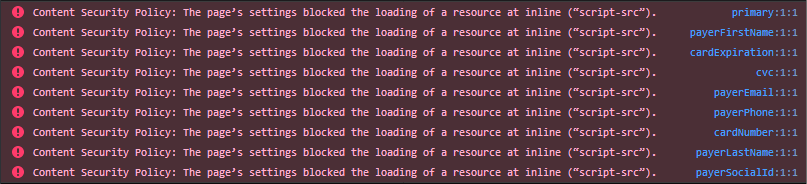
PayMe's fields have a strict Content Security Policy, which can put error messages in the browser console. They don't cause a malfunction or a security risk, and you can safely ignore them. Browser extensions that inject scripts cause most of them: to check, turn the extensions off or use a private window.